TOYOTA CAMRY HYBRID 2013 XV50 / 9.G User Guide
CAMRY HYBRID 2013 XV50 / 9.G
TOYOTA
TOYOTA
https://www.carmanualsonline.info/img/14/6280/w960_6280-0.png
TOYOTA CAMRY HYBRID 2013 XV50 / 9.G User Guide
Page 280 of 548
280 3-2. Using the audio system
CAUTION
■Caution while driving
Do not connect iPod or operate the controls.
NOTICE
■If the auxiliary box lid cannot be fully closed
Depending on the size and shape of the iPod that is connected to the sys-
tem, the auxiliary box lid may not close fully. In this case, do not forcibly
close the lid as this may damage the iPod or the terminal, etc.
■ To prevent damage to iPod
●Do not leave iPod in the vehicle. The temperature inside the vehicle may
become high, resulting in damage to the iPod.
● Do not push down on or apply unnecessary pressure to the iPod while it is
connected as this may damage the iPod or its terminal.
● Do not insert foreign objects into the port as this may damage the iPod or
its terminal.
Page 288 of 548
288 3-2. Using the audio system
CAUTION
■Caution while driving
Do not connect USB memory or operate the controls.
NOTICE
■If the auxiliary box lid cannot be fully closed
Depending on the size and shape of the USB memory that is connected to
the system, the auxiliary box lid may not close fully. In this case, do not forc-
ibly close the lid as this may damage the USB memory or the terminal, etc.
■ To prevent damage to USB memory
●Do not leave USB memory in the vehicle. The temperature inside the vehi-
cle may become high, resulting in damage to the player.
● Do not push down on or apply unnecessary pressure to the USB memory
while it is connected as this may damage the USB memory or its terminal.
● Do not insert foreign objects into the port as this may damage the USB
memory or its terminal.
Page 292 of 548
292
3-2. Using the audio system
Using the AUX port
■Operating portable audio devices connected to the audio system
The volume can be adjusted using the vehicle's audio controls. All other
adjustments must be made on the portable audio device itself.
■ When using a portable audio devi ce connected to the power outlet
Noise may occur during playback. Use the power source of the portable
audio device.
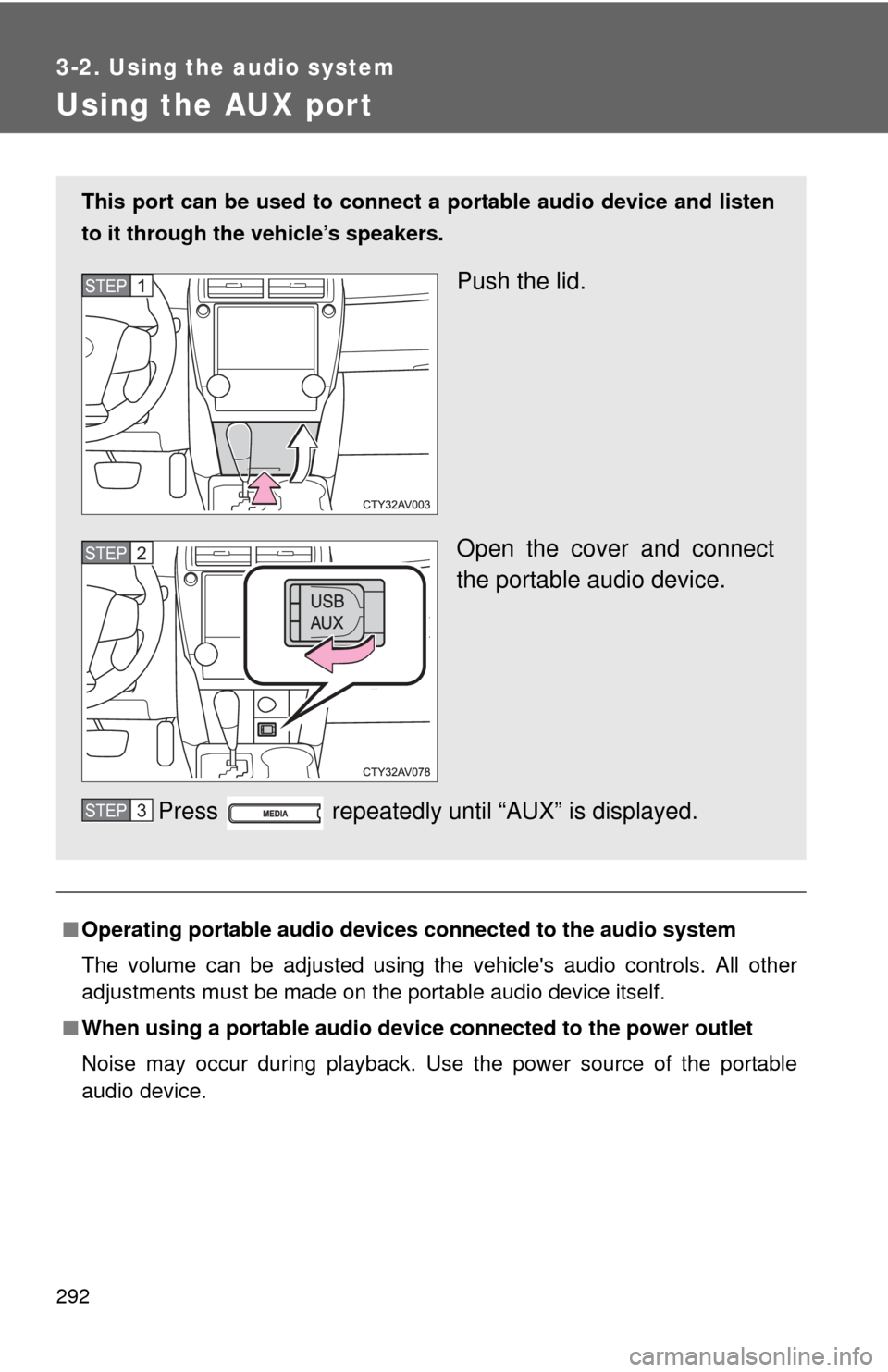
This port can be used to connect a portable audio device and listen
to it through the vehicle’s speakers.
Push the lid.
Open the cover and connect
the portable audio device.
Press repeatedly until “AUX” is displayed.STEP1
STEP2
STEP3
Page 293 of 548
293
3-2. Using the audio system
3
Interior features
NOTICE
■
If the auxiliary box lid cannot be fully closed
Depending on the size and shape of the portable audio device that is con-
nected to the system, the auxiliary box lid may not close fully. In this case, do
not forcibly close the lid as this may damage the portable audio device or the
terminal, etc.
Page 294 of 548
294
3-2. Using the audio system
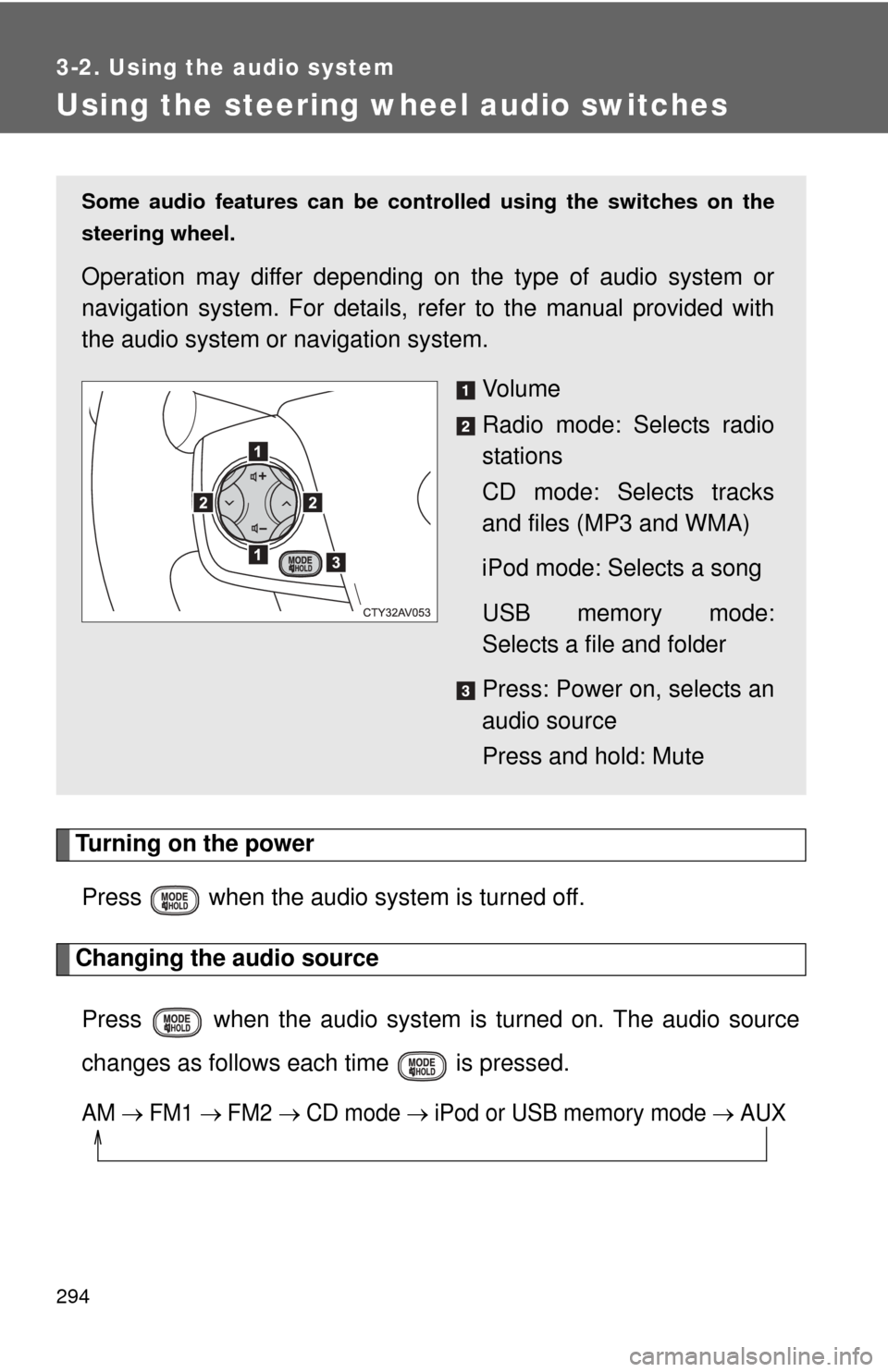
Using the steering wheel audio switches
Turning on the powerPress when the audio system is turned off.
Changing the audio source
Press when the audio system is turned on. The audio source
changes as follows each time is pressed.
AM FM1 FM2 CD mode iPod or USB memory mode AUX
Some audio features can be cont rolled using the switches on the
steering wheel.
Operation may differ depending on the type of audio system or
navigation system. For details, re fer to the manual provided with
the audio system or navigation system.
Vo l u m e
Radio mode: Selects radio
stations
CD mode: Selects tracks
and files (MP3 and WMA)
iPod mode: Selects a song
USB memory mode:
Selects a file and folder
Press: Power on, selects an
audio source
Press and hold: Mute
Page 300 of 548
300
3-4. Using the storage features
List of storage features
CAUTION
■Items that should not be left in the storage spaces
Do not leave glasses, lighters or spray cans in the storage spaces, as this
may cause the following when cabin temperature becomes high:
● Glasses may be deformed by heat or cracked if they come into contact
with other stored items.
● Lighters or spray cans may explode. If they come into contact with other
stored items, the lighter may catch fire or the spray can may release gas,
causing a fire hazard.
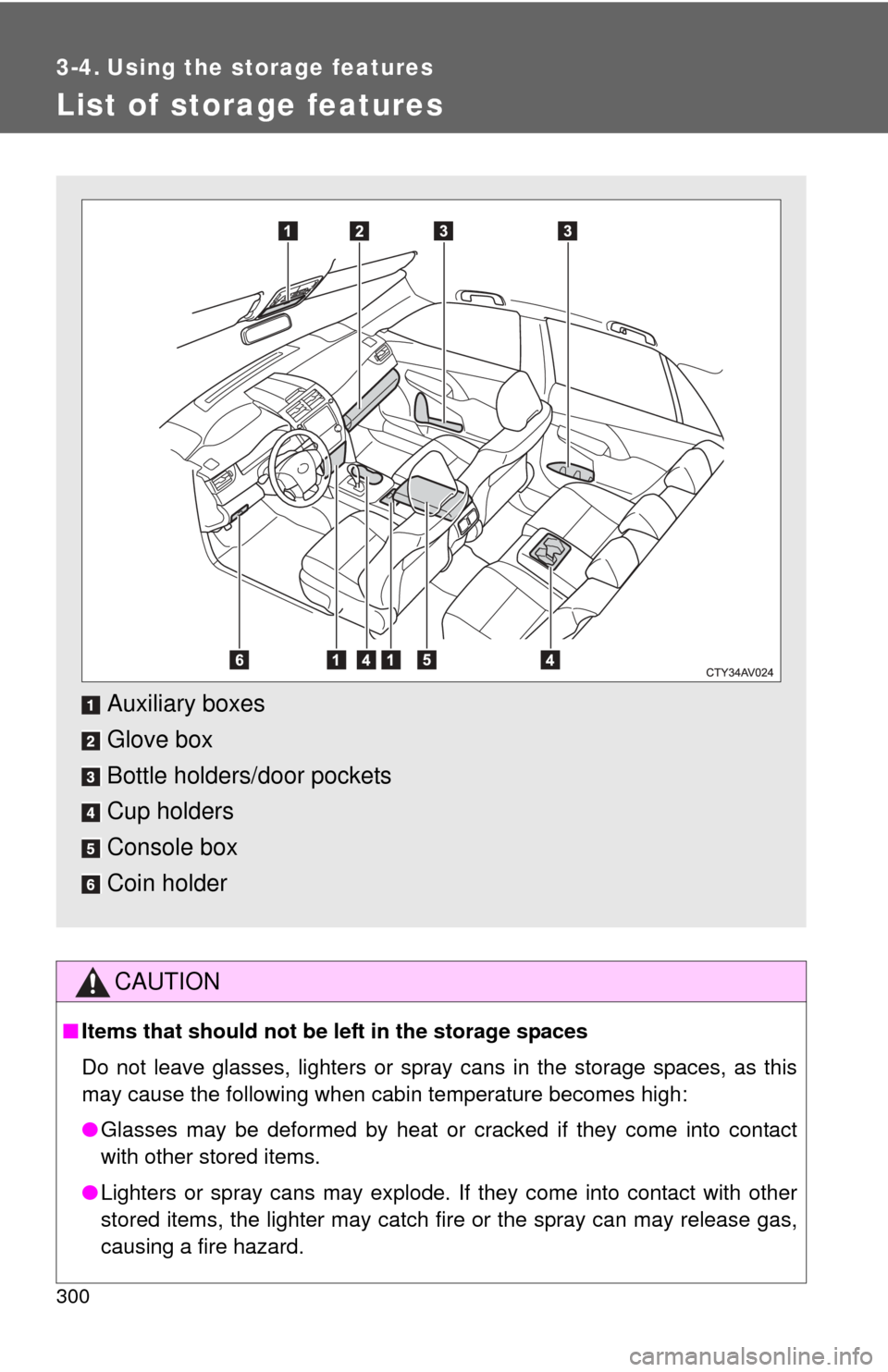
Auxiliary boxes
Glove box
Bottle holders/door pockets
Cup holders
Console box
Coin holder
Page 307 of 548
307
3-4. Using the
storage features
3
Interior features
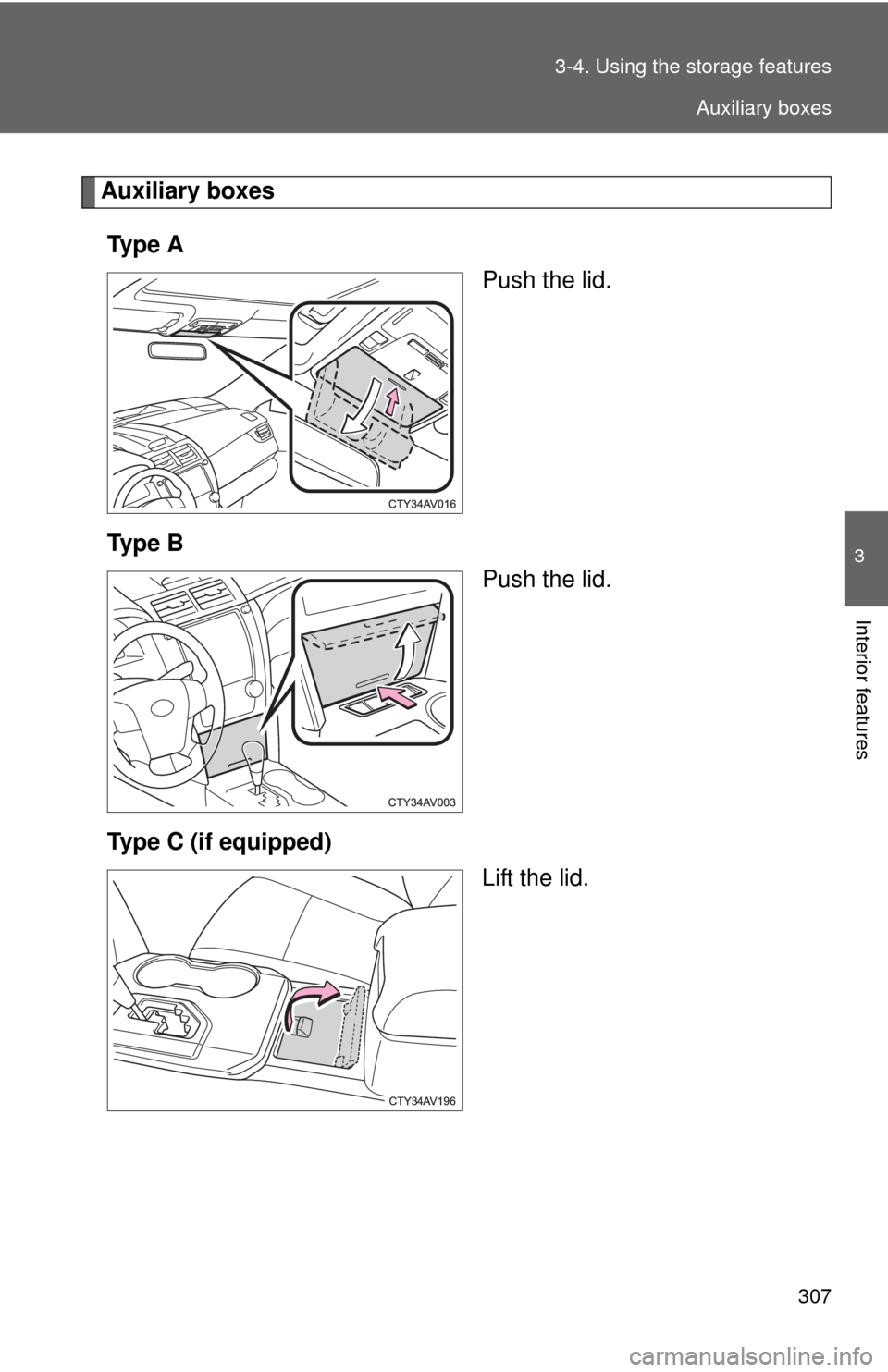
Auxiliary boxes
Ty p e A Push the lid.
Ty p e B Push the lid.
Type C (if equipped) Lift the lid.
Auxiliary boxes
Page 308 of 548
308 3-4. Using the storage features
CAUTION
■Caution while driving
Keep the auxiliary boxes closed. In the event of sudden braking, an accident
may occur due to an occupant being struck by an open auxiliary box or the
items stored inside.
■ Items unsuitable for storing (type A only)
Do not store items heavier than 0.4 lb. (0.2 kg).
Doing so may cause the auxiliary box to open and the items inside may fall
out, resulting in an accident.
Auxiliary boxes
Page 360 of 548
360
4-3. Do-it-yourself maintenance
Hood
CAUTION
■Pre-driving check
Check that the hood is fully closed and locked.
If the hood is not locked properly, it may open while the vehicle is in motion
and cause an accident, which may result in death or serious injury.
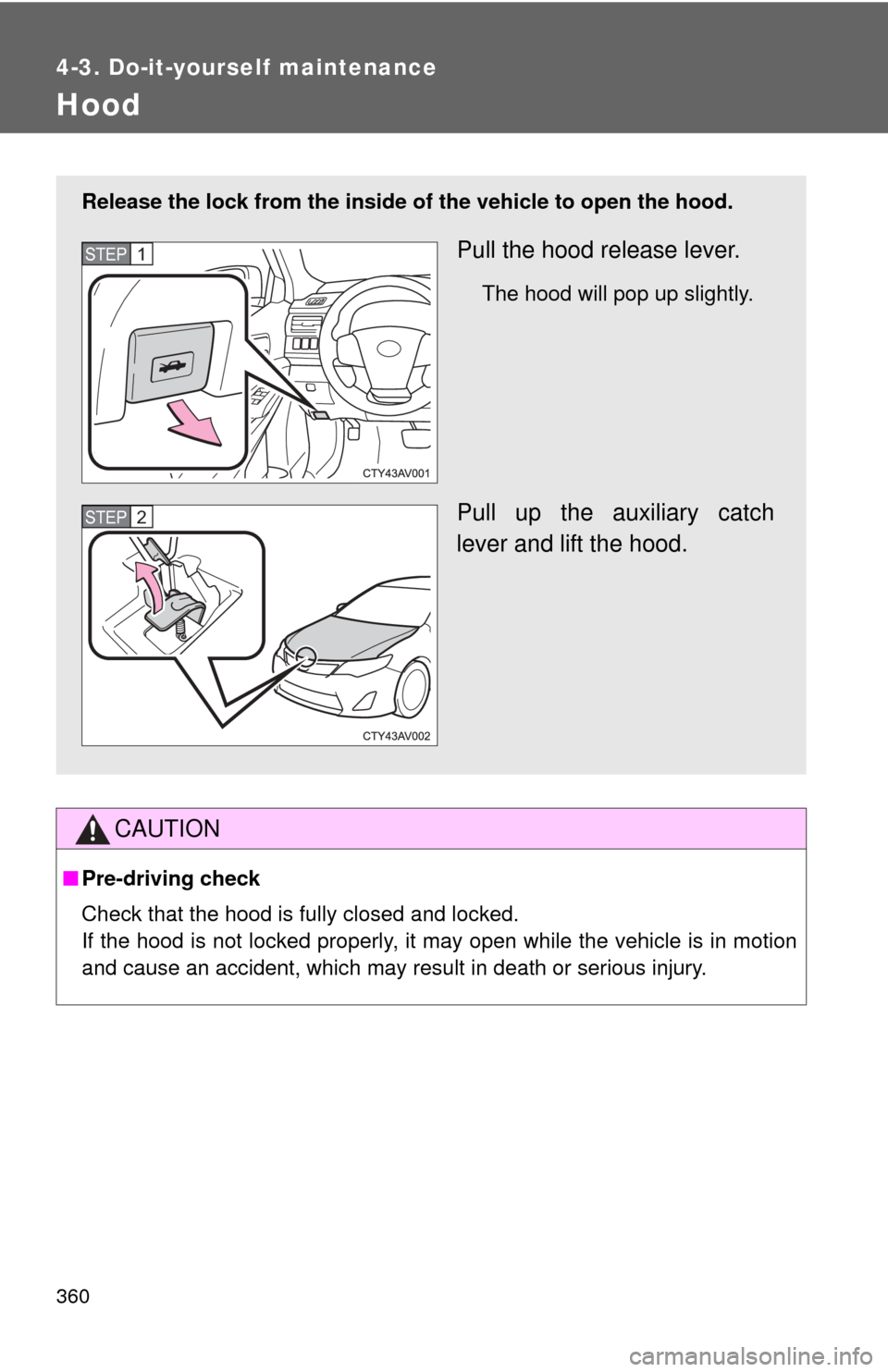
Release the lock from the inside of the vehicle to open the hood.
Pull the hood release lever.
The hood will pop up slightly.
Pull up the auxiliary catch
lever and lift the hood.
STEP1
STEP2
Page 521 of 548
521
7
For owners
SRS airbag instructions for Canadian owners (in French)
The following is a French explanation of SRS airbag instructions
extracted from the SRS airbag section in this manual.
See the SRS airbag section for more detailed SRS airbag instruc-
tions in English.
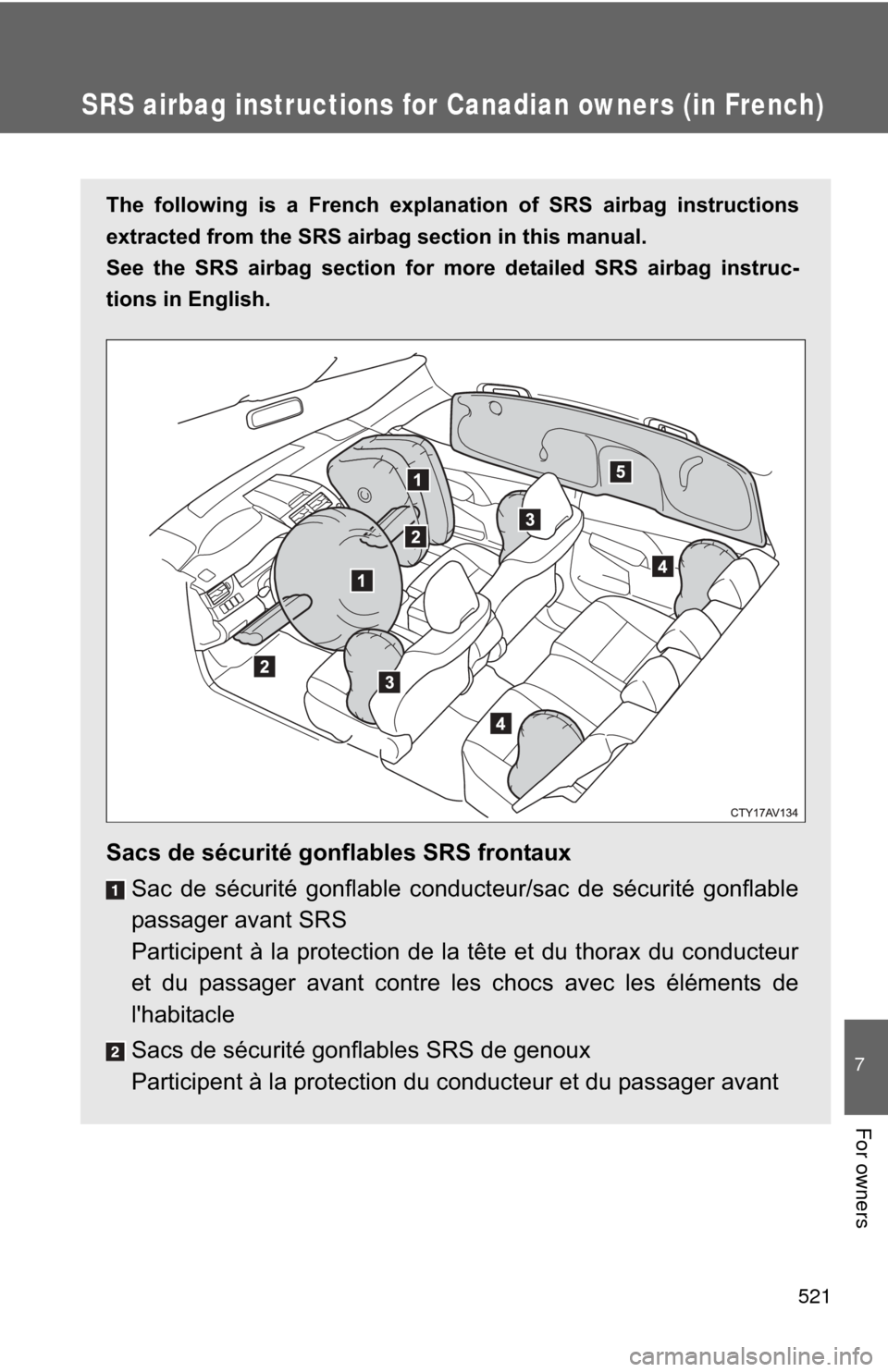
Sacs de sécurité gonflables SRS frontauxSac de sécurité gonflable conducteur/sac de sécurité gonflable
passager avant SRS
Participent à la protection de la tête et du thorax du conducteur
et du passager avant contre les chocs avec les éléments de
l'habitacle
Sacs de sécurité gonflables SRS de genoux
Participent à la protection du conducteur et du passager avant