ECO mode TOYOTA CAMRY HYBRID 2014 XV50 / 9.G Owner's Manual
[x] Cancel search | Manufacturer: TOYOTA, Model Year: 2014, Model line: CAMRY HYBRID, Model: TOYOTA CAMRY HYBRID 2014 XV50 / 9.GPages: 612, PDF Size: 7.26 MB
Page 189 of 612
189
2-2. Instrument cluster
2
When driving
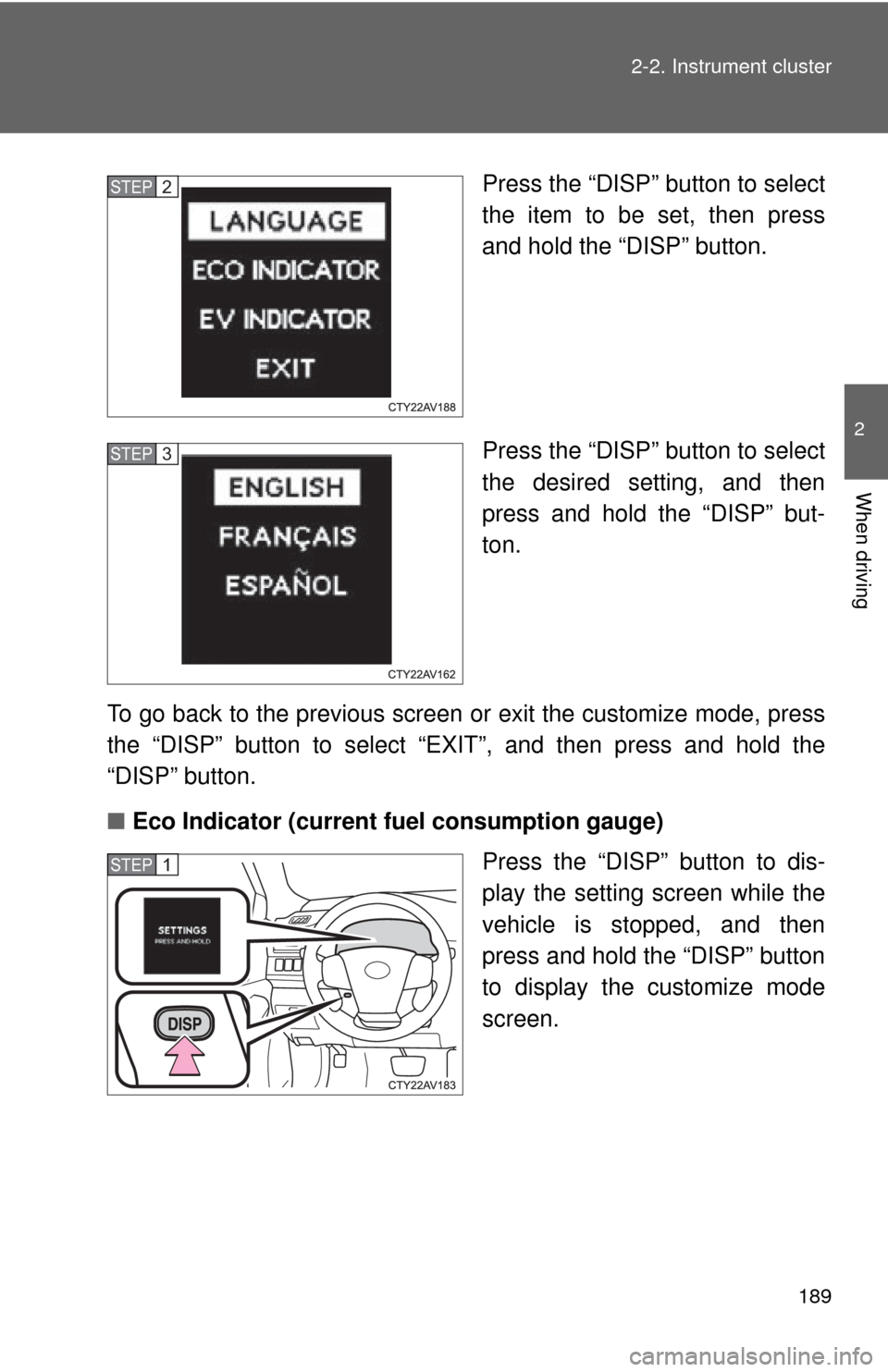
Press the “DISP” button to select
the item to be set, then press
and hold the “DISP” button.
Press the “DISP” button to select
the desired setting, and then
press and hold the “DISP” but-
ton.
To go back to the previous screen or exit the customize mode, press
the “DISP” button to select “EXIT”, and then press and hold the
“DISP” button.
■ Eco Indicator (current fuel consumption gauge)
Press the “DISP” button to dis-
play the setting screen while the
vehicle is stopped, and then
press and hold the “DISP” button
to display the customize mode
screen.STEP2
STEP3
STEP1
Page 190 of 612
190 2-2. Instrument cluster
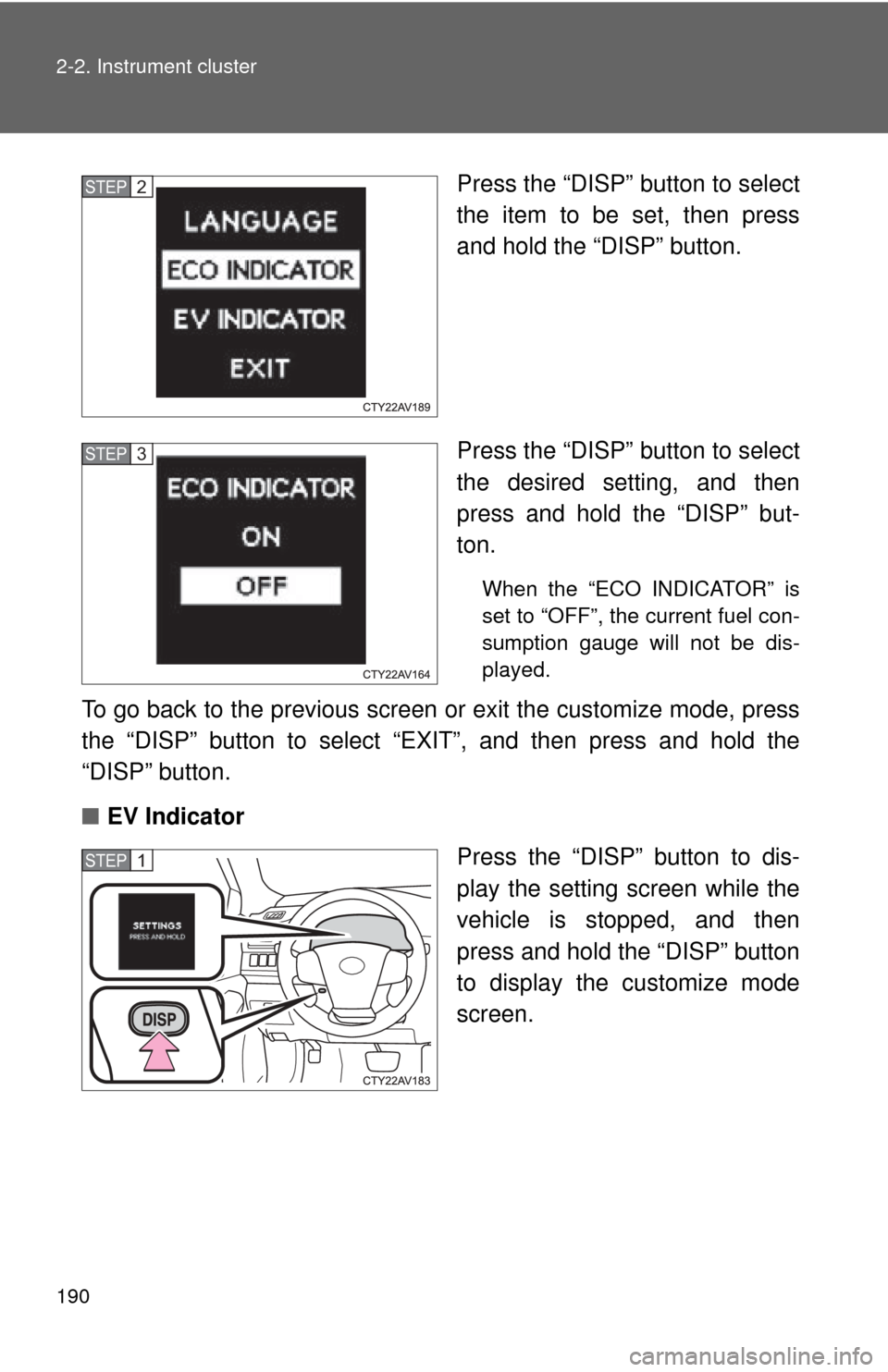
Press the “DISP” button to select
the item to be set, then press
and hold the “DISP” button.
Press the “DISP” button to select
the desired setting, and then
press and hold the “DISP” but-
ton.
When the “ECO INDICATOR” is
set to “OFF”, the current fuel con-
sumption gauge will not be dis-
played.
To go back to the previous screen or exit the customize mode, press
the “DISP” button to select “EXIT”, and then press and hold the
“DISP” button.
■ EV Indicator
Press the “DISP” button to dis-
play the setting screen while the
vehicle is stopped, and then
press and hold the “DISP” button
to display the customize mode
screen.
STEP2
STEP3
STEP1
Page 244 of 612
244 3-1. Using the air conditioning system and defogger
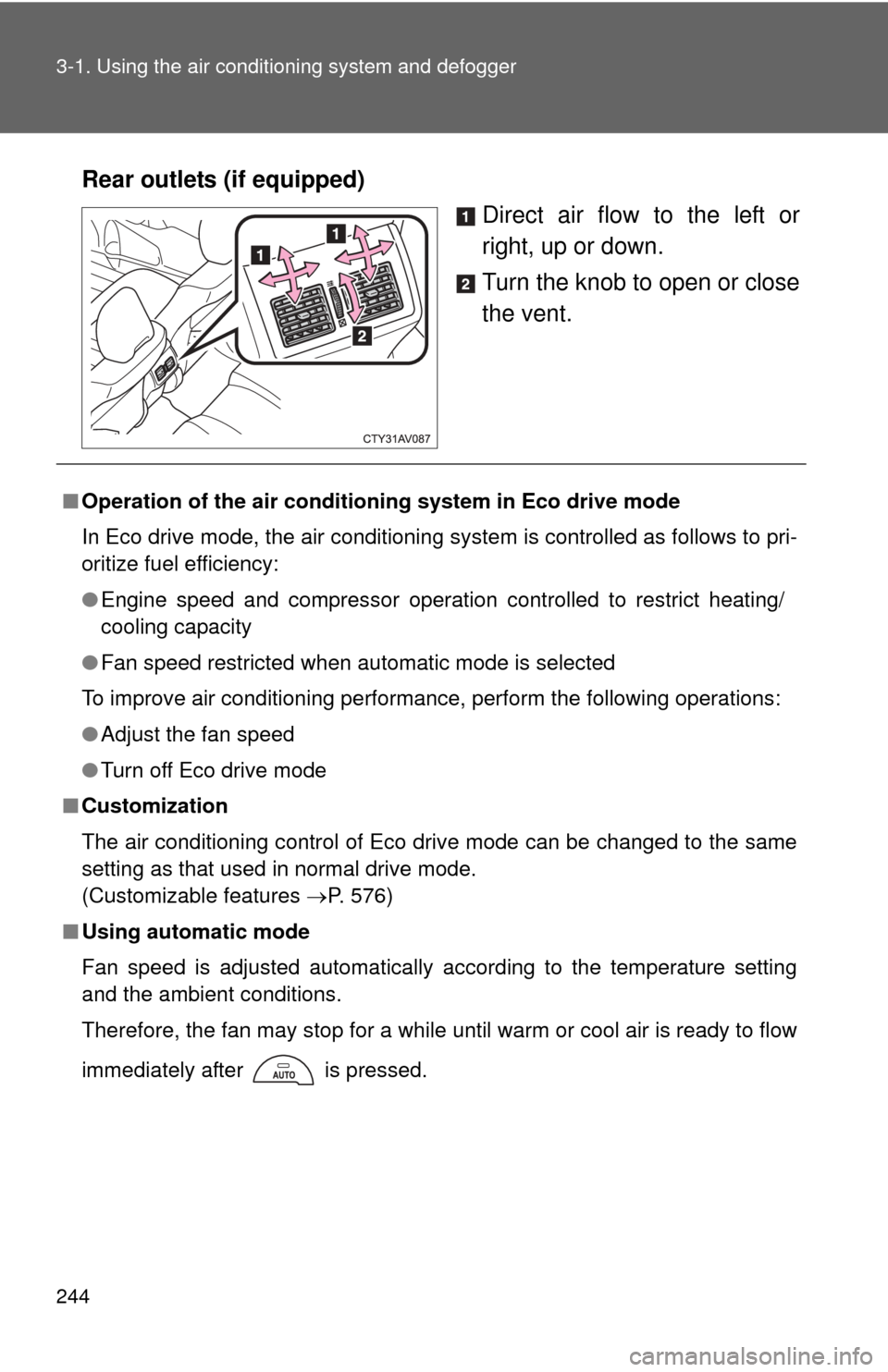
Rear outlets (if equipped)
Direct air flow to the left or
right, up or down.
Turn the knob to open or close
the vent.
■Operation of the air conditio ning system in Eco drive mode
In Eco drive mode, the air conditioning system is controlled as follows to pri-
oritize fuel efficiency:
● Engine speed and compressor operation controlled to restrict heating/
cooling capacity
● Fan speed restricted when automatic mode is selected
To improve air conditioning performance, perform the following operations:
● Adjust the fan speed
● Turn off Eco drive mode
■ Customization
The air conditioning control of Eco drive mode can be changed to the same
setting as that used in normal drive mode.
(Customizable features P. 576)
■ Using automatic mode
Fan speed is adjusted automatically according to the temperature setting
and the ambient conditions.
Therefore, the fan may stop for a while until warm or cool air is ready to flow
immediately after is pressed.
Page 246 of 612
246 3-1. Using the air conditioning system and defogger
■Air conditioning odors
●During use, various odors from inside and outside the vehicle may enter
into and accumulate in the air conditioning system. This may then cause
odor to be emitted from the vents.
● To reduce potential odors from occurring:
• It is recommended that the air conditioning system be set to outside air
mode prior to turning the vehicle off.
• The start timing of the blower may be delayed for a short period of time immediately after the air conditioning system is started in automatic
mode.
■ Air conditioning filter
P. 456
■ Customization that can be co nfigured at Toyota dealer
Settings (e.g. air conditioning setting) can be changed.
(Customizable features P. 576)
CAUTION
■To prevent the windshield from fogging up
Do not use during cool air operation in extremely humid weather.
The difference between the temperature of the outside air and that of the
windshield can cause the outer surface of the windshield to fog up, blocking
your vision.
Page 248 of 612
248
3-1. Using the air conditioning system and defogger
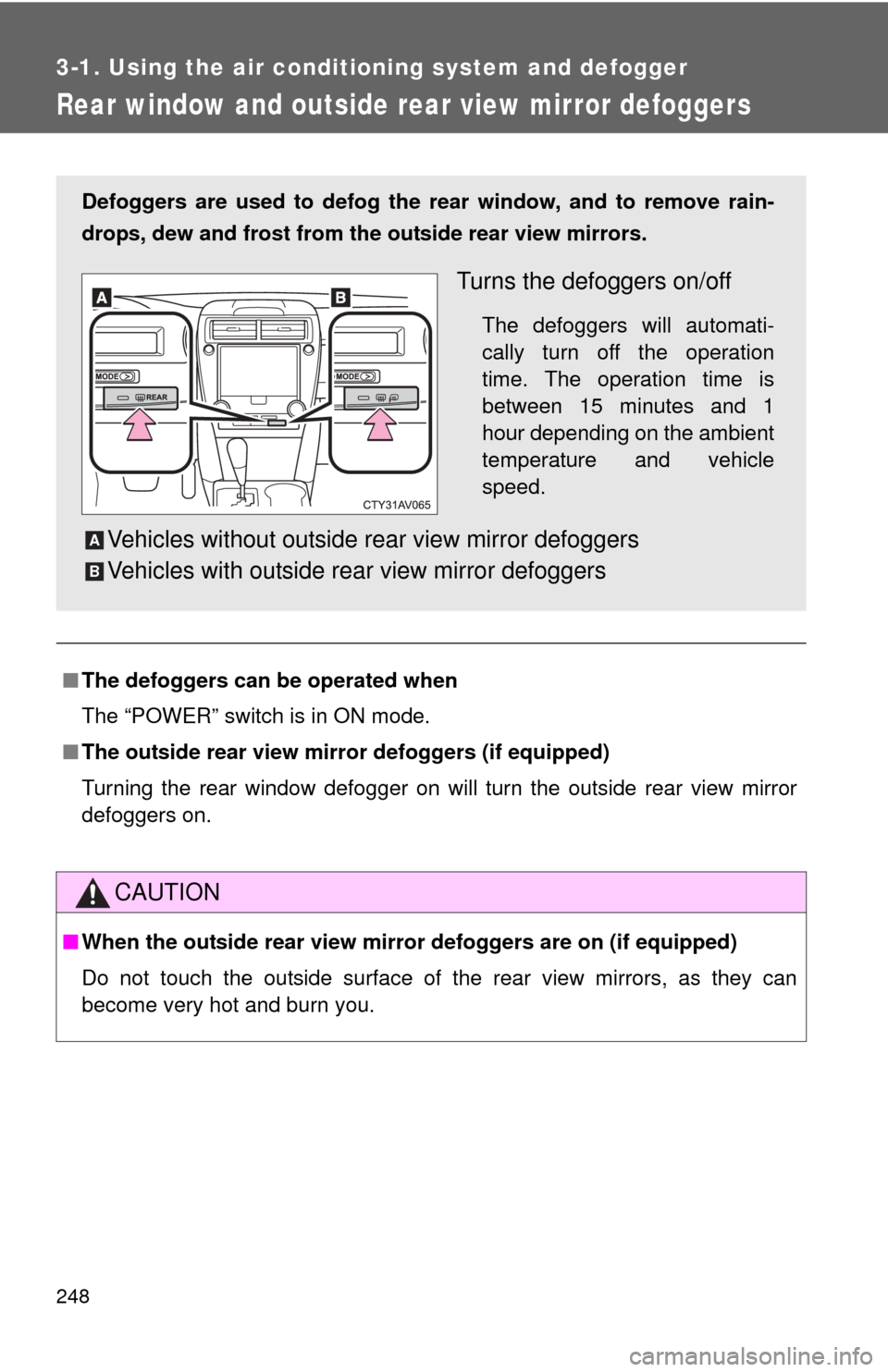
Rear window and outside rear view mirror defoggers
■The defoggers can be operated when
The “POWER” switch is in ON mode.
■ The outside rear view mirr or defoggers (if equipped)
Turning the rear window defogger on will turn the outside rear view mirror
defoggers on.
CAUTION
■ When the outside rear view mirr or defoggers are on (if equipped)
Do not touch the outside surface of the rear view mirrors, as they can
become very hot and burn you.
Defoggers are used to defog the rear window, and to remove rain-
drops, dew and frost from the outside rear view mirrors.
Turns the defoggers on/off
The defoggers will automati-
cally turn off the operation
time. The operation time is
between 15 minutes and 1
hour depending on the ambient
temperature and vehicle
speed.
Vehicles without outside rear view mirror defoggers
Vehicles with outside rear view mirror defoggersA
B
Page 277 of 612

277
3-2. Using the audio system
3
Interior features
●
AAC file compatibility
• Compatible standards
MPEG4/AAC-LC
• Compatible sampling frequencies 11.025/12/16/22.05/24/32/44.1/48 (kHz)
• Compatible bit rates 16-320 (kbps)
Compatible channel modes: 1ch and 2ch
● Compatible media
Media that can be used for MP3, WMA and AAC playback are CD-Rs and
CD-RWs.
Playback in some instances may not be possible if the CD-R or CD-RW is
not finalized. Playback may not be possible or the audio may jump if the
disc is scratched or marked with fingerprints.
● Compatible disc formats
The following disc formats can be used.
• Disc formats: CD-ROM Mode 1 and Mode 2
CD-ROM XA Mode 2, Form 1 and Form 2
• File formats: ISO9660 Level 1, Level 2, (Romeo, Joliet) UDF (2.01 or lower)
MP3, WMA and AAC files written in any format other than those listed
above may not play correctly, and their file names and folder names may
not be displayed correctly.
Items related to standards and limitations are as follows.
• Maximum directory hierarchy: 8 levels (including the root)
• Maximum length of folder names/file names: 32 characters
• Maximum number of folders: 192 (including the root)
• Maximum number of files per disc: 255
● File names
The only files that can be recognized as MP3/WMA/AAC and played are
those with the extension .mp3, .wma or .m4a.
● Discs containing multi-session recordings
As the audio system is compatible with multi session discs, it is possible to
play discs that contain MP3, WMA and AAC files. However, only the first
session can be played.
Page 283 of 612

283
3-2. Using the audio system
3
Interior features
■
About iPod
●“Made for iPod” and “Made for iPhone” mean that an electroni\
c acces-
sory has been designed to connect specifically to iPod or iPhone,
respectively, and has been certified by the developer to meet Apple per-
formance standards.
● Apple is not responsible for the operation of this device or its compliance
with safety and regulatory standards. Please note that the use of this
accessory with iPod or iPhone may affect wireless performance.
● iPhone, iPod, iPod classic, iPod nano, and iPod touch are trademarks of
Apple Inc., registered in the U.S. and other countries. Lightning is a
trademark of Apple Inc.
■ iPod cover art
●Depending on the iPod and songs in the iPod, iPod cover art may be dis-
played.
● This function can be changed to On/Off. ( P. 281)
● It may take time to display iPod cover art, and the iPod may not be oper-
ated while the cover art display is in process.
● Only iPod cover art that is saved in JPEG format can be displayed.
■ iPod functions
●When an iPod is connected and the audio source is changed to iPod
mode, the iPod will resume play from the same point in which it was last
used.
● Depending on the iPod that is connected to the system, certain functions
may not be available. If a function is unavailable due to a malfunction (as
opposed to a system specification), disconnecting the device and recon-
necting it may resolve the problem.
Page 290 of 612

290 3-2. Using the audio system
●MP3 file compatibility
• Compatible standards
MP3 (MPEG1 AUDIO LAYERII, III, MPEG2 AUDIO LAYERII, III)
• Compatible sampling frequencies MPEG1 AUDIO LAYERII, III: 32, 44.1, 48 (kHz)
MPEG2 AUDIO LAYERII, III: 16, 22.05, 24 (kHz)
• Compatible bit rates (compatible with VBR) MPEG1 AUDIO LAYERII, III: 32-320 (kbps)
MPEG2 AUDIO LAYERII, III: 8-160 (kbps)
• Compatible channel modes: stereo, joint stereo, dual channel and monaural
● WMA file compatibility
• Compatible standards
WMA Ver. 7, 8, 9
• Compatible sampling frequencies HIGH PROFILE 32, 44.1, 48 (kHz)
• Compatible bit rates HIGH PROFILE 48-320 (kbps, VBR)
● AAC file compatibility
• Compatible standards
MPEG4/AAC-LC
• Compatible sampling frequencies 11.025/12/16/22.05/24/32/44.1/48 (kHz)
• Compatible bit rates 16-320 (kbps)
• Compatible channel modes: 1 ch and 2 ch
● File names
The only files that can be recognized as MP3/WMA/AAC and played are
those with the extension .mp3, .wma or .m4a.
Page 291 of 612

291
3-2. Using the audio system
3
Interior features
●
ID3, WMA and AAC tags
ID3 tags can be added to MP3 files, making it possible to record the track
title, artist name, etc.
The system is compatible with ID3 Ver. 1.0, 1.1, and Ver. 2.2, 2.3 ID3 tags.
(The number of characters is based on ID3 Ver. 1.0 and 1.1.)
WMA tags can be added to WMA files, making it possible to record the
track title and artist name in the same way as with ID3 tags.
AAC tags can be added to AAC files, making it possible to record the track
title and artist name in the same way as with ID3 tags.
● MP3, WMA and AAC playback
• When a device containing MP3, WMA and AAC files is connected, all
files in the USB memory device are checked. Once the file check is fin-
ished, the first MP3, WMA and AAC file is played. To make the file
check finish more quickly, we recommend that you do not include any
files other than MP3, WMA and AAC files or create any unnecessary
folders.
• When a USB memory device is connected and the audio source is changed to USB memory mode, the USB memory device will start
playing the first file in the first folder. If the same device is removed and
reconnected (and the con- tents have not been changed), the USB
memory device will resume play from the same point in which it was
last used.
● Extensions
If the file extensions .mp3, .wma and .m4a are used for files other than
MP3, WMA and AAC files, they will be skipped (not played).
● Playback
• To play MP3 files with steady sound quality, we recommend a fixed bit
rate of at least 128 kbps and a sampling frequency of 44.1 kHz.
• There is a wide variety of freeware and other encoding software for MP3, WMA and AAC files on the market, and depending on the status
of the encoding and the file format, poor sound quality or noise at the
start of playback may result. In some cases, playback may not be pos-
sible at all.
• Microsoft, Windows, and Windows Media are the registered trade- marks of Microsoft Corporation in the U.S.A. and other countries.
Page 305 of 612

305
3-2. Using the audio system
3
Interior features
■
Reconnecting a Bluetooth® phone
If the system cannot connect due to poor signal strength with the “POWER”
switch in ACCESSORY or ON mode, the system will automatically attempt
to reconnect.
If the phone is turned off, the system will not attempt to reconnect. In this
case, the connection must be made manually, or the phone must be rese-
lected.