fuel TOYOTA CAMRY HYBRID 2014 XV50 / 9.G Owner's Manual
[x] Cancel search | Manufacturer: TOYOTA, Model Year: 2014, Model line: CAMRY HYBRID, Model: TOYOTA CAMRY HYBRID 2014 XV50 / 9.GPages: 612, PDF Size: 7.26 MB
Page 167 of 612

167
2-1. Driving procedures
2
When driving
■
Automatic cancelation of EV drive mode
When driving in EV drive mode, the gasoline engine may automatically
restart in the following situations. When EV drive mode is canceled, a buzzer
will sound and the EV drive mode indicator will flash and go off.
●The hybrid battery (traction battery) becomes low.
The remaining battery level indicated in the “Energy Monitor” display is
low. ( P. 41)
● Vehicle speed becomes more than about 25 mph (40 km/h).
● The accelerator pedal is depressed firmly or the vehicle is on a hill etc.
■ Possible driving distance when driving in EV drive mode
EV drive mode’s possible driving distance ranges from a few hundred yards
(a few hundred meters) to approximately 1.3 miles (2 km). Driving is possible
at speeds of less than approximately 25 mph (40 km/h). However, depend-
ing on vehicle conditions, there are situations when EV drive mode cannot
be used.
(The distance that is possible depends on the hybrid battery [traction battery]
level and driving conditions.)
■ Fuel economy
Your Toyota is designed to achieve the best possible fuel economy during
normal driving (using the gasoline engine and electric motor [traction
motor]). Driving in EV drive mode more than necessary may lower fuel econ-
omy.
CAUTION
■Caution while driving
When driving in EV drive mode no engine noise is made. As such, pedestri-
ans, people riding bicycles or other people and vehicles in the surrounding
area may not be aware of the vehicle starting off or approaching them.
Therefore, take extra care while driving even if the Vehicle Proximity Notifi-
cation System is active.
Page 169 of 612
169
2-1. Driving procedures
2
When driving
■
Operation of the air conditio ning system in Eco drive mode
Eco drive mode controls the heating/cooling operations and fan speed of the
air conditioning system to enhance fuel efficiency. ( P. 238) To improve air
conditioning performance, adjust the fan speed or turn off Eco drive mode.
■ When in heavy traffic
If the shift lever is in N, the hybrid battery (traction battery) will not be
charged. To help prevent the battery from discharging, avoid putting the shift
lever in N for an extended period of time.
■ If the shift lever cannot be shifted from P
P. 533
CAUTION
■When driving on slippery road surfaces
Do not accelerate or shift gears suddenly.
Sudden changes in engine braking may cause the vehicle to spin or skid,
resulting in an accident.
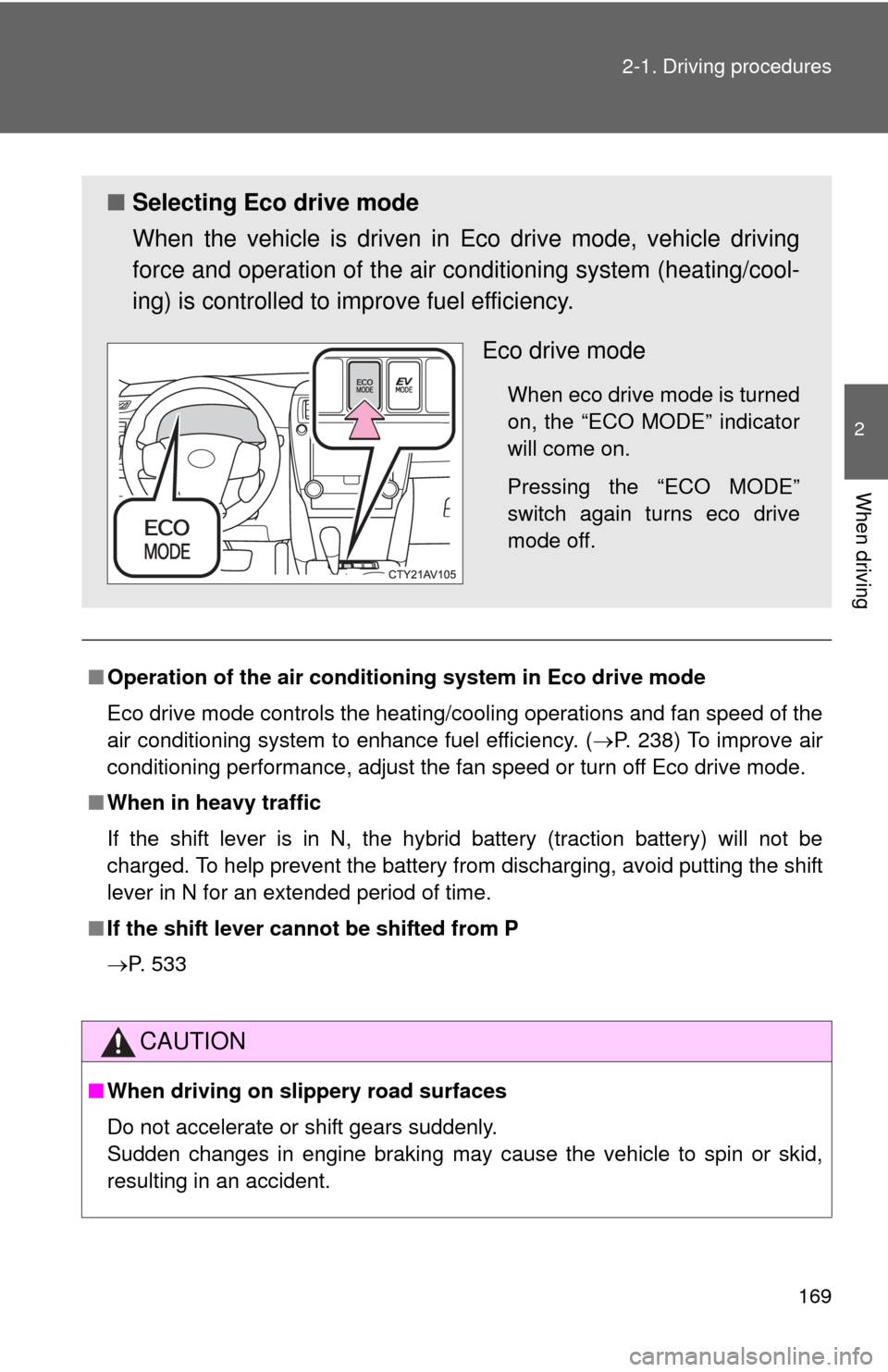
■ Selecting Eco drive mode
When the vehicle is driven in Eco drive mode, vehicle driving
force and operation of the air co nditioning system (heating/cool-
ing) is controlled to improve fuel efficiency.
Eco drive mode
When eco drive mode is turned
on, the “ECO MODE” indicator
will come on.
Pressing the “ECO MODE”
switch again turns eco drive
mode off.
Page 174 of 612
174
2-2. Instrument cluster
Gauges and meters
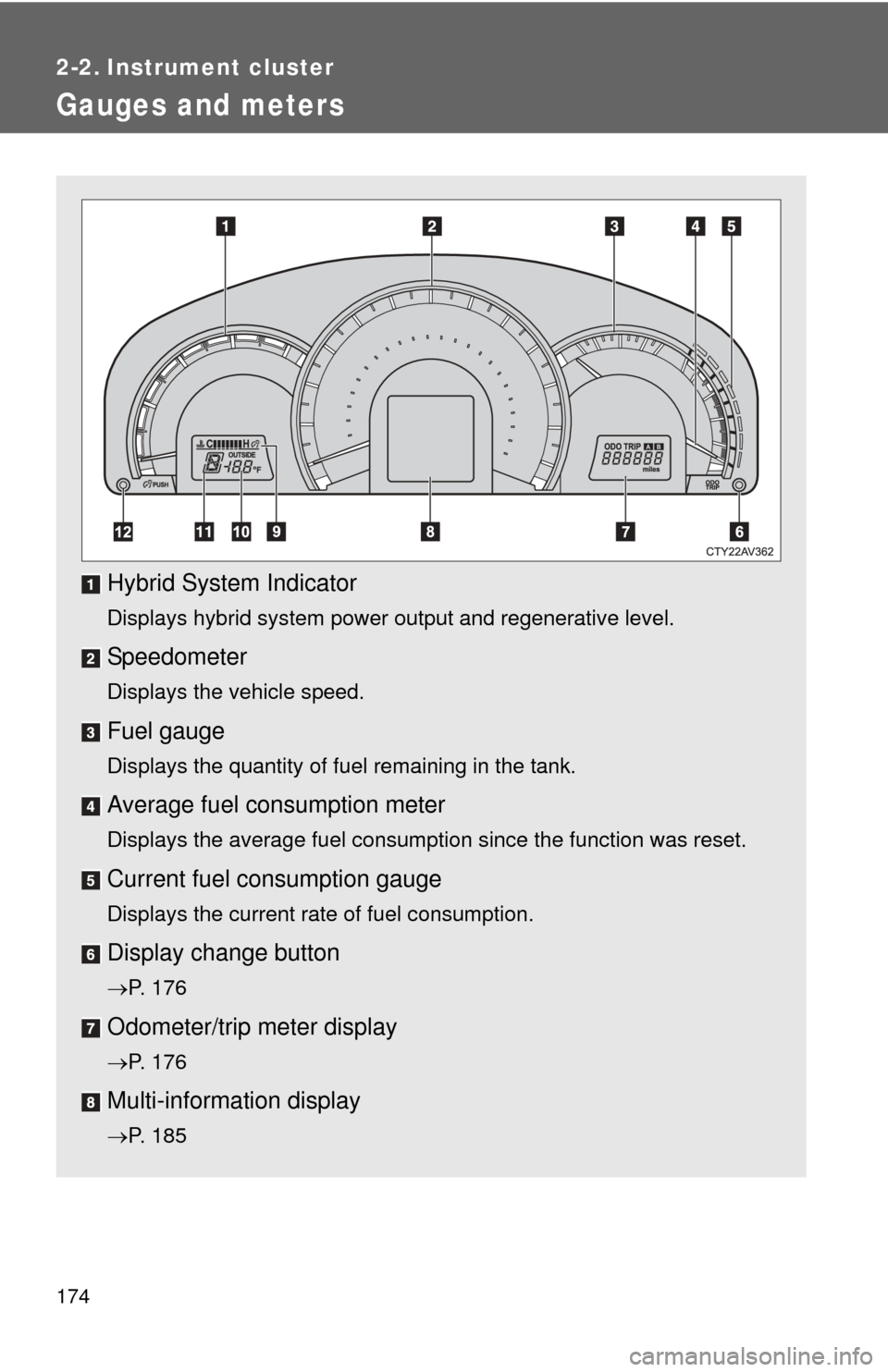
Hybrid System Indicator
Displays hybrid system power output and regenerative level.
Speedometer
Displays the vehicle speed.
Fuel gauge
Displays the quantity of fuel remaining in the tank.
Average fuel consumption meter
Displays the average fuel consumption since the function was reset.
Current fuel consumption gauge
Displays the current rate of fuel consumption.
Display change button
P. 176
Odometer/trip meter display
P. 176
Multi-information display
P. 185
Page 178 of 612
178 2-2. Instrument cluster
■The meters and display illuminate when
The “POWER” switch is in ON mode.
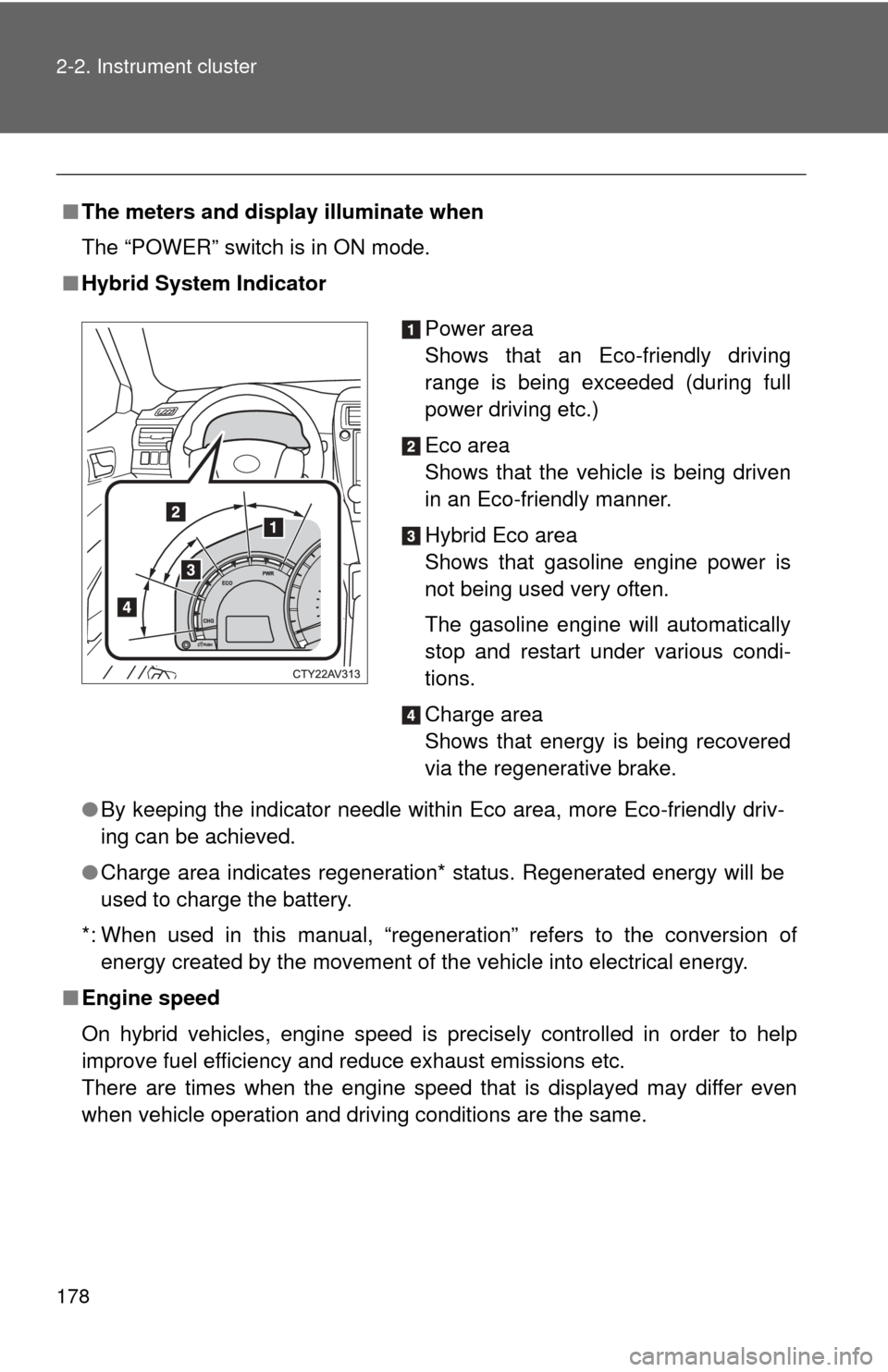
■ Hybrid System Indicator
●By keeping the indicator needle within Eco area, more Eco-friendly driv-
ing can be achieved.
● Charge area indicates regeneration* status. Regenerated energy will be
used to charge the battery.
*: When used in this manual, “regeneration” refers to the conversion of energy created by the movement of the vehicle into electrical energy.
■ Engine speed
On hybrid vehicles, engine speed is precisely controlled in order to help
improve fuel efficiency and reduce exhaust emissions etc.
There are times when the engine speed that is displayed may differ even
when vehicle operation and driving conditions are the same.
Power area
Shows that an Eco-friendly driving
range is being exceeded (during full
power driving etc.)
Eco area
Shows that the vehicle is being driven
in an Eco-friendly manner.
Hybrid Eco area
Shows that gasoline engine power is
not being used very often.
The gasoline engine will automatically
stop and restart under various condi-
tions.
Charge area
Shows that energy is being recovered
via the regenerative brake.
Page 179 of 612
179
2-2. Instrument cluster
2
When driving
■
The brightness of the instrument panel lights
When the tail lights are turned on, the meter’s brightness will be reduced
slightly unless the meter brightness level adjustment is set to the brightest
setting.
If the tail lights are turned on when the surroundings are dark, the meter’s
brightness will reduce slightly. However, when the surroundings are bright,
such as during the daytime, the meter’s brightness will not be reduced even
if the tail lights are turned on.
■ Fuel gauge and odometer/trip meter display remain on mode
After the “POWER” switch has been turned off, the fuel gauge and odome-
ter/trip meter display remain on for 10 minutes, enabling the fuel gauge and
odometer/trip meter values to be checked again without having to turn the
“POWER” switch to ON mode.
When confirming the gauges and meters, turn the headlight switch to the
position. Press the display change button to change between the
odometer and trip meter displays.
NOTICE
■ To prevent damage to the engine and its components
The engine may be overheating if the rightmost segment of the engine cool-
ant temperature display is flashing. In this case, immediately stop the vehicle
in a safe place, and check the engine after it has cooled completely.
(
P. 542)
Page 185 of 612
185
2-2. Instrument cluster
2
When driving
Multi-information display
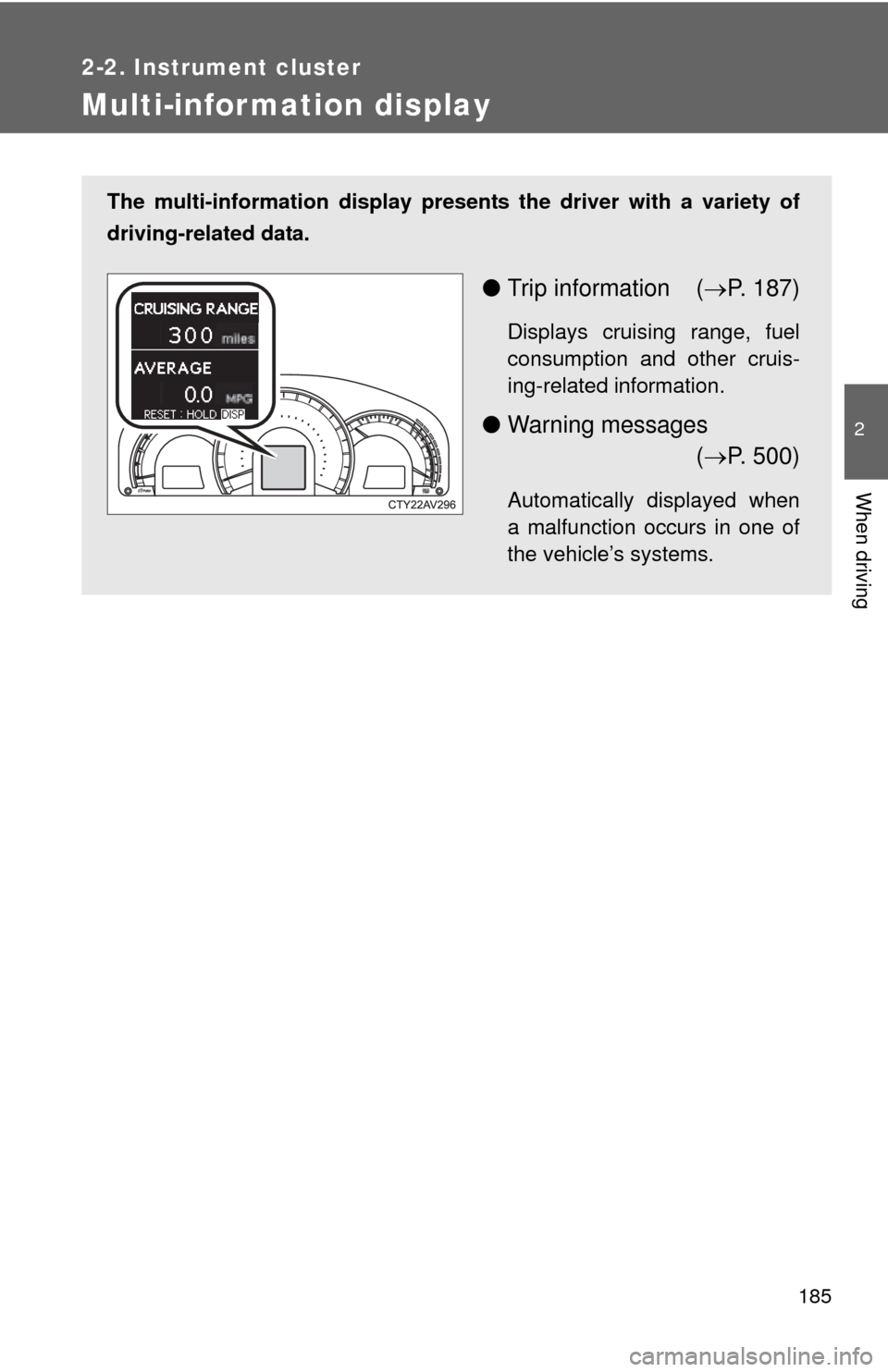
The multi-information display presents the driver with a variety of
driving-related data.
● Trip information ( P. 187)
Displays cruising range, fuel
consumption and other cruis-
ing-related information.
● Warning messages
( P. 500)
Automatically displayed when
a malfunction occurs in one of
the vehicle’s systems.
Page 186 of 612
186 2-2. Instrument cluster
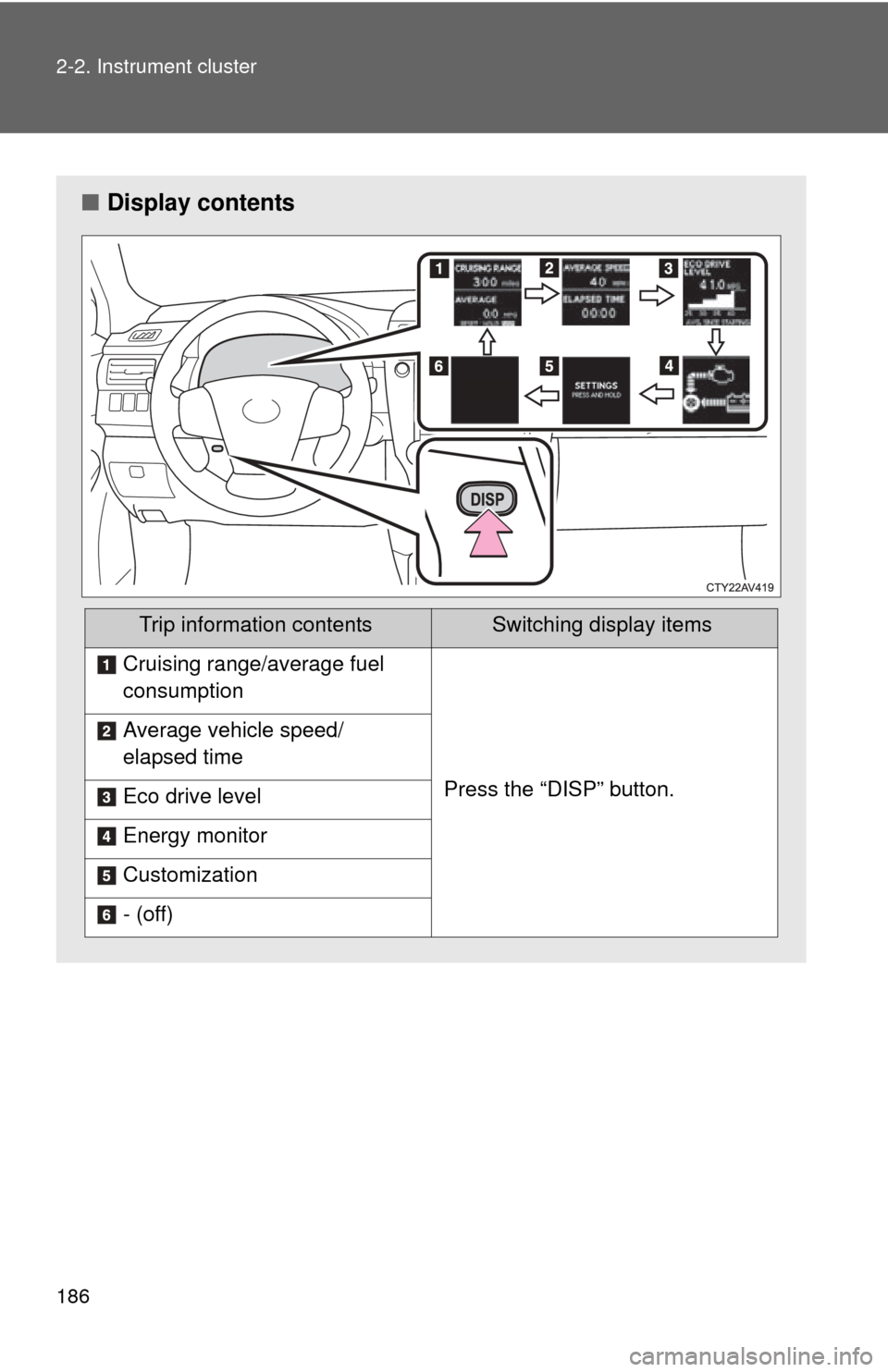
■Display contents
Trip information contentsSwitching display items
Cruising range/average fuel
consumption
Press the “DISP” button.
Average vehicle speed/
elapsed time
Eco drive level
Energy monitor
Customization
- (off)
Page 187 of 612

187
2-2. Instrument cluster
2
When driving
Trip information
■ Cruising range/average fuel consumption
Cruising range
Displays the estimated maximum di stance that can be driven with
the quantity of fuel remaining.
• This distance is computed based on your average fuel consumption.
As a result, the actual distance that can be driven may differ from that
displayed.
• When only a small amount of fuel is added to the tank, the display
may not be updated.
When refueling, turn the “POWER” switch off. If the vehicle is refueled
without turning the “POWER” switch off, the display may not be
updated.
Average fuel consumption
Displays the average fuel cons umption since the function was
reset.
• The function can be reset by pressing the “DISP” button for longer
than 1 second when the average fuel consumption is displayed.
The average fuel consumption meter will also be reset, returning the
needle to the 0 position.
• Use the displayed average fuel consumption as a reference.
■ Average vehicle speed/elapsed time
Displays the average vehicle speed and elapsed time since the
hybrid system was started.
Page 188 of 612
188 2-2. Instrument cluster
■Eco drive level
Displays the average fuel consum ption and eco drive level since
the hybrid system was started.
Even if a different screen has been selected for the multi-information dis-
play, when the “POWER” switch is turned off, the eco drive level is dis-
played. This is not a malfunction.
When the highest eco drive level has been achieved “EXCELLENT!” is
displayed.
■ Energy monitor
Displays the status of the hybrid system ( P. 4 1 )
■ Customization
Language, Eco Indicator (current fuel consumption gauge) and EV
Indicator settings can be changed. ( P. 188)
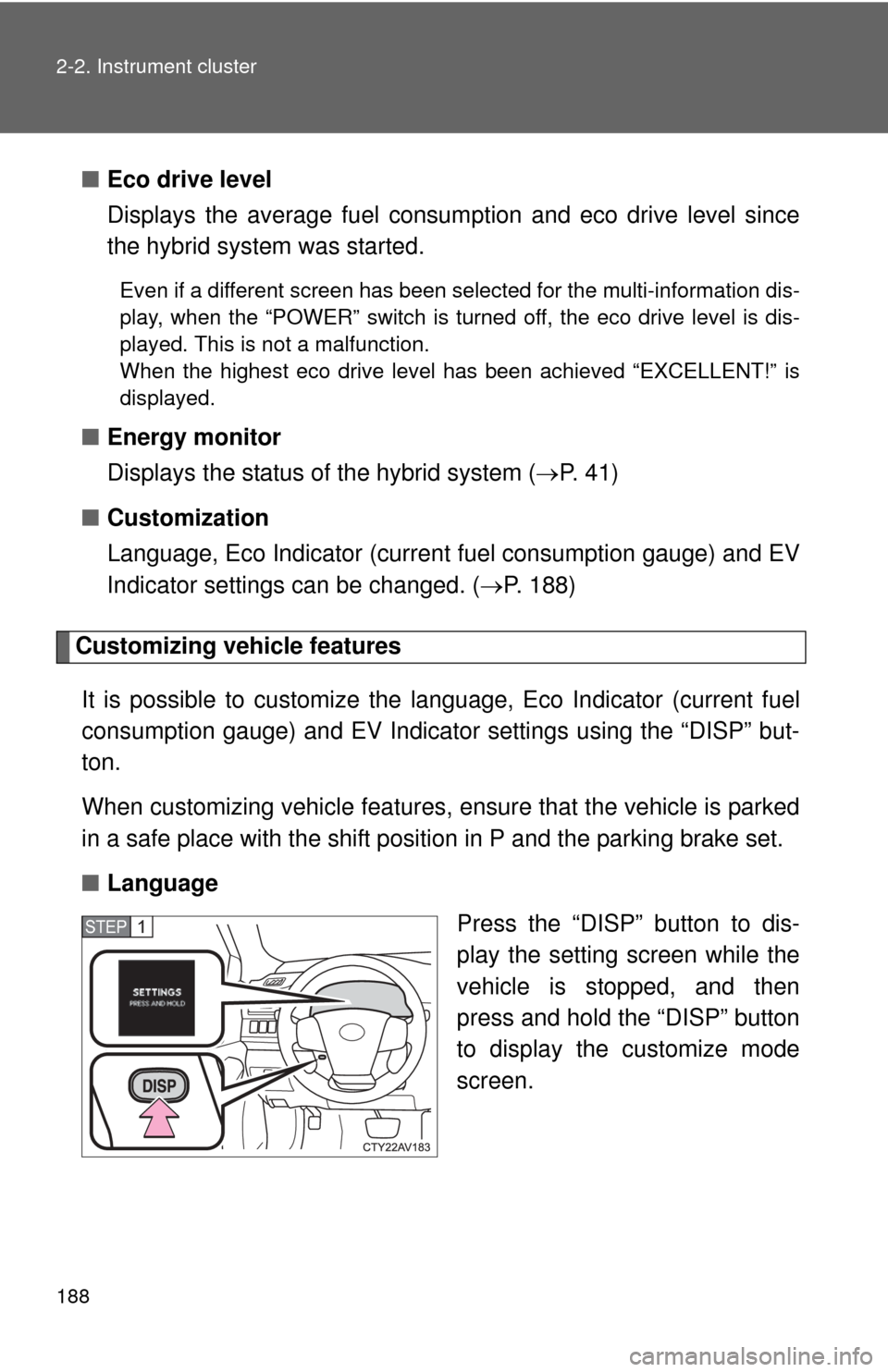
Customizing vehicle features
It is possible to cust omize the language, Eco Indicator (current fuel
consumption gauge) and EV Indicator settings using the “DISP” but-
ton.
When customizing vehicle features, ensure that the vehicle is parked
in a safe place with the shift position in P and the parking brake set.
■ Language
Press the “DISP” button to dis-
play the setting screen while the
vehicle is stopped, and then
press and hold the “DISP” button
to display the customize mode
screen.
STEP1
Page 189 of 612
189
2-2. Instrument cluster
2
When driving
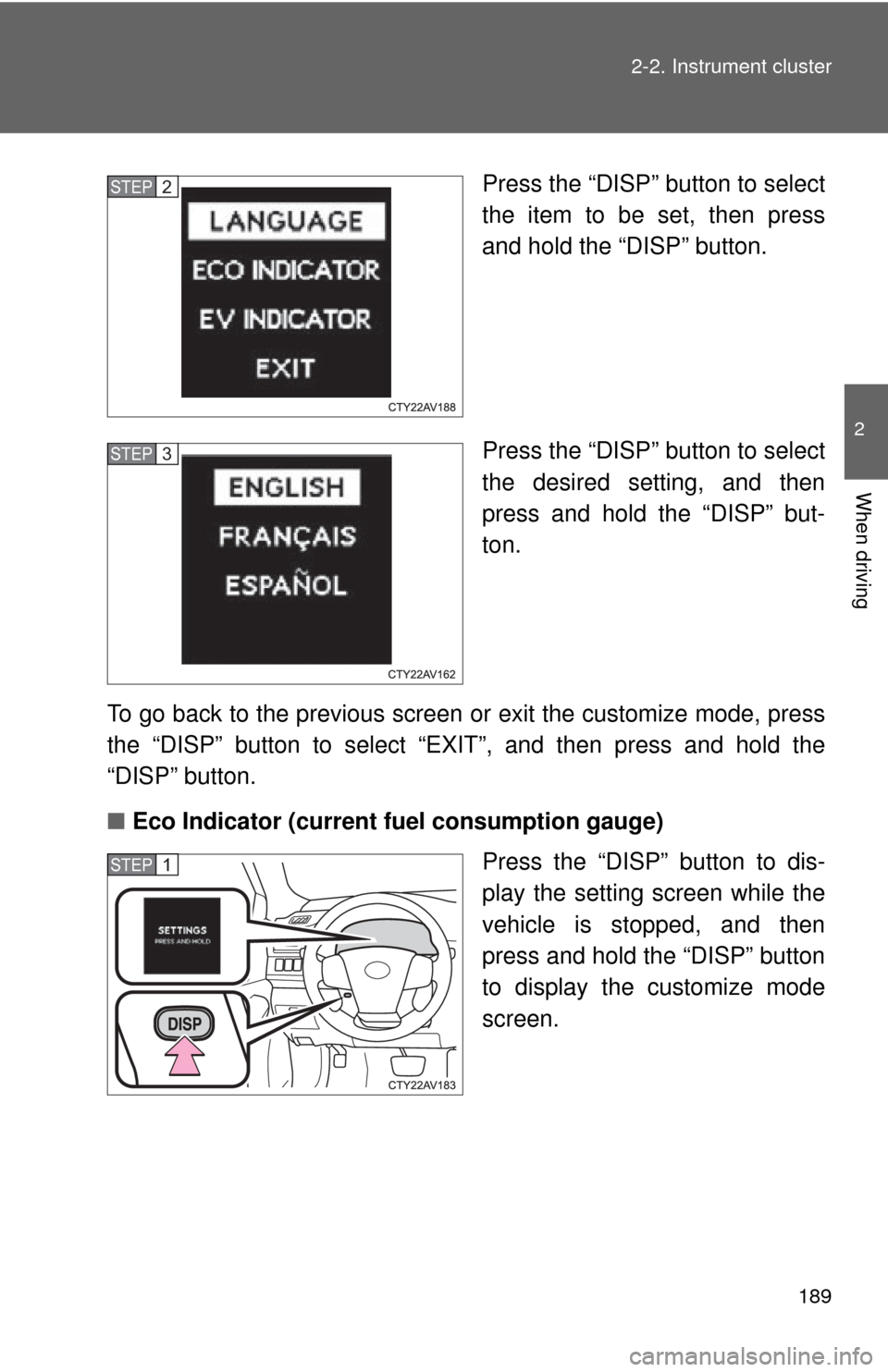
Press the “DISP” button to select
the item to be set, then press
and hold the “DISP” button.
Press the “DISP” button to select
the desired setting, and then
press and hold the “DISP” but-
ton.
To go back to the previous screen or exit the customize mode, press
the “DISP” button to select “EXIT”, and then press and hold the
“DISP” button.
■ Eco Indicator (current fuel consumption gauge)
Press the “DISP” button to dis-
play the setting screen while the
vehicle is stopped, and then
press and hold the “DISP” button
to display the customize mode
screen.STEP2
STEP3
STEP1