cruise control TOYOTA CAMRY HYBRID 2014 XV50 / 9.G Owners Manual
[x] Cancel search | Manufacturer: TOYOTA, Model Year: 2014, Model line: CAMRY HYBRID, Model: TOYOTA CAMRY HYBRID 2014 XV50 / 9.GPages: 612, PDF Size: 7.26 MB
Page 3 of 612

1
2
3
4
5
6
7
3
2-2. Instrument cluster
Gauges and meters................ 174
Indicators and warning lights ................................. 180
Multi-information display ..... 185
2-3. Operating the lights and wipers
Headlight switch .................. 192
Fog light switch ................... 198
Windshield wipers and washer .............................. 200
2-4. Using other driving systems
Cruise control ...................... 204
Driving assist systems ........ 207
Hill-start assist control ......... 212
BSM (Blind Spot Monitor) .......... 214
2-5. Driving information Cargo and luggage ............. 224
Vehicle load limits ............... 228
Winter driving tips ............... 229
Trailer towing ...................... 233
Dinghy towing ..................... 234 3-1. Using the air conditioning
system and defogger
Automatic air conditioning system .............................. 238
Rear window and outside rear view mirror
defoggers ......................... 248
3-2. Using the audio system Audio system types ............ 249
Audio system ...................... 251
Steering wheel audio switches ........................... 254
USB/AUX port .................... 256
Basic audio operations ....... 258
Setup menu ........................ 261
General settings ................. 262
Audio settings ..................... 264
Display settings .................. 265
Voice settings ..................... 267
Selecting the audio source .............................. 268
List screen operation .......... 269
Optimal use of the audio system .............................. 271
Radio operation .................. 272
CD player operation ........... 274
Listening to an iPod ............ 281
Listening to a USB memory device ................. 287
Using the AUX port............. 293
Preparations to use wireless
communication ................. 2943Interior features
Page 17 of 612
17
B
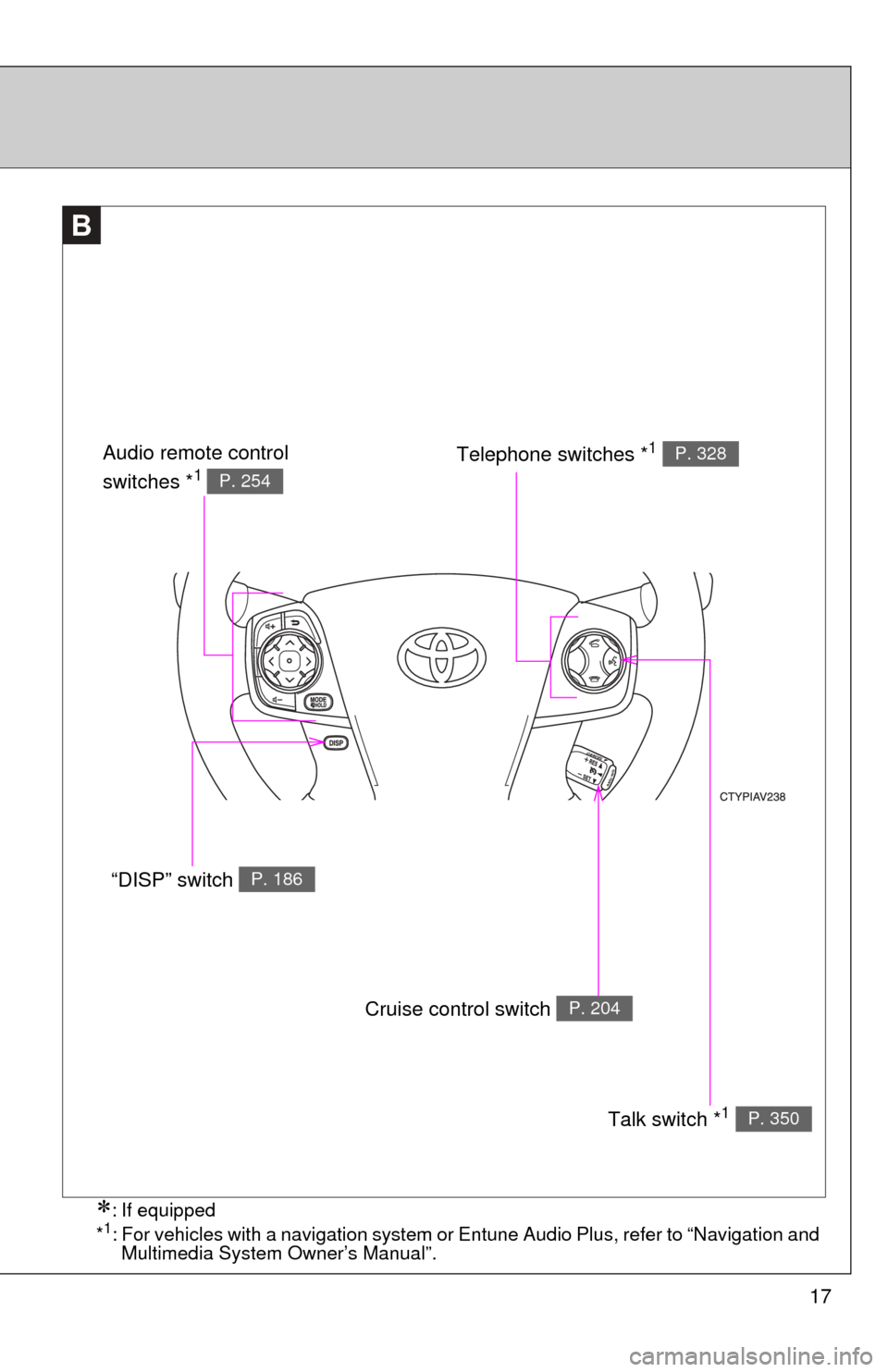
Cruise control switch P. 204
Talk switch *1 P. 350
“DISP” switch P. 186
Telephone switches *1 P. 328Audio remote control
switches *1 P. 254
: If equipped
*1: For vehicles with a navigation system or Entune Audio Plus, refer to “Navigation and Multimedia System Owner’s Manual”.
Page 21 of 612

21
Installation of a mobile two-way radio system
The installation of a mobile two-way radio system in your vehicle could affect
electronic systems such as:
●Multiport fuel injection system/sequential multiport fuel injection system
● Cruise control system
● Anti-lock brake system
● SRS airbag system
● Seat belt pretensioner system
Be sure to check with your Toyota dealer for precautionary measures or spe-
cial instructions regarding installation of a mobile two-way radio system.
High voltage parts and cables on the hybrid vehicles emit approximately the
same amount of electromagnetic waves as the conventional gasoline pow-
ered vehicles or home electronic appliances despite of their electromagnetic
shielding.
Unwanted noise may occur in the reception of the mobile two-way radio.
Page 145 of 612
When driving2
145
2-1. Driving proceduresDriving the vehicle............ 146
Power (ignition) switch ..... 157
EV drive mode ................. 165
Hybrid transmission ......... 168
Turn signal lever .............. 170
Parking brake ................... 172
Horn ................................. 173
2-2. Instrument cluster
Gauges and meters............. 174
Indicators and warning lights .............................. 180
Multi-information display............................ 185
2-3. Operating the lights and wipers
Headlight switch ............... 192
Fog light switch ................ 198
Windshield wipers and washer .................... 200 2-4. Using other driving systems
Cruise control ................... 204
Driving assist systems ..... 207
Hill-start assist control ...... 212
BSM (Blind Spot Monitor) ....... 214
2-5. Driving information Cargo and luggage .......... 224
Vehicle load limits ............ 228
Winter driving tips ............ 229
Trailer towing ................... 233
Dinghy towing .................. 234
Page 182 of 612
182 2-2. Instrument cluster
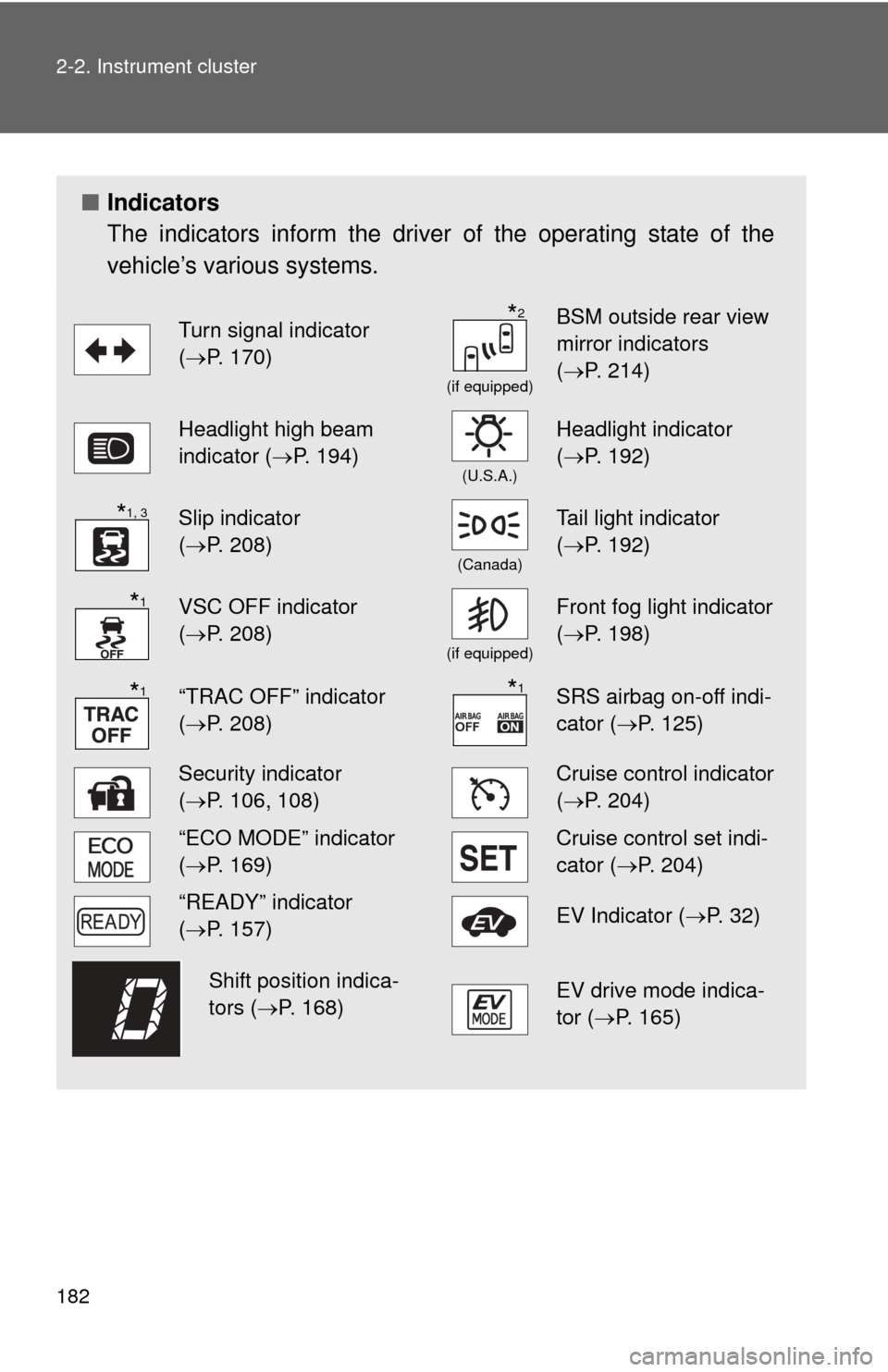
■Indicators
The indicators inform the driver of the operating state of the
vehicle’s various systems.
Turn signal indicator
(P. 170)
(if equipped)
BSM outside rear view
mirror indicators
( P. 214)
Headlight high beam
indicator ( P. 194)
(U.S.A.)
Headlight indicator
(P. 192)
Slip indicator
(P. 208)
(Canada)
Tail light indicator
( P. 192)
VSC OFF indicator
(P. 208)
(if equipped)
Front fog light indicator
( P. 198)
“TRAC OFF” indicator
(P. 208)SRS airbag on-off indi-
cator (P. 125)
Security indicator
(P. 106, 108)Cruise control indicator
( P. 204)
“ECO MODE” indicator
(P. 169)Cruise control set indi-
cator (P. 204)
“READY” indicator
(P. 157)EV Indicator ( P. 3 2 )
EV drive mode indica-
tor (P. 165)
*2
*1, 3
*1
*1*1
Shift position indica-
tors (P. 168)
Page 204 of 612
204
2-4. Using other driving systems
Cruise control
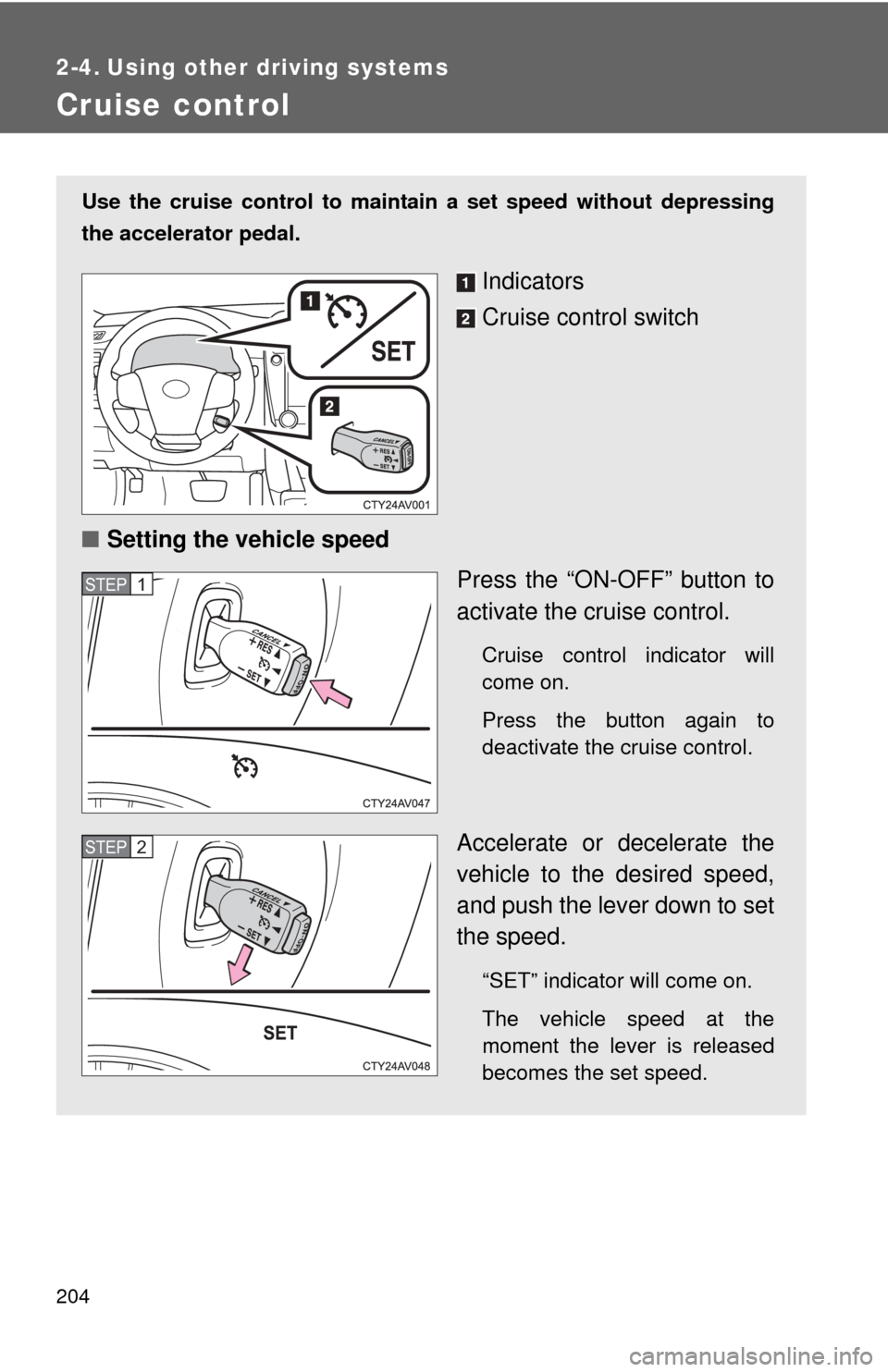
Use the cruise control to maintain a set speed without depressing
the accelerator pedal.
Indicators
Cruise control switch
■ Setting the vehicle speed
Press the “ON-OFF” button to
activate the cruise control.
Cruise control indicator will
come on.
Press the button again to
deactivate the cruise control.
Accelerate or decelerate the
vehicle to the desired speed,
and push the lever down to set
the speed.
“SET” indicator will come on.
The vehicle speed at the
moment the lever is released
becomes the set speed.
STEP1
STEP2
Page 206 of 612
206 2-4. Using other driving systems
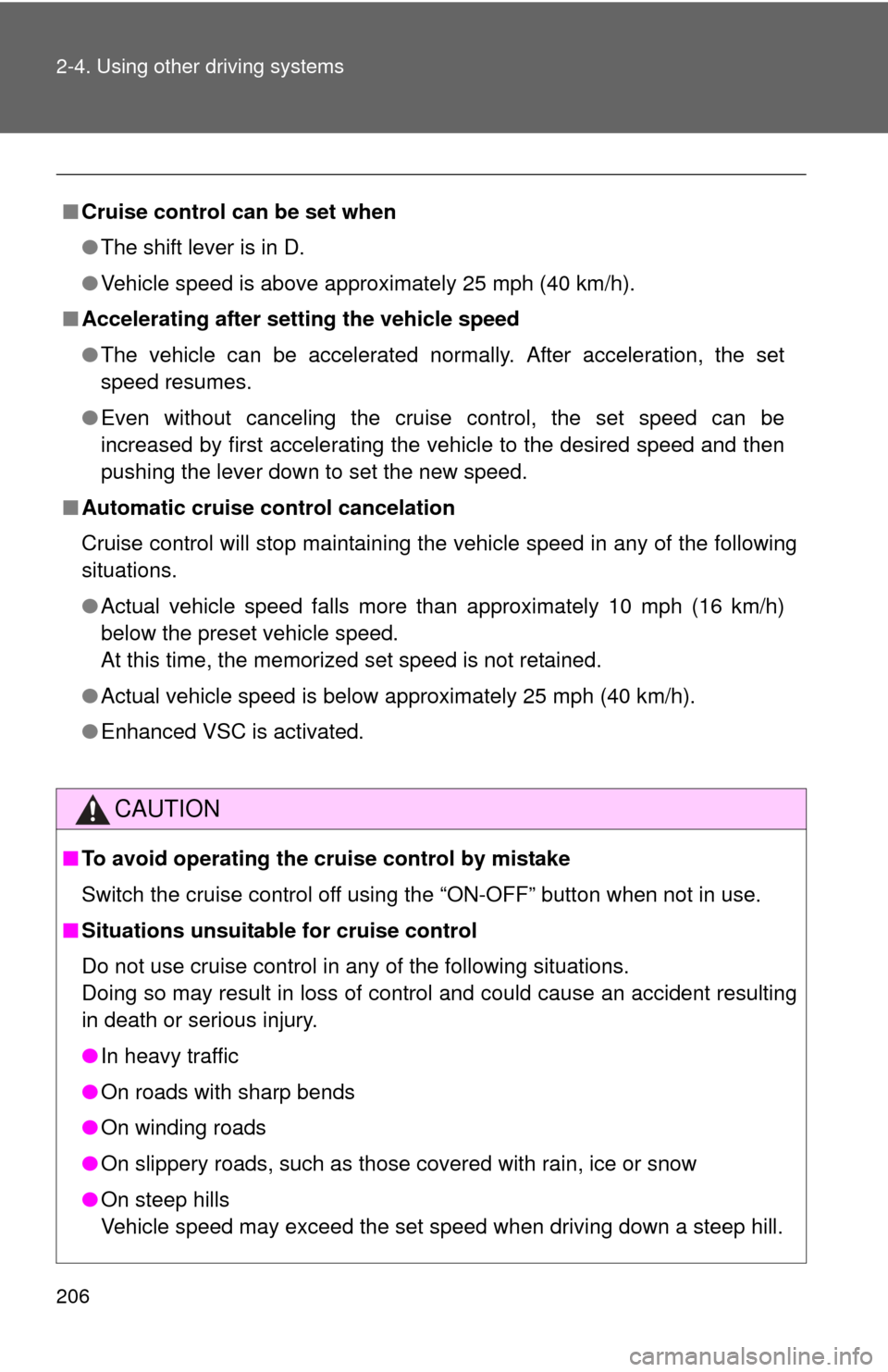
■Cruise control can be set when
●The shift lever is in D.
● Vehicle speed is above approximately 25 mph (40 km/h).
■ Accelerating after setting the vehicle speed
●The vehicle can be accelerated normally. After acceleration, the set
speed resumes.
● Even without canceling the cruise control, the set speed can be
increased by first accelerating the vehicle to the desired speed and then
pushing the lever down to set the new speed.
■ Automatic cruise control cancelation
Cruise control will stop maintaining the vehicle speed in any of the following
situations.
●Actual vehicle speed falls more than approximately 10 mph (16 km/h)
below the preset vehicle speed.
At this time, the memorized set speed is not retained.
● Actual vehicle speed is below approximately 25 mph (40 km/h).
● Enhanced VSC is activated.
CAUTION
■To avoid operating the cruise control by mistake
Switch the cruise control off using the “ON-OFF” button when not in use.
■ Situations unsuitable for cruise control
Do not use cruise control in any of the following situations.
Doing so may result in loss of control and could cause an accident resulting
in death or serious injury.
●In heavy traffic
● On roads with sharp bends
● On winding roads
● On slippery roads, such as those covered with rain, ice or snow
● On steep hills
Vehicle speed may exceed the set speed when driving down a steep hill.
Page 502 of 612
502 5-2. Steps to take in an emergency
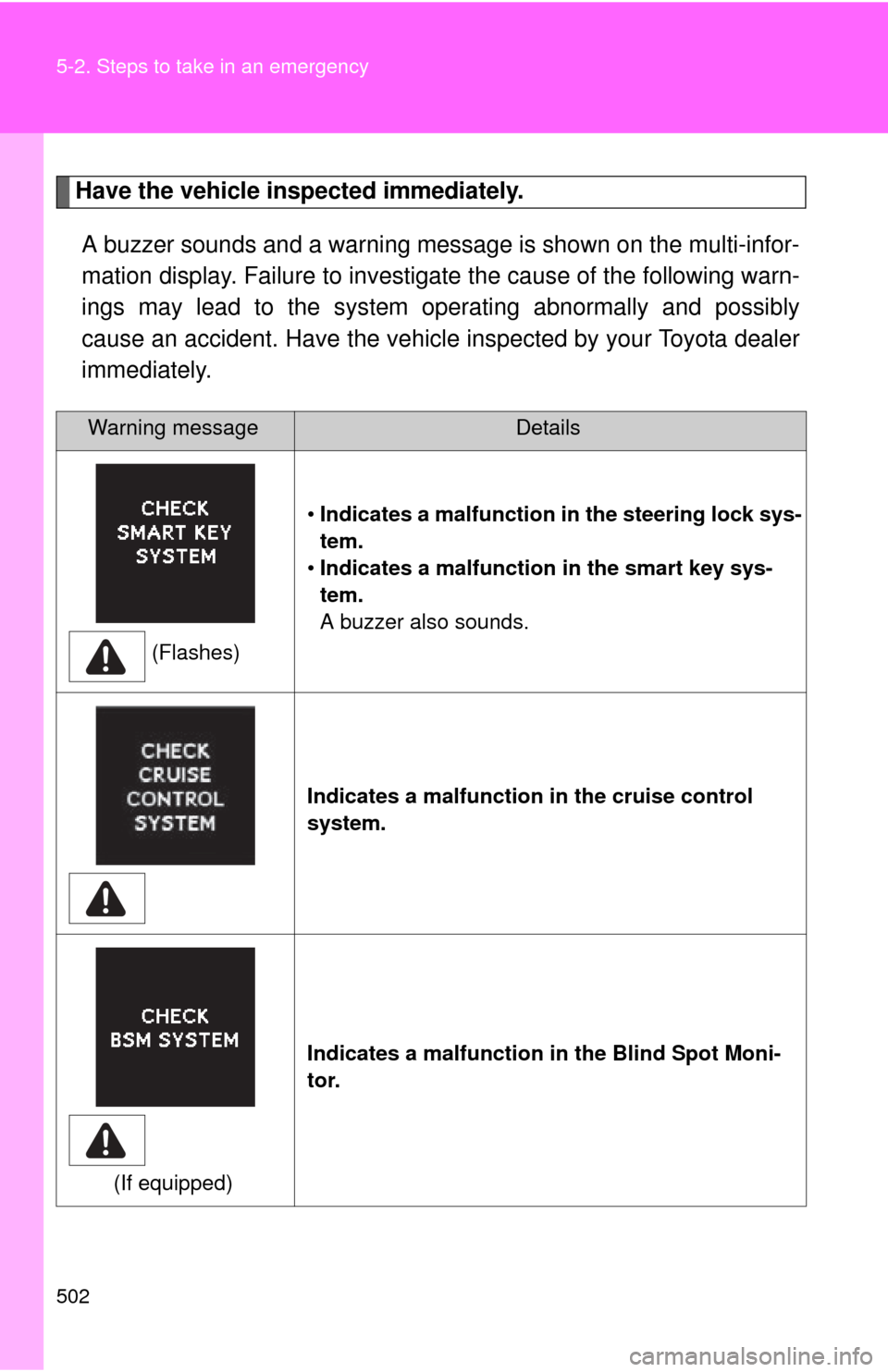
Have the vehicle inspected immediately.A buzzer sounds and a warning message is shown on the multi-infor-
mation display. Failure to investig ate the cause of the following warn-
ings may lead to the system operating abnormally and possibly
cause an accident. Have the vehicle inspected by your Toyota dealer
immediately.
Warning messageDetails
(Flashes) •
Indicates a malfunction in the steering lock sys-
tem.
• Indicates a malfunction in the smart key sys-
tem.
A buzzer also sounds.
Indicates a malfunction in the cruise control
system.
(If equipped) Indicates a malfunction in the Blind Spot Moni-
tor.
Page 527 of 612

5
When trouble arises
527
5-2. Steps to take in an emergency
CAUTION
■When using the compact spare tire
●
Remember that the compact spare tire provided is specifically designed
for use with your vehicle. Do not use your compact spare tire on another
vehicle.
● Do not use more than one compact spare tire simultaneously.
● Replace the compact spare tire with a standard tire as soon as possible.
● Avoid sudden acceleration, deceleration and braking, as well as sharp cor-
nering.
■
When storing the compact spare tire
Be careful not to catch fingers or other body parts between the compact
spare tire and the body of the vehicle.
■When the compact spare tire is attached
The vehicle speed may not be correctly detected, and the following sys-
tems may not operate correctly:
●ABS & Brake assist
●Cruise control
●VSC
●TRAC
●EPS
●Navigation system (if equipped)
■Speed limit when using the compact spare tire
Do not drive at speeds in excess of 50 mph (80 km/h) when a compact
spare tire is installed on the vehicle.
The compact spare tire is not designed for driving at high speeds. Failure
to observe this precaution may lead to an accident causing death or seri-
ous injury.
Page 600 of 612

600 Alphabetical index
CareExterior .................................. 410
Interior ................................... 413
Seat belts .............................. 414
Cargo capacity ......................... 224
CD player .................................. 274
Chains ....................................... 229
Child restraint system
Booster seats, definition ........ 131
Booster seats, installation ..... 135
Convertible seats, definition ............................. 131
Convertible seats, installation ........................... 135
Front passenger occupant classification system ........... 125
Infant seats, definition ........... 131
Infant seats, installation......... 135
Installing CRS with LATCH anchors ............................... 136
Installing CRS with seat belts ............................ 138
Installing CRS with top tether
straps .................................. 141 Child safety
Airbag precautions ................ 120
Child restraint system ........... 131
Child-protectors....................... 68
How your child should wear
the seat belt .......................... 86
Installing child restraints........ 135
Moon roof precautions .......... 101
Power window lock switch ...... 95
Power window precautions ..... 97
Removed key battery precautions ......................... 459
Seat belt extender precautions ........................... 89
Seat belt precautions .............. 87
Seat heater precautions ........ 384
Trunk precautions ................... 74
12-volt battery precautions ................. 441, 541
Child-protectors ......................... 68
Cleaning
Exterior.................................. 410
Interior ................................... 413
Seat belts .............................. 414
Clock ......................................... 378
Coat hooks ............................... 387
Coin holder ............................... 370
Compass................................... 398
Condenser ................................ 436
Console box ............................. 369
Cooling system Hybrid system overheating ... 542
Cruise control .......................... 204
Cup holder ................................ 372
Curtain shield airbags ............. 113
Customizable features ............ 576C