air conditioning TOYOTA CAMRY HYBRID 2015 XV50 / 9.G Owners Manual
[x] Cancel search | Manufacturer: TOYOTA, Model Year: 2015, Model line: CAMRY HYBRID, Model: TOYOTA CAMRY HYBRID 2015 XV50 / 9.GPages: 564, PDF Size: 7.41 MB
Page 5 of 564

5
1
9 8 6 5
4
3
2
CAMRY_HV_U (OM33A87U)
10
7
6-1. Using the air conditioning system
and defogger
Automatic air conditioning system............................. 332
Seat heaters ...................... 339
6-2. Using the interior lights Interior lights list ................ 340
• Interior lights ................. 341
• Personal lights .............. 341
6-3. Using the storage features
List of storage features...... 343
• Glove box...................... 344
• Console box .................. 344
• Coin holder ................... 345
• Bottle holders ................ 345
• Cup holders .................. 346
• Auxiliary boxes.............. 347
• Open tray ...................... 352
Trunk features ................... 353
6-4. Other interior features Other interior features ....... 354
• Sun visors ..................... 354
• Vanity mirrors................ 354
• Clock ............................. 355
• Ashtray.......................... 356
• Power outlets ................ 357
• Armrest ......................... 358
• Assist grips ................... 358
• Coat hooks.................... 359
Garage door opener .......... 360
Safety Connect.................. 365
Compass ........................... 370 7-1. Maintenance and care
Cleaning and protecting the vehicle exterior .......... 376
Cleaning and protecting the vehicle interior ........... 379
7-2. Maintenance Maintenance requirements ................... 382
General maintenance ........ 385
Emission inspection and maintenance (I/M)
programs ......................... 389
7-3. Do-it-yourself maintenance
Do-it-yourself service precautions ...................... 390
Hood .................................. 392
Positioning a floor jack....... 393
Engine compartment ......... 394
12-volt battery .................... 402
Tires................................... 406
Tire inflation pressure ........ 416
Wheels............................... 419
Air conditioning filter .......... 421
Electronic key battery ........ 423
Checking and replacing fuses ................................ 425
Light bulbs ......................... 428
6Interior features7Maintenance and care
Page 19 of 564

19Pictorial index
CAMRY_HV_U (OM33A87U)Parking brake . . . . . . . . . . . . . . . . . . . . . . . . . . . . . . . . . . . . . P. 171
Applying/releasing . . . . . . . . . . . . . . . . . . . . . . . . . . . . . . . . . . P. 171
Precautions against winter season . . . . . . . . . . . . . . . . . . . . . P. 243
Warning light/warning buzzer/warning message . . . . . . . P. 444, 455
Turn signal lever . . . . . . . . . . . . . . . . . . . . . . . . . . . . . . . . . . P. 170
Headlight switch . . . . . . . . . . . . . . . . . . . . . . . . . . . . . . . . . . P. 172
Headlights/parking lights/side marker lights/tail lights/
daytime running lights . . . . . . . . . . . . . . . . . . . . . . . . . . . . . . . P. 172
Windshield wiper and washer switch . . . . . . . . . . . . . . . . . P. 180
Usage . . . . . . . . . . . . . . . . . . . . . . . . . . . . . . . . . . . .\
. . . . . . . P. 180
Adding washer fluid . . . . . . . . . . . . . . . . . . . . . . . . . . . . . . . . . P. 401
Warning message . . . . . . . . . . . . . . . . . . . . . . . . . . . . . . . . . . P. 461
Emergency flasher switch . . . . . . . . . . . . . . . . . . . . . . . . . . P. 438
Trunk opener . . . . . . . . . . . . . . . . . . . . . . . . . . . . . . . . . . . . . P. 117
Fuel filler door opener . . . . . . . . . . . . . . . . . . . . . . . . . . . . . . P. 182
Hood lock release lever . . . . . . . . . . . . . . . . . . . . . . . . . . . . . P. 392
Tilt and telescopic steering lock release lever . . . . . . . . . . P. 134
Air conditioning system . . . . . . . . . . . . . . . . . . . . . . . . . . . . P. 332
Usage . . . . . . . . . . . . . . . . . . . . . . . . . . . . . . . . . . . .\
. . . . . . . P. 332
Rear window defogger . . . . . . . . . . . . . . . . . . . . . . . . . . . . . . . P. 334
Entune Audio system
*1, 2. . . . . . . . . . . . . . . . . . . . . . . . . . . P. 248
Navigation system
*1, 2
Clock . . . . . . . . . . . . . . . . . . . . . . . . . . . . . . . . . . . . \
. . . . . . . . P. 355
Glove box . . . . . . . . . . . . . . . . . . . . . . . . . . . . . . . . . . . . . . . . P. 344
*1: If equipped
*2: For vehicles with a navigation system or Entune Audio Plus, refer to “NAVIGATION AND MULTIMEDIA SYSTEM OWNER'S MANUAL”.
4
5
6
7
8
9
10
11
12
13
14
Page 73 of 564
731-2. Hybrid system
1
For safety and security
CAMRY_HV_U (OM33A87U)
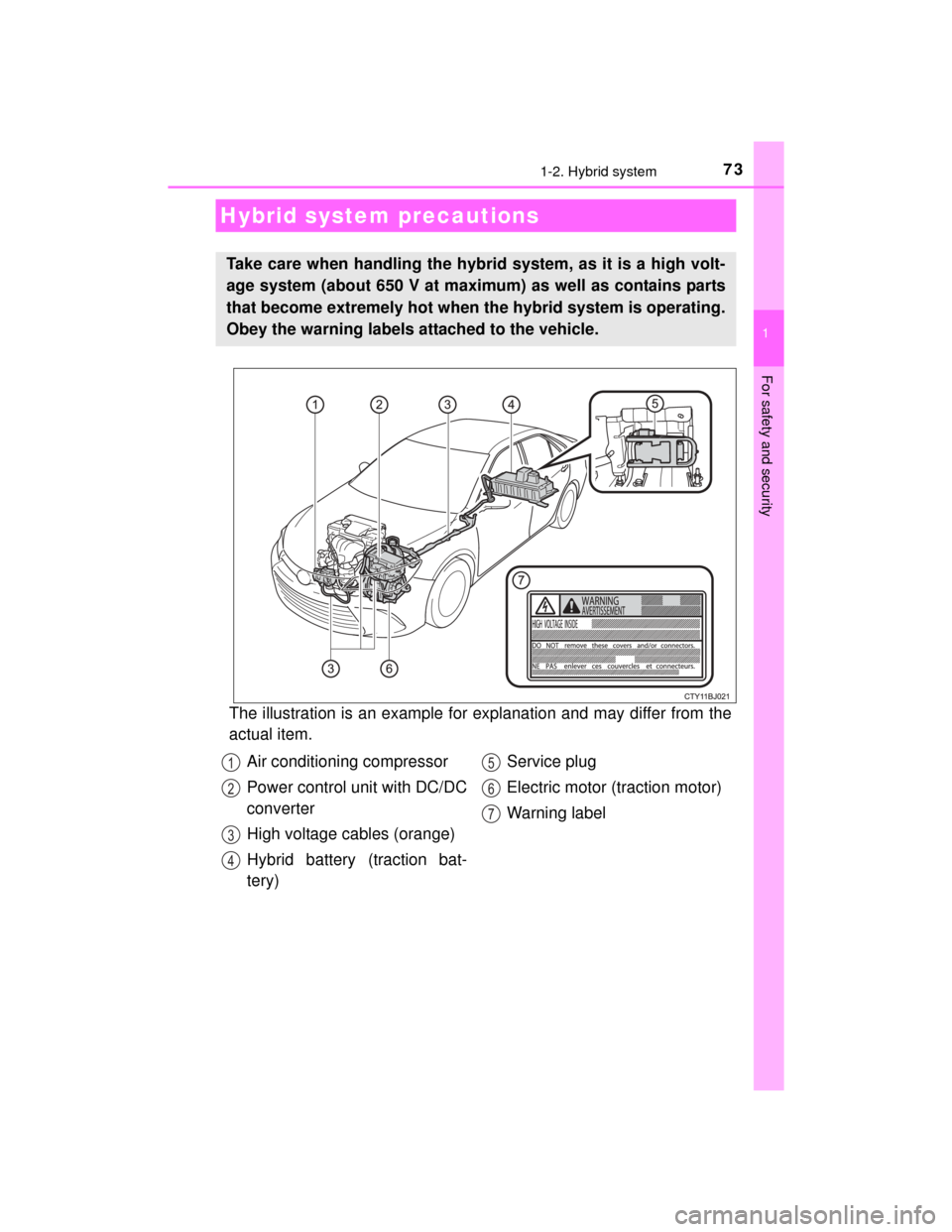
The illustration is an example for explanation and may differ from the
actual item.
Hybrid system precautions
Take care when handling the hybrid system, as it is a high volt-
age system (about 650 V at maximum) as well as contains parts
that become extremely hot when the hybrid system is operating.
Obey the warning labels attached to the vehicle.
Air conditioning compressor
Power control unit with DC/DC
converter
High voltage cables (orange)
Hybrid battery (traction bat-
tery)Service plug
Electric motor (traction motor)
Warning label1
2
3
4
5
6
7
Page 169 of 564
1694-2. Driving procedures
4
Driving
CAMRY_HV_U (OM33A87U)
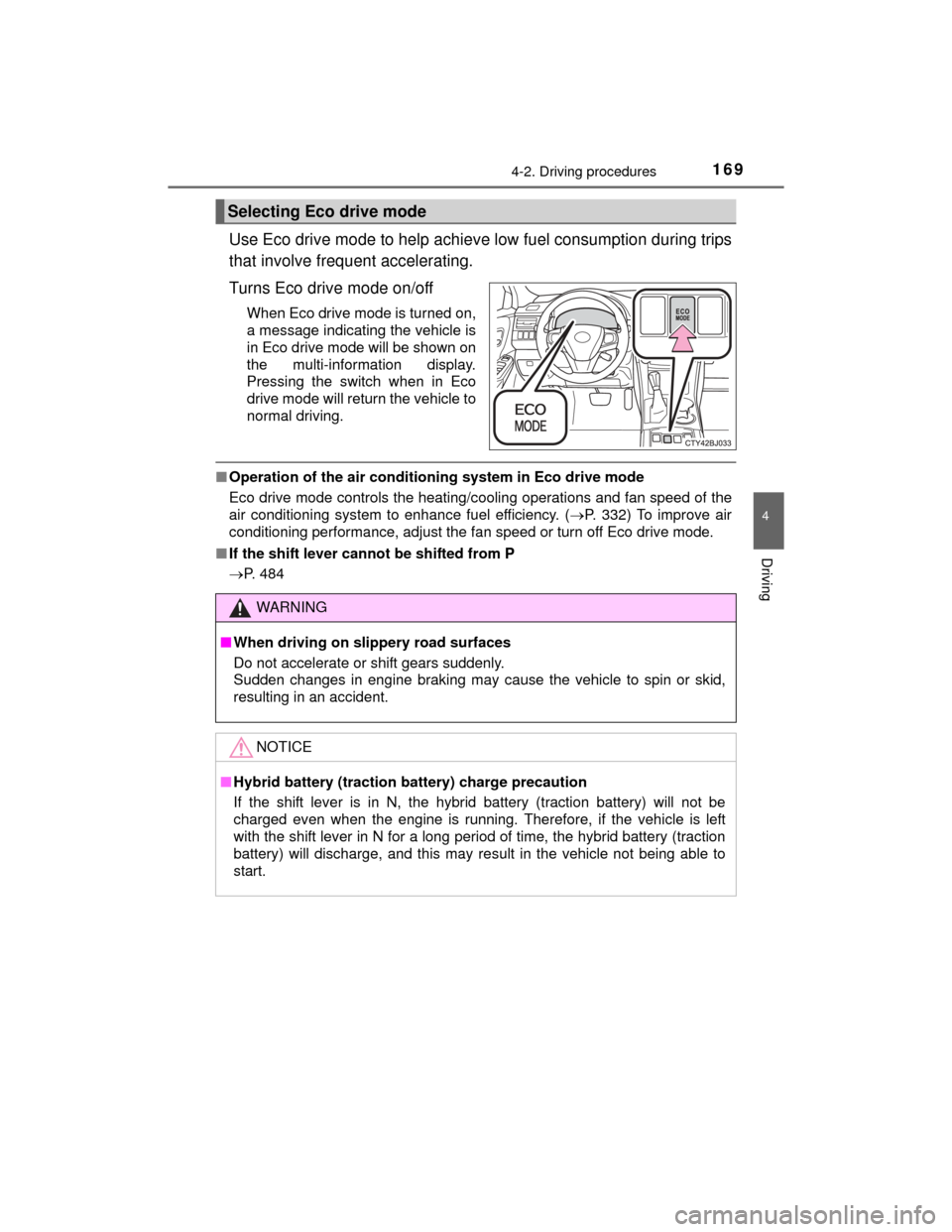
Use Eco drive mode to help achieve low fuel consumption during trips
that involve frequent accelerating.
Turns Eco drive mode on/off
When Eco drive mode is turned on,
a message indicating the vehicle is
in Eco drive mode will be shown on
the multi-information display.
Pressing the switch when in Eco
drive mode will return the vehicle to
normal driving.
■Operation of the air conditio ning system in Eco drive mode
Eco drive mode controls the heating/cooling operations and fan speed of the
air conditioning system to enhance fuel efficiency. ( P. 332) To improve air
conditioning performance, adjust the fan speed or turn off Eco drive mode.
■ If the shift lever cannot be shifted from P
P. 484
Selecting Eco drive mode
WARNING
■When driving on slippery road surfaces
Do not accelerate or shift gears suddenly.
Sudden changes in engine braking may cause the vehicle to spin or skid,
resulting in an accident.
NOTICE
■Hybrid battery (traction battery) charge precaution
If the shift lever is in N, the hybrid battery (traction battery) will not be
charged even when the engine is running. T herefore, if the vehicle is left
with the shift lever in N for a long period of time, the hybrid battery (traction
battery) will discharge, and this may re sult in the vehicle not being able to
start.
Page 204 of 564

2044-5. Using the driving support systems
CAMRY_HV_U (OM33A87U)
■Temporary cancelation of the LDA system functions
If any of the following occurs, the LDA system functions will be temporarily
canceled. The functions will resume after the necessary operating conditions
have returned.
●The turn signal lever is operated.
● The vehicle speed deviates from the operating range of the LDA system
functions.
● When the lane lines cannot be recognized while driving.
● When the lane departure warning function is activated.
The lane departure warning function will not operate again for a several sec-
onds after it has been activated, even if the vehicle leaves the lane again.
■ The lane departure warning
Depending on the audio system sound le vel or air conditioning fan noise
while the audio system or air conditioning system is in use, it may be difficult
to hear the warning sound.
■ After the vehicle has been parked in the sun
The LDA system may not be available and a warning message ( P. 458) will
be displayed for a while after driving has started. When the temperature in the
cabin decreases and the temperat ure around the camera sensor (P. 202)
becomes suitable for its operation, the functions will begin to operate.
■ If there are lane markers on only one side of the vehicle
The lane departure warning will not operate for the side on which lane mark-
ers could not be recognized.
Page 239 of 564
239
4
Driving
CAMRY_HV_U (OM33A87U)
4-6. Driving tips
◆Using Eco drive mode
When using Eco drive mode, the torque corresponding to the accel-
erator pedal depression amount can be generated more smoothly
than it is in normal conditions. In addition, the operation of the air
conditioning system (heating/cooling) will be minimized, improving
the fuel economy. (P. 332)
◆Use of Hybrid System Indicator
The Eco-friendly driving is possible by keeping the needle of Hybrid
System Indicator within Eco area. ( P. 9 0 )
◆Shift lever operation
Shift the shift lever to D when stopped at a traffic light, or driving in
heavy traffic etc. Shift the shift lever to P when parking. When using
the N, there is no positive effect on fuel consumption. In the N, the
gasoline engine operates but electricity cannot be generated. Also,
when using the air conditioning system, etc., the hybrid battery
(traction battery) power is consumed.
◆Accelerator pedal/brake pedal operation
● Drive your vehicle smoothly. Avoid abrupt acceleration and
deceleration. Gradual acceleration and deceleration will make
more effective use of the electric motor (traction motor) without
having to use gasoline engine power.
● Avoid repeated acceleration. Repeated acceleration consumes
hybrid battery (traction battery) power, resulting in poor fuel con-
sumption. Battery power can be restored by driving with the
accelerator pedal slightly released.
Hybrid vehicle driving tips
For economical and ecological driving, pay attention to the fol-
lowing points:
Page 240 of 564

2404-6. Driving tips
CAMRY_HV_U (OM33A87U)
◆When braking
Make sure to operate the brakes gently and in a timely manner. A
greater amount of electrical energy can be regenerated when slow-
ing down.
◆Delays
Repeated acceleration and deceleration, as well as long waits at
traffic lights, will lead to bad fuel economy. Check traffic reports
before leaving and avoid delays as much as possible. When driving
in a traffic jam, gently release the brake pedal to allow the vehicle to
move forward slightly while avoiding overuse of the accelerator
pedal. Doing so can help control excessive gasoline consumption.
◆Highway driving
Control and maintain the vehicle at a constant speed. Before stop-
ping at a toll booth or similar, allow plenty of time to release the
accelerator and gently apply the brakes. A greater amount of elec-
trical energy can be regenerated when slowing down.
◆Air conditioning
Use the air conditioning only when necessary. Doing so can help
reduce excessive gasoline consumption.
In summer: When the ambient temperature is high, use the recircu-
lated air mode. Doing so will help to reduce the burden on the air
conditioning system and reduce fuel consumption as well.
In winter: Because the gasoline engine will not automatically cut out
until it and the interior of the vehicle are warm, it will consume fuel.
Also, fuel consumption can be improved by avoiding overuse of the
heater.
◆Checking tire inflation pressure
Make sure to check the tire inflation pressure frequently. Improper
tire inflation pressure can cause poor fuel economy.
Also, as snow tires can cause large amounts of friction, their use on
dry roads can lead to poor fuel economy. Use tires that are appro-
priate for the season.
Page 322 of 564

322
CAMRY_HV_U (OM33A87U)
5-10.Bluetooth®
■When using the Bluetooth® audio system
● In the following conditions, the system may not function.
• If the portable audio player is turned off
• If the portable audio player is not connected
• If the portable audio player’s battery is low
● There may be a delay if a cellular phone connection is made during
Bluetooth
® audio play.
● Depending on the type of portable audio player that is connected to the sys-
tem, operation may differ slightly and certain functions may not be available.
■ When using the hands-free system
●The multimedia system is muted when making a call.
● If both parties speak at the same time, it may be difficult to hear.
● If the received call volume is overly loud, an echo may be heard.
If the Bluetooth
® phone is too close to the system, quality of the sound may
deteriorate and connection status may deteriorate.
● In the following circumstances, it may be difficult to hear the other party:
• When driving on unpaved roads
• When driving at high speeds
• If a roof or window is open
• If the air conditioning is bl owing directly on the microphone
• If there is interference from the network of the cellular phone
■ Conditions under which the system will not operate
●If using a cellular phone that does not support Bluetooth
®
●If the cellular phone is turned off
● If you are outside of cellular phone service coverage
● If the cellular phone is not connected
● If the cellular phone’s battery is low
● When outgoing calls are controlled, due to heavy traffic on telephone lines,
etc.
● When the cellular phone itself cannot be used
● When transferring contact data from the cellular phone
Bluetooth®
Page 327 of 564
327
5
Audio system
CAMRY_HV_U (OM33A87U)
5-11.Using the voice command system
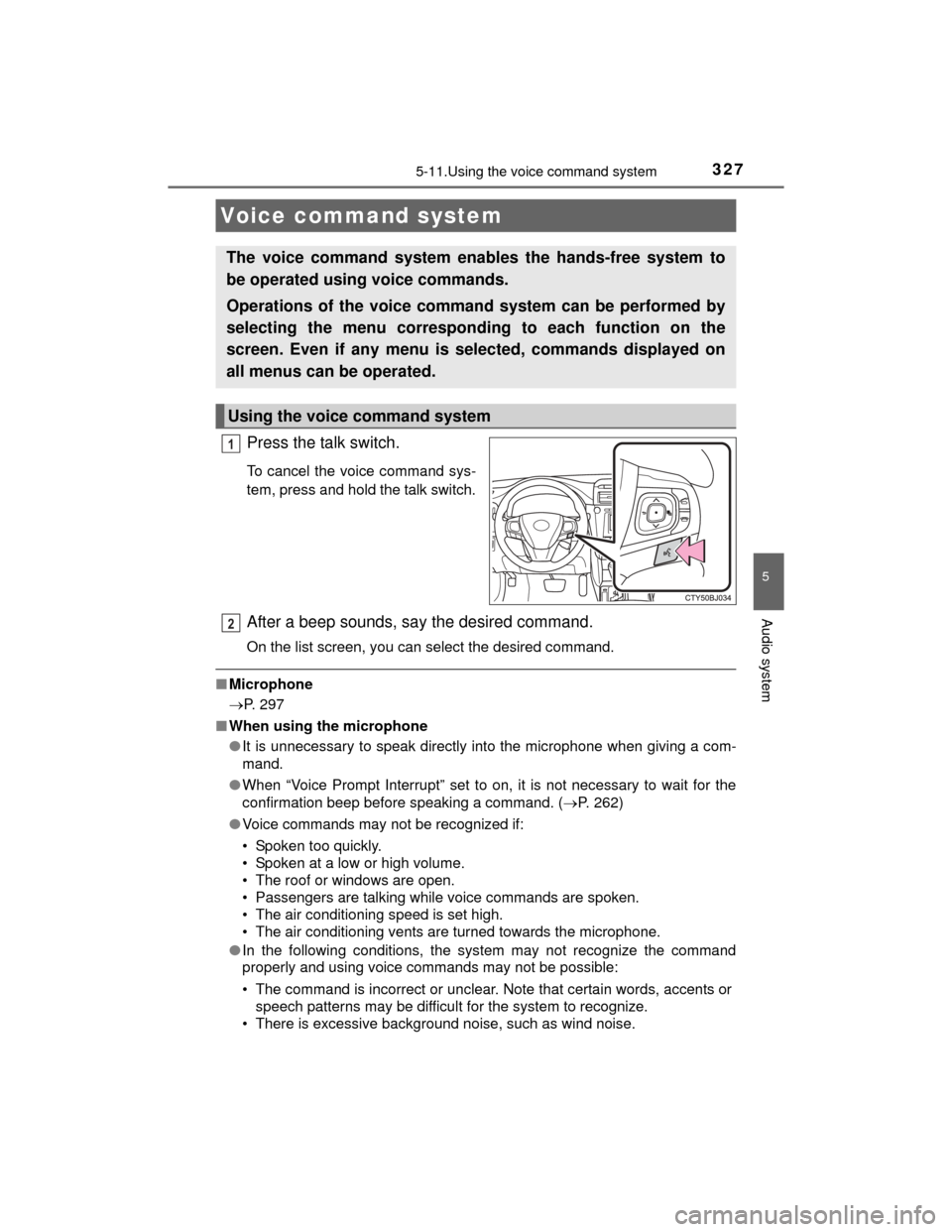
Press the talk switch.
To cancel the voice command sys-
tem, press and hold the talk switch.
After a beep sounds, say the desired command.
On the list screen, you can select the desired command.
■Microphone
P. 297
■ When using the microphone
●It is unnecessary to speak directly into the microphone when giving a com-
mand.
● When “Voice Prompt Interrupt” set to on, it is not necessary to wait for the
confirmation beep before speaking a command. ( P. 262)
● Voice commands may not be recognized if:
• Spoken too quickly.
• Spoken at a low or high volume.
• The roof or windows are open.
• Passengers are talking while voice commands are spoken.
• The air conditioning speed is set high.
• The air conditioning vents are turned towards the microphone.
● In the following conditions, the system may not recognize the command
properly and using voice commands may not be possible:
• The command is incorrect or unclear. Note that certain words, accents or
speech patterns may be difficult for the system to recognize.
• There is excessive background noise, such as wind noise.
Voice command system
The voice command system enables the hands-free system to
be operated using voice commands.
Operations of the voice command system can be performed by
selecting the menu corresponding to each function on the
screen. Even if any menu is selected, commands displayed on
all menus can be operated.
Using the voice command system
1
2
Page 331 of 564

331
6Interior features
CAMRY_HV_U (OM33A87U)6-1. Using the air
conditioning system
and defogger
Automatic air conditioning system............................. 332
Seat heaters ...................... 339
6-2. Using the interior lights
Interior lights list ................ 340
• Interior lights ................. 341
• Personal lights .............. 341 6-3. Using the storage
features
List of storage features ..... 343
• Glove box...................... 344
• Console box .................. 344
• Coin holder ................... 345
• Bottle holders ................ 345
• Cup holders .................. 346
• Auxiliary boxes.............. 347
• Open tray ...................... 352
Trunk features ................... 353
6-4. Other interior features Other interior features ....... 354
• Sun visors ..................... 354
• Vanity mirrors................ 354
• Clock ............................. 355
• Ashtray.......................... 356
• Power outlets ................ 357
• Armrest ......................... 358
• Assist grips ................... 358
• Coat hooks.................... 359
Garage door opener.......... 360
Safety Connect ................. 365
Compass ........................... 370