headlights TOYOTA CAMRY HYBRID 2017 XV50 / 9.G User Guide
[x] Cancel search | Manufacturer: TOYOTA, Model Year: 2017, Model line: CAMRY HYBRID, Model: TOYOTA CAMRY HYBRID 2017 XV50 / 9.GPages: 572, PDF Size: 13.11 MB
Page 179 of 572
1794-3. Operating the lights and wipers
4
Driving
CAMRY_HV_U (OM33C65U)
WARNING
■Limitations of the Automatic High Beam
Do not rely on the Automatic High Beam. Always drive safely, taking care to
observe your surroundings and turning high beam on or off manually if nec-
essary.
NOTICE
■Notes when using the Automatic High Beam system
Observe the following to ensure that the Automatic High Beam functions
correctly.
● Do not place items on the dashboard. There is a possibility that the cam-
era sensor will mistake items reflected in the windshield for streetlights,
the headlights of other vehicles, etc.
● Do not install a parking tag or any other accessories near or around the
camera sensor.
● Do not overload the vehicle.
● Do not modify the vehicle.
● If the windshield needs to be replaced, contact your Toyota dealer.
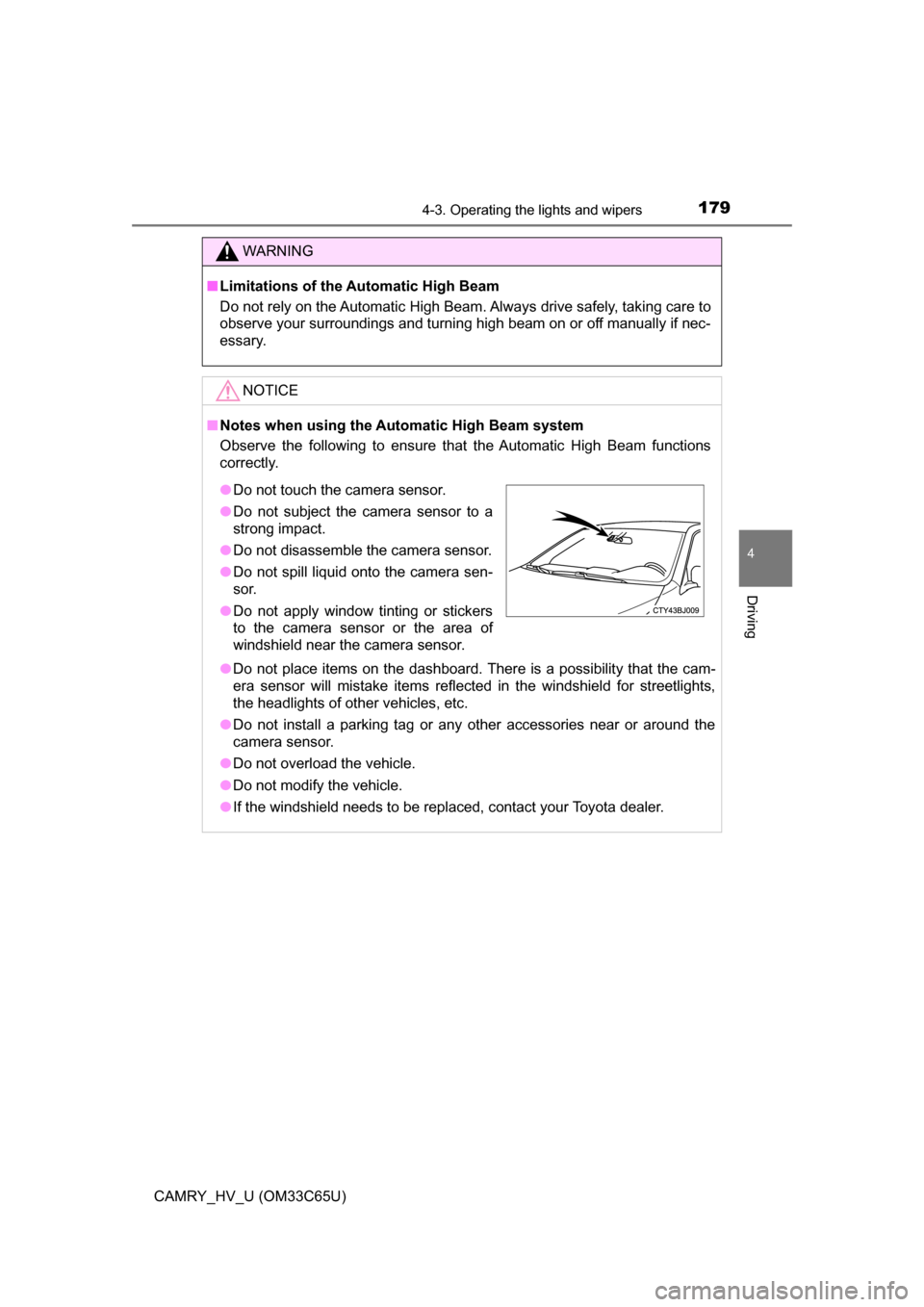
●Do not touch the camera sensor.
●Do not subject the camera sensor to a
strong impact.
● Do not disassemble the camera sensor.
● Do not spill liquid onto the camera sen-
sor.
● Do not apply window tinting or stickers
to the camera sensor or the area of
windshield near the camera sensor.
Page 205 of 572
2054-5. Using the driving support systems
4
Driving
CAMRY_HV_U (OM33C65U)■
Conditions in which the function may not operate correctly
In the following situations, the camera sensor may be unable to recognize
lane markers causing the lane departure warning function to operate incor-
rectly. However, this does not indicate a malfunction.
●When driving through an area with no lane markers, such as a tollbooth, a
crossing or before a ticket checkpoint
● When driving on a sharp curve
● When lane markers are extremely narrow or extremely wide
● When the vehicle leans to one side an unusual amount due to a heavy load
or improper tire inflation pressure
● When the following distance between your vehicle and the vehicle ahead is
extremely short
● When the lane markers are yellow (These may be more difficult for the sys-
tem to recognize compared to white markers.)
● When the lane markers are broken, Botts’ dots (raised pavement markers)
or stones
● When the lane markers are on a curb etc.
● When lane markers are obscured or partially obscured by sand, dirt, etc.
● When there are shadows on the road running parallel with lane markers, or
if a shadow covers the lane markers
● When driving on a particularly bright road surface, such as concrete
● When driving on a road surface that is bright due to reflected light
● When driving in a location where the light level changes rapidly, such as the
entrance to or exit from a tunnel
● When sunlight or the headlights of oncoming vehicles are shining directly
into the camera lens
● When driving on roads that are branching or merging
● When driving on a road surface that is wet due to rain, previous rainfall,
standing water, etc.
● When the vehicle experiences strong up-and-down motion such as when
driving on an extremely rough road or on a seam in the pavement
● When headlight brightness at nighttime is reduced due to dirt on the lenses,
or when the headlights are misaligned
● When driving on winding roads or roads that are uneven
● When driving on rough or unpaved roads
■ When changing the tires
Depending on the tires used, sufficient performance may not be maintainable.
■ Warning messages for the LDA system
Warning messages are used to indicate a system malfunction or to inform t\
he
driver of the need for caution while driving. ( P. 459)
Page 207 of 572
2074-5. Using the driving support systems
4
Driving
CAMRY_HV_U (OM33C65U)
NOTICE
■To prevent damage to or incorr ect operation of the LDA system
● Do not modify the headlights or attach stickers to the surface of the lights.
● Do not modify the suspension. If any suspension parts need to be
replaced, contact Toyota dealer.
● Do not install or place anything on the hood or the grille. Also, do not install
a grille guard (bull bars, kangaroo bar etc.).
● If your windshield needs repairs, contact your Toyota dealer.
■ Camera sensor
Observe the following to ensure that the LDA system functions correctly.
● Keep the windshield clean at all times.
Performance could be affected if the windshield is dirty, or if raindrops,
condensation or ice are adhering to the windshield.
● Do not spill liquid onto the camera sensor
● Do not attach window tinting to the windshield.
● Do not install an antenna in front of the camera lens.
● If the windshield is fogged up, use the windshield defogger to remove fog
from the windshield.
When it is cold, using the heater with air blowing to the feet may allow the
upper part of the windshield to fog up. This will have a negative effect on
the images.
● Do not scratch the camera lens, or let it get dirty.
When cleaning the inside of the windshield, be careful not to get any glass
cleaner etc. on the lens. Also, do not touch the lens.
For lens repair, contact your Toyota dealer.
● Do not change the installation position or direction of the camera sensor or
remove it. The direction of the camera sensor is precisely adjusted.
● Do not subject the camera sensor to strong impact or force, and do not
disassemble the camera sensor.
● If the windshield needs to be replaced, contact your Toyota dealer.
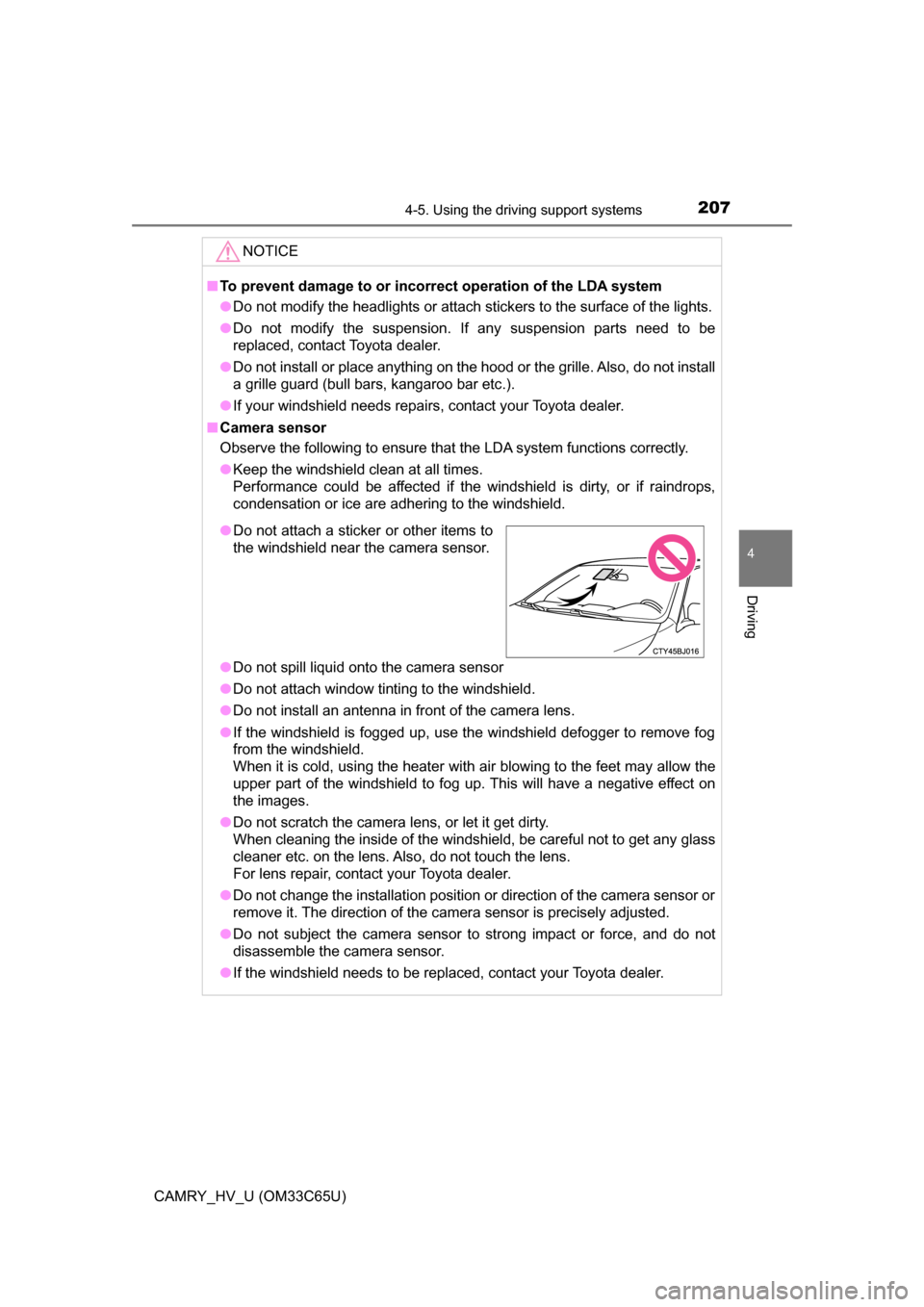
●Do not attach a sticker or other items to
the windshield near the camera sensor.
Page 215 of 572
2154-5. Using the driving support systems
4
Driving
CAMRY_HV_U (OM33C65U)■
If you notice any symptoms
If you notice any of the following symptoms, refer to the likely cause
and the solution, and re-check.
If the symptom is not resolved by
the solution, have the vehicle
inspected by your Toyota dealer.
Things you should know
Likely causeSolution
The image is difficult to see
• The vehicle is in a dark area
• The temperature around the lens
is either high or low
• The outside temperature is low
• There are water droplets on the camera
• It is raining or humid
• Foreign matter (mud etc.) is adhering to the camera
• There are scratches on the cam- era
• Sunlight or headlights are shining
directly into the camera
• The vehicle is under fluorescent
lights, sodium lights, mercury
lights etc.
If this happens due to these causes,
it does not indicate a malfunction.
Back up while visually checking the
vehicle’s surroundings. (Use the
monitor again once conditions have
been improved.)
To adjust the image on the rear view
monitor system screen. ( P. 261)
The image is blurry
Dirt or foreign matter (such as water
droplets, snow, mud etc.) is adher-
ing to the camera.Flush the camera with a large quan-
tity of water and wipe the camera
lens clean with a soft and wet cloth.
The image is out of alignment
The camera or surrounding area has
received a strong impact.Have the vehicle inspected by your
Toyota dealer.
The fixed guide lines are very far out of alignment
• The vehicle is tilted (there is a
heavy load on the vehicle, tire
pressure is low due to a tire punc-
ture, etc.)
• The vehicle is used on an incline.If this happens due to these causes,
it does not indicate a malfunction.
Back up while visually checking the
vehicle's surroundings.
The camera position is out of align-
ment.Have the vehicle inspected by your
Toyota dealer.
Page 261 of 572
2615-2. Setup
5
Audio system
CAMRY_HV_U (OM33C65U)
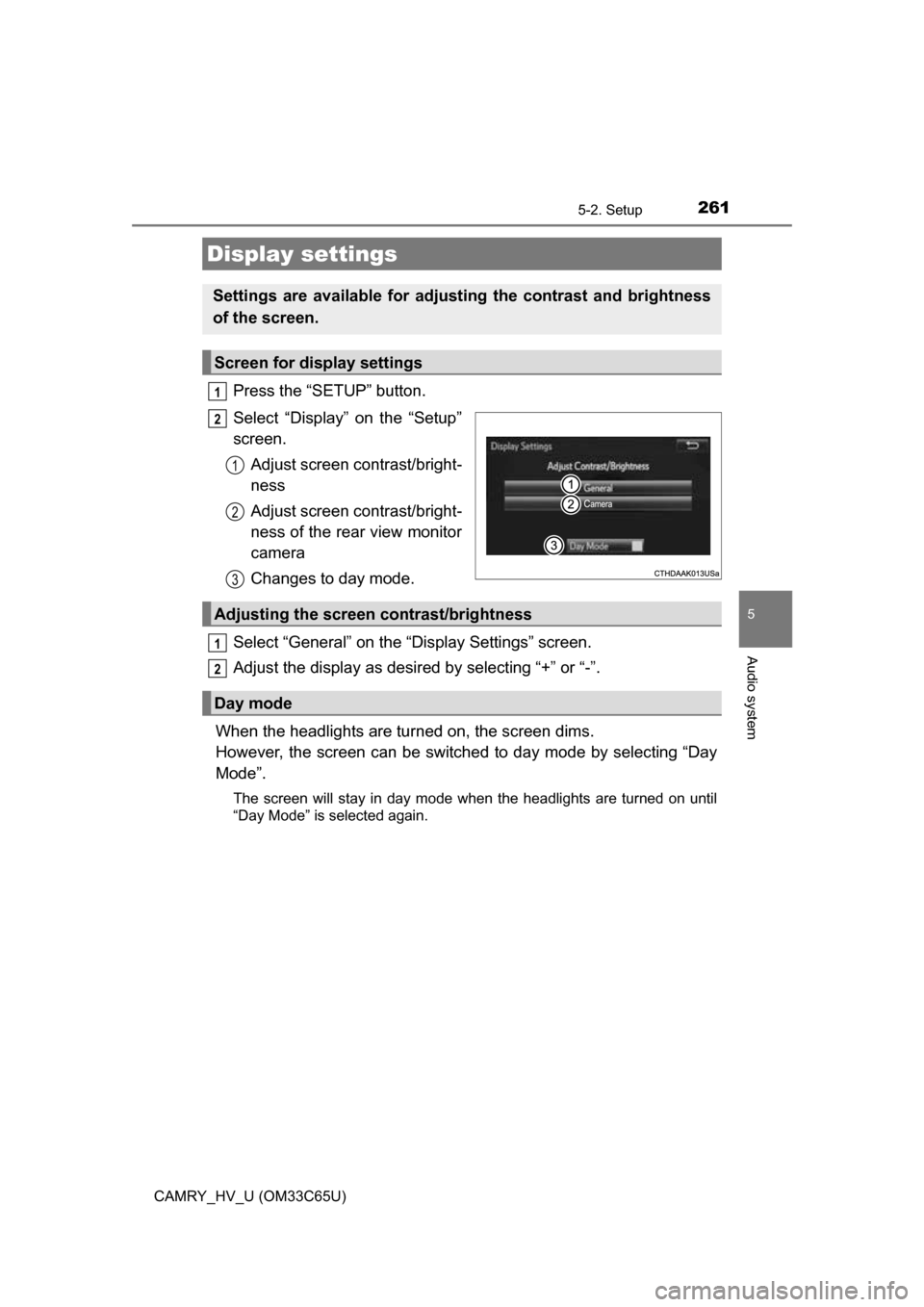
Press the “SETUP” button.
Select “Display” on the “Setup”
screen.Adjust screen contrast/bright-
ness
Adjust screen contrast/bright-
ness of the rear view monitor
camera
Changes to day mode.
Select “General” on the “Display Settings” screen.
Adjust the display as desired by selecting “+” or “-”.
When the headlights are tur ned on, the screen dims.
However, the screen can be switch ed to day mode by selecting “Day
Mode”.
The screen will stay in day mode when the headlights are turned on until
“Day Mode” is selected again.
Display settings
Settings are available for adjusting the contrast and brightness
of the screen.
Screen for display settings
1
2
1
2
3
Adjusting the screen contrast/brightness
Day mode
1
2
Page 438 of 572
4387-3. Do-it-yourself maintenance
CAMRY_HV_U (OM33C65U)
■LED light bulbs
The parking lights/daytime running lights (LED type) and high mounted stop-
lights consist of a number of LEDs. If any of the LEDs burns out, take your
vehicle to your Toyota dealer to have the light replaced.
■ Condensation build-up on the inside of the lens
Temporary condensation build-up on the inside of the headlight lens does not
indicate a malfunction.
Contact your Toyota dealer for more information in the following situations:
●Large drops of water have built up on the inside of the lens.
● Water has built up inside the headlight.
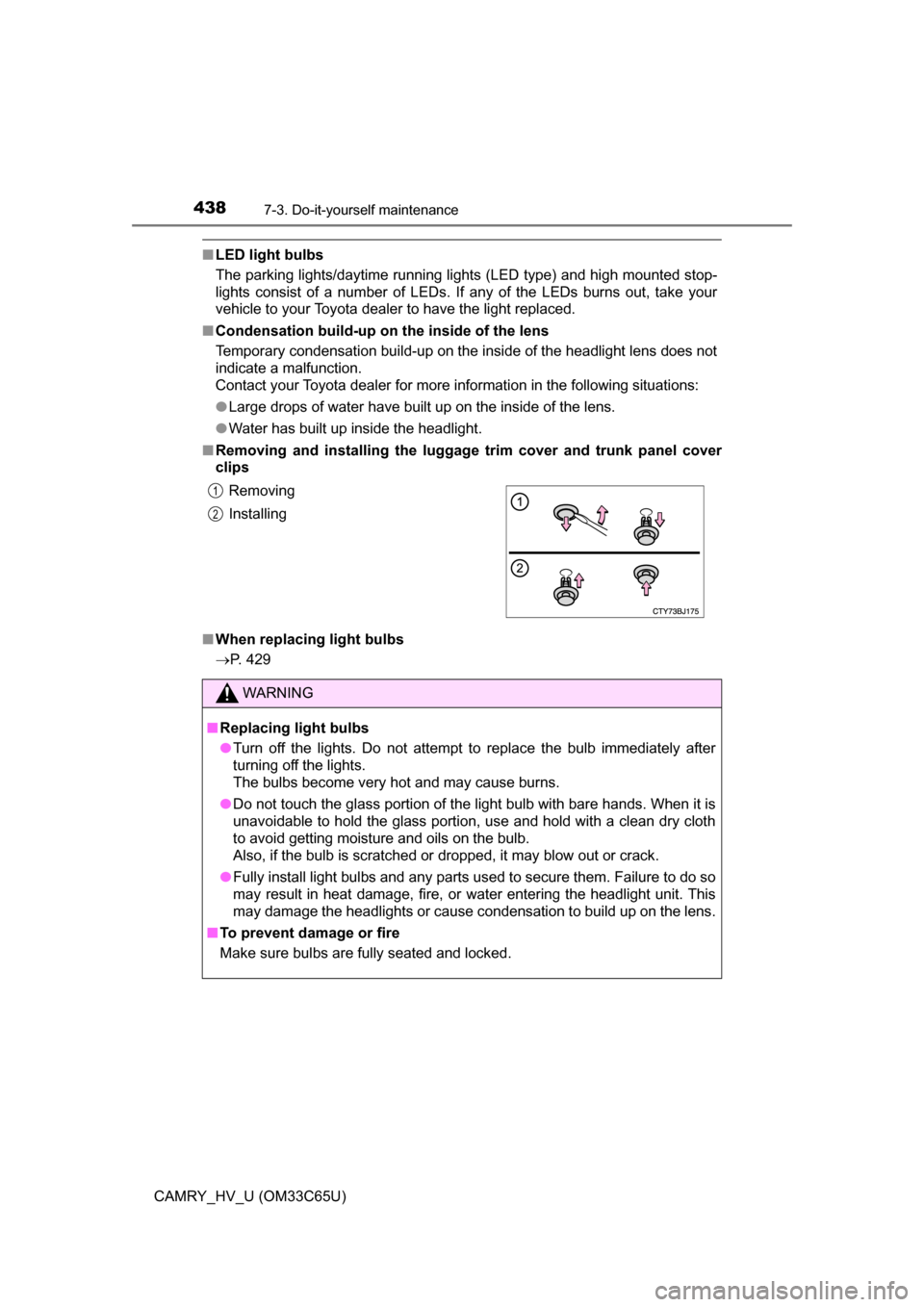
■ Removing and installing the luggag e trim cover and trunk panel cover
clips
■ When replacing light bulbs
P. 429Removing
Installing
WARNING
■ Replacing light bulbs
● Turn off the lights. Do not attempt to replace the bulb immediately after
turning off the lights.
The bulbs become very hot and may cause burns.
● Do not touch the glass portion of the light bulb with bare hands. When it is
unavoidable to hold the glass portion, use and hold with a clean dry cloth
to avoid getting moisture and oils on the bulb.
Also, if the bulb is scratched or dropped, it may blow out or crack.
● Fully install light bulbs and any parts used to secure them. Failure to do so
may result in heat damage, fire, or water entering the headlight unit. This
may damage the headlights or cause condensation to build up on the lens.
■ To prevent damage or fire
Make sure bulbs are fully seated and locked.
1
2
Page 484 of 572
4848-2. Steps to take in an emergency
CAMRY_HV_U (OM33C65U)
One of the following may be the cause of the problem:
●The electronic key may not be functioning properly. ( P. 488)
● There may not be sufficient fuel in the vehicle’s tank.
Refuel the vehicle.
● There may be a malfunction in the immobilizer system.
( P. 78)
● There may be a malfunction in the steering lock system.
● The hybrid system may be malfunctioning due to an electrical prob-
lem such as an open circuit or a blown fuse. However, depending
on the type of malfunction, an inte rim measure is available to start
the hybrid system. ( P. 485)
One of the following may be the cause of the problem:
● The 12-volt battery may be discharged. ( P. 490)
● The 12-volt battery terminal connections may be loose or corroded.
( P. 404)
If the hybrid system will not start
Reasons for the hybrid system not starting vary depending on
the situation. Check the follo wing and perform the appropriate
procedure:
The hybrid system will not start even though the correct starting
procedure is being followed. ( P. 161)
The interior lights and headlights are dim, or the horn does not
sound or sounds at a low volume.
Page 493 of 572
4938-2. Steps to take in an emergency
8
When trouble arises
CAMRY_HV_U (OM33C65U)
■Starting the hybrid system when the 12-volt battery is discharged
The hybrid system cannot be started by push-starting.
■ To prevent 12-volt battery discharge
●Turn off the headlights and the audio system while the hybrid system is off.
● Turn off any unnecessary electrical components when the vehicle is running
at a low speed for an extended period, such as in heavy traffic.
■ Charging the 12-volt battery
The electricity stored in the 12-volt battery will discharge gradually even when
the vehicle is not in use, due to natural discharge and the draining effects of
certain electrical appliances. If the vehicle is left for a long time, the 12-volt
battery may discharge, and the hybrid system may be unable to start. (The
12-volt battery recharges automatically during driving.)
■ When recharging or repl acing the 12-volt battery
● In some cases, it may not be possible to unlock the doors using the smart
key system when the 12-volt battery is discharged. Use the wireless remote
control or the mechanical key to lock or unlock the doors.
● The hybrid system may not start on the first attempt after the 12-volt battery
has recharged but will start normally after the second attempt. This is not a
malfunction.
● The power switch mode is memorized by the vehicle. When the 12-volt bat-
tery is reconnected, the system will return to the mode it was in before the
12-volt battery was discharged. Before disconnecting the 12-volt battery,
turn the power switch off.
If you are unsure what mode the power switch was in before the 12-volt bat-
tery discharged, be especially careful when reconnecting the 12-volt battery.
Page 512 of 572
5129-1. Specifications
CAMRY_HV_U (OM33C65U)
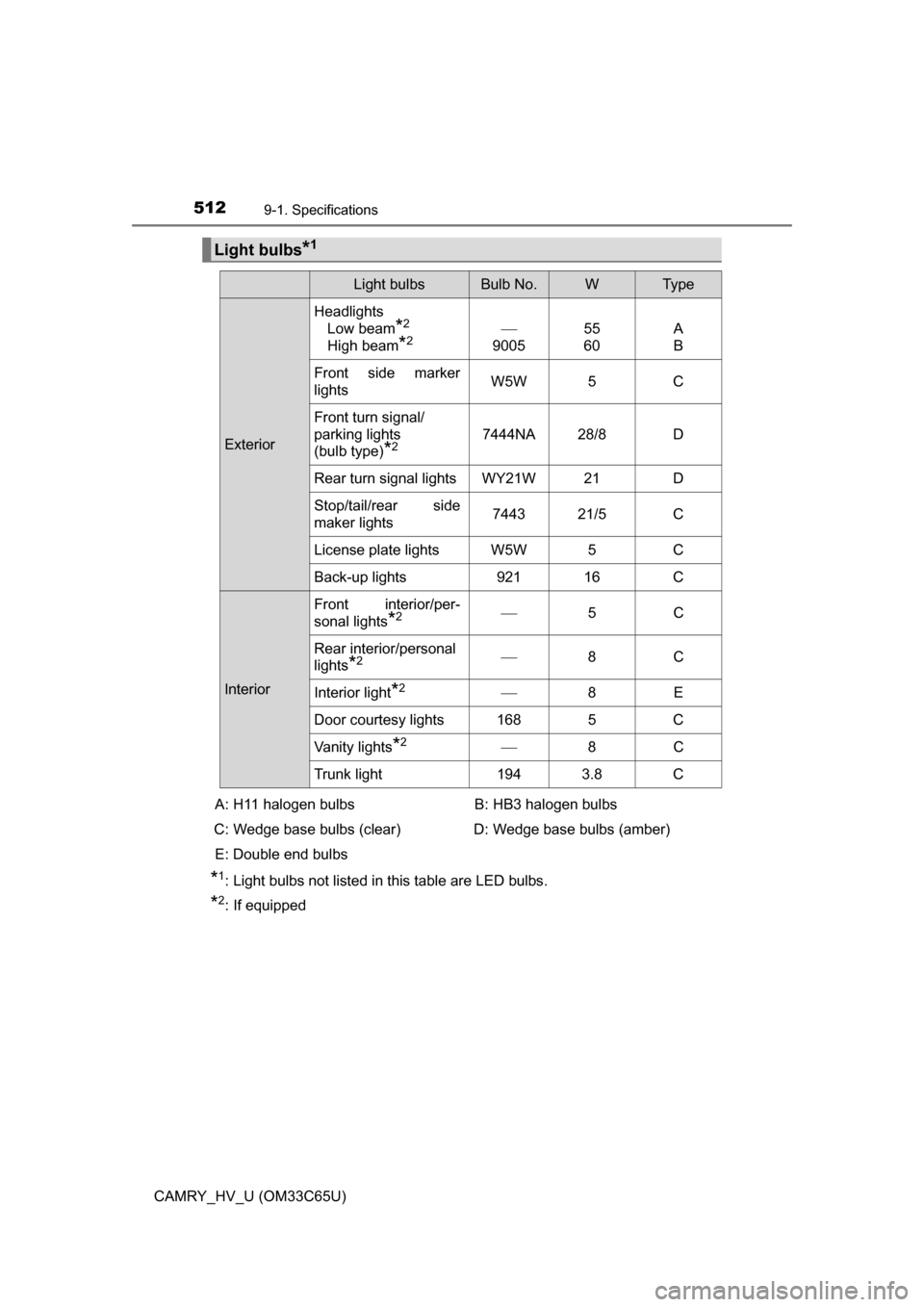
*1: Light bulbs not listed in this table are LED bulbs.
*2: If equipped
Light bulbs*1
Light bulbsBulb No.WTy p e
ExteriorHeadlights
Low beam
*2
High beam
*2
9005 55
60A
B
Front side marker
lights W5W 5 C
Front turn signal/
parking lights
(bulb type)
*27444NA 28/8 D
Rear turn signal lights WY21W 21 D
Stop/tail/rear side
maker lights 7443 21/5 C
License plate lights W5W 5 C
Back-up lights 921 16 C
Interior Front interior/per-
sonal lights
*2
5C
Rear interior/personal
lights
*2 8C
Interior light
*2 8E
Door courtesy lights 168 5 C
Vanity lights
*2 8C
Trunk light 194 3.8 C
A: H11 halogen bulbs
C: Wedge base bulbs (clear) E: Double end bulbs B: HB3 halogen bulbs
D: Wedge base bulbs (amber)
Page 535 of 572
5359-2. Customization
9
Vehicle specifications
CAMRY_HV_U (OM33C65U)■
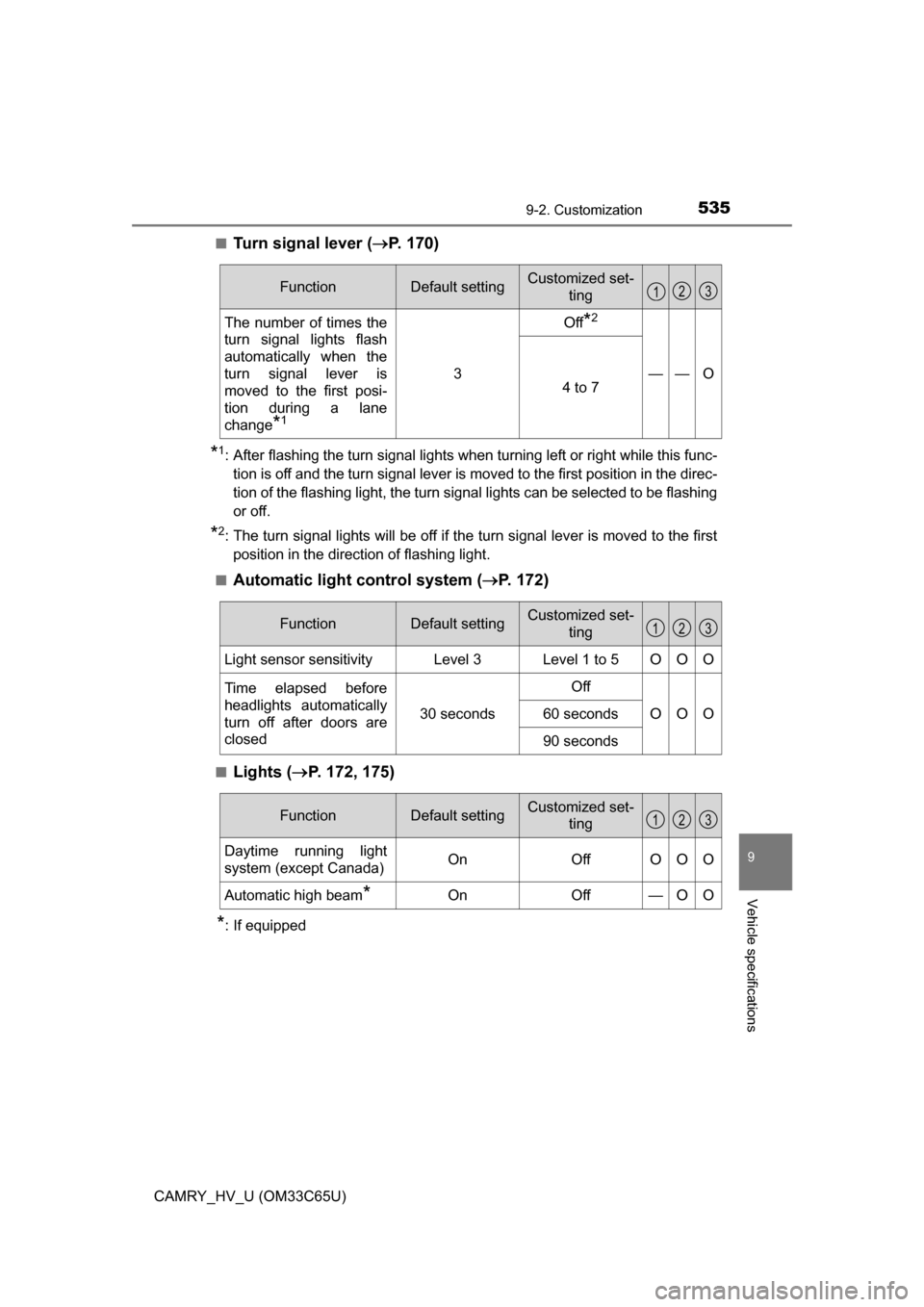
Turn signal lever (
P. 170)
*1: After flashing the turn signal lights when turning left or right while this func-
tion is off and the turn signal lever is moved to the first position in the direc-
tion of the flashing light, the turn signal lights can be selected to be flashing
or off.
*2: The turn signal lights will be off if the turn signal lever is moved to the firstposition in the direction of flashing light.
■
Automatic light control system ( P. 172)
■Lights ( P. 172, 175)
*: If equipped
FunctionDefault settingCustomized set-
ting
The number of times the
turn signal lights flash
automatically when the
turn signal lever is
moved to the first posi-
tion during a lane
change
*1
3
Off*2
——O4 to 7
123
FunctionDefault settingCustomized set-
ting
Light sensor sensitivityLevel 3Level 1 to 5OOO
Time elapsed before
headlights automatically
turn off after doors are
closed
30 seconds
Off
OOO60 seconds
90 seconds
123
FunctionDefault settingCustomized set-ting
Daytime running light
system (except Canada)OnOffOOO
Automatic high beam*OnOff—OO
123