radio TOYOTA CAMRY HYBRID 2018 Accessories, Audio & Navigation (in English)
[x] Cancel search | Manufacturer: TOYOTA, Model Year: 2018, Model line: CAMRY HYBRID, Model: TOYOTA CAMRY HYBRID 2018Pages: 340, PDF Size: 7.43 MB
Page 93 of 340
93
2. RADIO OPERATION
AUDIO SYSTEM
3
2. INTERNET RADIO
1Display the audio source selection
screen. (→P.74)
2Select the desired application screen
button.
The internet radio application screen is
displayed.
Perform operations according to the dis-
played application screen.
For the instrument panel operation
method: →P. 7 4
If a compatible phone is already regis-
tered, it will be connected automatically.
LISTENING TO INTERNET
RADIO
One of Toyota Entune App Suite Con-
nect features is the ability to listen to in-
ternet radio. In order to use this
service, a compatible phone and the
system needs to be set up. For details:
→P.309
INFORMATION
●Other applications can be activated
while listening to internet radio.
● Some parts of applications can be
adjusted using the switches on the
steering wheel.
● For additional information, refer to
http://www.toyota.com/Entune/
or call
1-800-331-4331.
Page 106 of 340
106
3. MEDIA OPERATION
Select to change the album.
Displays cover art
•Turn to change the track.
• Turn to move up/down the list. Also, the k nob can be used to enter selections on the
list screens by pressing it.
• Press to change the track.
• Press and hold to fast forward/rewind.
WA R N I N G
● Do not operate the player’s controls or connect to the Bluetooth® audio system while driv-
ing.
● Your audio unit is fitted with Bluetooth
® antennas. People with implantable cardiac pace-
makers, cardiac resynchronization therapy-pacemakers or implantable cardioverter
defibrillators should maintain a reasonable distance between themselves and the
Bluetooth
® antennas. The radio waves may affect the operation of such devices.
● Before using Bluetooth
® devices, users of any electrical medical device other than
implantable cardiac pacemakers, cardiac resynchronization therapy-pacemakers or
implantable cardioverter defibrillators should consult the manufacturer of the device for
information about its operation under the influence of radio waves. Radio waves could
have unexpected effects on the operation of such medical devices.
NOTICE
● Do not leave your portable player in the vehicle. In particular, high temperatures inside
the vehicle may damage the portable player.
No.Function
Page 112 of 340
112
4. AUDIO REMOTE CONTROLS
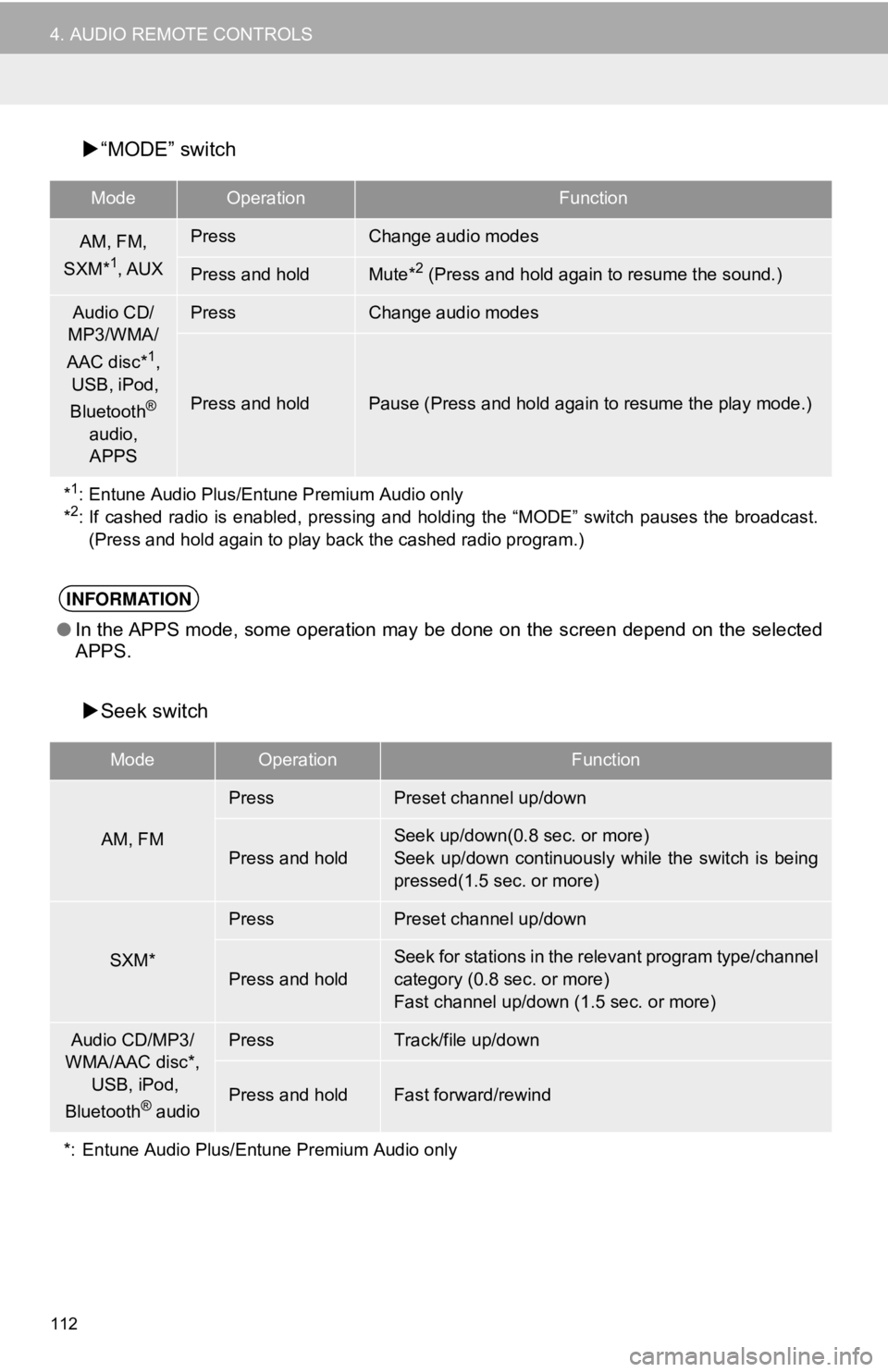
“MODE” switch
Seek switch
ModeOperationFunction
AM, FM,
SXM*1, AUX
PressChange audio modes
Press and holdMute*2 (Press and hold again to resume the sound.)
Audio CD/
MP3/WMA/
AAC disc*
1,
USB, iPod,
Bluetooth
®
audio, APPS
PressChange audio modes
Press and holdPause (Press and hold again to resume the play mode.)
*
1: Entune Audio Plus/Entune Premium Audio only
*2: If cashed radio is enabled, pressing and holdi ng the “MODE” switch pauses the broadcast.
(Press and hold again to play back the cashed radio program.)
INFORMATION
● In the APPS mode, some operation may be done on the screen depend on the selected
APPS.
ModeOperationFunction
AM, FM
PressPreset channel up/down
Press and hold
Seek up/down(0.8 sec. or more)
Seek up/down continuously while the switch is being
pressed(1.5 sec. or more)
SXM*
PressPreset channel up/down
Press and hold
Seek for stations in the relevant program type/channel
category (0.8 sec. or more)
Fast channel up/down (1.5 sec. or more)
Audio CD/MP3/
WMA/AAC disc*,
USB, iPod,
Bluetooth
® audio
PressTrack/file up/down
Press and holdFast forward/rewind
*: Entune Audio Plus/Entune Premium Audio only
Page 113 of 340
113
AUDIO SYSTEM
3
5. SETUP
1. AUDIO SETTINGS
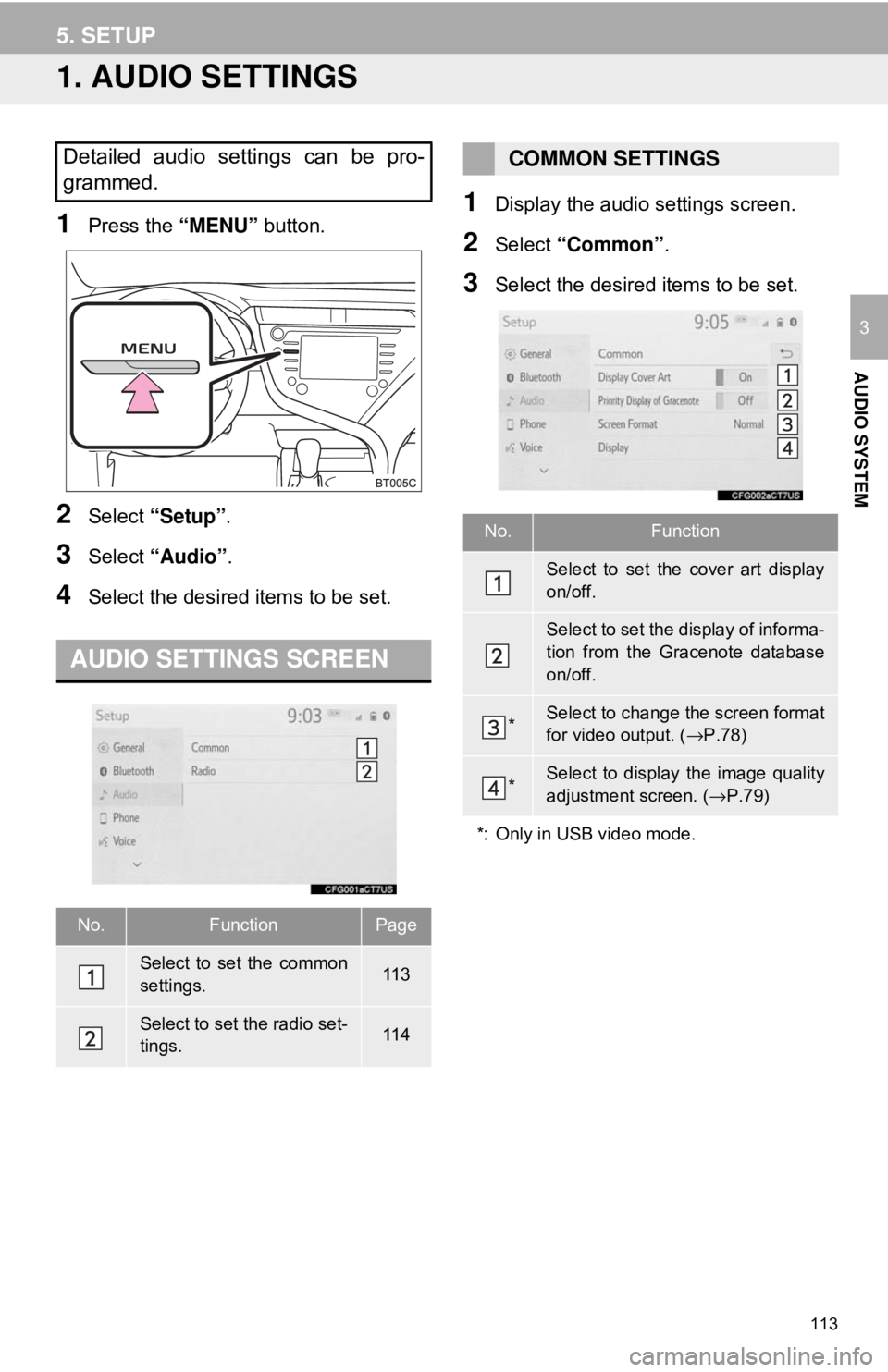
1Press the “MENU” button.
2Select “Setup” .
3Select “Audio” .
4Select the desired items to be set.
1Display the audio settings screen.
2Select “Common” .
3Select the desired items to be set.
Detailed audio settings can be pro-
grammed.
AUDIO SETTINGS SCREEN
No.FunctionPage
Select to set the common
settings.11 3
Select to set the radio set-
tings.11 4
COMMON SETTINGS
No.Function
Select to set the cover art display
on/off.
Select to set the display of informa-
tion from the Gracenote database
on/off.
*Select to change the screen format
for video output. ( →P.78)
*Select to display the image quality
adjustment screen. ( →P.79)
*: Only in USB video mode.
Page 114 of 340
114
5. SETUP
1Display the audio settings screen.
2Select “Radio” .
3Select the desired number of preset ra-
dio stations displayed on the screen.
1Display the audio settings screen.
2Select “Radio” .
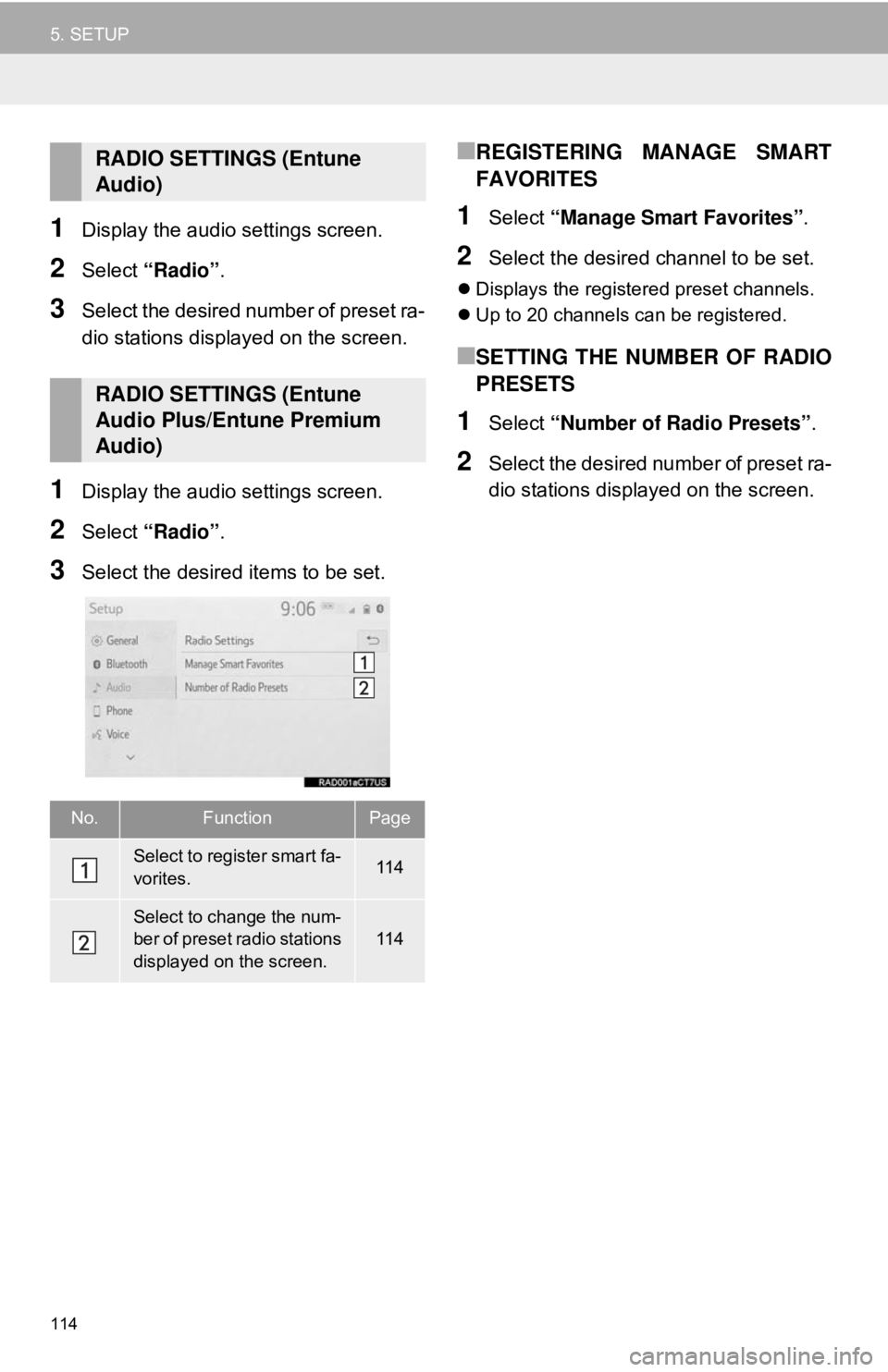
3Select the desired items to be set.
■REGISTERING MANAGE SMART
FAVORITES
1Select “Manage Smart Favorites” .
2Select the desired channel to be set.
Displays the registered preset channels.
Up to 20 channels can be registered.
■SETTING THE NUMBER OF RADIO
PRESETS
1Select “Number of Radio Presets” .
2Select the desired number of preset ra-
dio stations displayed on the screen.
RADIO SETTINGS (Entune
Audio)
RADIO SETTINGS (Entune
Audio Plus/Entune Premium
Audio)
No.FunctionPage
Select to register smart fa-
vorites.11 4
Select to change the num-
ber of preset radio stations
displayed on the screen.11 4
Page 115 of 340
115
AUDIO SYSTEM
3
6. TIPS FOR OPERATING THE AUDIO SYSTEM
1. OPERATING INFORMATION
Fading and drifting stations: Generally, the
effective range of FM is about 25 miles (40
km). Once outside this range, you may no-
tice fading and drifting, which increase with
the distance from the radio transmitter.
They are often accompanied by distortion.
Multi-path: FM signals are reflective, mak-
ing it possible for 2 signals to reach the ve-
hicle’s antenna at the same time. If this
happens, the signals will cancel each other
out, causing a momentary flutter or loss of
reception.
Static and fluttering: These occur when
signals are blocked by buildings, trees or
other large objects. Increasing the bass
level may reduce static and fluttering.
Station swapping: If the FM signal being
listened to is interrupted or weakened, and
there is another st rong station nearby on
the FM band, the radio may tune in the
second station until the original signal can
be picked up again.
Fading: AM broadcasts are reflected by
the upper atmosphere — especially at
night. These reflected signals can interfere
with those received directly from the radio
station, causing the radio station to sound
alternately strong and weak.
Station interference: When a reflected sig-
nal and a signal received directly from a ra-
dio station are very nearly the same
frequency, they can interfere with each
other, making it difficult to hear the broad-
cast.
Static: AM is easily affected by external
sources of electrical noise, such as high
tension power lines, lightening or electrical
motors. This results in static.
NOTICE
● To avoid damage to the audio system:
• Be careful not to spill beverages over
the audio system.
• Do not put anything other than an appropriate disc into the disc slot.
INFORMATION
● The use of a cellular phone inside or
near the vehicle may cause a noise from
the speakers of the audio system which
you are listening to. However, this does
not indicate a malfunction.
RADIO
Usually, a problem with radio reception
does not mean there is a problem with
the radio — it is just the normal result
of conditions outside the vehicle.
For example, nearby buildings and ter-
rain can interfere with FM reception.
Power lines or phone wires can inter-
fere with AM signals. And of course, ra-
dio signals have a limited range. The
farther the vehicle is from a station, the
weaker its signal will be. In addition, re-
ception conditions change constantly
as the vehicle moves.
Here, some common reception prob-
lems that probably do not indicate a
problem with the radio are described.
FM
AM
Page 116 of 340
116
6. TIPS FOR OPERATING THE AUDIO SYSTEM
Cargo loaded on the roof luggage carrier,
especially metal objects, may adversely
affect the reception of SiriusXM Satellite
Radio.
Alternation or modifications carried out
without appropriate authorization may
invalidate the user’s right to operate the
equipment.
This CD player is intended for use with 4.7
in. (12 cm). discs only.
Extremely high temperatures can keep the
CD player from working. On hot days, use
the air conditioning system to cool the
inside of the vehicle before using the
player.
Bumpy roads or other vibrations may
make the CD player skip.
If moisture gets into the CD player, the
discs may not be able to be played.
Remove the discs from the player and
wait until it dries.
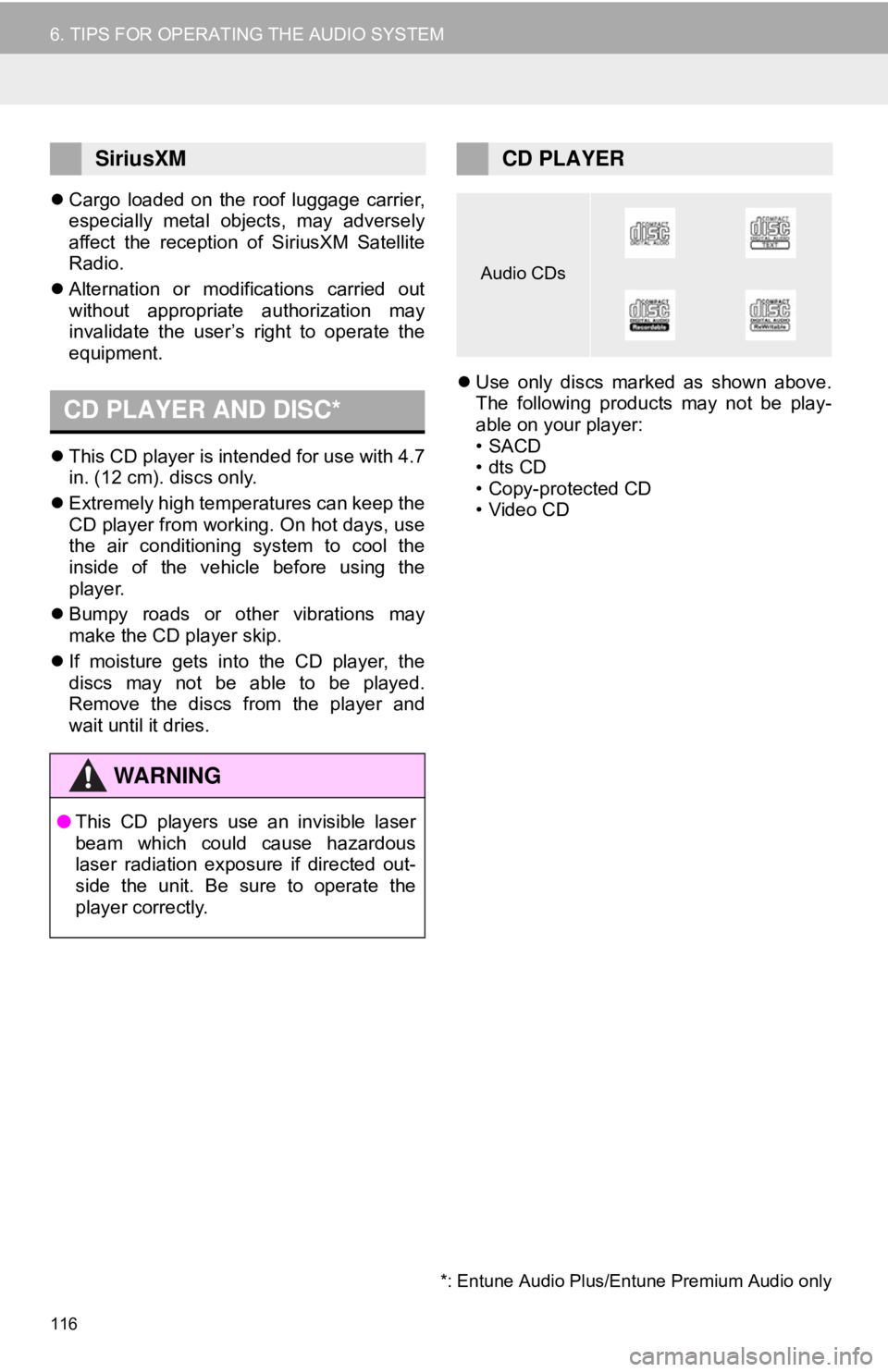
Use only discs marked as shown above.
The following products may not be play-
able on your player:
•SACD
•dts CD
• Copy-protected CD
• Video CD
SiriusXM
CD PLAYER AND DISC*
WA R N I N G
●This CD players use an invisible laser
beam which could cause hazardous
laser radiation exposure if directed out-
side the unit. Be sure to operate the
player correctly.
CD PLAYER
Audio CDs
*: Entune Audio Plus/Entune Premium Audio only
Page 126 of 340
126
1. VOICE COMMAND SYSTEM OPERATION
1. VOICE COMMAND SYSTEM
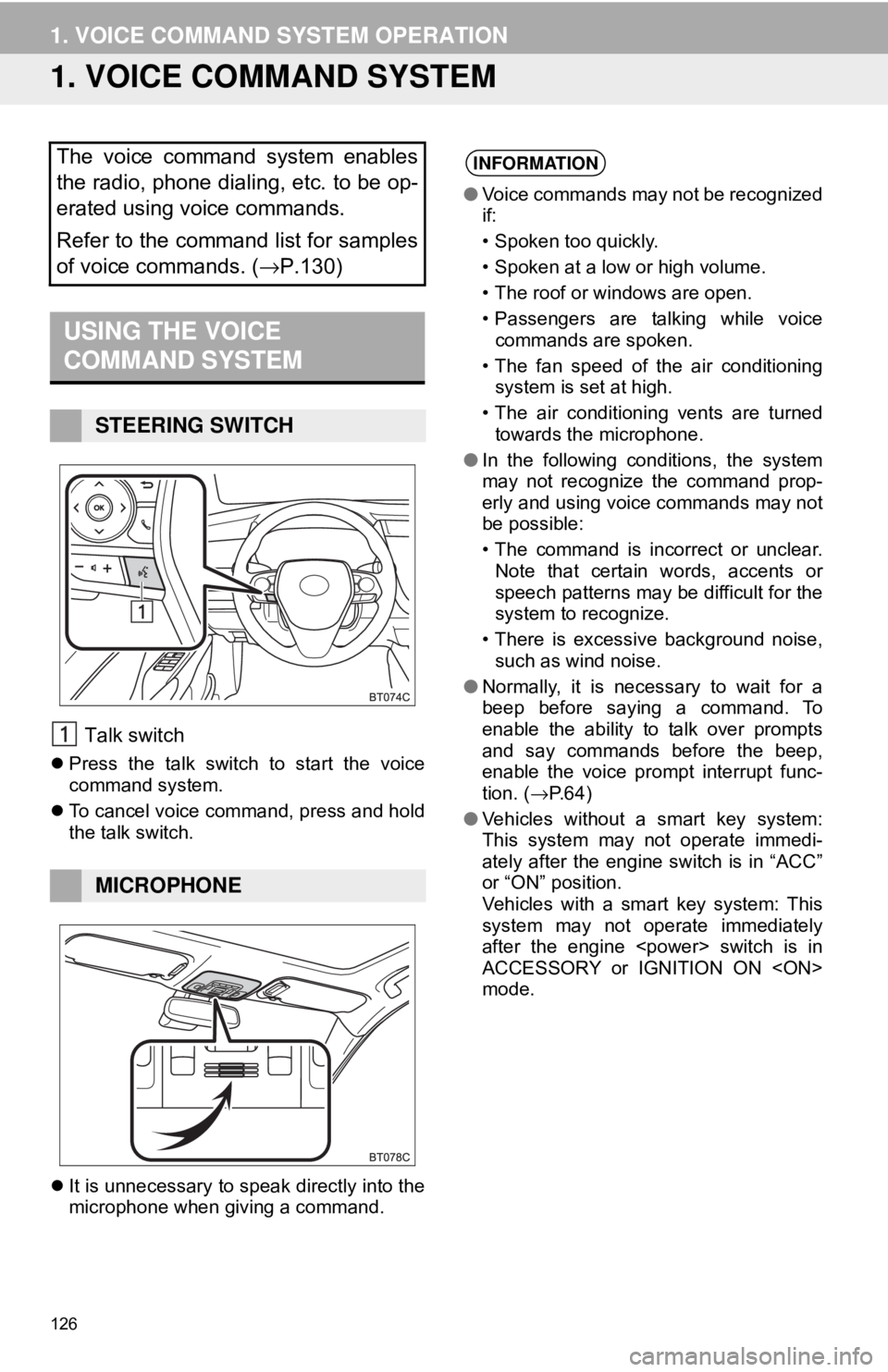
Talk switch
Press the talk switch to start the voice
command system.
To cancel voice command, press and hold
the talk switch.
It is unnecessary to speak directly into the
microphone when giving a command.
The voice command system enables
the radio, phone dialing, etc. to be op-
erated using voice commands.
Refer to the command list for samples
of voice commands. ( →P.130)
USING THE VOICE
COMMAND SYSTEM
STEERING SWITCH
MICROPHONE
INFORMATION
●Voice commands may not be recognized
if:
• Spoken too quickly.
• Spoken at a low or high volume.
• The roof or windows are open.
• Passengers are talking while voice
commands are spoken.
• The fan speed of the air conditioning system is set at high.
• The air conditioning vents are turned towards the microphone.
● In the following conditions, the system
may not recognize the command prop-
erly and using voice commands may not
be possible:
• The command is incorrect or unclear.
Note that certain words, accents or
speech patterns may be difficult for the
system to recognize.
• There is excessive background noise, such as wind noise.
● Normally, it is necessary to wait for a
beep before saying a command. To
enable the ability to talk over prompts
and say commands before the beep,
enable the voice prompt interrupt func-
tion. ( →P.64)
● Vehicles without a smart key system:
This system may not operate immedi-
ately after the engine switch is in “ACC”
or “ON” position.
Vehicles with a smart key system: This
system may not operate immediately
after the engine
ACCESSORY or IGNITION ON
mode.
Page 133 of 340
133
1. VOICE COMMAND SYSTEM OPERATION
VOICE COMMAND SYSTEM
4
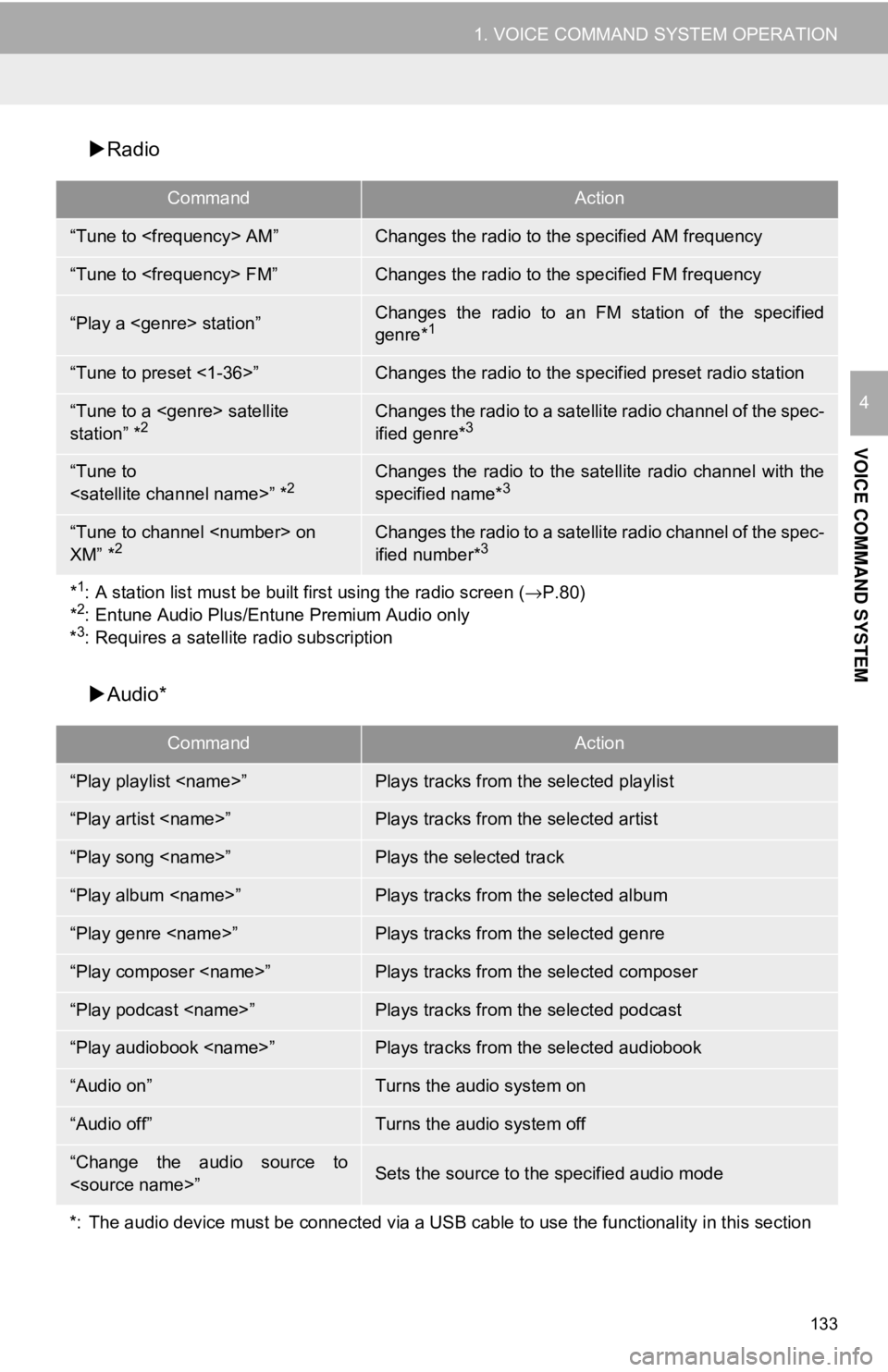
Radio
Audio*
CommandAction
“Tune to
“Tune to
“Play a
genre*1
“Tune to preset <1-36>”Changes the radio to the spec ified preset radio station
“Tune to a
station” *2Changes the radio to a satellite radio channel of the spec-
ified genre*3
“Tune to
specified name*3
“Tune to channel
XM” *2Changes the radio to a satellit e radio channel of the spec-
ified number*3
*1: A station list must be built first using the radio screen ( →P.80)
*2: Entune Audio Plus/Entune Premium Audio only
*3: Requires a satellite radio subscription
CommandAction
“Play playlist
“Play artist
“Play song
“Play album
“Play genre
“Play composer
“Play podcast
“Play audiobook
“Audio on”Turns the audio system on
“Audio off”Turns the audio system off
“Change the audio source to
*: The audio device must be connected via a USB cable to use the functionality in this section
Page 139 of 340
139
1. USEFUL INFORMATION
INFORMATION
5
2. RECEIVING WEATHER INFORMATION*
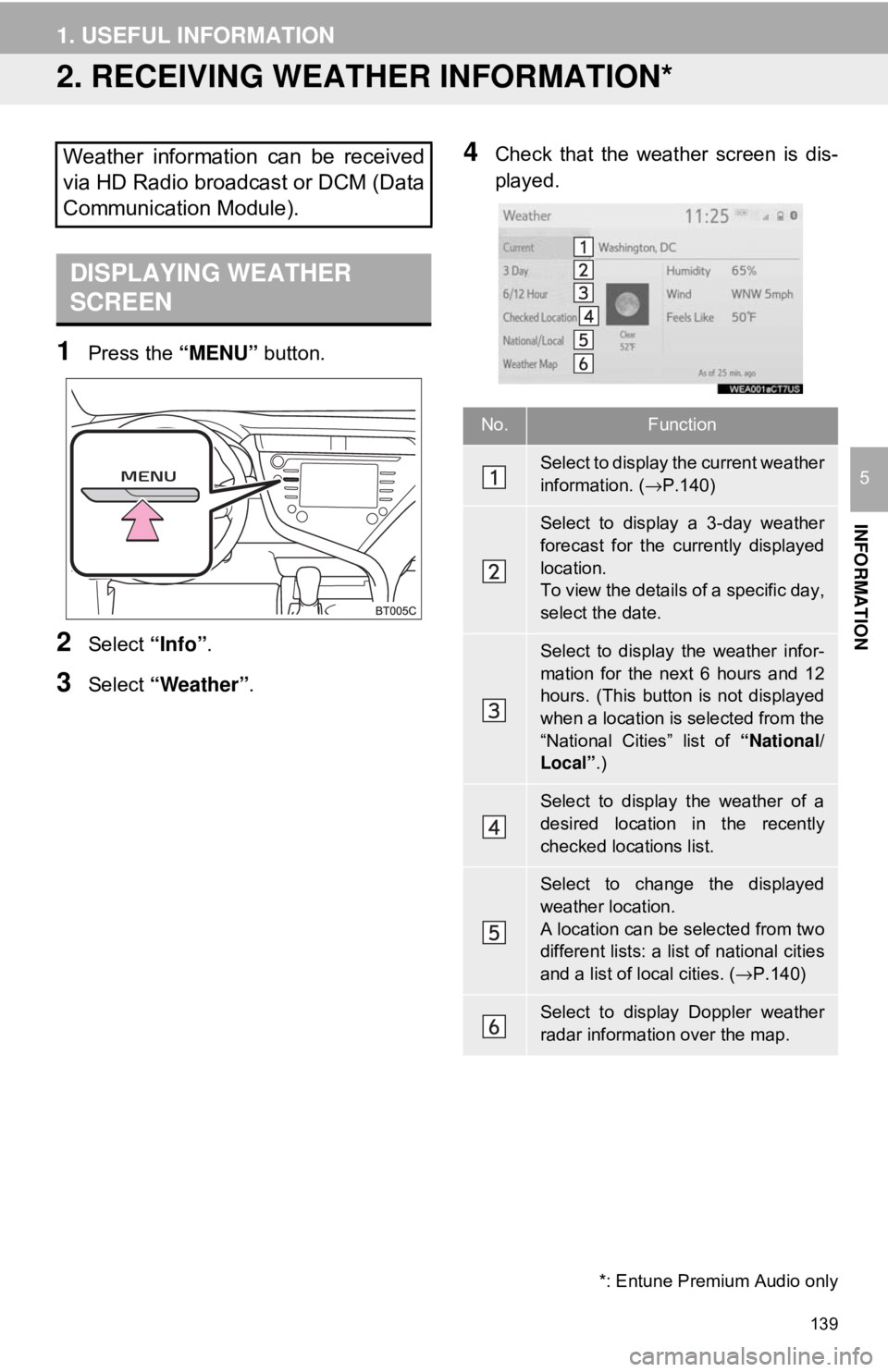
1Press the “MENU” button.
2Select “Info”.
3Select “Weather” .
4Check that the weather screen is dis-
played.Weather information can be received
via HD Radio broadcast or DCM (Data
Communication Module).
DISPLAYING WEATHER
SCREEN
No.Function
Select to display the current weather
information. ( →P.140)
Select to display a 3-day weather
forecast for the currently displayed
location.
To view the details of a specific day,
select the date.
Select to display the weather infor-
mation for the next 6 hours and 12
hours. (This button is not displayed
when a location is selected from the
“National Cities” list of “National/
Local” .)
Select to display the weather of a
desired location in the recently
checked locations list.
Select to change the displayed
weather location.
A location can be selected from two
different lists: a list of national cities
and a list of local cities. ( →P.140)
Select to display Doppler weather
radar information over the map.
*: Entune Premium Audio only