reset TOYOTA CAMRY HYBRID 2018 (in English) User Guide
[x] Cancel search | Manufacturer: TOYOTA, Model Year: 2018, Model line: CAMRY HYBRID, Model: TOYOTA CAMRY HYBRID 2018Pages: 596, PDF Size: 10.01 MB
Page 125 of 596
1252. Instrument cluster
2
Instrument cluster
■Odometer
Displays the total distance the vehicle has been driven.
■Trip meter A/trip meter B
Displays the distance the vehicle has been driven since the meter
was last reset. Trip meters A and B can be used to record and dis-
play different distances independently.
To reset, display the desired trip meter and press and hold the “ODO/
TRIP” switch.
Displays suggestions to the driver in the following situations. To select
a response to a displayed suggestio n, use the meter control switches.
The suggestion function can be turned on/off.
(Customizable features: →P. 551)
■
Suggestion to turn off the headlights
If the headlights are left on for a certain amount of time after the
power switch has been turned off, if the headlight switch is in the
“AUTO” position, a suggestion mess age will be displayed asking if
you wish to turn the headlights off. To turn the headlights off, select
“Yes”.
If a front door is opened after the power switch is turned off, this sugges-
tion message will not be displayed.
Odometer/trip meter
Suggestion function
Page 141 of 596
1412. Instrument cluster
2
Instrument cluster
■Trip information
Entune Audio or Entune Audio Plus (vehicles without Data Com-
munication Module)
Press the “INFO” button. ( →P. 136)
If the “Energy Monitor” or “History” screen is displayed, select “Trip
Information”.
Entune Audio Plus (vehicles with Data Communication Module)
Press the “INFO” button.
Select “ECO” on the “Information” screen.
If the “Energy Monitor” or “History” screen is displayed, select “Trip
Information”.
Entune Premium Audio
Press the “MENU” button. ( →P. 136)
Select “Info” on the “Menu” screen.
Select “ECO” on the “Information” screen.
If “Energy Monitor” or “History” screen is displayed, select “Trip Informa-
tion”.
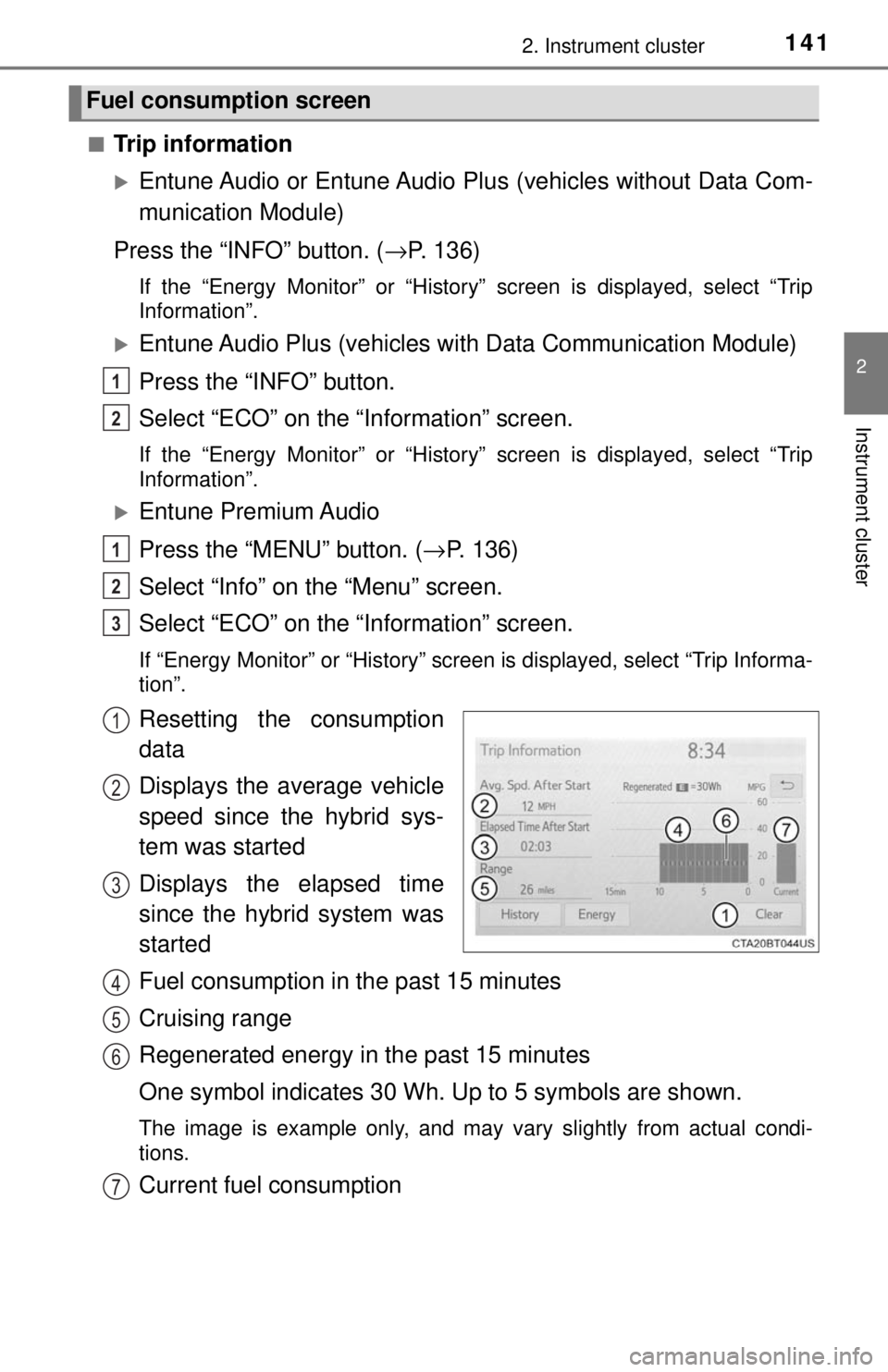
Resetting the consumption
data
Displays the average vehicle
speed since the hybrid sys-
tem was started
Displays the elapsed time
since the hybrid system was
started
Fuel consumption in the past 15 minutes
Cruising range
Regenerated energy in the past 15 minutes
One symbol indicates 30 Wh. Up to 5 symbols are shown.
The image is example only, and may va ry slightly from actual condi-
tions.
Current fuel consumption
Fuel consumption screen
1
2
1
2
3
1
2
3
4
5
6
7
Page 142 of 596
1422. Instrument cluster
■History
Entune Audio or Entune Audio Plus (vehicles without Data Com-
munication Module)
Press the “INFO” button. ( →P. 136)
If the “Energy Monitor” or “Trip Information” screen is displayed, select
“History”.
Entune Audio Plus (vehicles with Data Communication Module)
Press the “INFO” button.
Select “ECO” on the “Information” screen.
If the “Energy Monitor” or “Trip Information” screen is displayed, select
“History”.
Entune Premium Audio
Press the “MENU” button. ( →P. 136)
Select “Info” on the “Menu” screen.
Select “ECO” on the “Information” screen.
If “Energy Monitor” or “Trip Information” screen is displayed, select “His-
tory”.
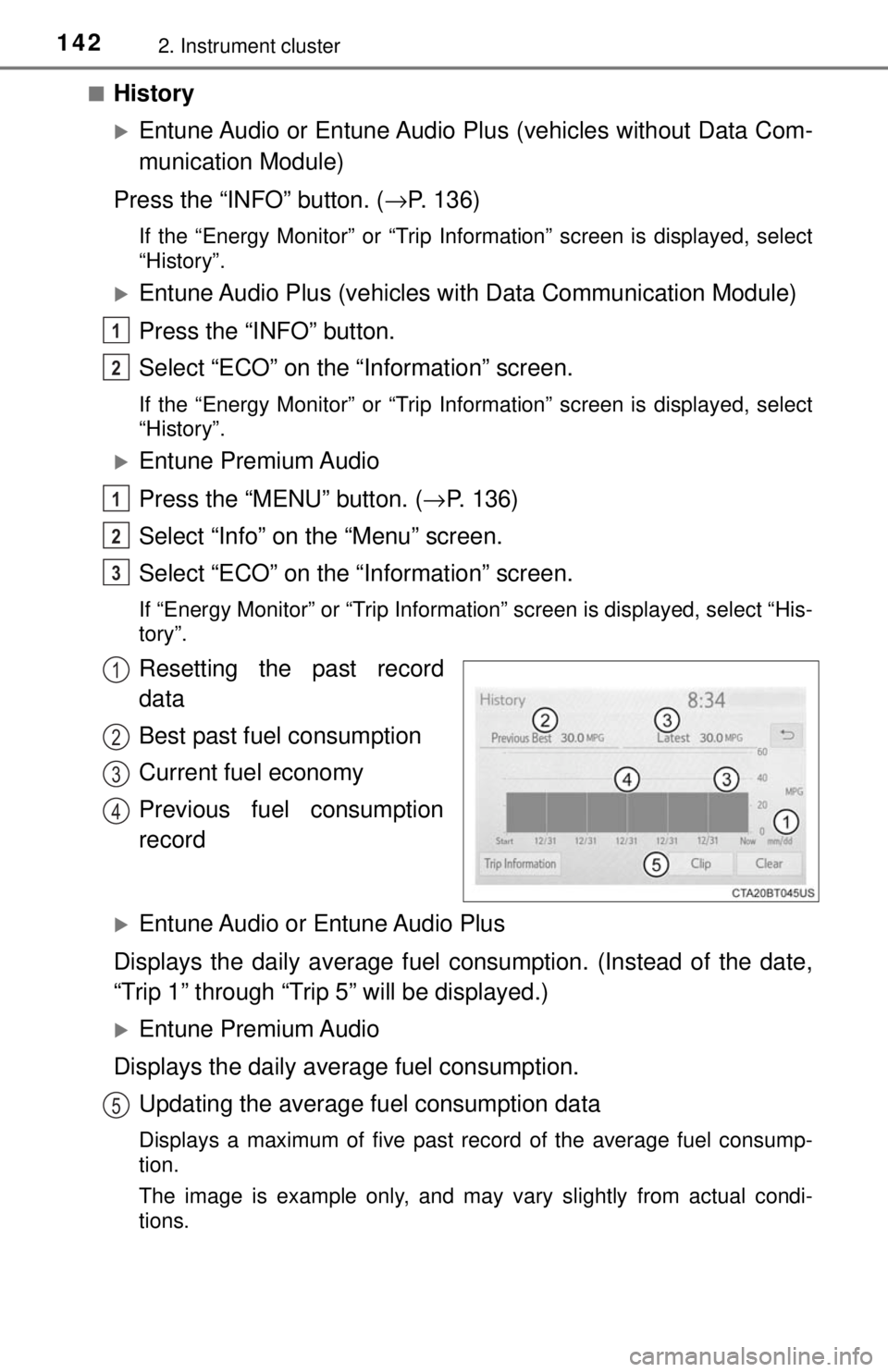
Resetting the past record
data
Best past fuel consumption
Current fuel economy
Previous fuel consumption
record
Entune Audio or Entune Audio Plus
Displays the daily average fuel consumption. (Instead of the date,
“Trip 1” through “Trip 5” will be displayed.)
Entune Premium Audio
Displays the daily average fuel consumption. Updating the average fu el consumption data
Displays a maximum of five past record of the average fuel consump-
tion.
The image is example only, and may va ry slightly from actual condi-
tions.
1
2
1
2
3
1
2
3
4
5
Page 143 of 596

1432. Instrument cluster
2
Instrument cluster
■Resetting the consumption data
Selecting “Clear” on the “Trip Information” screen will reset the fuel consump-
tion and the regenerated energy for the past 15 minutes. Selecting “Clear” on
the “History” screen will reset the past records and best past fuel consump-
tion. Selecting “Yes” on the following screen will confirm resetting of all the
data.
Page 405 of 596
4056-2. Maintenance
6
Maintenance and care
■Repair and replacement
It is recommended that genuine Toyota parts be used for repairs to ensure
performance of each system. If non-Toyota parts are used in replacement or if
a repair shop other than a Toyota dealer performs repairs, confirm the war-
ranty coverage.
■ Resetting the message indicating maintenance is required
After the required maintenance is preformed according to the maintenance
schedule, please reset the message.
To reset the message, perform the following procedure:
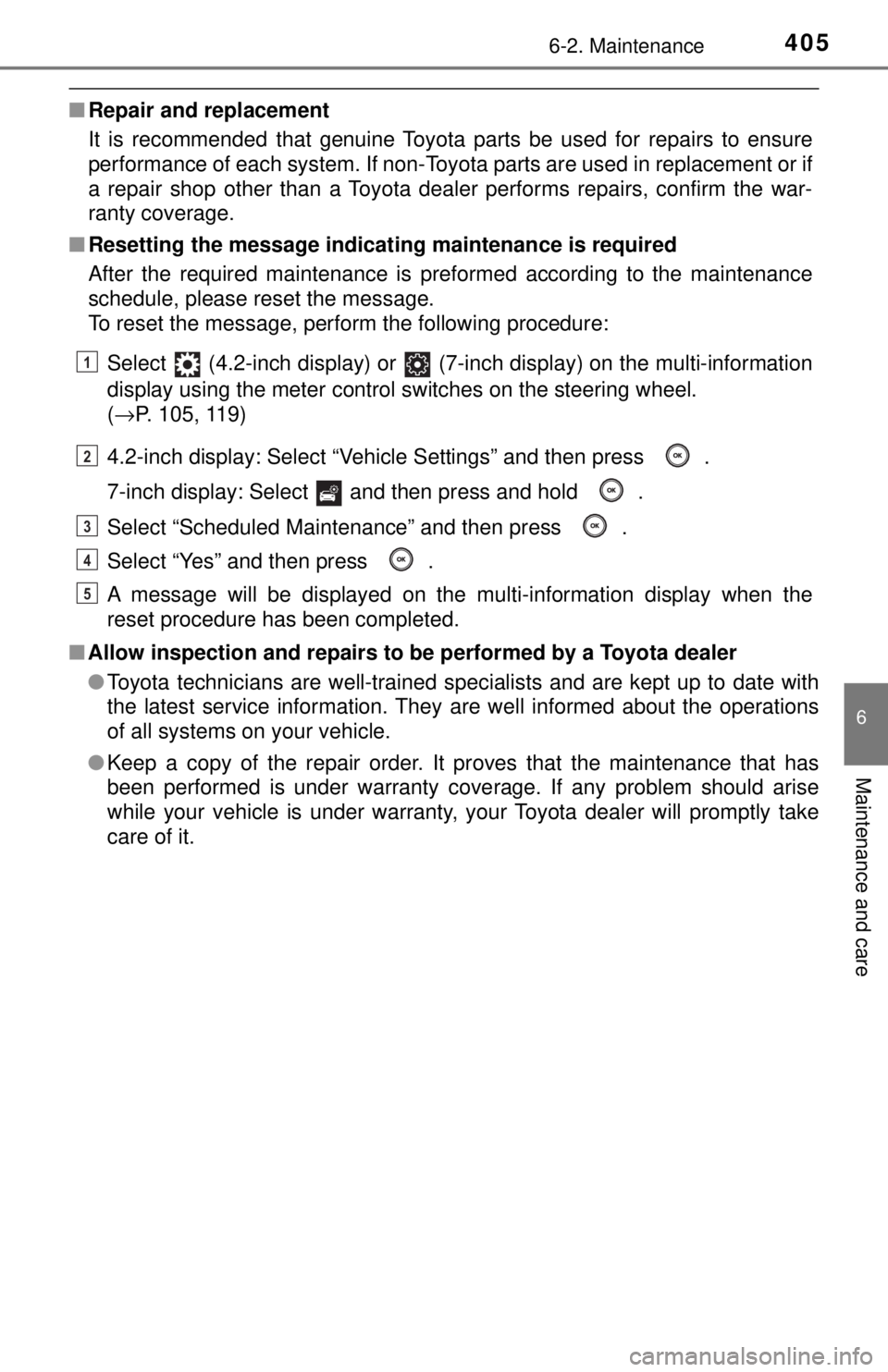
Select (4.2-inch display) or (7-inch display) on the multi-information
display using the meter control switches on the steering wheel.
(→P. 105, 119)
4.2-inch display: Select “Vehicle Settings” and then press .
7-inch display: Select and then press and hold .
Select “Scheduled Maintenance” and then press .
Select “Yes” and then press .
A message will be displayed on the multi-information display when the
reset procedure has been completed.
■ Allow inspection and repairs to be performed by a Toyota dealer
●Toyota technicians are well-trained specialists and are kept up to date with
the latest service information. They are well informed about the operations
of all systems on your vehicle.
● Keep a copy of the repair order. It proves that the maintenance that has
been performed is under warranty cove rage. If any problem should arise
while your vehicle is under warranty, your Toyota dealer will promptly take
care of it.
1
2
3
4
5
Page 494 of 596

4947-2. Steps to take in an emergency
■If “Auto Power Off to Conserve Battery” is displayed
This message is displayed when the power was cut off due to the automatic
power off function.
The next time the hybrid system is started, increase the engine speed sl\
ightly
and maintain it at that speed for approximately 5 minutes to recharge the 12-
volt battery.
■ If “A New Key has been Registered Contact Your Dealer for Details” is
displayed
This message will be displayed each time the driver’s door is opened when
the doors are unlocked from the outside for approximately one week after a
new electronic key has been registered.
If this message is displayed but you have not had a new electronic key regis-
tered, ask your Toyota dealer to check if an unknown electronic key (other
than those in your possession) has been registered.
■ When “Headlight System Malfunction Visit Your Dealer” is displayed
The following systems may be malfunctioning. Have the vehicle inspected by
your Toyota dealer immediately.
● The LED headlight system
● The automatic headlight leveling system (if equipped)
● Automatic High Beam
● AFS (Adaptive Front-lighting System) (if equipped)
■ “Front Camera Unavailable” or “Front Camera Vision Blocked Clean and
Demist Windshield” is displayed
The following systems may be suspended until the problem shown in the
message is resolved.
● PCS (Pre-Collision System)
● LDA (Lane Departure Alert with steering control)
● Dynamic radar cruise control with full-speed range
● Automatic High Beam
■ If “Maintenance Required Soon” is displayed
Indicates that all maintenance according to the driven distance on the mainte-
nance schedule
* should be performed soon.
Comes on approximately 4500 miles (7200 km) after the message has been
reset.
If necessary, perform maintenance. Please reset the message after the main-
tenance is performed. ( →P. 405)
*: Refer to the separate “Scheduled Maintenance Guide” or “Owner’s Manual
Supplement” for the maintenance interval applicable to your vehicle.
Page 495 of 596
4957-2. Steps to take in an emergency
7
When trouble arises
■If “Maintenance Required Visit Your Dealer” is displayed
Indicates that all maintenance is required to correspond to the driven distance
on the maintenance schedule
*.
Comes on approximately 5000 miles (8000 km) after the message has been
reset.
(The indicator will not work properly unless the message has been reset.)
Perform the necessary maintenance. Please reset the message after the
maintenance is performed. ( →P. 405)
*: Refer to the separate “Scheduled Maintenance Guide” or “Owner’s Manual
Supplement” for the maintenance interval applicable to your vehicle.
■ If “Engine Oil Level Low Add or Replace” is displayed
The engine oil level may be low. Check the level of the engine oil, and add
engine oil if necessary. This message may be displayed if the vehicle is
stopped on a slope. Move the vehicle to a level surface and check if the mes-
sage disappears.
■ Warning buzzer
→P. 486
NOTICE
■It “High Power Consumption Power to Climate Temporarily Limited” is
frequently shown
There is a possible malfunction relating to the charging system or the 12-
volt battery may be deteriorating. Have the vehicle inspected by your Toyota
dealer.
■ If “Have Traction Battery Inspected” is shown (AXVH70 model
*)
The hybrid battery (traction battery) is scheduled to be inspected or
replaced. Have the vehicle inspected by your Toyota dealer immediately.
● Continuing to drive the vehicle without having the hybrid battery (traction
battery) inspected will cause the hybrid system not to start.
● If the hybrid system does not start, contact your Toyota dealer immedi-
ately.
*: The model code is indicated on the Certification Label. ( →P. 527)
Page 588 of 596
588Alphabetical index
Lane Departure Alert with steering control (LDA) .......... 260
Language (multi- information display) ...... 108, 124
LATCH anchors ......................... 67
LDA (Lane Departure Alert with steering control)............ 260
Lever Auxiliary catch lever .............. 414
Hood lock release lever ........ 414
Internal trunk release lever ... 157
Shift lever .............................. 213
Tilt and telescopic steering lock release lever ............... 175
Turn signal lever ................... 219
Wiper lever............................ 234
License plate lights Light switch ........................... 227
Replacing light bulbs............. 470
Light bulbs Replacing .............................. 460
Wattage ................................ 534
Lights Automatic High Beam ........... 230
Headlight switch.................... 227
Illuminated entry system ....... 356
Interior lights ......................... 355
Interior lights list .................... 354
Personal lights ...................... 356
Replacing light bulbs............. 460
Trunk light ............................. 157
Turn signal lever ................... 219
Vanity lights .......................... 364
Wattage ................................ 534
Load capacity........................... 201
Lock steering column ............. 175 Maintenance
Do-it-yourself maintenance... 412
General maintenance ........... 407
Hybrid battery (traction battery)
air intake vent ..................... 450
Maintenance data ................. 526
Maintenance
requirements ...................... 404
Resetting the message
indicating maintenance
is required .......................... 405
Malfunction indicator lamp..... 480
Meter ........................................... 96
Head-up display.................... 128
Indicators ................................ 93
Instrument panel light control .................................. 97
Meters..................................... 96
Multi-information
display ........................ 100, 112
Settings......................... 105, 119
Warning lights ......................... 91
Warning messages ............... 490
Mirrors
Inside rear view mirror .......... 177
Outside rear view mirror defoggers ........................... 348
Outside rear view mirrors ..... 179
Vanity mirrors ....................... 364
Mobile Assistant
*
Moon roof ................................. 184
Door lock linked moon roof operation ..................... 185
Jam protection function ........ 185
Operation .............................. 184
MP3 disc
*
LM
Page 590 of 596

590Alphabetical index
Radar cruise control (dynamic radar cruise
control with full-speed
range) ..................................... 270
Radiator .................................... 421
Radio
*
Rear Camera Detection Function ................................. 300
Rear Cross Traffic Alert .......... 296
Rear Cross Traffic Auto Brake ............................. 314
Rear interior lights................... 355 Wattage ................................ 534
Rear passengers’ seat belt reminder light ........................ 483
Rear personal lights ................ 356
Rear seat
Folding down ........................ 171
Rear side marker lights
Light switch ........................... 227
Replacing light bulbs..... 467, 470
Wattage ................................ 534
Rear turn signal lights Replacing light bulbs..... 467, 470
Turn signal lever ................... 219
Wattage ................................ 534
Rear view mirror Inside rear view mirror .......... 177
Outside rear view mirrors...... 179 Rear view monitor system
*
Rear window defogger ............ 348
Refueling .................................. 238
Capacity................................ 528
Fuel types ..................... 528, 535
Opening the fuel tank cap..... 240
When the fuel filler door cannot be opened .............. 241
Replacing Electronic key battery ........... 455
Fuses .................................... 457
Light bulbs ............................ 460
Tires...................................... 496
Reporting safety defects for U.S. owners...................... 562
Resetting the message
indicating maintenance is
required.................................. 405
Road accident cautions ............ 81
R