parking brake TOYOTA CAMRY HYBRID 2018 (in English) Owner's Guide
[x] Cancel search | Manufacturer: TOYOTA, Model Year: 2018, Model line: CAMRY HYBRID, Model: TOYOTA CAMRY HYBRID 2018Pages: 596, PDF Size: 10.01 MB
Page 319 of 596

3194-5. Using the driving support systems
4
Driving
■The Intelligent Clearance Sonar function will operate when
The function will operate when the ICS OFF indicator is not illuminated or
flashing ( →P. 315, 323) and all of the following conditions are met:
● Hybrid system output restriction control
• The Intelligent Clearance Sonar system is enabled.
• The vehicle speed is 10 mph (15 km/h) or less.
• There is an object in the traveling direction of the vehicle and 6 to 13 ft. (2
to 4 m) away.
• The system determines that a stronger-than-normal brake operation is
necessary to avoid a collision.
● Brake control
• Hybrid system output restriction control is operating.
• The system determines that an emergency brake operation is necessary
to avoid a collision.
■ The Intelligent Clearance Sonar function will stop operating when
The function will stop operating if any of the following conditions are met:
●Hybrid system output restriction control
• The Intelligent Clearance Sonar system is disabled.
• The collision becomes avoidable with normal brake operation.
• The object is no longer 6 to 13 ft. (2 to 4 m) away in the traveling direction
of the vehicle.
● Brake control
• The Intelligent Clearance Sonar system is disabled.
• Approximately 2 seconds elapse after the vehicle is stopped by brake
control.
• The brake pedal is depressed after the vehicle is stopped by brake con-
trol.
• The object is no longer 6 to 13 ft. (2 to 4 m) away in the traveling direction of the vehicle.
■ Detection range of the Intelligent Clearance Sonar function
The detection range of the Intelligent Clearance Sonar function differs from
the detection range of the intuitive parking assist. ( →P. 307)
Therefore, even if the intuitive parking assist detects an object and provides a
warning, the Intelligent Clearance Sonar function may not start operating.
■ If the Intelligent Clearance So nar function has operated
If the vehicle is stopped due to operation of the Intelligent Clearance Sonar
function, the Intelligent Clearance Sonar system will be disabled and the ICS
OFF indicator will illuminate.
Page 320 of 596

3204-5. Using the driving support systems
■Re-enabling the Intelligent Clearance Sonar system
To re-enable the Intelligent Clearance Sonar system when it is disabled due
to operation of the Intelligent Clearance Sonar function, either enable the sys-
tem again (→P. 315), or turn the power switch off and then back to ON mode.
Additionally, if the object becomes no longer in the traveling direction of the
vehicle or if the traveling direction of the vehicle changes (such as changing
from moving forward to backing up, or from backing up to moving forward),
the system will be re-enabled automatically.
■ Objects that the Inte lligent Clearance Sonar function may not detect
The sensors may not be able to detect certain objects, such as the following.
● Cotton cloth, snow, and other materials that are poor reflectors of ultrasonic
waves.
(People may also not be detected depending on the type of clothing they are
wearing.)
● Objects which are not perpendicular to the ground, are not perpendicular to
the traveling direction of the vehicle, are uneven or are waving.
● Low objects
● Thin objects such as wires, fences, ropes and signposts
● Objects that are extremely close to the bumper
■ Intuitive parking assist buzzer
Regardless of whether the intuitive parking assist system is enabled or not
(→P. 304), if the Intelligent Clearance Sonar system is enabled ( →P. 315),
the front or rear sensors detect an object and brake control is performed, the
intuitive parking assist buzzer will sound to notify the driver of the approxi-
mate distance to the object.
Page 321 of 596
3214-5. Using the driving support systems
4
Driving
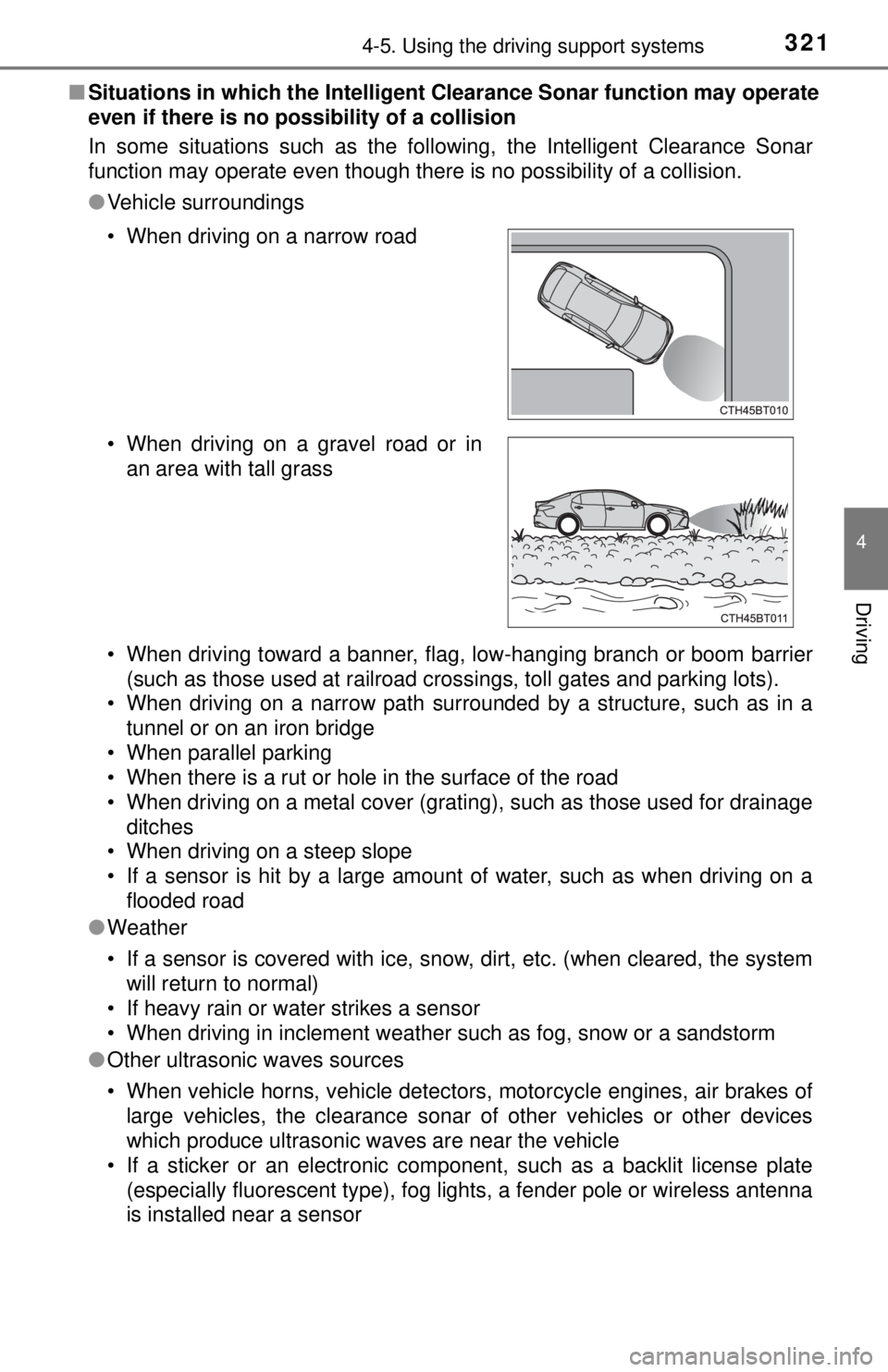
■Situations in which the Intelligent Clearance Sonar function may operate
even if there is no possibility of a collision
In some situations such as the following, the Intelligent Clearance Sonar
function may operate even though there is no possibility of a collision.
●Vehicle surroundings
• When driving toward a banner, flag, low-hanging branch or boom barrier
(such as those used at railroad crossings, toll gates and parking lots).
• When driving on a narrow path surrounded by a structure, such as in a
tunnel or on an iron bridge
• When parallel parking
• When there is a rut or hole in the surface of the road
• When driving on a metal cover (grating), such as those used for drainage ditches
• When driving on a steep slope
• If a sensor is hit by a large amount of water, such as when driving on a flooded road
● Weather
• If a sensor is covered with ice, snow, dirt, etc. (when cleared, the system
will return to normal)
• If heavy rain or water strikes a sensor
• When driving in inclement weather such as fog, snow or a sandstorm
● Other ultrasonic waves sources
• When vehicle horns, vehicle detectors, motorcycle engines, air brakes of
large vehicles, the clearance sonar of other vehicles or other devices
which produce ultrasonic waves are near the vehicle
• If a sticker or an electronic component, such as a backlit license plate (especially fluorescent type), fog lights, a fender pole or wireless antenna
is installed near a sensor
• When driving on a narrow road
• When driving on a gravel road or in
an area with tall grass
Page 329 of 596
3294-5. Using the driving support systems
4
Driving
■Re-enabling the Rear Cross Traffic Auto Brake function
To re-enable the Rear Cross Traffic Auto Brake function when it is disabled
while it is operating, either enable the Intelligent Clearance Sonar system
again ( →P. 315), or turn the power switch off and then back to ON mode.
When the function is disabled, the ICS OFF indicator will illuminate. ( →P. 93)
If there is no longer a vehicle approaching from the right or left at the rear of
the vehicle when backing up, or if the traveling direction of the vehicle
changes (such as changing from backing up to moving forward), the system
will be re-enabled automatically. When the function is re-enabled, the ICS
OFF indicator will turn off.
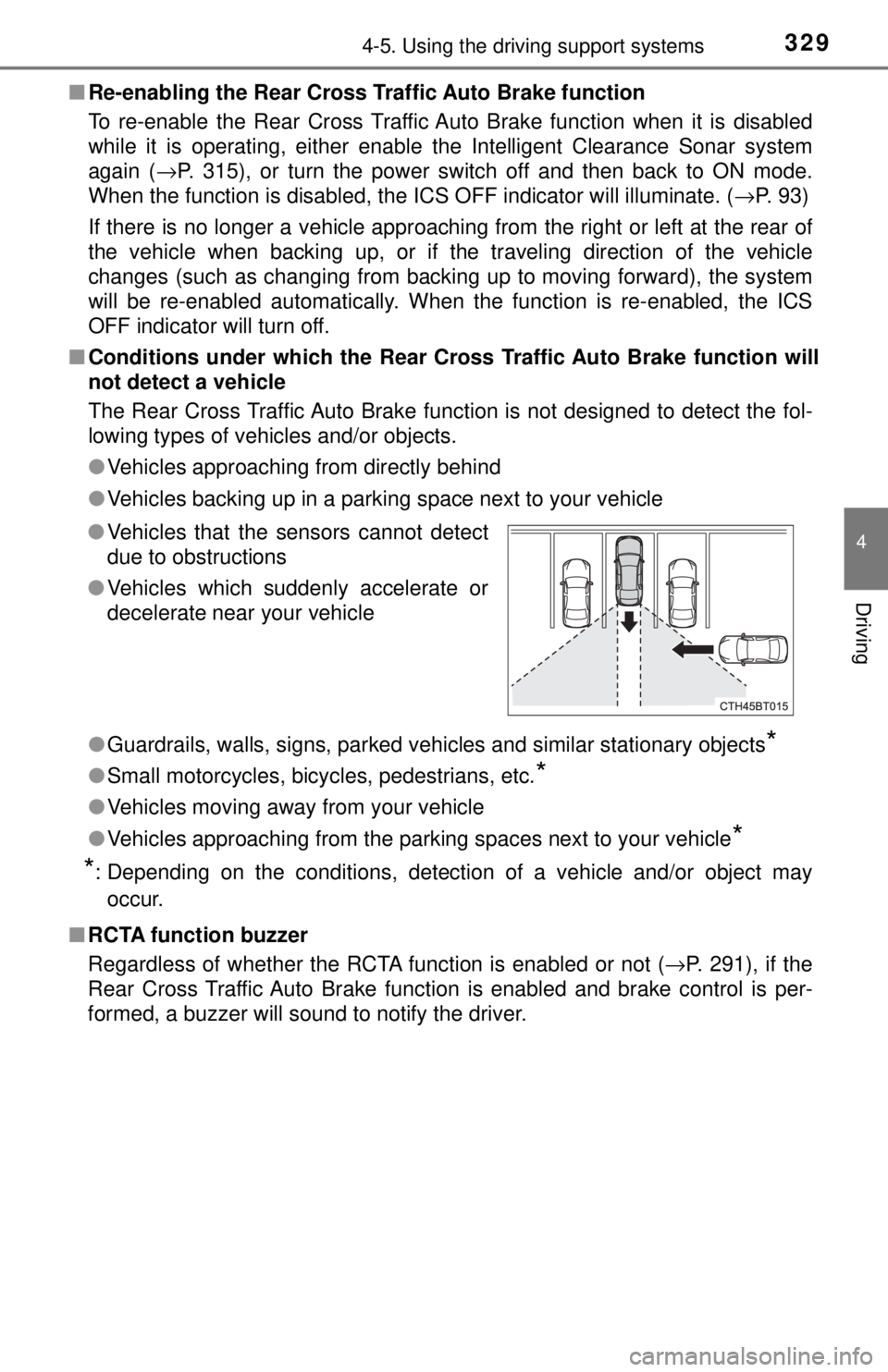
■ Conditions under which the Rear Cro ss Traffic Auto Brake function will
not detect a vehicle
The Rear Cross Traffic Auto Brake function is not designed to detect the fol-
lowing types of vehicles and/or objects.
● Vehicles approaching from directly behind
● Vehicles backing up in a parking space next to your vehicle
● Guardrails, walls, signs, parked vehicles and similar stationary objects\
*
●Small motorcycles, bicycles, pedestrians, etc.*
●Vehicles moving away from your vehicle
● Vehicles approaching from the parking spaces next to your vehicle
*
*
: Depending on the conditions, detection of a vehicle and/or object may
occur.
■ RCTA function buzzer
Regardless of whether the RCTA function is enabled or not ( →P. 291), if the
Rear Cross Traffic Auto Brake function is enabled and brake control is per-
formed, a buzzer will sound to notify the driver. ● Vehicles that the sensors cannot detect
due to obstructions
● Vehicles which suddenly accelerate or
decelerate near your vehicle
Page 330 of 596
3304-5. Using the driving support systems
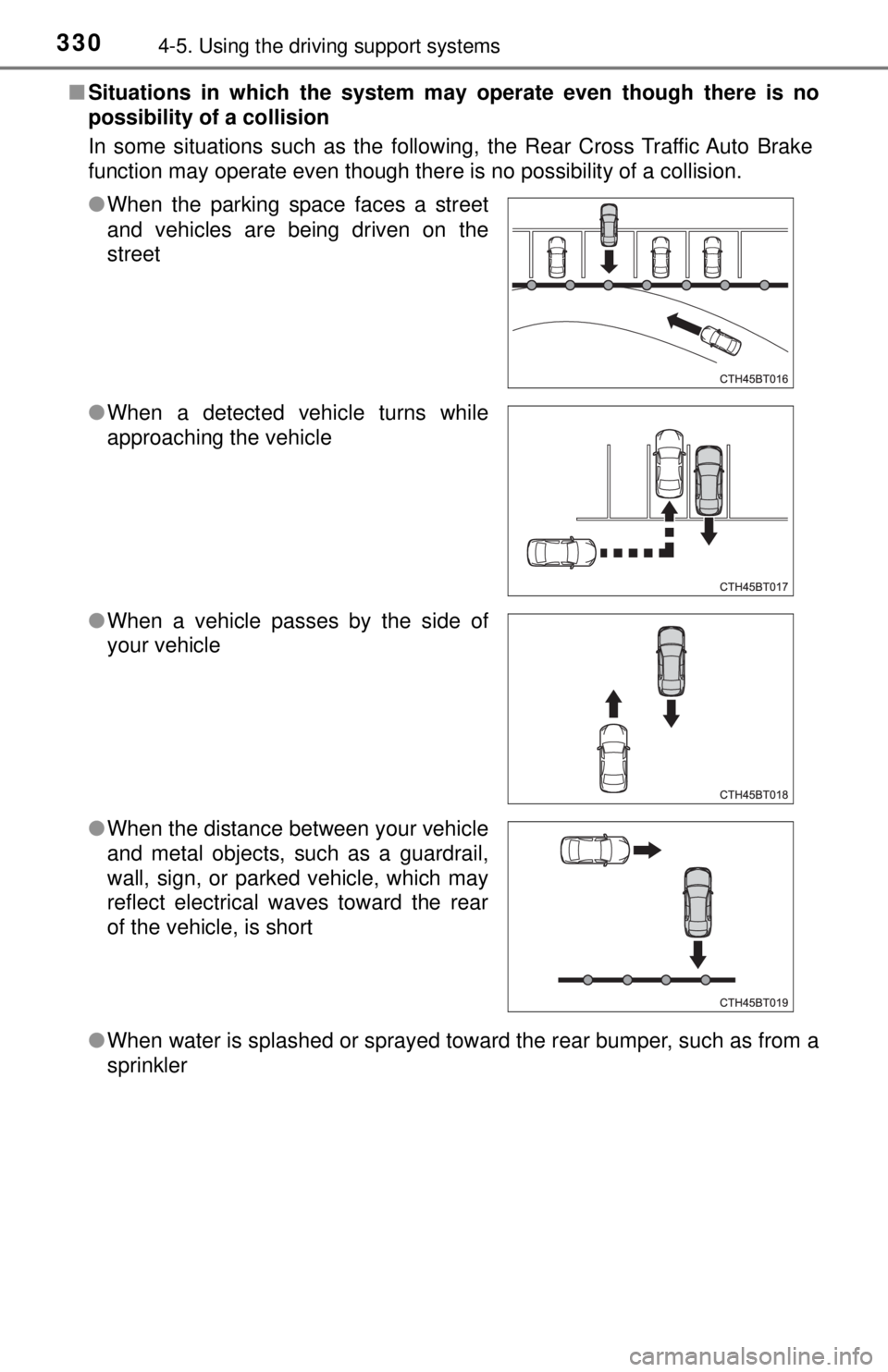
■Situations in which the system m ay operate even though there is no
possibility of a collision
In some situations such as the following, the Rear Cross Traffic Auto Brake
function may operate even though there is no possibility of a collision.
● When water is splashed or sprayed toward the rear bumper, such as from a
sprinkler
●
When the parking space faces a street
and vehicles are being driven on the
street
● When a detected vehicle turns while
approaching the vehicle
● When a vehicle passes by the side of
your vehicle
● When the distance between your vehicle
and metal objects, such as a guardrail,
wall, sign, or parked vehicle, which may
reflect electrical waves toward the rear
of the vehicle, is short
Page 335 of 596
335
4
Driving
4-6. Driving tips
◆Using Eco drive mode
When using Eco drive mode, the torque corresponding to the accel-
erator pedal depression amount can be generated more smoothly
than it is in normal conditions. In addition, the operation of the air
conditioning system (h eating/cooling) will be minimized, improving
the fuel economy. ( →P. 333)
◆Use of Hybrid System Indicator
The Eco-friendly driving is possible by keeping the needle of Hybrid
System Indicator within Eco area. ( →P. 98)
◆Shift lever operation
Shift the shift lever to D when stopped at a traffic light, or driving in
heavy traffic etc. Shift the shift le ver to P when parking. When using
the N, there is no positive effect on fuel consumption. In the N, the
gasoline engine operates but elec tricity cannot be generated. Also,
when using the air conditioning s ystem, etc., the hybrid battery
(traction battery) power is consumed.
◆Accelerator pedal/brake pedal operation
● Drive your vehicle smoothly. Avoid abrupt acceleration and
deceleration. Gradual accelerati on and deceleration will make
more effective use of the electric motor (traction motor) without
having to use gasoline engine power.
● Avoid repeated acceleration. Repeated acceleration consumes
hybrid battery (traction battery) power, resulting in poor fuel con-
sumption. Battery power can be restored by driving with the
accelerator pedal slightly released.
Hybrid vehicle driving tips
For economical and ecological driv ing, pay attention to the fol-
lowing points:
Page 339 of 596
3394-6. Driving tips
4
Driving
Accelerate the vehicle slowly, keep a safe distance between you and
the vehicle ahead, and drive at a reduced speed suitable to road con-
ditions.
●Park the vehicle and move the shift lever to P without setting the
parking brake. The parking brake may freeze up, preventing it from
being released. If the vehicle is parked without setting the parking
brake, make sure to block the wheels.
Failure to do so may be dangerous because it may cause the vehi-
cle to move unexpectedly, pos sibly leading to an accident.
● If the vehicle is parked without se tting the parking brake, confirm
that the shift lever ca nnot be moved out of P
*.
*: The shift lever will be locked if it is attempted to be shifted from P to any
other position without depressing the brake pedal. If the shift lever can be
shifted from P, there may be a problem with the shift lock system. Have the
vehicle inspected by your Toyota dealer immediately.
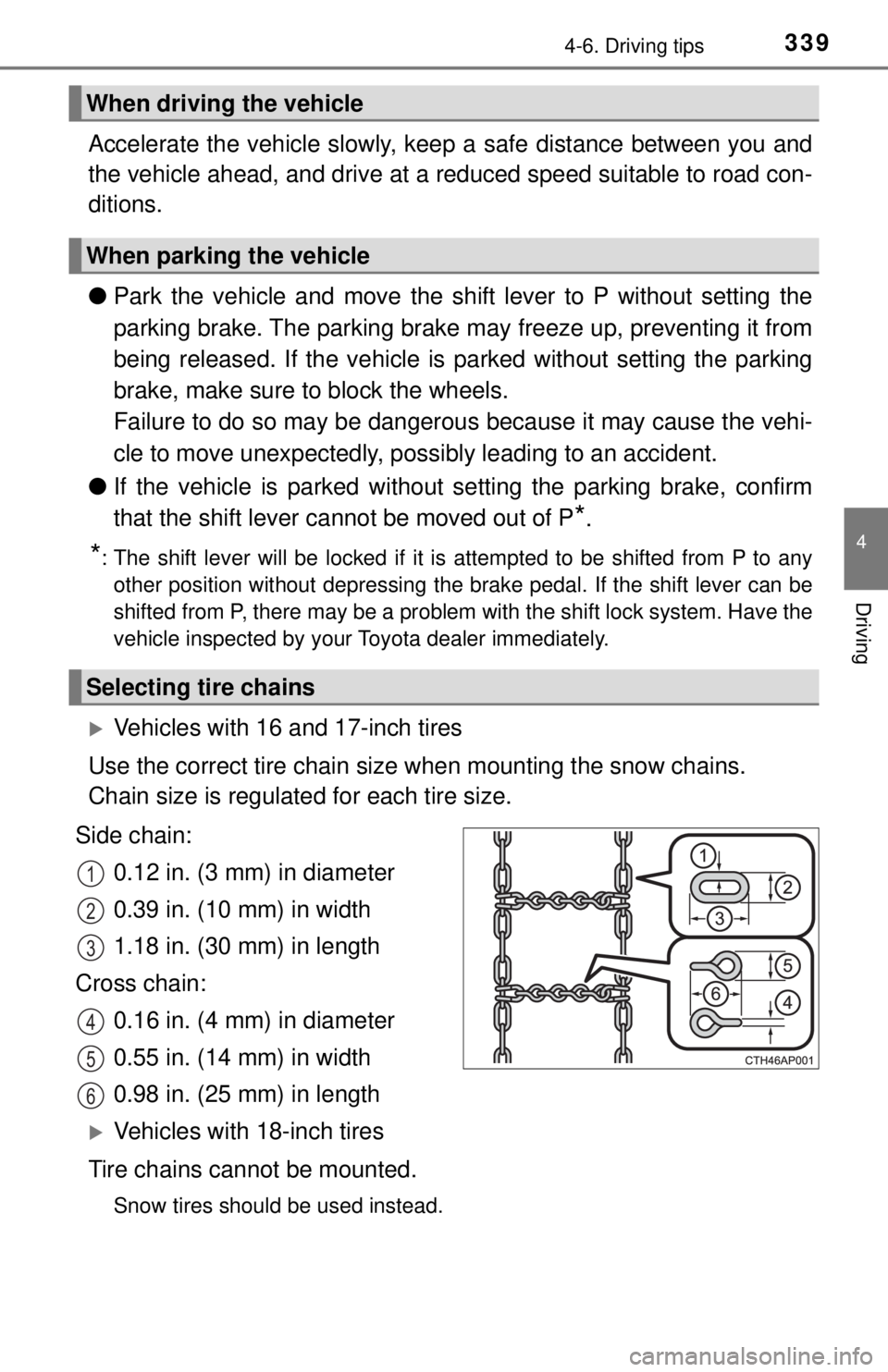
Vehicles with 16 and 17-inch tires
Use the correct tire chain size when mounting the snow chains.
Chain size is regulated for each tire size.
Side chain: 0.12 in. (3 mm) in diameter
0.39 in. (10 mm) in width
1.18 in. (30 mm) in length
Cross chain: 0.16 in. (4 mm) in diameter
0.55 in. (14 mm) in width
0.98 in. (25 mm) in length
Vehicles with 18-inch tires
Tire chains cannot be mounted.
Snow tires should be used instead.
When driving the vehicle
When parking the vehicle
Selecting tire chains
1
2
3
4
5
6
Page 408 of 596
4086-2. Maintenance
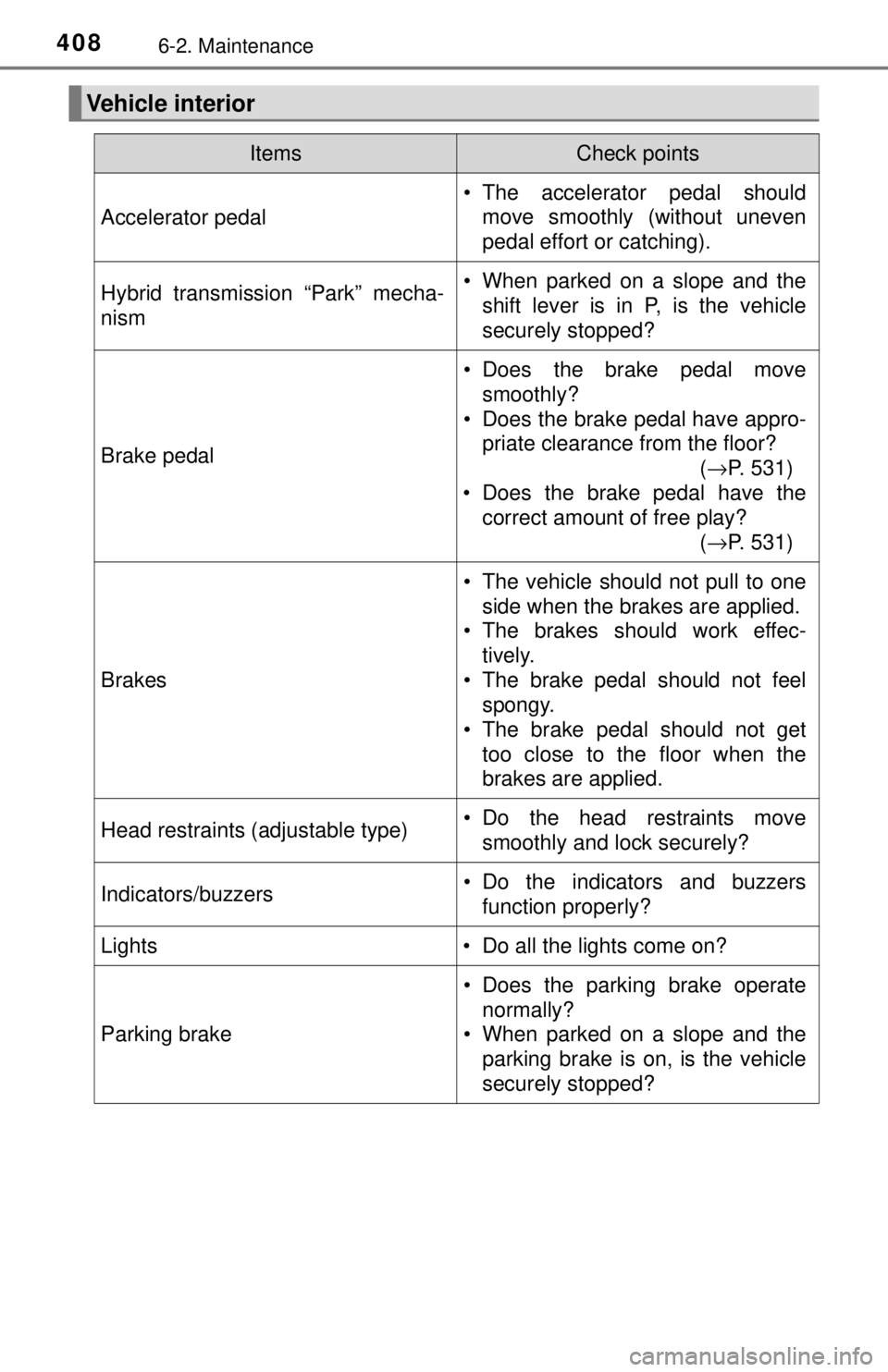
Vehicle interior
ItemsCheck points
Accelerator pedal
• The accelerator pedal shouldmove smoothly (without uneven
pedal effort or catching).
Hybrid transmission “Park” mecha-
nism• When parked on a slope and theshift lever is in P, is the vehicle
securely stopped?
Brake pedal
• Does the brake pedal move
smoothly?
• Does the brake pedal have appro- priate clearance from the floor?
(→P. 531)
• Does the brake pedal have the correct amount of free play?
(→P. 531)
Brakes
• The vehicle should not pull to one
side when the brakes are applied.
• The brakes should work effec- tively.
• The brake pedal should not feel spongy.
• The brake pedal should not get
too close to the floor when the
brakes are applied.
Head restraints (adjustable type)• Do the head restraints movesmoothly and lock securely?
Indicators/buzzers• Do the indicators and buzzersfunction properly?
Lights • Do all the lights come on?
Parking brake
• Does the parking brake operate normally?
• When parked on a slope and the parking brake is on, is the vehicle
securely stopped?
Page 476 of 596
4767-2. Steps to take in an emergency
The following may indicate a problem with your transmission. Contact
your Toyota dealer or commercial towing service before towing.
● A warning message for the hybrid system is shown on the multi-
information display and the vehicle does not move.
● The vehicle makes an abnormal sound.
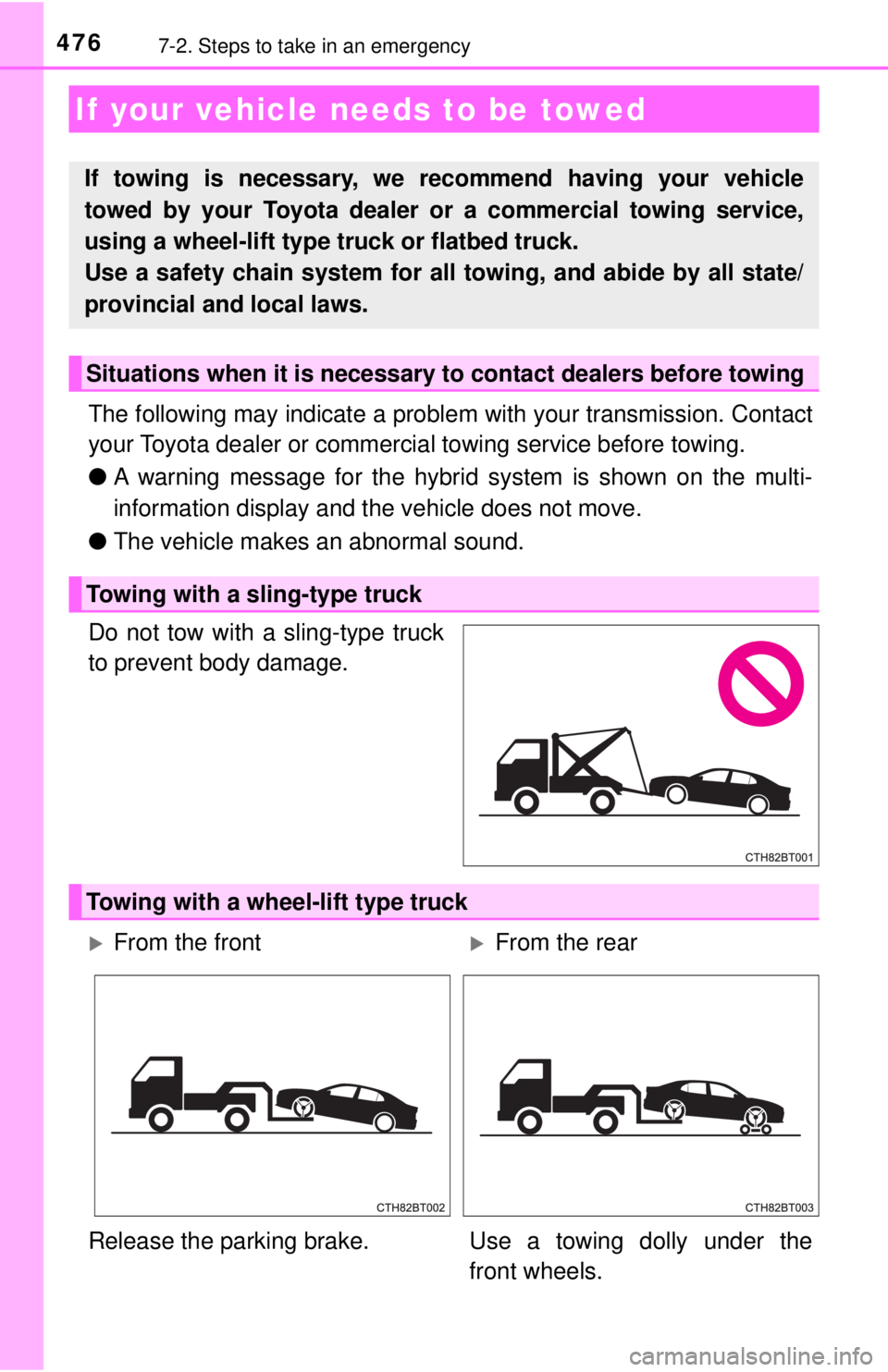
Do not tow with a sling-type truck
to prevent body damage.
If your vehicle needs to be towed
If towing is necessary, we re commend having your vehicle
towed by your Toyota dealer or a commercial towing service,
using a wheel-lift type truck or flatbed truck.
Use a safety chain system for all towing, and abide by all state/
provincial and local laws.
Situations when it is necessary to contact dealers before towing
Towing with a sling-type truck
Towing with a wheel-lift type truck
From the frontFrom the rear
Release the parking brake. Use a towing dolly under the front wheels.
Page 480 of 596
4807-2. Steps to take in an emergency
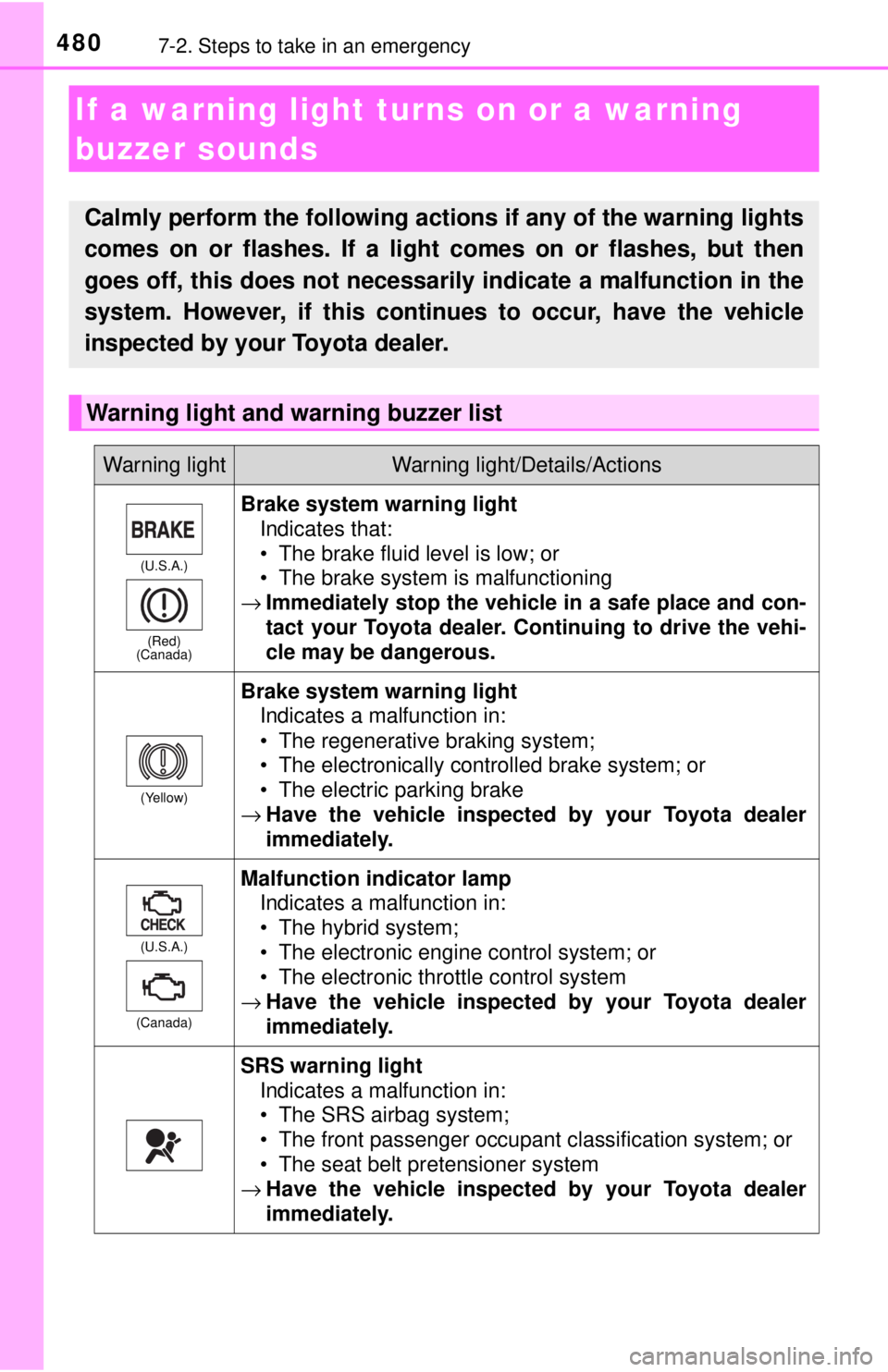
If a warning light turns on or a warning
buzzer sounds
Calmly perform the following actions if any of the warning lights
comes on or flashes. If a light comes on or flashes, but then
goes off, this does not necessarily indicate a malfunction in the
system. However, if this continues to occur, have the vehicle
inspected by your Toyota dealer.
Warning light and warning buzzer list
Warning lightWarning light/Details/Actions
(U.S.A.)
(Red)
(Canada)
Brake system warning light
Indicates that:
• The brake fluid level is low; or
• The brake system is malfunctioning
→ Immediately stop the vehicle in a safe place and con-
tact your Toyota dealer. Continuing to drive the vehi-
cle may be dangerous.
(Yellow)
Brake system warning light
Indicates a malfunction in:
• The regenerative braking system;
• The electronically controlled brake system; or
• The electric parking brake
→ Have the vehicle inspected by your Toyota dealer
immediately.
(U.S.A.)
(Canada)
Malfunction indicator lamp Indicates a malfunction in:
• The hybrid system;
• The electronic engine control system; or
• The electronic throttle control system
→ Have the vehicle inspected by your Toyota dealer
immediately.
SRS warning light
Indicates a malfunction in:
• The SRS airbag system;
• The front passenger occupant classification system; or
• The seat belt pretensioner system
→ Have the vehicle inspected by your Toyota dealer
immediately.