Hybrid not charging TOYOTA CAMRY HYBRID 2018 Owners Manual (in English)
[x] Cancel search | Manufacturer: TOYOTA, Model Year: 2018, Model line: CAMRY HYBRID, Model: TOYOTA CAMRY HYBRID 2018Pages: 596, PDF Size: 10.01 MB
Page 74 of 596
741-3. Hybrid system
◆When stopped/during start off
The gasoline engine stops
*, when the vehicle is stopped. During
start off, the electric motor (traction motor) drives the vehicle. At
slow speeds or when traveling down a gentle slope, the engine is
stopped
*, and the electric motor (traction motor) is used.
When the shift lever is in N, the hybrid battery (traction battery) is
not being charged.
*: When the hybrid battery (traction battery) requires charging or the engine is warming up, etc., the gasoline engine will not automatically
stop. ( →P. 75)
◆During normal driving
The gasoline engine is predomin antly used. The electric motor
(traction motor) charges the hybrid battery (traction battery) as nec-
essary.
◆When accelerating sharply
When the accelerator pedal is depressed heavily, the power of the
hybrid battery (traction battery) is added to that of the gasoline
engine via the electric motor (traction motor).
◆When braking (regenerative braking)
The wheels operate the electric motor (traction motor) as a power
generator, and the hybrid battery (traction battery) is charged.
When driving with the gasoline engine stopped, a sound, which
changes in accordance with the driving speed, will be played in order
to warn people nearby of the vehi cle’s approach. The sound will stop
when the vehicle speed exceeds approximately 15 mph (25 km/h).
Vehicle proximity notification system
Page 75 of 596
751-3. Hybrid system
1
For safety and security
■Regenerative braking
In the following situations, kinetic energy is converted to electric energy and
deceleration force can be obtained in conjunction with the recharging of the
hybrid battery (traction battery).
●The accelerator pedal is released while driving with the shift lever in D or S\
.
● The brake pedal is depressed while driving with the shift lever in D or S.
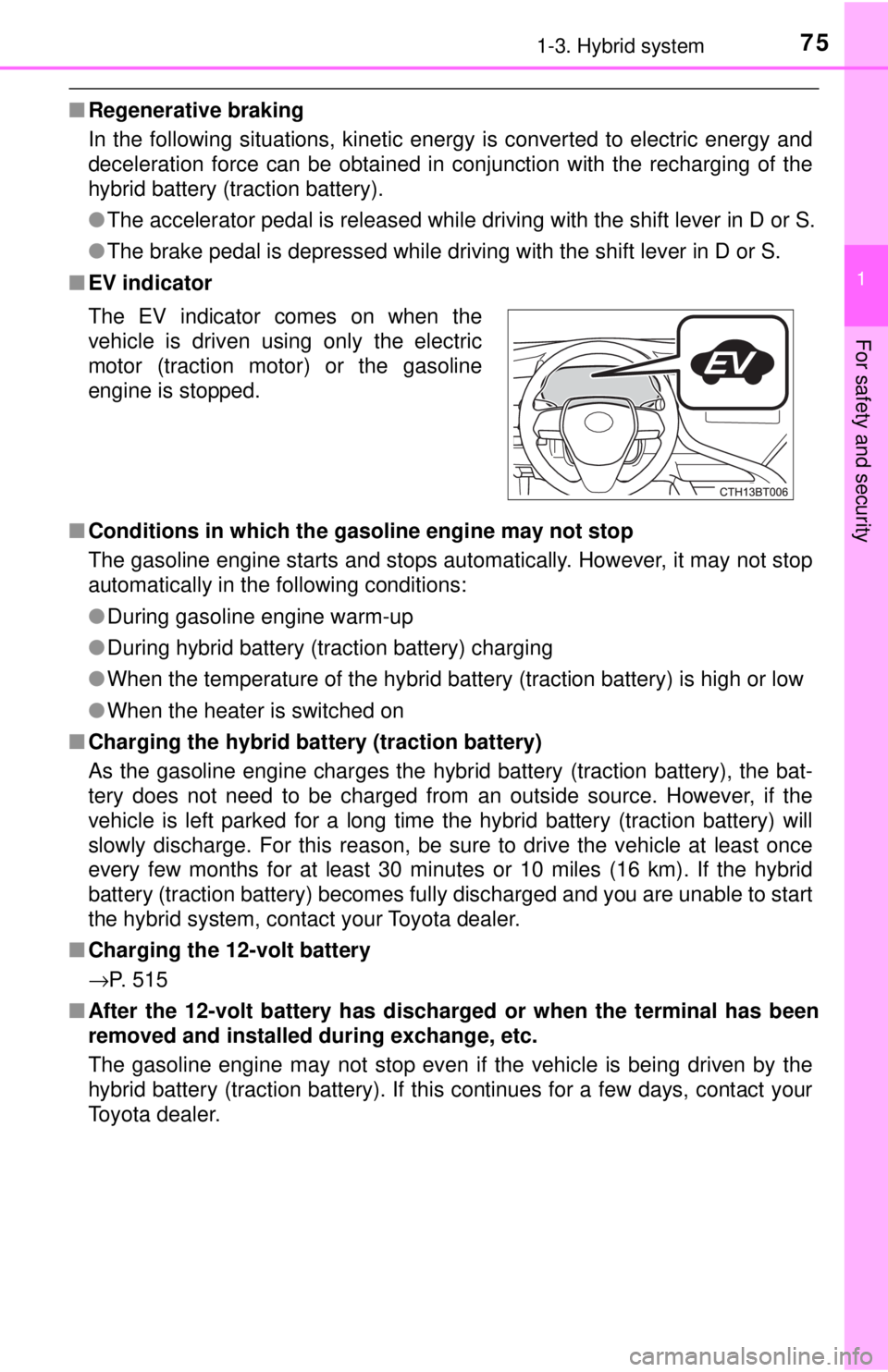
■ EV indicator
■ Conditions in which the gasoline engine may not stop
The gasoline engine starts and stops automatically. However, it may not stop
automatically in the following conditions:
●During gasoline engine warm-up
● During hybrid battery (traction battery) charging
● When the temperature of the hybrid battery (traction battery) is high or low
● When the heater is switched on
■ Charging the hybrid battery (traction battery)
As the gasoline engine charges the hybrid battery (traction battery), the bat-
tery does not need to be charged from an outside source. However, if the
vehicle is left parked for a long time the hybrid battery (traction battery) will
slowly discharge. For this reason, be sure to drive the vehicle at least once
every few months for at least 30 minutes or 10 miles (16 km). If the hybrid
battery (traction battery) becomes fully discharged and you are unable to start
the hybrid system, contact your Toyota dealer.
■ Charging the 12-volt battery
→P. 515
■ After the 12-volt battery has dischar ged or when the terminal has been
removed and installed during exchange, etc.
The gasoline engine may not stop even if the vehicle is being driven by the
hybrid battery (traction battery). If this continues for a few days, contact your
Toyota dealer. The EV indicator comes on when the
vehicle is driven using only the electric
motor (traction motor) or the gasoline
engine is stopped.
Page 98 of 596
982. Instrument cluster
■The meters and display illuminate when
The power switch is in ON mode.
■ Brightness of the meters (day mode and night mode)
●The brightness of the meters is changed between day mode and night
mode.
• Day mode: When the tail lights are off or when the tail lights are on but
the surrounding area is bright
• Night mode: When the tail lights are on and the surrounding area is dark
● When in night mode, the brightness will be reduced slightly unless the
meters are set to the maximum brightness level.
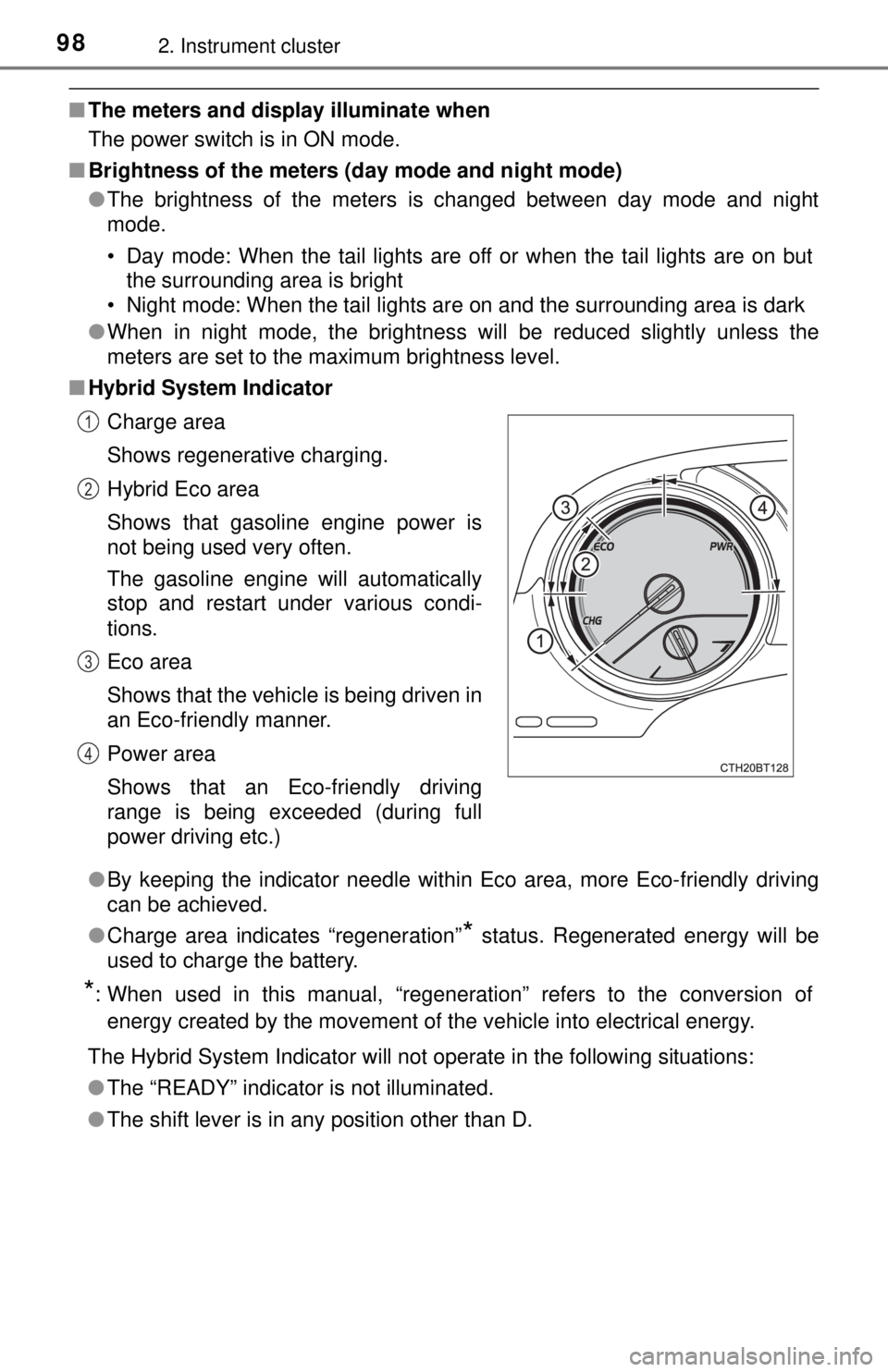
■ Hybrid System Indicator
●By keeping the indicator needle within Eco area, more Eco-friendly driving
can be achieved.
● Charge area indicates “regeneration”
* status. Regenerated energy will be
used to charge the battery.
*: When used in this manual, “regeneration” refers to the conversion of
energy created by the movement of the vehicle into electrical energy.
The Hybrid System Indicator will not operate in the following situations:
● The “READY” indicator is not illuminated.
● The shift lever is in any position other than D. Charge area
Shows regenerative charging.
Hybrid Eco area
Shows that gasoline engine power is
not being used very often.
The gasoline engine will automatically
stop and restart under various condi-
tions.
Eco area
Shows that the vehicle is being driven in
an Eco-friendly manner.
Power area
Shows that an Eco-friendly driving
range is being exceeded (during full
power driving etc.)
1
2
3
4
Page 148 of 596

1483-1. Key information
■When riding in an aircraft
When bringing an electronic key onto an aircraft, make sure you do not press
any button on the electronic key while inside the aircraft cabin. If you are car-
rying an electronic key in your bag etc., ensure that the buttons are not likely
to be pressed accidentally. Pressing a button may cause the electronic key to
emit radio waves that could interfere with the operation of the aircraft.
■ Conditions affecting operation
→P. 163
■ Electronic key battery depletion
●The standard battery life is 1 to 2 years.
● If the battery becomes low, an alarm will sound in the cabin when the hybrid
system stops.
● As the electronic key always receives radio waves, the battery will become
depleted even if the electronic key is not used. The following symptoms indi-
cate that the electronic key battery may be depleted. Replace the battery
when necessary. ( →P. 455)
• The smart key system or the wireless remote control does not operate.
• The detection area becomes smaller.
• The LED indicator on the key surface does not turn on.
● To reduce key battery depletion when the electronic key is to not be used for
long periods of time, set the electronic key to the battery-saving mode.
(→P. 162)
● To avoid serious deterioration, do not leave the electronic key within 3 ft. (1
m) of the following electrical appl iances that produce a magnetic field:
•TVs
• Personal computers
• Cellular phones, cordless phones and battery chargers
• Recharging cellular phones or cordless phones
• Table lamps
• Induction cookers
■ Replacing the battery
→P. 455
■ Confirmation of the registered key number
The number of keys already registered to the vehicle can be confirmed. Ask
your Toyota dealer for details.
■ If a wrong key is used
The key cylinder rotates freely to isolate inside mechanism.
■ Certification for the wireless remote control
→P. 166
Page 367 of 596

3675-4. Other interior features
5
Interior features
NOTICE
■To prevent damage to the USB charging ports
● Do not insert foreign objects into the ports.
● Do not spill water or other liquids into the ports.
● When the USB charging ports are not in use, close the lids. If a foreign
object or liquid enters a port may cause a short circuit.
● Do not apply excessive force to or impact the USB charging ports.
● Do not disassemble or modify the USB charging ports.
■ To prevent damage to external devices
● Do not leave external devices in the vehicle. The temperature inside the
vehicle may become high, resulting in damage to an external device.
● Do not push down on or apply unnecessary force to an external device or
the cable of an external device while it is connected.
■ To prevent 12-volt battery discharge
Do not use the USB charging ports for a long period of time with the hybrid
system stopped.
Page 376 of 596
3765-4. Other interior features
NOTICE
■Conditions in which the wireless charger may not operate correctly
In the following situations, the wireless charger may not operate correctly:
● When a portable device is fully charged
● When there is a foreign object between the charging area and portable
device
● When a portable device becomes hot while charging
● When a portable device is placed on the wireless area with its charging
surface facing up
● When a portable device is not centered on the charging area
● When the vehicle is near a TV tower, electric power plant, gas station,
radio station, large display, airport or other facility that generates strong
radio waves or electrical noise
● When the portable device is in contact with, or is covered by any of the fol-
lowing metallic objects:
• Cards to which aluminum foil is attached
• Cigarette boxes that have aluminum foil inside
• Metallic wallets or bags
• Coins
• Metal hand warmers
• Media such as CDs and DVDs
● When wireless keys (that emit radio waves) other than those of your vehi-
cle are being used nearby.
If in situations other than above the wireless charger does not operate prop-
erly or the operation indicator light is blinking, the wireless charger may be
malfunctioning. Contact your Toyota dealer.
■ To prevent failure or damage to data
● Do not bring magnetic cards, such as a credit card, or magnetic recording
media, close to the wireless charger while charging. Otherwise, data may
be erased due to the influence of magnetism.
Additionally, do not bring precision instruments such as wrist watches,
close to the wireless charger, as such objects may malfunction.
● Do not leave portable devices in the cabin. The temperature inside the
cabin may become high when parked in the sun, and cause damage to the
device.
■ To prevent 12-volt battery discharge
Do not use the wireless charger for a long period of time with the hybrid sys-
tem stopped.
Page 425 of 596
4256-3. Do-it-yourself maintenance
6
Maintenance and care
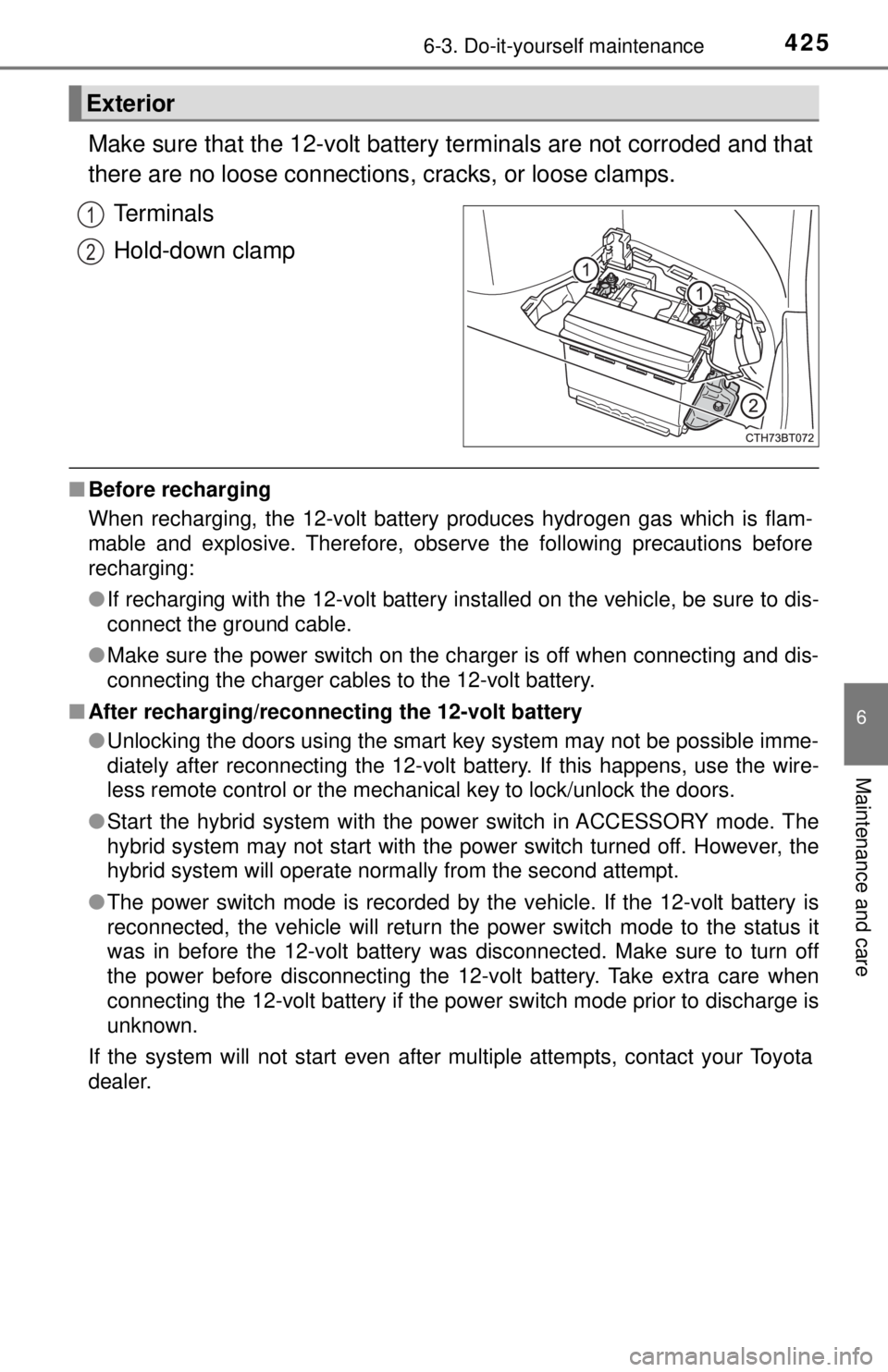
Make sure that the 12-volt battery terminals are not corroded and that
there are no loose connections, cracks, or loose clamps.
Terminals
Hold-down clamp
■ Before recharging
When recharging, the 12-volt battery produces hydrogen gas which is flam-
mable and explosive. Therefore, observe the following precautions before
recharging:
●If recharging with the 12-volt battery installed on the vehicle, be sure to dis-
connect the ground cable.
● Make sure the power switch on the charger is off when connecting and dis-
connecting the charger cables to the 12-volt battery.
■ After recharging/reconnect ing the 12-volt battery
● Unlocking the doors using the smart key system may not be possible imme-
diately after reconnecting the 12-volt battery. If this happens, use the wire-
less remote control or the mechanical key to lock/unlock the doors.
● Start the hybrid system with the power switch in ACCESSORY mode. The
hybrid system may not start with the power switch turned off. However, the
hybrid system will operate normally from the second attempt.
● The power switch mode is recorded by the vehicle. If the 12-volt battery is
reconnected, the vehicle will return the power switch mode to the status it
was in before the 12-volt battery was disconnected. Make sure to turn off
the power before disconnecting the 12-volt battery. Take extra care when
connecting the 12-volt battery if the power switch mode prior to discharge is
unknown.
If the system will not start even after multiple attempts, contact your Toyota
dealer.
Exterior
1
2
Page 427 of 596
4276-3. Do-it-yourself maintenance
6
Maintenance and care
NOTICE
■When recharging the 12-volt battery
Never recharge the 12-volt battery while the hybrid system is operating.
Also, be sure all accessories are turned off.
Page 492 of 596

4927-2. Steps to take in an emergency
■Warning messages
The warning messages explained below may differ from the actual messages
according to operation conditions and vehicle specifications.
■ System warning lights
The master warning light does not come on or flash in the following cases.
Instead, a separate system warning light will come on along with a message
shown on the multi-information display.
●Malfunction in the ABS
The ABS warning light comes on. ( →P. 481)
● Malfunction in the brake system
The brake system warning light (yellow) comes on. ( →P. 480)
● Malfunction in the tire pressure warning system
The tire pressure warning light comes on. ( →P. 483)
● Remaining fuel level is low
The low fuel level warning light comes on. ( →P. 483)
■ If a message instructing to refer to the Owner’s Manual is displayed
● If the following messages are shown, there may be a malfunction.
Immediately stop the vehicle in a safe place and contact your Toyota dealer.
Continuing to drive the vehicle may be dangerous.
• “Low Braking Power Stop in a Safe Place See Owner’s Manual”
• “Oil Pressure Low Stop in a Safe Place See Owner’s Manual”
• “Charging System Malfunction Stop in a Safe Place See Owner’s Man-
ual”
● If the following message is shown, there may be a malfunction.
Immediately have the vehicle inspected by your Toyota dealer.
• “Hybrid System Malfunction”
• “Check Engine”
• “Hybrid Battery System Malfunction”
• “Accelerator System Malfunction”
• “Smart Key System Malfunction See Owner’s Manual”
● If “Engine Coolant Temp High Stop in a Safe Place See Owner’s Manual” is
displayed, follow the instructions accordingly. ( →P. 519)
● If “Maintenance Required for Traction Battery Cooling Parts See Owner’s
Manual” is displayed, follow the instructions accordingly. ( →P. 493)
Page 495 of 596
4957-2. Steps to take in an emergency
7
When trouble arises
■If “Maintenance Required Visit Your Dealer” is displayed
Indicates that all maintenance is required to correspond to the driven distance
on the maintenance schedule
*.
Comes on approximately 5000 miles (8000 km) after the message has been
reset.
(The indicator will not work properly unless the message has been reset.)
Perform the necessary maintenance. Please reset the message after the
maintenance is performed. ( →P. 405)
*: Refer to the separate “Scheduled Maintenance Guide” or “Owner’s Manual
Supplement” for the maintenance interval applicable to your vehicle.
■ If “Engine Oil Level Low Add or Replace” is displayed
The engine oil level may be low. Check the level of the engine oil, and add
engine oil if necessary. This message may be displayed if the vehicle is
stopped on a slope. Move the vehicle to a level surface and check if the mes-
sage disappears.
■ Warning buzzer
→P. 486
NOTICE
■It “High Power Consumption Power to Climate Temporarily Limited” is
frequently shown
There is a possible malfunction relating to the charging system or the 12-
volt battery may be deteriorating. Have the vehicle inspected by your Toyota
dealer.
■ If “Have Traction Battery Inspected” is shown (AXVH70 model
*)
The hybrid battery (traction battery) is scheduled to be inspected or
replaced. Have the vehicle inspected by your Toyota dealer immediately.
● Continuing to drive the vehicle without having the hybrid battery (traction
battery) inspected will cause the hybrid system not to start.
● If the hybrid system does not start, contact your Toyota dealer immedi-
ately.
*: The model code is indicated on the Certification Label. ( →P. 527)