language TOYOTA CAMRY HYBRID 2018 Owners Manual (in English)
[x] Cancel search | Manufacturer: TOYOTA, Model Year: 2018, Model line: CAMRY HYBRID, Model: TOYOTA CAMRY HYBRID 2018Pages: 596, PDF Size: 10.25 MB
Page 108 of 596
1082. Instrument cluster
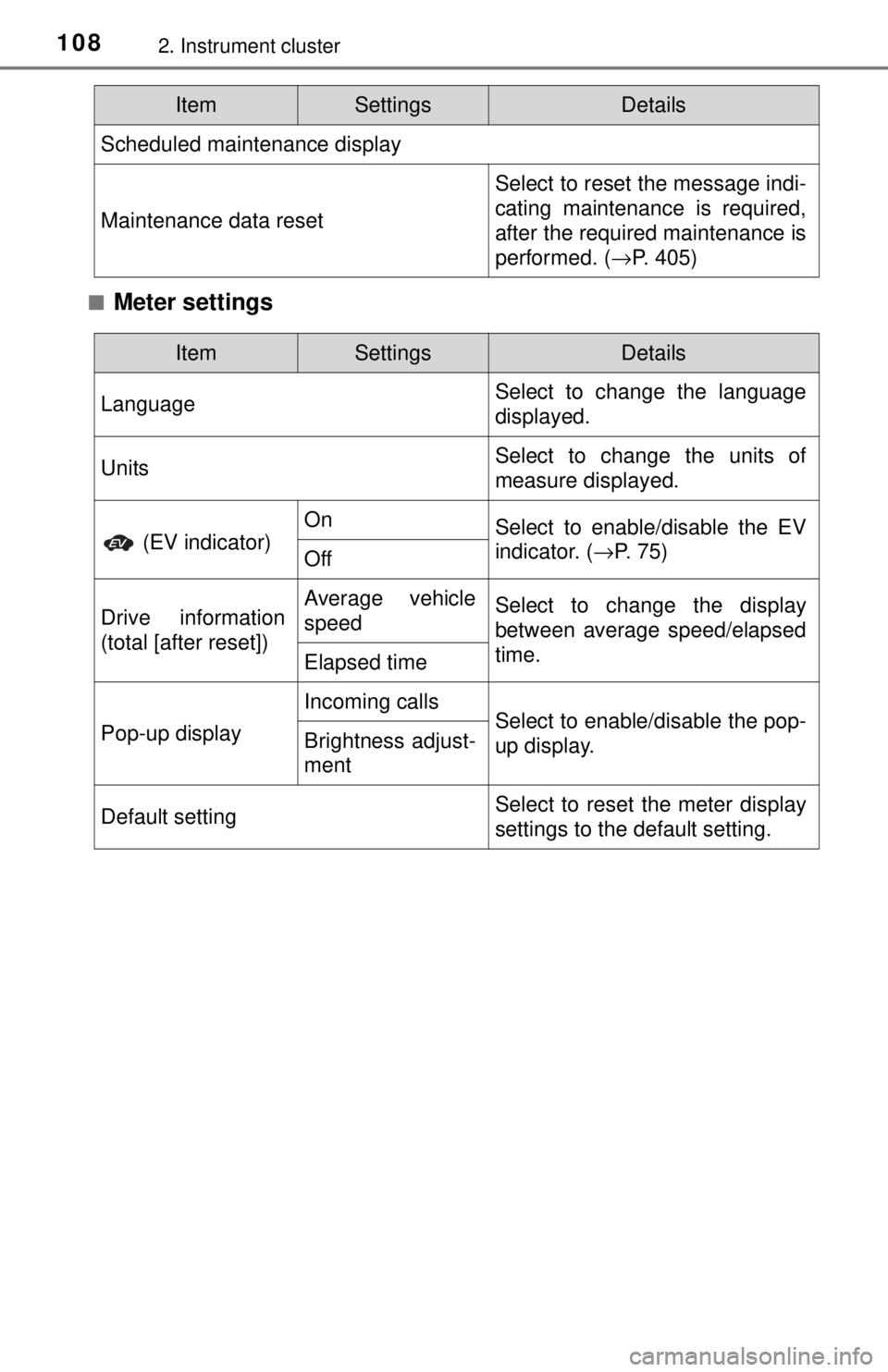
■Meter settings
Scheduled maintenance display
Maintenance data reset
Select to reset the message indi-
cating maintenance is required,
after the required maintenance is
performed. (→P. 405)
ItemSettingsDetails
ItemSettingsDetails
Language Select to change the language
displayed.
UnitsSelect to change the units of
measure displayed.
(EV indicator)
OnSelect to enable/disable the EV
indicator. (
→P. 75)
Off
Drive information
(total [after reset])Average vehicle
speedSelect to change the display
between average speed/elapsed
time.
Elapsed time
Pop-up display
Incoming callsSelect to enable/disable the pop-
up display.Brightness adjust-
ment
Default settingSelect to reset the meter display
settings to the default setting.
Page 124 of 596
1242. Instrument cluster
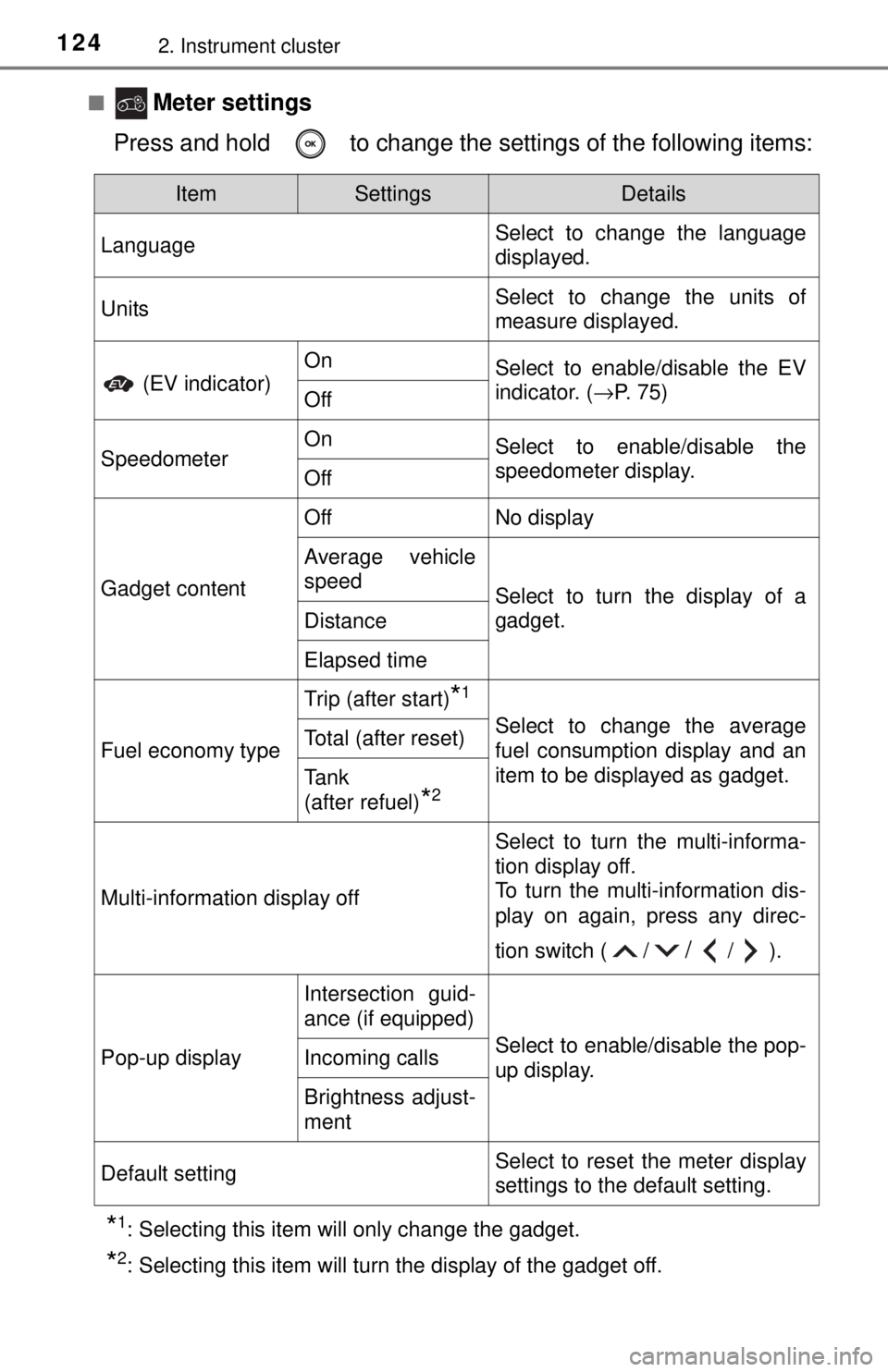
■ Meter settings
Press and hold to change the settings of the following items:
*1: Selecting this item will only change the gadget.
*2: Selecting this item will turn the display of the gadget off.
ItemSettingsDetails
Language Select to change the language
displayed.
UnitsSelect to change the units of
measure displayed.
(EV indicator)
OnSelect to enable/disable the EV
indicator. (
→P. 75)
Off
SpeedometerOnSelect to enable/disable the
speedometer display.
Off
Gadget content
OffNo display
Average vehicle
speed
Select to turn the display of a
gadget.
Distance
Elapsed time
Fuel economy type
Trip (after start)*1
Select to change the average
fuel consumption display and an
item to be displayed as gadget.Total (after reset)
Tank
(after refuel)
*2
Multi-information display off
Select to turn the multi-informa-
tion display off.
To turn the multi-information dis-
play on again, press any direc-
tion switch ( /
//).
Pop-up display
Intersection guid-
ance (if equipped)
Select to enable/disable the pop-
up display.Incoming calls
Brightness adjust-
ment
Default settingSelect to reset the meter display
settings to the default setting.
Page 388 of 596
3885-4. Other interior features
■Languages
The Safety Connect response center will offer support in multiple languages.
The Safety Connect system will offer voice prompts in English and Spanish.
Please indicate your language of choice when enrolling.
■ When contacting th e response center
You may be unable to contact the response center if the network is busy.
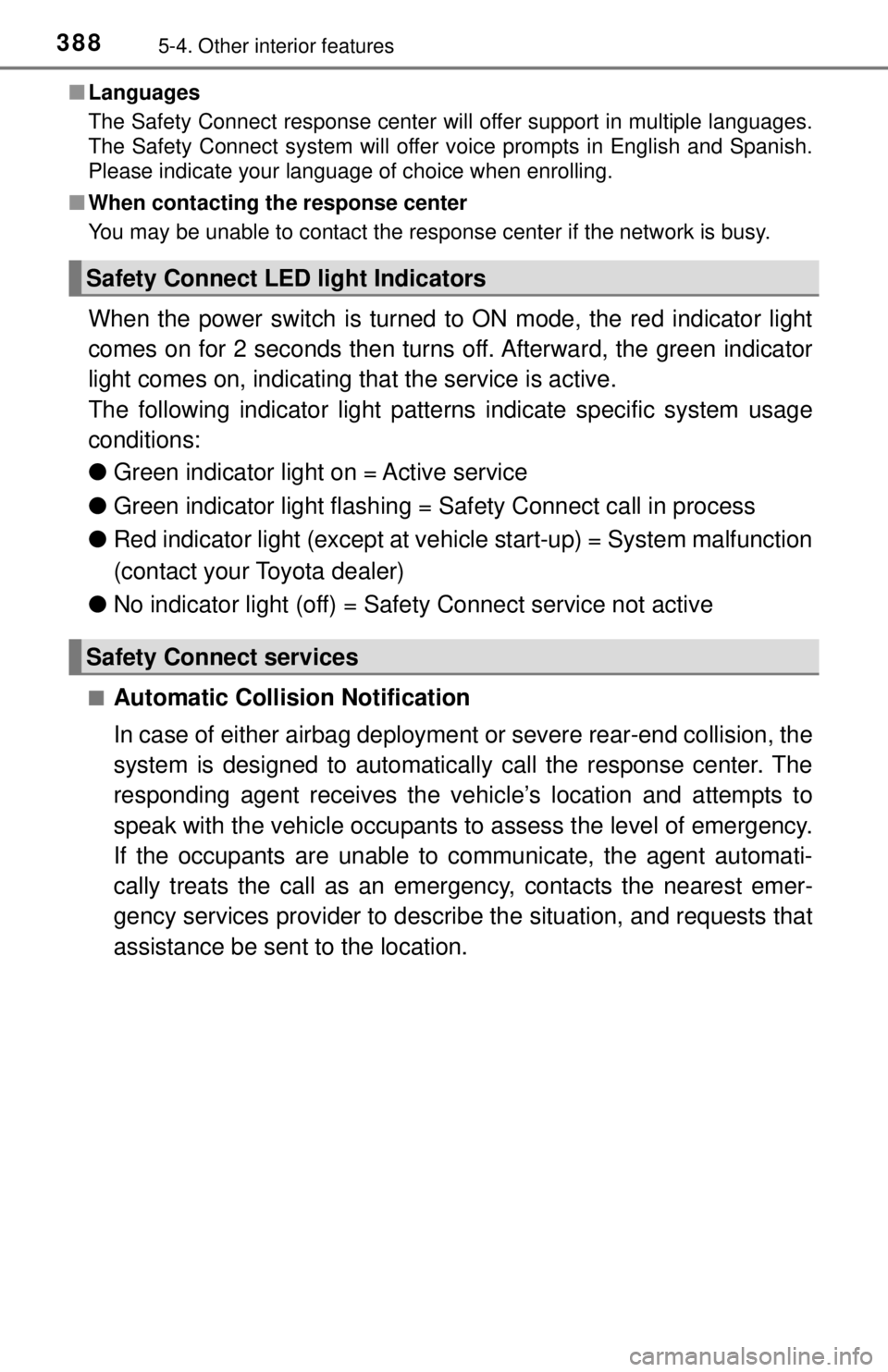
When the power switch is turned to ON mode, the red indicator light
comes on for 2 seconds then turns off. Afterward, the green indicator
light comes on, indicating t hat the service is active.
The following indicator light pattern s indicate specific system usage
conditions:
● Green indicator light on = Active service
● Green indicator light flashing = Sa fety Connect call in process
● Red indicator light (except at vehicle start-up) = System malfunction
(contact your Toyota dealer)
● No indicator light (off) = Safety Connect service not active
■Automatic Collision Notification
In case of either airbag deployment or severe rear-end collision, the
system is designed to automatically call the response center. The
responding agent receives the ve hicle’s location and attempts to
speak with the vehicle occupants to assess the level of emergency.
If the occupants are unable to communicate, the agent automati-
cally treats the call as an emergency, contacts the nearest emer-
gency services provider to descri be the situation, and requests that
assistance be sent to the location.
Safety Connect LE D light Indicators
Safety Connect services
Page 552 of 596
5528-2. Customization
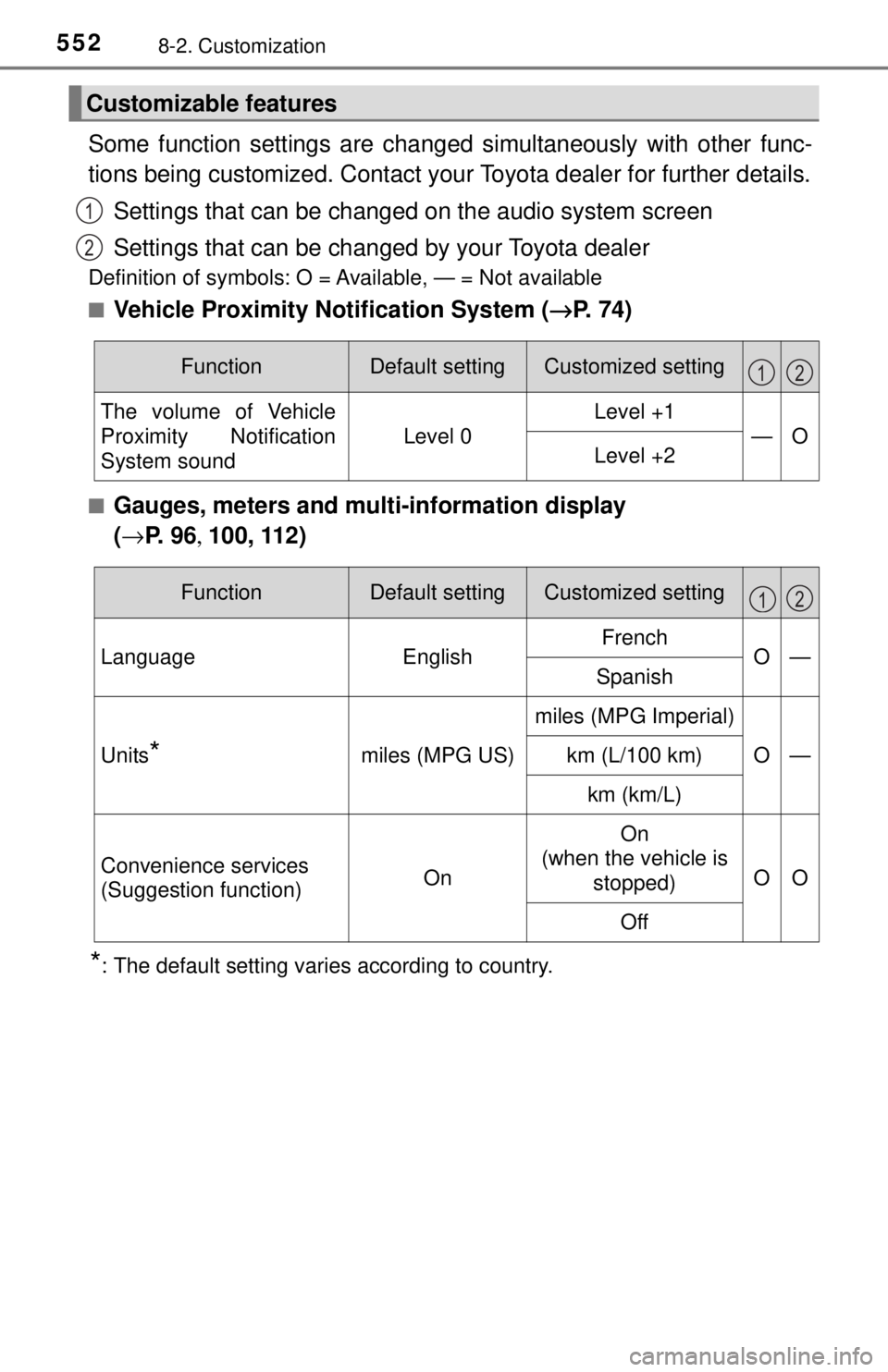
Some function settings are changed simultaneously with other func-
tions being customized. Contact your Toyota dealer for further details.
Settings that can be changed on the audio system screen
Settings that can be changed by your Toyota dealer
Definition of symbols: O = Available, — = Not available
■
Vehicle Proximity Notification System ( →P. 74)
■Gauges, meters and mult i-information display
( → P. 9 6 , 100, 112)
*: The default setting varies according to country.
Customizable features
1
2
FunctionDefault settingCustomized setting
The volume of Vehicle
Proximity Notification
System sound
Level 0
Level +1
—OLevel +2
12
FunctionDefault settingCustomized setting
LanguageEnglishFrenchO—Spanish
Units*miles (MPG US)
miles (MPG Imperial)
O—km (L/100 km)
km (km/L)
Convenience services
(Suggestion function)On
On
(when the vehicle is stopped)
OO
Off
12
Page 588 of 596

588Alphabetical index
Lane Departure Alert with steering control (LDA) .......... 260
Language (multi- information display) ...... 108, 124
LATCH anchors ......................... 67
LDA (Lane Departure Alert with steering control)............ 260
Lever Auxiliary catch lever .............. 414
Hood lock release lever ........ 414
Internal trunk release lever ... 157
Shift lever .............................. 213
Tilt and telescopic steering lock release lever ............... 175
Turn signal lever ................... 219
Wiper lever............................ 234
License plate lights Light switch ........................... 227
Replacing light bulbs............. 470
Light bulbs Replacing .............................. 460
Wattage ................................ 534
Lights Automatic High Beam ........... 230
Headlight switch.................... 227
Illuminated entry system ....... 356
Interior lights ......................... 355
Interior lights list .................... 354
Personal lights ...................... 356
Replacing light bulbs............. 460
Trunk light ............................. 157
Turn signal lever ................... 219
Vanity lights .......................... 364
Wattage ................................ 534
Load capacity........................... 201
Lock steering column ............. 175 Maintenance
Do-it-yourself maintenance... 412
General maintenance ........... 407
Maintenance data ................. 526
Maintenance requirements ...................... 404
Resetting the message
indicating maintenance
is required .......................... 405
Malfunction indicator lamp..... 480
Meter ........................................... 96
Head-up display.................... 128
Indicators ................................ 93
Instrument panel light control .................................. 97
Meters..................................... 96
Multi-information
display ........................ 100, 112
Settings......................... 105, 119
Warning lights ......................... 91
Warning messages ............... 490
Mirrors
Inside rear view mirror .......... 177
Outside rear view mirror defoggers ........................... 348
Outside rear view mirrors ..... 179
Vanity mirrors ....................... 364
Mobile Assistant
*
Moon roof ................................. 184
Door lock linked moon roof operation ..................... 185
Jam protection function ........ 185
Operation .............................. 184
MP3 disc
*
LM
Page 589 of 596
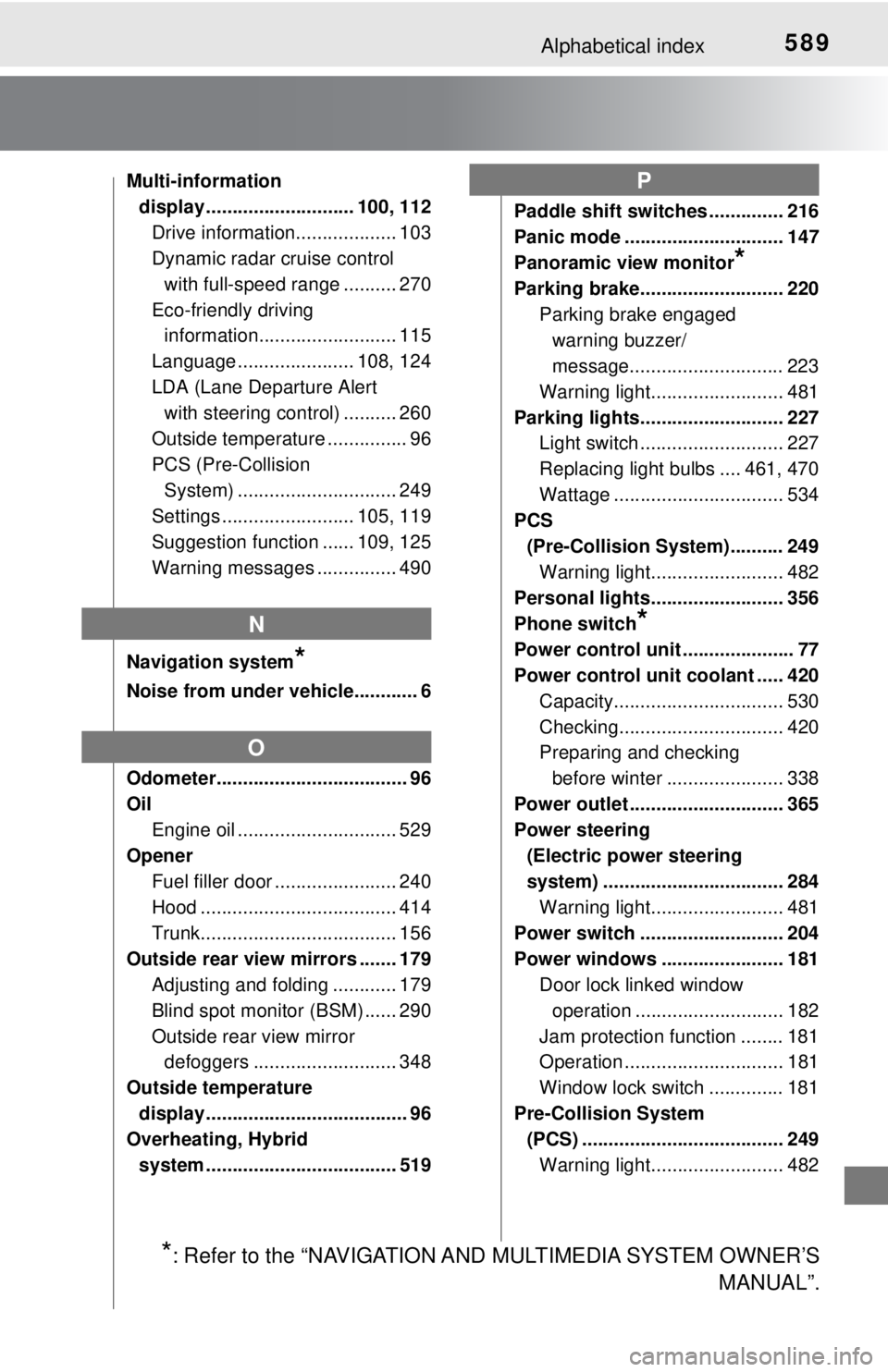
589Alphabetical index
Multi-information display ............................ 100, 112 Drive information................... 103
Dynamic radar cruise control
with full-speed range .......... 270
Eco-friendly driving information.......................... 115
Language ...................... 108, 124
LDA (Lane Departure Alert with steering control) .......... 260
Outside temperature ............... 96
PCS (Pre-Collision System) .............................. 249
Settings ......................... 105, 119
Suggestion function ...... 109, 125
Warning messages ............... 490
Navigation system
*
Noise from under vehicle............ 6
Odometer.................................... 96
Oil Engine oil .............................. 529
Opener Fuel filler door ....................... 240
Hood ..................................... 414
Trunk..................................... 156
Outside rear view mirrors ....... 179 Adjusting and folding ............ 179
Blind spot monitor (BSM) ...... 290
Outside rear view mirror defoggers ........................... 348
Outside temperature display ...................................... 96
Overheating, Hybrid
system .................................... 519 Paddle shift switches .............. 216
Panic mode .............................. 147
Panoramic view monitor
*
Parking brake........................... 220
Parking brake engaged warning buzzer/
message............................. 223
Warning light......................... 481
Parking lights........................... 227 Light switch ........................... 227
Replacing light bulbs .... 461, 470
Wattage ................................ 534
PCS
(Pre-Collision System).......... 249 Warning light......................... 482
Personal lights......................... 356
Phone switch
*
Power control unit ..................... 77
Power control unit coolant ..... 420
Capacity................................ 530
Checking............................... 420
Preparing and checking before winter ...................... 338
Power outlet ............................. 365
Power steering (Electric power steering
system) .................................. 284 Warning light......................... 481
Power switch ........................... 204
Power windows ....................... 181 Door lock linked window
operation ............................ 182
Jam protection function ........ 181
Operation .............................. 181
Window lock switch .............. 181
Pre-Collision System (PCS) ...................................... 249
Warning light......................... 482
N
O
P
*: Refer to the “NAVIGATION AND MULTIMEDIA SYSTEM OWNER’S MANUAL”.