ad blue TOYOTA CAMRY HYBRID 2021 Accessories, Audio & Navigation (in English)
[x] Cancel search | Manufacturer: TOYOTA, Model Year: 2021, Model line: CAMRY HYBRID, Model: TOYOTA CAMRY HYBRID 2021Pages: 324, PDF Size: 10.46 MB
Page 269 of 324
2698-2. Setup
8
Phone
CAMRY_CAMRY HV(TMMK)_Navi_(U)
Select to change the incom-
ing e-mail display.
• “Full Screen”: When an e-mail is received, the incoming e-mail dis-
play screen is displayed and can
be operated on the screen.
• “Drop-down”: When an e-mail is received, a message is displayed
at the top of the screen.
Select to set display of the
contact/history transfer com-
pletion message on/off.
The phone top screen can be
set to be displayed on the
multi-information display or
system screen.
Select to reset all setup
items.
●Depending on the type of Blue-
tooth® phone, these functions
may not be available.
Contacts can be transferred
from a Bluetooth
® phone to this
system. Contacts and favorites
can be added, edited and
deleted. Also, the call history
can be deleted.
1 Display the phone settings
screen. ( P.267)
2 Select “Contacts/Call His-
tory”. 3
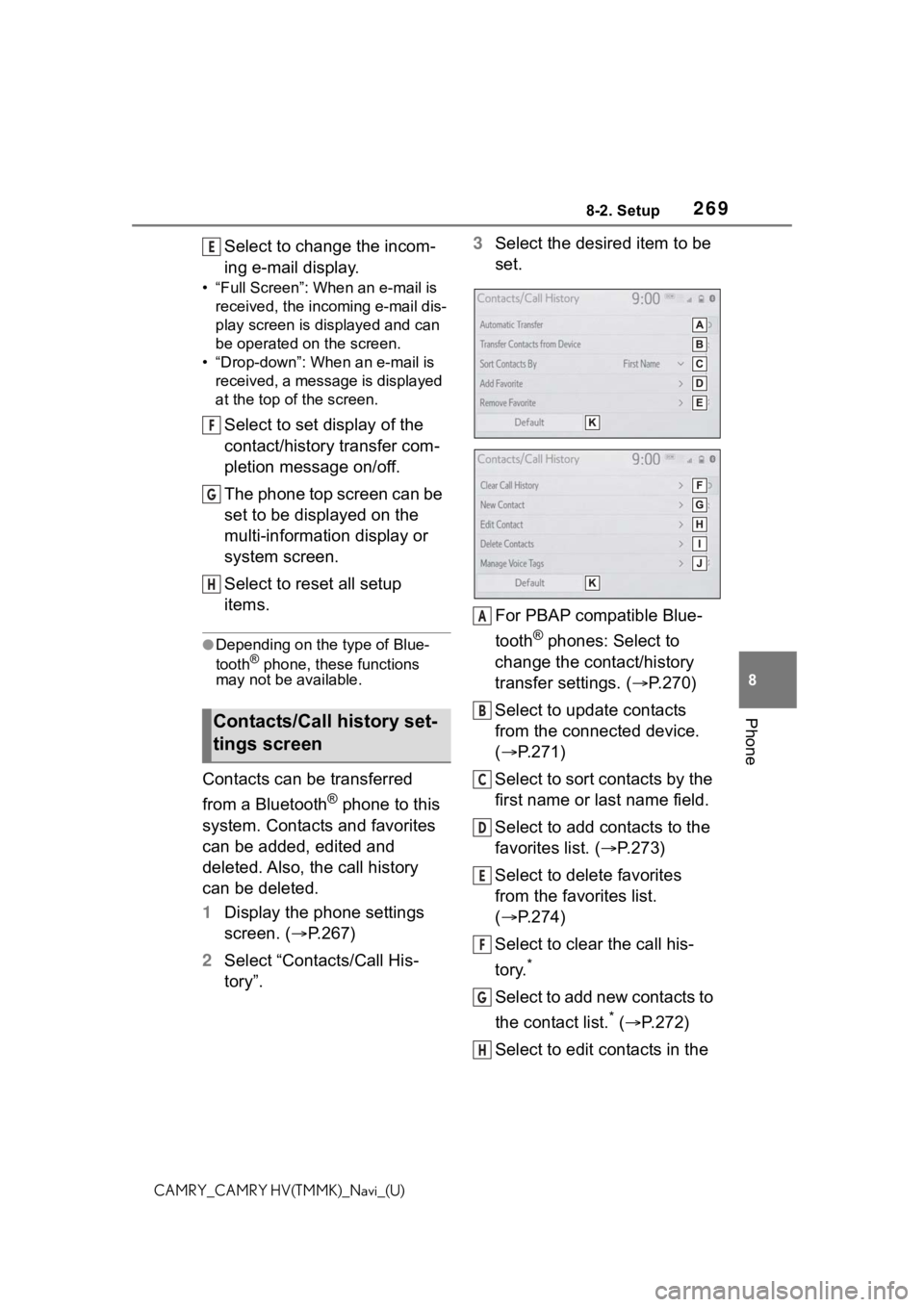
Select the desired item to be
set.
For PBAP compatible Blue-
tooth
® phones: Select to
change the contact/history
transfer settings. ( P.270)
Select to update contacts
from the connected device.
( P.271)
Select to sort contacts by the
first name or last name field.
Select to add contacts to the
favorites list. ( P.273)
Select to delete favorites
from the favorites list.
( P.274)
Select to clear the call his-
tory.
*
Select to add new contacts to
the contact list.
* ( P.272)
Select to edit contacts in the
Contacts/Call history set-
tings screen
E
F
G
H
A
B
C
D
E
F
G
H
Page 270 of 324
2708-2. Setup
CAMRY_CAMRY HV(TMMK)_Navi_(U)
contact list.* ( P.273)
Select to delete contacts
from the contact list.
*
( P.273)
Select to set the voice tags.
( P.274)
Select to reset all setup
items.
*: For PBAP compatible Bluetooth®
phones, this function is available
when “Automatic Transfer” is set
to off. ( P.270)
●Depending on the type of Blue-
tooth® phone, certain functions
may not be available.
●Contact data is managed inde-
pendently for every registered
phone. When one phone is con-
nected, another phone’s regis-
tered data cannot be read.
The automatic contact/history
function is available for PBAP
compatible Bluetooth
® phones
only.
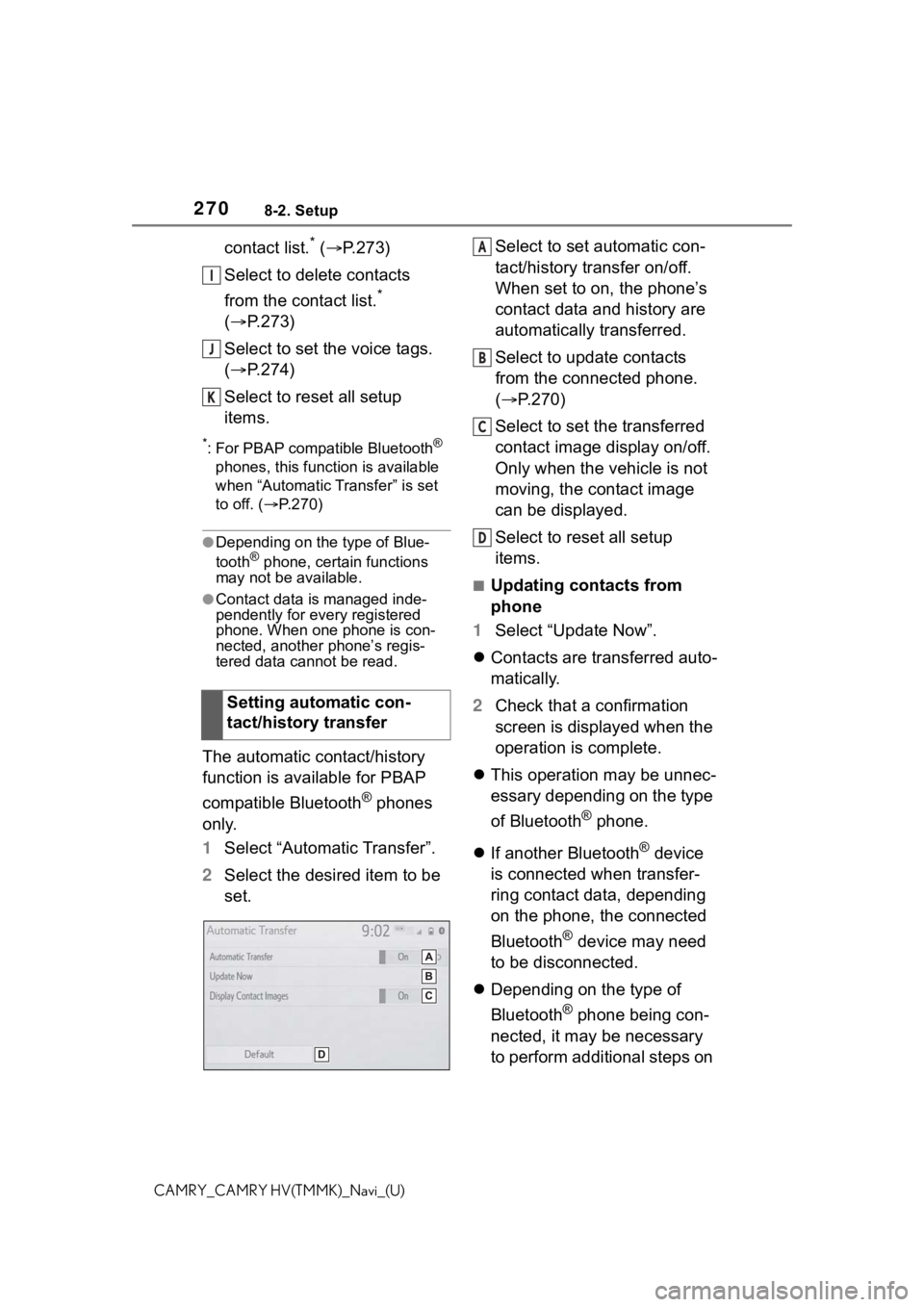
1 Select “Automatic Transfer”.
2 Select the desired item to be
set. Select to set automatic con-
tact/history transfer on/off.
When set to on, the phone’s
contact data and history are
automatically transferred.
Select to update contacts
from the connected phone.
(
P.270)
Select to set the transferred
contact image display on/off.
Only when the vehicle is not
moving, the contact image
can be displayed.
Select to reset all setup
items.
■Updating contacts from
phone
1 Select “Update Now”.
Contacts are transferred auto-
matically.
2 Check that a confirmation
screen is displayed when the
operation is complete.
This operation may be unnec-
essary depending on the type
of Bluetooth
® phone.
If another Bluetooth
® device
is connected when transfer-
ring contact data, depending
on the phone, the connected
Bluetooth
® device may need
to be disconnected.
Depending on the type of
Bluetooth
® phone being con-
nected, it may be necessary
to perform additional steps on
Setting automatic con-
tact/history transfer
I
J
K
A
B
C
D
Page 271 of 324
2718-2. Setup
8
Phone
CAMRY_CAMRY HV(TMMK)_Navi_(U)
the phone.
■Updating the contacts in a
different way (from the call
history screen)
*
1Display the phone top
screen. ( P.250)
2 Select “History” and select a
contact not yet registered in
the contact list.
3 Select “Update Contact”.
4 Select the desired contact.
5 Select a phone type for the
phone number.
*: For PBAP compatible Bluetooth®
phones, this function is available
when “Automatic Transfer” is set
to off. ( P.270)
When an Android Auto connec-
tion is established, this function
will be unavailable.
*
*: This function is not available in
some countries or areas.
When the contact is not regis-
tered
1 Select “Transfer Contacts
from Device”.
2 Select “From Phone (Blue-
tooth)”. 3
Transfer the contact data to
the system using a Blue-
tooth
® phone.
This operation may be unnec-
essary depending on the type
of Bluetooth
® phone.
To cancel this function, select
“Cancel”.
4 Check that a confirmation
screen is displayed when the
operation is complete.
When the contact is regis-
tered
1 Select “Transfer Contacts
from Device”.
2 Select “From Phone (Blue-
tooth)”.
3 Select “Replace Contacts” or
“Add Contact”.
“Replace Contacts”: Select to trans-
fer the contact fr om the connected
cellular phone and replace the cur-
rent one.
“Add Contact”: Select to transfer
the desired contact data from the
connected cellular phone to add to
the current one.
4 Transfer the contact data to
the system using a Blue-
tooth
® phone.
This operation may be unnec-
essary depending on the type
of Bluetooth
® phone.
To cancel this function, select
“Cancel”.
5 Check that a confirmation
screen is displayed when the
operation is complete.
Transfer contacts from
device
From phone (OPP compati-
ble Bluetooth
® phones only)
Page 272 of 324
2728-2. Setup
CAMRY_CAMRY HV(TMMK)_Navi_(U)
Backed-up contact data
(“vCard” formatted) can be
transferred from USB device or
Bluetooth
® phone to this sys-
tem.
1 Connect a USB device.
( P.131)
2 Select “Transfer Contacts
from Device”.
3 Select “From USB”.
4 Select “USB 1” or “USB 2”
when the multiple USB
devices are connected. If a
USB device is connected,
skip this procedure.
5 Select “Replace Contacts” or
“Add Contact”. If the contact
is not registered, skip this
procedure.
“Replace Contacts”: Select to trans-
fer the contact fro m the connected
USB device or Bluetooth
® phone
and replace the current one.
“Add Contact”: Select to transfer
the desired contact data from the
connected USB device or Blue-
tooth
® phone to add to the current
one.
6 Select a desired file from
vCard file list.
7 Check that a confirmation
screen is displayed when the
operation is complete.
●Depending on the type of Blue-
tooth® phone used and number of
files, it may take time to display
vCard file lists and download con- tacts.
●Downloading may not complete
correctly in the
following cases:
• If the engine
• If the USB device or Bluetooth
®
phone is removed before down-
loading is complete.
New contact data can be regis-
tered.
Up to 4 numbers per person can
be registered. For PBAP com-
patible Bluetooth
® phones, this
function is available when “Auto-
matic Transfer” is set to off.
( P.270)
1 Select “New Contact”.
2 Enter the name and select
“OK”.
3 Enter the phone number and
select “OK”.
4 Select the phone type for the
phone number.
5 To add another number to
this contact, select “Yes”.
■Registering a new contact
in a different way (from the
call history screen)
1 Display the phone top
screen. ( P.250)
2 Select “History” and select a
contact not yet registered in
the contact list.
3 Select “Add to Contacts”.
From USB device
Registering a new contact
to the contacts list
Page 273 of 324
2738-2. Setup
8
Phone
CAMRY_CAMRY HV(TMMK)_Navi_(U)
4Follow the steps in “Register-
ing a new contact to the con-
tacts list” from step 2.
( P.272)
For PBAP compatible Blue-
tooth
® phones, this function is
available when “Automatic
Transfer” is set to off. ( P.270)
1 Select “Edit Contact”.
2 Select the desired contact.
3 Select corresponding to
the desired name or number.
4 Enter the name or the phone
number and select “OK”.
For PBAP compatible Blue-
tooth
® phones, this function is
available when “Automatic
Transfer” is set to off. ( P.270)
1 Select “Delete Contacts”.
2 Select the desired contact
and select “Delete”.
3 Select “Yes” when the confir-
mation screen appears.
●Multiple data can be selected and
deleted at the same time.
●When a Bluetooth® phone is
deleted, the contact data will be
deleted at the same time.
Up to 15 contacts (maximum of
4 numbers per contact) can be
registered in the favorites list.
■Registering the contacts in
the favorites list
1 Select “Add Favorite”.
2 Select the desired contact to
add to the favorites list.
Dimmed contacts are already
stored as a favorite.
3 Check that a confirmation
screen is displayed when the
operation is complete.
When 15 contacts have
already been registered to the
favorites list
1 When 15 contacts have
already been registered to
the favorites list, a registered
contact needs to be replaced.
Select “Yes” when the confir-
mation screen appears to
replace a contact.
2 Select the contact to be
replaced.
3 Check that a confirmation
screen is displayed when the
operation is complete.
■Registering contacts in the
favorites list in a different
way (from the contact
details screen)
1 Display the phone top
screen. ( P.250)
Editing the contact data
Deleting the contact data
Favorites list setting
Page 277 of 324
2778-3. What to do if...
8
Phone
CAMRY_CAMRY HV(TMMK)_Navi_(U)
8-3.What to do if...
■The connected device may
not be a compatible Blue-
tooth
® cellular phone.
For a list of specific devices
which operation has been con-
firmed on this system, check
with your Toyota dealer or the
following website:
https://www.toyota.com/
audio-multimedia in the United
States,
https://www.toyota.ca/connected
in Canada, and
http://www.toyotapr.com/
audio-multimedia in Puerto Rico
■The Bluetooth® version of
the connected cellular
phone may be older than
the specified version.
Use a cellular phone with Blue-
tooth
® version 2.0 or higher
(recommended: Ver. 4.2 or
higher). ( P.42)
■An incorrect passcode was
entered on the cellular
phone.
Enter the correct passcode on
the cellular phone.
■The registration operation
has not been completed on
the cellular phone side.
Complete the registration opera-
tion on the cellular phone
(approve registration on the
phone).
■Old registration informa-
tion remains on either this
system or the cellular
phone.
Delete the existing registration
information from both this sys-
tem and the cellular phone, then
register the cellular phone you
wish to connect to this system.
( P.47)
Troubleshooting
If there is a problem with the
hands-free system or a
Bluetooth
® device, first
check the followings.
Troubleshooting
When using the
hands-free system with a
Bluetooth
® device
The hands-free system or
Bluetooth
® device does not
work.
When registering/connect-
ing a cellular phone
A cellular phone cannot be
registered.
Page 278 of 324

2788-3. What to do if...
CAMRY_CAMRY HV(TMMK)_Navi_(U)
■Another Bluetooth® device
is already connected.
Manually connect the cellular
phone you wish to use to this
system. ( P.44)
■Bluetooth® function is not
enabled on the cellular
phone.
Enable the Bluetooth
® function
on the cellular phone.
■Automatic Bluetooth® con-
nection on this system is
set to off.
Set automatic Bluetooth
® con-
nection on this system to on
when the engine
switch is in following. ( P. 4 9 )
Vehicles without a smart key
system
The engine switch is in the
“ACC” or “ON” position.
Vehicles with a smart key sys-
tem
The engine
ACCESSORY or IGNITION ON
■Preferred device settings
function on this system is
set to on.
Set preferred device settings
function on this system to off.
( P. 5 0 ) Set the desired cellular phone to
the highest automatic connec-
tion priority. (
P. 5 0 )
■Bluetooth® function is not
enabled on the cellular
phone.
Enable the Bluetooth
® function
on the cellular phone.
■Old registration informa-
tion remains on either this
system or the cellular
phone.
Delete the existing registration
information from both this sys-
tem and the cellular phone, then
register the cellular phone you
wish to connect to this system.
( P.47)
A Bluetooth
® connection
cannot be made.
A cellular phone cannot be
connected.
Page 280 of 324

2808-3. What to do if...
CAMRY_CAMRY HV(TMMK)_Navi_(U)
■Message transfer is not
enabled on the cellular
phone.
Enable message transfer on the
cellular phone (approve mes-
sage transfer on the phone).
■Automatic transfer func-
tion on this system is set to
off.
Set automatic transfer function
on this system to on. ( P.270)
■Notification of SMS/MMS/
E-mail reception on this
system is set to off.
Set notification of SMS/MMS/
E-mail reception on this system
to on. ( P.268)
■Automatic message trans-
fer function is not enabled
on the cellular phone.
Enable automatic transfer func-
tion on the cellular phone.
■Connection confirmation
display on this system is
set to on.
To turn off the display, set con-
nection confirmation display on
this system to off. ( P. 5 0 )
*1: Vehicles without a smart key sys-
tem:
The engine swit ch is in the
“ACC” or “ON” position.
*2: Vehicles with a smart key sys- tem:
The engine
ACCESSORY or IGNITION ON
When using the Blue-
tooth
® message function
Messages cannot be viewed.
New message notifications
are not displayed.
In other situations
The Bluetooth
® connection
status is displayed at the top
of the screen each time the
system is activated
*1, 2.
Page 281 of 324
2818-3. What to do if...
8
Phone
CAMRY_CAMRY HV(TMMK)_Navi_(U)
■The cellular phone is not
close enough to this sys-
tem.
Bring the cellular phone closer
to this system.
■Radio interference has
occurred.
Turn off Wi-Fi
® devices or other
devices that may emit radio
waves.
■The cellular phone is the
most likely cause of the
symptom.
Turn the cellular phone off,
remove and reinstall the battery
pack, and then restart the cellu-
lar phone.
Enable the cellular phone’s
Bluetooth
® connection.
Disable the Wi-Fi
® connection of
the cellular phone.
Stop the cellular phone’s secu-
rity software and close all appli-
cations.
Before using an application
installed on the cellular phone,
carefully check its source and
how its operation might affect
this system.
●For details, refer to the owner’s
manual that came with the cellular
phone.
Even though all conceivable
measures have been taken,
the symptom status does not
change.
Page 285 of 324
2859-1. Connected Services overview
9
Connected Services
CAMRY_CAMRY HV(TMMK)_Navi_(U)
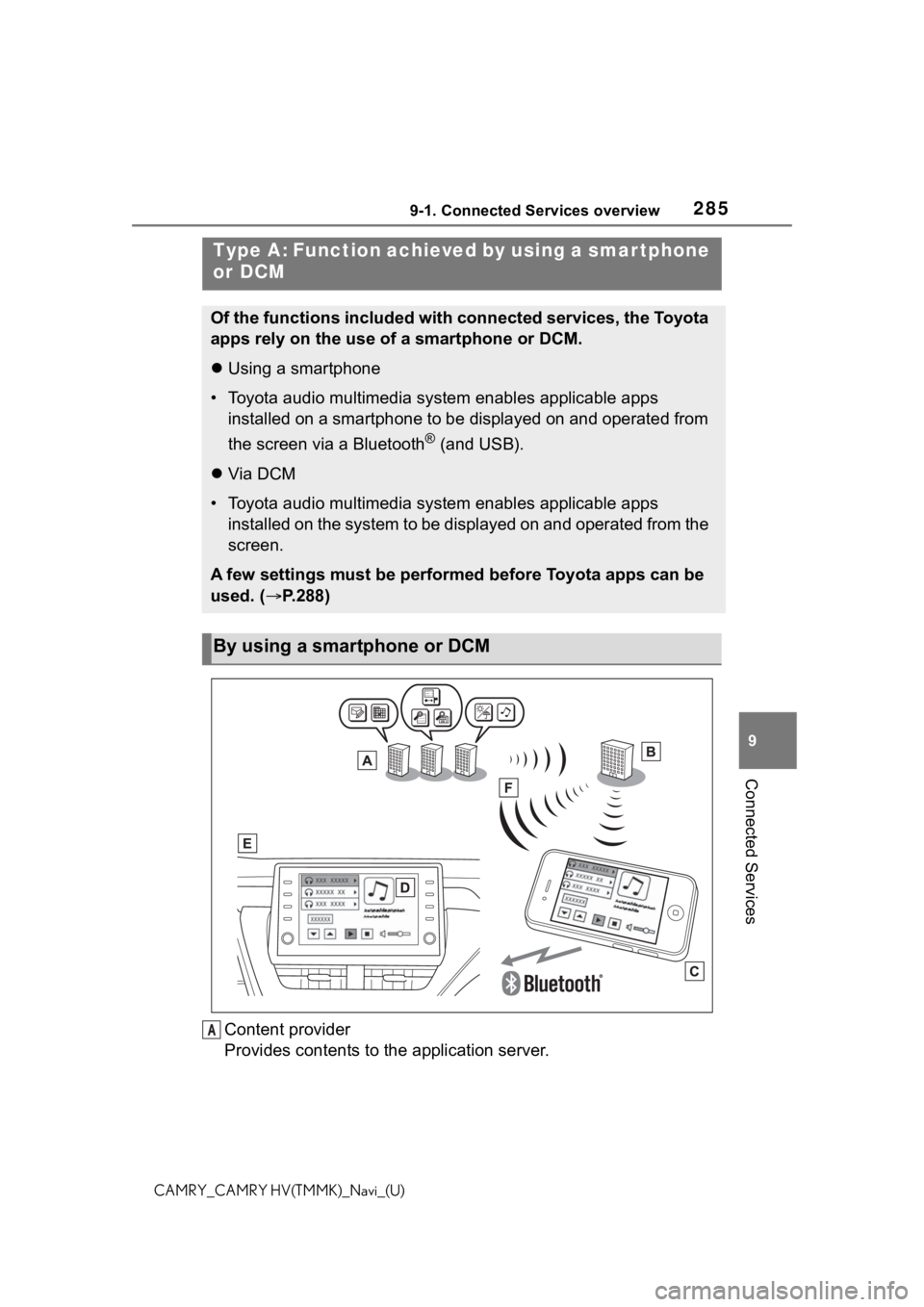
Content provider
Provides contents to the application server.
Type A: Function achieved by using a smar tphone
or DCM
Of the functions included with connected services, the Toyota
apps rely on the use of a smartphone or DCM.
Using a smartphone
• Toyota audio multimedia system enables applicable apps
installed on a smartphone to be displayed on and operated from
the screen via a Bluetooth
® (and USB).
Via DCM
• Toyota audio multimedia system enables applicable apps
installed on the system to be displayed on and operated from th e
screen.
A few settings must be performed before Toyota apps can be
used. ( P.288)
By using a smartphone or DCM
A