charging TOYOTA CAMRY HYBRID 2021 (in English) User Guide
[x] Cancel search | Manufacturer: TOYOTA, Model Year: 2021, Model line: CAMRY HYBRID, Model: TOYOTA CAMRY HYBRID 2021Pages: 624, PDF Size: 15.98 MB
Page 403 of 624
4035-4. Other interior features
5
Interior features
NOTICE
■To prevent damage to the USB charging ports
● Do not insert foreign objects into the ports.
● Do not spill water or other liquids into the ports.
● When the USB charging ports are not in use, close the lids. If a foreign
object or liquid enters a port may cause a short circuit.
● Do not apply excessive force to or impact the USB charging ports.
● Do not disassemble or modify the USB charging ports.
■ To prevent damage to external devices
● Do not leave external devices in the vehicle. The temperature i nside the
vehicle may become high, resulting in damage to an external device.
● Do not push down on or apply unnecessary force to an external device or
the cable of an external device while it is connected.
■ To prevent 12-volt battery discharge
Do not use the USB charging ports for a long period of time with the hybrid
system stopped.
Page 404 of 624
4045-4. Other interior features
A portable device, such as a smartphone or mobile battery, can be
charged by just placing it on th e charging area, provided the d evice is
compatible with the Qi wireless charging standard created by th e
Wireless Power Consortium.
The wireless charger cannot be used with a portable device that is
larger than the charging area. Additionally, depending on the p ortable
device, the wireless charger may not operate properly. Refer to the
operation manual of the portable device.
■The “Qi” symbol
The “Qi” symbol is a trademark of the Wireless Power Consortium .
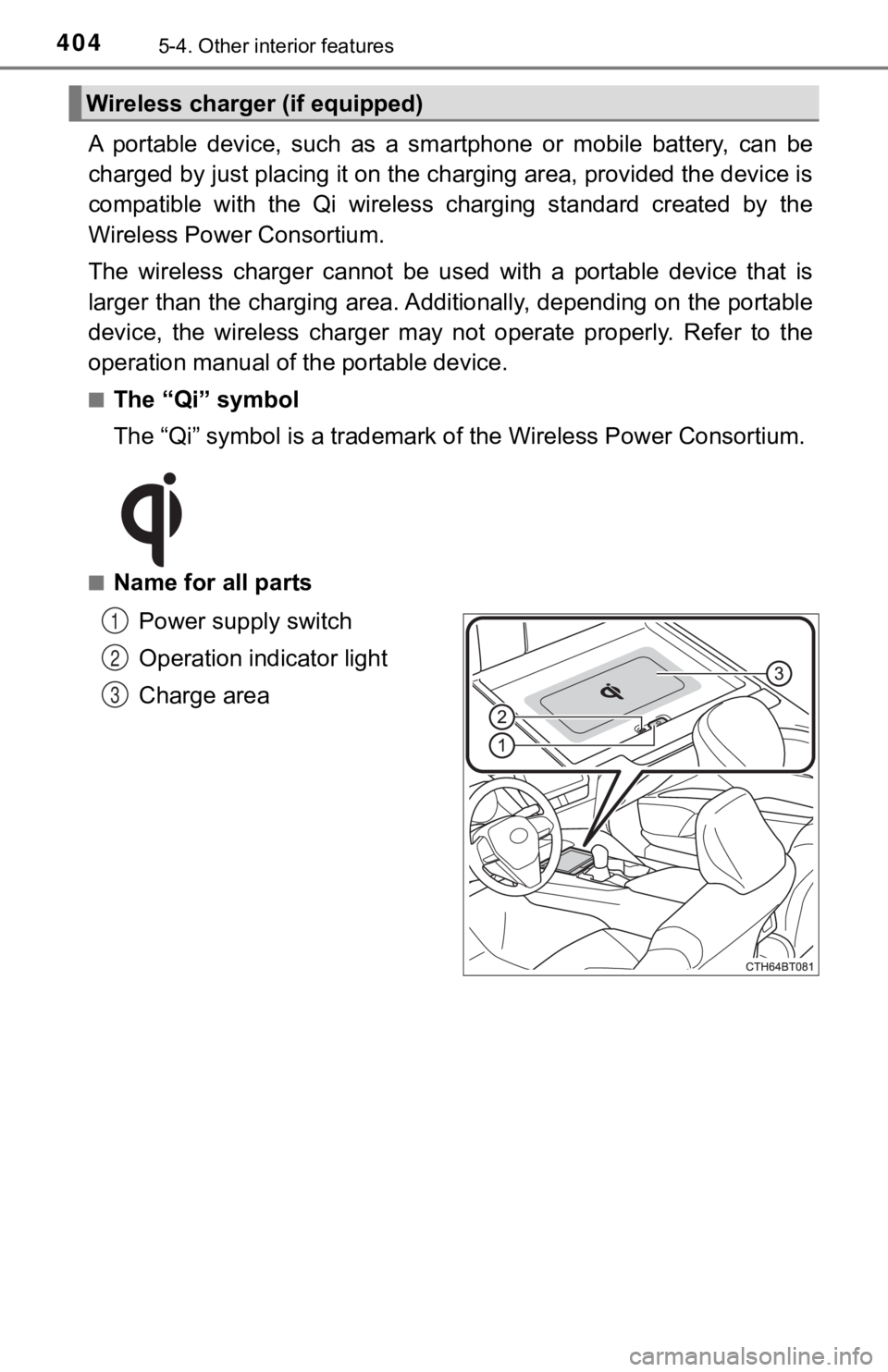
■Name for all parts
Power supply switch
Operation indicator light
Charge area
Wireless charger (if equipped)
1
2
3
Page 405 of 624
4055-4. Other interior features
5
Interior features
■Using the wireless charger
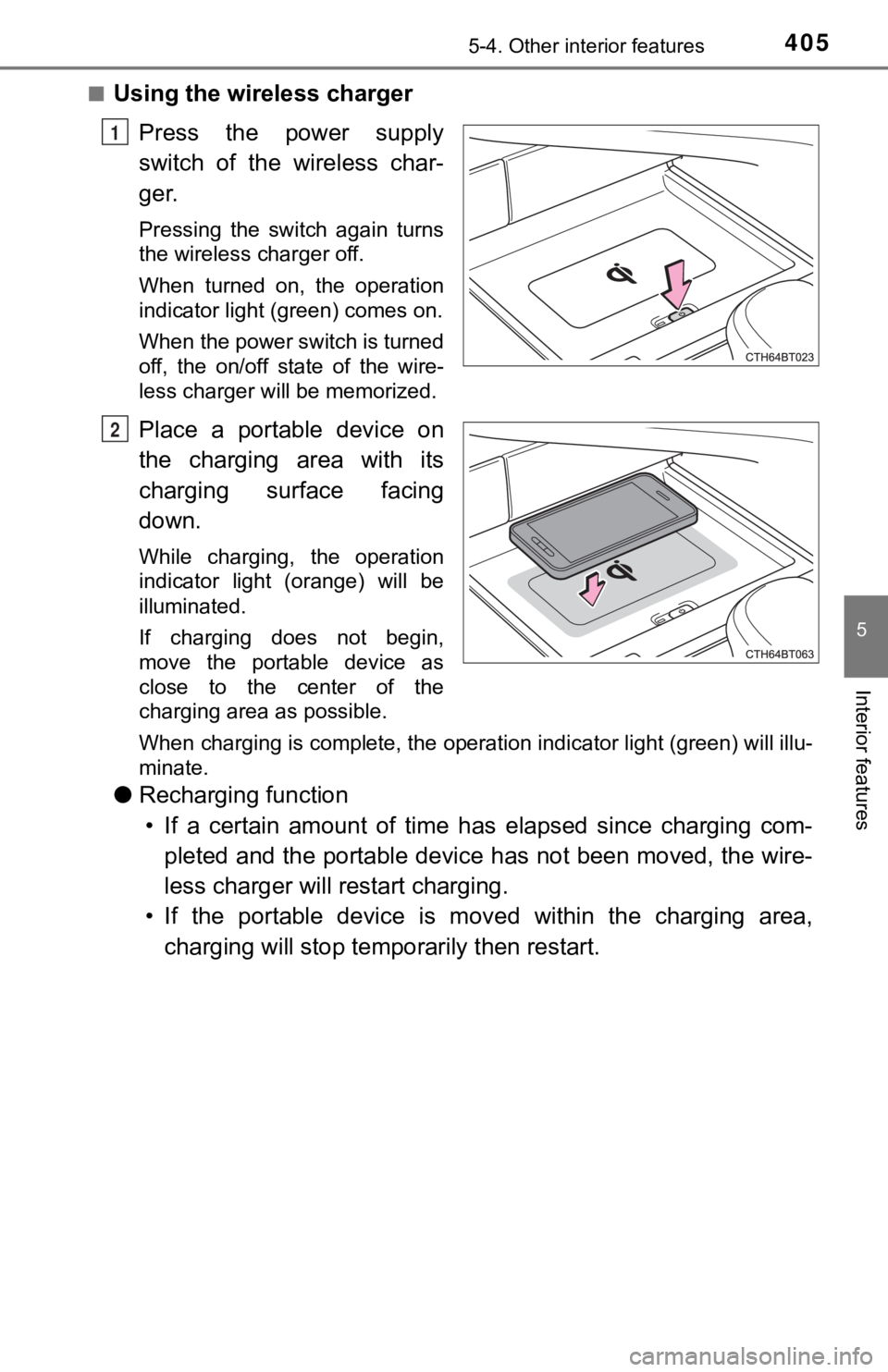
Press the power supply
switch of the wireless char-
ger.
Pressing the switch again turns
the wireless charger off.
When turned on, the operation
indicator light (green) comes on.
When the power switch is turned
off, the on/off state of the wire-
less charger will be memorized.
Place a portable device on
the charging area with its
charging surface facing
down.
While charging, the operation
indicator light (orange) will be
illuminated.
If charging does not begin,
move the portable device as
close to the center of the
charging area as possible.
When charging is complete, the operation indicator light (green ) will illu-
minate.
● Recharging function
• If a certain amount of time has elapsed since charging com- pleted and the portable device has not been moved, the wire-
less charger will restart charging.
• If the portable device is mov ed within the charging area,
charging will stop tempo rarily then restart.
1
2
Page 406 of 624
4065-4. Other interior features
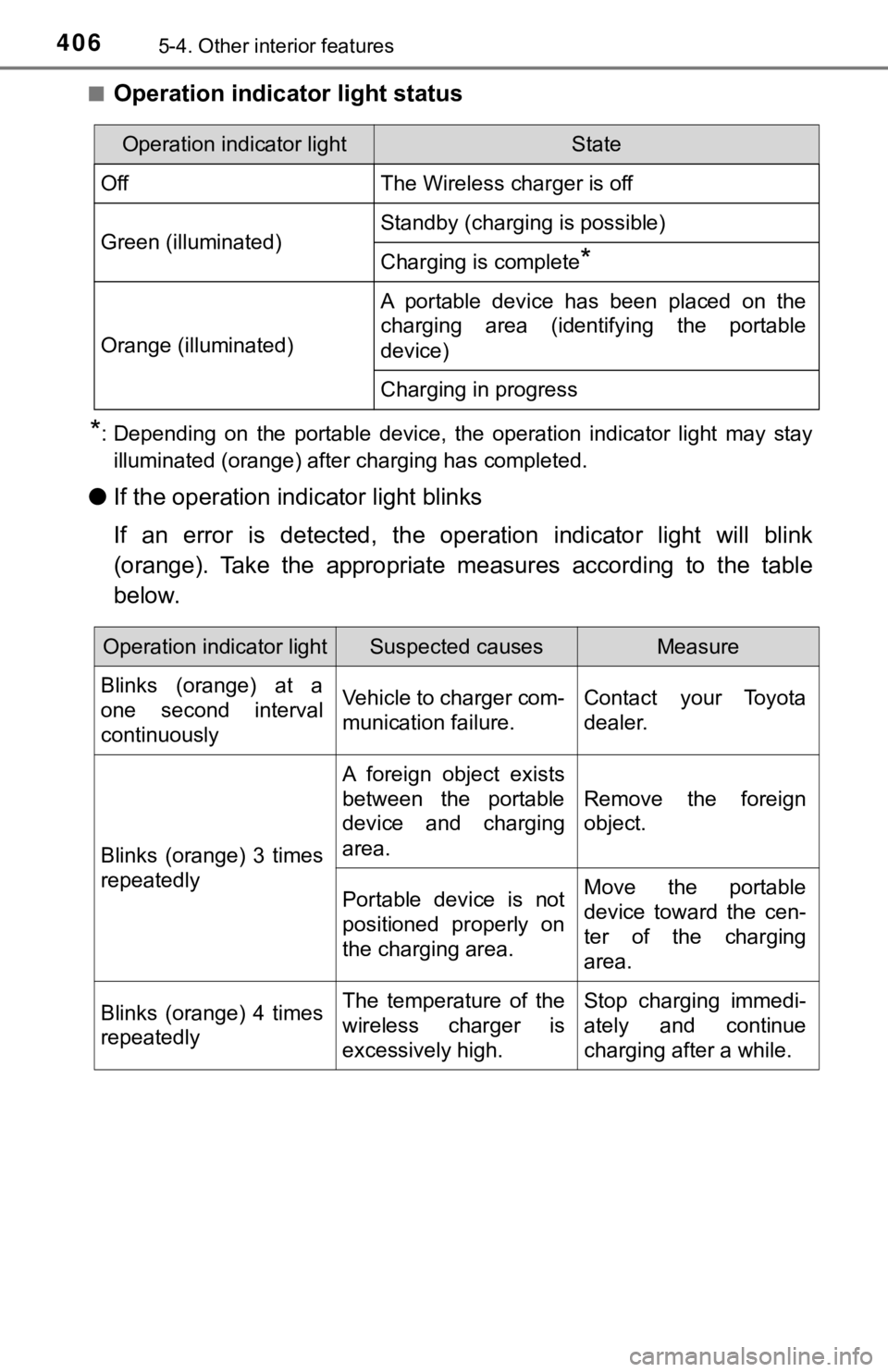
■Operation indicator light status
*: Depending on the portable device, the operation indicator light may stay
illuminated (orange) after charging has completed.
● If the operation indi cator light blinks
If an error is detected, the operation indicator light will bli nk
(orange). Take the appropriate measures according to the table
below.
Operation indicator lightState
OffThe Wireless charger is off
Green (illuminated)Standby (charging is possible)
Charging is complete*
Orange (illuminated)
A portable device has been placed on the
charging area (identifying the portable
device)
Charging in progress
Operation indicator lightSuspected causesMeasure
Blinks (orange) at a
one second interval
continuously Vehicle to charger com-
munication failure.
Contact your Toyota
dealer.
Blinks (orange) 3 times
repeatedly A foreign object exists
between the portable
device and charging
area.
Remove the foreign
object.
Portable device is not
positioned properly on
the charging area. Move the portable
device toward the cen-
ter of the charging
area.
Blinks (orange) 4 times
repeatedly The temperature of the
wireless charger is
excessively high.Stop charging immedi-
ately and continue
charging after a while.
Page 407 of 624

4075-4. Other interior features
5
Interior features
■The wireless charger can be operated when
The power switch is in ACCESSORY or ON mode.
■ Portable devices that can be charged
●Portable devices compatible with the Qi wireless charging stand ard can be
charged by the wireless charger. However, compatibility with all devices
which meet the Qi wireless charging standard is not guaranteed.
● The wireless charger is designed to supply low power electricit y (5 W or
less) to a cellular phone, smartphone, or other portable device .
■ If a cover or accessory is attach ed to the portable device
Do not charge a portable device if a cover or accessory which i s not Qi com-
patible is attached. Depending on the type of cover and/or acce ssory
attached, it may not be possible to charge the portable device. If the portable
device is placed on the charging area and does not charge, remo ve the cover
and/or accessories.
■ If interference is heard in AM ra dio broadcasts while charging
Turn off the wireless charger and check if the noise is reduced. If noise is
reduced, press and hold the power supply switch of the wireless charger for 2
seconds. The frequency of the wireless charger is changed and n oise may be
reduced. When the frequency is changed, the operation indicator light will
blink (orange) 2 times.
■ Charging precautions
●If the electronic key cannot be detected in the cabin, charging cannot be
performed. When a door is opened and closed, charging may be te mporarily
suspended.
● While charging, the wireless charger and the portable device wi ll become
warm. This is not a malfunction.
If a portable device becomes warm while charging and charging stops due
to the protection function of the portable device, wait until the portable
device cools down and charge it again.
■ Sound generated during operation
When the power supply switch is turned on or while a portable d evice is being
identified, operation sounds may be heard. This is not a malfunction.
■ Cleaning the wireless charger
P. 428
Page 411 of 624

4115-4. Other interior features
5
Interior features
WARNING
■Caution while driving
When charging a portable device while driving, for safety reasons, the driver
should not operate the portable device.
■ Caution regarding interfer ence with electronic devices
People with implantable cardiac pacemakers, cardiac resynchronization
therapy pacemakers or implantable cardioverter defibrillators, as well as
any other electrical medical device, should consult their physi cian about the
usage of the wireless charger.
Operations of the wireless charger may have an affect on medical devices.
■ To prevent damage or burns
Observe the following precautions.
Failure to do so may result in the possibility of fire, equipment failure or
damage, or burns due to heat.
● Do not put any metallic objects between the charging area and the porta-
ble device while charging.
● Do not attach metallic objects, such as aluminum stickers, to t he charging
area.
● Do not cover the wireless charger with a cloth or other object while
charging.
● Do not attempt to charge portable devices which are not compati ble with
the Qi wireless charging standard.
● Do not disassemble, modify or remove the wireless charger.
● Do not apply force or impact to the wireless charger.
Page 412 of 624
4125-4. Other interior features
NOTICE
■Conditions in which the wireless charger may not operate correctly
In the following situations, the wireless charger may not operate correctly:
● When a portable device is fully charged
● When there is a foreign object between the charging area and portable
device
● When a portable device becomes hot while charging
● When a portable device is placed on the wireless area with its charging
surface facing up
● When a portable device is not centered on the charging area
● When the vehicle is near a TV tower, electric power plant, gas station,
radio station, large display, airport or other facility that ge nerates strong
radio waves or electrical noise
● When the portable device is in contact with, or is covered by a ny of the fol-
lowing metallic objects:
• Cards to which aluminum foil is attached
• Cigarette boxes that have aluminum foil inside
• Metallic wallets or bags
• Coins
• Metal hand warmers
• Media such as CDs and DVDs
● When wireless keys (that emit radio waves) other than those of your vehi-
cle are being used nearby.
If in situations other than above the wireless charger does not operate prop-
erly or the operation indicator light is blinking, the wireless charger may be
malfunctioning. Contact your Toyota dealer.
■ To prevent failure or damage to data
● Do not bring magnetic cards, such as a credit card, or magnetic recording
media, close to the wireless charger while charging. Otherwise, data may
be erased due to the influence of magnetism.
Additionally, do not bring precision instruments such as wrist watches,
close to the wireless charger, as such objects may malfunction.
● Do not leave portable devices in the cabin. The temperature ins ide the
cabin may become high when parked in the sun, and cause damage to the
device.
■ To prevent 12-volt battery discharge
Do not use the wireless charger for a long period of time with the hybrid sys-
tem stopped.
Page 452 of 624
4526-3. Do-it-yourself maintenance
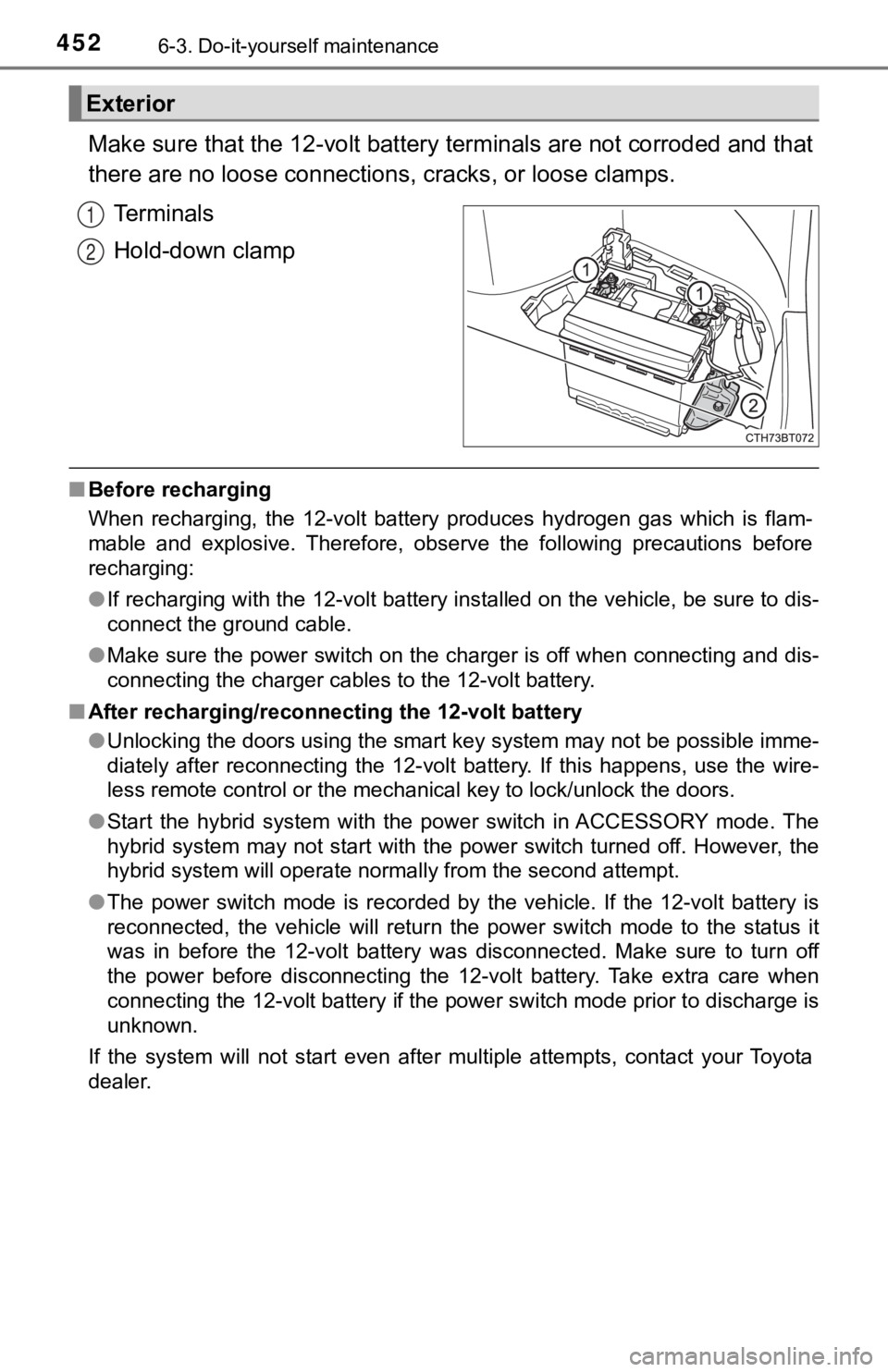
Make sure that the 12-volt battery terminals are not corroded and that
there are no loose connections, cracks, or loose clamps.
Terminals
Hold-down clamp
■ Before recharging
When recharging, the 12-volt battery produces hydrogen gas which is flam-
mable and explosive. Therefore, observe the following precautio ns before
recharging:
● If recharging with the 12-volt battery installed on the vehicle , be sure to dis-
connect the ground cable.
● Make sure the power switch on the charger is off when connectin g and dis-
connecting the charger cables to the 12-volt battery.
■ After recharging/reconnecting the 12-volt battery
●Unlocking the doors using the smart key system may not be possi ble imme-
diately after reconnecting the 12-volt battery. If this happens, use the wire-
less remote control or the mechanical key to lock/unlock the do ors.
● Start the hybrid system with the power switch in ACCESSORY mode . The
hybrid system may not start with the power switch turned off. However, the
hybrid system will operate normally from the second attempt.
● The power switch mode is recorded by the vehicle. If the 12-vol t battery is
reconnected, the vehicle will return the power switch mode to t he status it
was in before the 12-volt battery was disconnected. Make sure t o turn off
the power before disconnecting the 12-volt battery. Take extra care when
connecting the 12-volt battery if the power switch mode prior t o discharge is
unknown.
If the system will not start even after multiple attempts, contact your Toyota
dealer.
Exterior
1
2
Page 454 of 624

4546-3. Do-it-yourself maintenance
NOTICE
■When recharging th e 12-volt battery
Never recharge the 12-volt battery while the hybrid system is o perating.
Also, be sure all accessories are turned off.
Page 480 of 624

4806-3. Do-it-yourself maintenance
■Scheduled maintenance of the air intake vent is necessary when
In some situations such as when the vehicle is used frequently or in heavy
traffic or dusty areas, the air intake vent may need to be cleaned more regu-
larly. For details, refer to “Scheduled Maintenance Guide” or “Owner’s Man-
ual Supplement”.
■ Cleaning the air intake vent
●Dust in the air intake vent may interfere with the cooling of t he hybrid battery
(traction battery). If charging/discharging of the hybrid battery (traction bat-
tery) becomes limited, the distance that the vehicle can be driven using the
electric motor (traction motor) may be reduced and the fuel economy may
be reduced.
Inspect and clean the air intake vent periodically.
● Improper handling of the air intake vent cover and filter may result in dam-
age to them. If you have any concerns about cleaning the filter, contact your
Toyota dealer.
■ If “Maintenance Required for Traction Battery Cooling Parts See Owner’s
Manual” is displayed on the multi-information display
●If this warning message is displayed on the multi-information display,
remove the air intake vent cover and clean the filter. ( P. 477)
● After cleaning the air intake vent, start the hybrid system and check that the
warning message is no longer displayed.
After the hybrid system is started, it may be necessary to drive the vehicle
up to approximately 20 minutes before the warning message disap pears. If
the warning message does not disappear after driving for appropriately 20
minutes, have the vehicle inspected by your Toyota dealer.
WARNING
■
When cleaning the air intake vent
● Do not use water or other liquids to clean the air intake vent. If water is
applied to the hybrid battery (traction battery) or other compo nents, a mal-
function or fire may occur.
● Before cleaning the air intake vent, make sure to turn the power switch off
to stop the hybrid system.
■
When removing the air intake vent cover
Do not touch the service plug located near the air intake vent. ( P. 86)