wipers TOYOTA CAMRY HYBRID 2021 (in English) User Guide
[x] Cancel search | Manufacturer: TOYOTA, Model Year: 2021, Model line: CAMRY HYBRID, Model: TOYOTA CAMRY HYBRID 2021Pages: 624, PDF Size: 15.98 MB
Page 243 of 624

2434-3. Operating the lights and wipers
4
Driving
●In the following situations the system may not be able to correctly detect the
surrounding brightness level. This may cause the low beams to r emain on
or the high beams to flash or dazzle pedestrians or vehicles ah ead. In such
a case, it is necessary to manually switch between the high and low beams.
• When driving in inclement weather (heavy rain, snow, fog, sand storms,
etc.)
• When the windshield is obscured by fog, mist, ice, dirt, etc.
• When the windshield is cracked or damaged
• When the front camera is deformed or dirty
• When the temperature of the front camera is extremely high
• When the surrounding brightness level is equal to that of head lights, tail
lights or fog lights
• When headlights or tail lights of vehicles ahead are turned off, dirty, changing color, or not aimed properly
• When the vehicle is hit by water, snow, dust, etc. from a prec eding vehi-
cle
• When driving through an area of intermittently changing brightness and
darkness
• When frequently and repeatedly driving ascending/descending roads, or roads with rough, bumpy or uneven surfaces (such as stone-paved
roads, gravel roads, etc.)
• When frequently and repeatedly taking curves or driving on a w inding
road
• When there is a highly reflective object ahead of the vehicle, such as a sign or mirror
• When the back of a preceding vehicle is highly reflective, such as a con-
tainer on a truck
• When the vehicle's headlights are damaged or dirty, or are not aimed
properly
• When the vehicle is listing or titling due to a flat tire, a trailer being towed, etc.
• When the headlights are changed between the high beams and low
beams repeatedly in an abnormal manner
• When the driver believes that the high beams may be flashing or dazzling pedestrians or other drivers
■ Temporarily lowering sensor sensitivity
The sensitivity of the sensor can be temporarily lowered.
Turn the power switch off while the following conditions are me t.
• The headlight switch is in the or position.
• The headlight switch lever is in the original position.
Turn the power switch to ON mode.
Within 60 seconds after , repeat pushing the headlight switch lever to the
high beam position then pulling it to the original position qui ckly 10 times,
then leave the lever in the original position.
1
2
32
Page 244 of 624
2444-3. Operating the lights and wipers
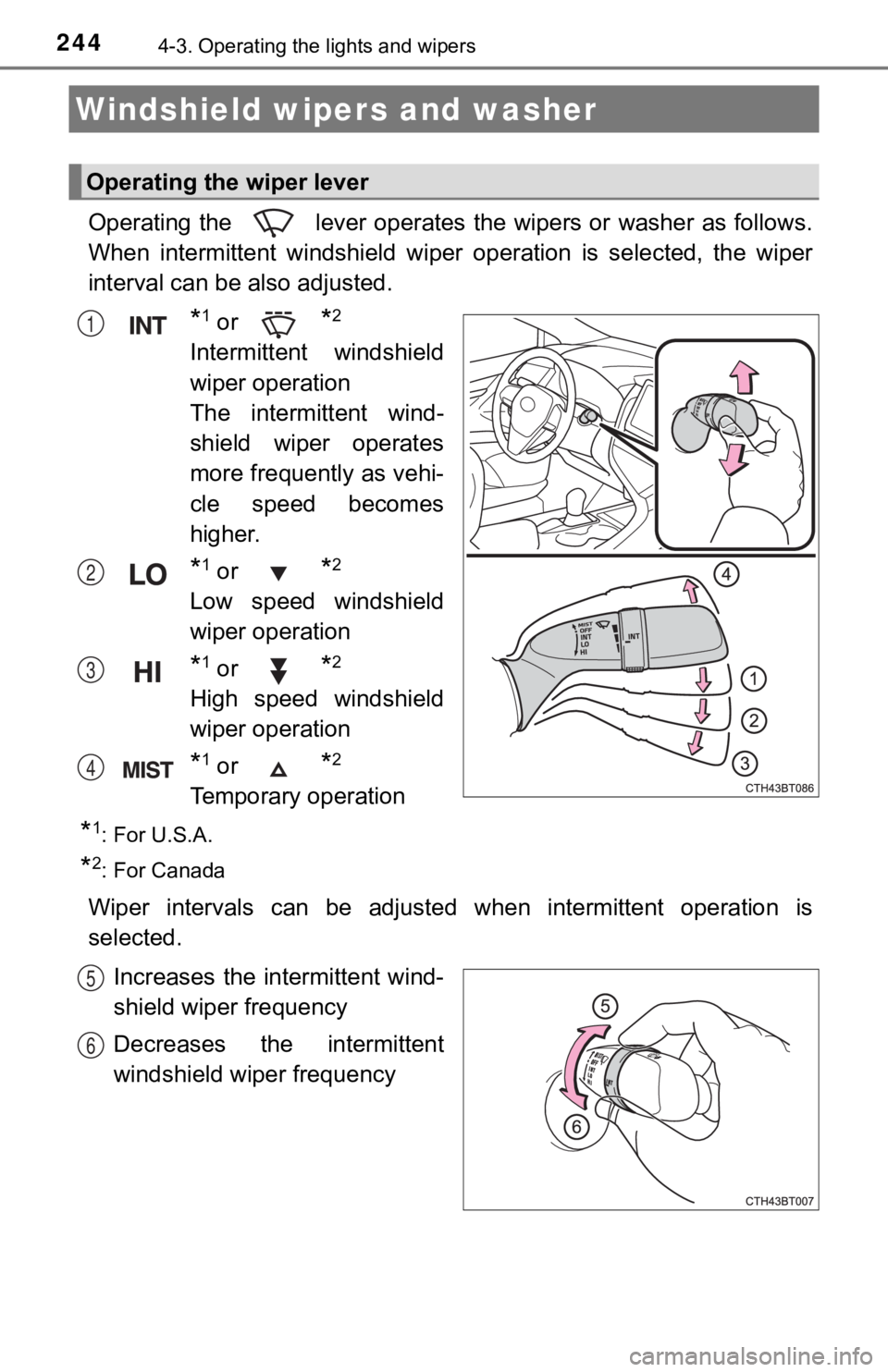
Operating the lever operates the wipers or washer as follows.
When intermittent windshield wiper operation is selected, the w iper
interval can be also adjusted.
*1 or *2
Intermittent windshield
wiper operation
The intermittent wind-
shield wiper operates
more frequently as vehi-
cle speed becomes
higher.
*1 or *2
Low speed windshield
wiper operation
*1 or *2
High speed windshield
wiper operation
*1 or *2
Temporary operation
*1: For U.S.A.
*2: For Canada
Wiper intervals can be adjusted when intermittent operation is
selected.
Increases the intermittent wind-
shield wiper frequency
Decreases the intermittent
windshield wiper frequency
Windshield wipers and washer
Operating the wiper lever
1
2
3
4
5
6
Page 245 of 624
2454-3. Operating the lights and wipers
4
Driving
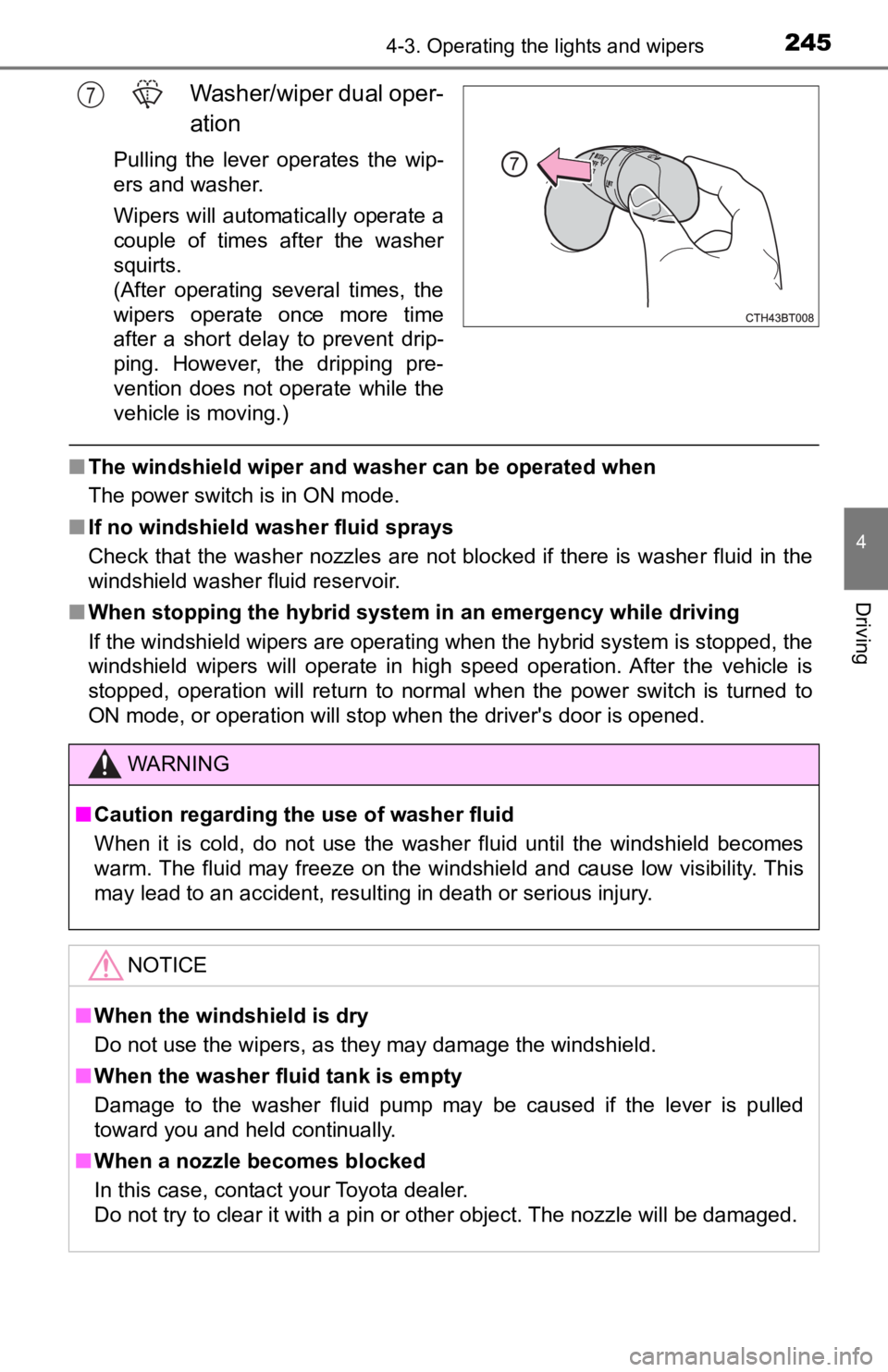
Washer/wiper dual oper-
ation
Pulling the lever operates the wip-
ers and washer.
Wipers will automatically operate a
couple of times after the washer
squirts.
(After operating several times, the
wipers operate once more time
after a short delay to prevent drip-
ping. However, the dripping pre-
vention does not operate while the
vehicle is moving.)
■The windshield wiper and washer can be operated when
The power switch is in ON mode.
■ If no windshield washer fluid sprays
Check that the washer nozzles are not blocked if there is washe r fluid in the
windshield washer fluid reservoir.
■ When stopping the hybrid system in an emergency while driving
If the windshield wipers are operating when the hybrid system is stopped, the
windshield wipers will operate in high speed operation. After t he vehicle is
stopped, operation will return to normal when the power switch is turned to
ON mode, or operation will stop when the driver's door is opened.
7
WARNING
■ Caution regarding the use of washer fluid
When it is cold, do not use the washer fluid until the windshie ld becomes
warm. The fluid may freeze on the windshield and cause low visi bility. This
may lead to an accident, resulting in death or serious injury.
NOTICE
■ When the windshield is dry
Do not use the wipers, as they may damage the windshield.
■ When the washer fluid tank is empty
Damage to the washer fluid pump may be caused if the lever is p ulled
toward you and held continually.
■ When a nozzle becomes blocked
In this case, contact your Toyota dealer.
Do not try to clear it with a pin or other object. The nozzle will be damaged.
Page 246 of 624
2464-3. Operating the lights and wipers
When the windshield wipers are not being used, they retract to below
the hood. To enable the windshie ld wipers to be lifted when parking in
cold conditions or when replacing a windshield wiper insert, ch ange
the rest position of the windshiel d wipers to the service position using
the wiper lever.
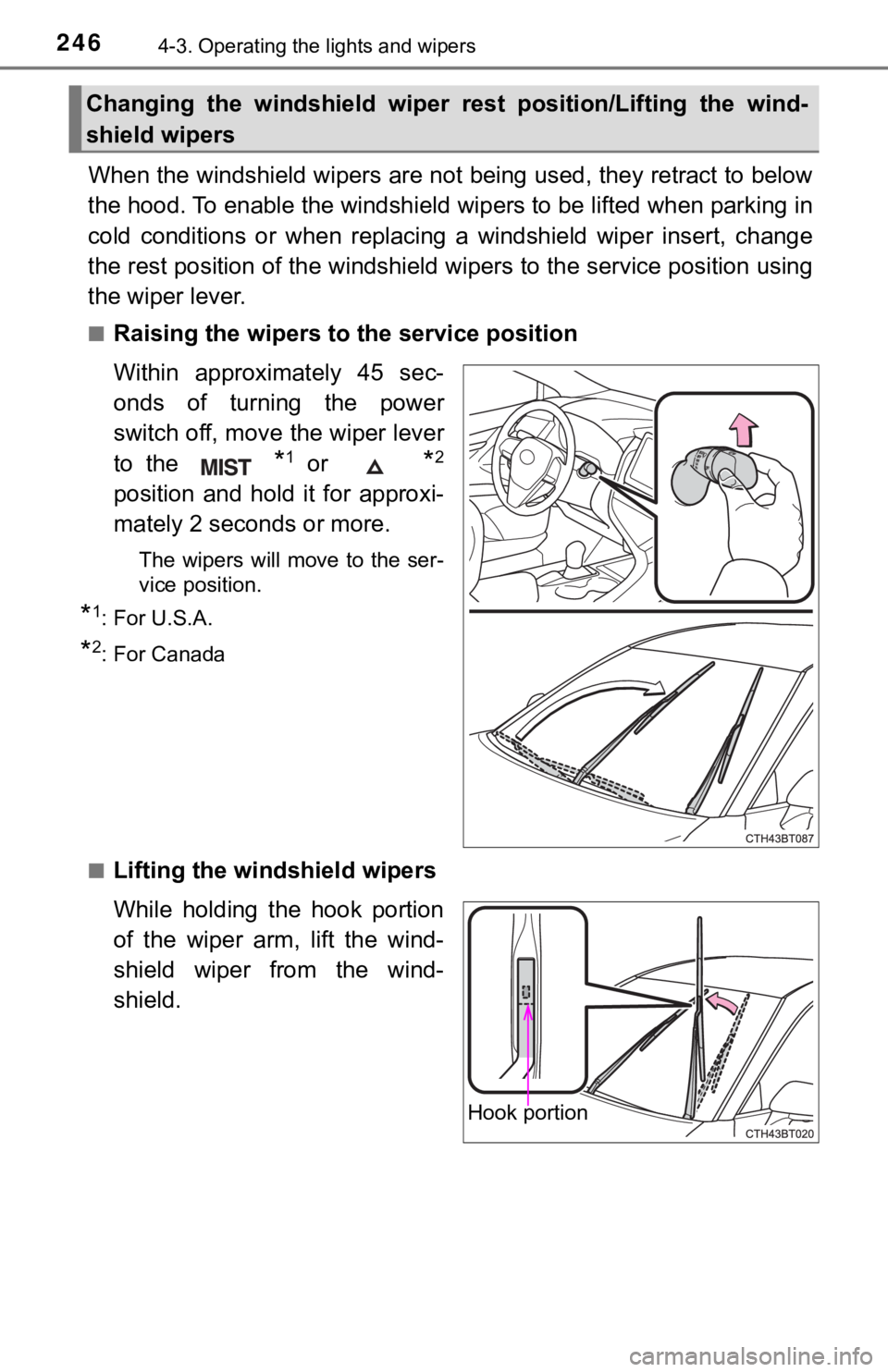
■Raising the wipers to the service position
Within approximately 45 sec-
onds of turning the power
switch off, move the wiper lever
to the
*1 or *2
position and hold it for approxi-
mately 2 seconds or more.
The wipers will move to the ser-
vice position.
*1: For U.S.A.
*2: For Canada
■
Lifting the winds hield wipers
While holding the hook portion
of the wiper arm, lift the wind-
shield wiper from the wind-
shield.
Changing the windshield wiper rest position/Lifting the wind-
shield wipers
Hook portion
Page 247 of 624

2474-3. Operating the lights and wipers
4
Driving
■Lowering the windshield wipers to the retracted position
With the windshield wipers placed on the windshield, turn the p ower switch to
ON mode and then move the wiper lever to an operating position. When the
wiper switch is turned off, the windshield wipers will stop at the retracted posi-
tion.
NOTICE
■When lifting the windshield wipers
● Do not lift the windshield wipers when they are in the retracted position
below the hood. Otherwise, they may contact the hood, possibly resulting
in damage to a windshield wiper and/or the hood.
● Do not operate the wiper lever when the windshield wipers are l ifted. Oth-
erwise, the windshield wipers may contact the hood, possibly resulting in
damage to the windshield wipers and/or hood.
Page 254 of 624
2544-5. Using the driving support systems
WARNING
■To avoid malfunction of the front camera
Observe the following precautions.
Otherwise, the front camera may not operate properly, possibly leading to
an accident resulting in death or serious injury.
● Keep the windshield clean at all times.
• If the windshield is dirty or covered with an oily film, water droplets,
snow, etc., clean the windshield.
• If a glass coating agent is applied to the windshield, it will still be neces- sary to use the windshield wipers to remove water droplets, etc. from
the area of the windshield in front of the front camera.
• If the inner side of the windshield where the front camera is installed is
dirty, contact your Toyota dealer.
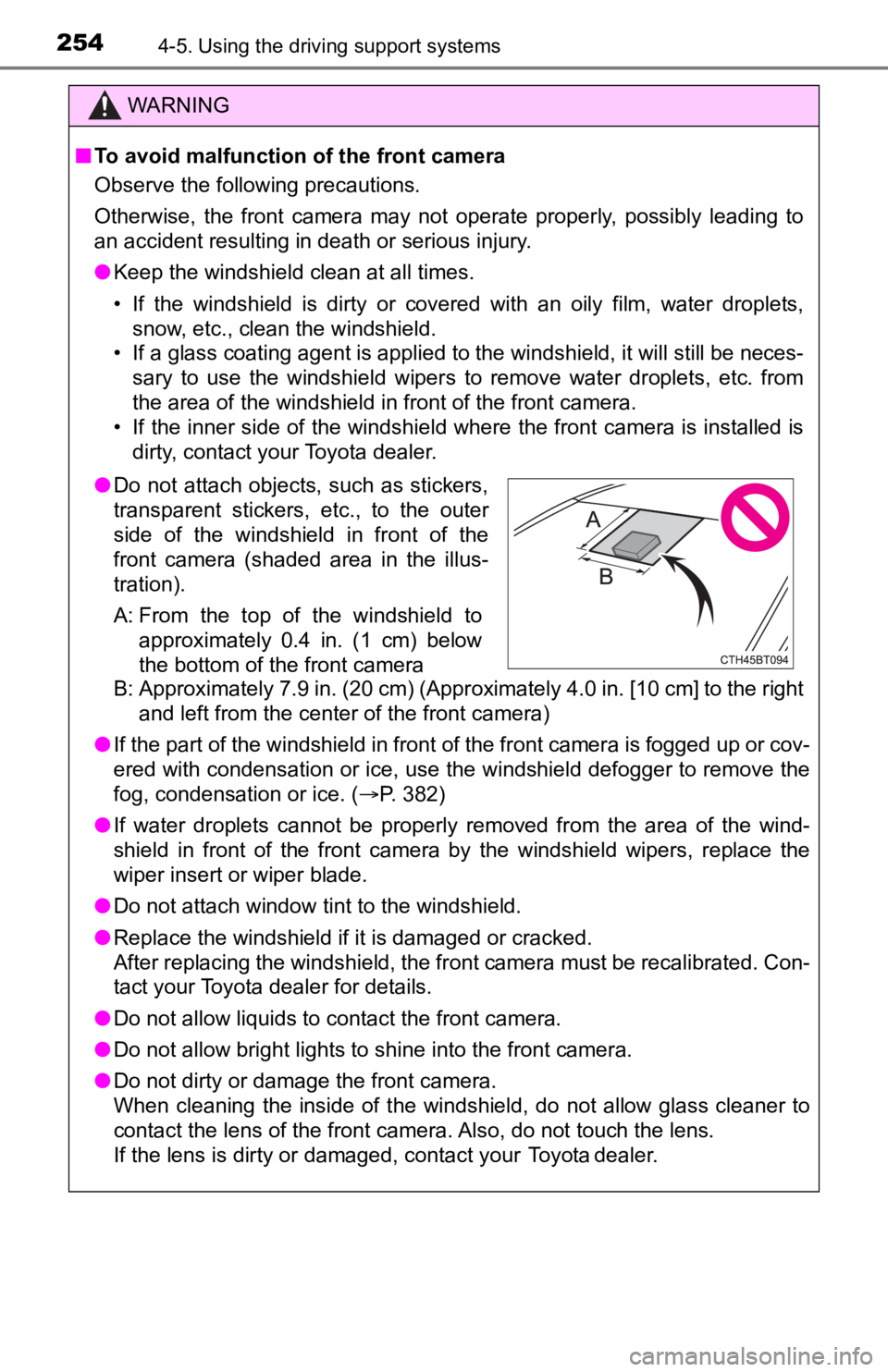
B: Approximately 7.9 in. (20 cm) (Approximately 4.0 in. [10 cm] to the right and left from the center of the front camera)
● If the part of the windshield in front of the front camera is fogged up or cov-
ered with condensation or ice, use the windshield defogger to remove the
fog, condensation or ice. ( P. 382)
● If water droplets cannot be properly removed from the area of t he wind-
shield in front of the front camera by the windshield wipers, replace the
wiper insert or wiper blade.
● Do not attach window tint to the windshield.
● Replace the windshield if it is damaged or cracked.
After replacing the windshield, the front camera must be recali brated. Con-
tact your Toyota dealer for details.
● Do not allow liquids to contact the front camera.
● Do not allow bright lights to shine into the front camera.
● Do not dirty or damage the front camera.
When cleaning the inside of the windshield, do not allow glass cleaner to
contact the lens of the front camera. Also, do not touch the lens.
If the lens is dirty or damaged, contact your Toyota dealer.
● Do not attach objects, such as stickers,
transparent stickers, etc., to the outer
side of the windshield in front of the
front camera (shaded area in the illus-
tration).
A: From the top of the windshield to
approximately 0.4 in. (1 cm) below
the bottom of the front camera
Page 435 of 624
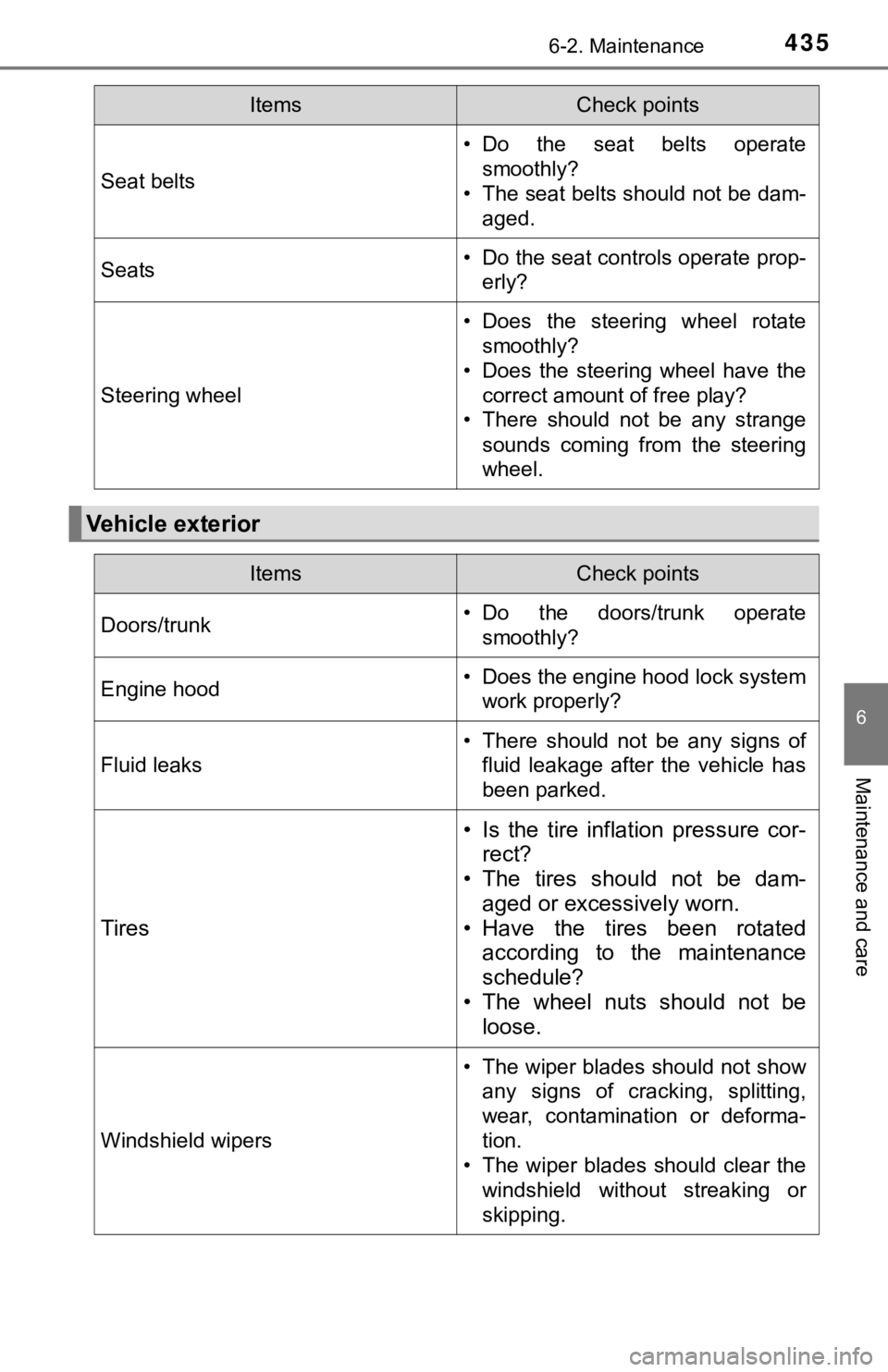
4356-2. Maintenance
6
Maintenance and care
Seat belts
• Do the seat belts operatesmoothly?
• The seat belts should not be dam- aged.
Seats• Do the seat controls operate prop-erly?
Steering wheel
• Does the steering wheel rotatesmoothly?
• Does the steering wheel have the correct amount of free play?
• There should not be any strange
sounds coming from the steering
wheel.
Vehicle exterior
ItemsCheck points
ItemsCheck points
Doors/trunk• Do the doors/trunk operatesmoothly?
Engine hood• Does the engine hood lock systemwork properly?
Fluid leaks
• There should not be any signs offluid leakage after the vehicle has
been parked.
Tires
• Is the tire inflation pressure cor-rect?
• The tires should not be dam-
aged or excessively worn.
• Have the tires been rotated according to the maintenance
schedule?
• The wheel nuts should not be loose.
Windshield wipers
• The wiper blades should not show
any signs of cracking, splitting,
wear, contamination or deforma-
tion.
• The wiper blades should clear the windshield without streaking or
skipping.
Page 623 of 624

623Alphabetical index
Warning lights............................ 97ABS....................................... 510
Brake hold operated indicator .............................. 510
Brake system ....... ................. 509
Electric power steering ......... 510
Intuitive parking assist OFF indicator .............................. 327
Low fuel level ........................ 512
LTA (Lane Tracing Assist) indicator .............................. 511
Malfunction indicator lamp .... 509
Master warning light.............. 512
Parking brake indicator ......... 510
PCS warning light ................. 511
PKSB OFF indicator ............. 511
RCD OFF indicator ............... 341
Seat belt reminder light ......... 512
Slip indicator ......................... 512
SRS ...................................... 509
Tire pressure......................... 513
Warning messages .................. 519
Washer...................................... 244
Checking ............................... 450
Preparing and checking before winter....................... 373
Switch ................................... 244
Washing and waxing ............... 424 Weight ...................................... 556
Cargo capacity...................... 209
Load limits ............................ 209
Vehicle capacity weight ........ 556
Wheels ...................................... 473 Replacing.............................. 473
Size....................................... 562
Window glasses ...................... 189
Window lock switch ................ 189
Windows................................... 189 Power windows..................... 189
Rear window defogger.......... 382
Washer ................................. 244
Windshield wipers ................... 244
Winter driving tips ................... 373
Wireless charger ..................... 404
Wireless remote control ......... 154 Battery-Saving Function ....... 170
Locking/Unlocking ........ 158, 164
Panic mode........................... 155
Replacing the battery............ 482
WMA disc
*
*: Refer to the “NAVIGATION AND MULTIMEDIA SYSTEM OWNER’S MANUAL”.