cruise control TOYOTA CAMRY HYBRID 2021 (in English) Owner's Manual
[x] Cancel search | Manufacturer: TOYOTA, Model Year: 2021, Model line: CAMRY HYBRID, Model: TOYOTA CAMRY HYBRID 2021Pages: 624, PDF Size: 15.98 MB
Page 298 of 624

2984-5. Using the driving support systems
WARNING
■Situations unsuitable for dynamic radar cruise control with ful l-speed
range
Do not use dynamic radar cruise control with full-speed range in any of the
following situations.
Doing so may result in inappropriate speed control and could cause an acci-
dent resulting in death or serious injury.
● Roads where there are pedestrians, cyclists, etc.
● In heavy traffic
● On roads with sharp bends
● On winding roads
● On slippery roads, such as those covered with rain, ice or snow
● On steep downhills, or where there are sudden changes between s harp up
and down gradients
Vehicle speed may exceed the set speed when driving down a stee p hill.
● At entrances to freeways and highways
● When weather conditions are bad enough that they may prevent the sen-
sors from detecting correctly (fog, snow, sandstorm, heavy rain, etc.)
● When there is rain, snow, etc. on the front surface of the rada r or front
camera
● In traffic conditions that require frequent repeated acceleration and decel-
eration
● During emergency towing
● When an approach warning buzzer is heard often
Page 300 of 624
3004-5. Using the driving support systems
When the turn signal lever is operated and your vehicle moves to an over-
taking lane while driving at 50 mph (80 km/h) or more, the vehi cle will
accelerate to help to overtake a passing vehicle.
The system’s identification of what is an overtaking lane may b e deter-
mined solely based on the location of the steering wheel in the vehicle (left
side driver position versus right side driver position.) If the vehicle is driven
to a region where the overtaking lane is on a different side fr om where the
vehicle is normally driven, the vehicle may accelerate when the turn signal
lever is operated in the opposite direction to the overtaking l ane (e.g., if the
driver normally operates the vehicle in a region where the overtaking lane
is to the right but then drives to a region where the overtaking lane is to the
left, the vehicle may accelerate when the right turn signal is activated).
Example of acceleration
When there are no longer any preceding vehicles driving slower
than the set speed
The system accelerates until the set speed is reached. The syst em then
returns to constant speed cruising.
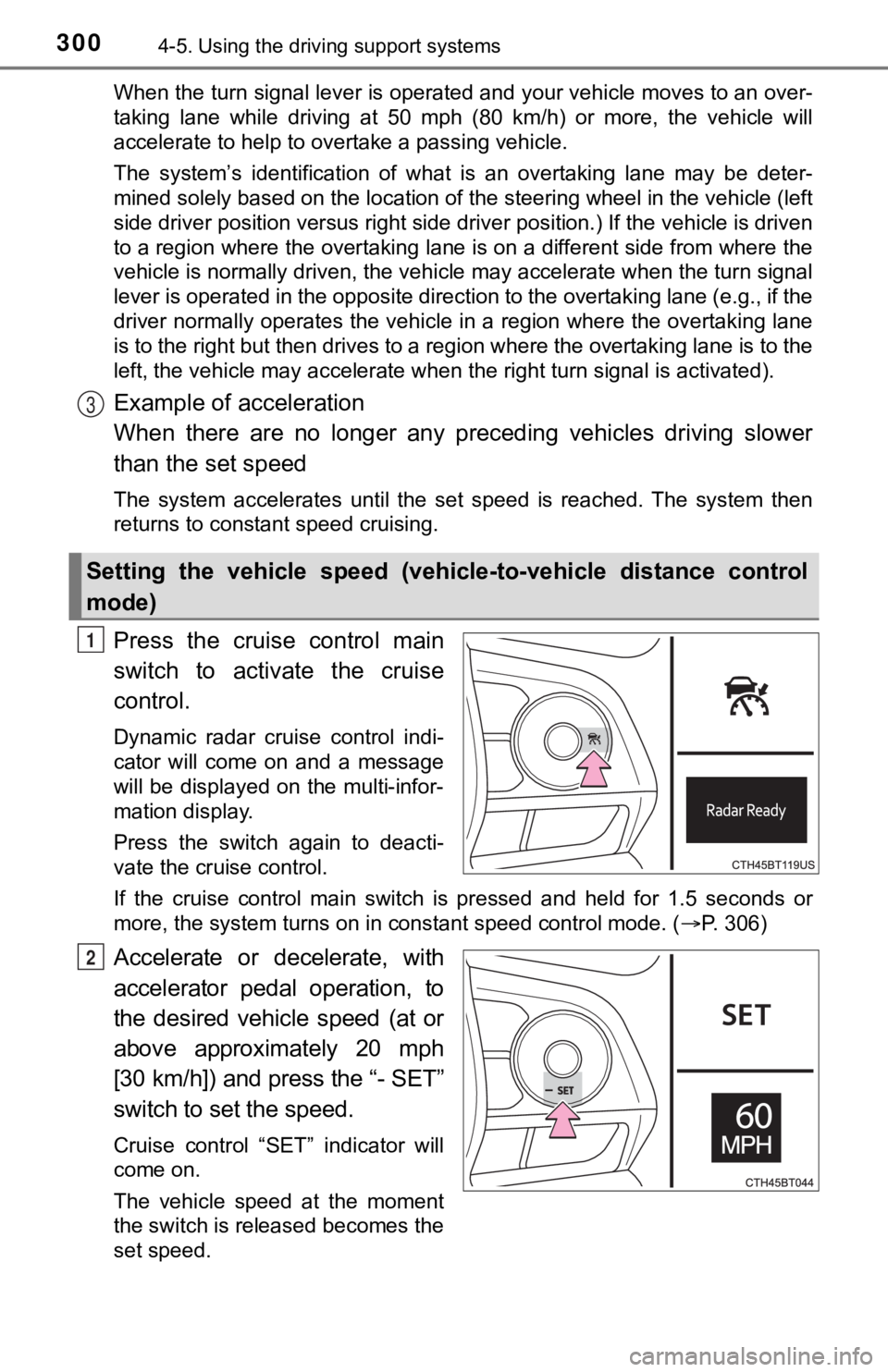
Press the cruise control main
switch to activate the cruise
control.
Dynamic radar cruise control indi-
cator will come on and a message
will be displayed on the multi-infor-
mation display.
Press the switch again to deacti-
vate the cruise control.
If the cruise control main switch is pressed and held for 1.5 seconds or
more, the system turns on in constant speed control mode. ( P. 306)
Accelerate or decelerate, with
accelerator pedal operation, to
the desired vehicle speed (at or
above approximately 20 mph
[30 km/h]) and press the “- SET”
switch to set the speed.
Cruise control “SET” indicator will
come on.
The vehicle speed at the moment
the switch is released becomes the
set speed.
Setting the vehicle speed (vehicle-to-vehicle distance control
mode)
3
1
2
Page 303 of 624
3034-5. Using the driving support systems
4
Driving
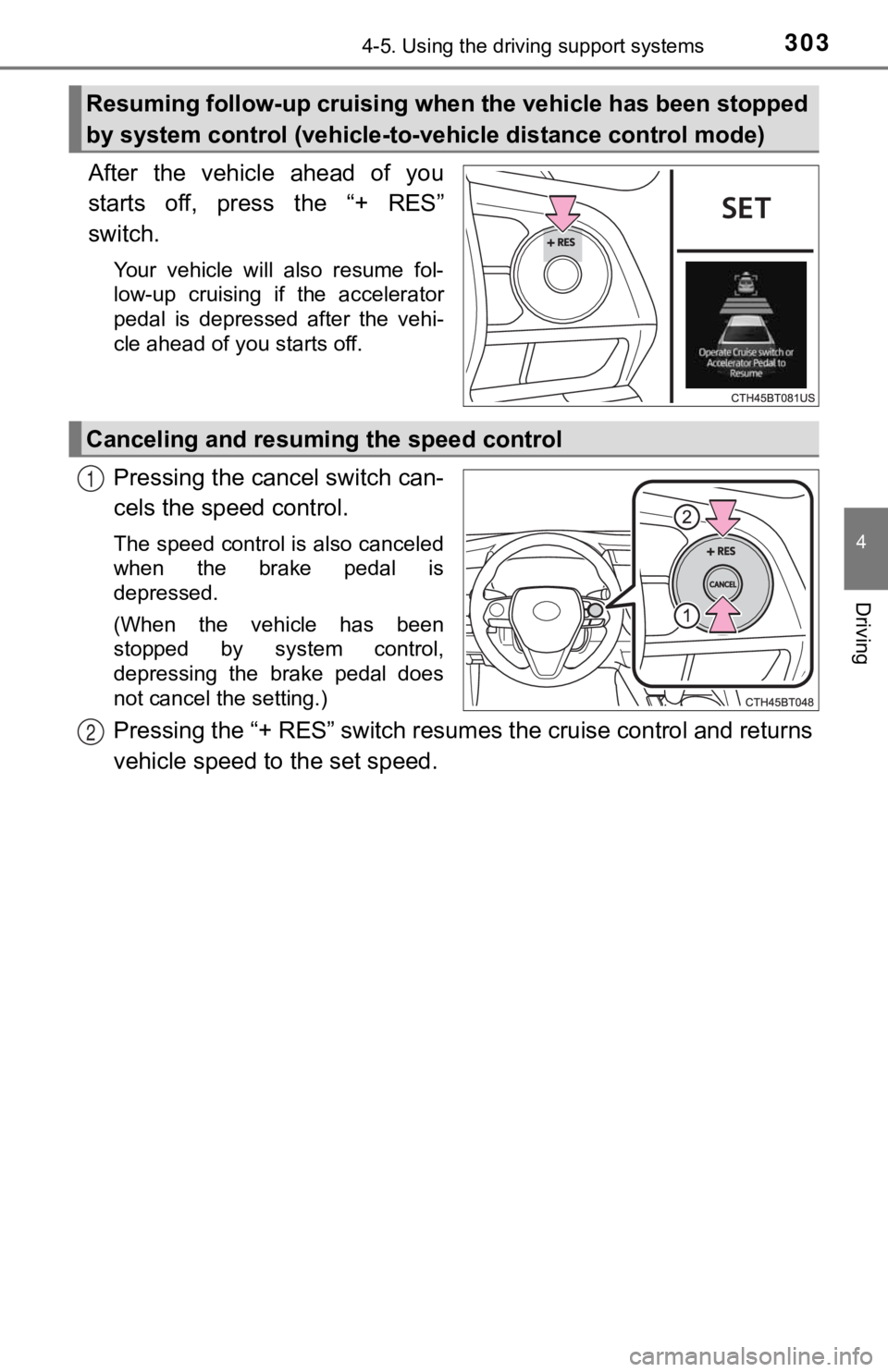
After the vehicle ahead of you
starts off, press the “+ RES”
switch.
Your vehicle will also resume fol-
low-up cruising if the accelerator
pedal is depressed after the vehi-
cle ahead of you starts off.
Pressing the cancel switch can-
cels the speed control.
The speed control is also canceled
when the brake pedal is
depressed.
(When the vehicle has been
stopped by system control,
depressing the brake pedal does
not cancel the setting.)
Pressing the “+ RES” switch resumes the cruise control and returns
vehicle speed to the set speed.
Resuming follow-up cruising when the vehicle has been stopped
by system control (vehicle-to- vehicle distance control mode)
Canceling and resuming the speed control
1
2
Page 304 of 624
3044-5. Using the driving support systems
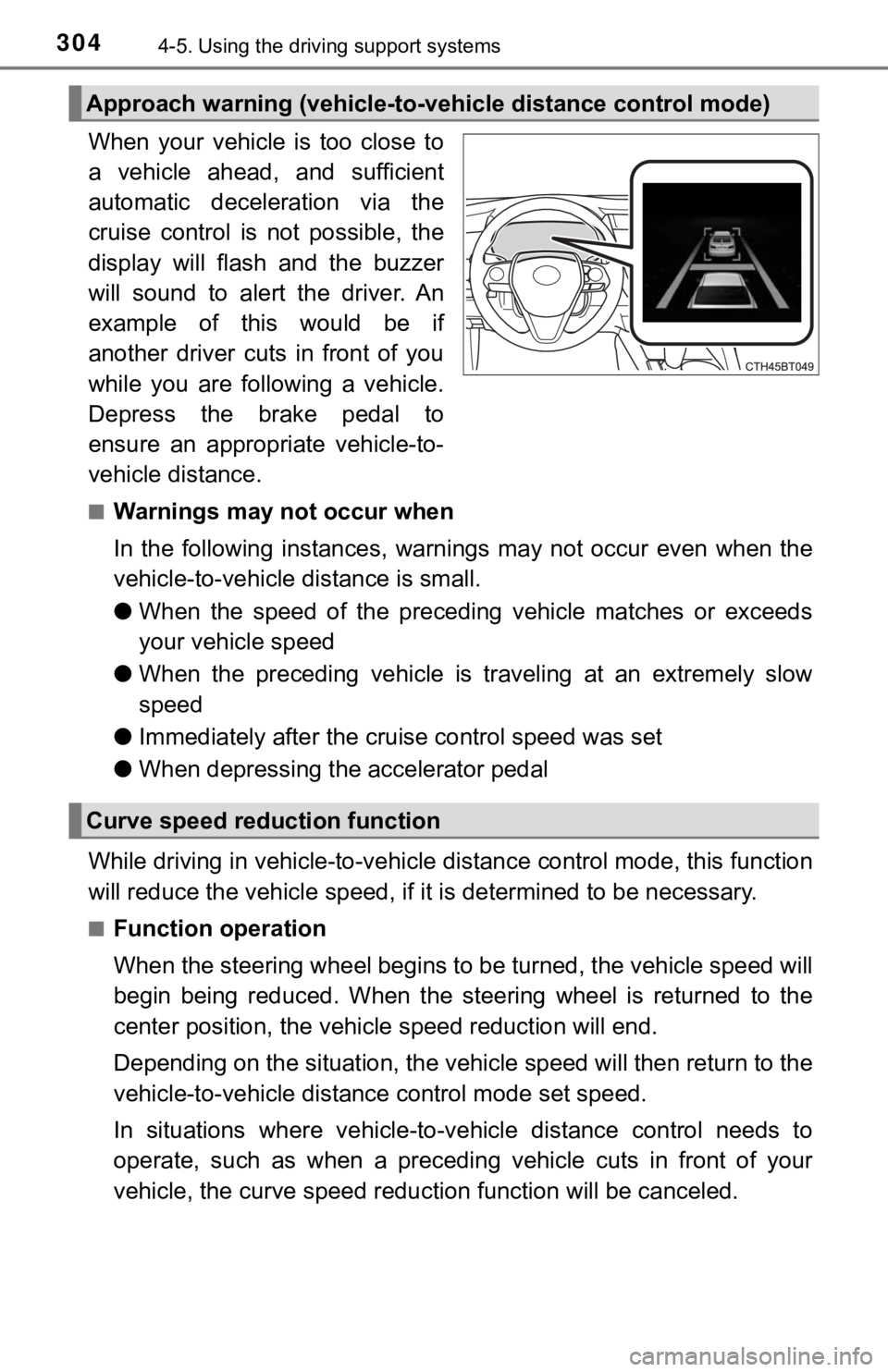
When your vehicle is too close to
a vehicle ahead, and sufficient
automatic deceleration via the
cruise control is not possible, the
display will flash and the buzzer
will sound to alert the driver. An
example of this would be if
another driver cuts in front of you
while you are following a vehicle.
Depress the brake pedal to
ensure an appropriate vehicle-to-
vehicle distance.
■Warnings may not occur when
In the following instances, war nings may not occur even when th e
vehicle-to-vehicle distance is small.
● When the speed of the preceding vehicle matches or exceeds
your vehicle speed
● When the preceding vehicle is traveling at an extremely slow
speed
● Immediately after the cruise control speed was set
● When depressing the accelerator pedal
While driving in vehicle-to-vehi cle distance control mode, this function
will reduce the vehicl e speed, if it is determined to be necess ary.
■Function operation
When the steering wheel begins to be turned, the vehicle speed will
begin being reduced. When the steering wheel is returned to the
center position, the vehicl e speed reduction will end.
Depending on the situat ion, the vehicle speed will then return to the
vehicle-to-vehicle distanc e control mode set speed.
In situations where vehicle-to-v ehicle distance control needs to
operate, such as when a preceding vehicle cuts in front of your
vehicle, the curve speed reduction function will be canceled.
Approach warning (vehicle-to-v ehicle distance control mode)
Curve speed reduction function
Page 306 of 624
3064-5. Using the driving support systems
When constant speed control mode is selected, your vehicle will main-
tain a set speed without controllin g the vehicle-to-vehicle distance.
Select this mode only when vehic le-to-vehicle distance control mode
does not function correctly due to a dirty radar, etc.
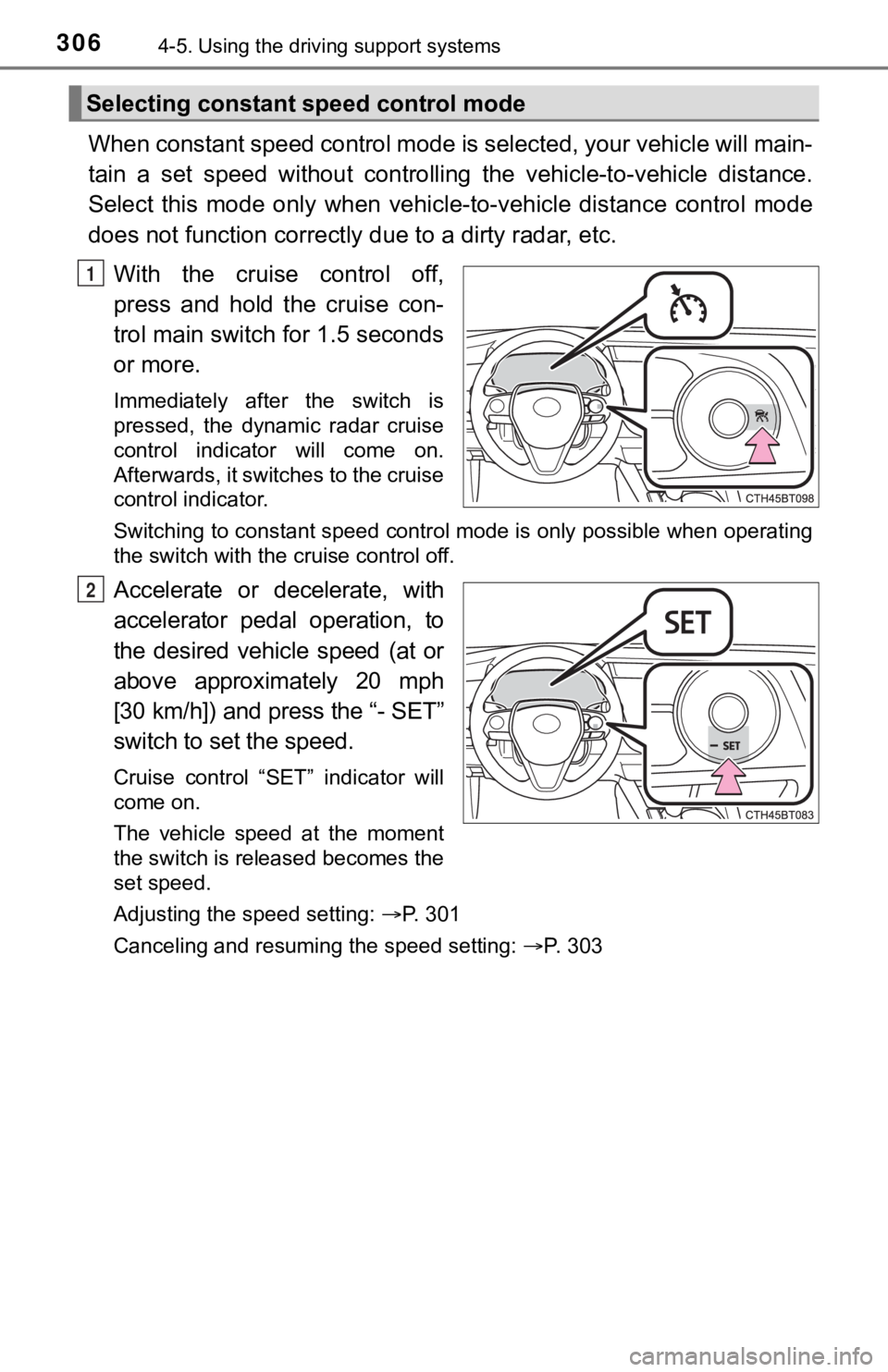
With the cruise control off,
press and hold the cruise con-
trol main switch for 1.5 seconds
or more.
Immediately after the switch is
pressed, the dynamic radar cruise
control indicator will come on.
Afterwards, it switches to the cruise
control indicator.
Switching to constant speed control mode is only possible when operating
the switch with the cruise control off.
Accelerate or decelerate, with
accelerator pedal operation, to
the desired vehicle speed (at or
above approximately 20 mph
[30 km/h]) and press the “- SET”
switch to se t the speed.
Cruise control “SET” indicator will
come on.
The vehicle speed at the moment
the switch is released becomes the
set speed.
Adjusting the speed setting: P. 301
Canceling and resuming the speed setting: P. 303
Selecting constant speed control mode
1
2
Page 307 of 624

3074-5. Using the driving support systems
4
Driving
■Dynamic radar cruise control wi th full-speed range can be set when
● The shift lever is in D.
● The desired set speed can be set when the vehicle speed is approximately
20 mph (30 km/h) or more.
(However, when the vehicle speed is set while driving at below approxi-
mately 20 mph [30 km/h], the set speed will be set to approximately 20 mph
[30 km/h].)
■ Accelerating after setting the vehicle speed
The vehicle can accelerate by operating the accelerator pedal. After acceler-
ating, the set speed resumes. However, during vehicle-to-vehicl e distance
control mode, the vehicle speed may decrease below the set spee d in order
to maintain the distance to the preceding vehicle.
■ When the vehicle stops while follow-up cruising
●Pressing the “+ RES” switch while the vehicle ahead stops will resume fol-
low-up cruising if the vehicle ahead starts off within approxim ately 3 sec-
onds after the switch is pressed.
● If the vehicle ahead starts off within 3 seconds after your vehicle stops, fol-
low-up cruising will be resumed.
■ Automatic cancelation of vehicle-to-vehicle distance control mo de
Vehicle-to-vehicle distance control mode is automatically cance led in the fol-
lowing situations:
● VSC is activated.
● TRAC is activated for a period of time.
● When the VSC or TRAC system is turned off.
● The sensor cannot detect correctly because it is covered in some way.
● Pre-collision braking is activated.
● The parking brake is operated.
● The vehicle is stopped by system control on a steep incline.
● The following are detected when the vehicle has been stopped by system
control:
• The driver is not wearing a seat belt.
• The driver’s door is opened.
• The vehicle has been stopped for about 3 minutes
If vehicle-to-vehicle distance control mode is automatically ca nceled for any
reasons other than the above, there may be a malfunction in the system.
Contact your Toyota dealer.
Page 308 of 624

3084-5. Using the driving support systems
■Automatic cancelation of c onstant speed control mode
Constant speed control mode is automatically canceled in the following situa-
tions:
● Actual vehicle speed is more than approximately 10 mph (16 km/h ) below
the set vehicle speed.
● Actual vehicle speed falls below approximately 20 mph (30 km/h) .
● VSC is activated.
● TRAC is activated for a period of time.
● When the VSC or TRAC system is turned off.
● Pre-collision braking is activated.
If constant speed control mode is automatically canceled for any reasons
other than the above, there may be a malfunction in the system. Contact your
Toyota dealer.
■ Situations in which the curve speed reduction function may not operate
In situations such as the following, the curve speed reduction function may
not operate:
● When the vehicle is being driven around a gentle curve
● When the accelerator pedal is being depressed
● When the vehicle is being driven around an extremely short curve
■ Brake operation
A brake operation sound may be heard and the brake pedal response may
change, but these are not malfunctions.
■ Warning messages and buzzers for d ynamic radar cruise control with
full-speed range
Warning messages and buzzers are used to indicate a system malfunction or
to inform the driver of the need for caution while driving. If a warning message
is shown on the multi-information display, read the message and follow the
instructions. ( P. 258, 519)
Page 369 of 624
3694-5. Using the driving support systems
4
Driving
■Operation of the air conditioning system in Eco drive mode
Eco drive mode controls the heating/cooling operations and fan speed of the
air conditioning system to enhance fuel efficiency ( P. 378). To improve air
conditioning performance, adjust the fan speed or turn off Eco drive mode.
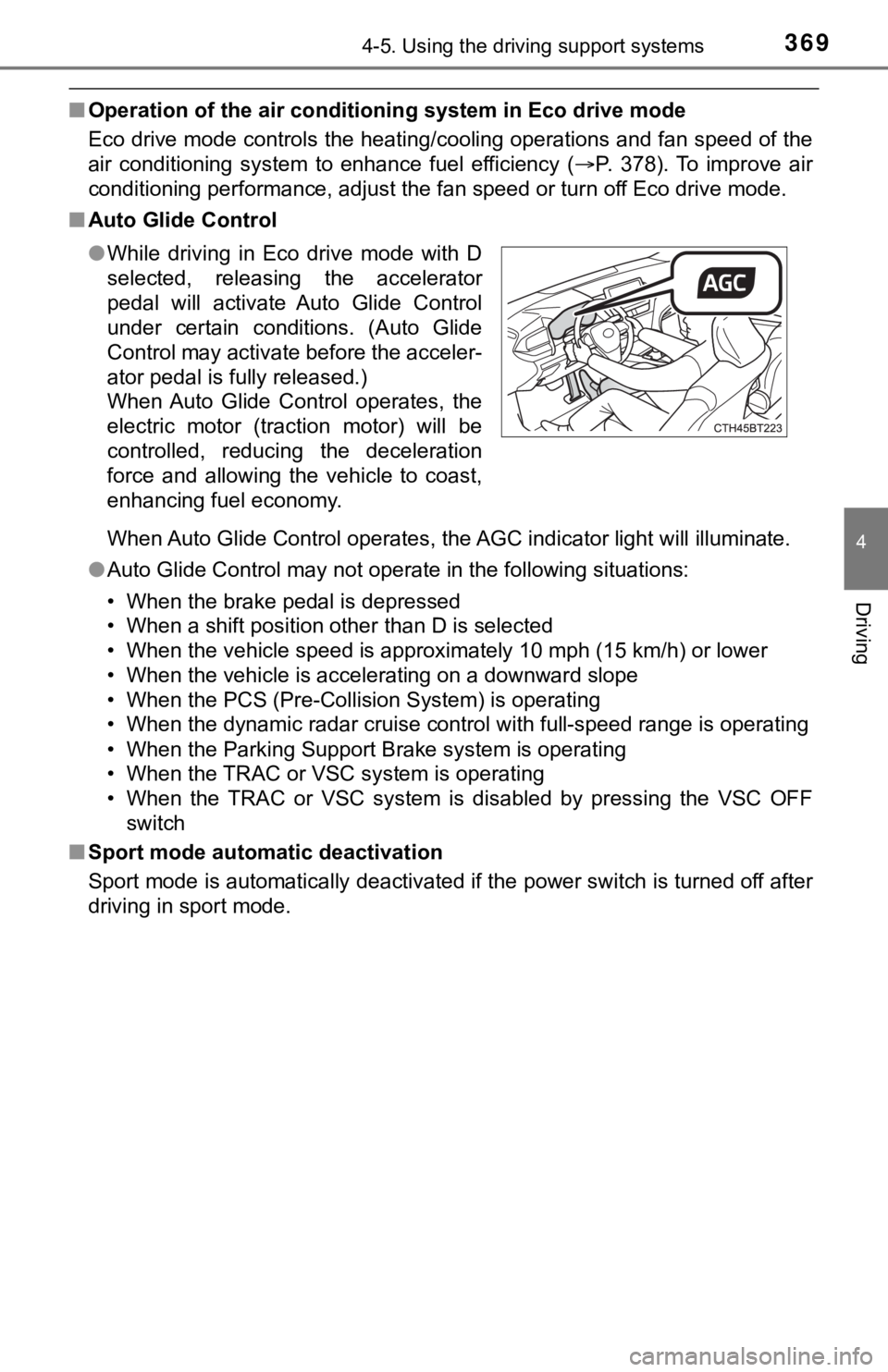
■ Auto Glide Control
When Auto Glide Control operates, the AGC indicator light will illuminate.
● Auto Glide Control may not operate in the following situations:
• When the brake pedal is depressed
• When a shift position other than D is selected
• When the vehicle speed is approximately 10 mph (15 km/h) or lo wer
• When the vehicle is accelerating on a downward slope
• When the PCS (Pre-Collision System) is operating
• When the dynamic radar cruise control with full-speed range is operating
• When the Parking Support Brake system is operating
• When the TRAC or VSC system is operating
• When the TRAC or VSC system is disabled by pressing the VSC OF F
switch
■ Sport mode automatic deactivation
Sport mode is automatically deactivated if the power switch is turned off after
driving in sport mode. ● While driving in Eco drive mode with D
selected, releasing the accelerator
pedal will activate Auto Glide Control
under certain conditions. (Auto Glide
Control may activate before the acceler-
ator pedal is fully released.)
When Auto Glide Control operates, the
electric motor (traction motor) will be
controlled, reducing the deceleration
force and allowing the vehicle to coast,
enhancing fuel economy.
Page 523 of 624

5237-2. Steps to take in an emergency
7
When trouble arises
■If “Auto Power Off to Con serve Battery” is displayed
This message is displayed when the power was cut off due to the automatic
power off function.
The next time the hybrid system is started, increase the engine speed slightly
and maintain it at that speed for approximately 5 minutes to re charge the 12-
volt battery.
■ If “A New Key has been Registered Contact Your Dealer for Detai ls” is
displayed
This message will be displayed each time the driver’s door is opened when
the doors are unlocked from the outside for approximately one week after a
new electronic key has been registered.
If this message is displayed but you have not had a new electro nic key regis-
tered, ask your Toyota dealer to check if an unknown electronic key (other
than those in your possession) has been registered.
■ If “Headlight System Malfunction Visit Your Dealer” is displayed
The following systems may be malfunctioning. Have the vehicle i nspected by
your Toyota dealer immediately.
● The LED headlight system
● The automatic headlight leveling system (if equipped)
● AHB (Automatic High Beam)
● AFS (Adaptive Front-lighting System) (if equipped)
■ If “Radar Cruise Control Unavailable See Owner's Manual” is sho wn
The dynamic radar cruise control with full-speed range system is suspended
temporarily or until the problem shown in the message is resolv ed. (causes
and coping methods: P. 258)
■ If “Radar Cruise Control Unavailable” is shown
The dynamic radar cruise control with full-speed range system c annot be
used temporarily. Use the system when it becomes available agai n.
■ If a message that indicates the mal function of front camera is displayed
The following systems may be suspended until the problem shown in the
message is resolved. ( P. 258, 509)
● PCS (Pre-Collision System)
● LTA (Lane Tracing Assist)
● AHB (Automatic High Beam)
● RSA (Road Sign Assist) (if equipped)
● Dynamic radar cruise control with full-speed range
■ If a message that indicates the malfunction of radar sensor is displayed
The following systems may be suspended until the problem shown in the
message is resolved. ( P. 258, 509)
● PCS (Pre-Collision System)
● LTA (Lane Tracing Assist)
● Dynamic radar cruise control with full-speed range
Page 535 of 624

5357-2. Steps to take in an emergency
7
When trouble arises
WARNING
■When using the compact spare tire
●Remember that the compact spare tire provided is specifically
designed for use with your vehicle. Do not use your compact spare tire
on another vehicle.
●Do not use more than one compact spare tires simultaneously.
●Replace the compact spare tire with a standard tire as soon as possi-
ble.
●Avoid sudden acceleration, abrupt steering, sudden braking and shift-
ing operations that cause sudden engine braking.
■When the compact spa re tire is attached
The vehicle speed may not be co rrectly detected, and the following sys-
tems may not operate correctly:
*:If equipped
■Speed limit when using the compact spare tire
Do not drive at speeds in excess of 50 mph (80 km/h) when a com pact
spare tire is installed on the vehicle.
The compact spare tire is not designed for driving at high spee ds. Fail-
ure to observe this precaution may lead to an accident causing death or
serious injury.
■After using the tools and jack
Before driving, make sure all t he tools and jack are securely i n place in
their storage location to reduce the possibility of personal in jury during a
collision or sudden braking.
• ABS & Brake assist
• VSC
• TRAC
• EPS
• AHB (Automatic High Beam)
•AFS (Adaptive Front-lighting
System)
*
• Dynamic radar cruise control with full-speed range
• LTA (Lane Tracing Assist)
• PCS (Pre-Collision System)
• Tire pressure warning system
• BSM (Blind Spot Monitor)
*
• Intuitive parking assist*
• PKSB (Parking Support
Brake)
*
• Rear view monitor system*
• Toyota parking assist monitor*
• Panoramic view monitor*
• Navigation system*