oil level TOYOTA CAMRY HYBRID 2021 Owners Manual (in English)
[x] Cancel search | Manufacturer: TOYOTA, Model Year: 2021, Model line: CAMRY HYBRID, Model: TOYOTA CAMRY HYBRID 2021Pages: 624, PDF Size: 15.98 MB
Page 5 of 624
5
1
9 7 6
5
4
3
2
8
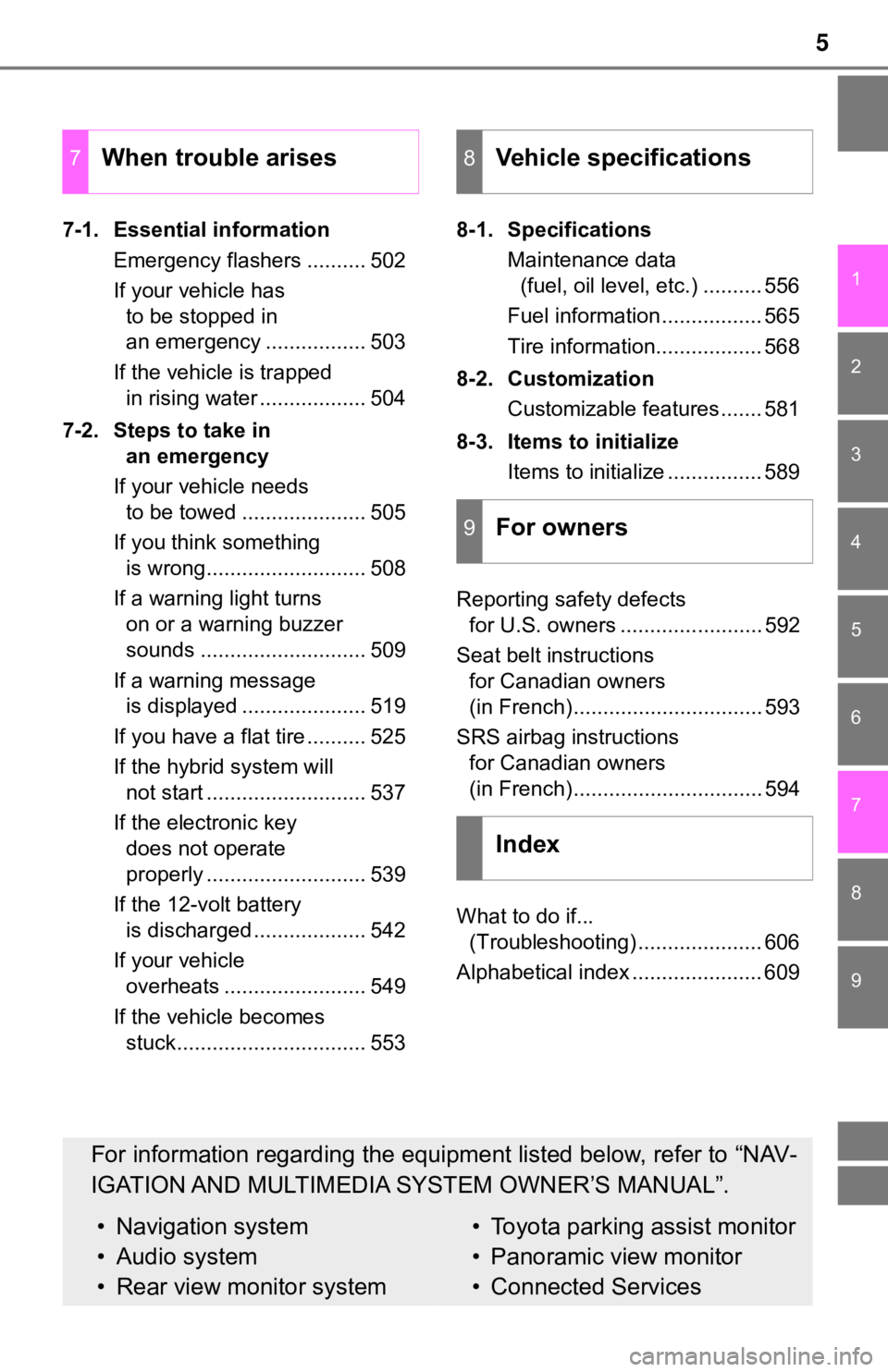
7-1. Essential informationEmergency flashers .......... 502
If your vehicle has to be stopped in
an emergency ................. 503
If the vehicle is trapped in rising water .................. 504
7-2. Steps to take in an emergency
If your vehicle needs to be towed ..................... 505
If you think something is wrong........................... 508
If a warning light turns on or a warning buzzer
sounds ............................ 509
If a warning message is displayed ..................... 519
If you have a flat tire .......... 525
If the hybrid system will not start ........................... 537
If the electronic key does not operate
properly ........................... 539
If the 12-volt battery is discharged ................... 542
If your vehicle overheats ........................ 549
If the vehicle becomes stuck................................ 553 8-1. Specifications
Maintenance data (fuel, oil level, etc.) .......... 556
Fuel information ................. 565
Tire information.................. 568
8-2. Customization Customizable features ....... 581
8-3. Items to initialize Items to initialize ................ 589
Reporting safety defects for U.S. owners ........................ 592
Seat belt instructions for Canadian owners
(in French)................................ 593
SRS airbag instructions for Canadian owners
(in French)................................ 594
What to do if... (Troubleshooting) ..................... 606
Alphabetical index ...................... 609
7When trouble arises8Vehicle specifications
9For owners
Index
For information regarding the equipment listed below, refer to “NAV-
IGATION AND MULTIMEDIA SYSTEM OWNER’S MANUAL”.
• Navigation system
• Audio system
• Rear view monitor system• Toyota parking assist monitor
• Panoramic view monitor
• Connected Services
Page 286 of 624
2864-5. Using the driving support systems
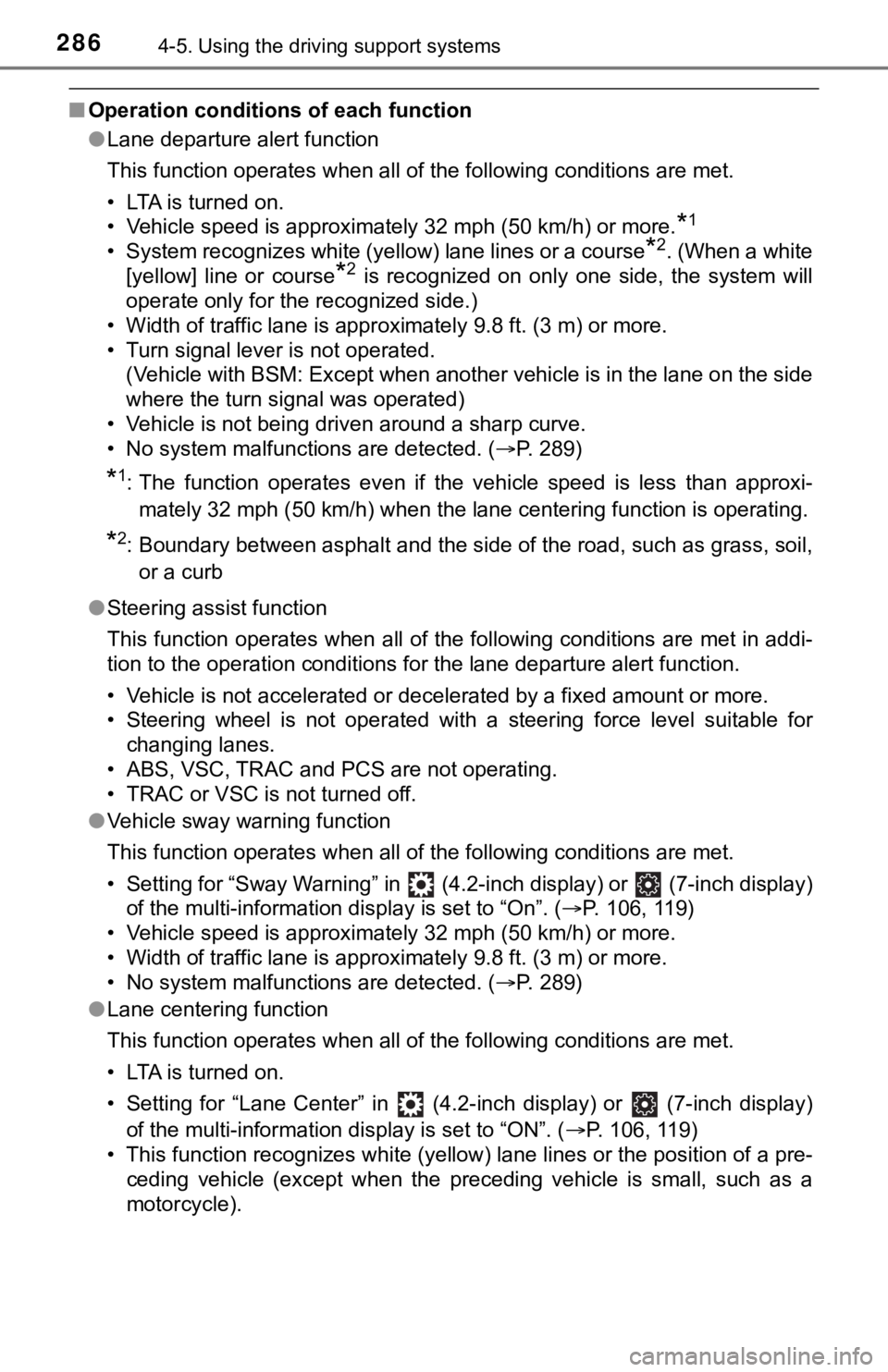
■Operation conditio ns of each function
● Lane departure alert function
This function operates when all of the following conditions are met.
• LTA is turned on.
• Vehicle speed is approximately 32 mph (50 km/h) or more.
*1
• System recognizes white (yellow) lane lines or a course*2. (When a white
[yellow] line or course
*2 is recognized on only one side, the system will
operate only for the recognized side.)
• Width of traffic lane is approximately 9.8 ft. (3 m) or more.
• Turn signal lever is not operated. (Vehicle with BSM: Except when another vehicle is in the lane o n the side
where the turn signal was operated)
• Vehicle is not being driven around a sharp curve.
• No system malfunctions are detected. ( P. 289)
*1: The function operates even if the vehicle speed is less than a pproxi-
mately 32 mph (50 km/h) when the lane centering function is ope rating.
*2: Boundary between asphalt and the side of the road, such as gra ss, soil,
or a curb
● Steering assist function
This function operates when all of the following conditions are met in addi-
tion to the operation conditions for the lane departure alert function.
• Vehicle is not accelerated or decelerated by a fixed amount or more.
• Steering wheel is not operated with a steering force level suitable for changing lanes.
• ABS, VSC, TRAC and PCS are not operating.
• TRAC or VSC is not turned off.
● Vehicle sway warning function
This function operates when all of the following conditions are met.
• Setting for “Sway Warning” in (4.2-inch display) or (7-inch display)
of the multi-information display is set to “On”. ( P. 106, 119)
• Vehicle speed is approximately 32 mph (50 km/h) or more.
• Width of traffic lane is approximately 9.8 ft. (3 m) or more.
• No system malfunctions are detected. ( P. 289)
● Lane centering function
This function operates when all of the following conditions are met.
• LTA is turned on.
• Setting for “Lane Center” in (4.2-inch display) or (7-inch d isplay)
of the multi-information display is set to “ON”. ( P. 106, 119)
• This function recognizes white (yellow) lane lines or the posi tion of a pre-
ceding vehicle (except when the preceding vehicle is small, such as a
motorcycle).
Page 287 of 624
2874-5. Using the driving support systems
4
Driving
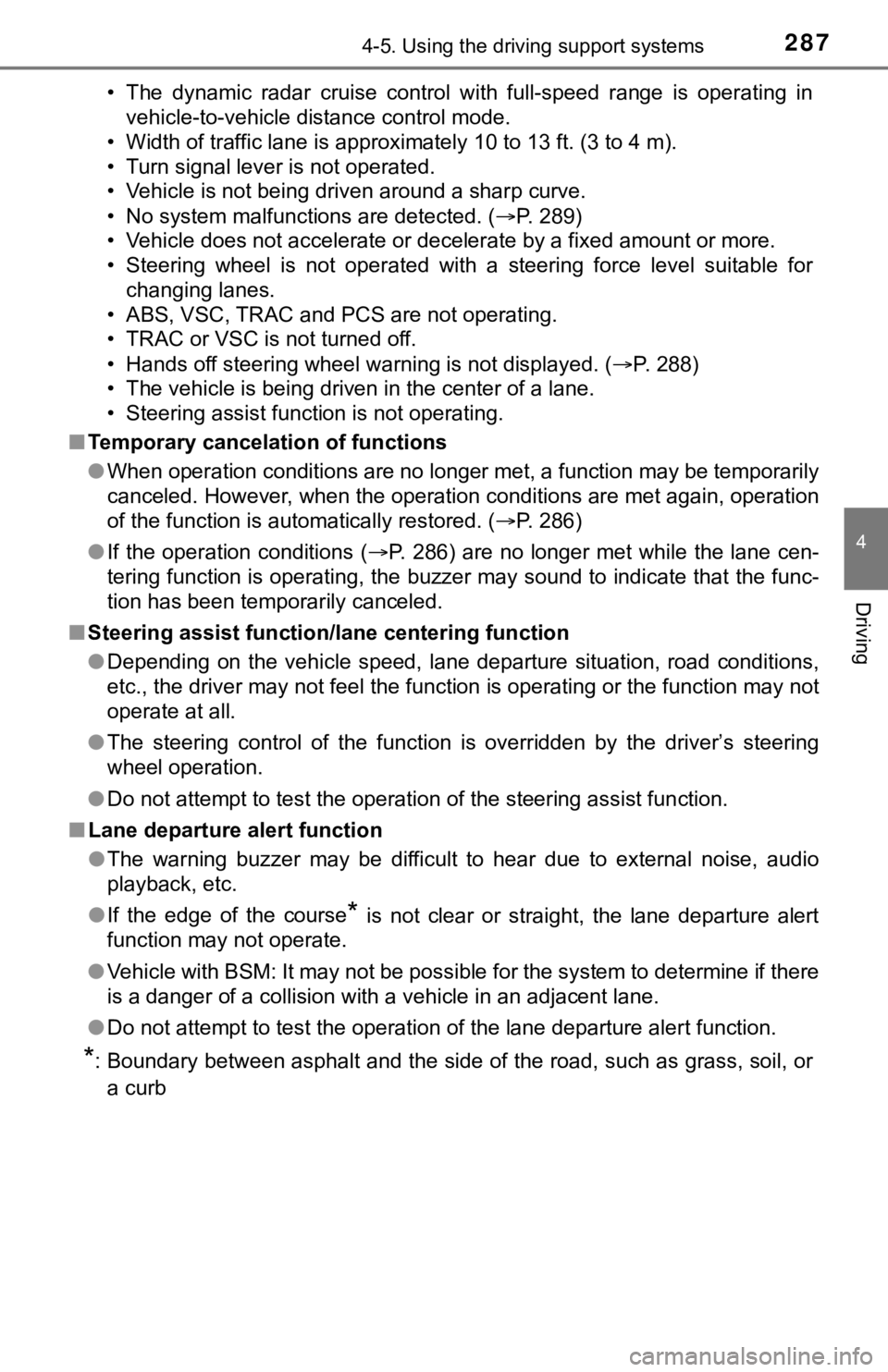
• The dynamic radar cruise control with full-speed range is operating in
vehicle-to-vehicle distance control mode.
• Width of traffic lane is approximately 10 to 13 ft. (3 to 4 m).
• Turn signal lever is not operated.
• Vehicle is not being driven around a sharp curve.
• No system malfunctions are detected. ( P. 289)
• Vehicle does not accelerate or decelerate by a fixed amount or more.
• Steering wheel is not operated with a steering force level suitable for
changing lanes.
• ABS, VSC, TRAC and PCS are not operating.
• TRAC or VSC is not turned off.
• Hands off steering wheel warning is not displayed. ( P. 2 8 8 )
• The vehicle is being driven in the center of a lane.
• Steering assist function is not operating.
■ Temporary cancelation of functions
●When operation conditions are no longer met, a function may be temporarily
canceled. However, when the operation conditions are met again, operation
of the function is automatically restored. ( P. 286)
● If the operation conditions ( P. 286) are no longer met while the lane cen-
tering function is operating, the buzzer may sound to indicate that the func-
tion has been temporarily canceled.
■ Steering assist function/lane centering function
●Depending on the vehicle speed, lane departure situation, road conditions,
etc., the driver may not feel the function is operating or the function may not
operate at all.
● The steering control of the function is overridden by the drive r’s steering
wheel operation.
● Do not attempt to test the operation of the steering assist fun ction.
■ Lane departure alert function
●The warning buzzer may be difficult to hear due to external noi se, audio
playback, etc.
● If the edge of the course
* is not clear or straight, the lane departure alert
function may not operate.
● Vehicle with BSM: It may not be possible for the system to determine if there
is a danger of a collision with a vehicle in an adjacent lane.
● Do not attempt to test the operation of the lane departure aler t function.
*: Boundary between asphalt and the side of the road, such as gra ss, soil, or
a curb
Page 433 of 624
4336-2. Maintenance
6
Maintenance and care
General maintenance
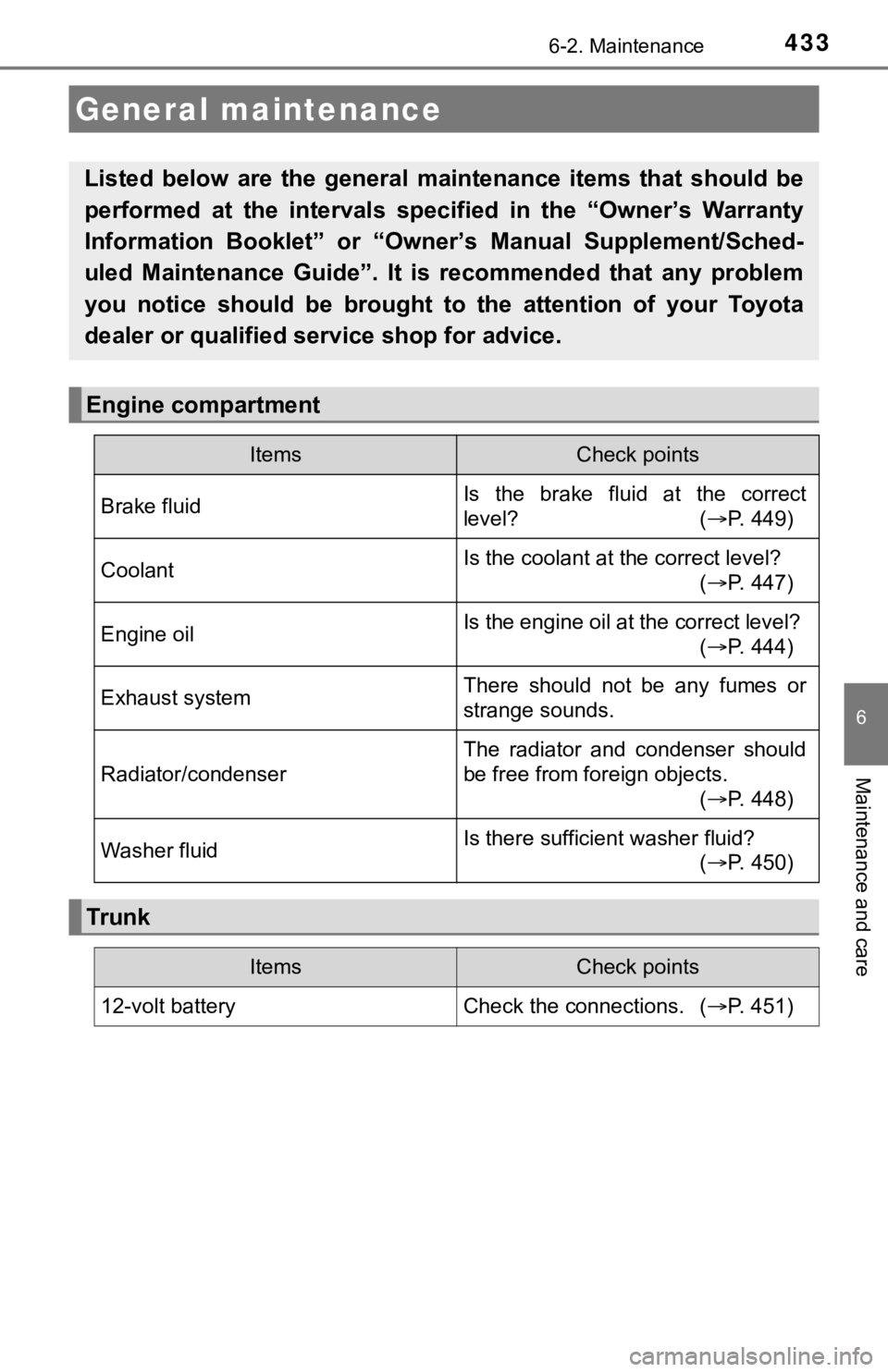
Listed below are the general maintenance items that should be
performed at the intervals specified in the “Owner’s Warranty
Information Booklet” or “Own er’s Manual Supplement/Sched-
uled Maintenance Guide”. It is recommended that any problem
you notice should be brought to the attention of your Toyota
dealer or qualified s ervice shop for advice.
Engine compartment
ItemsCheck points
Brake fluidIs the brake fluid at the correct
level? ( P. 449)
CoolantIs the coolant at the correct level?
(P. 447)
Engine oilIs the engine oil at the correct level?
(P. 444)
Exhaust systemThere should not be any fumes or
strange sounds.
Radiator/condenser
The radiator and condenser should
be free from foreign objects.
(P. 448)
Washer fluidIs there sufficient washer fluid?
(P. 450)
Tr u nk
ItemsCheck points
12-volt battery Check the connections. (P. 451)
Page 438 of 624
4386-3. Do-it-yourself maintenance
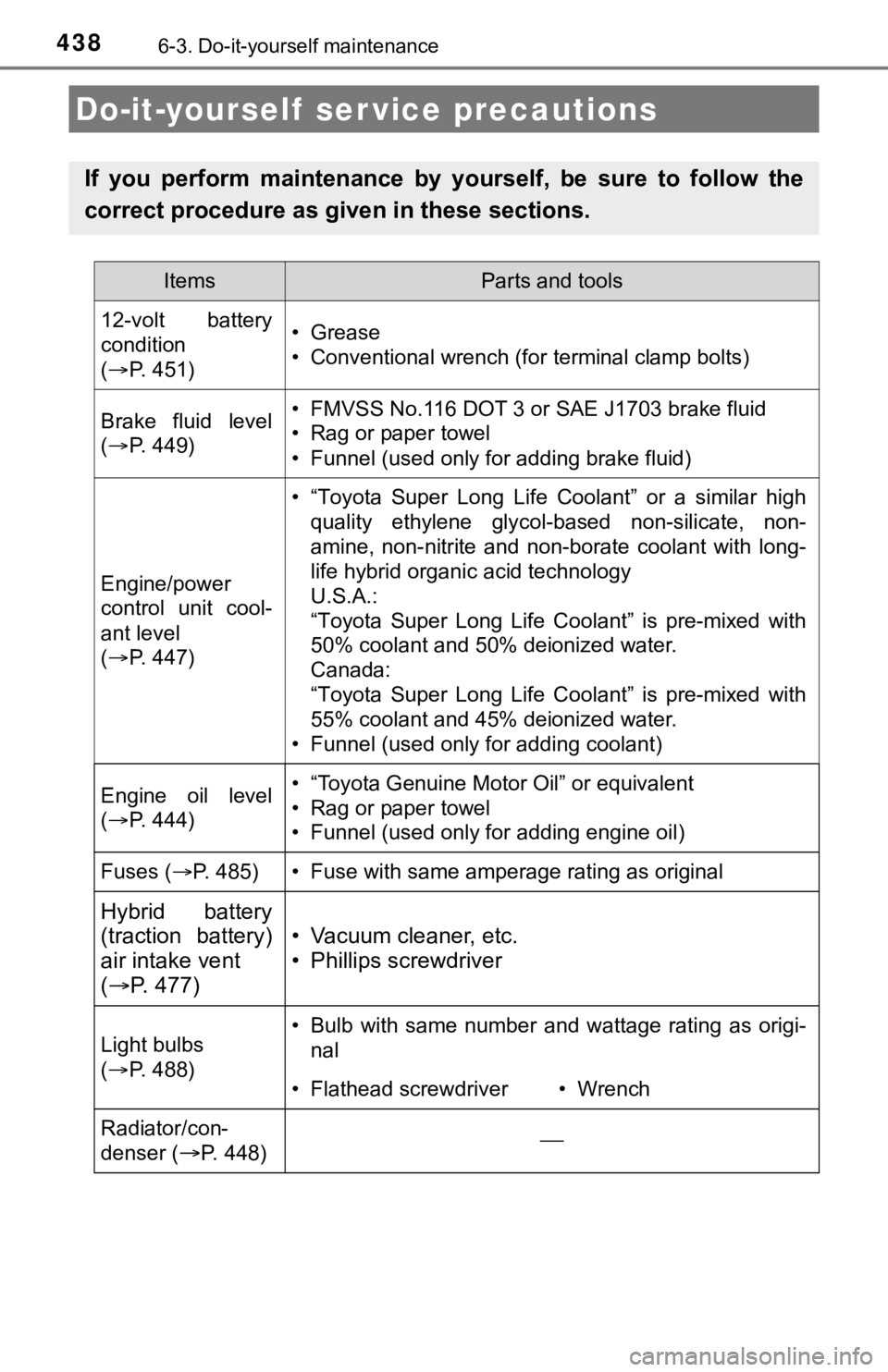
Do-it-yourself ser vice precautions
If you perform maintenance by yourself, be sure to follow the
correct procedure as given in these sections.
ItemsParts and tools
12-volt battery
condition
( P. 451)•Grease
• Conventional wrench (for terminal clamp bolts)
Brake fluid level
( P. 449)• FMVSS No.116 DOT 3 or SAE J1703 brake fluid
• Rag or paper towel
• Funnel (used only for adding brake fluid)
Engine/power
control unit cool-
ant level
( P. 447)
• “Toyota Super Long Life Coolant” or a similar high
quality ethylene glycol-based non-silicate, non-
amine, non-nitrite and non-borate coolant with long-
life hybrid organic acid technology
U.S.A.:
“Toyota Super Long Life Coolant” is pre-mixed with
50% coolant and 50% deionized water.
Canada:
“Toyota Super Long Life Coolant” is pre-mixed with
55% coolant and 45% deionized water.
• Funnel (used only for adding coolant)
Engine oil level
( P. 444)• “Toyota Genuine Motor Oil” or equivalent
• Rag or paper towel
• Funnel (used only for adding engine oil)
Fuses ( P. 485)• Fuse with same amperage rating as original
Hybrid battery
(traction battery)
air intake vent
( P. 477)
• Vacuum cleaner, etc.
• Phillips screwdriver
Light bulbs
( P. 488)• Bulb with same number and wattage rating as origi-
nal
• Flathead screwdriver• Wrench
Radiator/con-
denser (
P. 448)
Page 443 of 624
4436-3. Do-it-yourself maintenance
6
Maintenance and care
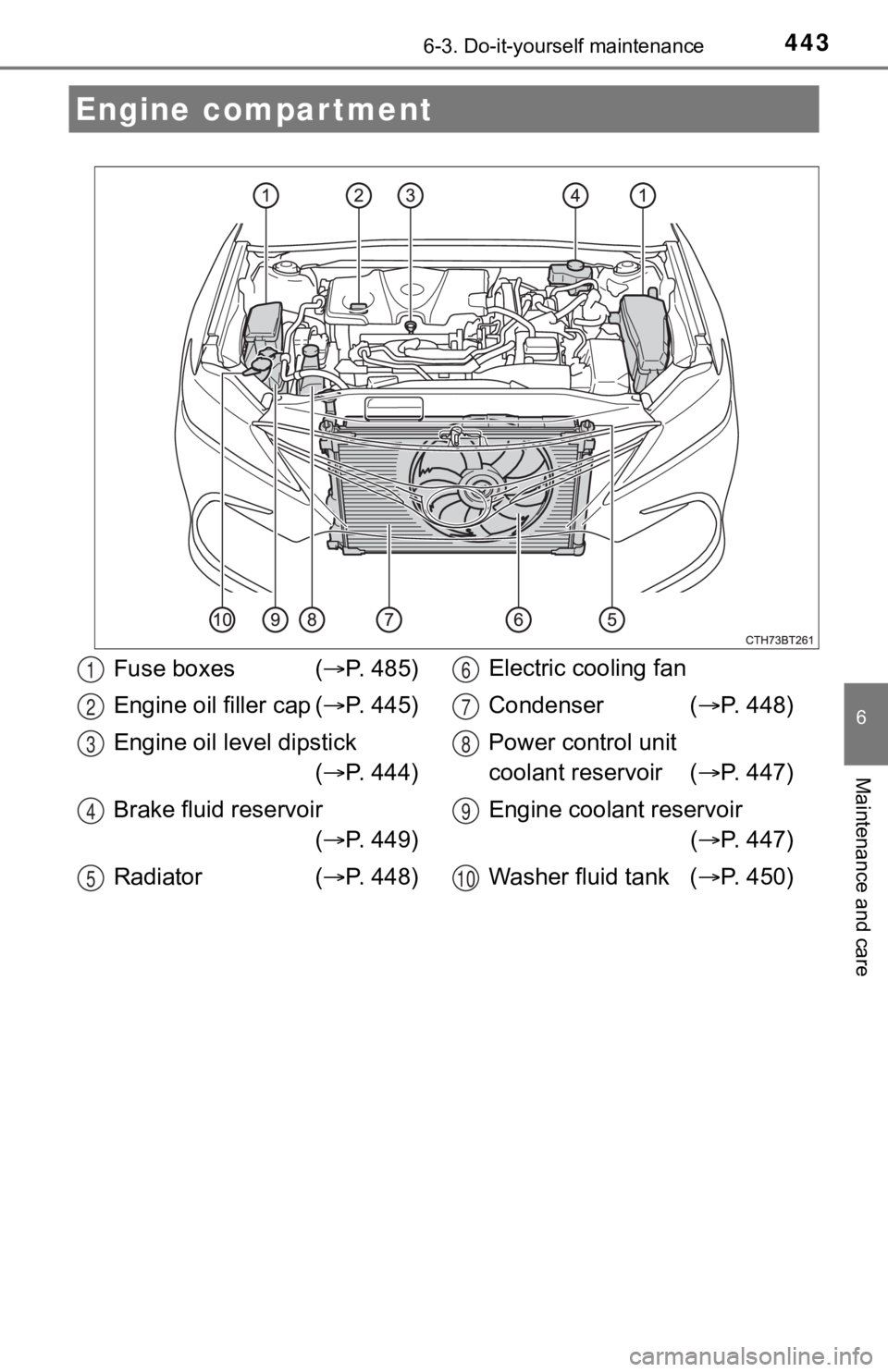
Engine compartment
Fuse boxes (P. 485)
Engine oil filler cap ( P. 445)
Engine oil level dipstick ( P. 444)
Brake fluid reservoir ( P. 449)
Radiator ( P. 448) Electric cooling fan
Condenser (
P. 448)
Power control unit
coolant reservoir ( P. 447)
Engine coolant reservoir ( P. 447)
Washer fluid tank ( P. 450)1
2
3
4
5
6
7
8
9
10
Page 444 of 624
4446-3. Do-it-yourself maintenance
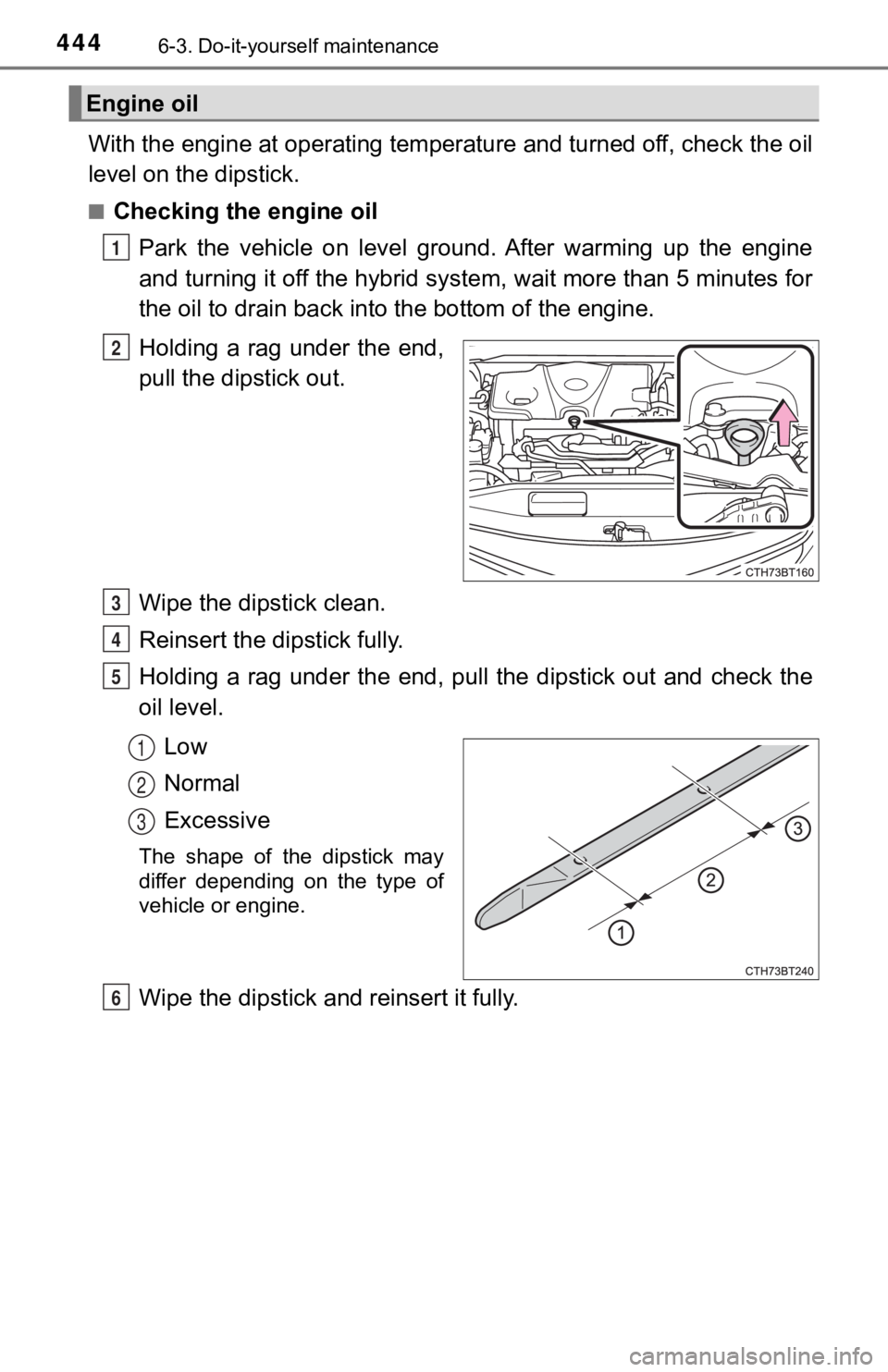
With the engine at operating temperature and turned off, check the oil
level on the dipstick.
■Checking the engine oil
Park the vehicle on level ground. After warming up the engine
and turning it off the hybrid sys tem, wait more than 5 minutes for
the oil to drain back into the bottom of the engine.
Holding a rag under the end,
pull the dipstick out.
Wipe the dipstick clean.
Reinsert the dipstick fully.
Holding a rag under the end, pull the dipstick out and check th e
oil level.
Low
Normal
Excessive
The shape of the dipstick may
differ depending on the type of
vehicle or engine.
Wipe the dipstick and reinsert it fully.
Engine oil
1
2
3
4
5
1
2
3
6
Page 445 of 624
4456-3. Do-it-yourself maintenance
6
Maintenance and care
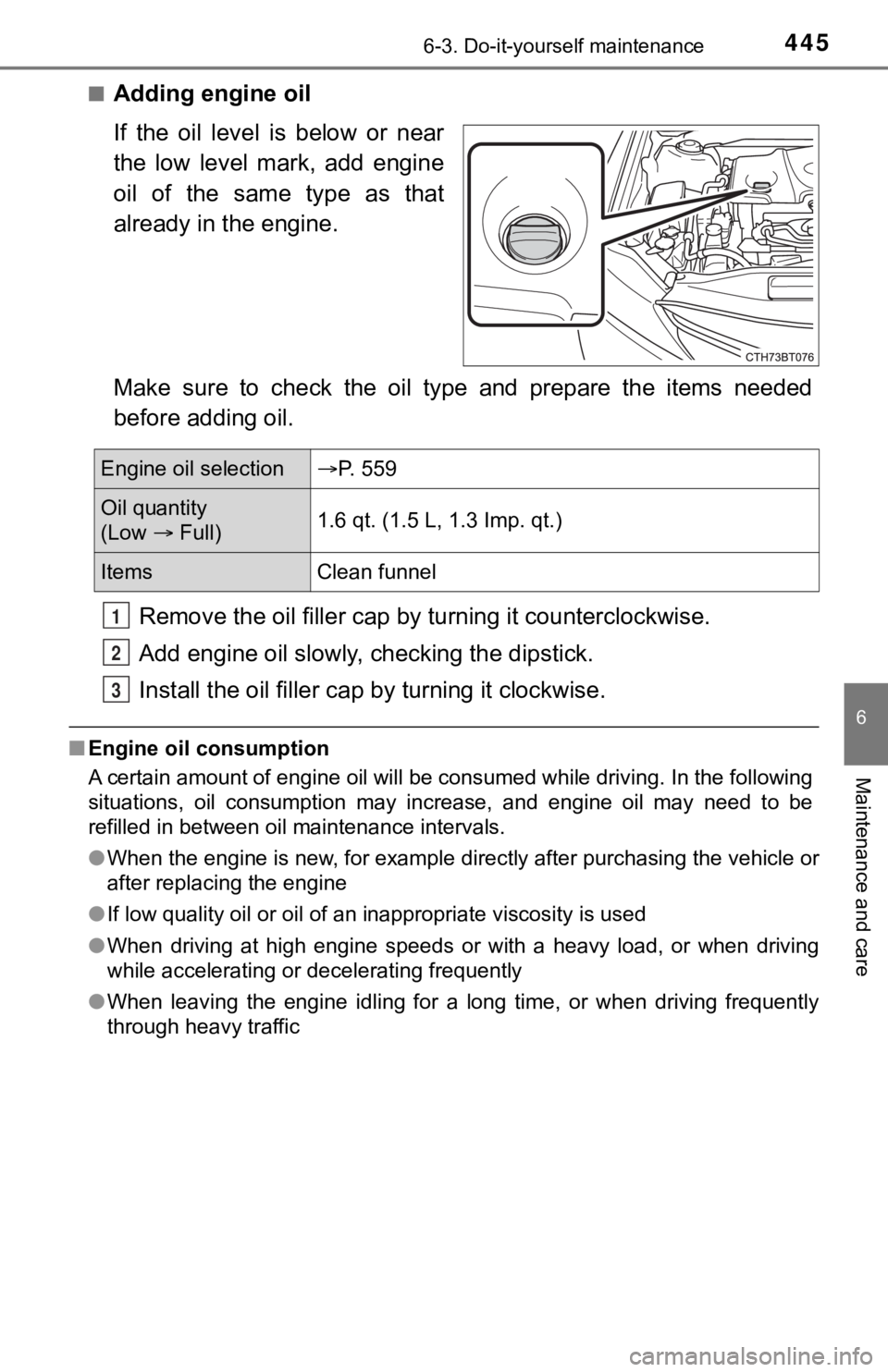
■Adding engine oil
If the oil level is below or near
the low level mark, add engine
oil of the same type as that
already in the engine.
Make sure to check the oil type and prepare the items needed
before adding oil.Remove the oil fille r cap by turning it counterclockwise.
Add engine oil slowly, checking the dipstick.
Install the oil filler cap by turning it clockwise.
■Engine oil consumption
A certain amount of engine oil will be consumed while driving. In the following
situations, oil consumption may increase, and engine oil may ne ed to be
refilled in between oil maintenance intervals.
● When the engine is new, for example directly after purchasing t he vehicle or
after replacing the engine
● If low quality oil or oil of an inappropriate viscosity is used
● When driving at high engine speeds or with a heavy load, or whe n driving
while accelerating or decelerating frequently
● When leaving the engine idling for a long time, or when driving frequently
through heavy traffic
Engine oil selection P. 559
Oil quantity
(Low Full) 1.6 qt. (1.5 L, 1.3 Imp. qt.)
Items
Clean funnel
1
2
3
Page 446 of 624
4466-3. Do-it-yourself maintenance
WARNING
■Used engine oil
● Used engine oil contains potentially harmful contaminants which may
cause skin disorders such as inflammation and skin cancer, so care
should be taken to avoid prolonged and repeated contact. To remove used
engine oil from your skin, wash thoroughly with soap and water.
● Dispose of used oil and filters only in a safe and acceptable manner. Do
not dispose of used oil and filters in household trash, in sewers or onto the
ground.
Call your Toyota dealer, service station or auto parts store fo r information
concerning recycling or disposal.
● Do not leave used engine oil within the reach of children.
NOTICE
■To prevent serious engine damage
Check the oil level on a regular basis.
■ When replacing the engine oil
● Be careful not to spill engine oil on the vehicle components.
● Avoid overfilling, or the engine could be damaged.
● Check the oil level on the dipstick every time you refill the vehicle.
● Be sure the engine oil filler cap is properly tightened.
■ If oil is spilled on the engine cover
To prevent the engine cover from being damaged, remove any engine oil
from the engine cover as soon as possible using a neutral detergent.
Do not use an organic solvent such as brake cleaner.
Page 521 of 624
5217-2. Steps to take in an emergency
7
When trouble arises
■Warning messages
The warning messages explained below may differ from the actual messages
according to operation conditions and vehicle specifications.
■ System warning lights
The master warning light does not come on or flash in the following cases.
Instead, a separate system warning light will come on along wit h a message
shown on the multi-information display.
● Malfunction in the ABS
The ABS warning light comes on. ( P. 510)
● Malfunction in the brake system
The brake system warning light (yellow) comes on. ( P. 509)
● Malfunction in the tire pressure warning system
The tire pressure warning light comes on. ( P. 513)
● Remaining fuel level is low
The low fuel level warning light comes on. ( P. 512)
■ If a message instructing to refer to the Owner’s Manual is disp layed
● If the following messages are shown, there may be a malfunction .
Immediately stop the vehicle in a safe place and contact your T oyota dealer.
Continuing to drive the vehicle may be dangerous.
• “Low Braking Power Stop in a Safe Place See Owner’s Manual”
• “Oil Pressure Low Stop in a Safe Place See Owner’s Manual”
• “Charging System Malfunction Stop in a Safe Place See Owner’s Man-
ual”
● If the following message is shown, there may be a malfunction.
Immediately have the vehicle inspected by your Toyota dealer.
• “Hybrid System Malfunction”
• “Check Engine”
• “Hybrid Battery System Malfunction”
• “Accelerator System Malfunction”
• “Smart Key System Malfunction See Owner’s Manual”
● If “Engine Coolant Temp High Stop in a Safe Place See Owner’s Manual” is
displayed, follow the instructions accordingly. ( P. 549)
● If “Maintenance Required for Traction Battery Cooling Parts See Owner’s
Manual” is displayed, follow the instructions accordingly. ( P. 522)