suspension TOYOTA CAMRY HYBRID 2021 Owners Manual (in English)
[x] Cancel search | Manufacturer: TOYOTA, Model Year: 2021, Model line: CAMRY HYBRID, Model: TOYOTA CAMRY HYBRID 2021Pages: 624, PDF Size: 15.98 MB
Page 42 of 624

421-1. For safe use
■If the SRS airbags deploy (inflate)
●Slight abrasions, burns, bruising etc., may be sustained from S RS airbags,
due to the extremely high speed deployment (inflation) by hot gases.
● A loud noise and white powder will be emitted.
● Parts of the airbag module (steering wheel hub, airbag cover and inflator) as
well as the front seats, parts of the front and rear pillars, and roof side rails,
may be hot for several minutes. The airbag itself may also be hot.
● The windshield may crack.
● The hybrid system will be stopped and fuel supply to the engine will be
stopped. ( P. 84)
● All of the doors will be unlocked. ( P. 162)
● The brakes and stop lights will be controlled automatically. ( P. 311)
● The interior lights will turn on automatically. ( P. 392)
● The emergency flashers will turn on automatically. ( P. 502)
WARNING
■Modification and disposal of SRS airbag system components
Do not dispose of your vehicle or perform any of the following modifications
without consulting your Toyota dealer. The SRS airbags may malfunction or
deploy (inflate) accidentally, causing death or serious injury.
● Installation, removal, disassembly and repair of the SRS airbags
● Repairs, modifications, removal or replacement of the steering wheel,
instrument panel, dashboard, seats or seat upholstery, front, side and rear
pillars, roof side rails, front door panels, front door trims or front door
speakers
● Modifications to the front door panel (such as making a hole in it)
● Repairs or modifications of the front fender, front bumper, or side of the
occupant compartment
● Installation of a grille guard (bull bars, kangaroo bar, etc.), snow plows,
winches or roof luggage carrier
● Modifications to the vehicle’s suspension system
● Installation of electronic devices such as mobile two-way radio s and CD
players
● Modifications to your vehicle for a person with a physical disability
Page 117 of 624

1172. Instrument cluster
2
Instrument cluster
■Suspension of the settings display
●Some settings cannot be changed while driving. When changing se ttings,
park the vehicle in a safe place.
● If a warning message is displayed, operation of the settings di splay will be
suspended.
■ Tire pressure (vehicles with a tire inflation pressure display function)
● It may take a few minutes to display the tire inflation pressur e after the
power switch is turned to ON mode. It may also take a few minut es to dis-
play the tire inflation pressure after inflation pressure has b een adjusted.
● “---” may be displayed if the tire position information cannot be determined
due to unfavorable radio wave conditions.
● Tire inflation pressure changes with temperature. The displayed values may
also be different from the values measured using a tire pressur e gauge.
■ Liquid crystal display
Small spots or light spots may appear on the display. This phen omenon is
characteristic of liquid crystal displays, and there is no prob lem continuing to
use the display.
■ Customization
Some functions can be customized. ( P. 111, 581)
Page 136 of 624

1362. Instrument cluster
■The Eco guide will not operate when
The Eco guide will not operate in the following situations:
●The Hybrid System Indicator is not operating.
● The vehicle is being driven using the dynamic radar cruise cont rol with full-
speed range.
■ Suspension of the settings display
●Some settings cannot be changed while driving. When changing se ttings,
park the vehicle in a safe place.
● If a warning message is displayed, operation of the settings di splay will be
suspended.
■ Tire pressure
●It may take a few minutes to display the tire inflation pressur e after the
power switch is turned to ON mode. It may also take a few minut es to dis-
play the tire inflation pressure after inflation pressure has b een adjusted.
● “---” may be displayed if the tire position information cannot be determined
due to unfavorable radio wave conditions.
● Tire inflation pressure changes with temperature. The displayed values may
also be different from the values measured using a tire pressur e gauge.
■ Liquid crystal display
Small spots or light spots may appear on the display. This phen omenon is
characteristic of liquid crystal displays, and there is no prob lem continuing to
use the display.
■ Customization
Some functions can be customized. ( P. 128, 581)
Page 205 of 624

2054-1. Before driving
4
Driving
NOTICE
■When driving the vehicle
● Do not depress the accelerator and brake pedals at the same tim e during
driving, as this may restrain driving torque.
● Do not use the accelerator pedal or depress the accelerator and brake
pedals at the same time to hold the vehicle on a hill.
■ When parking the vehicle
Always set the parking brake and shift the shift lever to P. Failure to do so
may cause the vehicle to move or the vehicle may accelerate sud denly if
the accelerator pedal is accidentally depressed.
■ Avoiding damage to vehicle parts
● Do not turn the steering wheel fully in either direction and ho ld it there for
an extended period of time.
Doing so may damage the power steering motor.
● When driving over bumps on the road, drive as slowly as possible to avoid
damaging the wheels, underside of the vehicle, etc.
■ If you get a flat tire while driving
A flat or damaged tire may cause the following situations. Hold the steering
wheel firmly and gradually depress the brake pedal to slow down the vehi-
cle.
● It may be difficult to control your vehicle.
● The vehicle will make abnormal sounds or vibrations.
● The vehicle will lean abnormally.
Information on what to do in case of a flat tire ( P. 525)
■ When encountering flooded roads
Do not drive on a road that has flooded after heavy rain etc. D oing so may
cause the following serious damage to the vehicle:
● Engine stalling
● Short in electrical components
● Engine damage caused by water immersion
In the event that you drive on a flooded road and the vehicle i s flooded, be
sure to have your Toyota dealer check the following:
● Brake function
● Changes in quantity and quality of oil and fluid used for the engine, hybrid
transmission, etc.
● Lubricant condition for the bearings and suspension joints (where possi-
ble), and the function of all joints, bearings, etc.
Page 276 of 624

2764-5. Using the driving support systems
WARNING
■Situations unsuitable for LTA system
In the following situations, use the LTA switch to turn the system off. Failure
to do so may lead to an accident, resulting in death or serious injury.
● Vehicle is driven on a road surface which is slippery due to rainy weather,
fallen snow, freezing, etc.
● Vehicle is driven on a snow-covered road.
● White (yellow) lines are difficult to see due to rain, snow, fog, dust, etc.
● Vehicle is driven in a temporary lane or restricted lane due to construction
work.
● Vehicle is driven in a construction zone.
● A spare tire, tire chains, etc. are equipped.
● When the tires have been excessively worn, or when the tire inf lation pres-
sure is low.
● During emergency towing
■ Preventing LTA system malfunctions and operations performed by
mistake
● Do not modify the headlights or place stickers, etc. on the sur face of the
lights.
● Do not modify the suspension etc. If the suspension etc. needs to be
replaced, contact your Toyota dealer.
● Do not install or place anything on the hood or grille. Also, d o not install a
grille guard (bull bars, kangaroo bar, etc.).
● If your windshield needs repairs, contact your Toyota dealer.
Page 317 of 624

3174-5. Using the driving support systems
4
Driving
WARNING
■Replacing tires
Make sure that all tires are of the specified size, brand, trea d pattern and
total load capacity. In addition, make sure that the tires are inflated to the
recommended tire inflation pressure level.
The ABS, TRAC and VSC systems will not function correctly if different tires
are installed on the vehicle.
Contact your Toyota dealer for further information when replaci ng tires or
wheels.
■ Handling of tires and the suspension
Using tires with any kind of problem or modifying the suspensio n will affect
the driving assist systems, and may cause a system to malfunction.
Page 333 of 624

3334-5. Using the driving support systems
4
Driving
WARNING
■Sensors
Certain vehicle conditions and the surrounding environment may affect the
ability of a sensor to correctly detect an object. Particular instances where
this may occur are listed below.
● There is dirt, snow or ice on the sensor. (Wiping the sensors w ill resolve
this problem.)
● The sensor is frozen. (Thawing the area will resolve this probl em.)
In especially cold weather, if a sensor is frozen the screen may show an
abnormal display, or objects may not be detected.
● The sensor is covered in any way.
● The vehicle is leaning considerably to one side.
● On an extremely bumpy road, on an incline, on gravel, or on grass.
● The vicinity of the vehicle is noisy due to vehicle horns, moto rcycle
engines, air brakes of large vehicles, or other loud noises pro ducing ultra-
sonic waves.
● There is another vehicle equipped with parking assist sensors in the vicin-
ity.
● The sensor is coated with a sheet of spray or heavy rain.
● The sensor is drenched with water on a flooded road.
● The vehicle is equipped with a fender pole, wireless antenna or fog lights.
● The bumper or sensor receives a strong impact.
● The vehicle is approaching a tall or curved curb.
● The detection range is reduced due to an object such as a sign.
● In harsh sunlight or intense cold weather.
● The area directly under the bumpers is not detected.
● If objects draw too close to the sensor.
● A non-genuine Toyota suspension (lowered suspension, etc.) is installed.
● A backlit license plate is installed.
In addition to the examples above, there are instances in which , because of
their shape, signs and other objects may be judged by a sensor to be closer
than they are.
Page 344 of 624

3444-5. Using the driving support systems
●In some situations, such as the following, the Rear Camera Dete ction func-
tion may operate even though there are no pedestrians in the detection
area.
• When a three dimensional object, such as a pole, traffic cone, fence, or parked vehicle, is detected
• When a moving object, such as a car or motorcycle is detected
• When backing up toward moving objects such as flags or puddles , or air-
borne matter, such as smoke, steam, rain, or snow
• When there is a pattern on the road, due to the road being mad e of cob-
blestone or gravel or having tram rails, traces of repair, white lines,
pedestrian crossings or fallen leaves on the surface
• When backing up on a metal cover (grating), such as those used for
drainage ditches
• When backing up toward the roadside or a bump on the road
• When an object is reflected in a puddle or on a wet road surfa ce
• When there are shadows on the road
• When backing up over a bump on the road
• If the vehicle is significantly tilted, such as when carrying a heavy load
• When backing up toward an incline/decline
• If the suspension has been modified or tires of a size other than specified
are installed
• If the rear of the vehicle is raised or lowered due to the carried load
• If an electronic compartment, such as a backlit license plate or rear fog
light, is installed near the rear camera
• If a bumper protector, such as an additional trim strip, is installed to the rear bumper
• If the orientation of the rear camera has been changed due to a collision
or other impact, or removal and installation
• If a towing eyelet is installed to the rear of the vehicle
• When the rear camera is obscured (dirt, snow, ice, etc. are at tached) or
scratched
• When water is flowing over the rear camera lens
• If there is a flashing light in the detection area, such as th e emergency
flashers of another vehicle
■ Situations in which the Rear Cam era Detection function may be difficult
to notice
● If buzzer may be difficult to hear if the surrounding area is noisy, the volume
of the audio system volume is high, the air conditioning system is being
used, etc.
● If the temperature in the cabin is extremely high or low, the a udio system
screen may not operate correctly.
Page 357 of 624
3574-5. Using the driving support systems
4
Driving
●Changes in the vehicle posture
• If the vehicle is significantly tilted
• If the front of the vehicle is raised or lowered due to the ca rried load
• If the orientation of a sensor has been changed due to a collision or other impact
• When equipment that may obstruct a sensor is installed, such a s a
bumper protector (an additional trim strip, etc.), bicycle carr ier, or snow
plow
• If the suspension has been modified or tires of a size other than specified are installed
• If a sensor has been painted or covered with a sticker, etc.
■ If the Parking Support Brake func tion (static objects) operates unneces-
sarily such as at a railroad crossing
Even in the event that the Parking Support Brake function opera tes unneces-
sarily, such as at a railroad crossing, brake control will be c anceled after
approximately 2 seconds, allowing you to proceed forward and leave the
area, Brake control can also be canceled by depressing the brak e pedal.
Depressing the accelerator pedal again will allow you to procee d forward and
leave the area.
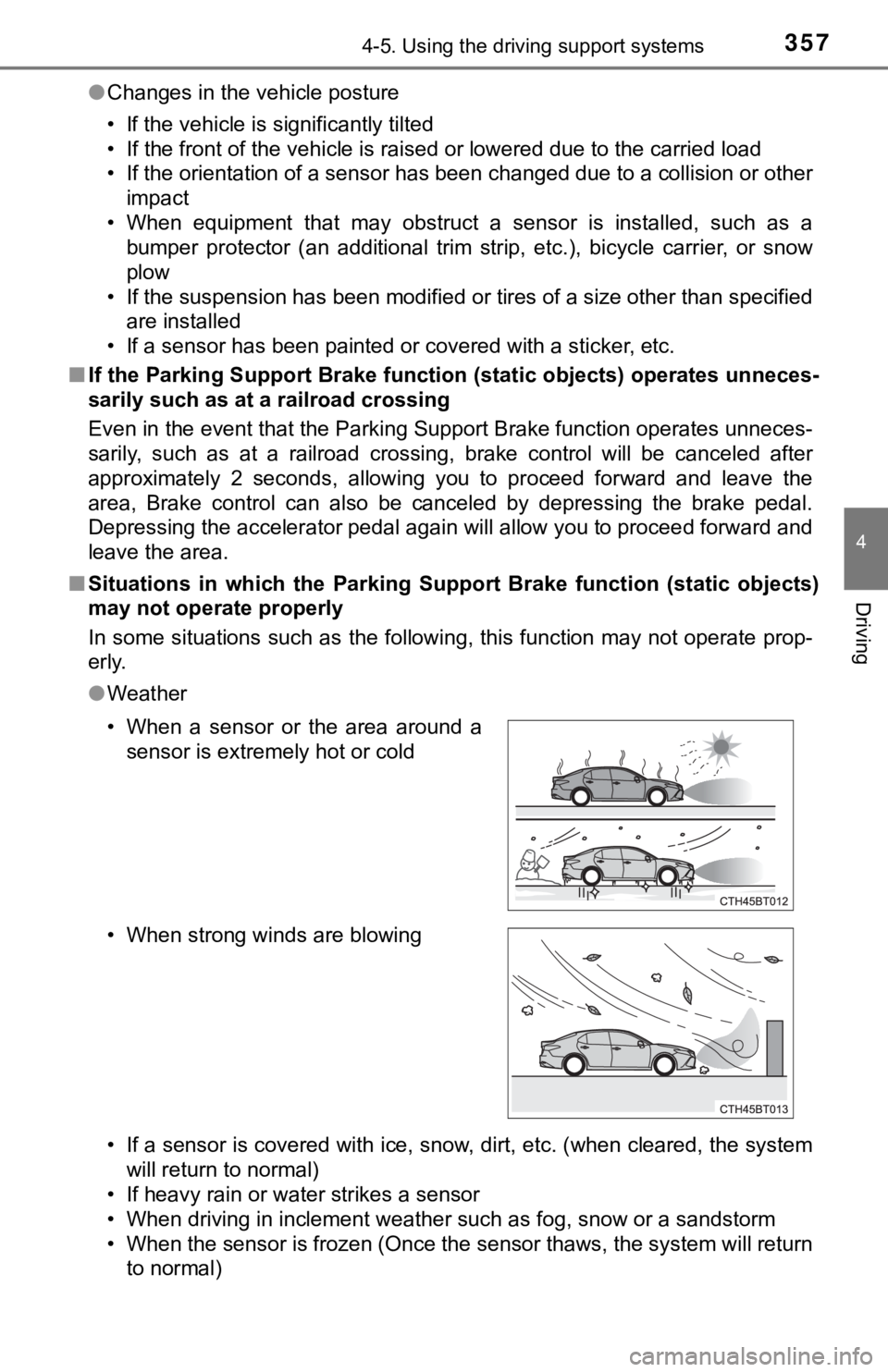
■ Situations in which the Parkin g Support Brake function (static objects)
may not operate properly
In some situations such as the following, this function may not operate prop-
erly.
● Weather
• If a sensor is covered with ice, snow, dirt, etc. (when cleared, the system
will return to normal)
• If heavy rain or water strikes a sensor
• When driving in inclement weather such as fog, snow or a sands torm
• When the sensor is frozen (Once the sensor thaws, the system w ill return
to normal)
• When a sensor or the area around a
sensor is extremely hot or cold
• When strong winds are blowing
Page 358 of 624

3584-5. Using the driving support systems
●Vehicle surroundings
• When an object that cannot be detected is between the vehicle and a
detected object
• If an object such as a vehicle, motorcycle, bicycle or pedestrian cuts in front of the vehicle or runs out from the side of the vehicle.
• The vehicle is approaching a tall or curved curb.
• On an extremely bumpy road, on an incline, on gravel, or on gr ass.
• If objects draw too close to the sensor.
● Other ultrasonic waves sources
• When vehicle horns, vehicle detectors, motorcycle engines, air brakes of
large vehicles, the clearance sonar of other vehicles or other devices
which produce ultrasonic waves are near the vehicle
• If a sticker or an electronic component, such as a backlit license plate (especially fluorescent type), fog lights, a fender pole or wir eless antenna
is installed near a sensor
● Changes in the vehicle posture
• If the vehicle is significantly tilted
• If the front of the vehicle is raised or lowered due to the ca rried load
• If the orientation of a sensor has been changed due to a collision or other
impact
• When equipment that may obstruct a sensor is installed, such a s a
bumper protector (an additional trim strip, etc.), bicycle carr ier, or snow
plow
• If the suspension has been modified or tires of a size other than specified are installed
• If a sensor has been painted or covered with a sticker, etc.