warning light TOYOTA CAMRY HYBRID 2022 Owner's Manual
[x] Cancel search | Manufacturer: TOYOTA, Model Year: 2022, Model line: CAMRY HYBRID, Model: TOYOTA CAMRY HYBRID 2022Pages: 624, PDF Size: 13.76 MB
Page 95 of 624
952. Instrument cluster
2
Instrument cluster
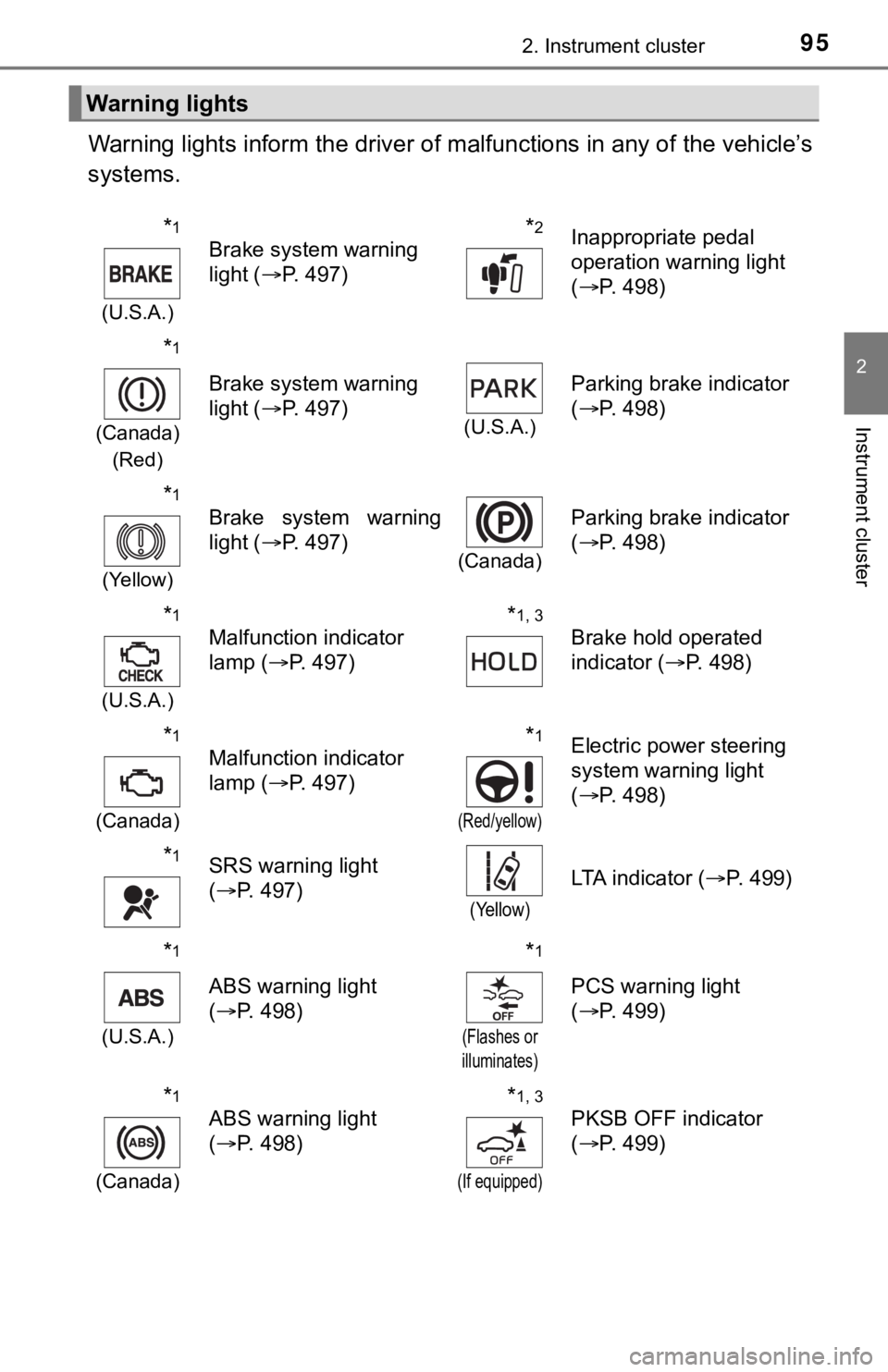
Warning lights inform the driver of malfunctions in any of the vehicle’s
systems.
Warning lights
*1
(U.S.A.)
Brake system warning
light (P. 497)*2Inappropriate pedal
operation warning light
(P. 498)
*1
(Canada)
(Red)
Brake system warning
light (P. 497)
(U.S.A.)
Parking brake indicator
(P. 498)
*1
(Yellow)
Brake system warning
light (P. 497)
(Canada)
Parking brake indicator
(P. 498)
*1
(U.S.A.)
Malfunction indicator
lamp (P. 497)*1, 3
Brake hold operated
indicator (P. 498)
*1
(Canada)
Malfunction indicator
lamp (P. 497)*1
(Red/yellow)
Electric power steering
system warning light
(P. 498)
*1SRS warning light
(P. 497)
(Yellow)
LTA indicator (P. 499)
*1
(U.S.A.)
ABS warning light
(P. 498)
*1
(Flashes or
illuminates)
PCS warning light
(P. 499)
*1
(Canada)
ABS warning light
(P. 498)*1, 3
(If equipped)
PKSB OFF indicator
(P. 499)
Page 96 of 624
962. Instrument cluster
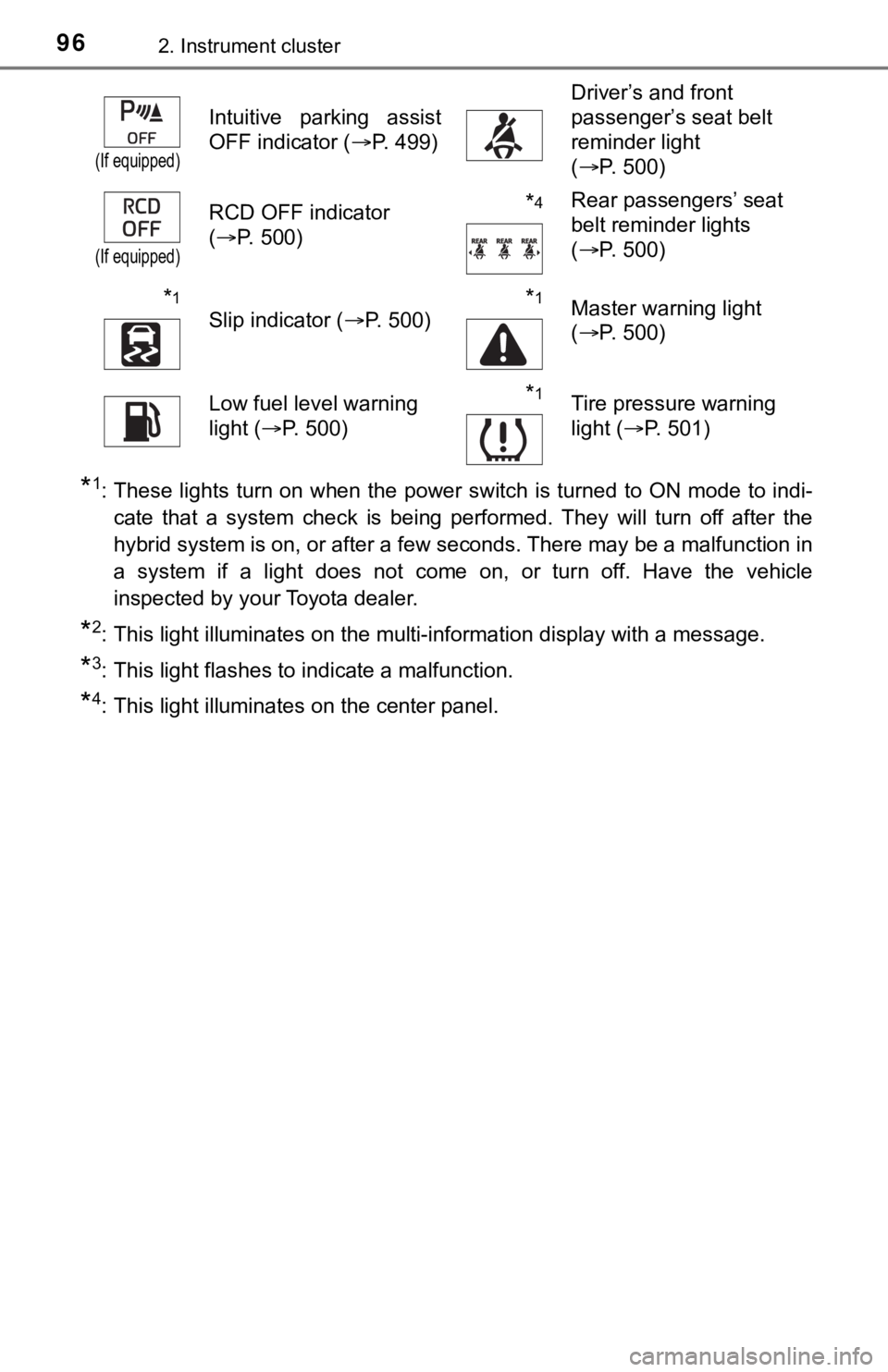
*1: These lights turn on when the power switch is turned to ON mode to indi-
cate that a system check is being performed. They will turn off after the
hybrid system is on, or after a few seconds. There may be a malfunction in
a system if a light does not come on, or turn off. Have the vehicle
inspected by your Toyota dealer.
*2: This light illuminates on the multi-information display with a message.
*3: This light flashes to indicate a malfunction.
*4: This light illuminates on the center panel.
(If equipped)
Intuitive parking assist
OFF indicator (P. 499)
Driver’s and front
passenger’s seat belt
reminder light
(P. 500)
(If equipped)
RCD OFF indicator
(P. 500)*4Rear passengers’ seat
belt reminder lights
(P. 500)
*1
Slip indicator (P. 500)*1Master warning light
(P. 500)
Low fuel level warning
light (P. 500)*1Tire pressure warning
light (P. 501)
Page 97 of 624
972. Instrument cluster
2
Instrument cluster
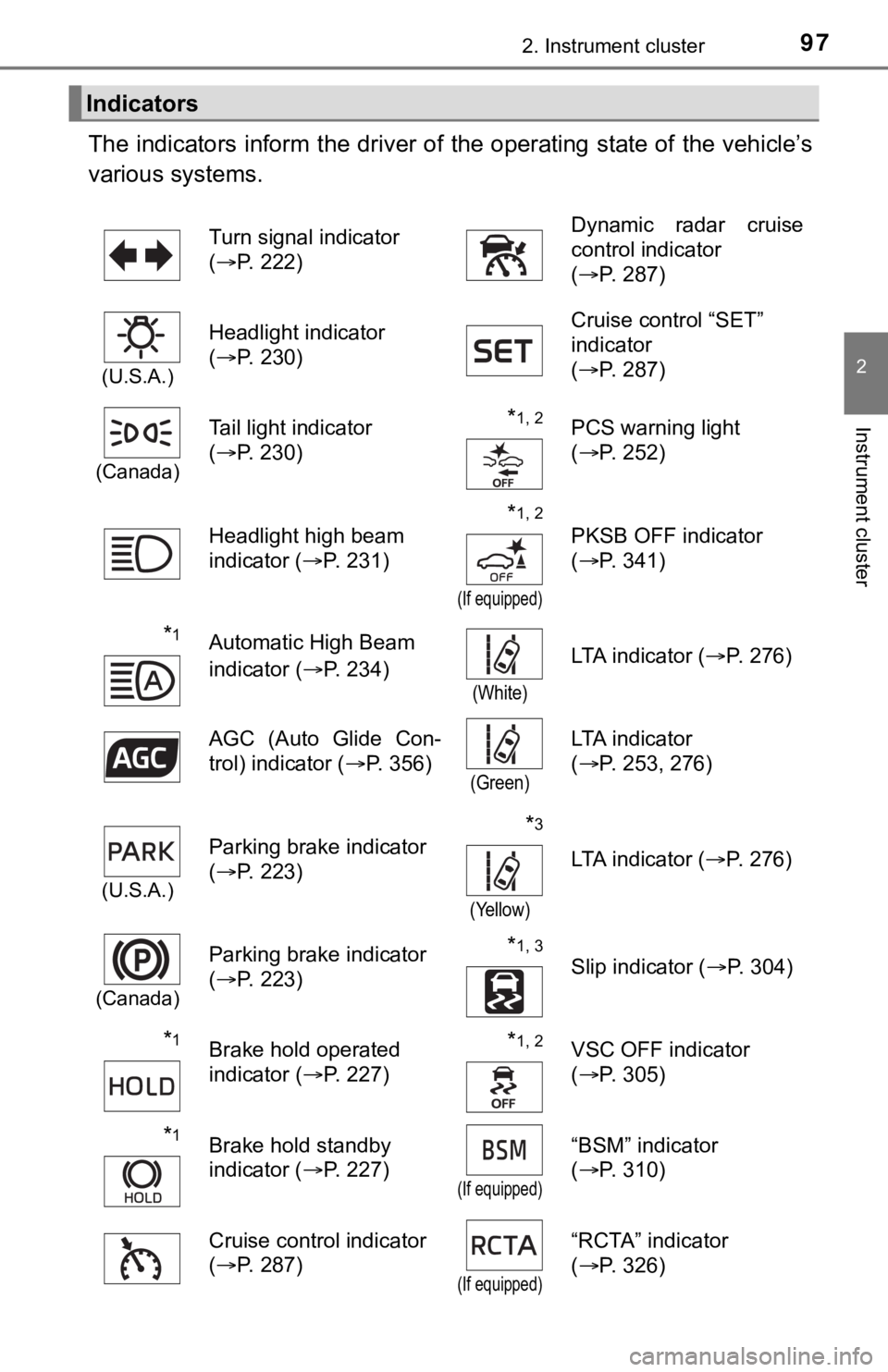
The indicators inform the driver of the operating state of the vehicle’s
various systems.
Indicators
Turn signal indicator
(P. 222)Dynamic radar cruise
control indicator
(P. 287)
(U.S.A.)
Headlight indicator
(P. 230)Cruise control “SET”
indicator
(P. 287)
(Canada)
Tail light indicator
(P. 230) *1, 2PCS warning light
(P. 252)
Headlight high beam
indicator (P. 231)
*1, 2
(If equipped)
PKSB OFF indicator
(P. 341)
*1Automatic High Beam
indicator (P. 234)
(White)
LTA indicator (P. 276)
AGC (Auto Glide Con-
trol) indicator (P. 356)
(Green)
LTA indicator
(P. 253, 276)
(U.S.A.)
Parking brake indicator
(P. 223)*3
(Yellow)
LTA indicator (P. 276)
(Canada)
Parking brake indicator
(P. 223)*1, 3
Slip indicator (P. 304)
*1Brake hold operated
indicator (P. 227)*1, 2VSC OFF indicator
(P. 305)
*1Brake hold standby
indicator (P. 227)
(If equipped)
“BSM” indicator
(P. 310)
Cruise control indicator
(P. 287)
(If equipped)
“RCTA” indicator
(P. 326)
Page 99 of 624

992. Instrument cluster
2
Instrument cluster
*4: These indicators will illuminate in the following situations to indicate that
the system initial check is being performed:
• When the BSM function or RCTA function is enabled and the power
switch is turned to ON mode.
• When the power switch is ON mode and the BSM function is enabled.
• When the power switch is ON mode and the RCTA function is enabled.
(At this time, a buzzer will also sound).
The indicators will turn off after a few seconds. If the indicators do not
illuminate or turn off, or if a buzzer does not sound when the RCTA func-
tion is enabled, the system may be malfunctioning. Have the vehicle
inspected by your Toyota dealer.
*5: This light illuminates on the outside rear view mirrors.
*6: This light illuminates on the center panel.
*7: When the outside temperature is approximately 37°F (3°C) or lower, this
indicator will flash for approximately 10 seconds, then stay on.
WARNING
■If a safety system warning light does not come on
Should a safety system light such as the ABS and SRS warning lights not
come on when you start the hybrid system, this could mean that these sys-
tems are not available to help protect you in an accident, which could result
in death or serious injury. Have the vehicle inspected by your Toyota dealer
immediately if this occurs.
Page 101 of 624
1012. Instrument cluster
2
Instrument cluster
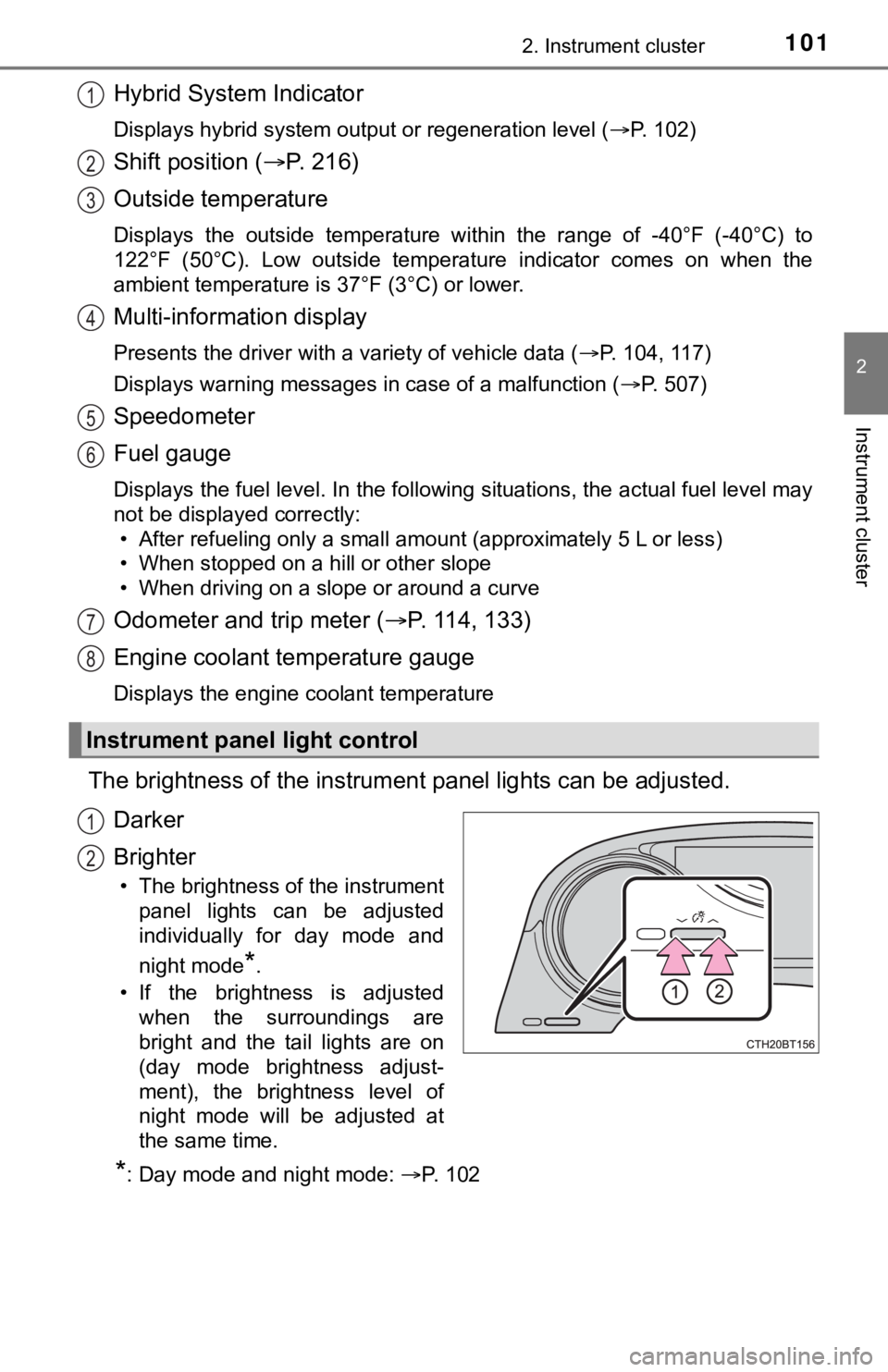
Hybrid System Indicator
Displays hybrid system output or regeneration level (P. 102)
Shift position (P. 2 1 6 )
Outside temperature
Displays the outside temperature within the range of -40°F (-40°C) to
122°F (50°C). Low outside temperature indicator comes on when the
ambient temperature is 37°F (3°C) or lower.
Multi-information display
<0033005500480056004800510057005600030057004b0048000300470055004c0059004800550003005a004c0057004b000300440003005900440055004c00480057005c000300520049000300590048004b004c0046004f00480003004700440057004400
03000b[P. 104, 117)
Displays warning messages in case of a malfunction (P. 507)
Speedometer
Fuel gauge
Displays the fuel level. In the following situations, the actual fuel level may
not be displayed correctly:
• After refueling only a small amount (approximately 5 L or less)
• When stopped on a hill or other slope
• When driving on a slope or around a curve
Odometer and trip meter (P. 114, 133)
Engine coolant temperature gauge
Displays the engine coolant temperature
The brightness of the instrument panel lights can be adjusted.
Darker
Brighter
• The brightness of the instrument
panel lights can be adjusted
individually for day mode and
night mode
*.
• If the brightness is adjusted
when the surroundings are
bright and the tail lights are on
(day mode brightness adjust-
ment), the brightness level of
night mode will be adjusted at
the same time.
*: Day mode and night mode: P. 1 0 2
Instrument panel light control
1
2
3
4
5
6
7
8
1
2
Page 115 of 624

1152. Instrument cluster
2
Instrument cluster
■Suspension of the settings display
●Some settings cannot be changed while driving. When changing settings,
park the vehicle in a safe place.
●If a warning message is displayed, operation of the settings display will be
suspended.
■Tire pressure (vehicles with a tire inflation pressure display function)
●It may take a few minutes to display the tire inflation pressure after the
power switch is turned to ON mode. It may also take a few minutes to dis-
<0053004f0044005c00030057004b004800030057004c005500480003004c00510049004f00440057004c005200510003005300550048005600560058005500480003004400490057004800550003004c00510049004f00440057004c005200510003005300
550048005600560058005500480003004b0044005600030045[een adjusted.
●“---” may be displayed if the tire position information cannot be determined
due to unfavorable radio wave conditions.
●Tire inflation pressure changes with temperature. The displayed values may
also be different from the values measured using a tire pressure gauge.
■Liquid crystal display
Small spots or light spots may appear on the display. This phenomenon is
characteristic of liquid crystal displays, and there is no problem continuing to
use the display.
■Customization
Some functions can be customized. (P. 109, 569)
Page 134 of 624

1342. Instrument cluster
■The Eco guide will not operate when
The Eco guide will not operate in the following situations:
●The Hybrid System Indicator is not operating.
●The vehicle is being driven using the dynamic radar cruise control with full-
speed range.
■Suspension of the settings display
●Some settings cannot be changed while driving. When changing settings,
park the vehicle in a safe place.
●If a warning message is displayed, operation of the settings display will be
suspended.
■Tire pressure
●It may take a few minutes to display the tire inflation pressure after the
power switch is turned to ON mode. It may also take a few minutes to dis-
<0053004f0044005c00030057004b004800030057004c005500480003004c00510049004f00440057004c005200510003005300550048005600560058005500480003004400490057004800550003004c00510049004f00440057004c005200510003005300
550048005600560058005500480003004b0044005600030045[een adjusted.
●“---” may be displayed if the tire position information cannot be determined
due to unfavorable radio wave conditions.
●Tire inflation pressure changes with temperature. The displayed values may
also be different from the values measured using a tire pressure gauge.
■Liquid crystal display
Small spots or light spots may appear on the display. This phenomenon is
characteristic of liquid crystal displays, and there is no problem continuing to
use the display.
■Customization
Some functions can be customized. (P. 126, 569)
Page 158 of 624
1583-2. Opening, closing and locking the doors
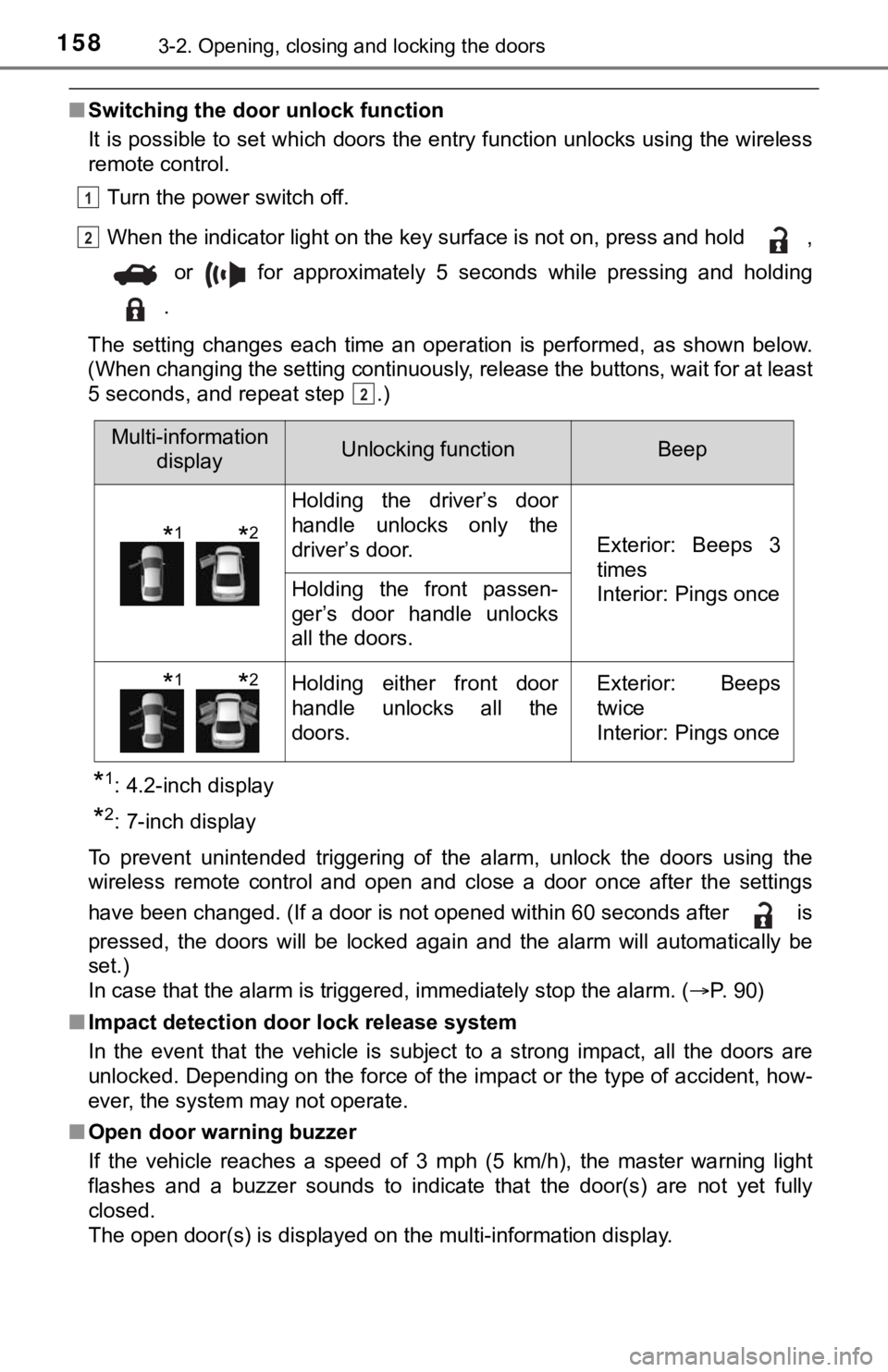
■Switching the door unlock function
It is possible to set which doors the entry function unlocks using the wireless
remote control.
Turn the power switch off.
When the indicator light on the key surface is not on, press and hold ,
or for approximately 5 seconds while pressing and holding
.
The setting changes each time an operation is performed, as shown below.
(When changing the setting continuously, release the buttons, wait for at least
5 seconds, and repeat step .)
*1: 4.2-inch display
*2: 7-inch display
To prevent unintended triggering of the alarm, unlock the doors using the
wireless remote control and open and close a door once after the settings
have been changed. (If a door is not opened within 60 seconds after is
pressed, the doors will be locked again and the alarm will automatically be
set.)
In case that the alarm is triggered, immediately stop the alarm. (P. 90)
■Impact detection door lock release system
In the event that the vehicle is subject to a strong impact, all the doors are
unlocked. Depending on the force of the impact or the type of accident, how-
ever, the system may not operate.
■Open door warning buzzer
If the vehicle reaches a speed of 3 mph (5 km/h), the master warning light
flashes and a buzzer sounds to indicate that the door(s) are not yet fully
closed.
The open door(s) is displayed on the multi-information display.
1
2
2
Multi-information
displayUnlocking functionBeep
Holding the driver’s door
handle unlocks only the
driver’s door.
Exterior: Beeps 3
times
Interior: Pings once
Holding the front passen-
ger’s door handle unlocks
all the doors.
Holding either front door
handle unlocks all the
doors.Exterior: Beeps
twice
Interior: Pings once
*1*2
*1*2
Page 161 of 624
1613-2. Opening, closing and locking the doors
3
Operation of each component
■Trunk light
The trunk light turns on when the trunk is opened.
■Function to prevent the trunk being locked with the electronic key inside
●When all doors are locked, closing the trunk lid with the electronic key left
inside the trunk will sound an alarm.
In this case, the trunk lid can be opened by pressing the trunk release but-
ton on the trunk lid.
●If the spare electronic key is put in the trunk with all the doors locked, the
key confinement prevention function is activated so the trunk can be
opened. In order to prevent theft, take all electronic keys with you when
leaving the vehicle.
●If the electronic key is put in the trunk with all the doors locked, the key may
not be detected depending on the location of the key and the surrounding
radio wave conditions. In this case, the key confinement prevention function
cannot be activated, causing the doors to lock when the trunk is closed.
Make sure to check where the key is before closing the trunk.
●The key confinement prevention function cannot be activated if any one of
the doors is unlocked. In this case, open the trunk using the trunk opener.
■Open trunk warning buzzer
If the vehicle reaches a speed of 3 mph (5 km/h), the master warning light
flashes and a buzzer sounds to indicate that the trunk is not yet fully closed.
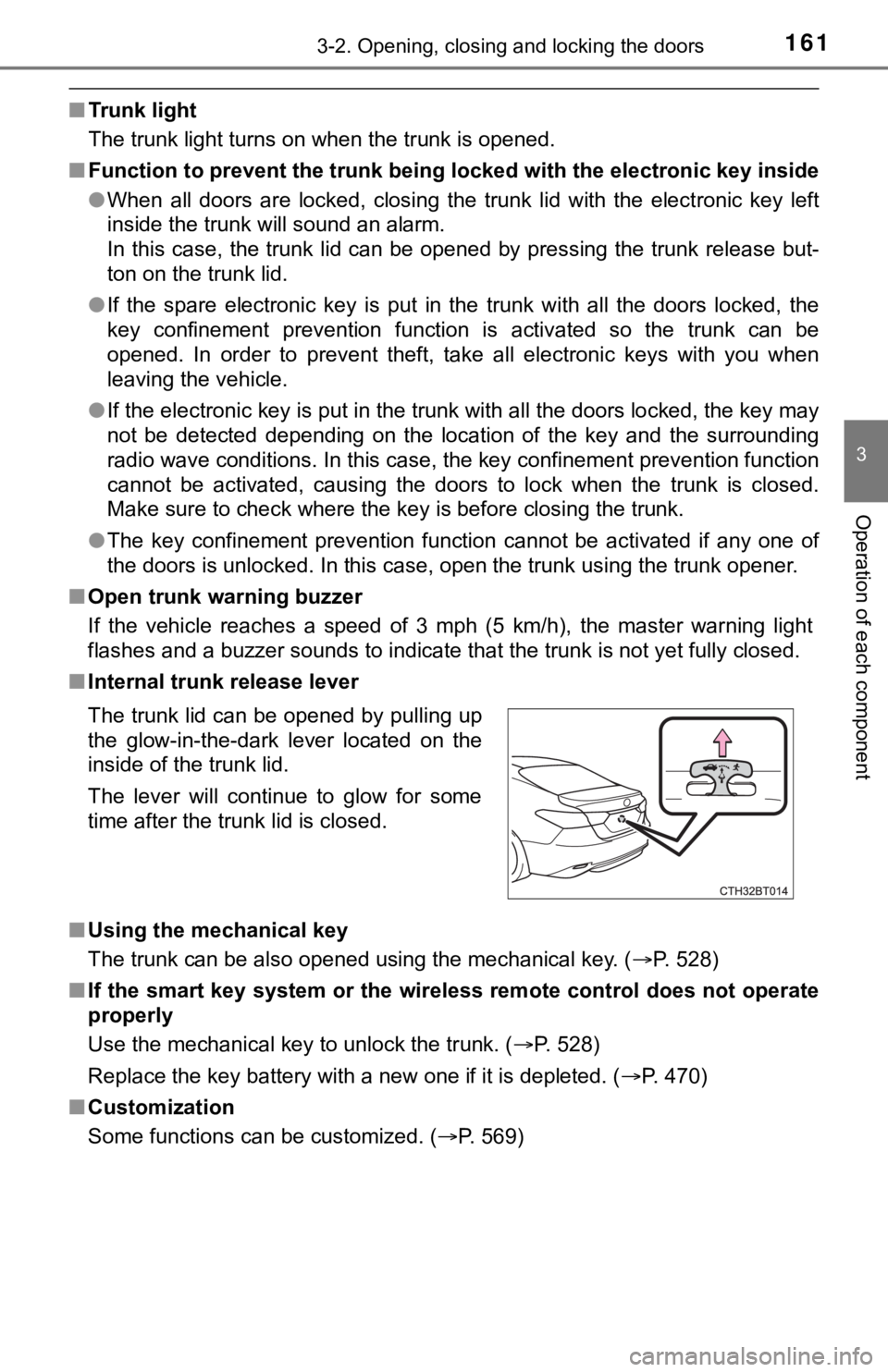
■Internal trunk release lever
■Using the mechanical key
The trunk can be also opened using the mechanical key. (P. 528)
■If the smart key system or the wireless remote control does not operate
properly
Use the mechanical key to unlock the trunk. (P. 528)
<003500480053004f00440046004800030057004b00480003004e0048005c0003004500440057005700480055005c0003005a004c0057004b00030044000300510048005a00030052005100480003004c00490003004c00570003004c005600030047004800
53004f004800570048004700110003000b[P. 470)
■Customization
Some functions can be customized. (P. 569) The trunk lid can be opened by pulling up
the glow-in-the-dark lever located on the
inside of the trunk lid.
The lever will continue to glow for some
time after the trunk lid is closed.
Page 163 of 624
1633-2. Opening, closing and locking the doors
3
Operation of each component
WARNING
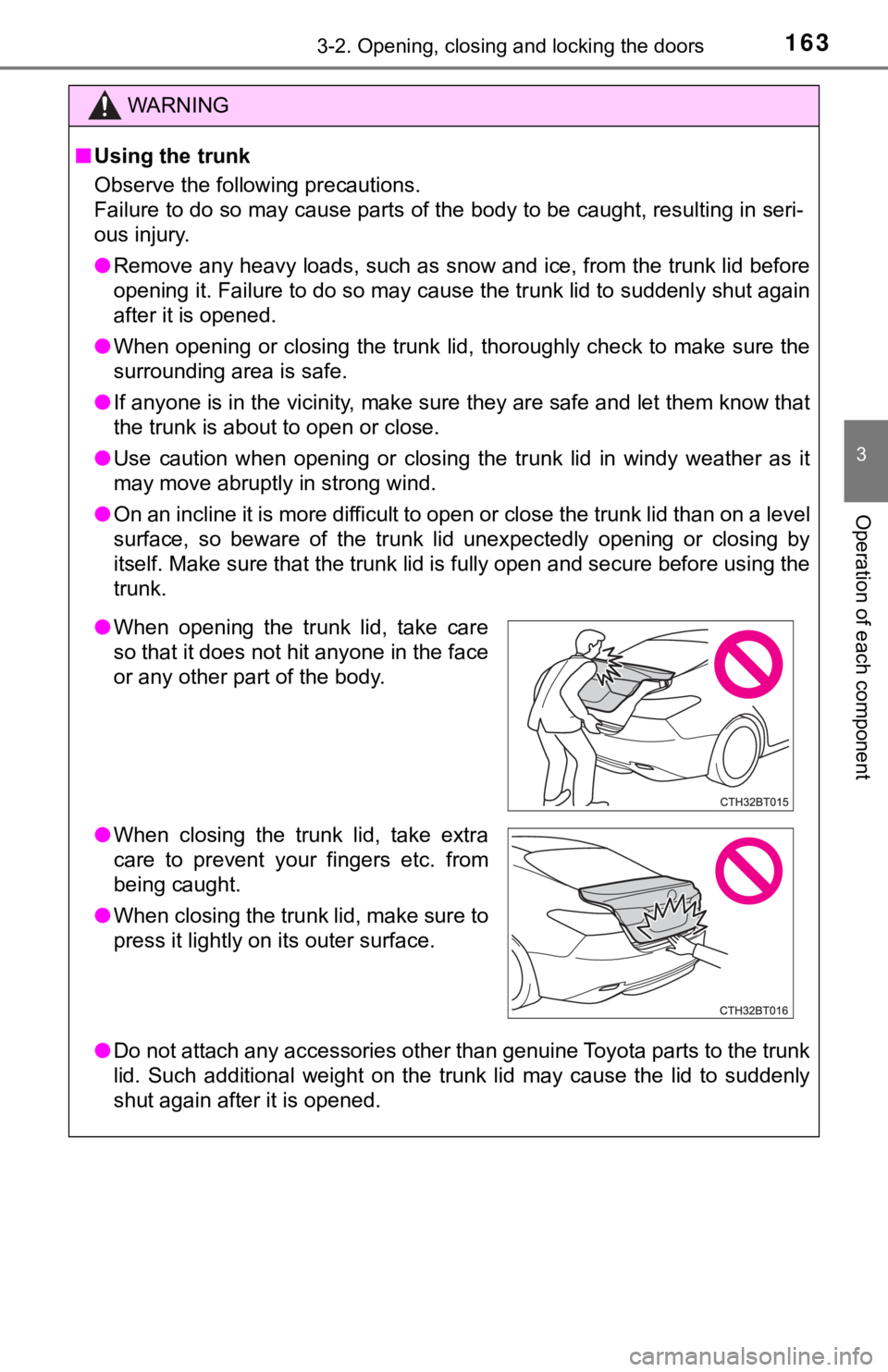
■Using the trunk
Observe the following precautions.
Failure to do so may cause parts of the body to be caught, resulting in seri-
ous injury.
●Remove any heavy loads, such as snow and ice, from the trunk lid before
opening it. Failure to do so may cause the trunk lid to suddenly shut again
after it is opened.
●When opening or closing the trunk lid, thoroughly check to make sure the
surrounding area is safe.
●If anyone is in the vicinity, make sure they are safe and let them know that
the trunk is about to open or close.
●Use caution when opening or closing the trunk lid in windy weather as it
may move abruptly in strong wind.
●On an incline it is more difficult to open or close the trunk lid than on a level
surface, so beware of the trunk lid unexpectedly opening or closing by
itself. Make sure that the trunk lid is fully open and secure before using the
trunk.
●Do not attach any accessories other than genuine Toyota parts to the trunk
lid. Such additional weight on the trunk lid may cause the lid to suddenly
shut again after it is opened.
●When opening the trunk lid, take care
so that it does not hit anyone in the face
or any other part of the body.
●When closing the trunk lid, take extra
care to prevent your fingers etc. from
being caught.
●When closing the trunk lid, make sure to
press it lightly on its outer surface.