key TOYOTA CAMRY HYBRID 2022 Service Manual
[x] Cancel search | Manufacturer: TOYOTA, Model Year: 2022, Model line: CAMRY HYBRID, Model: TOYOTA CAMRY HYBRID 2022Pages: 624, PDF Size: 13.76 MB
Page 396 of 624

3965-4. Other interior features
■The wireless charger can be operated when
The power switch is in ACCESSORY or ON mode.
■Portable devices that can be charged
●Portable devices compatible with the Qi wireless charging standard can be
charged by the wireless charger. However, compatibility with all devices
<005a004b004c0046004b0003005000480048005700030057004b004800030034004c0003005a004c00550048004f00480056005600030046004b00440055004a004c0051004a0003005600570044005100470044005500470003004c005600030051005200
570003004a0058004400550044005100570048004800470011[
●The wireless charger is designed to supply low power electricity (5 W or
less) to a cellular phone, smartphone, or other portable device.
●However, portable devices, such as the following, can be charged with more
than 5 W.
• 7.5 W charging compatible iPhones can be charged at 7.5 W or less.
• Portable devices which conform to WPC Ver 1.2.4 can be charged at 10
W or less.
■Using the smart key system
During charging, when the smart key system searches for an electronic key,
charging may be temporarily suspended.
■If a cover or accessory is attached to the portable device
Do not charge a portable device if a cover or accessory which is not Qi com-
patible is attached. Depending on the type of cover and/or accessory
attached, it may not be possible to charge the portable device. If the portable
device is placed on the charging area and does not charge, remove the cover
and/or accessories.
■If interference is heard in AM radio broadcasts while charging
●Turn off the wireless charger and check if the noise is reduced. If noise is
reduced, press and hold the power supply switch of the wireless charger for
2 seconds. The frequency of the wireless charger is changed and noise may
be reduced. When the frequency is changed, the operation indicator light
will blink (orange) 2 times.
●Rapid charging for iPhones is performed using a specific radio wave fre-
quency.
Depending on the version of iOS installed, while the frequency is being
changed, rapid charging may not be performed.
■Charging precautions
While charging, the wireless charger and the portable device will become
warm. This is not a malfunction.
If a portable device becomes warm while charging and charging stops due to
the protection function of the portable device, wait until the portable device
cools down and charge it again.
Also, to decrease the temperature inside the wireless charger, a fan may
operate. This does not indicate a malfunction.
Page 397 of 624

3975-4. Other interior features
5
Interior features
■Sound generated during operation
Operation sounds may be heard when the power supply switch is pressed to
turn the wireless charger on, when the power switch is pressed to change to
ACCESSORY or ON mode while the wireless charger is on, or when a porta-
ble device is being detected. This does not indicate a malfunction.
■Situations in which the wireless charger may not operate correctly
In the following situations, the wireless charger may not operate correctly:
●When a portable device is fully charged
●When a portable device is being charged by a wired connection.
●When there is foreign matter between the charging area and portable device
●When the temperature of a portable device becomes high while charging
●When the temperature near the charging tray is 95°F (35°C) or more due to
being in direct sunlight, etc.
●When a portable device is placed with its charging surface facing up
●When a portable device is not centered on the charging area
●When a portable device is larger than the charging tray
●When a foldable portable device is placed outside of the charging area
●When the vehicle is near a TV tower, electric power plant, fuel station, radio
station, large display, airport, or other facility that generates strong radio
waves or electrical noise
●When the any of the following objects, with a thickness of 0.08 in. (2 mm) or
more, are between the charging surface of a portable device and the
charging area:
• Thick cases or covers
• Thick decorations
• Accessories, such as finger rings, straps, etc.
●When the portable device is in contact with, or is covered by any of the fol-
lowing metallic objects:
• Cards covered with metal, such as aluminum foil
• Cigarette boxes that have aluminum foil inside
• Metallic wallets or bags
• Coins
• Heat packs
• Recorded media such as CDs and DVDs
• Metallic decorations
• Metallic cases or covers
●When wireless keys (that emit radio waves) other than those of your vehicle
are being used nearby
●When 2 or more portable devices are placed on the charging tray at the
same time
In situations other than above, if the wireless charger does not operate prop-
erly or the operation indicator light blinks continuously, the wireless charger
may be malfunctioning.
Contact your Toyota dealer.
Page 411 of 624

411
6Maintenance and care
6-1. Maintenance and care
Cleaning and protecting
the vehicle exterior .......... 412
Cleaning and protecting
the vehicle interior ........... 416
6-2. Maintenance
Maintenance
requirements ................... 419
General maintenance........ 422
Emission inspection and
maintenance (I/M)
programs......................... 426
6-3. Do-it-yourself
maintenance
Do-it-yourself service
precautions ..................... 427
Hood ................................. 429
Positioning a floor jack ...... 431
Engine compartment ......... 432
12-volt battery ................... 440
Tires .................................. 444
Tire inflation pressure ....... 458
Wheels .............................. 461
Air conditioning filter.......... 463
Cleaning the hybrid battery
(traction battery) air
intake vent and filter ........ 465
Electronic key battery........ 470
Checking and replacing
fuses ............................... 473
Light bulbs......................... 476
Page 413 of 624

4136-1. Maintenance and care
6
Maintenance and care
■When using a car wash
<002c004900030057004b0048000300470052005200550003004b004400510047004f0048000300450048004600520050004800560003005a004800570003005a004b004c004f004800030057004b004800030048004f004800460057005500520051004c00
460003004e0048005c0003004c00560003005a004c0057004b[in the effective
range, the door may lock and unlock repeatedly. In that case, follow the fol-
lowing correction procedures to wash the vehicle:
●Place the key in a position 6 ft. (2 m) or more separate from the vehicle
while the vehicle is being washed. (Take care to ensure that the key is not
stolen.)
●Set the electronic key to battery-saving mode to disable the smart key sys-
tem. (P. 166)
■Wheels and wheel ornaments
●<003500480050005200590048000300440051005c00030047004c005500570003004c0050005000480047004c004400570048004f005c00030045005c000300580056004c0051004a000300440003005100480058005700550044004f000300470048005700
480055004a0048005100570011[
●Wash detergent off with water immediately after use.
●To protect the paint from damage, make sure to observe the following pre-
cautions.
• Do not use acidic, alkaline or abrasive detergent
• Do not use hard brushes
• Do not use detergent on the wheels when they are hot, such as after driv-
ing or parking in hot weather
■Brake pads and calipers
Rust may form if the vehicle is parked with wet brake pads or disc rotors,
causing them to stick. Before parking the vehicle after it is washed, drive
slowly and apply the brakes several times to dry the parts.
■Bumpers
Do not scrub with abrasive cleaners.
■Plated portions
<002c004900030047004c00550057000300460044005100510052005700030045004800030055004800500052005900480047000f00030046004f00480044005100030057004b0048000300530044005500570056000300440056000300490052004f004f00
52005a0056001d[
●Use a soft cloth dampened with an approximately 5% solution of neutral
detergent and water to clean the dirt off.
●Wipe the surface with a dry, soft cloth to remove any remaining moisture.
●To remove oily deposits, use alcohol wet wipes or a similar product.
Page 441 of 624
4416-3. Do-it-yourself maintenance
6
Maintenance and care
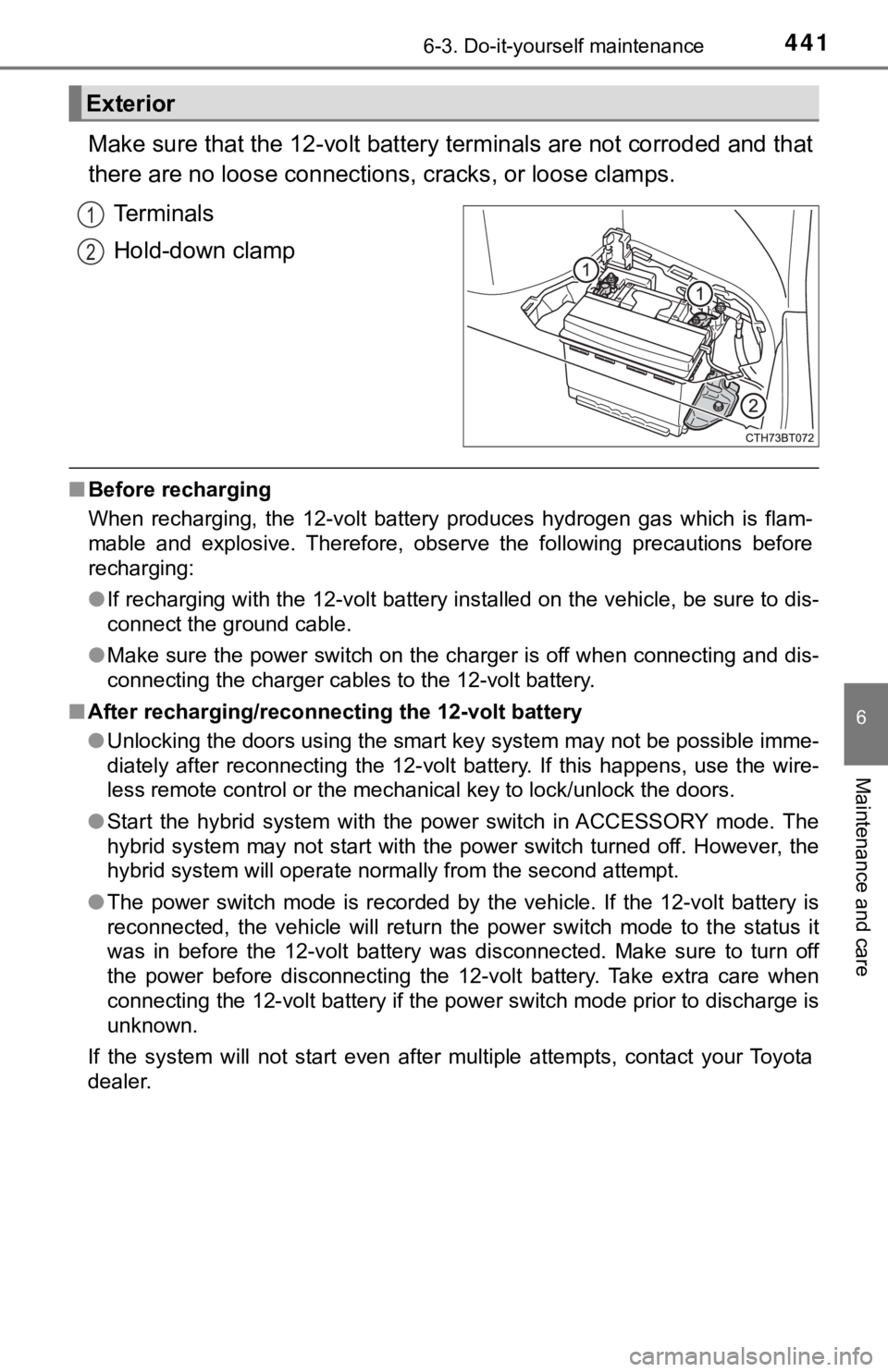
Make sure that the 12-volt battery terminals are not corroded and that
there are no loose connections, cracks, or loose clamps.
Terminals
Hold-down clamp
■Before recharging
When recharging, the 12-volt battery produces hydrogen gas which is flam-
mable and explosive. Therefore, observe the following precautions before
recharging:
●If recharging with the 12-volt battery installed on the vehicle, be sure to dis-
connect the ground cable.
●Make sure the power switch on the charger is off when connecting and dis-
connecting the charger cables to the 12-volt battery.
■After recharging/reconnecting the 12-volt battery
●Unlocking the doors using the smart key system may not be possible imme-
diately after reconnecting the 12-volt battery. If this happens, use the wire-
less remote control or the mechanical key to lock/unlock the doors.
●Start the hybrid system with the power switch in ACCESSORY mode. The
hybrid system may not start with the power switch turned off. However, the
hybrid system will operate normally from the second attempt.
●The power switch mode is recorded by the vehicle. If the 12-volt battery is
reconnected, the vehicle will return the power switch mode to the status it
was in before the 12-volt battery was disconnected. Make sure to turn off
the power before disconnecting the 12-volt battery. Take extra care when
connecting the 12-volt battery if the power switch mode prior to discharge is
unknown.
If the system will not start even after multiple attempts, contact your Toyota
dealer.
Exterior
1
2
Page 470 of 624
4706-3. Do-it-yourself maintenance
●Flathead screwdriver
●Small flathead screwdriver
●Lithium battery CR2032
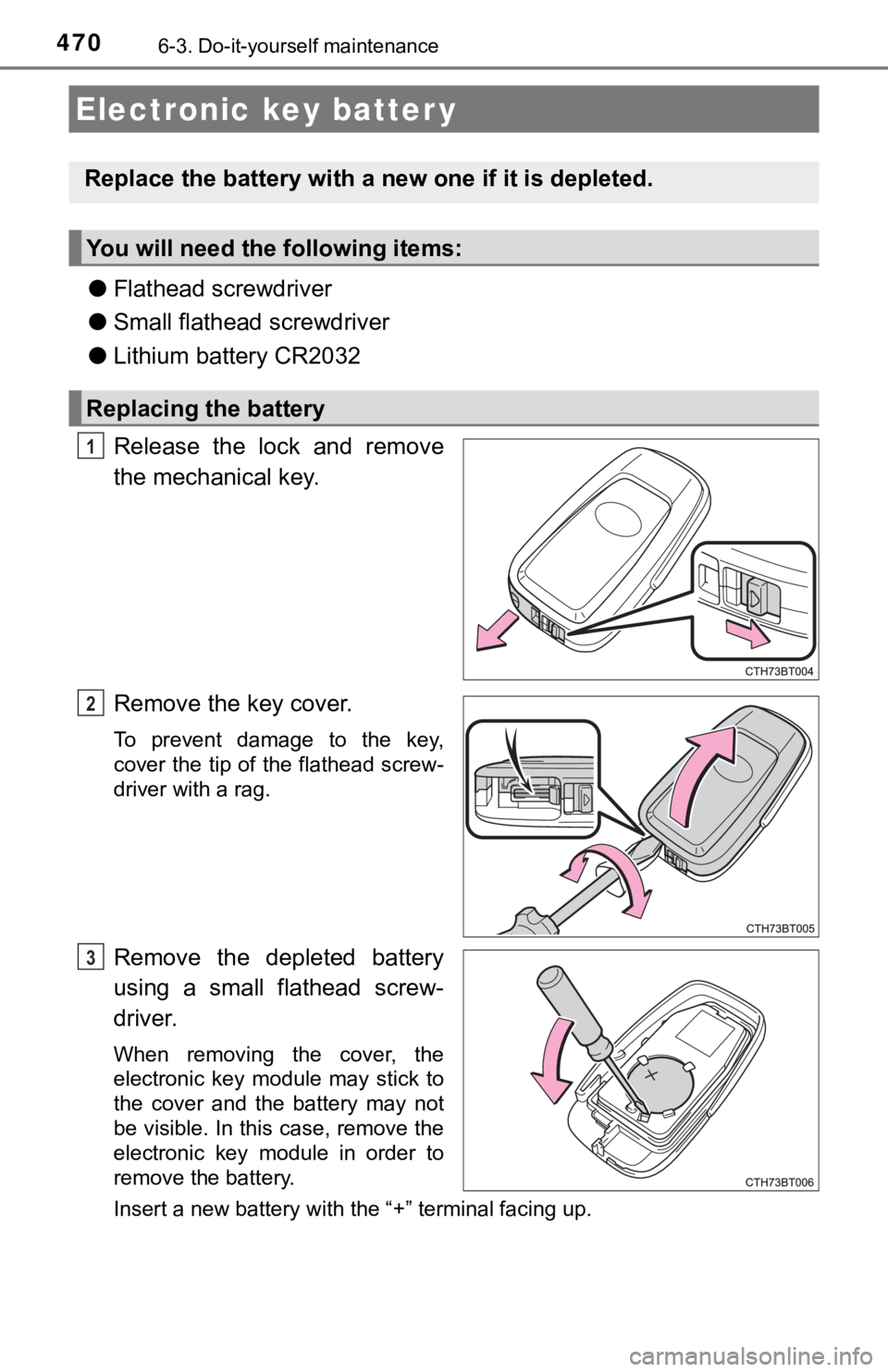
Release the lock and remove
the mechanical key.
Remove the key cover.
To prevent damage to the key,
cover the tip of the flathead screw-
driver with a rag.
Remove the depleted battery
using a small flathead screw-
driver.
When removing the cover, the
electronic key module may stick to
the cover and the battery may not
be visible. In this case, remove the
electronic key module in order to
remove the battery.
Insert a new battery with the “+” terminal facing up.
Electronic key batter y
Replace the battery with a new one if it is depleted.
You will need the following items:
Replacing the battery
1
2
3
Page 471 of 624
4716-3. Do-it-yourself maintenance
6
Maintenance and care
When installing the key cover and mechanical key, install by con-
ducting and with the directions reversed.
Operate the or switch and check that the doors can
be locked/unlocked.
■When replacing the key battery
<002500480003004600440055004800490058004f00030051005200570003005700520003004f00520056004800030057004b00480003004500440057005700480055005c000300520055000300440051005c000300520057004b0048005500030056005000
44004f004f0003005300440055005700560011[
■Use a CR2032 lithium battery
●Batteries can be purchased at your Toyota dealer, local electrical appliance
shops or camera stores.
●Replace only with the same or equivalent type recommended by the manu-
facturer.
●Dispose of used batteries according to local laws.
■If the key battery is depleted
The following symptoms may occur:
●The smart key system and wireless remote control will not function properly.
●The operational range will be reduced.
WARNING
■Battery precautions
Observe the following precautions. Failure to do so may result in death or
serious injury.
●Do not swallow the battery. Doing so may cause chemical burns.
●A coin battery or button battery is used in the electronic key. If a battery is
swallowed, it may cause severe chemical burns in as little as 2 hours and
may result in death or serious injury.
●Keep away new and removed batteries from children.
●If the cover cannot be firmly closed, stop using the electronic key and stow
the key in the place where children cannot reach, and then contact your
Toyota dealer.
●If you accidentally swallow a battery or put a battery into a part of your
body, get emergency medical attention immediately.
■To prevent battery explosion or leakage of flammable liquid or gas
●Replace the battery with a new battery of the same type. If a wrong type of
battery is used, it may explode.
●Do not expose batteries to extremely low pressure due to high altitude or
extremely high temperatures.
●Do not burn, break or cut a battery.
4
21
5
Page 489 of 624

489
7When trouble arises
7-1. Essential information
Emergency flashers .......... 490
If your vehicle has
to be stopped in
an emergency ................. 491
If the vehicle is submerged
or water on the road is
rising ............................... 492
7-2. Steps to take in
an emergency
If your vehicle needs
to be towed ..................... 493
If you think something
is wrong .......................... 496
If a warning light turns
on or a warning
buzzer sounds ................ 497
If a warning message
is displayed ..................... 507
If you have a flat tire.......... 513
If the hybrid system will
not start ........................... 525
If the electronic key
does not operate
properly ........................... 527
If the 12-volt battery
is discharged ................... 530
If your vehicle
overheats ........................ 537
If the vehicle becomes
stuck ............................... 541
Page 509 of 624

5097-2. Steps to take in an emergency
7
When trouble arises
■Warning messages
The warning messages explained below may differ from the actual messages
<004400460046005200550047004c0051004a0003005700520003005200530048005500440057004c0052005100030046005200510047004c0057004c0052005100560003004400510047000300590048004b004c0046004f00480003005600530048004600
4c0049004c004600440057004c0052005100560011[
■System warning lights
The master warning light does not come on or flash in the following cases.
Instead, a separate system warning light will come on along with a message
shown on the multi-information display.
●Malfunction in the ABS
The ABS warning light comes on. (P. 498)
●Malfunction in the brake system
The brake system warning light (yellow) comes on. (P. 497)
●Malfunction in the tire pressure warning system
The tire pressure warning light comes on. (P. 501)
●Remaining fuel level is low
The low fuel level warning light comes on. (P. 500)
■If a message instructing to refer to the Owner’s Manual is displayed
●If the following messages are shown, there may be a malfunction.
Immediately stop the vehicle in a safe place and contact your Toyota dealer.
Continuing to drive the vehicle may be dangerous.
• “Low Braking Power Stop in a Safe Place See Owner’s Manual”
• “Oil Pressure Low Stop in a Safe Place See Owner’s Manual”
• “Charging System Malfunction Stop in a Safe Place See Owner’s Man-
ual”
●<002c004900030057004b0048000300490052004f004f0052005a004c0051004a000300500048005600560044004a00480003004c005600030056004b0052005a0051000f00030057004b004800550048000300500044005c00030045004800030044000300
500044004f00490058005100460057004c005200510011[
Immediately have the vehicle inspected by your Toyota dealer.
• “Hybrid System Malfunction”
• “Check Engine”
• “Hybrid Battery System Malfunction”
• “Accelerator System Malfunction”
• “Smart Key System Malfunction See Owner’s Manual”
●If “Engine Coolant Temp High Stop in a Safe Place See Owner’s Manual” is
displayed, follow the instructions accordingly. (P. 537)
●If “Maintenance Required for Traction Battery Cooling Parts See Owner’s
Manual” is displayed, follow the instructions accordingly. (P. 510)
Page 511 of 624

5117-2. Steps to take in an emergency
7
When trouble arises
■If “Auto Power Off to Conserve Battery” is displayed
This message is displayed when the power was cut off due to the automatic
power off function.
The next time the hybrid system is started, keep the hybrid system operating
for approximately 5 minutes to recharge the 12-volt battery.
■If “A New Key has been Registered Contact Your Dealer for Details” is
displayed
This message will be displayed each time the driver’s door is opened when
the doors are unlocked from the outside for approximately one week after a
new electronic key has been registered.
If this message is displayed but you have not had a new electronic key regis-
tered, ask your Toyota dealer to check if an unknown electronic key (other
than those in your possession) has been registered.
■If “Headlight System Malfunction Visit Your Dealer” is displayed
The following systems may be malfunctioning. Have the vehicle inspected by
your Toyota dealer immediately.
●The LED headlight system
●The automatic headlight leveling system (if equipped)
●AHB (Automatic High Beam)
●AFS (Adaptive Front-lighting System) (if equipped)
■If “Radar Cruise Control Unavailable See Owner's Manual” is shown
The dynamic radar cruise control with full-speed range system is suspended
temporarily or until the problem shown in the message is resolved. (causes
and coping methods: P. 250)
■If “Radar Cruise Control Unavailable” is shown
The dynamic radar cruise control with full-speed range system cannot be
used temporarily. Use the system when it becomes available again.
■If a message that indicates the malfunction of front camera is displayed
The following systems may be suspended until the problem shown in the
message is resolved. (P. 250, 497)
●PCS (Pre-Collision System)
●LTA (Lane Tracing Assist)
●AHB (Automatic High Beam)
●RSA (Road Sign Assist) (if equipped)
●Dynamic radar cruise control with full-speed range
■If a message that indicates the malfunction of radar sensor is displayed
The following systems may be suspended until the problem shown in the
message is resolved. (P. 250, 497)
●PCS (Pre-Collision System)
●LTA (Lane Tracing Assist)
●Dynamic radar cruise control with full-speed range