instrument cluster TOYOTA CAMRY HYBRID 2022 Workshop Manual
[x] Cancel search | Manufacturer: TOYOTA, Model Year: 2022, Model line: CAMRY HYBRID, Model: TOYOTA CAMRY HYBRID 2022Pages: 624, PDF Size: 13.76 MB
Page 141 of 624
1412. Instrument cluster
2
Instrument cluster
NOTICE
■To prevent damage to components
■When changing the settings of the head-up display
To prevent 12-volt battery discharge, ensure that the hybrid system is oper-
ating while the changing the settings of the head-up display.
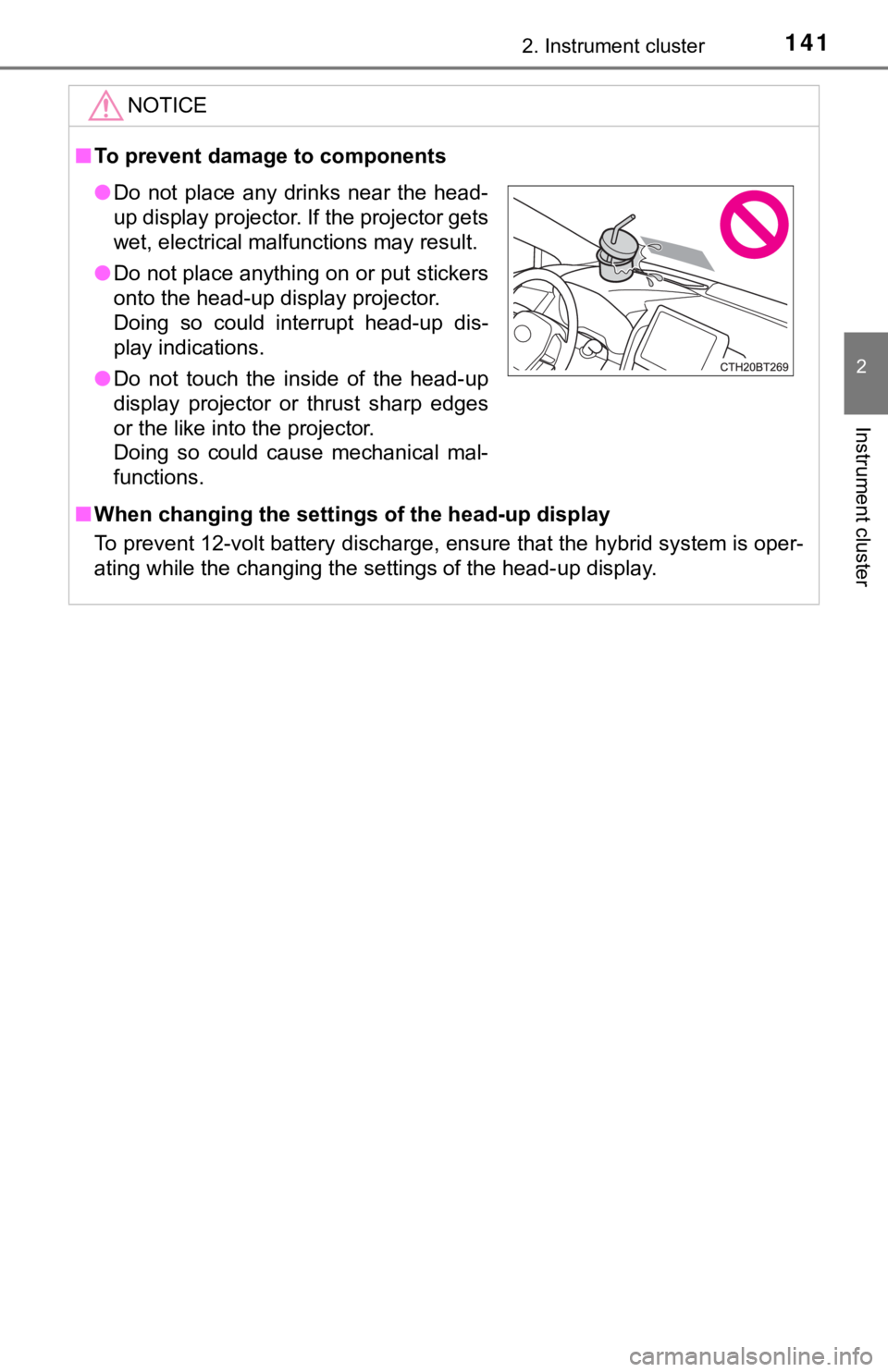
●Do not place any drinks near the head-
up display projector. If the projector gets
wet, electrical malfunctions may result.
●Do not place anything on or put stickers
onto the head-up display projector.
Doing so could interrupt head-up dis-
play indications.
●Do not touch the inside of the head-up
display projector or thrust sharp edges
or the like into the projector.
Doing so could cause mechanical mal-
functions.
Page 142 of 624
1422. Instrument cluster
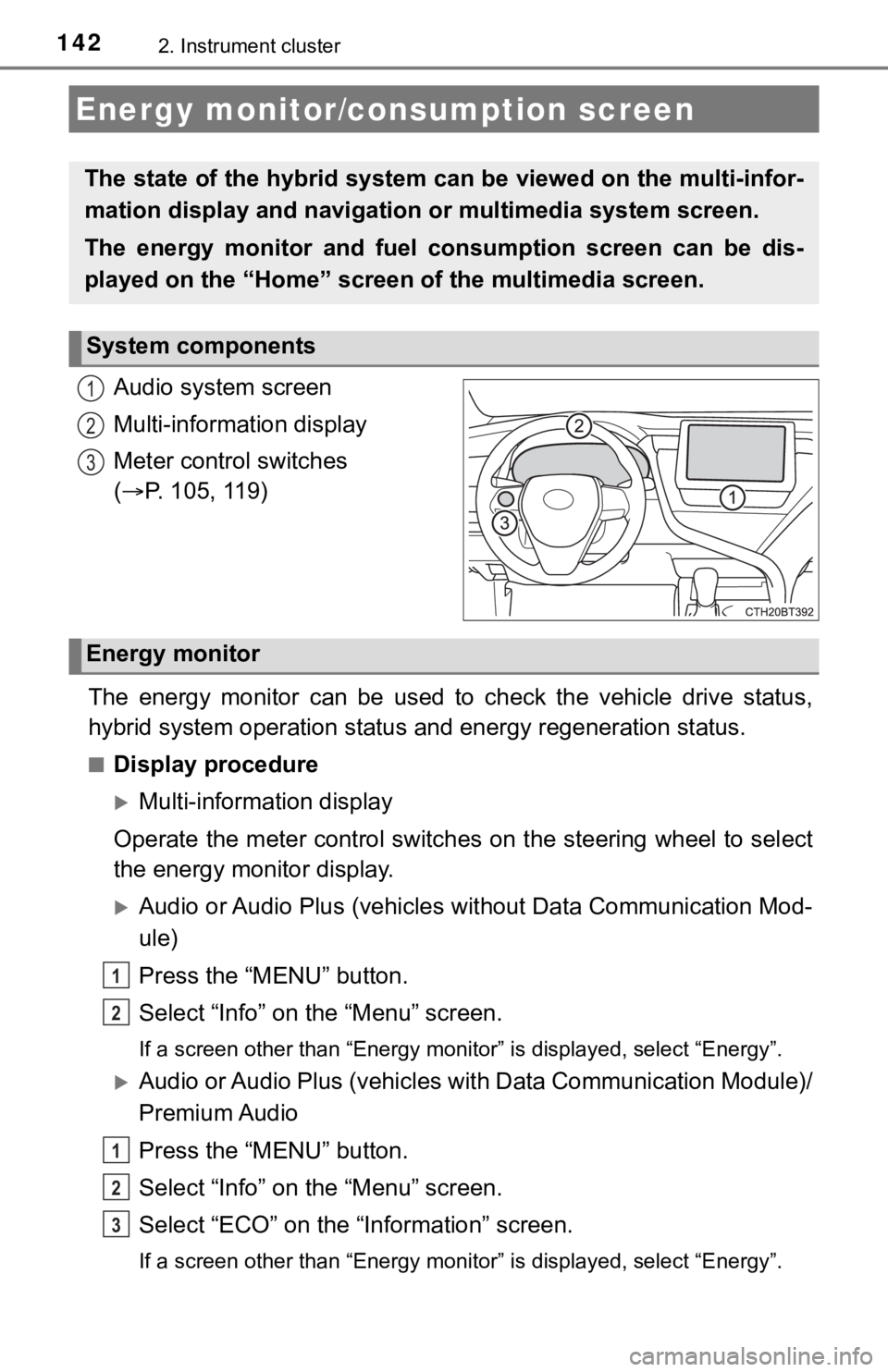
Audio system screen
Multi-information display
Meter control switches
(P. 105, 119)
The energy monitor can be used to check the vehicle drive status,
hybrid system operation status and energy regeneration status.
■Display procedure
Multi-information display
Operate the meter control switches on the steering wheel to select
the energy monitor display.
Audio or Audio Plus (vehicles without Data Communication Mod-
ule)
Press the “MENU” button.
Select “Info” on the “Menu” screen.
<002c0049000300440003005600460055004800480051000300520057004b0048005500030057004b00440051000300b30028005100480055004a005c0003005000520051004c00570052005500b40003004c005600030047004c00560053004f0044005c00
480047000f000300560048004f004800460057000300b30028[nergy”.
Audio or Audio Plus (vehicles with Data Communication Module)/
Premium Audio
Press the “MENU” button.
Select “Info” on the “Menu” screen.
Select “ECO” on the “Information” screen.
<002c0049000300440003005600460055004800480051000300520057004b0048005500030057004b00440051000300b30028005100480055004a005c0003005000520051004c00570052005500b40003004c005600030047004c00560053004f0044005c00
480047000f000300560048004f004800460057000300b30028[nergy”.
Energy monitor/consumption screen
The state of the hybrid system can be viewed on the multi-infor-
mation display and navigation or multimedia system screen.
The energy monitor and fuel consumption screen can be dis-
played on the “Home” screen of the multimedia screen.
System components
1
2
3
Energy monitor
1
2
1
2
3
Page 143 of 624
1432. Instrument cluster
2
Instrument cluster
■Reading the display
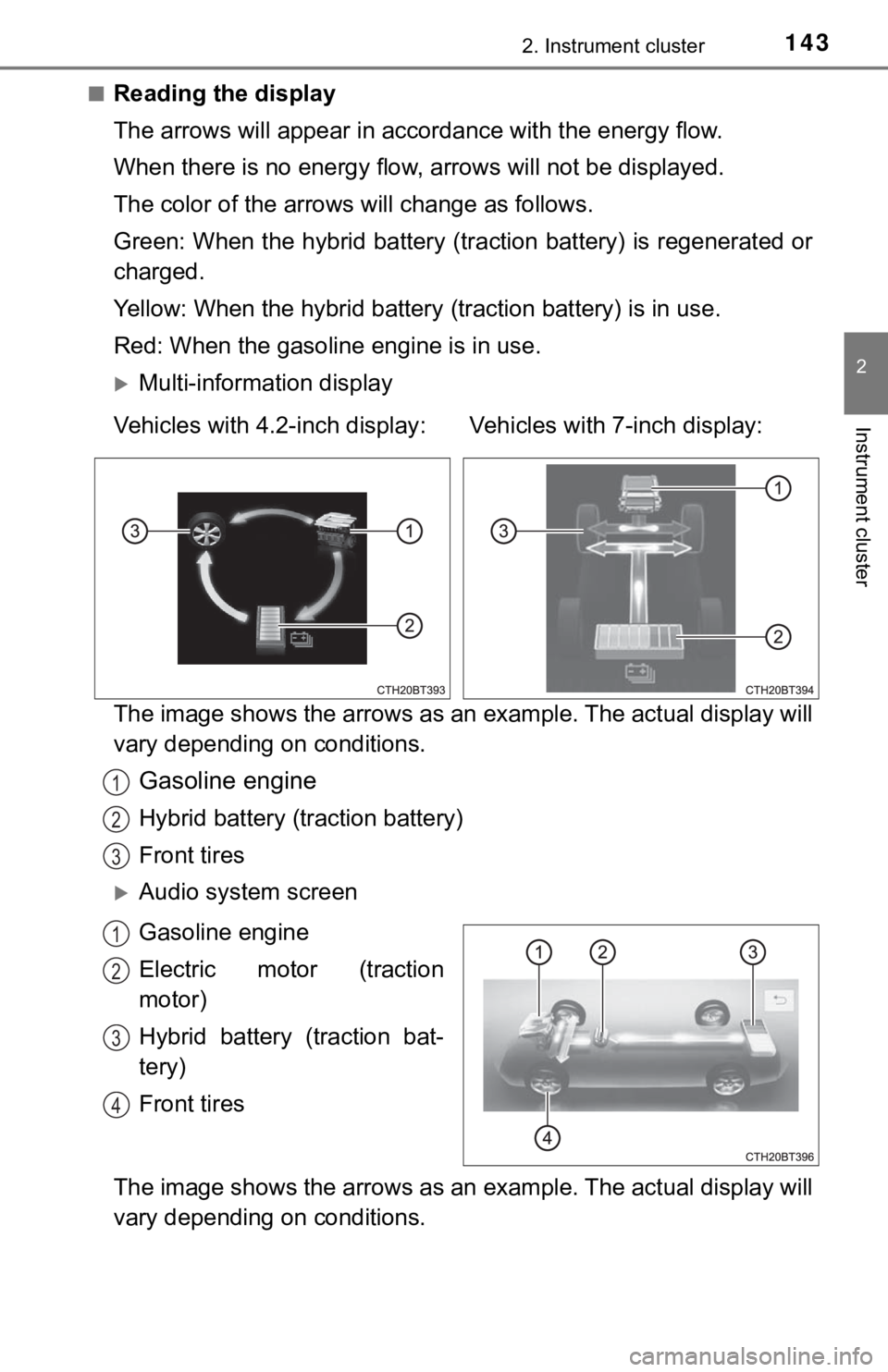
The arrows will appear in accordance with the energy flow.
When there is no energy flow, arrows will not be displayed.
The color of the arrows will change as follows.
Green: When the hybrid battery (traction battery) is regenerated or
charged.
Yellow: When the hybrid battery (traction battery) is in use.
Red: When the gasoline engine is in use.
Multi-information display
The image shows the arrows as an example. The actual display will
vary depending on conditions.
Gasoline engine
Hybrid battery (traction battery)
Front tires
Audio system screen
Gasoline engine
Electric motor (traction
motor)
Hybrid battery (traction bat-
tery)
Front tires
The image shows the arrows as an example. The actual display will
vary depending on conditions. Vehicles with 4.2-inch display: Vehicles with 7-inch display:
1
2
3
1
2
3
4
Page 144 of 624
1442. Instrument cluster
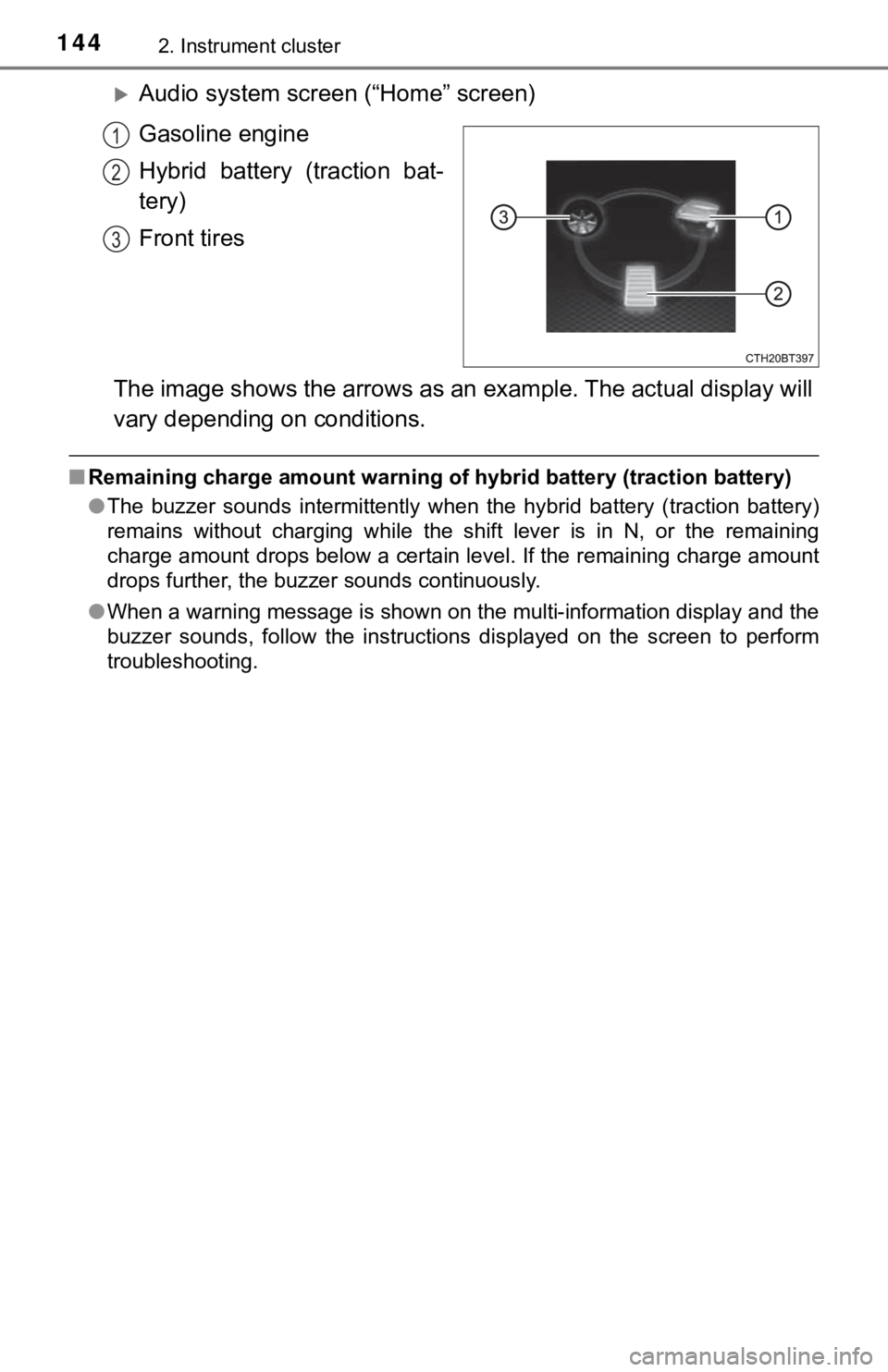
Audio system screen (“Home” screen)
Gasoline engine
Hybrid battery (traction bat-
tery)
Front tires
The image shows the arrows as an example. The actual display will
vary depending on conditions.
■Remaining charge amount warning of hybrid battery (traction battery)
●The buzzer sounds intermittently when the hybrid battery (traction battery)
remains without charging while the shift lever is in N, or the remaining
charge amount drops below a certain level. If the remaining charge amount
drops further, the buzzer sounds continuously.
●When a warning message is shown on the multi-information display and the
buzzer sounds, follow the instructions displayed on the screen to perform
troubleshooting.
1
2
3
Page 145 of 624
1452. Instrument cluster
2
Instrument cluster
■Trip information
Audio (vehicles without Data Communication Module) or Audio
Plus (vehicles without Data Communication Module)
Press the “MENU” button.
Select “Info” on the “Menu” screen.
If the “Energy Monitor” or “History” screen is displayed, select “Trip
Information”.
Audio (vehicles with Data Communication Module), Audio Plus
(vehicles with Data Communication Module) and Premium Audio
Press the “MENU” button.
Select “Info” on the “Menu” screen.
Select “ECO” on the “Information” screen.
If “Energy Monitor” or “History” screen is displayed, select “Trip Informa-
tion”.
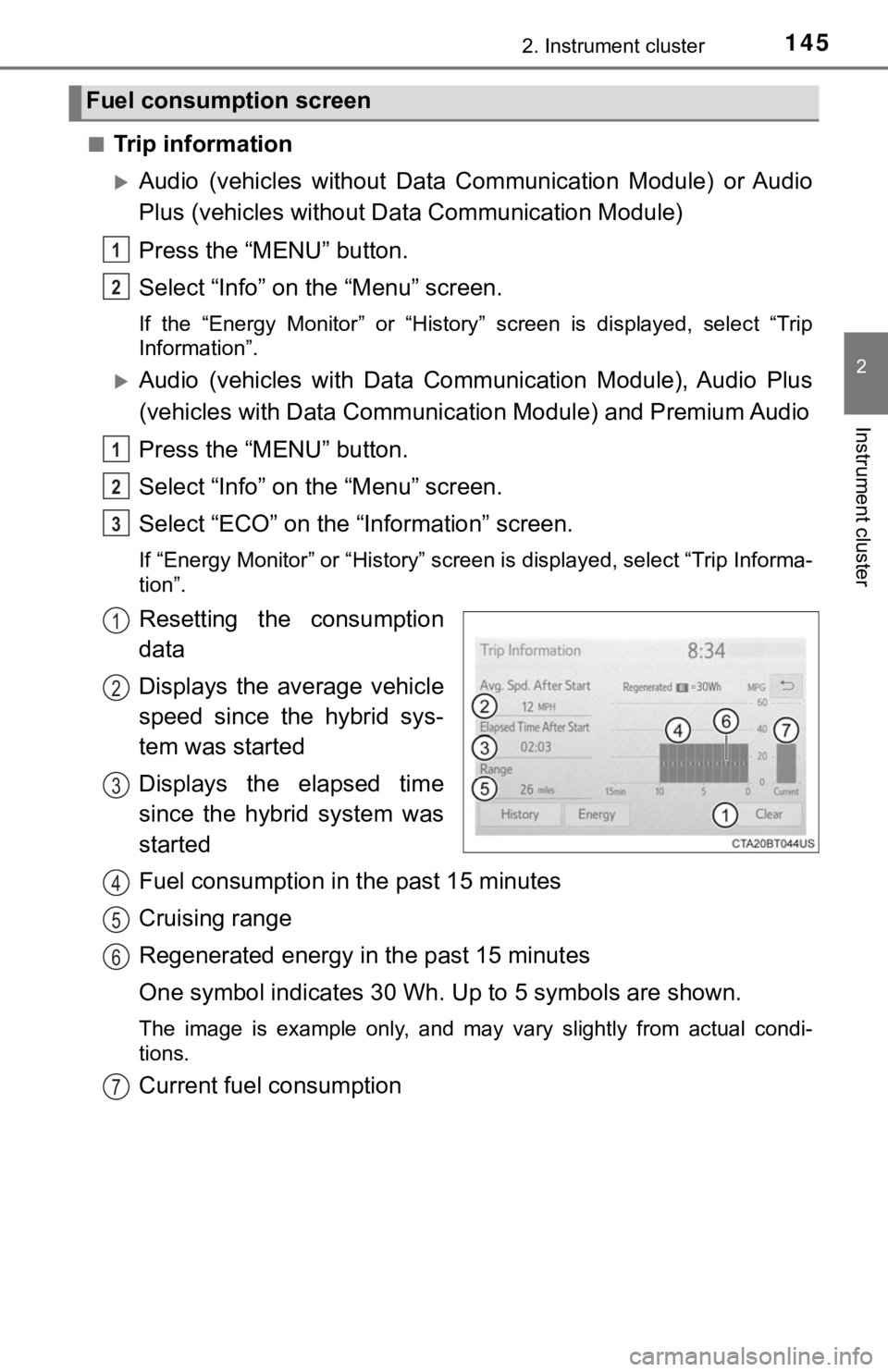
Resetting the consumption
data
Displays the average vehicle
speed since the hybrid sys-
tem was started
Displays the elapsed time
since the hybrid system was
started
Fuel consumption in the past 15 minutes
Cruising range
Regenerated energy in the past 15 minutes
One symbol indicates 30 Wh. Up to 5 symbols are shown.
The image is example only, and may vary slightly from actual condi-
tions.
Current fuel consumption
Fuel consumption screen
1
2
1
2
3
1
2
3
4
5
6
7
Page 146 of 624
1462. Instrument cluster
■History
Audio (vehicles without Data Communication Module) or Audio
Plus (vehicles without Data Communication Module)
Press the “MENU” button.
Select “Info” on the “Menu” screen.
If the “Energy Monitor” or “Trip Information” screen is displayed, select
“History”.
Audio (vehicles with Data Communication Module), Audio Plus
(vehicles with Data Communication Module) and Premium Audio
Press the “MENU” button.
Select “Info” on the “Menu” screen.
Select “ECO” on the “Information” screen.
If “Energy Monitor” or “Trip Information” screen is displayed, select “His-
tory”.
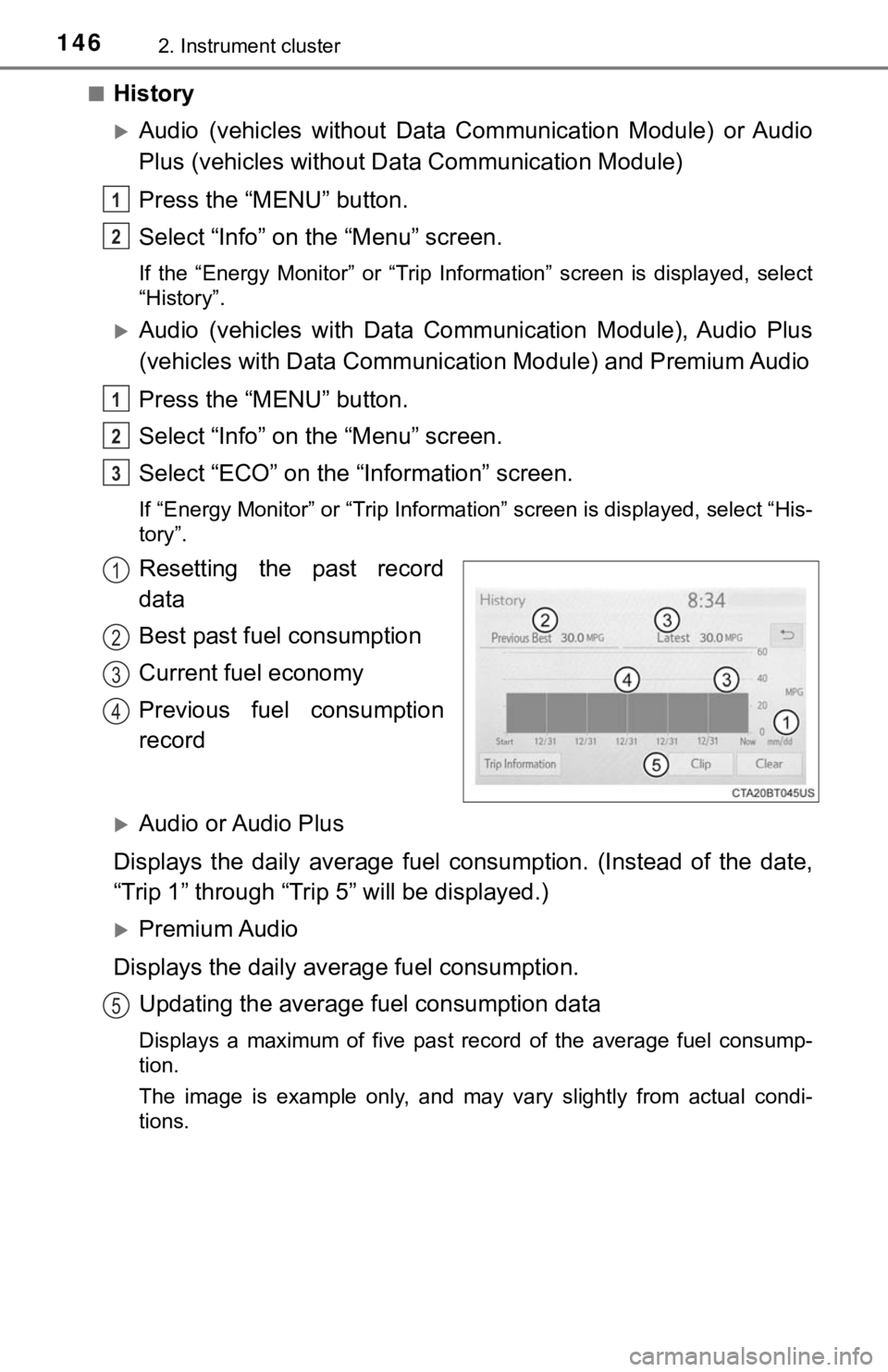
Resetting the past record
data
Best past fuel consumption
Current fuel economy
Previous fuel consumption
record
Audio or Audio Plus
Displays the daily average fuel consumption. (Instead of the date,
“Trip 1” through “Trip 5” will be displayed.)
Premium Audio
Displays the daily average fuel consumption.
Updating the average fuel consumption data
Displays a maximum of five past record of the average fuel consump-
tion.
The image is example only, and may vary slightly from actual condi-
tions.
1
2
1
2
3
1
2
3
4
5
Page 147 of 624

1472. Instrument cluster
2
Instrument cluster
■Resetting the consumption data
Selecting “Clear” on the “Trip Information” screen will reset the fuel consump-
tion and the regenerated energy for the past 15 minutes. Selecting “Clear” on
the “History” screen will reset the past records and best past fuel consump-
tion. Selecting “Yes” on the following screen will confirm resetting of all the
data.
Page 148 of 624

1482. Instrument cluster
Page 184 of 624

1843-5. Opening and closing the windows
■When the window cannot be opened or closed
When the jam protection function or catch protection function operates
unusually and the door window cannot be opened or closed, perform the fol-
lowing operations with the power window switch of that door.
●Stop the vehicle. With the power switch in ON mode, within 4 seconds of the
jam protection function or catch protection function activating, continuously
operate the power window switch in the one-touch closing direction or one-
touch opening direction so that the door window can be opened and closed.
●If the door window cannot be opened and closed even when performing the
above operations, perform the following procedure for function initialization.
Turn the power switch to ON mode.
Pull and hold the power window switch in the one-touch closing direction
and completely close the door window.
Release the power window switch for a moment, resume pulling the
switch in the one-touch closing direction, and hold it there for approxi-
mately 6 seconds or more.
Press and hold the power window switch in the one-touch opening direc-
tion. After the door window is completely opened, continue holding the
switch for an additional 1 second or more.
Release the power window switch for a moment, resume pushing the
switch in the one-touch opening direction, and hold it there for approxi-
mately 4 seconds or more.
Pull and hold the power window switch in the one-touch closing direction
again. After the door window is completely closed, continue holding the
switch for a further 1 second or more.
If you release the switch while the window is moving, start again from the
beginning.
If the window reverses and cannot be fully closed or opened, have the vehicle
inspected by your Toyota dealer.
■Door lock linked window operation
●The power windows can be opened and closed using the mechanical key.
*
(P. 527)
●The power windows can be opened using the wireless remote control.
*
(P. 154)
*: These settings must be customized at your Toyota dealer.
■Alarm
The alarm may be triggered if the alarm is set and a power window is closed
using the door lock linked power window operation function. (P. 91)
■Power windows open warning buzzer
A buzzer sounds and a message is shown on the multi-information display in
the instrument cluster when the power switch is turned off and the driver’s
door is opened with the power windows open.
1
2
3
4
5
6
Page 188 of 624

1883-5. Opening and closing the windows
■When the moon roof does not close normally
Perform the following procedure:
●If the moon roof closes but then re-opens slightly
Stop the vehicle.
Press and hold the “CLOSE” switch.
*1
The moon roof will close, reopen and pause for approximately 10 sec-
onds.
*2 Then it will close again, tilt up and pause for approximately 1 sec-
ond. Finally, it will tilt down, open and close.
Check to make sure that the moon roof is completely closed and then
release the switch.
●If the moon roof tilts down but then tilts back up
Stop the vehicle.
Press and hold the “UP” switch
*1 until the moon roof moves into the tilt
up position and stops.
Release the “UP” switch once and then press and hold the “UP” switch
again.
*1
The moon roof will pause for approximately 10 seconds in the tilt up posi-
tion.
*2 Then it will adjust slightly and pause for approximately 1 second.
Finally, it will tilt down, open and close.
Check to make sure that the moon roof is completely closed and then
release the switch.
*1: If the switch is released at the incorrect time, the procedure will have to
be performed again from the beginning.
*2: If the switch is released after the above mentioned 10 second pause,
automatic operation will be disabled. In that case, press and hold the
“CLOSE” or “UP” switch, and the moon roof will tilt up and pause for
approximately 1 second. Then it will tilt down, open and close. Check to
make sure that the moon roof is completely closed and then release the
switch.
If the moon roof does not fully close even after performing the above proce-
dure correctly, have the vehicle inspected by your Toyota dealer.
■Alarm
The alarm may be triggered if the alarm is set and the moon roof is closed
<00580056004c0051004a00030057004b0048000300470052005200550003004f00520046004e0003004f004c0051004e0048004700030050005200520051000300550052005200490003005200530048005500440057004c00520051000300490058005100
460057004c0052005100110003000b[P. 91)
■Moon roof open warning buzzer
A buzzer sounds and a message is shown on the multi-information display in
the instrument cluster when the power switch is turned off and the driver's
door is opened with the moon roof open.
■Customization
Some functions can be customized. (P. 569)
1
2
3
1
2
3
4