air condition TOYOTA CAMRY HYBRID 2022 Owners Manual
[x] Cancel search | Manufacturer: TOYOTA, Model Year: 2022, Model line: CAMRY HYBRID, Model: TOYOTA CAMRY HYBRID 2022Pages: 624, PDF Size: 13.76 MB
Page 4 of 624

TABLE OF CONTENTS4
5-1. Using the air conditioning
system and defogger
Automatic air conditioning
system............................. 366
Heated steering wheel/
seat heaters/
seat ventilators ................ 375
5-2. Using the interior lights
Interior lights list ................ 378
• Interior lights ................. 379
• Personal lights .............. 380
5-3. Using the storage
features
List of storage features...... 381
• Glove box...................... 382
• Console box .................. 382
• Coin holder ................... 382
• Bottle holders ................ 383
• Cup holders .................. 384
• Auxiliary boxes.............. 385
• Open tray ...................... 386
Trunk features ................... 387
5-4. Other interior features
Other interior features ....... 388
• Sun visors ..................... 388
• Vanity mirrors................ 388
• Power outlet .................. 389
• USB charging ports....... 390
• Wireless charger ........... 392
• Armrest ......................... 401
• Assist grips ................... 401
• Coat hooks.................... 402
Garage door opener .......... 4036-1. Maintenance and care
Cleaning and protecting
the vehicle exterior .......... 412
Cleaning and protecting
the vehicle interior ........... 416
6-2. Maintenance
Maintenance
requirements ................... 419
General maintenance ........ 422
Emission inspection and
maintenance (I/M)
programs ......................... 426
6-3. Do-it-yourself
maintenance
Do-it-yourself service
precautions ...................... 427
Hood .................................. 429
Positioning a floor jack....... 431
Engine compartment ......... 432
12-volt battery .................... 440
Tires................................... 444
Tire inflation pressure ........ 458
Wheels............................... 461
Air conditioning filter .......... 463
Cleaning the hybrid battery
(traction battery) air
intake vent and filter ........ 465
Electronic key battery ........ 470
Checking and replacing
fuses ................................ 473
Light bulbs ......................... 476
5Interior features6Maintenance and care
Page 17 of 624

17Pictorial index
Turn signal lever . . . . . . . . . . . . . . . . . . . . . . . . . . . . . . . . . . P. 222
Headlight switch . . . . . . . . . . . . . . . . . . . . . . . . . . . . . . . . . . P. 230
Headlights/side marker lights/parking lights/tail lights/
license plate lights/daytime running lights . . . . . . . . . . . . . . . . P. 230
Windshield wiper and washer switch . . . . . . . . . . . . . . . . . P. 238
Usage . . . . . . . . . . . . . . . . . . . . . . . . . . . . . . . . . . . . . . . . . . . P. 238
Adding washer fluid . . . . . . . . . . . . . . . . . . . . . . . . . . . . . . . . . P. 439
Emergency flasher switch . . . . . . . . . . . . . . . . . . . . . . . . . . P. 490
Hood lock release lever. . . . . . . . . . . . . . . . . . . . . . . . . . . . . P. 429
Tilt and telescopic steering lock release lever . . . . . . . . . . P. 177
Air conditioning system . . . . . . . . . . . . . . . . . . . . . . . . . . . . P. 366
Usage . . . . . . . . . . . . . . . . . . . . . . . . . . . . . . . . . . . . . . . . . . . P. 366
Rear window defogger . . . . . . . . . . . . . . . . . . . . . . . . . . . . . . . P. 370
Audio
*1, 2
Audio Plus*1, 2
Premium Audio*1, 2
Clock*2
4
5
6
7
8
9
10
*1: If equipped
*2: Refer to “NAVIGATION AND MULTIMEDIA SYSTEM OWNER’S MANUAL”.
Page 43 of 624

431-1. For safe use
1
For safety and security
●For Safety Connect subscribers, if any of the following situations occur, the
system is designed to send an emergency call to the response center, noti-
fying them of the vehicle’s location (without needing to push the “SOS” but-
ton) and an agent will attempt to speak with the occupants to ascertain the
level of emergency and assistance required. If the occupants are unable to
communicate, the agent automatically treats the call as an emergency and
<004b0048004f0053005600030057005200030047004c00560053004400570046004b00030057004b0048000300510048004600480056005600440055005c00030048005000480055004a004800510046005c00030056004800550059004c00460048005600
110003000b[P. 73)
• An SRS airbag is deployed.
• A seat belt pretensioner is activated.
• The vehicle is involved in a severe rearend collision.
■SRS airbag deployment conditions (SRS front airbags)
●The SRS front airbags will deploy in the event of an impact that exceeds the
set threshold level (the level of force corresponding to an approximately 12 -
18 mph [20 - 30 km/h] frontal collision with a fixed wall that does not move or
deform).
However, this threshold velocity will be considerably higher in the following
situations:
• If the vehicle strikes an object, such as a parked vehicle or sign pole,
which can move or deform on impact
• If the vehicle is involved in an underride collision, such as a collision in
which the front of the vehicle “underrides”, or goes under, the bed of a
truck
●Depending on the type of collision, it is possible that only the seat belt pre-
tensioners will activate.
●The SRS front airbags for the front passenger will not activate if there is no
passenger sitting in the front passenger seat. However, the SRS front air-
bags for the front passenger may deploy if luggage is put in the seat, even if
the seat is unoccupied.
■SRS airbag deployment conditions (SRS side and curtain shield airbags)
●The SRS side and curtain shield airbags will deploy in the event of an
impact that exceeds the set threshold level (the level of force corresponding
to the impact force produced by an approximately 3300 lb. [1500 kg] vehicle
colliding with the vehicle cabin from a direction perpendicular to the vehicle
orientation at an approximate speed of 12 - 18 mph [20 - 30 km/h]).
●Both SRS curtain shield airbags may deploy in the event of a severe side
collision.
●Both SRS curtain shield airbags will deploy in the event of vehicle rollover.
●Both SRS curtain shield airbags may also deploy in the event of a severe
frontal collision.
Page 44 of 624
441-1. For safe use
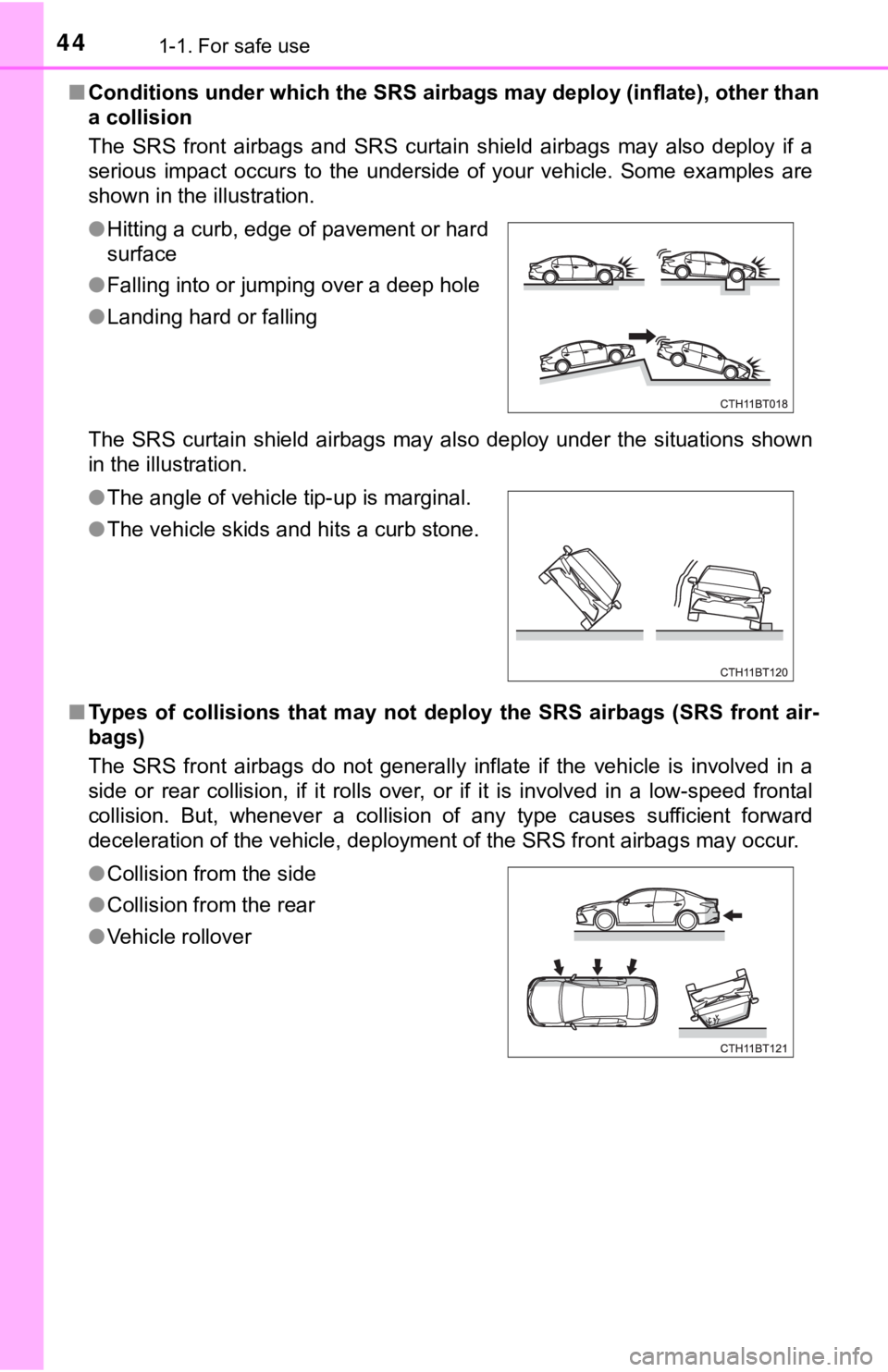
■Conditions under which the SRS airbags may deploy (inflate), other than
a collision
The SRS front airbags and SRS curtain shield airbags may also deploy if a
serious impact occurs to the underside of your vehicle. Some examples are
shown in the illustration.
The SRS curtain shield airbags may also deploy under the situations shown
in the illustration.
■Types of collisions that may not deploy the SRS airbags (SRS front air-
bags)
The SRS front airbags do not generally inflate if the vehicle is involved in a
side or rear collision, if it rolls over, or if it is involved in a low-speed frontal
collision. But, whenever a collision of any type causes sufficient forward
deceleration of the vehicle, deployment of the SRS front airbags may occur. ●Hitting a curb, edge of pavement or hard
surface
●Falling into or jumping over a deep hole
●Landing hard or falling
●The angle of vehicle tip-up is marginal.
●The vehicle skids and hits a curb stone.
●Collision from the side
●Collision from the rear
●Vehicle rollover
Page 47 of 624
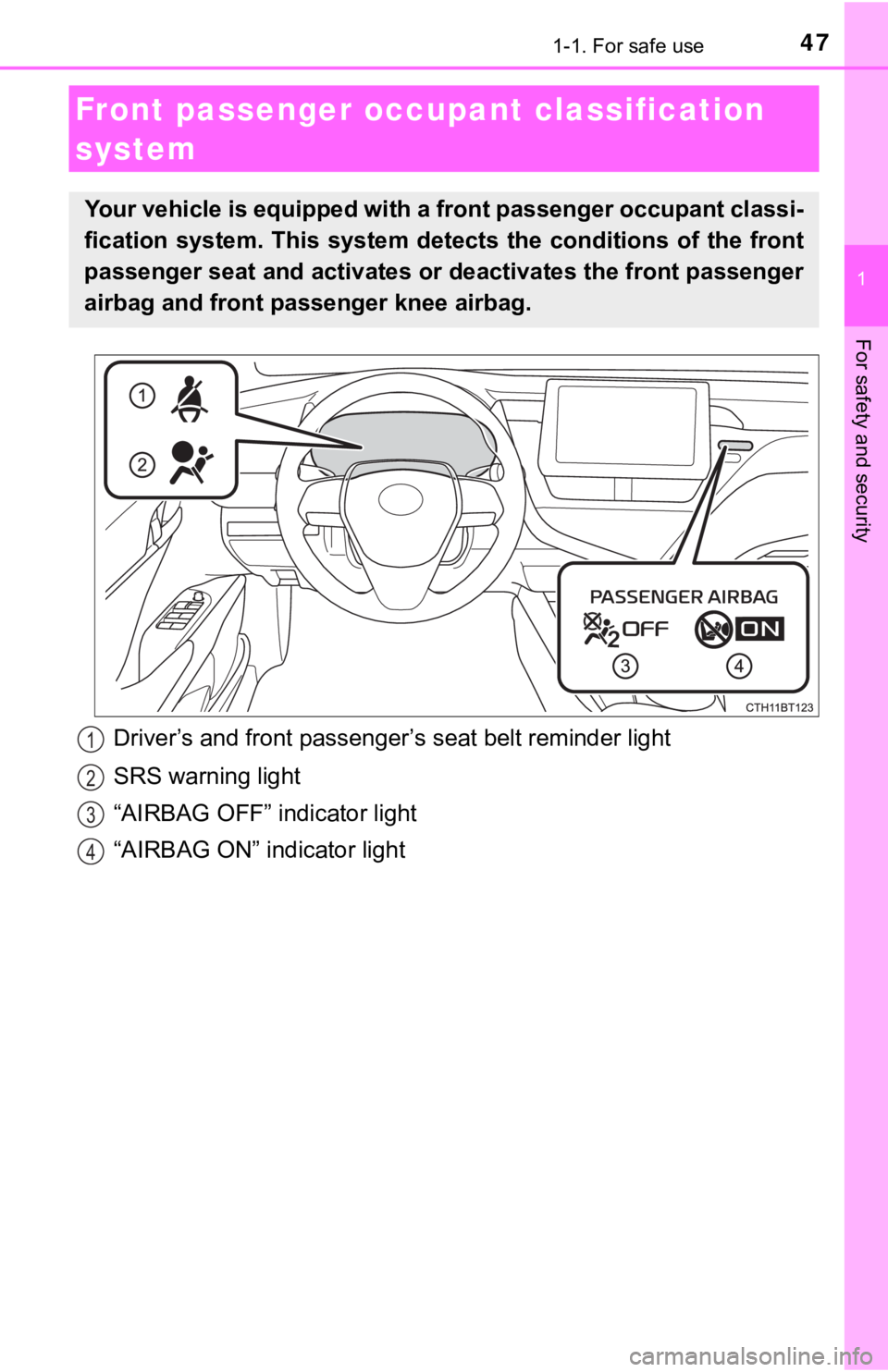
471-1. For safe use
1
For safety and security
Driver’s and front passenger’s seat belt reminder light
SRS warning light
“AIRBAG OFF” indicator light
“AIRBAG ON” indicator light
Front passenger occupant classification
system
Your vehicle is equipped with a front passenger occupant classi-
fication system. This system detects the conditions of the front
passenger seat and activates or deactivates the front passenger
airbag and front passenger knee airbag.
1
2
3
4
Page 48 of 624
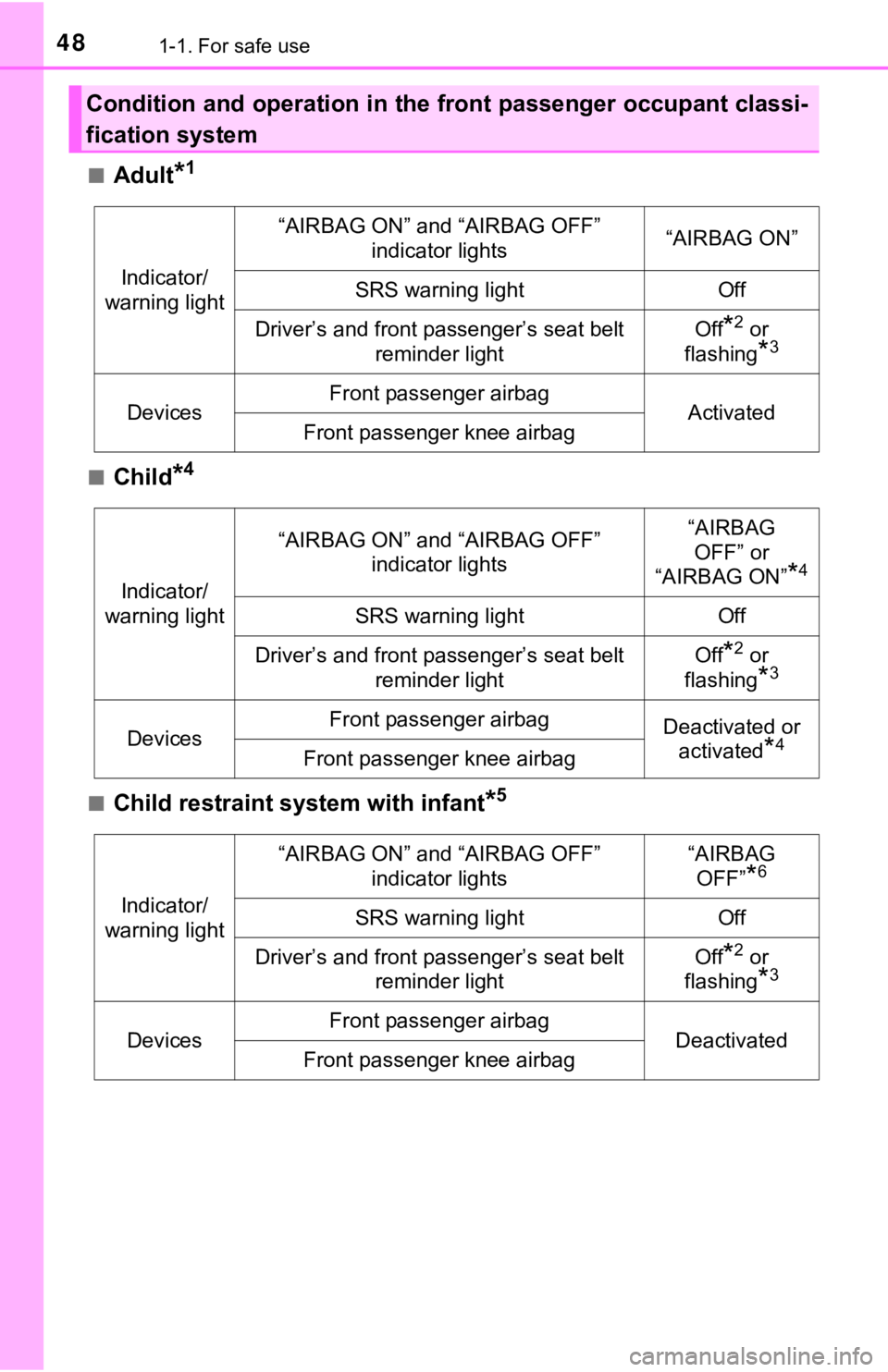
481-1. For safe use
■Adult*1
■Child*4
■Child restraint system with infant*5
Condition and operation in the front passenger occupant classi-
fication system
Indicator/
warning light
“AIRBAG ON” and “AIRBAG OFF”
indicator lights“AIRBAG ON”
SRS warning lightOff
Driver’s and front passenger’s seat belt
reminder lightOff*2 or
flashing
*3
DevicesFront passenger airbagActivatedFront passenger knee airbag
Indicator/
warning light
“AIRBAG ON” and “AIRBAG OFF”
indicator lights“AIRBAG
OFF” or
“AIRBAG ON”
*4
SRS warning lightOff
Driver’s and front passenger’s seat belt
reminder lightOff*2 or
flashing
*3
DevicesFront passenger airbagDeactivated or
activated
*4Front passenger knee airbag
Indicator/
warning light
“AIRBAG ON” and “AIRBAG OFF”
indicator lights“AIRBAG
OFF”
*6
SRS warning lightOff
Driver’s and front passenger’s seat belt
reminder lightOff*2 or
flashing
*3
DevicesFront passenger airbagDeactivatedFront passenger knee airbag
Page 82 of 624
821-4. Hybrid system
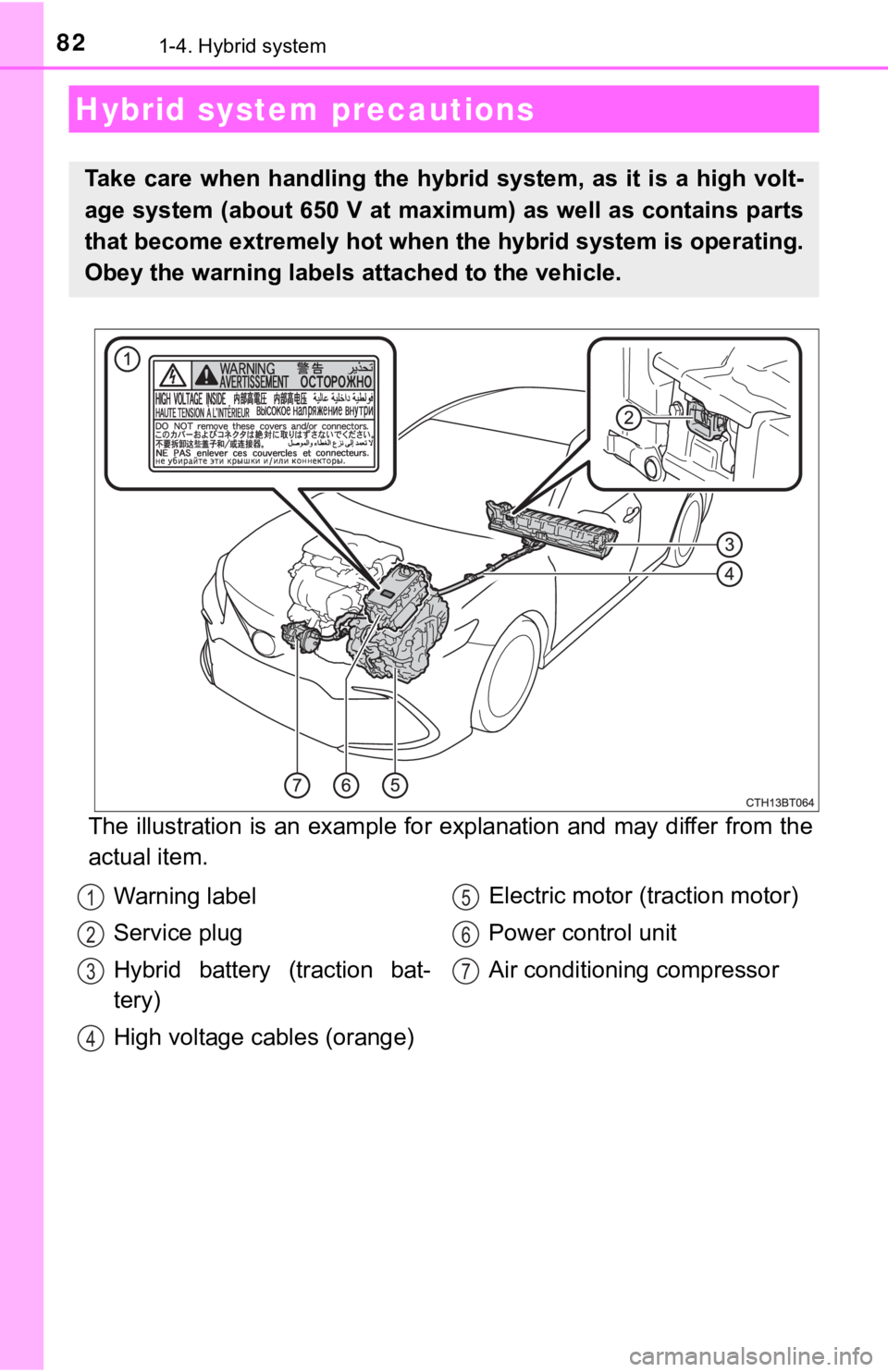
The illustration is an example for explanation and may differ from the
actual item.
Hybrid system precautions
Take care when handling the hybrid system, as it is a high volt-
age system (about 650 V at maximum) as well as contains parts
that become extremely hot when the hybrid system is operating.
Obey the warning labels attached to the vehicle.
Warning label
Service plug
Hybrid battery (traction bat-
tery)
High voltage cables (orange)Electric motor (traction motor)
Power control unit
Air conditioning compressor1
2
3
4
5
6
7
Page 152 of 624

1523-1. Key information
■When riding in an aircraft
When bringing an electronic key onto an aircraft, make sure you do not press
any button on the electronic key while inside the aircraft cabin. If you are car-
rying an electronic key in your bag etc., ensure that the buttons are not likely
to be pressed accidentally. Pressing a button may cause the electronic key to
emit radio waves that could interfere with the operation of the aircraft.
■Conditions affecting operation
P. 167
■Electronic key battery depletion
●The standard battery life is 1 to 2 years.
●If the battery becomes low, an alarm will sound in the cabin when the hybrid
system stops.
●As the electronic key always receives radio waves, the battery will become
depleted even if the electronic key is not used. The following symptoms indi-
cate that the electronic key battery may be depleted. Replace the battery
when necessary. (P. 470)
• The smart key system or the wireless remote control does not operate.
• The detection area becomes smaller.
• The LED indicator on the key surface does not turn on.
●To reduce key battery depletion when the electronic key is to not be used for
long periods of time, set the electronic key to the battery-saving mode.
(P. 166)
●To avoid serious deterioration, do not leave the electronic key within 3 ft. (1
m) of the following electrical appliances that produce a magnetic field:
•TVs
• Personal computers
• Cellular phones, cordless phones and battery chargers
• Recharging cellular phones or cordless phones
• Table lamps
• Induction cookers
■Replacing the battery
P. 470
■Confirmation of the registered key number
The number of keys already registered to the vehicle can be confirmed. Ask
your Toyota dealer for details.
■If a wrong key is used
<0037004b00480003004e0048005c00030046005c004f004c00510047004800550003005500520057004400570048005600030049005500480048004f005c0003005700520003004c00560052004f0044005700480003004c00510056004c00470048000300
5000480046004b00440051004c005600500011[
Page 167 of 624

1673-2. Opening, closing and locking the doors
3
Operation of each component
■Conditions affecting operation
The smart key system, wireless remote control and immobilizer system use
weak radio waves. In the following situations, the communication between
the electronic key and the vehicle may be affected, preventing the smart key
system, wireless remote control and immobilizer system from operating prop-
erly. (Ways of coping: P. 527)
●When the electronic key battery is depleted
●Near a TV tower, electric power plant, gas station, radio station, large dis-
play, airport or other facility that generates strong radio waves or electrical
noise
●When the electronic key is in contact with, or is covered by the following
metallic objects
• Cards to which aluminum foil is attached
• Cigarette boxes that have aluminum foil inside
• Metallic wallets or bags
• Coins
• Hand warmers made of metal
• Media such as CDs and DVDs
●When other wireless keys (that emit radio waves) are being used nearby
●When carrying the electronic key together with the following devices that
emit radio waves
• Portable radio, cellular phone, cordless phone or other wireless commu-
nication devices
• Another vehicle’s electronic key, another electronic key of your vehicle, or
a wireless key that emits radio waves
• Personal computers or personal digital assistants (PDAs)
• Digital audio players
• Portable game systems
●If window tint with a metallic content or metallic objects are attached to the
rear window
●When the electronic key is placed near a battery charger or electronic
devices
●When the vehicle is parked in a pay parking spot where radio waves are
emitted.
Page 250 of 624
2504-5. Using the driving support systems
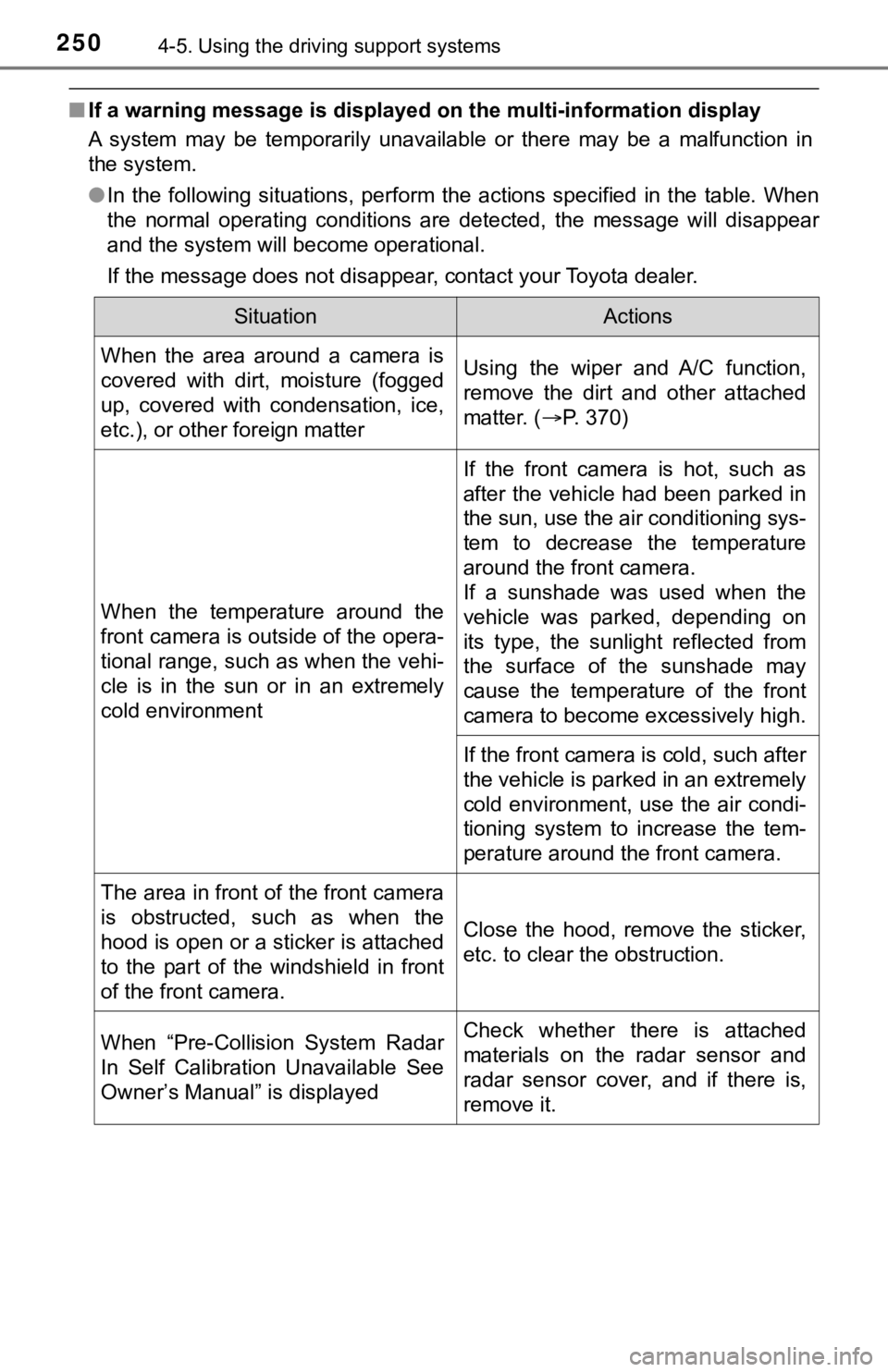
■If a warning message is displayed on the multi-information display
A system may be temporarily unavailable or there may be a malfunction in
the system.
●In the following situations, perform the actions specified in the table. When
the normal operating conditions are detected, the message will disappear
and the system will become operational.
If the message does not disappear, contact your Toyota dealer.
SituationActions
When the area around a camera is
covered with dirt, moisture (fogged
up, covered with condensation, ice,
etc.), or other foreign matterUsing the wiper and A/C function,
remove the dirt and other attached
matter. (P. 370)
When the temperature around the
front camera is outside of the opera-
tional range, such as when the vehi-
cle is in the sun or in an extremely
cold environment
If the front camera is hot, such as
after the vehicle had been parked in
the sun, use the air conditioning sys-
tem to decrease the temperature
around the front camera.
If a sunshade was used when the
vehicle was parked, depending on
its type, the sunlight reflected from
the surface of the sunshade may
cause the temperature of the front
camera to become excessively high.
If the front camera is cold, such after
the vehicle is parked in an extremely
cold environment, use the air condi-
tioning system to increase the tem-
perature around the front camera.
The area in front of the front camera
is obstructed, such as when the
hood is open or a sticker is attached
to the part of the windshield in front
of the front camera.Close the hood, remove the sticker,
etc. to clear the obstruction.
When “Pre-Collision System Radar
In Self Calibration Unavailable See
Owner’s Manual” is displayedCheck whether there is attached
materials on the radar sensor and
radar sensor cover, and if there is,
remove it.