phone TOYOTA CAMRY HYBRID 2022 Owners Manual
[x] Cancel search | Manufacturer: TOYOTA, Model Year: 2022, Model line: CAMRY HYBRID, Model: TOYOTA CAMRY HYBRID 2022Pages: 624, PDF Size: 13.76 MB
Page 10 of 624
10
The SRS airbag and seat belt pretensioner devices in your Toyota contain
explosive chemicals. If the vehicle is scrapped with the airbags and seat belt
pretensioners left as they are, this may cause an accident such as fire. Be
sure to have the systems of the SRS airbag and seat belt pretensioner
removed and disposed of by a qualified service shop or by your Toyota dealer
before you scrap your vehicle.
Special handling may apply, See www.dtsc.ca.gov/hazardouswaste/perchlorate.
Your vehicle has components that may contain perchlorate. These compo-
nents may include the airbags, seat belt pretensioners, wireless remote con-
trol batteries, and the batteries in the tire pressure warning valve and
transmitters.
Scrapping of your Toyota
Perchlorate Material
WARNING
■General precautions while driving
Driving under the influence: Never drive your vehicle when under the influ-
ence of alcohol or drugs that have impaired your ability to operate your vehi-
cle. Alcohol and certain drugs delay reaction time, impair judgment and
reduce coordination, which could lead to an accident that could result in
death or serious injury.
Defensive driving: Always drive defensively. Anticipate mistakes that other
drivers or pedestrians might make and be ready to avoid accidents.
Driver distraction: Always give your full attention to driving. Anything that
distracts the driver, such as adjusting controls, talking on a cellular phone or
reading can result in a collision with resulting death or serious injury to you,
your occupants or others.
■General precaution regarding children’s safety
Never leave children unattended in the vehicle, and never allow children to
have or use the key.
Children may be able to start the vehicle or shift the vehicle into neutral.
There is also a danger that children may injure themselves by playing with
the windows, the moon roof, or other features of the vehicle. In addition,
heat build-up or extremely cold temperatures inside the vehicle can be fatal
to children.
Page 19 of 624
19Pictorial index
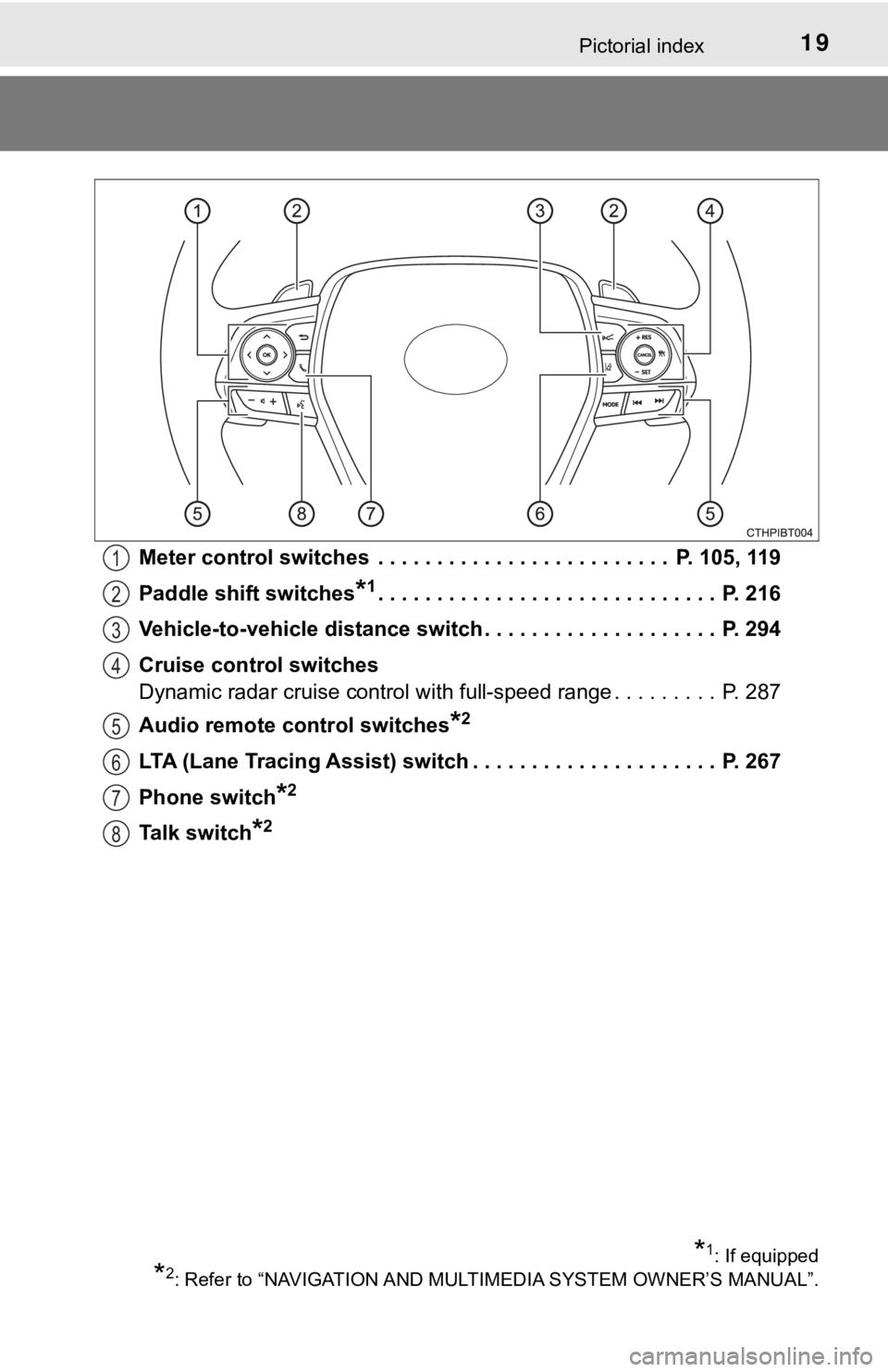
Meter control switches . . . . . . . . . . . . . . . . . . . . . . . . . P. 105, 119
Paddle shift switches
*1. . . . . . . . . . . . . . . . . . . . . . . . . . . . . P. 216
Vehicle-to-vehicle distance switch . . . . . . . . . . . . . . . . . . . . P. 294
Cruise control switches
Dynamic radar cruise control with full-speed range . . . . . . . . . P. 287
Audio remote control switches
*2
LTA (Lane Tracing Assist) switch . . . . . . . . . . . . . . . . . . . . . P. 267
Phone switch
*2
Talk switch*2
1
2
3
4
5
6
7
8
*1: If equipped
*2: Refer to “NAVIGATION AND MULTIMEDIA SYSTEM OWNER’S MANUAL”.
Page 73 of 624
73
1
For safety and security
1-3. Emergency assistance
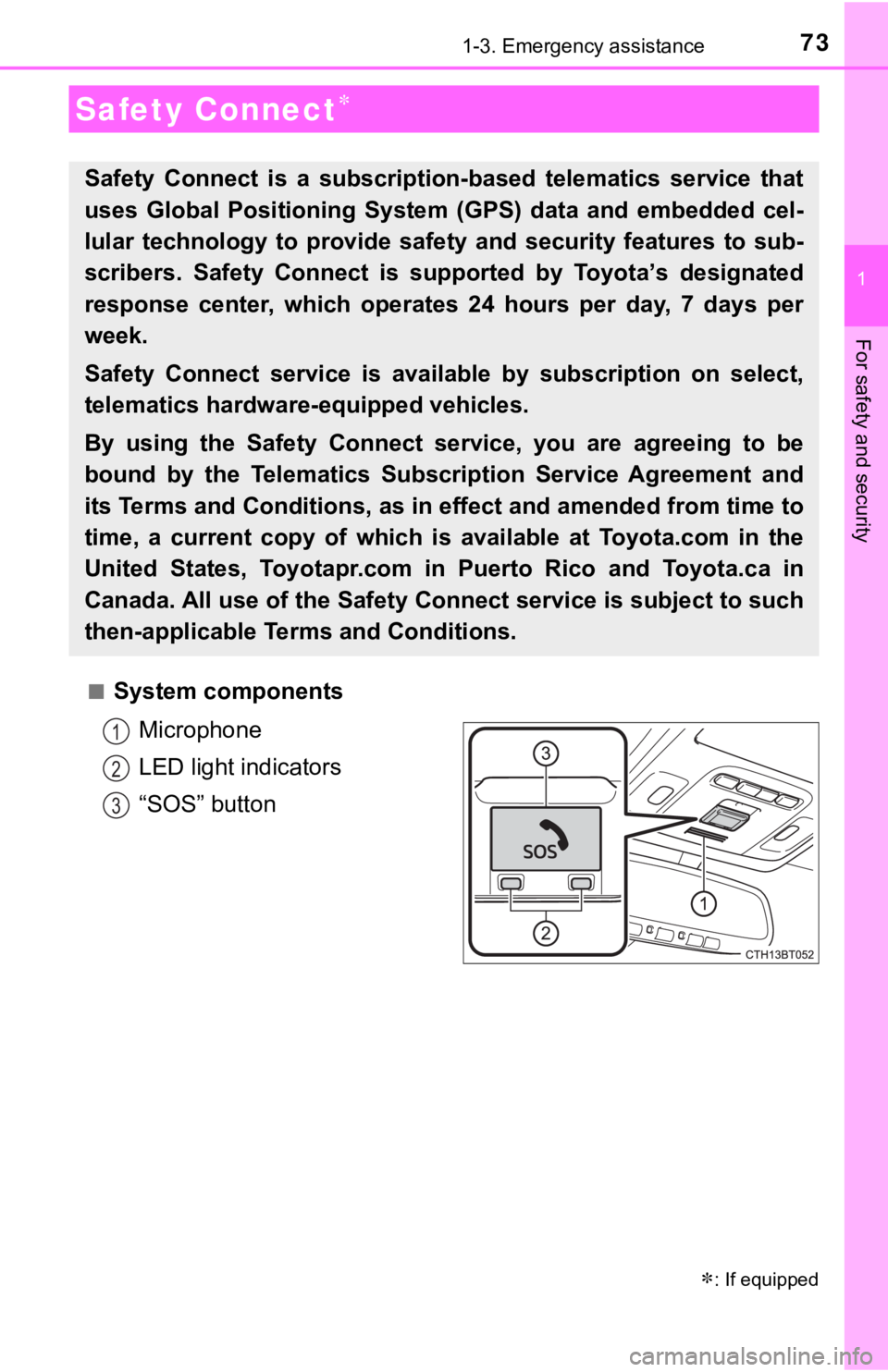
■System components
Microphone
LED light indicators
“SOS” button
Safety Connect
: If equipped
Safety Connect is a subscription-based telematics service that
uses Global Positioning System (GPS) data and embedded cel-
lular technology to provide safety and security features to sub-
scribers. Safety Connect is supported by Toyota’s designated
response center, which operates 24 hours per day, 7 days per
week.
Safety Connect service is available by subscription on select,
telematics hardware-equipped vehicles.
By using the Safety Connect service, you are agreeing to be
bound by the Telematics Subscription Service Agreement and
its Terms and Conditions, as in effect and amended from time to
time, a current copy of which is available at Toyota.com in the
United States, Toyotapr.com in Puerto Rico and Toyota.ca in
Canada. All use of the Safety Connect service is subject to such
then-applicable Terms and Conditions.
1
2
3
Page 75 of 624
751-3. Emergency assistance
1
For safety and security
■Safety Connect Services Information
●Phone calls using the vehicle’s Bluetooth® technology will not be possible
when Safety Connect is active and in use.
●Safety Connect is available beginning Fall 2009 on select Toyota models (in
the contiguous United States only). Contact with the Safety Connect
response center is dependent upon the telematics device being in operative
condition, cellular connection availability, and GPS satellite signal reception,
which can limit the ability to reach the response center or receive emer-
gency service support. Enrollment and Telematics Subscription Service
Agreement are required. A variety of subscription terms are available;
charges vary by subscription term selected and location.
●Automatic Collision Notification, Emergency Assistance and Stolen Vehicle
Location are available in the United States, including Hawaii and Alaska,
Puerto Rico and Canada, and Enhanced Roadside Assistance are available
in the United States, Puerto Rico and Canada.
●Automatic Collision Notification, Emergency Assistance, Stolen Vehicle and
Enhanced Road Assistance are not available in the U.S. Virgin Islands.
For vehicles first sold in the U.S. Virgin Islands, no Safety Connect services
will function in or outside the U.S. Virgin Islands.
●Safety Connect services are not subject to section 255 of the Telecommuni-
cations Act and the device is not TTY compatible.
■Languages
The Safety Connect response center will offer support in multiple languages.
The Safety Connect system will offer voice prompts in English, Spanish, and
French. Please indicate your language of choice when enrolling.
■When contacting the response center
You may be unable to contact the response center if the network is busy.
When the power switch is turned to ON mode, the red indicator light
comes on for 2 seconds then turns off. Afterward, the green indicator
light comes on, indicating that the service is active.
The following indicator light patterns indicate specific system usage
conditions:
●Green indicator light on = Active service
●Green indicator light flashing = Safety Connect call in process
●Red indicator light (except at vehicle start-up) = System malfunction
(contact your Toyota dealer)
●No indicator light (off) = Safety Connect service not active
Safety Connect LED light Indicators
Page 77 of 624
771-3. Emergency assistance
1
For safety and security
■Enhanced Roadside Assistance
Enhanced Roadside Assistance adds GPS data to the already
included warranty-based Toyota roadside service.
Subscribers can press the “SOS” button to reach a Safety Connect
response-center agent, who can help with a wide range of needs,
such as: towing, flat tire, fuel delivery, etc. For a description of the
Enhanced Roadside Assistance services and their limitations,
please see the Safety Connect Terms and Conditions, which are
available at Toyota.com in the United States, Toyotapr.com in
Puerto Rico and Toyota.ca in Canada.
Important! Read this information before using Safety Connect.
■Exposure to radio frequency signals
The Safety Connect system installed in your vehicle is a low-power
radio transmitter and receiver. It receives and also sends out radio
frequency (RF) signals.
In August 1996, the Federal Communications Commission (FCC)
adopted RF exposure guidelines with safety levels for mobile wire-
less phones. Those guidelines are consistent with the safety stan-
dards previously set by the following U.S. and international
standards bodies.
●ANSI (American National Standards Institute) C95.1 [1992]
●NCRP (National Council on Radiation Protection and Measure-
ment) Report 86 [1986]
●ICNIRP (International Commission on Non-Ionizing Radiation
Protection) [1996]
Those standards were based on comprehensive and periodic eval-
uations of the relevant scientific literature. Over 120 scientists, engi-
neers, and physicians from universities, and government health
agencies and industries reviewed the available body of research to
develop the ANSI Standard (C95.1).
The design of Safety Connect complies with the FCC guidelines in
addition to those standards.
Safety information for Safety Connect
Page 152 of 624

1523-1. Key information
■When riding in an aircraft
When bringing an electronic key onto an aircraft, make sure you do not press
any button on the electronic key while inside the aircraft cabin. If you are car-
rying an electronic key in your bag etc., ensure that the buttons are not likely
to be pressed accidentally. Pressing a button may cause the electronic key to
emit radio waves that could interfere with the operation of the aircraft.
■Conditions affecting operation
P. 167
■Electronic key battery depletion
●The standard battery life is 1 to 2 years.
●If the battery becomes low, an alarm will sound in the cabin when the hybrid
system stops.
●As the electronic key always receives radio waves, the battery will become
depleted even if the electronic key is not used. The following symptoms indi-
cate that the electronic key battery may be depleted. Replace the battery
when necessary. (P. 470)
• The smart key system or the wireless remote control does not operate.
• The detection area becomes smaller.
• The LED indicator on the key surface does not turn on.
●To reduce key battery depletion when the electronic key is to not be used for
long periods of time, set the electronic key to the battery-saving mode.
(P. 166)
●To avoid serious deterioration, do not leave the electronic key within 3 ft. (1
m) of the following electrical appliances that produce a magnetic field:
•TVs
• Personal computers
• Cellular phones, cordless phones and battery chargers
• Recharging cellular phones or cordless phones
• Table lamps
• Induction cookers
■Replacing the battery
P. 470
■Confirmation of the registered key number
The number of keys already registered to the vehicle can be confirmed. Ask
your Toyota dealer for details.
■If a wrong key is used
<0037004b00480003004e0048005c00030046005c004f004c00510047004800550003005500520057004400570048005600030049005500480048004f005c0003005700520003004c00560052004f0044005700480003004c00510056004c00470048000300
5000480046004b00440051004c005600500011[
Page 167 of 624

1673-2. Opening, closing and locking the doors
3
Operation of each component
■Conditions affecting operation
The smart key system, wireless remote control and immobilizer system use
weak radio waves. In the following situations, the communication between
the electronic key and the vehicle may be affected, preventing the smart key
system, wireless remote control and immobilizer system from operating prop-
erly. (Ways of coping: P. 527)
●When the electronic key battery is depleted
●Near a TV tower, electric power plant, gas station, radio station, large dis-
play, airport or other facility that generates strong radio waves or electrical
noise
●When the electronic key is in contact with, or is covered by the following
metallic objects
• Cards to which aluminum foil is attached
• Cigarette boxes that have aluminum foil inside
• Metallic wallets or bags
• Coins
• Hand warmers made of metal
• Media such as CDs and DVDs
●When other wireless keys (that emit radio waves) are being used nearby
●When carrying the electronic key together with the following devices that
emit radio waves
• Portable radio, cellular phone, cordless phone or other wireless commu-
nication devices
• Another vehicle’s electronic key, another electronic key of your vehicle, or
a wireless key that emits radio waves
• Personal computers or personal digital assistants (PDAs)
• Digital audio players
• Portable game systems
●If window tint with a metallic content or metallic objects are attached to the
rear window
●When the electronic key is placed near a battery charger or electronic
devices
●When the vehicle is parked in a pay parking spot where radio waves are
emitted.
Page 392 of 624
3925-4. Other interior features
A portable device, such as a smartphone or mobile battery, can be
charged by just placing it on the charging area, provided the device is
compatible with the Qi wireless charging standard created by the
Wireless Power Consortium.
The wireless charger cannot be used with a portable device that is
larger than the charging area. Additionally, depending on the portable
device, the wireless charger may not operate properly. Refer to the
operation manual of the portable device.
■The “Qi” logo
The “Qi” logo is a trademark of the Wireless Power Consortium.
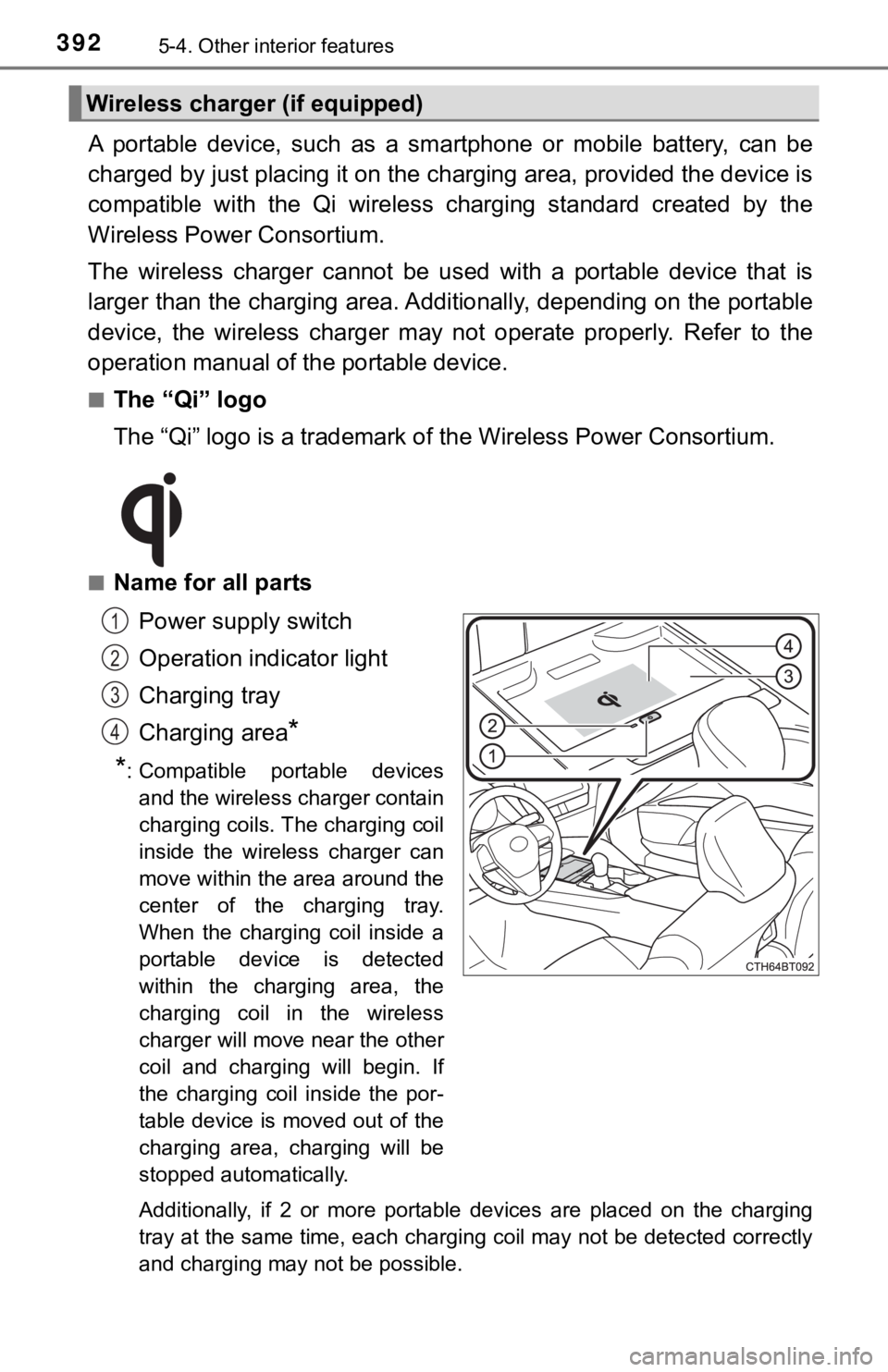
■Name for all parts
Power supply switch
Operation indicator light
Charging tray
Charging area
*
*
: Compatible portable devices
and the wireless charger contain
charging coils. The charging coil
inside the wireless charger can
move within the area around the
center of the charging tray.
When the charging coil inside a
portable device is detected
within the charging area, the
charging coil in the wireless
charger will move near the other
coil and charging will begin. If
the charging coil inside the por-
table device is moved out of the
charging area, charging will be
stopped automatically.
Additionally, if 2 or more portable devices are placed on the charging
tray at the same time, each charging coil may not be detected correctly
and charging may not be possible.
Wireless charger (if equipped)
1
2
3
4
Page 394 of 624
3945-4. Other interior features
■Rapid charging function
●Portable devices, such as the following, can be rapidly charged.
• Rapid charging capable devices which conform to WPC Ver
1.2.4.
• 7.5 W charging capable iPhones (iPhone 8 and later)
●To turn the rapid charging function on, press the power supply
switch 3 times while charging is being performed. If rapid
charging is possible, the operation indicator will change from illu-
minated (orange) to alternating between (green) and (orange).
●When charging is finished, the rapid charging function will turn
off. To perform rapid charging again, turn the rapid charging func-
tion back on.
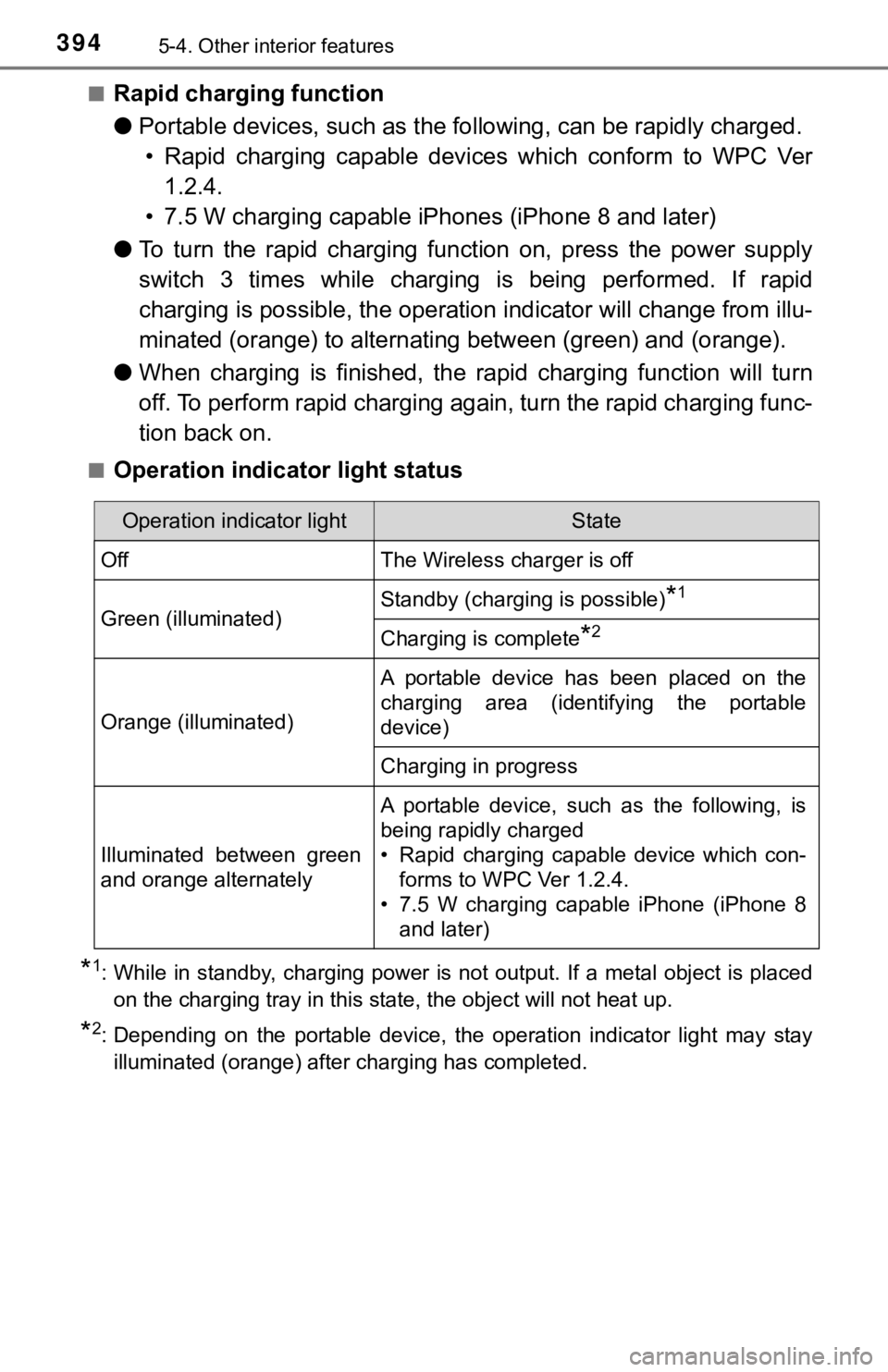
■Operation indicator light status
*1: While in standby, charging power is not output. If a metal object is placed
on the charging tray in this state, the object will not heat up.
*2: Depending on the portable device, the operation indicator light may stay
illuminated (orange) after charging has completed.
Operation indicator lightState
OffThe Wireless charger is off
Green (illuminated)Standby (charging is possible)*1
Charging is complete*2
Orange (illuminated)
A portable device has been placed on the
charging area (identifying the portable
device)
Charging in progress
Illuminated between green
and orange alternately
A portable device, such as the following, is
being rapidly charged
• Rapid charging capable device which con-
forms to WPC Ver 1.2.4.
• 7.5 W charging capable iPhone (iPhone 8
and later)
Page 396 of 624

3965-4. Other interior features
■The wireless charger can be operated when
The power switch is in ACCESSORY or ON mode.
■Portable devices that can be charged
●Portable devices compatible with the Qi wireless charging standard can be
charged by the wireless charger. However, compatibility with all devices
<005a004b004c0046004b0003005000480048005700030057004b004800030034004c0003005a004c00550048004f00480056005600030046004b00440055004a004c0051004a0003005600570044005100470044005500470003004c005600030051005200
570003004a0058004400550044005100570048004800470011[
●The wireless charger is designed to supply low power electricity (5 W or
less) to a cellular phone, smartphone, or other portable device.
●However, portable devices, such as the following, can be charged with more
than 5 W.
• 7.5 W charging compatible iPhones can be charged at 7.5 W or less.
• Portable devices which conform to WPC Ver 1.2.4 can be charged at 10
W or less.
■Using the smart key system
During charging, when the smart key system searches for an electronic key,
charging may be temporarily suspended.
■If a cover or accessory is attached to the portable device
Do not charge a portable device if a cover or accessory which is not Qi com-
patible is attached. Depending on the type of cover and/or accessory
attached, it may not be possible to charge the portable device. If the portable
device is placed on the charging area and does not charge, remove the cover
and/or accessories.
■If interference is heard in AM radio broadcasts while charging
●Turn off the wireless charger and check if the noise is reduced. If noise is
reduced, press and hold the power supply switch of the wireless charger for
2 seconds. The frequency of the wireless charger is changed and noise may
be reduced. When the frequency is changed, the operation indicator light
will blink (orange) 2 times.
●Rapid charging for iPhones is performed using a specific radio wave fre-
quency.
Depending on the version of iOS installed, while the frequency is being
changed, rapid charging may not be performed.
■Charging precautions
While charging, the wireless charger and the portable device will become
warm. This is not a malfunction.
If a portable device becomes warm while charging and charging stops due to
the protection function of the portable device, wait until the portable device
cools down and charge it again.
Also, to decrease the temperature inside the wireless charger, a fan may
operate. This does not indicate a malfunction.