remote control TOYOTA CAMRY HYBRID 2022 Owners Manual
[x] Cancel search | Manufacturer: TOYOTA, Model Year: 2022, Model line: CAMRY HYBRID, Model: TOYOTA CAMRY HYBRID 2022Pages: 624, PDF Size: 13.76 MB
Page 10 of 624
10
The SRS airbag and seat belt pretensioner devices in your Toyota contain
explosive chemicals. If the vehicle is scrapped with the airbags and seat belt
pretensioners left as they are, this may cause an accident such as fire. Be
sure to have the systems of the SRS airbag and seat belt pretensioner
removed and disposed of by a qualified service shop or by your Toyota dealer
before you scrap your vehicle.
Special handling may apply, See www.dtsc.ca.gov/hazardouswaste/perchlorate.
Your vehicle has components that may contain perchlorate. These compo-
nents may include the airbags, seat belt pretensioners, wireless remote con-
trol batteries, and the batteries in the tire pressure warning valve and
transmitters.
Scrapping of your Toyota
Perchlorate Material
WARNING
■General precautions while driving
Driving under the influence: Never drive your vehicle when under the influ-
ence of alcohol or drugs that have impaired your ability to operate your vehi-
cle. Alcohol and certain drugs delay reaction time, impair judgment and
reduce coordination, which could lead to an accident that could result in
death or serious injury.
Defensive driving: Always drive defensively. Anticipate mistakes that other
drivers or pedestrians might make and be ready to avoid accidents.
Driver distraction: Always give your full attention to driving. Anything that
distracts the driver, such as adjusting controls, talking on a cellular phone or
reading can result in a collision with resulting death or serious injury to you,
your occupants or others.
■General precaution regarding children’s safety
Never leave children unattended in the vehicle, and never allow children to
have or use the key.
Children may be able to start the vehicle or shift the vehicle into neutral.
There is also a danger that children may injure themselves by playing with
the windows, the moon roof, or other features of the vehicle. In addition,
heat build-up or extremely cold temperatures inside the vehicle can be fatal
to children.
Page 19 of 624
19Pictorial index
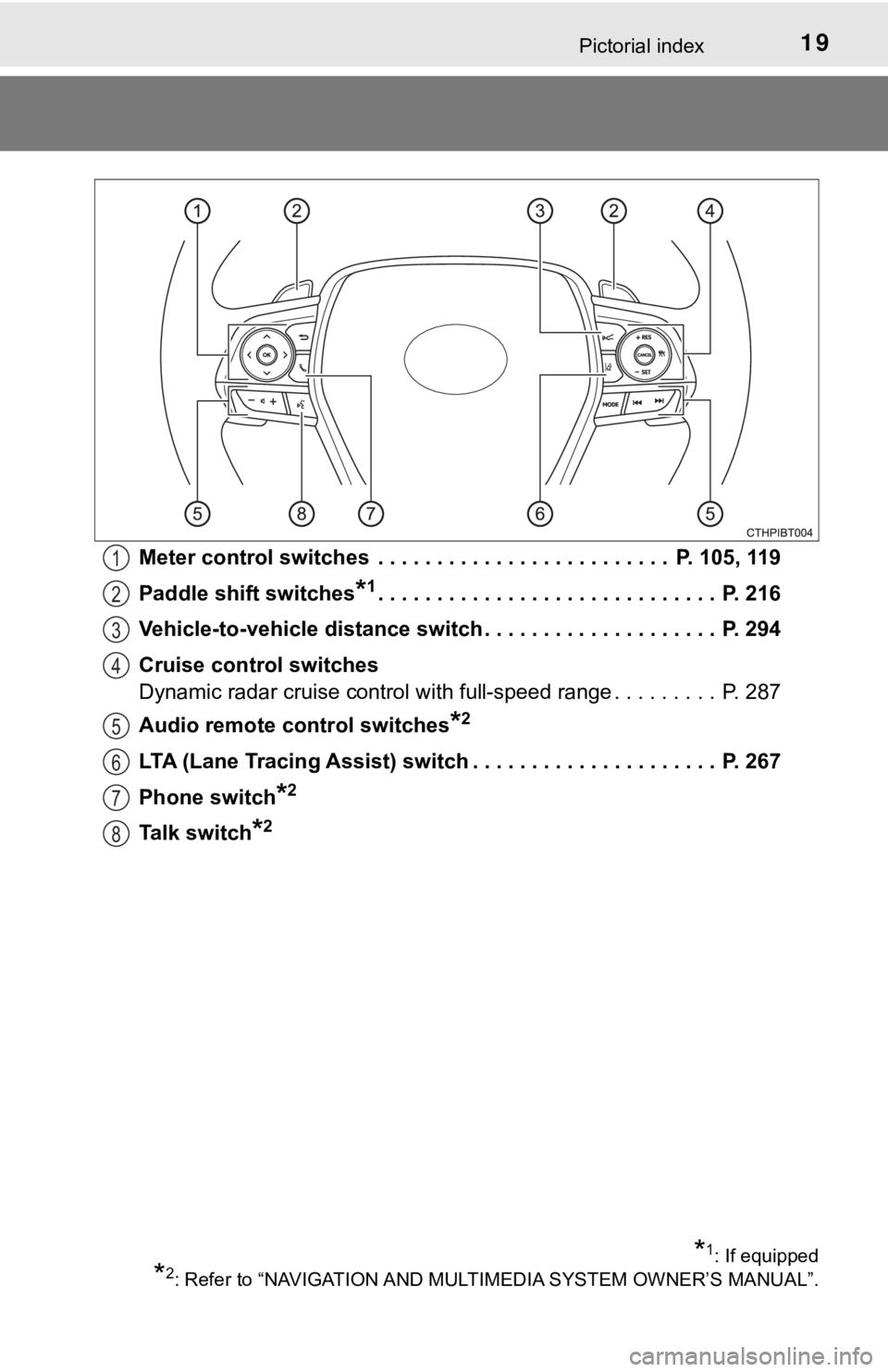
Meter control switches . . . . . . . . . . . . . . . . . . . . . . . . . P. 105, 119
Paddle shift switches
*1. . . . . . . . . . . . . . . . . . . . . . . . . . . . . P. 216
Vehicle-to-vehicle distance switch . . . . . . . . . . . . . . . . . . . . P. 294
Cruise control switches
Dynamic radar cruise control with full-speed range . . . . . . . . . P. 287
Audio remote control switches
*2
LTA (Lane Tracing Assist) switch . . . . . . . . . . . . . . . . . . . . . P. 267
Phone switch
*2
Talk switch*2
1
2
3
4
5
6
7
8
*1: If equipped
*2: Refer to “NAVIGATION AND MULTIMEDIA SYSTEM OWNER’S MANUAL”.
Page 90 of 624
901-5. Theft deterrent system
The alarm uses light and sound to give an alert when an intrusion is
detected.
The alarm is triggered in the following situations when the alarm is
set:
●A locked door is unlocked or opened in any way other than using
the entry function, wireless remote control or mechanical key.
(The doors will lock again automatically.)
●The trunk is opened in any way other than using the entry function
or wireless remote control.
●The hood is opened.
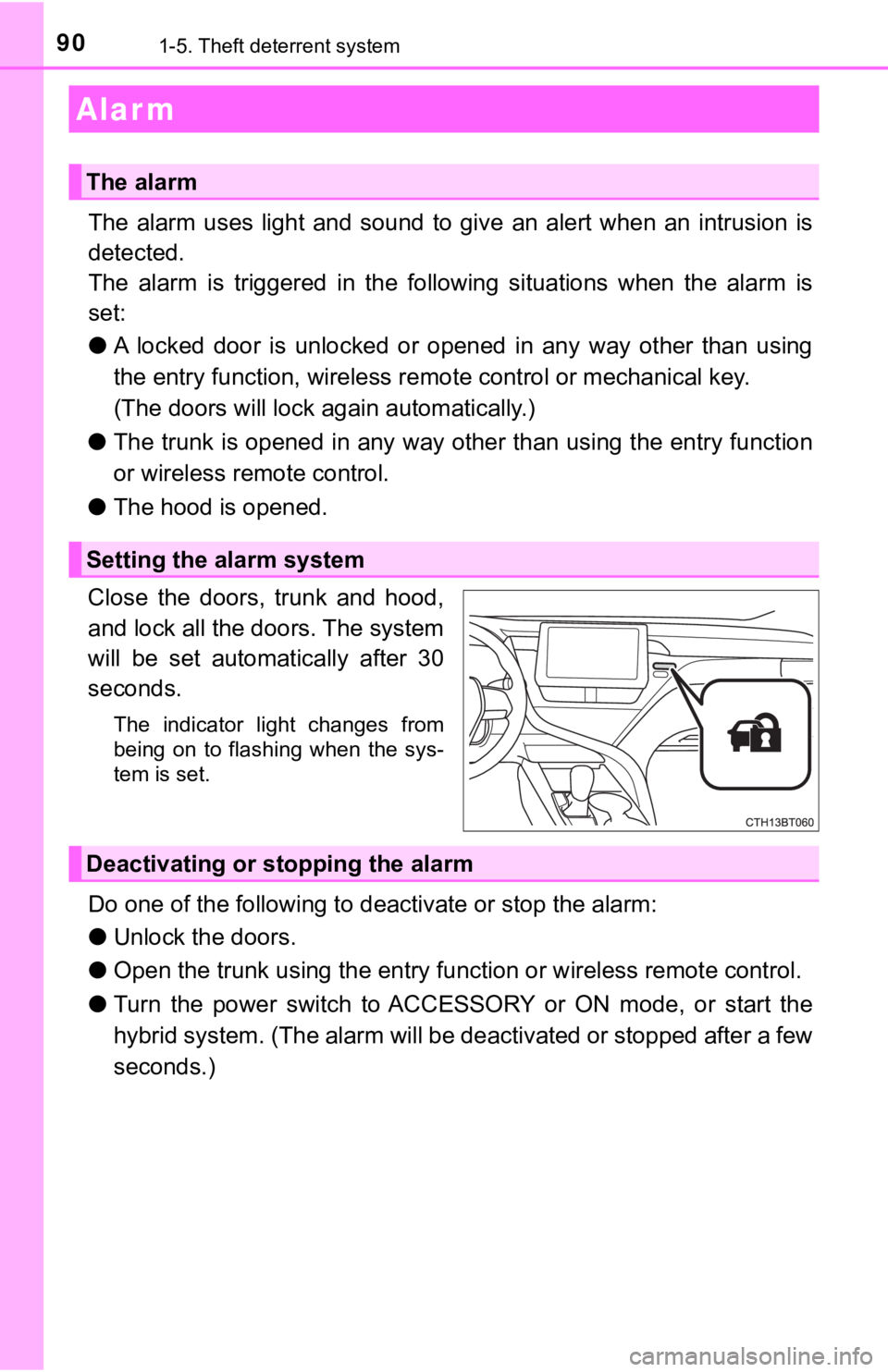
Close the doors, trunk and hood,
and lock all the doors. The system
will be set automatically after 30
seconds.
The indicator light changes from
being on to flashing when the sys-
tem is set.
Do one of the following to deactivate or stop the alarm:
●Unlock the doors.
●Open the trunk using the entry function or wireless remote control.
●Turn the power switch to ACCESSORY or ON mode, or start the
hybrid system. (The alarm will be deactivated or stopped after a few
seconds.)
Alar m
The alarm
Setting the alarm system
Deactivating or stopping the alarm
Page 150 of 624
1503-1. Key information
The following keys are provided with the vehicle.
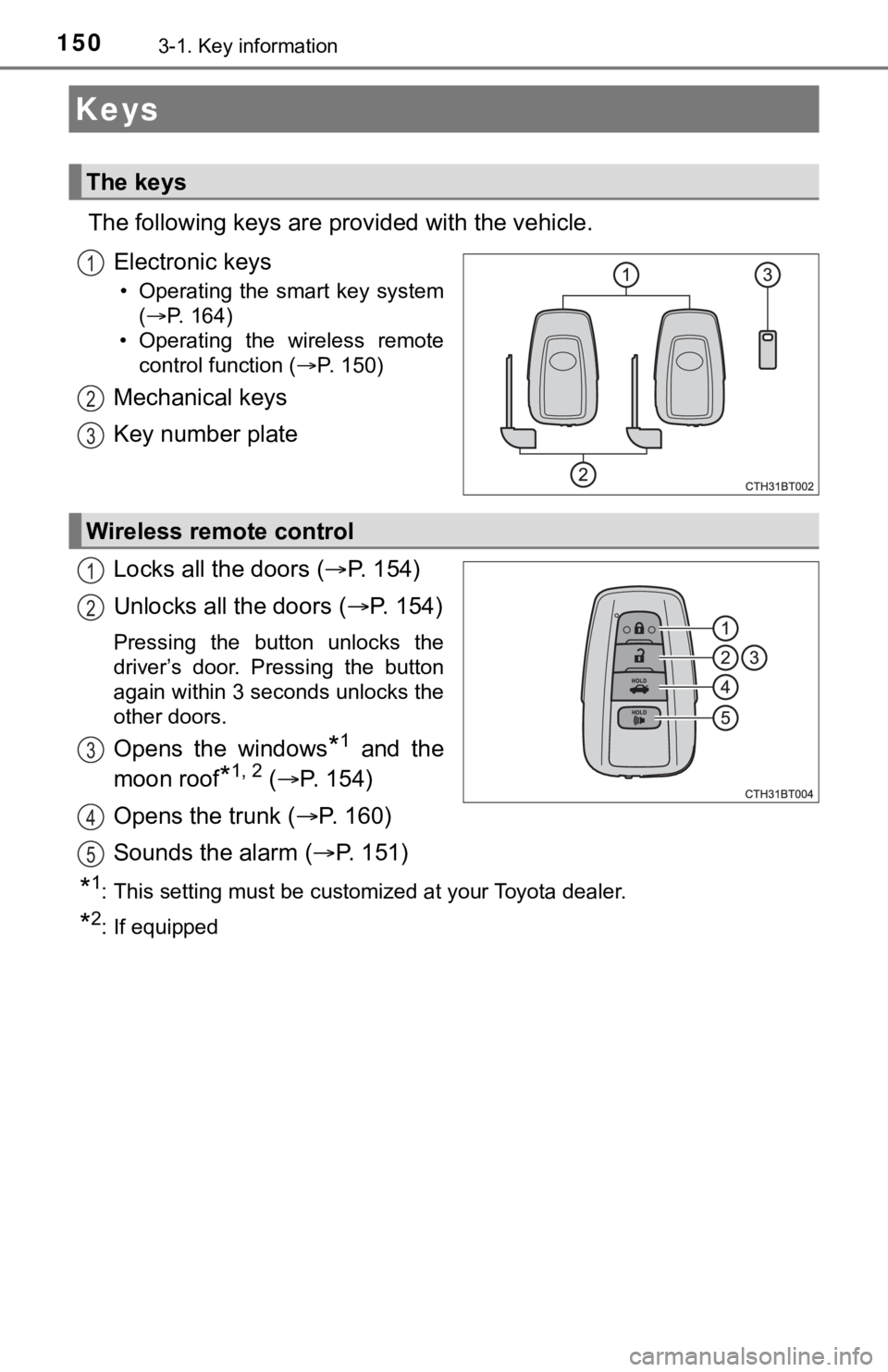
Electronic keys
• Operating the smart key system
(P. 164)
• Operating the wireless remote
control function (P. 150)
Mechanical keys
Key number plate
Locks all the doors (P. 1 5 4 )
Unlocks all the doors (P. 1 5 4 )
Pressing the button unlocks the
driver’s door. Pressing the button
again within 3 seconds unlocks the
other doors.
Opens the windows*1 and the
moon roof
*1, 2 (P. 154)
Opens the trunk (P. 1 6 0 )
Sounds the alarm (P. 151)
*1: This setting must be customized at your Toyota dealer.
*2: If equipped
Keys
The keys
1
2
3
Wireless remote control
1
2
3
4
5
Page 152 of 624

1523-1. Key information
■When riding in an aircraft
When bringing an electronic key onto an aircraft, make sure you do not press
any button on the electronic key while inside the aircraft cabin. If you are car-
rying an electronic key in your bag etc., ensure that the buttons are not likely
to be pressed accidentally. Pressing a button may cause the electronic key to
emit radio waves that could interfere with the operation of the aircraft.
■Conditions affecting operation
P. 167
■Electronic key battery depletion
●The standard battery life is 1 to 2 years.
●If the battery becomes low, an alarm will sound in the cabin when the hybrid
system stops.
●As the electronic key always receives radio waves, the battery will become
depleted even if the electronic key is not used. The following symptoms indi-
cate that the electronic key battery may be depleted. Replace the battery
when necessary. (P. 470)
• The smart key system or the wireless remote control does not operate.
• The detection area becomes smaller.
• The LED indicator on the key surface does not turn on.
●To reduce key battery depletion when the electronic key is to not be used for
long periods of time, set the electronic key to the battery-saving mode.
(P. 166)
●To avoid serious deterioration, do not leave the electronic key within 3 ft. (1
m) of the following electrical appliances that produce a magnetic field:
•TVs
• Personal computers
• Cellular phones, cordless phones and battery chargers
• Recharging cellular phones or cordless phones
• Table lamps
• Induction cookers
■Replacing the battery
P. 470
■Confirmation of the registered key number
The number of keys already registered to the vehicle can be confirmed. Ask
your Toyota dealer for details.
■If a wrong key is used
<0037004b00480003004e0048005c00030046005c004f004c00510047004800550003005500520057004400570048005600030049005500480048004f005c0003005700520003004c00560052004f0044005700480003004c00510056004c00470048000300
5000480046004b00440051004c005600500011[
Page 154 of 624
1543-2. Opening, closing and locking the doors
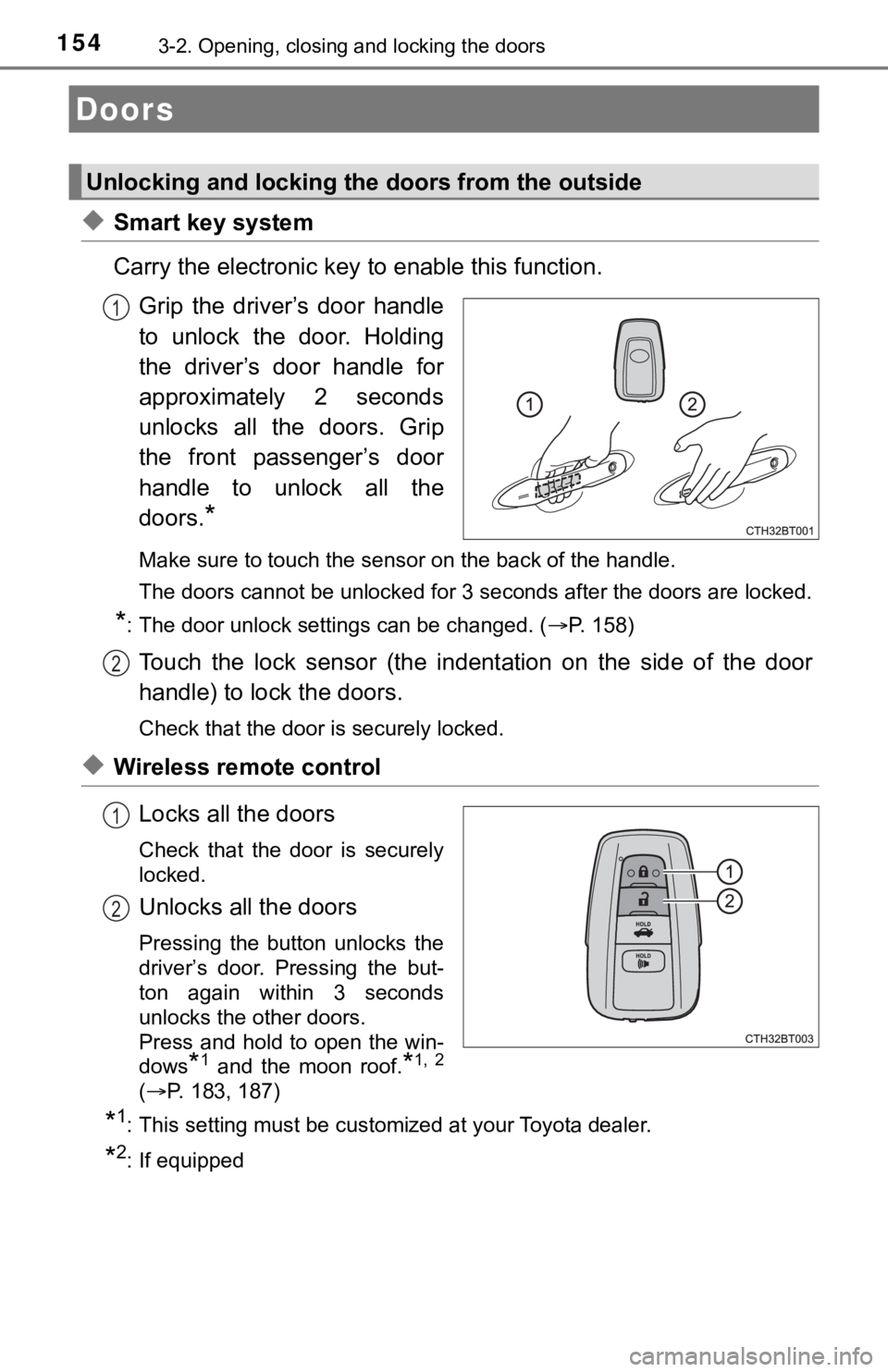
◆Smart key system
Carry the electronic key to enable this function.
Grip the driver’s door handle
to unlock the door. Holding
the driver’s door handle for
approximately 2 seconds
unlocks all the doors. Grip
the front passenger’s door
handle to unlock all the
doors.
*
Make sure to touch the sensor on the back of the handle.
<0037004b00480003004700520052005500560003004600440051005100520057000300450048000300580051004f00520046004e00480047000300490052005500030016000300560048004600520051004700560003004400490057004800550003005700
4b004800030047005200520055005600030044005500480003[locked.
*: The door unlock settings can be changed. (P. 158)
Touch the lock sensor (the indentation on the side of the door
handle) to lock the doors.
Check that the door is securely locked.
◆Wireless remote control
Locks all the doors
Check that the door is securely
locked.
Unlocks all the doors
Pressing the button unlocks the
driver’s door. Pressing the but-
ton again within 3 seconds
unlocks the other doors.
Press and hold to open the win-
dows
*1 and the moon roof.*1, 2
(P. 183, 187)
*1: This setting must be customized at your Toyota dealer.
*2: If equipped
Doors
Unlocking and locking the doors from the outside
1
2
1
2
Page 155 of 624
1553-2. Opening, closing and locking the doors
3
Operation of each component
■Operation signals
Doors:
A buzzer sounds and the emergency flashers flash to indicate that the doors
have been locked/unlocked. (Locked: Once; Unlocked: Twice)
Windows and moon roof:
A buzzer sounds to indicate that the windows and moon roof are opening.
■Security feature
If a door is not opened within approximately 60 seconds after the vehicle is
unlocked, the security feature automatically locks the vehicle again.
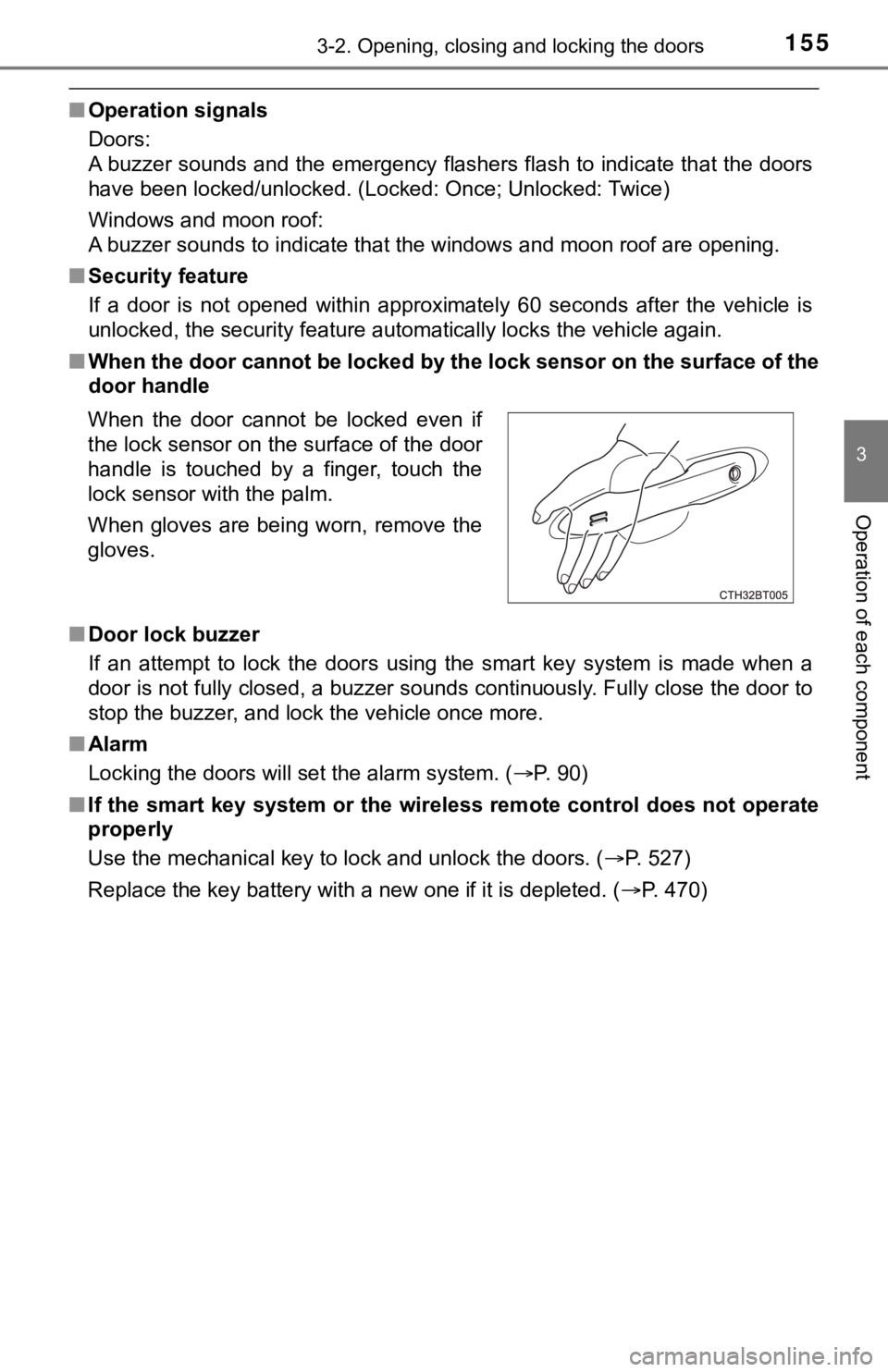
■When the door cannot be locked by the lock sensor on the surface of the
door handle
■Door lock buzzer
If an attempt to lock the doors using the smart key system is made when a
door is not fully closed, a buzzer sounds continuously. Fully close the door to
stop the buzzer, and lock the vehicle once more.
■Alarm
Locking the doors will set the alarm system. (P. 90)
■If the smart key system or the wireless remote control does not operate
properly
Use the mechanical key to lock and unlock the doors. (P. 527)
<003500480053004f00440046004800030057004b00480003004e0048005c0003004500440057005700480055005c0003005a004c0057004b00030044000300510048005a00030052005100480003004c00490003004c00570003004c005600030047004800
53004f004800570048004700110003000b[P. 470) When the door cannot be locked even if
the lock sensor on the surface of the door
handle is touched by a finger, touch the
lock sensor with the palm.
When gloves are being worn, remove the
gloves.
Page 158 of 624
1583-2. Opening, closing and locking the doors
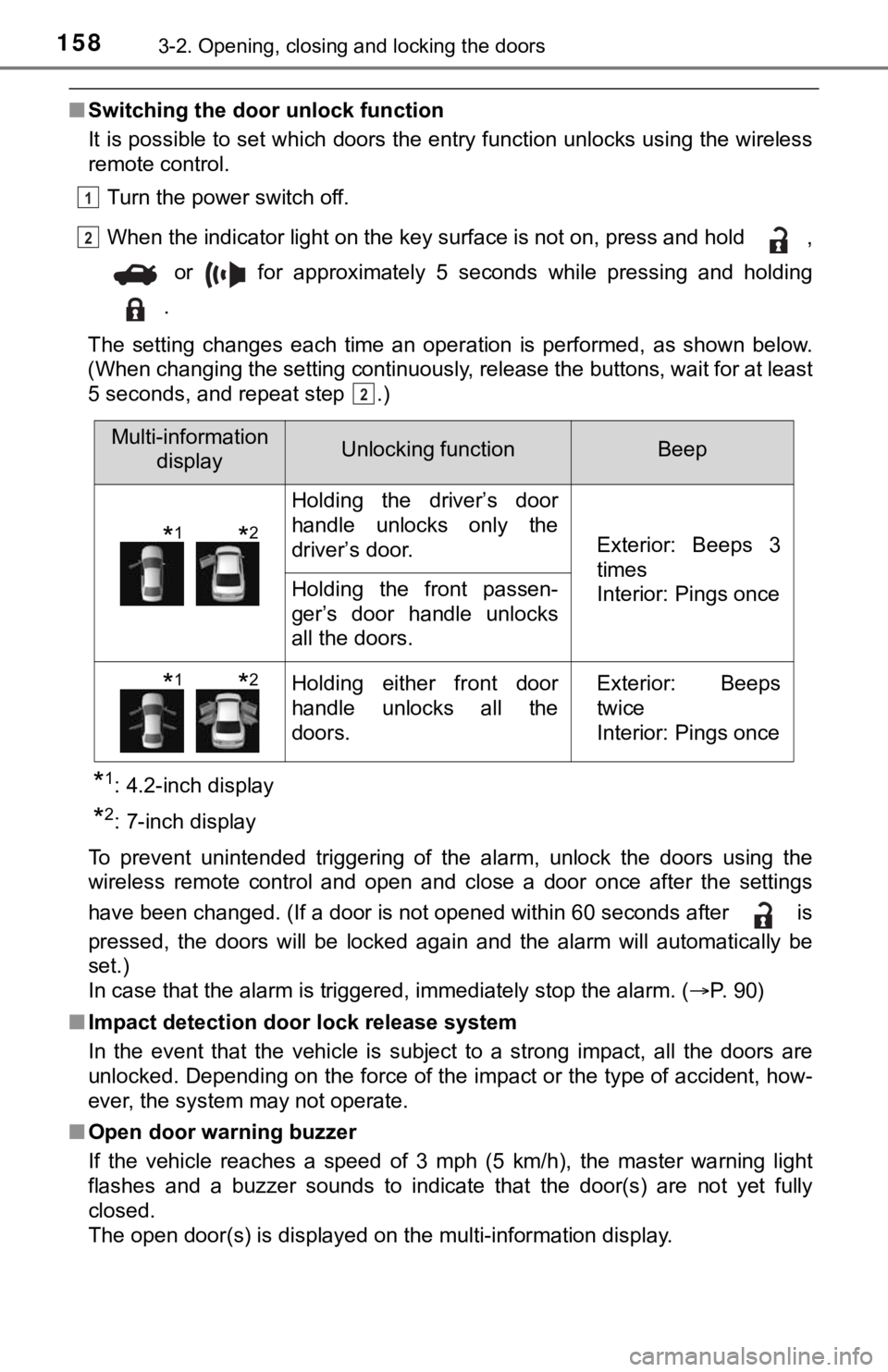
■Switching the door unlock function
It is possible to set which doors the entry function unlocks using the wireless
remote control.
Turn the power switch off.
When the indicator light on the key surface is not on, press and hold ,
or for approximately 5 seconds while pressing and holding
.
The setting changes each time an operation is performed, as shown below.
(When changing the setting continuously, release the buttons, wait for at least
5 seconds, and repeat step .)
*1: 4.2-inch display
*2: 7-inch display
To prevent unintended triggering of the alarm, unlock the doors using the
wireless remote control and open and close a door once after the settings
have been changed. (If a door is not opened within 60 seconds after is
pressed, the doors will be locked again and the alarm will automatically be
set.)
In case that the alarm is triggered, immediately stop the alarm. (P. 90)
■Impact detection door lock release system
In the event that the vehicle is subject to a strong impact, all the doors are
unlocked. Depending on the force of the impact or the type of accident, how-
ever, the system may not operate.
■Open door warning buzzer
If the vehicle reaches a speed of 3 mph (5 km/h), the master warning light
flashes and a buzzer sounds to indicate that the door(s) are not yet fully
closed.
The open door(s) is displayed on the multi-information display.
1
2
2
Multi-information
displayUnlocking functionBeep
Holding the driver’s door
handle unlocks only the
driver’s door.
Exterior: Beeps 3
times
Interior: Pings once
Holding the front passen-
ger’s door handle unlocks
all the doors.
Holding either front door
handle unlocks all the
doors.Exterior: Beeps
twice
Interior: Pings once
*1*2
*1*2
Page 159 of 624
1593-2. Opening, closing and locking the doors
3
Operation of each component
■Conditions affecting the operation of the smart key system or wireless
remote control
P. 167
■Rear seat reminder function
In order to remind you not to forget luggage, etc. in the rear seat, when the
power switch is turned off after any of the following conditions are met, a
buzzer will sound and a message will be displayed on the multi-information
display for approximately 6 seconds.
●The hybrid system is started within 10 minutes after opening and closing a
rear door.
●A rear door has been opened and closed after the hybrid system was
started.
However, if a rear door is opened and then closed within approximately 2 sec-
<0052005100470056000f00030057004b004800030055004800440055000300560048004400570003005500480050004c0051004700480055000300490058005100460057004c00520051000300500044005c00030051005200570003005200530048005500
44005700480011[
The rear seat reminder function determines that luggage, etc. has been
placed in a rear seat based on opening and closing of a rear door. Therefore,
depending on the situation, the rear seat reminder function may not operate
and you may still forget luggage, etc. in the rear seat, or it may operate
unnecessarily.
<0037004b004800030055004800440055000300560048004400570003005500480050004c0051004700480055000300490058005100460057004c00520051000300460044005100030045004800030048005100440045004f0048004700120047004c005600
440045004f0048004700110003000b[P. 109, 126)
■Customization
Some functions can be customized. (P. 569)
WARNING
■To prevent an accident
Observe the following precautions while driving the vehicle.
Failure to do so may result in a door opening and an occupant falling out,
resulting in death or serious injury.
●Ensure that all doors are properly closed.
●Do not pull the inside handle of the doors while driving.
Be especially careful for the front doors, as the doors may be opened
<00480059004800510003004c004900030057004b00480003004c00510056004c004700480003004f00520046004e0003004500580057005700520051005600030044005500480003004c00510003004f00520046004e004800470003005300520056004c00
57004c005200510011[
●Set the rear door child-protector locks when children are seated in the rear
seats.
■When opening or closing a door
Check the surroundings of the vehicle such as whether the vehicle is on an
incline, whether there is enough space for a door to open and whether a
strong wind is blowing.
When opening or closing the door, hold the door handle tightly to prepare
for any unpredictable movement.
Page 160 of 624
1603-2. Opening, closing and locking the doors
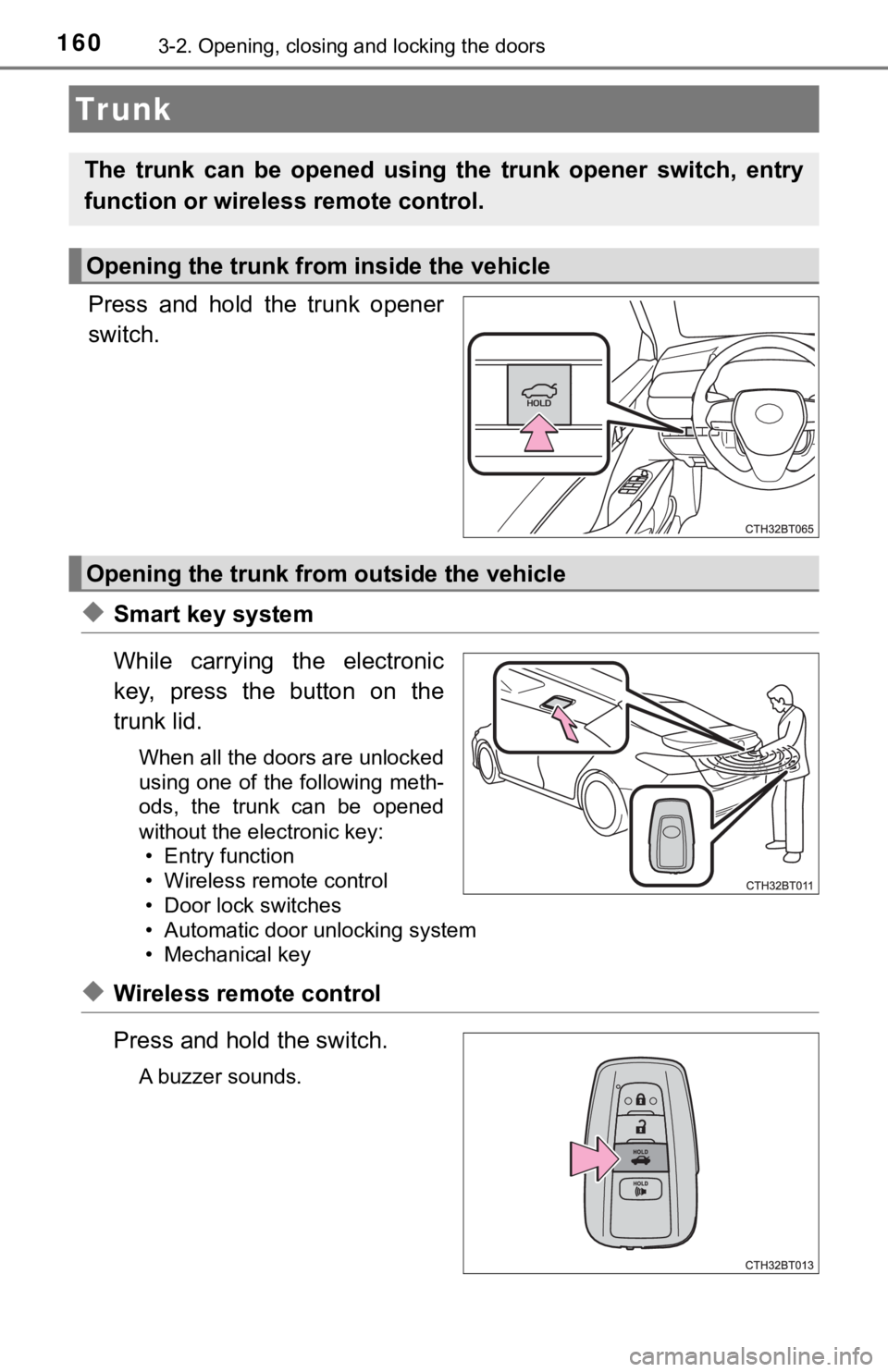
Press and hold the trunk opener
switch.
◆Smart key system
While carrying the electronic
key, press the button on the
trunk lid.
When all the doors are unlocked
using one of the following meth-
ods, the trunk can be opened
without the electronic key:
• Entry function
• Wireless remote control
• Door lock switches
• Automatic door unlocking system
• Mechanical key
◆Wireless remote control
Press and hold the switch.
A buzzer sounds.
Tr unk
The trunk can be opened using the trunk opener switch, entry
function or wireless remote control.
Opening the trunk from inside the vehicle
Opening the trunk from outside the vehicle