change time TOYOTA CAMRY HYBRID 2023 User Guide
[x] Cancel search | Manufacturer: TOYOTA, Model Year: 2023, Model line: CAMRY HYBRID, Model: TOYOTA CAMRY HYBRID 2023Pages: 624, PDF Size: 10.51 MB
Page 168 of 624

1683-2. Opening, closing and locking the doors
■Note for the entry function
●Even when the electronic key is within the effective range (detection areas),
the system may not operate properly in the following cases:
• The electronic key is too close to the window or outside door handle, near
the ground, or in a high place when the doors are locked or unl ocked.
• The electronic key is near the ground or in a high place, or t oo close to
the rear bumper center when the trunk is opened.
• The electronic key is on the instrument panel, rear package tray or floor, or in the door pockets or glove box when the hybrid system is s tarted or
power switch modes are changed.
● Do not leave the electronic key on top of the instrument panel or near the
door pockets when exiting the vehicle. Depending on the radio w ave recep-
tion conditions, it may be detected by the antenna outside the cabin and the
door will become lockable from the outside, possibly trapping the electronic
key inside the vehicle.
● As long as the electronic key is within the effective range, th e doors may be
locked or unlocked by anyone. However, only the doors detecting the elec-
tronic key can be used to unlock the vehicle.
● Even if the electronic key is not inside the vehicle, it may be possible to start
the hybrid system if the electronic key is near the window.
● The doors may unlock or lock if a large amount of water splashes on the
door handle, such as in the rain or in a car wash, when the electronic key is
within the effective range. (The doors will automatically be lo cked after
approximately 60 seconds if the doors are not opened and closed.)
● If the wireless remote control is used to lock the doors when t he electronic
key is near the vehicle, there is a possibility that the door m ay not be
unlocked by the entry function. (Use the wireless remote contro l to unlock
the doors.)
● Touching the door lock sensor while wearing gloves may delay or prevent
lock operation. Remove the gloves and touch the lock sensor aga in.
● When the lock operation is performed using the lock sensor, rec ognition sig-
nals will be shown up to two consecutive times. After this, no recognition
signals will be given.
*
● If the door handle becomes wet while the electronic key is with in the effec-
tive range, the door may lock and unlock repeatedly. In this case, follow the
following correction procedures to wash the vehicle:
• Place the electronic key in a location 6 ft. (2 m) or more awa y from the
vehicle. (Take care to ensure that the key is not stolen.)
• Set the electronic key to battery-saving mode to disable the s mart key
system. ( P. 166)
● If the electronic key is inside the vehicle and a door handle b ecomes wet
during a car wash, a message may be shown on the multi-informat ion dis-
play and a buzzer will sound outside the vehicle. To turn off t he alarm, lock
all the doors.
Page 199 of 624

1994-1. Before driving
4
Driving
NOTICE
■When driving the vehicle
● Do not depress the accelerator and brake pedals at the same tim e during
driving, as this may restrain the hybrid system output.
● Do not use the accelerator pedal or depress the accelerator and brake
pedals at the same time to hold the vehicle on a hill.
■ When parking the vehicle
Always set the parking brake and shift the shift lever to P. Failure to do so
may cause the vehicle to move or the vehicle may accelerate sud denly if
the accelerator pedal is accidentally depressed.
■ Avoiding damage to vehicle parts
● Do not turn the steering wheel fully in either direction and ho ld it there for
an extended period of time.
Doing so may damage the power steering.
● When driving over bumps on the road, drive as slowly as possible to avoid
damaging the wheels, underside of the vehicle, etc.
■ If you get a flat tire while driving
A flat or damaged tire may cause the following situations. Hold the steering
wheel firmly and gradually depress the brake pedal to slow down the vehi-
cle.
● It may be difficult to control your vehicle.
● The vehicle will make abnormal sounds or vibrations.
● The vehicle will lean abnormally.
Information on what to do in case of a flat tire ( P. 513)
■ When encountering flooded roads
Do not drive on a road that has flooded after heavy rain etc. D oing so may
cause the following serious damage to the vehicle:
● Engine stalling
● Short in electrical components
● Engine damage caused by water immersion
In the event that you drive on a flooded road and the vehicle i s flooded, be
sure to have your Toyota dealer check the following:
● Brake function
● Changes in quantity and quality of oil and fluid used for the engine, hybrid
transmission, etc.
● Lubricant condition for the bearings and suspension joints (where possi-
ble), and the function of all joints, bearings, etc.
Page 208 of 624
2084-2. Driving procedures
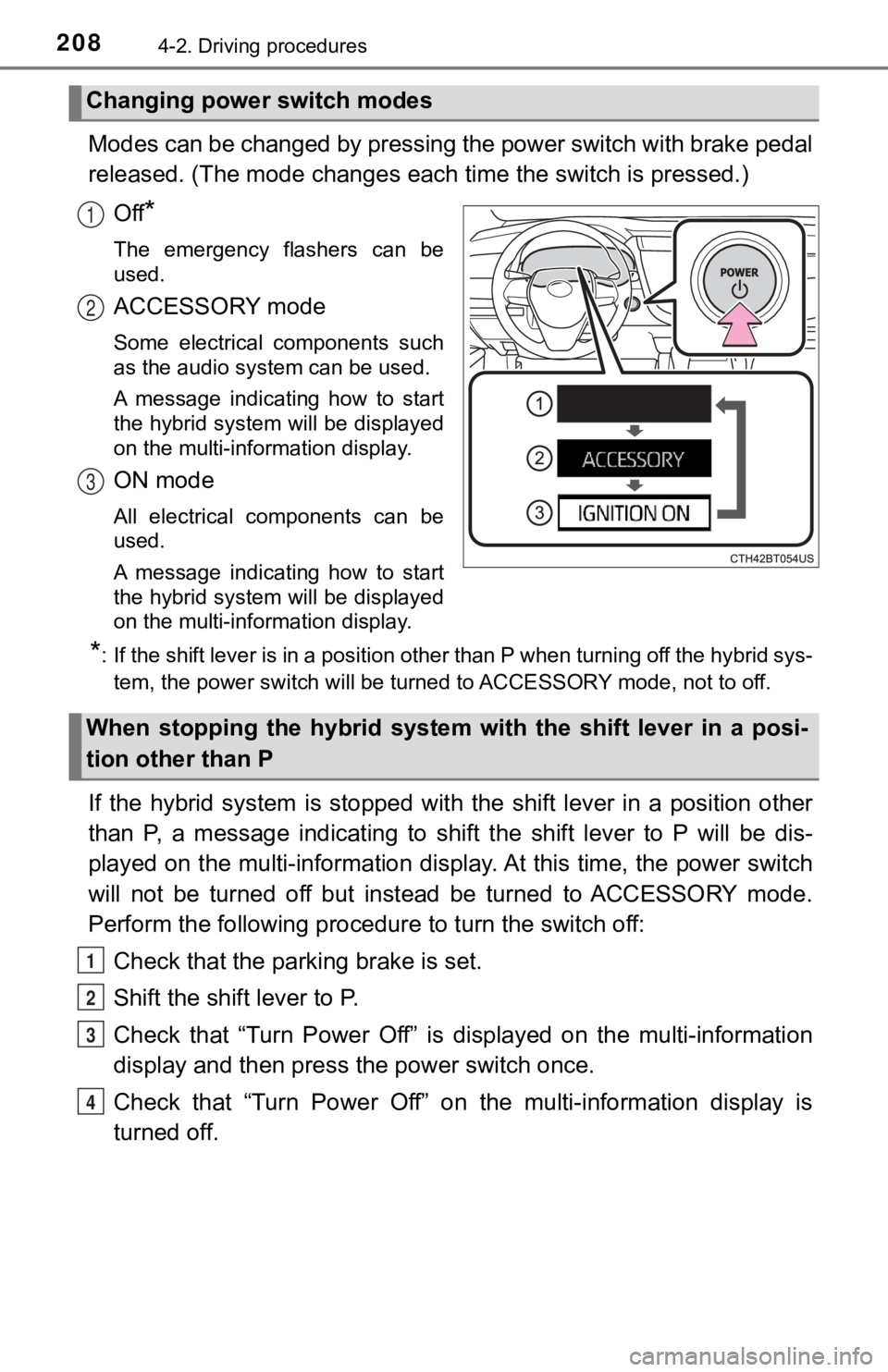
Modes can be changed by pressing the power switch with brake pedal
released. (The mode changes each time the switch is pressed.)
Off
*
The emergency flashers can be
used.
ACCESSORY mode
Some electrical components such
as the audio system can be used.
A message indicating how to start
the hybrid system will be displayed
on the multi-information display.
ON mode
All electrical components can be
used.
A message indicating how to start
the hybrid system will be displayed
on the multi-information display.
*: If the shift lever is in a position other than P when turning off the hybrid sys-
tem, the power switch will be turned to ACCESSORY mode, not to off.
If the hybrid system is stopped with the shift lever in a position other
than P, a message indicating to shift the shift lever to P will be dis-
played on the multi-information display. At this time, the powe r switch
will not be turned off but instead be turned to ACCESSORY mode.
Perform the following procedure to turn the switch off:
Check that the park ing brake is set.
Shift the shift lever to P.
Check that “Turn Power Off” is displayed on the multi-informati on
display and then press the power switch once.
Check that “Turn Power Off” on the multi-information display is
turned off.
Changing power switch modes
1
2
3
When stopping the hybrid system with the shift lever in a posi-
tion other than P
1
2
3
4
Page 211 of 624

2114-2. Driving procedures
4
Driving
WARNING
■When starting the hybrid system
Always start the hybrid system while sitting in the driver’s seat. Do not
depress the accelerator pedal while starting the hybrid system under any
circumstances.
Doing so may cause an accident resulting in death or serious in jury.
■ Stopping the hybrid system in an emergency
● If you want to stop the hybrid system in an emergency while driving the
vehicle, press and hold the power switch for more than 2 second s, or
press it briefly 3 times or more in succession. ( P. 491)
However, do not touch the power switch while driving except in an emer-
gency. Turning the hybrid system off while driving will not cause loss of
steering or braking control, however, power assist to the steer ing will be
lost. This will make it more difficult to steer smoothly, so you should pull
over and stop the vehicle as soon as it is safe to do so.
● If the power switch is operated while the vehicle is running, a warning
message will be shown on the multi-information display and a buzzer
sounds.
● When restarting the hybrid system after an emergency shutdown w hile
driving, press the power switch. When restarting the hybrid sys tem after
stopping the vehicle, change the shift position to P and then press the
power switch.
■ When parking
Exhaust gases include harmful carbon monoxide (CO), which is co lorless
and odorless. Observe the following precautions.
Failure to do so may cause exhaust gases to enter the vehicle a nd may
lead to an accident caused by light-headedness, or may lead to death or a
serious health hazard.
● If the vehicle is in a poorly ventilated area or a closed area, such as a
garage, stop the hybrid system.
● Do not leave the vehicle with the hybrid system operating for a long time. If
such a situation cannot be avoided, park the vehicle in an open space and
ensure that exhaust fumes do not enter the vehicle interior.
● Do not leave the hybrid system operating in an area with snow build-up, or
where it is snowing. If snowbanks build up around the vehicle w hile the
hybrid system is operating, exhaust gases may collect and enter the vehi-
cle.
Page 221 of 624

2214-2. Driving procedures
4
Driving
■If the S indicator does not come on or the D indicator is displayed even
after shifting the shift lever to S
This may indicate a malfunction in the automatic transmission system. Have
the vehicle inspected by your Toyota dealer immediately.
(In this situation, the transmission will operate in the same manner as when
the shift lever is in D.)
WARNING
■ When driving on slippery road surfaces
Do not accelerate or shift gears suddenly.
Sudden changes in engine braking may cause the vehicle to spin or skid,
resulting in an accident.
■ To prevent an accident when releasing the shift lock
Before pressing the shift lock override button, make sure to se t the parking
brake and depress the brake pedal.
If the accelerator pedal is accidentally depressed instead of t he brake pedal
when the shift lock override button is pressed and the shift lever is shifted
out of P, the vehicle may suddenly start, possibly leading to an accident
resulting in death or serious injury.
NOTICE
■ Hybrid battery (traction battery) charge precaution
If the shift lever is in N, the hybrid battery (traction battery) will not be
charged even when the engine is running. Therefore, if the vehicle is left
with the shift lever in N for a certain amount of time, the hybrid battery (trac-
tion battery) will discharge, and this may result in the vehicl e not being able
to start.
Page 222 of 624
2224-2. Driving procedures
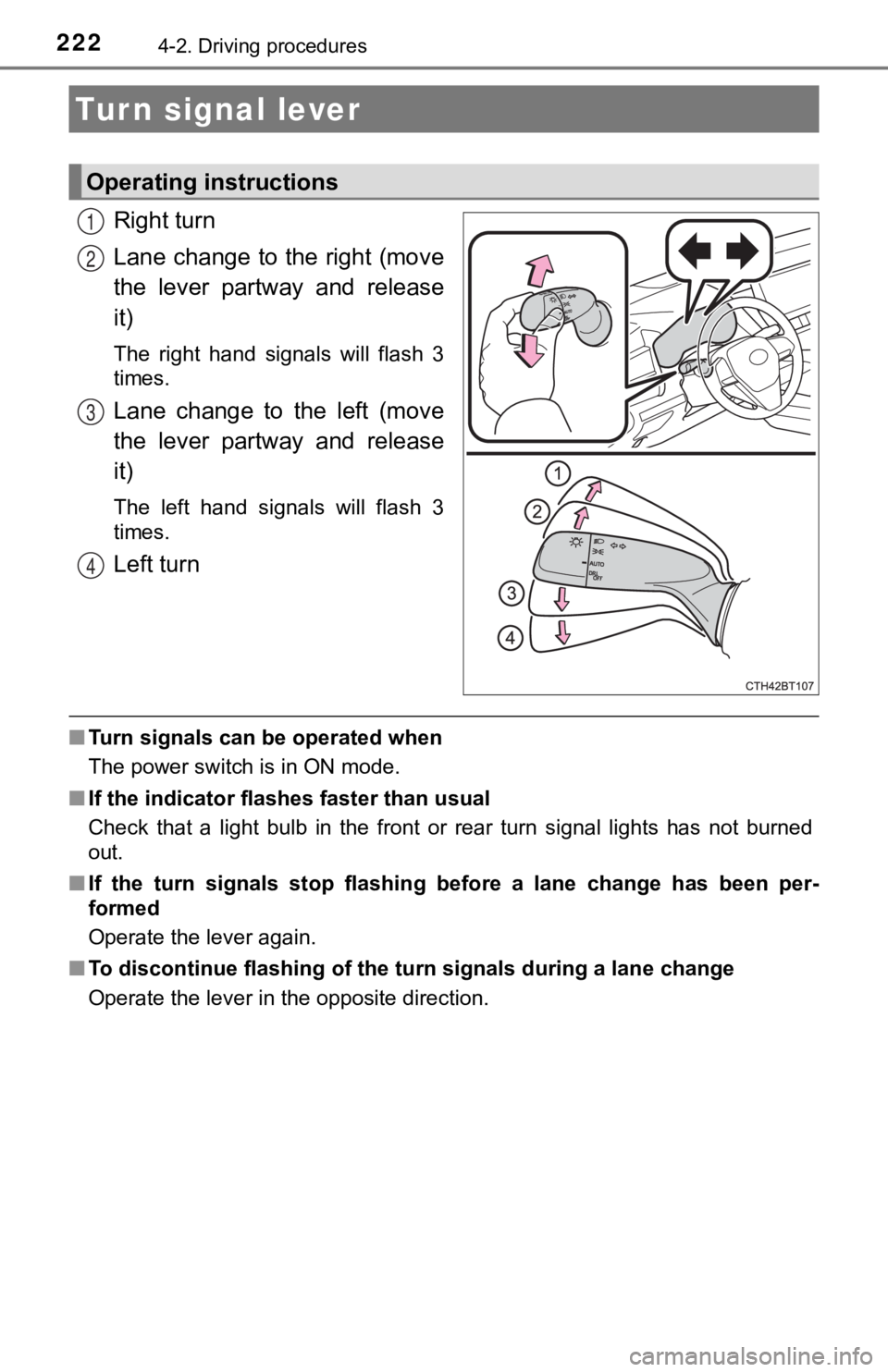
Right turn
Lane change to the right (move
the lever partway and release
it)
The right hand signals will flash 3
times.
Lane change to the left (move
the lever partway and release
it)
The left hand signals will flash 3
times.
Left turn
■Turn signals can be operated when
The power switch is in ON mode.
■ If the indicator flashes faster than usual
Check that a light bulb in the front or rear turn signal lights has not burned
out.
■ If the turn signals stop flashing before a lane change has been per-
formed
Operate the lever again.
■ To discontinue flashing of the turn signals during a lane chang e
Operate the lever in the opposite direction.
Turn signal lever
Operating instructions
1
2
3
4
Page 236 of 624

2364-3. Operating the lights and wipers
■Conditions to turn the high beams on/off automatically
●When all of the following conditions are met, the high beams will be turned
on automatically (after approximately 1 second):
• The vehicle speed is approximately 21 mph (34 km/h) or more.
• The area ahead of the vehicle is dark.
• There are no vehicles ahead with headlights or tail lights turned on.
• There are few streetlights on the road ahead.
● If any of the following conditions is met, the high beams will turn off automat-
ically:
• The vehicle speed is below approximately 17 mph (27 km/h).
• The area ahead of the vehicle is not dark.
• Vehicles ahead have their headlights or tail lights turned on.
• There are many streetlights on the road ahead.
■ Front camera detection information
●The high beams may not be automatically turned off in the following situa-
tions:
• When a vehicle suddenly appears from around a curve
• When the vehicle is cut in front of by another vehicle
• When vehicles ahead cannot be detected due to repeated curves, road
dividers or roadside trees
• When vehicles ahead appear in a faraway lane on a wide road
• When the lights of vehicles ahead are not on
● The high beams may be turned off if a vehicle ahead that is usi ng fog lights
without its headlights turned on is detected.
● House lights, street lights, traffic signals, and illuminated billboards or signs
and other reflective objects may cause the high beams to change to the low
beams, or the low beams to remain on.
● The following factors may affect the amount of time taken for t he high
beams to turn on or off:
• The brightness of the headlights, fog lights, and tail lights of vehicles
ahead
• The movement and direction of vehicles ahead
• When a vehicle ahead only has operational lights on one side
• When a vehicle ahead is a two-wheeled vehicle
• The condition of the road (gradient, curve, condition of the r oad surface,
etc.)
• The number of passengers and amount of luggage in the vehicle
● The high beams may turn on or off unexpectedly.
● Bicycles or similar vehicles may not be detected.
Page 237 of 624

2374-3. Operating the lights and wipers
4
Driving
●In the following situations the system may not be able to correctly detect the
surrounding brightness level. This may cause the low beams to r emain on
or the high beams to flash or dazzle pedestrians or vehicles ah ead. In such
a case, it is necessary to manually switch between the high and low beams.
• When driving in inclement weather (heavy rain, snow, fog, sand storms,
etc.)
• When the windshield is obscured by fog, mist, ice, dirt, etc.
• When the windshield is cracked or damaged
• When the front camera is deformed or dirty
• When the temperature of the front camera is extremely high
• When the surrounding brightness level is equal to that of head lights, tail
lights or fog lights
• When headlights or tail lights of vehicles ahead are turned off, dirty, changing color, or not aimed properly
• When the vehicle is hit by water, snow, dust, etc. from a prec eding vehi-
cle
• When driving through an area of intermittently changing brightness and
darkness
• When frequently and repeatedly driving ascending/descending roads, or roads with rough, bumpy or uneven surfaces (such as stone-paved
roads, gravel roads, etc.)
• When frequently and repeatedly taking curves or driving on a w inding
road
• When there is a highly reflective object ahead of the vehicle, such as a sign or mirror
• When the back of a preceding vehicle is highly reflective, such as a con-
tainer on a truck
• When the vehicle's headlights are damaged or dirty, or are not aimed
properly
• When the vehicle is listing or titling due to a flat tire, a trailer being towed, etc.
• When the headlights are changed between the high beams and low
beams repeatedly in an abnormal manner
• When the driver believes that the high beams may be flashing or dazzling pedestrians or other drivers
■ Temporarily lowering sensor sensitivity
The sensitivity of the sensor can be temporarily lowered.
Turn the power switch off while the following conditions are me t.
• The headlight switch is in the or position.
• The headlight switch lever is in the original position.
Turn the power switch to ON mode.
Within 60 seconds after , repeat pushing the headlight switch lever to the
high beam position then pulling it to the original position qui ckly 10 times,
then leave the lever in the original position.
1
2
32
Page 251 of 624

2514-5. Using the driving support systems
4
Driving
●In the following situations, if the situation has changed (or the vehicle has
been driven for some time) and the normal operating conditions are
detected, the message will disappear and the system will become opera-
tional.
If the message does not disappear, contact your Toyota dealer.
• When the temperature around the radar sensor is outside of the opera- tional range, such as when the vehicle is in the sun or in an e xtremely
cold environment
• When the front camera cannot detect objects in front of the ve hicle, such
as when driving in the dark, snow, or fog, or when bright lights are shining
into the front camera
• Depending on the conditions in the vicinity of the vehicle, th e radar may
judge the surrounding environment cannot be properly recognized . In
that case, “Pre-Collision System Unavailable See Owner's Manual ” is dis-
played.
Page 257 of 624

2574-5. Using the driving support systems
4
Driving
■Enabling/disabling the pre-collision system
The pre-collision system can be enabled/disabled on (4.2-inch
display) or (7-inch display) ( P. 109, 126) of the multi-informa-
tion display.
The system is automatically enabled each time the power switch is
turned to ON mode.
If the system is disabled, the
PCS warning light will turn on
and a message will be dis-
played on the multi-information
display.
■Changing the pre-colli sion warning timing
The pre-collision warn ing timing can be changed on (4.2-inch
display) or (7-inch display) ( P. 109, 126) of the multi-informa-
tion display.
The warning timing setting is retained when the power switch is turned
off. However, if the pre-collision system is disabled and re-en abled, the
operation timing will return to the default setting (middle).
If the pre-collision warning timing is changed, e mergency steering
assist timing will also b e changed accordingly.
If late is selected, emergency st eering assist would not operate in
case of an emergency.
Early
Middle
This is the default setting.
Late
Changing settings of the pre-collision system
1
2
3