window TOYOTA CAMRY HYBRID 2023 User Guide
[x] Cancel search | Manufacturer: TOYOTA, Model Year: 2023, Model line: CAMRY HYBRID, Model: TOYOTA CAMRY HYBRID 2023Pages: 624, PDF Size: 10.51 MB
Page 91 of 624
911-5. Theft deterrent system
1
For safety and security
■System maintenance
The vehicle has a maintenance-free type alarm system.
■ Items to check before locking the vehicle
To prevent unexpected triggering of the alarm and vehicle theft , make sure of
the following:
● Nobody is in the vehicle.
● The windows and moon roof are closed before the alarm is set.
● No valuables or other personal items are left in the vehicle.
■ Triggering of the alarm
The alarm may be triggered in the following situations:
(Stopping the alarm deactivates the alarm system.)
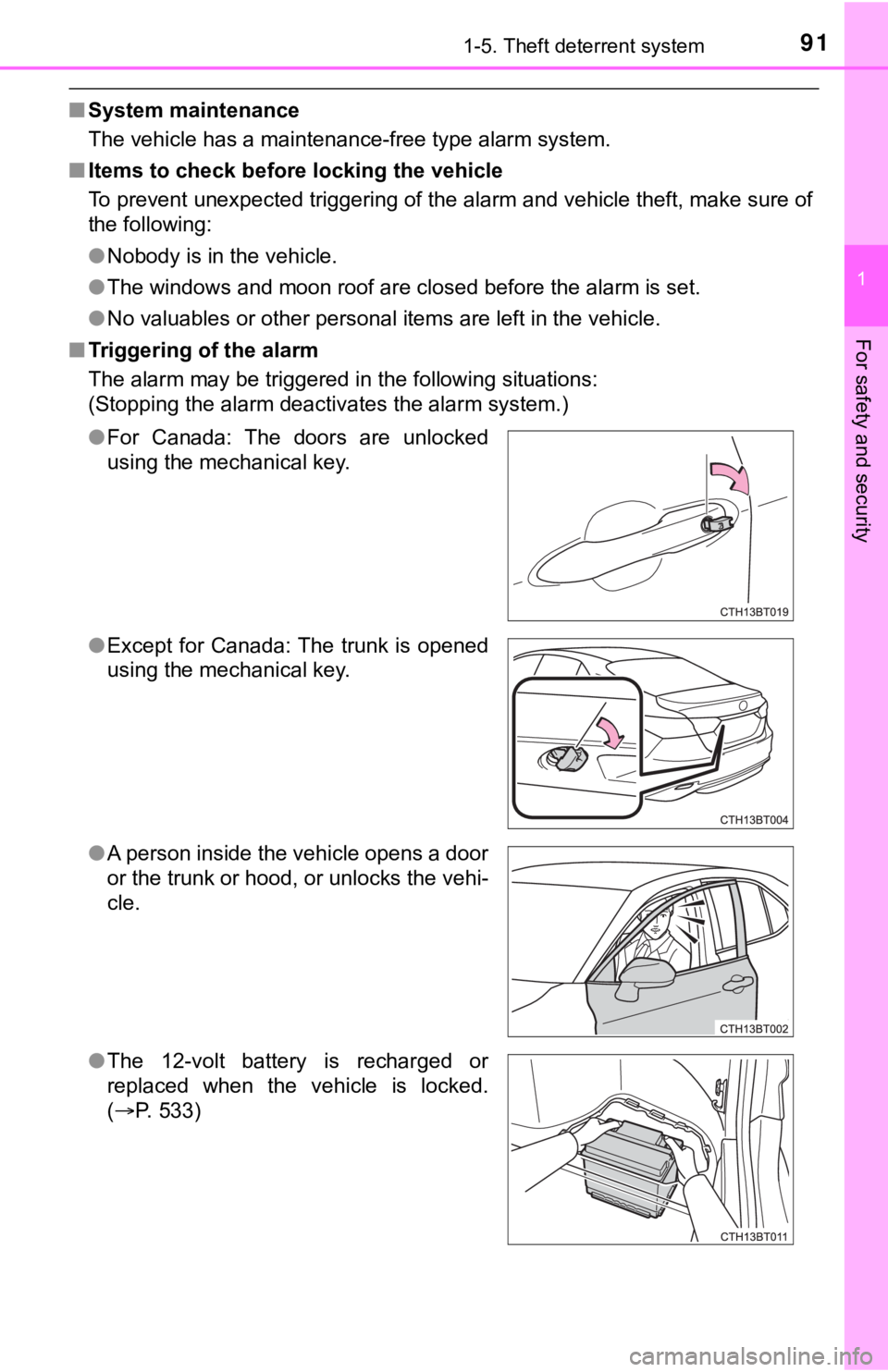
●For Canada: The doors are unlocked
using the mechanical key.
● Except for Canada: The trunk is opened
using the mechanical key.
● A person inside the vehicle opens a door
or the trunk or hood, or unlocks the vehi-
cle.
● The 12-volt battery is recharged or
replaced when the vehicle is locked.
(P. 533)
Page 149 of 624

149
3
Operation of
each component
3-1. Key information
Keys .................................. 150
3-2. Opening, closing and locking the doors
Doors ................................ 154
Trunk ................................. 160
Smart key system ............. 164
3-3. Adjusting the seats Front seats ........................ 171
Rear seats......................... 173
Head restraints.................. 175
3-4. Adjusting the steering wheel and mirrors
Steering wheel .................. 177
Inside rear view mirror ...... 179
Outside rear view mirrors ............................. 181
3-5. Opening and closing the windows
Power windows ................. 183
Moon roof .......................... 186
Page 150 of 624
1503-1. Key information
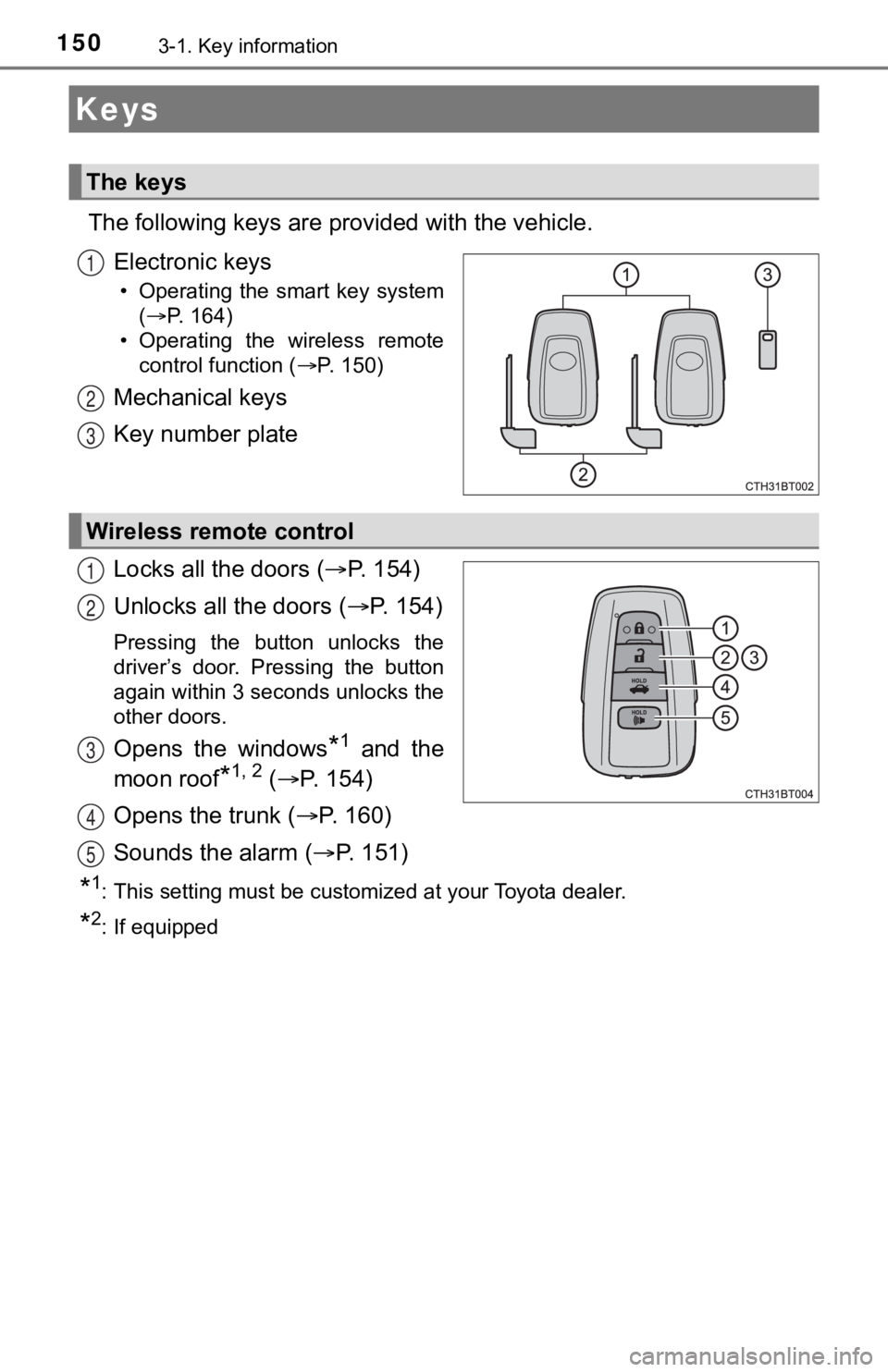
The following keys are provided with the vehicle.
Electronic keys
• Operating the smart key system (P. 164)
• Operating the wireless remote control function ( P. 150)
Mechanical keys
Key number plate
Locks all the doors ( P. 1 5 4 )
Unlocks all the doors ( P. 1 5 4 )
Pressing the button unlocks the
driver’s door. Pressing the button
again within 3 seconds unlocks the
other doors.
Opens the windows*1 and the
moon roof
*1, 2 ( P. 154)
Opens the trunk ( P. 1 6 0 )
Sounds the alarm ( P. 151)
*1: This setting must be customized at your Toyota dealer.
*2: If equipped
Keys
The keys
1
2
3
Wireless remote control
1
2
3
4
5
Page 155 of 624
1553-2. Opening, closing and locking the doors
3
Operation of each component
■Operation signals
Doors:
A buzzer sounds and the emergency flashers flash to indicate th at the doors
have been locked/unlocked. (Locked: Once; Unlocked: Twice)
Windows and moon roof:
A buzzer sounds to indicate that the windows and moon roof are opening.
■ Security feature
If a door is not opened within approximately 60 seconds after t he vehicle is
unlocked, the security feature automatically locks the vehicle again.
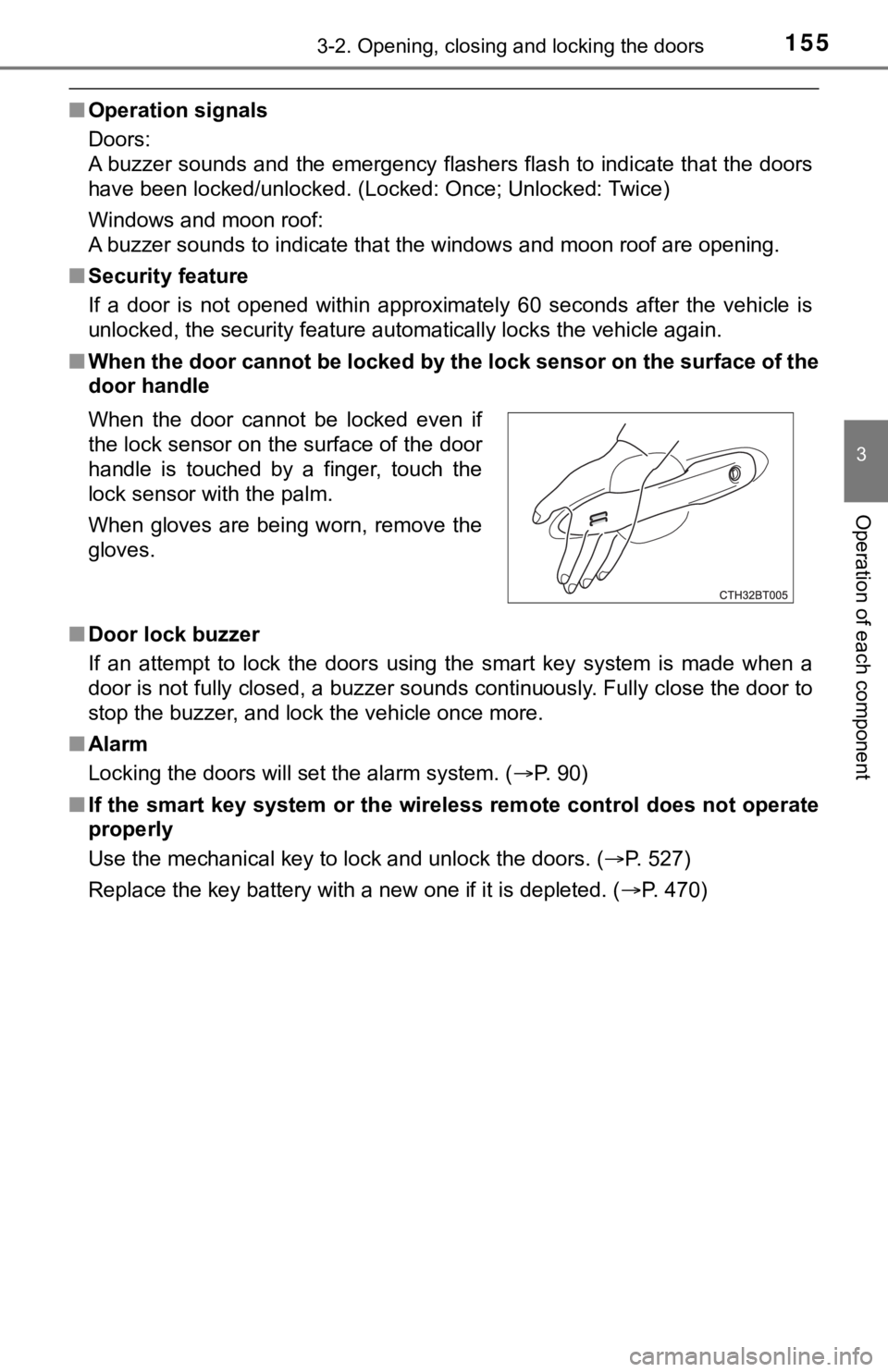
■ When the door cannot be locked by the lock sensor on the surface of the
door handle
■ Door lock buzzer
If an attempt to lock the doors using the smart key system is made when a
door is not fully closed, a buzzer sounds continuously. Fully c lose the door to
stop the buzzer, and lock the vehicle once more.
■ Alarm
Locking the doors will set the alarm system. ( P. 90)
■ If the smart key system or the wireless remote control does not operate
properly
Use the mechanical key to lock and unlock the doors. ( P. 527)
Replace the key battery with a new one if it is depleted. ( P. 470)
When the door cannot be locked even if
the lock sensor on the surface of the door
handle is touched by a finger, touch the
lock sensor with the palm.
When gloves are being worn, remove the
gloves.
Page 167 of 624

1673-2. Opening, closing and locking the doors
3
Operation of each component
■Conditions affecting operation
The smart key system, wireless remote control and immobilizer s ystem use
weak radio waves. In the following situations, the communication between
the electronic key and the vehicle may be affected, preventing the smart key
system, wireless remote control and immobilizer system from operating prop-
erly. (Ways of coping: P. 527)
● When the electronic key battery is depleted
● Near a TV tower, electric power plant, gas station, radio stati on, large dis-
play, airport or other facility that generates strong radio wav es or electrical
noise
● When the electronic key is in contact with, or is covered by th e following
metallic objects
• Cards to which aluminum foil is attached
• Cigarette boxes that have aluminum foil inside
• Metallic wallets or bags
• Coins
• Hand warmers made of metal
• Media such as CDs and DVDs
● When other wireless keys (that emit radio waves) are being used nearby
● When carrying the electronic key together with the following devices that
emit radio waves
• Portable radio, cellular phone, cordless phone or other wirele ss commu-
nication devices
• Another vehicle’s electronic key, another electronic key of yo ur vehicle, or
a wireless key that emits radio waves
• Personal computers or personal digital assistants (PDAs)
• Digital audio players
• Portable game systems
● If window tint with a metallic content or metallic objects are attached to the
rear window
● When the electronic key is placed near a battery charger or ele ctronic
devices
● When the vehicle is parked in a pay parking spot where radio wa ves are
emitted.
Page 168 of 624

1683-2. Opening, closing and locking the doors
■Note for the entry function
●Even when the electronic key is within the effective range (detection areas),
the system may not operate properly in the following cases:
• The electronic key is too close to the window or outside door handle, near
the ground, or in a high place when the doors are locked or unl ocked.
• The electronic key is near the ground or in a high place, or t oo close to
the rear bumper center when the trunk is opened.
• The electronic key is on the instrument panel, rear package tray or floor, or in the door pockets or glove box when the hybrid system is s tarted or
power switch modes are changed.
● Do not leave the electronic key on top of the instrument panel or near the
door pockets when exiting the vehicle. Depending on the radio w ave recep-
tion conditions, it may be detected by the antenna outside the cabin and the
door will become lockable from the outside, possibly trapping the electronic
key inside the vehicle.
● As long as the electronic key is within the effective range, th e doors may be
locked or unlocked by anyone. However, only the doors detecting the elec-
tronic key can be used to unlock the vehicle.
● Even if the electronic key is not inside the vehicle, it may be possible to start
the hybrid system if the electronic key is near the window.
● The doors may unlock or lock if a large amount of water splashes on the
door handle, such as in the rain or in a car wash, when the electronic key is
within the effective range. (The doors will automatically be lo cked after
approximately 60 seconds if the doors are not opened and closed.)
● If the wireless remote control is used to lock the doors when t he electronic
key is near the vehicle, there is a possibility that the door m ay not be
unlocked by the entry function. (Use the wireless remote contro l to unlock
the doors.)
● Touching the door lock sensor while wearing gloves may delay or prevent
lock operation. Remove the gloves and touch the lock sensor aga in.
● When the lock operation is performed using the lock sensor, rec ognition sig-
nals will be shown up to two consecutive times. After this, no recognition
signals will be given.
*
● If the door handle becomes wet while the electronic key is with in the effec-
tive range, the door may lock and unlock repeatedly. In this case, follow the
following correction procedures to wash the vehicle:
• Place the electronic key in a location 6 ft. (2 m) or more awa y from the
vehicle. (Take care to ensure that the key is not stolen.)
• Set the electronic key to battery-saving mode to disable the s mart key
system. ( P. 166)
● If the electronic key is inside the vehicle and a door handle b ecomes wet
during a car wash, a message may be shown on the multi-informat ion dis-
play and a buzzer will sound outside the vehicle. To turn off t he alarm, lock
all the doors.
Page 181 of 624
1813-4. Adjusting the steering wheel and mirrors
3
Operation of each component
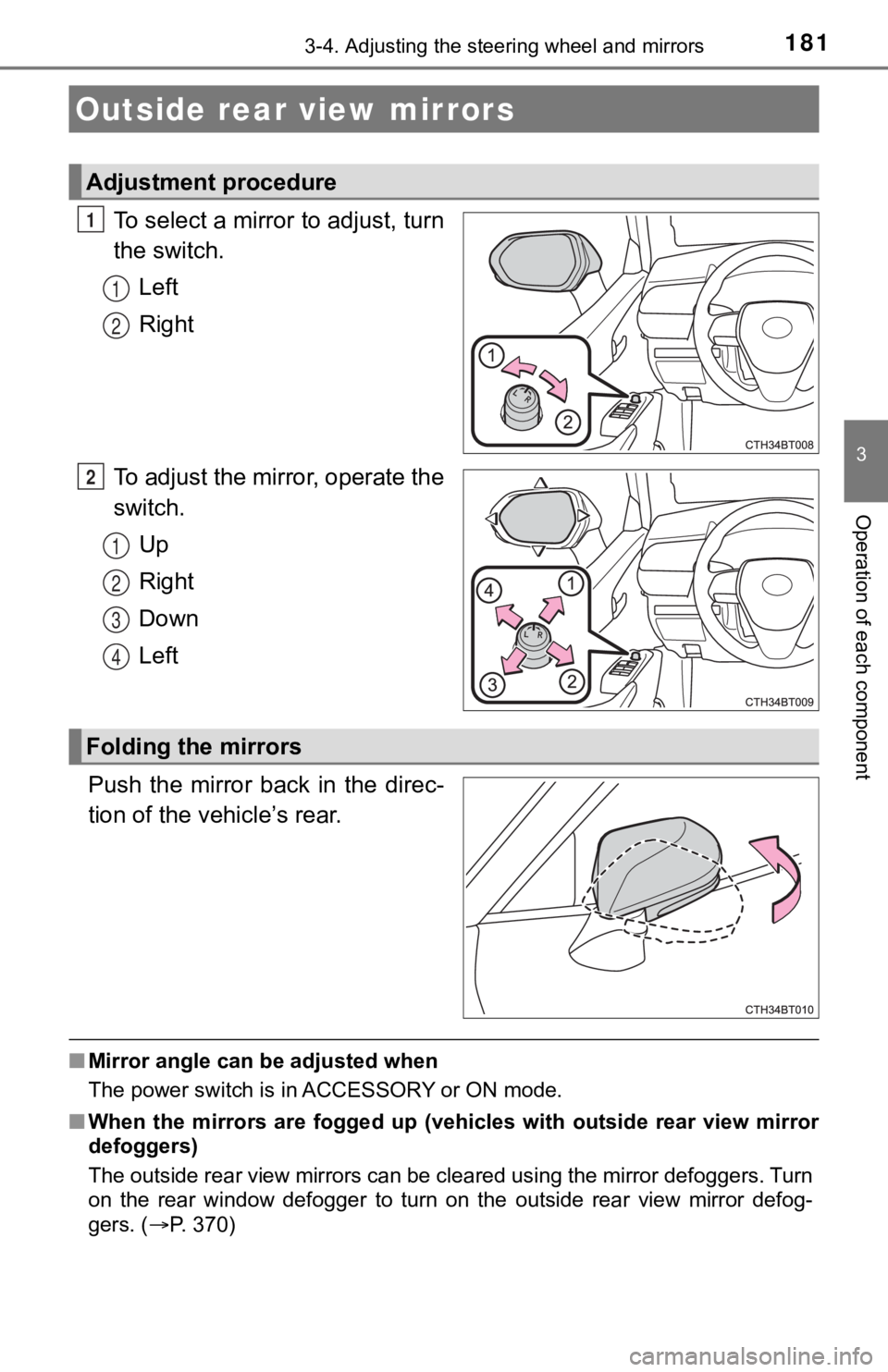
To select a mirror to adjust, turn
the switch.
Left
Right
To adjust the mirror, operate the
switch. Up
Right
Down
Left
Push the mirror back in the direc-
tion of the vehicle’s rear.
■ Mirror angle can be adjusted when
The power switch is in ACCESSORY or ON mode.
■ When the mirrors are fogged up ( vehicles with outside rear view mirror
defoggers)
The outside rear view mirrors can be cleared using the mirror d efoggers. Turn
on the rear window defogger to turn on the outside rear view mi rror defog-
gers. ( P. 370)
Outside rear view mirrors
Adjustment procedure
1
1
2
2
1
2
3
4
Folding the mirrors
Page 183 of 624
183
3
Operation of each component
3-5. Opening and closing the windows
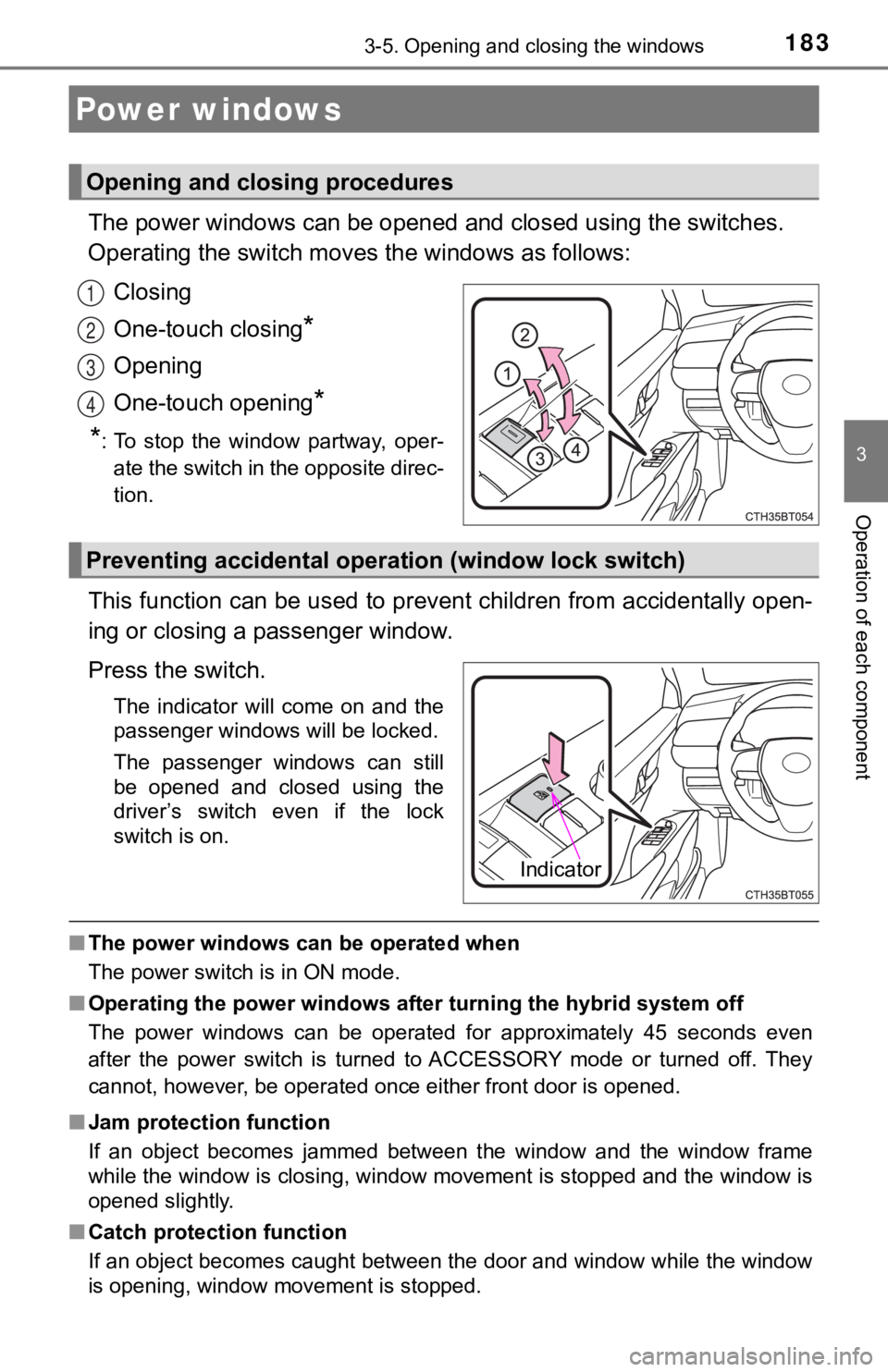
The power windows can be opened and closed using the switches.
Operating the switch moves the windows as follows:
Closing
One-touch closing
*
Opening
One-touch opening
*
*
: To stop the window partway, oper- ate the switch in the opposite direc-
tion.
This function can be used to prev ent children from accidentally open-
ing or closing a passenger window.
Press the switch.
The indicator will come on and the
passenger windows will be locked.
The passenger windows can still
be opened and closed using the
driver’s switch even if the lock
switch is on.
■ The power windows can be operated when
The power switch is in ON mode.
■ Operating the power windows after turning the hybrid system off
The power windows can be operated for approximately 45 seconds even
after the power switch is turned to ACCESSORY mode or turned off. They
cannot, however, be operated once either front door is opened.
■ Jam protection function
If an object becomes jammed between the window and the window f rame
while the window is closing, window movement is stopped and the window is
opened slightly.
■ Catch protection function
If an object becomes caught between the door and window while the window
is opening, window movement is stopped.
Power windows
Opening and closing procedures
1
2
3
4
Preventing accidental operation (window lock switch)
Indicator
Page 184 of 624

1843-5. Opening and closing the windows
■When the window cannot be opened or closed
When the jam protection function or catch protection function o perates
unusually and the door window cannot be opened or closed, perfo rm the fol-
lowing operations with the power window switch of that door.
● Stop the vehicle. With the power switch in ON mode, within 4 seconds of the
jam protection function or catch protection function activating , continuously
operate the power window switch in the one-touch closing direct ion or one-
touch opening direction so that the door window can be opened a nd closed.
● If the door window cannot be opened and closed even when perfor ming the
above operations, perform the foll owing procedure for function initialization.
Turn the power switch to ON mode.
Pull and hold the power window switch in the one-touch closing direction
and completely close the door window.
Release the power window switch for a moment, resume pulling the
switch in the one-touch closing direction, and hold it there for approxi-
mately 6 seconds or more.
Press and hold the power window switch in the one-touch opening direc-
tion. After the door window is completely opened, continue hold ing the
switch for an additional 1 second or more.
Release the power window switch for a moment, resume pushing th e
switch in the one-touch opening direction, and hold it there fo r approxi-
mately 4 seconds or more.
Pull and hold the power window switch in the one-touch closing direction
again. After the door window is completely closed, continue holding the
switch for a further 1 second or more.
If you release the switch while the window is moving, start aga in from the
beginning.
If the window reverses and cannot be fully closed or opened, have the vehicle
inspected by your Toyota dealer.
■ Door lock linked window operation
●The power windows can be opened and closed using the mechanical key.
*
(P. 527)
● The power windows can be opened using the wireless remote control.
*
(P. 154)
*: These settings must be customized at your Toyota dealer.
■ Alarm
The alarm may be triggered if the alarm is set and a power window is closed
using the door lock linked power window operation function. ( P. 91)
■ Power windows open warning buzzer
A buzzer sounds and a message is shown on the multi-information display in
the instrument cluster when the power switch is turned off and the driver’s
door is opened with the power windows open.
1
2
3
4
5
6
Page 185 of 624
1853-5. Opening and closing the windows
3
Operation of each component
■Customization
Some functions can be customized. ( P. 569)
WARNING
Observe the following precautions.
Failure to do so may result in death or serious injury.
■Closing the windows
● The driver is responsible for all the power window operations, including the
operation for the passengers. In order to prevent accidental op eration,
especially by a child, do not let a child operate the power windows. It is
possible for children and other passengers to have body parts c aught in
the power window. Also, when riding with a child, it is recommended to use
the window lock switch. ( P. 183)
● When using the wireless remote control or mechanical key and op erating
the power windows, operate the power window after checking to m ake
sure that there is no possibility of any passenger having any o f their body
parts caught in the window. Also do not let a child operate window by the
wireless remote control or mechanical key. It is possible for c hildren and
other passengers to get caught in the power window.
● When exiting the vehicle, turn the power switch off, carry the key and exit
the vehicle along with the child. There may be accidental operation, due to
mischief, etc., that may possibly lead to an accident.
■ Jam protection function
● Never use any part of your body to intentionally activate the jam protection
function.
● The jam protection function may not work if something gets jammed just
before the window is fully closed. Be careful not to get any pa rt of your
body jammed in the window.
■ Catch protection function
● Never use any part of your body or clothing to intentionally ac tivate the
catch protection function.
● The catch protection function may not work if something gets caught just
before the window is fully opened. Be careful not to get any part of your
body or clothing caught in the window.
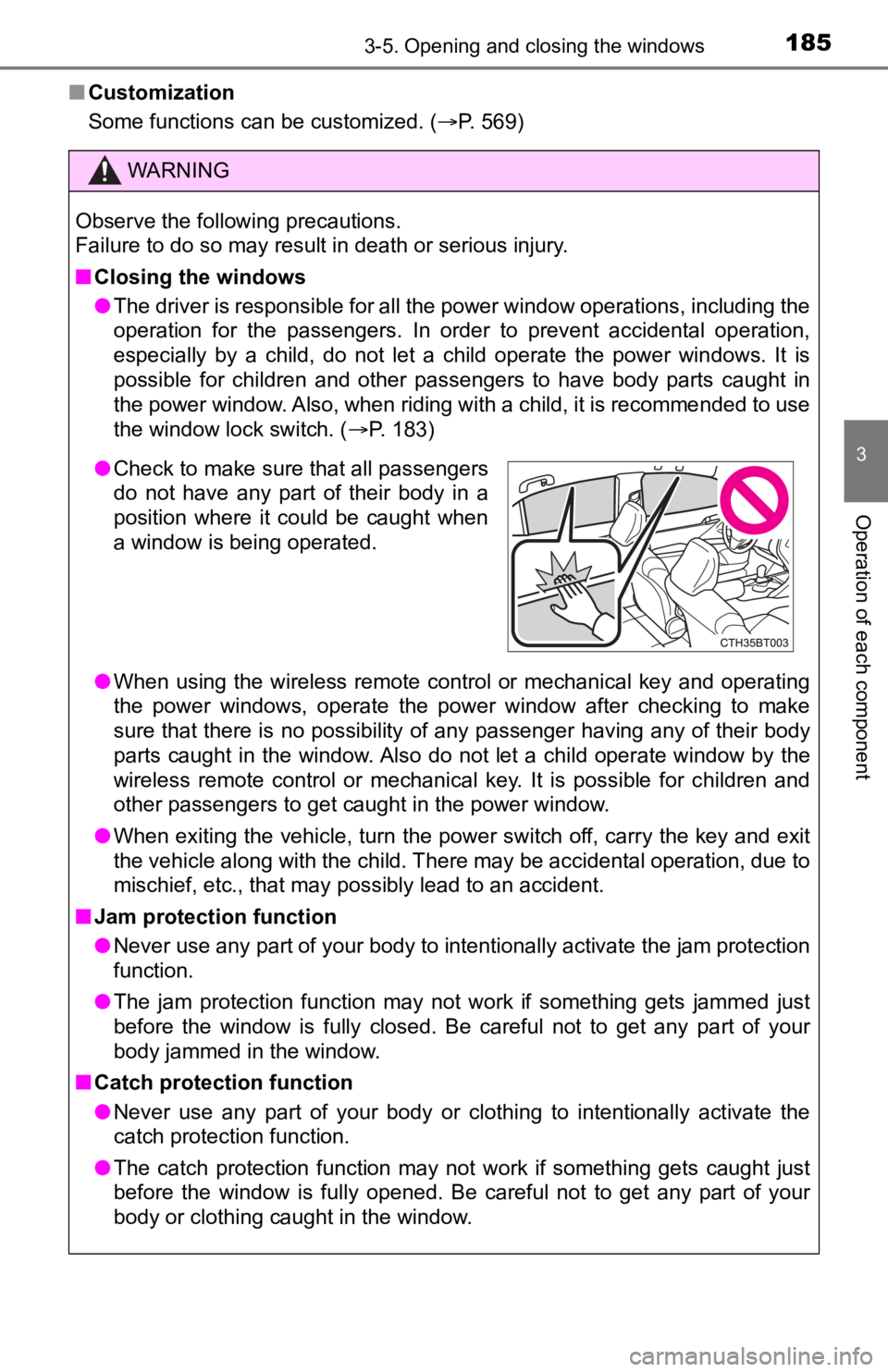
●Check to make sure that all passengers
do not have any part of their body in a
position where it could be caught when
a window is being operated.