engine TOYOTA COROLLA 2009 10.G User Guide
[x] Cancel search | Manufacturer: TOYOTA, Model Year: 2009, Model line: COROLLA, Model: TOYOTA COROLLA 2009 10.GPages: 468, PDF Size: 9.31 MB
Page 30 of 468
30 1-2. Opening, closing and locking the doors and trunk
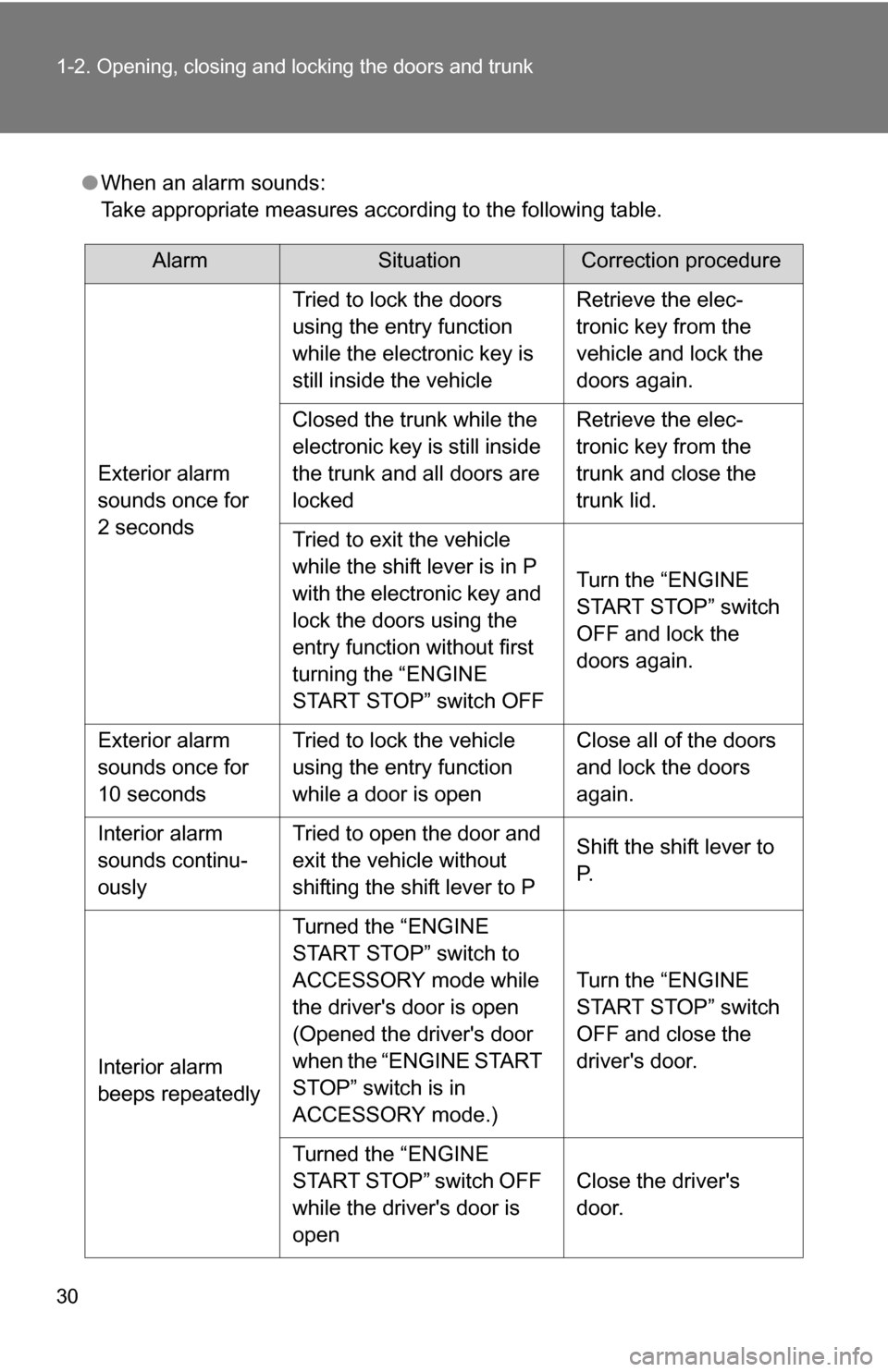
●When an alarm sounds:
Take appropriate measures according to the following table.
AlarmSituationCorrection procedure
Exterior alarm
sounds once for
2 seconds Tried to lock the doors
using the entry function
while the electronic key is
still inside the vehicle
Retrieve the elec-
tronic key from the
vehicle and lock the
doors again.
Closed the trunk while the
electronic key is still inside
the trunk and all doors are
locked Retrieve the elec-
tronic key from the
trunk and close the
trunk lid.
Tried to exit the vehicle
while the shift lever is in P
with the electronic key and
lock the doors using the
entry function without first
turning the “ENGINE
START STOP” switch OFF Turn the “ENGINE
START STOP” switch
OFF and lock the
doors again.
Exterior alarm
sounds once for
10 seconds Tried to lock the vehicle
using the entry function
while a door is open Close all of the doors
and lock the doors
again.
Interior alarm
sounds continu-
ously Tried to open the door and
exit the vehicle without
shifting the shift lever to P
Shift the shift lever to
P.
Interior alarm
beeps repeatedly Turned the “ENGINE
START STOP” switch to
ACCESSORY mode while
the driver's door is open
(Opened the driver's door
when the “ENGINE START
STOP” switch is in
ACCESSORY mode.)
Turn the “ENGINE
START STOP” switch
OFF and close the
driver's door.
Turned the “ENGINE
START STOP” switch OFF
while the driver's door is
open Close the driver's
door.
Page 31 of 468
31
1-2. Opening, closing and locking the doors and trunk
1
Before driving
■
If the smart key system does not operate properly
● Locking and unlocking the doors and trunk: Use the mechanical key.
( P. 403)
● Starting the engine: P. 404
■ When the electronic key battery is fully depleted
P. 343
■ Customization that can be co nfigured at Toyota dealer
It is possible to deactivate the smart key system, etc.
(Customizable features P. 443)
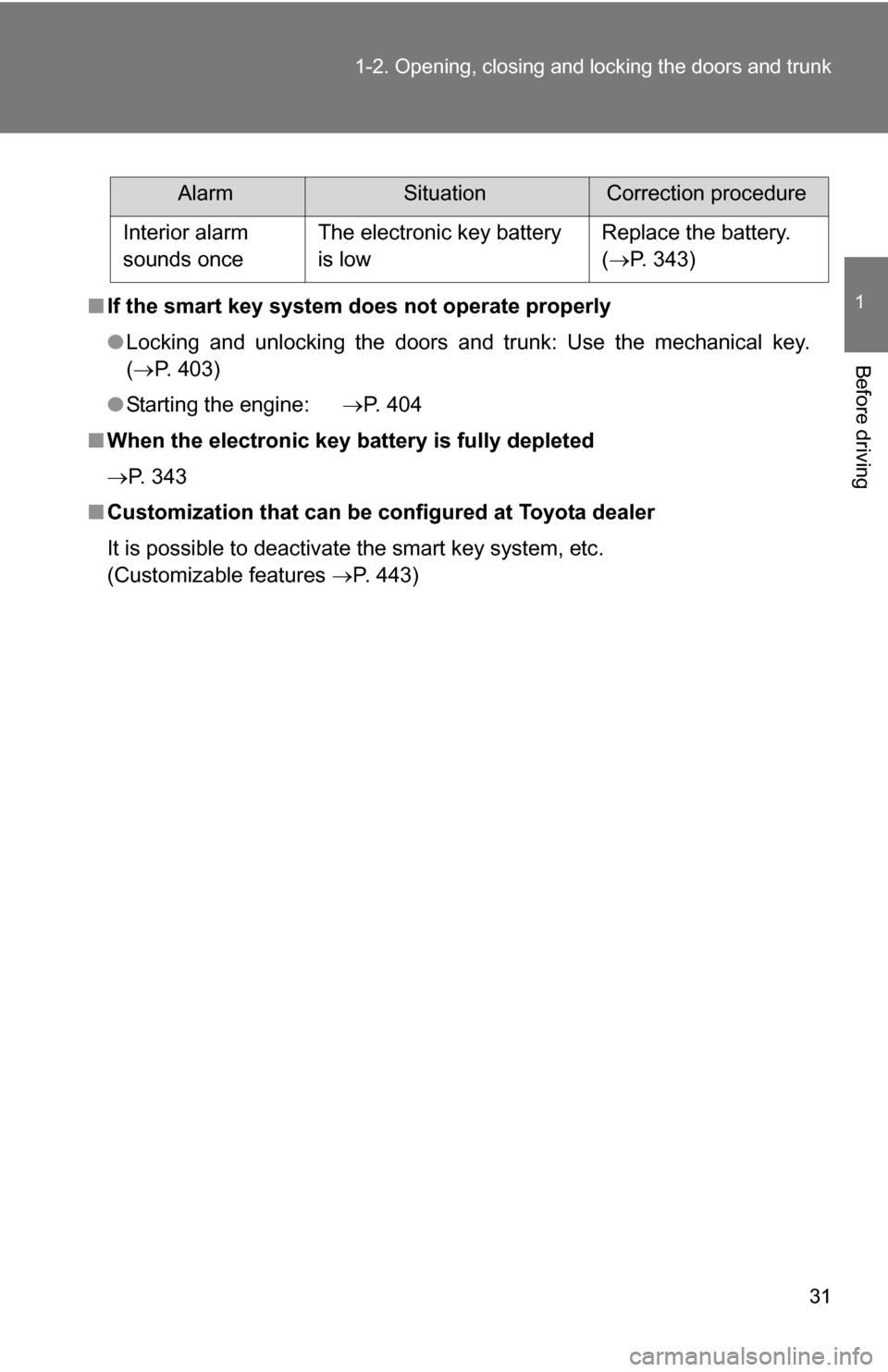
AlarmSituationCorrection procedure
Interior alarm
sounds once The electronic key battery
is low Replace the battery.
(
P. 343)
Page 40 of 468
40 1-2. Opening, closing and locking the doors and trunk
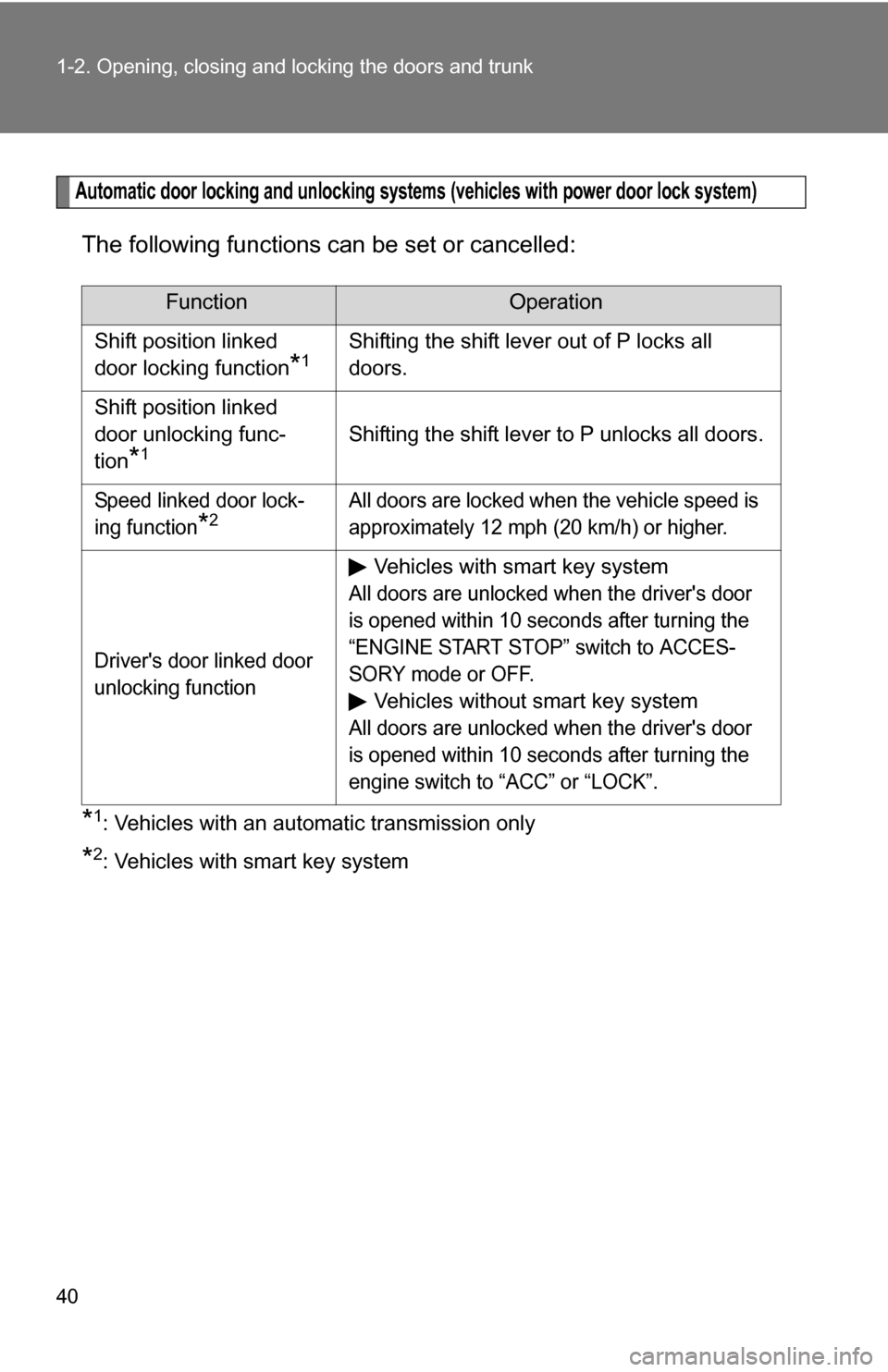
Automatic door locking and unlocking systems (vehicles with power door lock system)
The following functions can be set or cancelled:
*1: Vehicles with an automatic transmission only
*2: Vehicles with smart key system
FunctionOperation
Shift position linked
door locking function
*1Shifting the shift lever out of P locks all
doors.
Shift position linked
door unlocking func-
tion
*1Shifting the shift lever to P unlocks all doors.
Speed linked door lock-
ing function
*2All doors are locked when the vehicle speed is
approximately 12 mph (20 km/h) or higher.
Driver's door linked door
unlocking function
Vehicles with smart key system
All doors are unlocked when the driver's door
is opened within 10 seconds after turning the
“ENGINE START STOP” switch to ACCES-
SORY mode or OFF.
Vehicles without smart key system
All doors are unlocked when the driver's door
is opened within 10 seconds after turning the
engine switch to “ACC” or “LOCK”.
Page 41 of 468
41
1-2. Opening, closing and locking the doors and trunk
1
Before driving
■
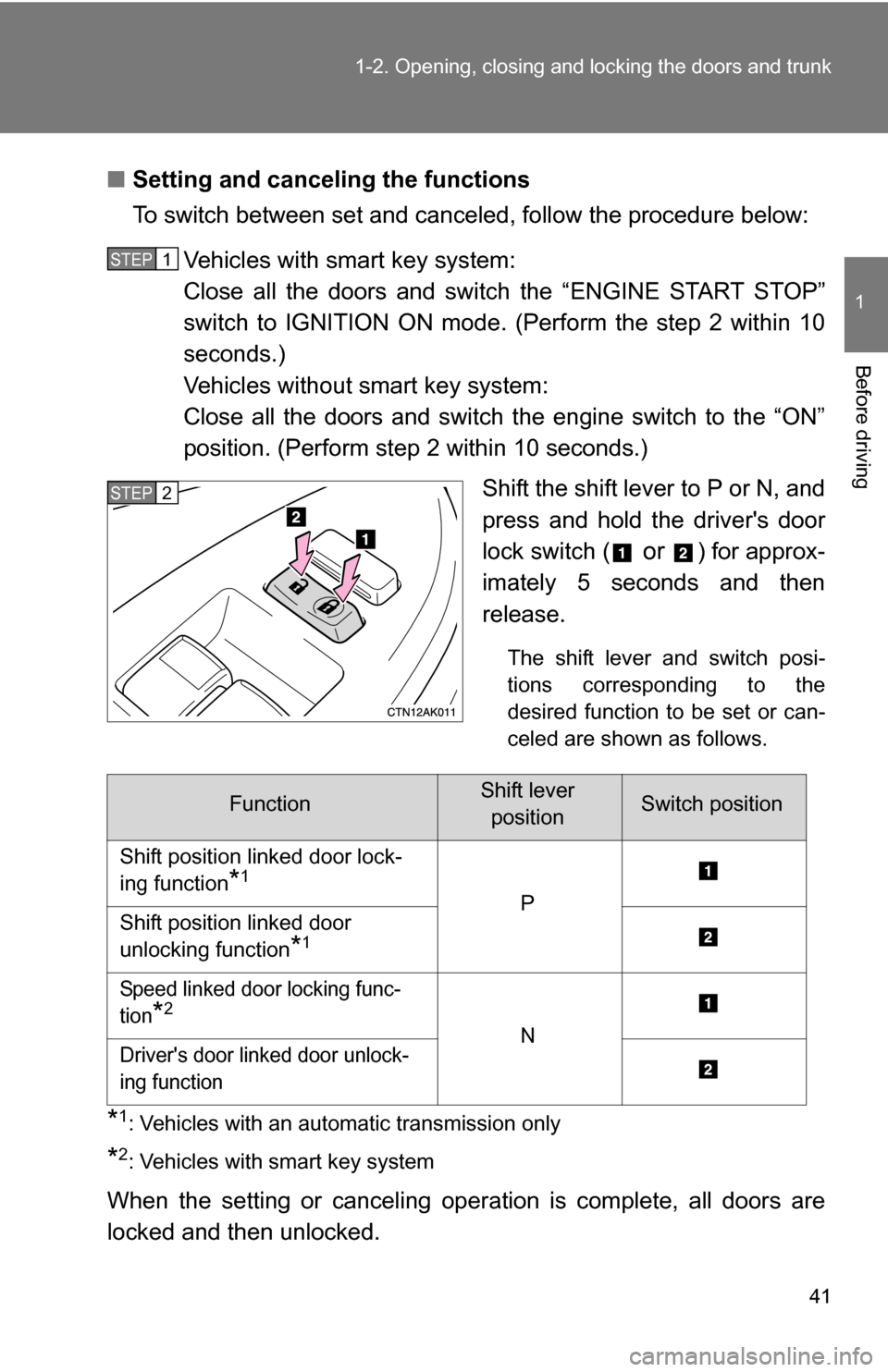
Setting and canceling the functions
To switch between set and canceled, follow the procedure below:
Vehicles with smart key system:
Close all the doors and switch the “ENGINE START STOP”
switch to IGNITION ON mode. (Perform the step 2 within 10
seconds.)
Vehicles without smart key system:
Close all the doors and switch the engine switch to the “ON”
position. (Perform step 2 within 10 seconds.) Shift the shift lever to P or N, and
press and hold the driver's door
lock switch (
or ) for approx-
imately 5 seconds and then
release.
The shift lever and switch posi-
tions corresponding to the
desired function to be set or can-
celed are shown as follows.
*1: Vehicles with an automatic transmission only
*2: Vehicles with smart key system
When the setting or canceling operation is complete, all doors are
locked and then unlocked.
STEP1
STEP2
FunctionShift lever positionSwitch position
Shift position linked door lock-
ing function
*1
P
Shift position linked door
unlocking function
*1
Speed linked door locking func-
tion
*2
N
Driver's door linked door unlock-
ing function
Page 42 of 468
42 1-2. Opening, closing and locking the doors and trunk
■When all the doors are locked with the wireless remote control, entry
function or key
The doors cannot be unlocked with the door lock switch.
The door lock switch can be reset by unlocking all the doors with the wire-
less remote control, entry function or key.
■ The doors cannot be locked when
Vehicles with smart key system
The “ENGINE START STOP” switch is in ACCESSORY or IGNITION ON
mode, or the electronic key is left inside the vehicle.
Depending on the position of the electronic key, the key may not be detected
correctly and the door may be locked. Vehicles without smart key system
The key is in the engine switch and either of the front door is open.
■ Customization that can be co nfigured at Toyota dealer
Settings (e.g. unlocking function using a key) can be changed. (Customiz-
able features P. 443)
CAUTION
■To prevent an accident
Observe the following precautions while driving the vehicle.
Failing to do so may result in a door opening and an occupant falling out,
resulting in death or serious injury.
●Always use a seat belt.
● Always lock the doors.
● Ensure that all doors are properly closed.
● Do not pull the inside handle of either of the front doors while driving.
● Set the rear door child protector locks when children are seated in the rear
seat.
Page 62 of 468
62
1-3. Adjustable components (seats, mirrors, steering wheel)
Anti-glare inside rear view mirror
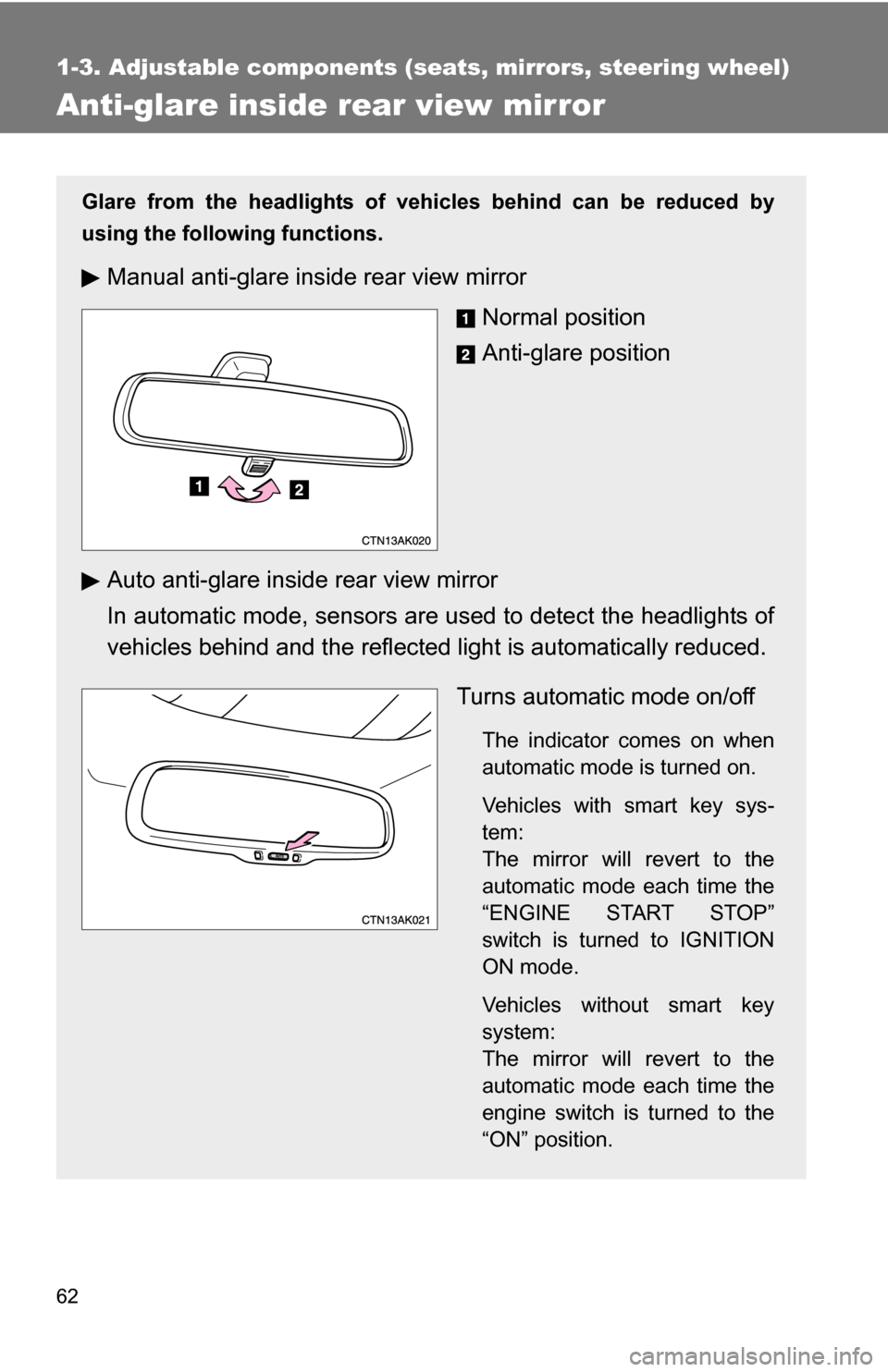
Glare from the headlights of vehicles behind can be reduced by
using the following functions.
Manual anti-glare inside rear view mirrorNormal position
Anti-glare position
Auto anti-glare inside rear view mirror
In automatic mode, sensors are used to detect the headlights of
vehicles behind and the reflecte d light is automatically reduced.
Turns automatic mode on/off
The indicator comes on when
automatic mode is turned on.
Vehicles with smart key sys-
tem:
The mirror will revert to the
automatic mode each time the
“ENGINE START STOP”
switch is turned to IGNITION
ON mode.
Vehicles without smart key
system:
The mirror will revert to the
automatic mode each time the
engine switch is turned to the
“ON” position.
Page 65 of 468
65
1-3. Adjustable components (s
eats, mirrors, steering wheel)
1
Before driving
■Mirror angle can be adjusted when
Vehicles with smart key system
The “ENGINE START STOP” switch is in ACCESSORY or IGNITION ON
mode.
Vehicles without smart key system
The engine switch is in the “ACC” or “ON” position.
■ When the mirrors are fogged up (veh icles with outside rear view mirror
defoggers)
Turn on the mirror defoggers to defog the mirrors. ( P. 197)
CAUTION
■When driving the vehicle
Observe the following precautions while driving.
Failing to do so may result in loss of control of the vehicle and cause an acci-
dent, resulting in death or serious injury.
●Do not adjust the mirrors while driving.
● Do not drive with the mirrors folded back.
● Both the driver and passenger side mirrors must be properly adjusted
before driving.
■ When the mirror defoggers are oper ating (vehicles with outside rear
view mirror defoggers)
Do not touch the surface of the mirror, as it may be hot.
Page 67 of 468
67
1-4. Opening and closing the windows
1
Before driving
■
The power windows can be operated when
Vehicles with smart key system
The “ENGINE START STOP” switch is in IGNITION ON mode.
Vehicles without smart key system
The engine switch is in the “ON” position.
■ Operating the power windows after turning the engine OFF
Vehicles with smart key system
The power windows can be operated for approximately 45 seconds after the
“ENGINE START STOP” switch is turned to ACCESSORY mode or turned
to OFF. They cannot, however, be operated once either front door is opened.
Vehicles without smart key system
The power windows can be operated for approximately 45 seconds after the
engine switch is turned to the “ACC” or “LOCK” position. They cannot, how-
ever, be operated once either front door is opened.
CAUTION
■ Closing the windows
Observe the following precautions.
Failing to do so may result in death or serious injury.
●Check to make sure that all passengers do not have any part of their body
in a position where it could be caught when a window is being operated.
● Do not allow children to operate the power windows.
Closing a power window on someone can cause serious injury, and in
some instances, even death.
Page 69 of 468
69
1-4. Opening and closing the windows
1
Before driving
■
The moon roof can be operated when
Vehicles with smart key system
The “ENGINE START STOP” switch is in IGNITION ON mode.
Vehicles without smart key system
The engine switch is in the “ON” position.
■ Operating the moon roof af ter turning the engine OFF
Vehicles with smart key system
The moon roof can be operated for approximately 45 seconds after the
“ENGINE START STOP” switch is turned to ACCESSORY mode or turned
OFF. They cannot, however, be operated once either front door is opened.
Vehicles without smart key system
The moon roof can be operated for approximately 45 seconds after the
engine switch is turned to the “ACC” or “LOCK” position. It cannot, however,
be operated once either front door is opened.
■ Jam protection function
If an object is detected between the moon roof and the frame while closing
or tilting down, travel is stopped and the moon roof opens slightly.
■ To reduce wind noise
Drive with the moon roof opened to slightly before the fully open position as
driving with the moon roof opened fully will cause wind noise.
■ Sunshade
The sunshade can be opened and closed manually. However, the sunshade
will open automatically when the moon roof is opened.
Page 71 of 468
71
1
Before driving
1-5. Refueling
Opening the fuel tank cap
Perform the following steps to open the fuel tank cap.
■Before refueling the vehicle
Vehicles with smart key system
Turn the “ENGINE START STOP” switch OFF and ensure that
all the doors and windows are closed.
Vehicles without smart key system
Turn the engine switch OFF and ensure that all the doors and
windows are closed.
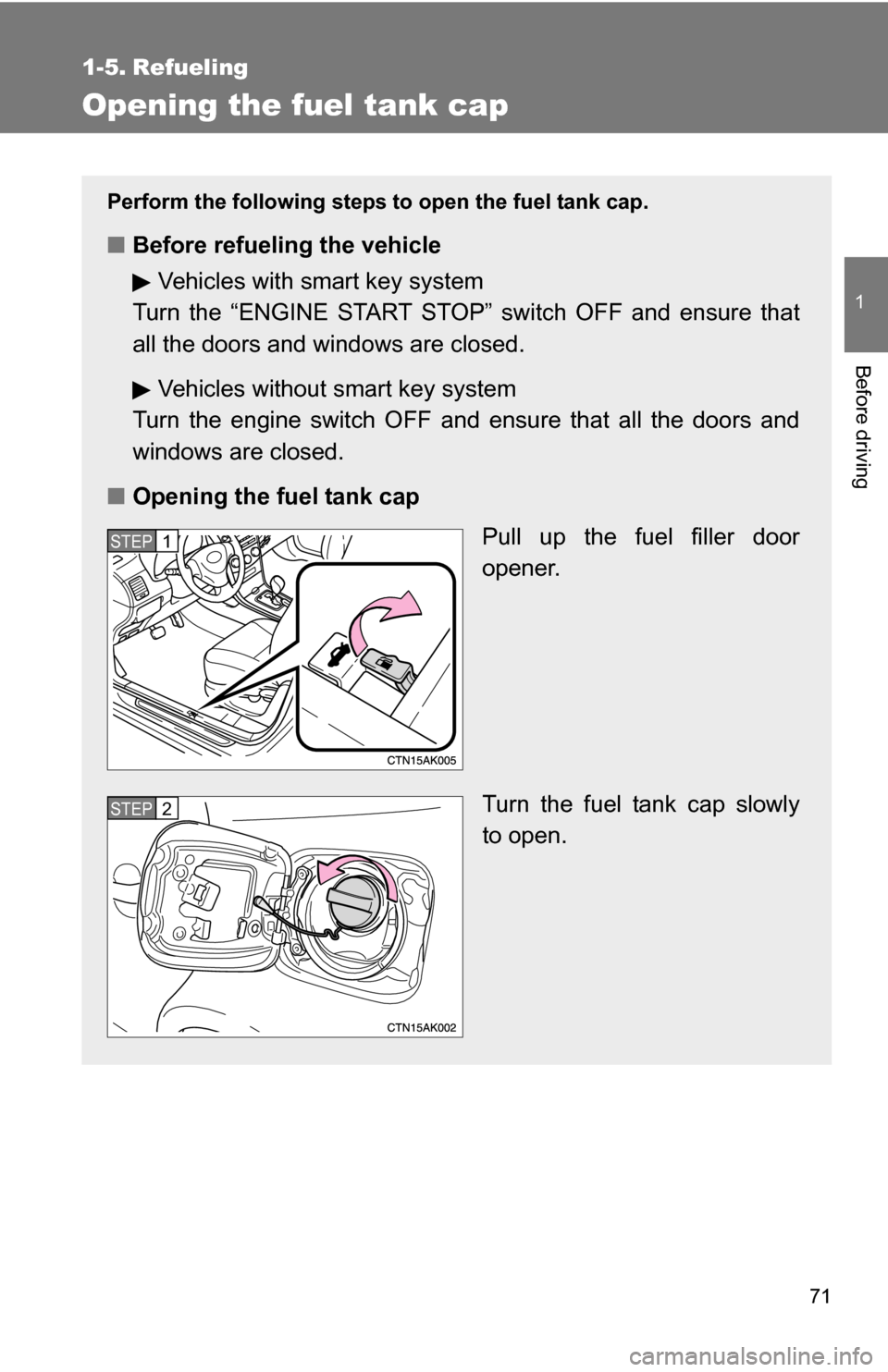
■ Opening the fuel tank cap
Pull up the fuel filler door
opener.
Turn the fuel tank cap slowly
to open.
STEP1
STEP2