heater TOYOTA COROLLA 2009 10.G Owners Manual
[x] Cancel search | Manufacturer: TOYOTA, Model Year: 2009, Model line: COROLLA, Model: TOYOTA COROLLA 2009 10.GPages: 468, PDF Size: 9.31 MB
Page 4 of 468
TABLE OF CONTENTSIndex
4
3-5. Using the storage features ........................... 264
List of storage features....... 264
• Glove box ......................... 265
• Console box ..................... 265
• Cup holders ...................... 267
• Auxiliary boxes ................. 269
• Bottle holders ................... 271
3-6. Other interior features ..... 272 Sun visors .......................... 272
Vanity mirrors ..................... 273
Grocery bag hook............... 274
Ashtrays ............................. 275
Cigarette lighter .................. 276
Power outlet ....................... 277
Seat heaters ....................... 279
Armrest............................... 281
Floor mat ............................ 282
Trunk features .................... 283
Compass ............................ 284 4-1. Maintenance and care ...... 290
Cleaning and protecting the vehicle exterior ........... 290
Cleaning and protecting the vehicle interior ............ 292
4-2. Maintenance ...................... 295 Maintenance requirements .................... 295
General maintenance ......... 297
Emission inspection and maintenance (I/M)
programs .......................... 300
4-3. Do-it-yourself maintenance ................... 301
Do-it-yourself service precautions ....................... 301
Hood ................................... 305
Positioning a floor jack........ 307
Engine compartment .......... 310
Tires.................................... 326
Tire inflation pressure ......... 335
Wheels................................ 339
Air conditioning filter ........... 341
Key battery ......................... 343
Checking and replacing fuses ................................. 347
Light bulbs .......................... 357
4Maintenance and care
Page 11 of 468
11
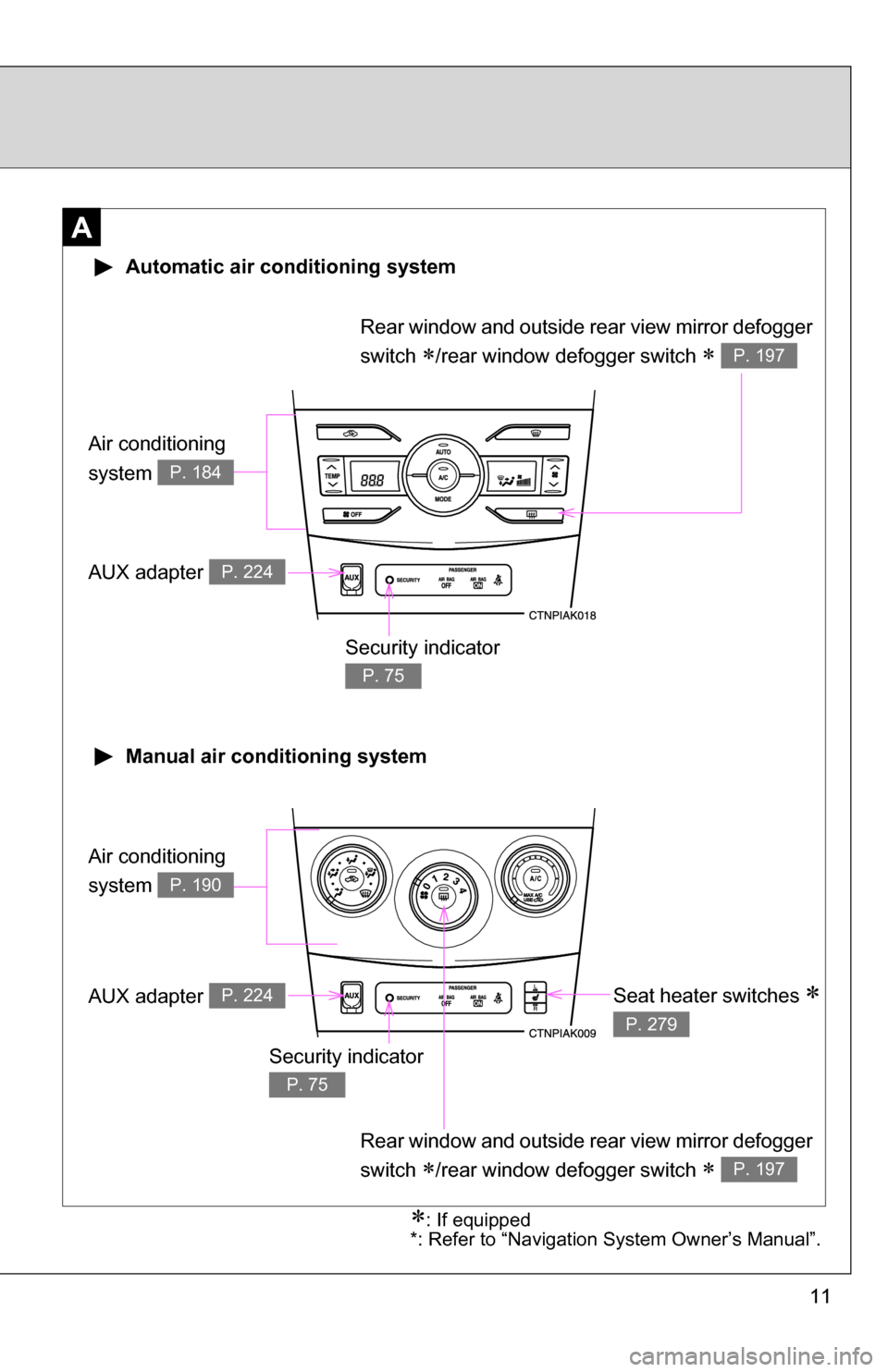
A
Air conditioning
system
P. 184
Air conditioning
system
P. 190
Automatic air conditioning system
Manual air conditioning system
Security indicator
P. 75
Seat heater switches
P. 279
AUX adapter P. 224
AUX adapter P. 224
: If equipped
*: Refer to “Navigation System Owner’s Manual”.
Rear window and outside rear view mirror defogger
switch
/rear window defogger switch P. 197
Rear window and outside rear view mirror defogger
switch
/rear window defogger switch P. 197
Security indicator
P. 75
Page 183 of 468
Interior features3
183
3-3. Using the hands-free phone system
(for cellular phone) ...... 228
Hands-free phone system (for cellular phone)
features .......................... 228
Using the hands-free phone system
(for cellular phone) ......... 231
Making a phone call ......... 240
Setting a cellular phone ... 244
Security and system setup .............................. 249
Using the phone book ...... 253
3-4. Using the interior lights ............................. 260
Interior lights list ............... 260
• Interior light .................... 262
• Personal lights ............... 262
• Personal/interior lights ... 263 3-5. Using the storage
features ......................... 264
List of storage features .... 264
• Glove box....................... 265
• Console box ................... 265
• Cup holders ................... 267
• Auxiliary boxes ............... 269
• Bottle holders ................. 271
3-6. Other interior features ... 272 Sun visors ........................ 272
Vanity mirrors ................... 273
Grocery bag hook ............ 274
Ashtrays ........................... 275
Cigarette lighter................ 276
Power outlet ..................... 277
Seat heaters..................... 279
Armrest ............................ 281
Floor mat .......................... 282
Trunk features .................. 283
Compass .......................... 284
Page 188 of 468
188 3-1. Using the air conditioning system and defogger
■Using the automatic mode
Fan speed is adjusted automatically in accordance with the temperature set-
ting and ambient conditions. As a result, the following may occur.
●The system may switch automatically to recirculated air mode when the
coolest temperature setting is selected in summer.
● Immediately after
is pressed, the fan may stop for a while until
warm or cool air is ready to flow.
● Cool air may flow to the area around the upper body when the heater is
on.
■ Using the recirculated air mode
The windows will fog up more easily if the recirculated air mode is used for
an extended period.
■ Window defogger feature
Recirculated air mode may automatically switch to outside air mode in situa-
tions where the windows need to be defogged.
■ When outside air temperat ure approaches 32°F (0°C)
The air conditioning system may not operate even when
is pressed.
■ When
is selected for the air outlets used
For your driving comfort, air flowing to the feet may be warmer than air flow-
ing to the upper body depending on the temperature setting.
Page 190 of 468
190
3-1. Using the air conditioning system and defogger
Manual air conditioning system (if equipped)
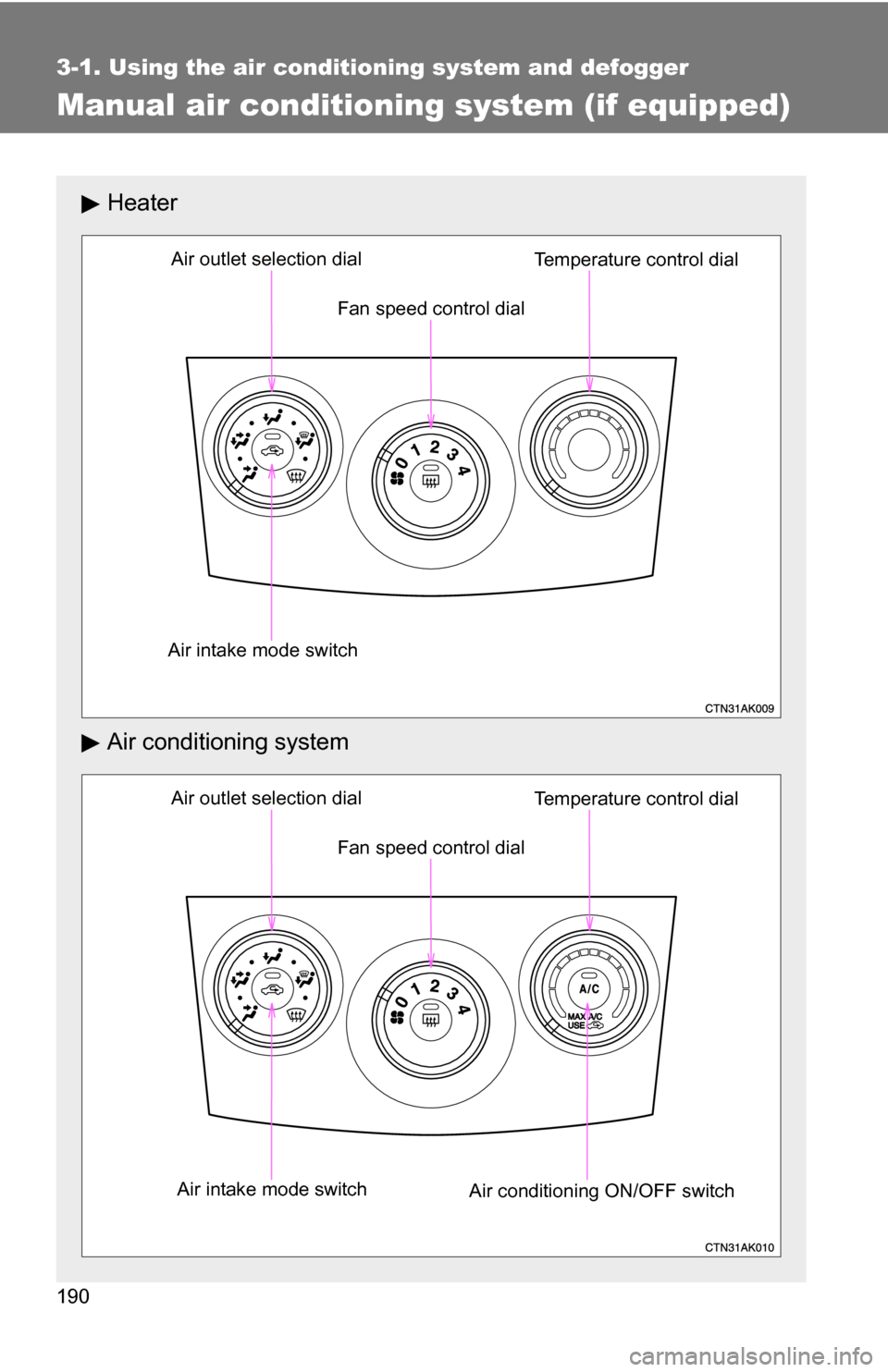
Heater
Air conditioning system
Fan speed control dial
Air outlet selection dial
Air intake mode switch Temperature control dial
Fan speed control dial
Air outlet selection dial
Air intake mode switch Air conditioning ON/OFF switchTemperature control dial
Page 191 of 468
191
3-1. Using the air conditioning system
and defogger
3
Interior features
Adjusting the settings
■ Adjusting the temperature setting (heater)
Turn the temperature control dial clockwise to increase the temper-
ature.
■ Adjusting the temperature setting (air conditioning system)
Turn the temperature control dial clockwise (warm) or counter-
clockwise (cool).
If is not pressed, the system will blow ambient temperature air or
heated air.
■ Adjusting the fan speed
Turn the fan speed control dial clockwise (increase) or counter-
clockwise (decrease).
Set the dial to “0” to turn the fan off.
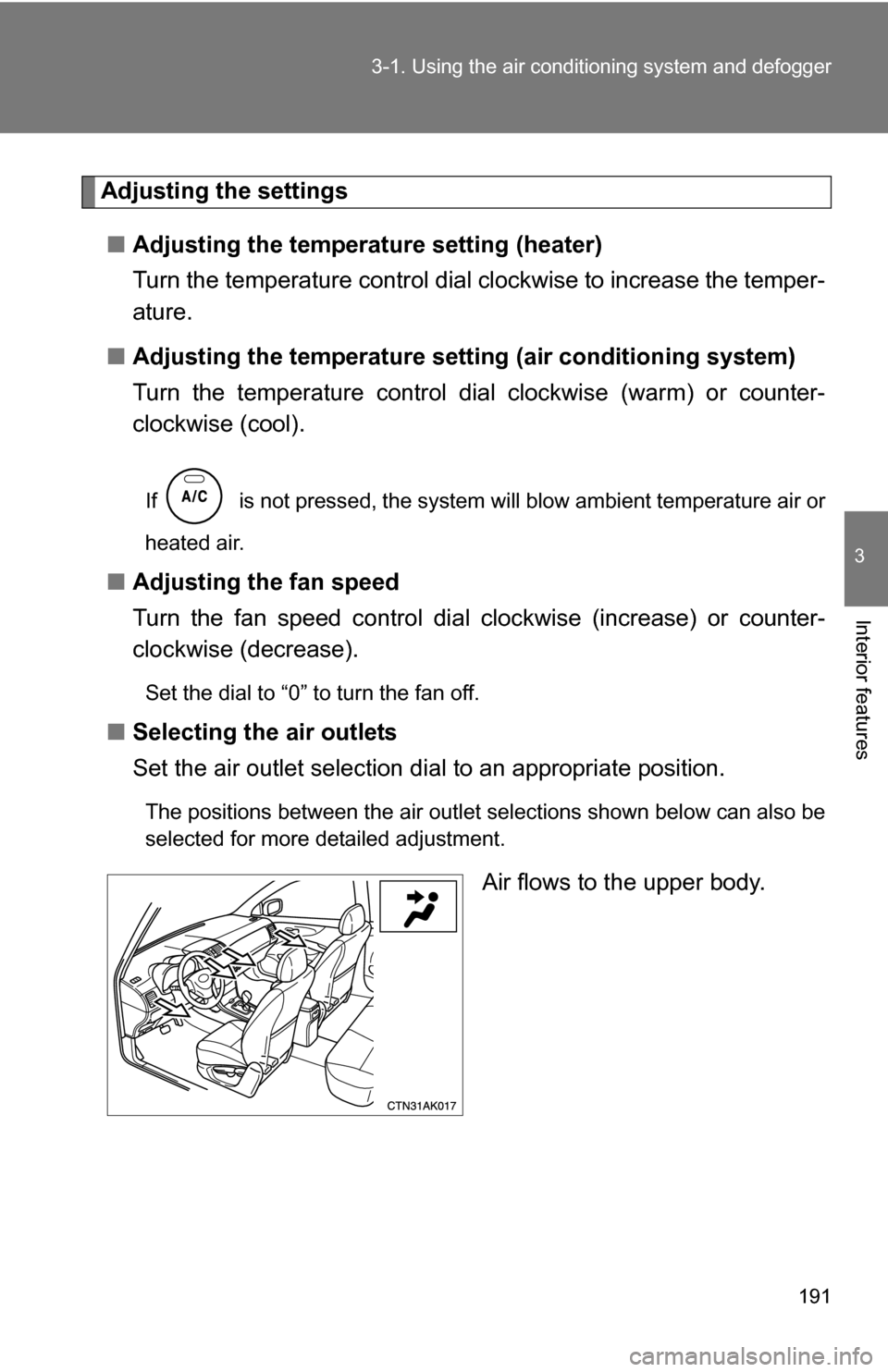
■ Selecting the air outlets
Set the air outlet selection di al to an appropriate position.
The positions between the air outlet selections shown below can also be
selected for more detailed adjustment.
Air flows to the upper body.
Page 279 of 468
279
3-6. Other interior features
3
Interior features
Seat heaters (if equipped)
■The seat heaters can be used when
Vehicles with smart key system
The “ENGINE START STOP” switch is in IGNITION ON mode.
Vehicles without smart key system
The engine switch is in the “ON” position.
CAUTION
■ Burns
●Use caution when seating the following persons in a seat with the seat
heater on to avoid the possibility of burns:
• Babies, small children, the elderly, the sick and the disabled
• Persons with sensitive skin
• Persons who are fatigued
• Persons who have taken alcohol or drugs that induce sleep (sleeping
drugs, cold remedies, etc.)
● Do not cover the seat with anything when using the seat heater.
Using the seat heater with a blanket or cushion increases the temperature
of the seat and may lead to overheating.
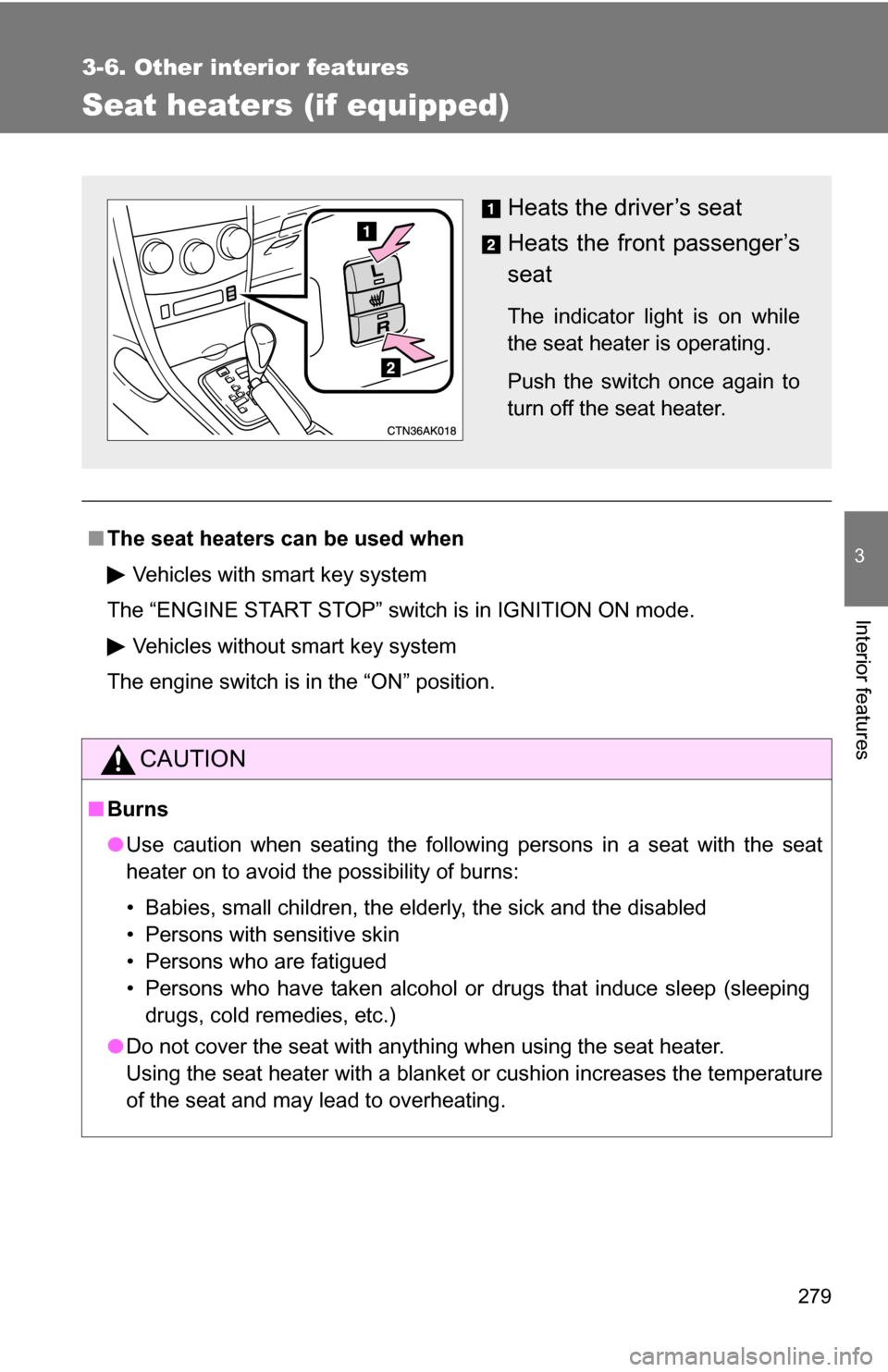
Heats the driver’s seat
Heats the front passenger’s
seat
The indicator light is on while
the seat heater is operating.
Push the switch once again to
turn off the seat heater.
Page 280 of 468
280 3-6. Other interior features
NOTICE
■To prevent seat heater damage
Do not put unevenly weighted objects on the seat and do not stick sharp
objects (needles, nails, etc.) into the seat.
■ To prevent battery discharge
Turn the switches off when the engine is not running.
Page 293 of 468
293
4-1. Maintenance and care
4
Maintenance and care
■
Cleaning the inside of the rear window
Do not use glass cleaner to clean the rear window, as this may cause dam-
age to the rear window defogger heater wires or antenna. Use a cloth damp-
ened with lukewarm water to gently wipe the window clean. Wipe the
window in strokes running parallel to the heater wires or antenna.
■ Caring for leather areas
Toyota recommends cleaning the interior of the vehicle at least twice a year
to maintain the quality of the vehicle's interior.
■ Shampooing the carpets
There are several commercial foaming-type cleaners available. Use a
sponge or brush to apply the foam. Rub in overlapping circles. Do not apply
water. Excellent results are obtained by keeping the carpet as dry as possi-
ble.
■ Seat belts
Clean with mild soap and lukewarm water using a cloth or sponge. Also
check the belts periodically for excessive wear, fraying or cuts.
CAUTION
■Water in the vehicle
●Be careful not to splash or spill liquid on the floor.
● Do not get any of the SRS components or wiring in the vehicle interior wet.
( P. 8 1 )
Electrical malfunction may cause the airbags to deploy or not function
properly, resulting in death or severe injury.
Page 294 of 468
294 4-1. Maintenance and care
NOTICE
■Cleaning detergents
Do not use organic substances such as benzene or gasoline, acidic or alka-
line solutions, dye, bleach or other detergent. Doing so may discolor the
vehicle interior or cause streaks or damage to painted surfaces.
■ Preventing damage to leather surfaces
Observe the following precautions to avoid damage to and deterioration o\
f
leather surfaces.
●Remove any dust or dirt on leather surfaces immediately.
● Do not expose the vehicle to direct sunlight for extended periods of time.
Park the vehicle in the shade, especially during summer.
● Do not place items made of vinyl, plastic, or that contain wax, on the
upholstery, as they may stick to the leather surface if the vehicle interior
heats up significantly.
■ Water on the floor
Do not wash the vehicle floor with water.
Vehicle systems such as the audio system may be damaged if water comes
into contact with electrical components under the floor of the vehicle, and
may also cause the body to rust.
■ Cleaning the inside of the rear window
Be careful not to scratch or damage the heater wires or antenna.