ignition TOYOTA COROLLA 2011 10.G User Guide
[x] Cancel search | Manufacturer: TOYOTA, Model Year: 2011, Model line: COROLLA, Model: TOYOTA COROLLA 2011 10.GPages: 529, PDF Size: 9.69 MB
Page 79 of 529
79
1
Before driving
1-6. Theft deterrent system
Engine immobilizer system
The vehicle's keys have built-in transponder chips that prevent the
engine from starting if the key has not been previously registered in
the vehicle's on-board computer.
Never leave the keys inside the vehicle when you leave the vehicle.
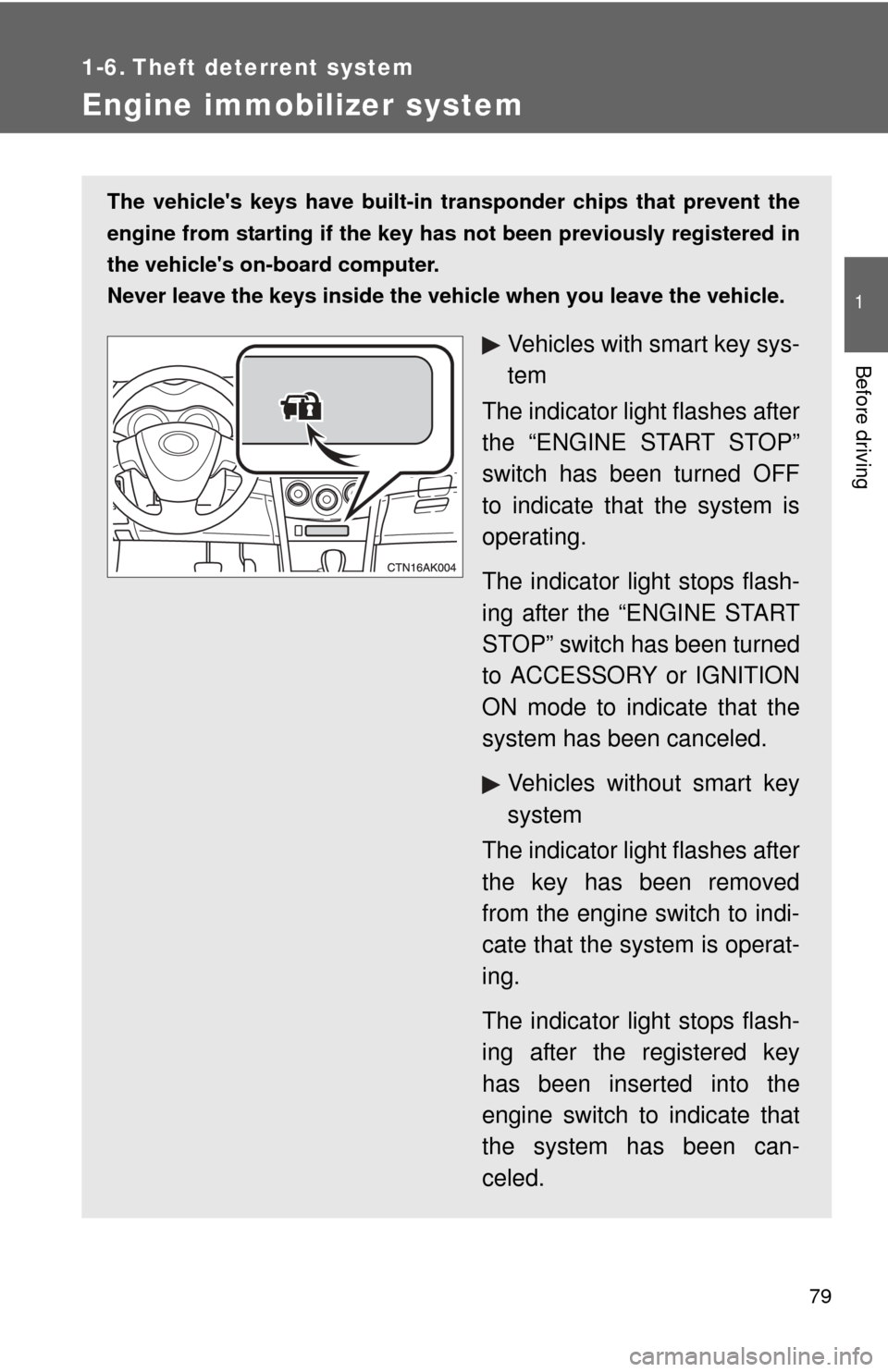
Vehicles with smart key sys-
tem
The indicator light flashes after
the “ENGINE START STOP”
switch has been turned OFF
to indicate that the system is
operating.
The indicator light stops flash-
ing after the “ENGINE START
STOP” switch has been turned
to ACCESSORY or IGNITION
ON mode to indicate that the
system has been canceled.
Vehicles without smart key
system
The indicator light flashes after
the key has been removed
from the engine switch to indi-
cate that the system is operat-
ing.
The indicator light stops flash-
ing after the registered key
has been inserted into the
engine switch to indicate that
the system has been can-
celed.
Page 117 of 529
When driving2
117
2-1. Driving proceduresDriving the vehicle............ 118
Engine (ignition) switch (vehicles with smart key
system) .......................... 129
Engine (ignition) switch (vehicles without smart
key system).................... 133
Automatic transmission .... 137
Manual transmission ........ 143
Turn signal lever .............. 144
Parking brake ................... 145
Horn ................................. 146
2-2. Instrument cluster Gauges and meters ......... 147
Indicators and warning lights .............................. 150
Multi-information display............................ 154 2-3. Operating the lights and
wipers
Headlight switch ............... 157
Fog light switch ................ 159
Windshield wipers and washer ........................... 160
2-4. Using other driving systems
Cruise control ................... 162
Driving assist systems ..... 166
2-5. Driving information Cargo and luggage .......... 170
Vehicle load limits ............ 173
Winter driving tips ............ 174
Trailer towing (2.4 L 4-cylinder
[2AZ-FE] engine) ........... 178
Trailer towing (1.8 L 4-cylinder
[2ZR-FE] engine) ........... 186
Dinghy towing (automatic transmission) ................. 187
Dinghy towing (manual transmission) ................. 188
Page 129 of 529
129
2-1. Driving procedures
2
When driving
Engine (ignition) switch (vehicles with smart key system)
Performing the following operations when carrying the electronic
key on your person starts the en gine or changes “ENGINE START
STOP” switch modes.
■ Starting the engine
Check that the parking brake is set.
Check that the shift lever is set in P.
Sit in the driver’s seat and firmly depress the brake pedal.
The “ENGINE START STOP” switch indicator turns green. If the
indicator does not turn green, the engine cannot be started.
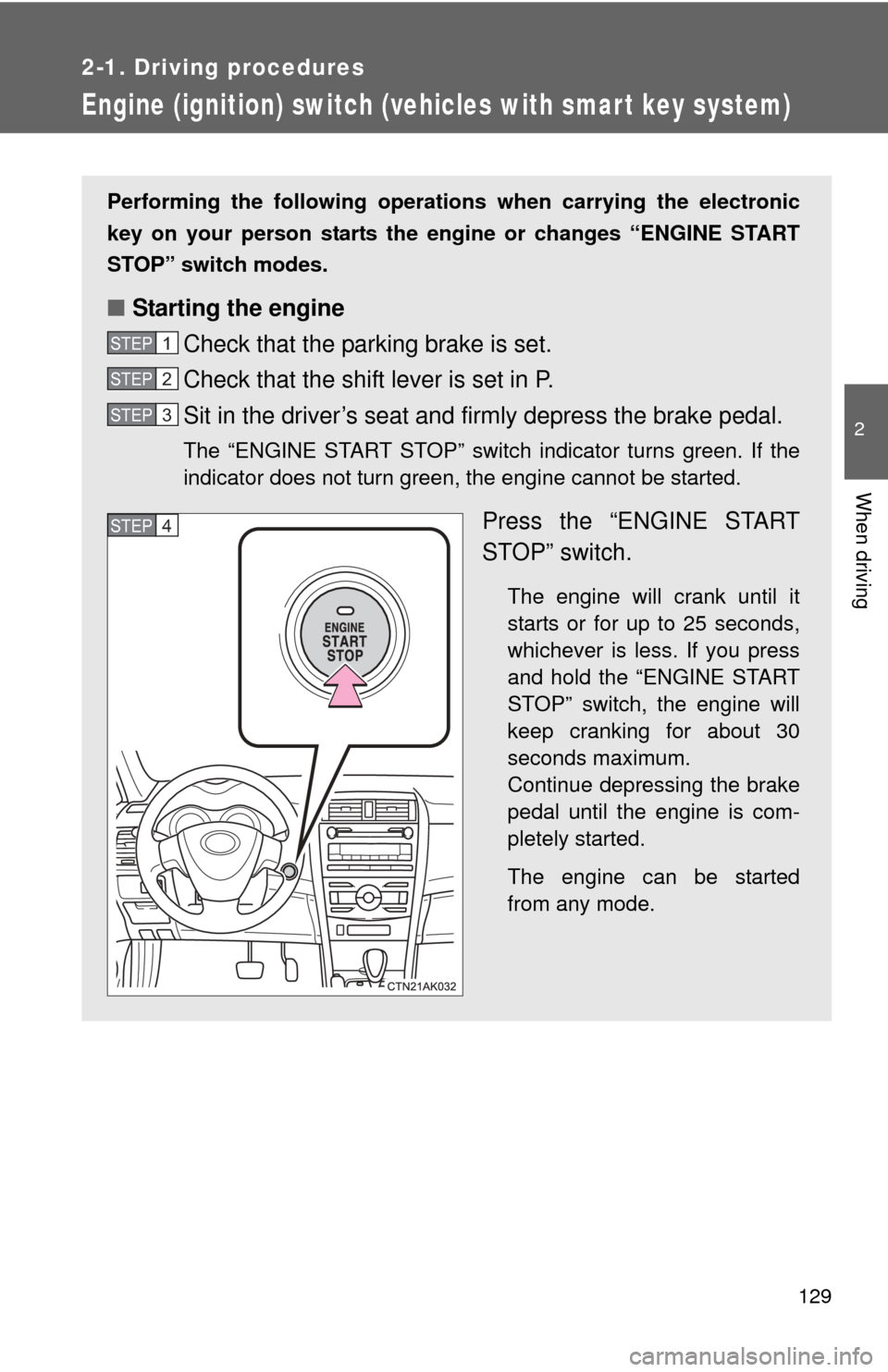
Press the “ENGINE START
STOP” switch.
The engine will crank until it
starts or for up to 25 seconds,
whichever is less. If you press
and hold the “ENGINE START
STOP” switch, the engine will
keep cranking for about 30
seconds maximum.
Continue depressing the brake
pedal until the engine is com-
pletely started.
The engine can be started
from any mode.
STEP 1
STEP 2
STEP 3
STEP 4
Page 130 of 529
130 2-1. Driving procedures
■Changing “ENGINE START STOP” switch mode
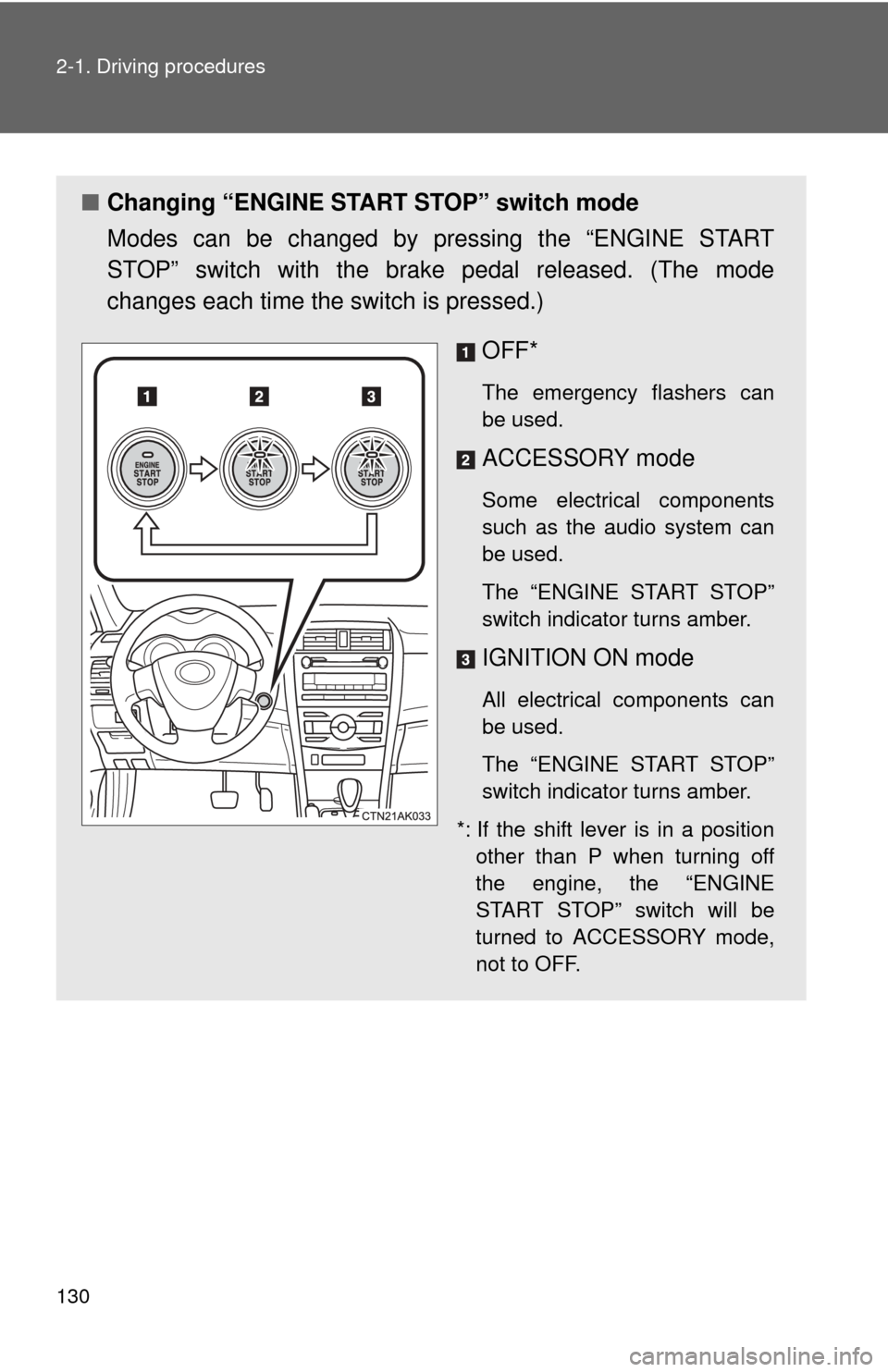
Modes can be changed by pressing the “ENGINE START
STOP” switch with the brake pedal released. (The mode
changes each time the switch is pressed.)
OFF*
The emergency flashers can
be used.
ACCESSORY mode
Some electrical components
such as the audio system can
be used.
The “ENGINE START STOP”
switch indicator turns amber.
IGNITION ON mode
All electrical components can
be used.
The “ENGINE START STOP”
switch indicator turns amber.
*: If the shift lever is in a position other than P when turning off
the engine, the “ENGINE
START STOP” switch will be
turned to ACCESSORY mode,
not to OFF.
Page 133 of 529
133
2-1. Driving procedures
2
When driving
Engine (ignition) switch (vehicles without smart key system)
■Starting the engine
Automatic transmission
Check that the parking brake is set.
Check that the shift lever is set in P.
Sit in the driver’s seat and firmly depress the brake pedal.
Turn the engine switch to the “START” position and start
the engine.
1.8 L 4-cylinder (2ZR-FE) engine: The engine will crank until it
starts or for up to 25 seconds, whichever is less. If you turn the
engine switch, the engine will keep cranking for about 30 seconds
maximum.
Continue depressing the brake pedal until the engine is com-
pletely started.
Manual transmissionCheck that the parking brake is set.
Check that the shift lever is set in N.
Firmly depress the clutch pedal.
Turn the engine switch to the “START” position and start
the engine.
1.8 L 4-cylinder (2ZR-FE) engine: The engine will crank until it
starts or for up to 25 seconds, whichever is less. If you turn the
engine switch, the engine will keep cranking for about 30 seconds
maximum.
Continue depressing the brake pedal until the engine is com-
pletely started.
STEP 1
STEP 2
STEP 3
STEP 4
STEP 1
STEP 2
STEP 3
STEP 4
Page 137 of 529
137
2-1. Driving procedures
2
When driving
Automatic transmission
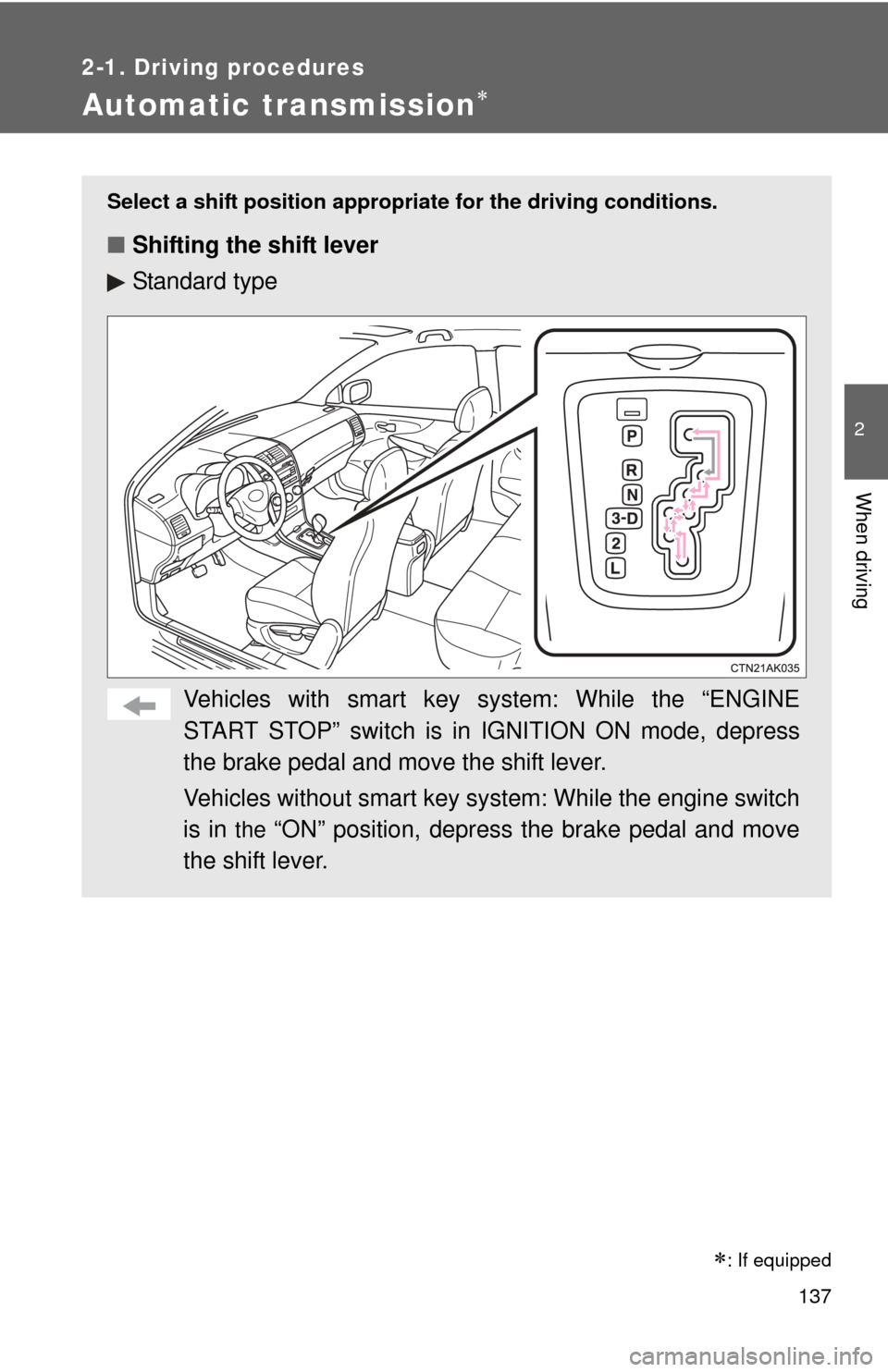
Select a shift position appropriate for the driving conditions.
■Shifting the shift lever
Standard type
Vehicles with smart key system: While the “ENGINE
START STOP” switch is in IGNITION ON mode, depress
the brake pedal and move the shift lever.
Vehicles without smart key sy stem: While the engine switch
is in
the “ON” position, depress the brake pedal and move
the shift lever.
: If equipped
Page 144 of 529
144
2-1. Driving procedures
Tur n signal lever
■Turn signals can be operated when
Vehicles with smart key system
The “ENGINE START STOP” switch is in IGNITION ON mode.
Vehicles without smart key system
The engine switch is in
the “ON” position.
■ If the indicators flash faster than usual
Check that a light bulb in the front or rear turn signal lights has not burned
out.
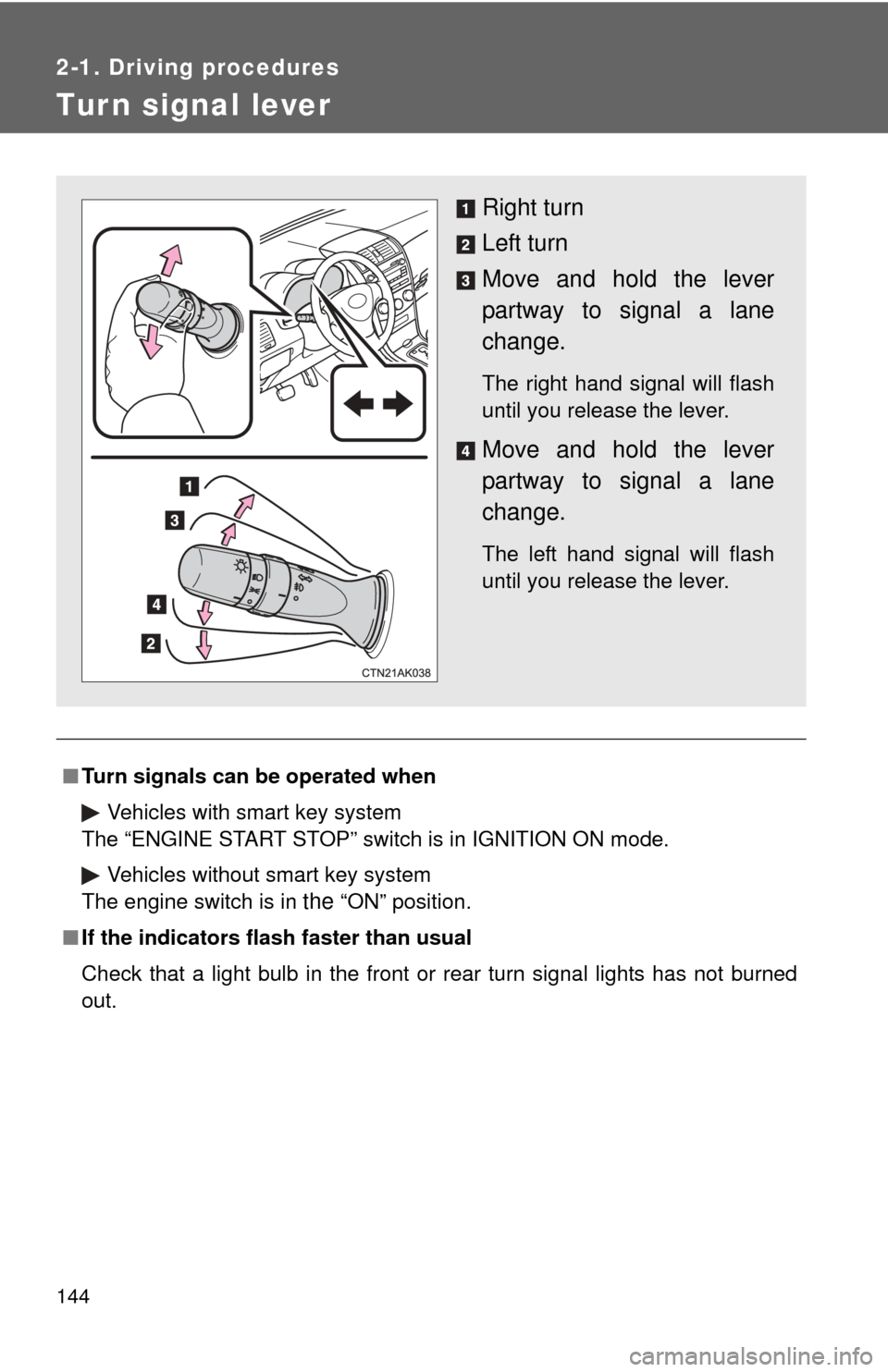
Right turn
Left turn
Move and hold the lever
partway to signal a lane
change.
The right hand signal will flash
until you release the lever.
Move and hold the lever
partway to signal a lane
change.
The left hand signal will flash
until you release the lever.
Page 152 of 529
152 2-2. Instrument cluster
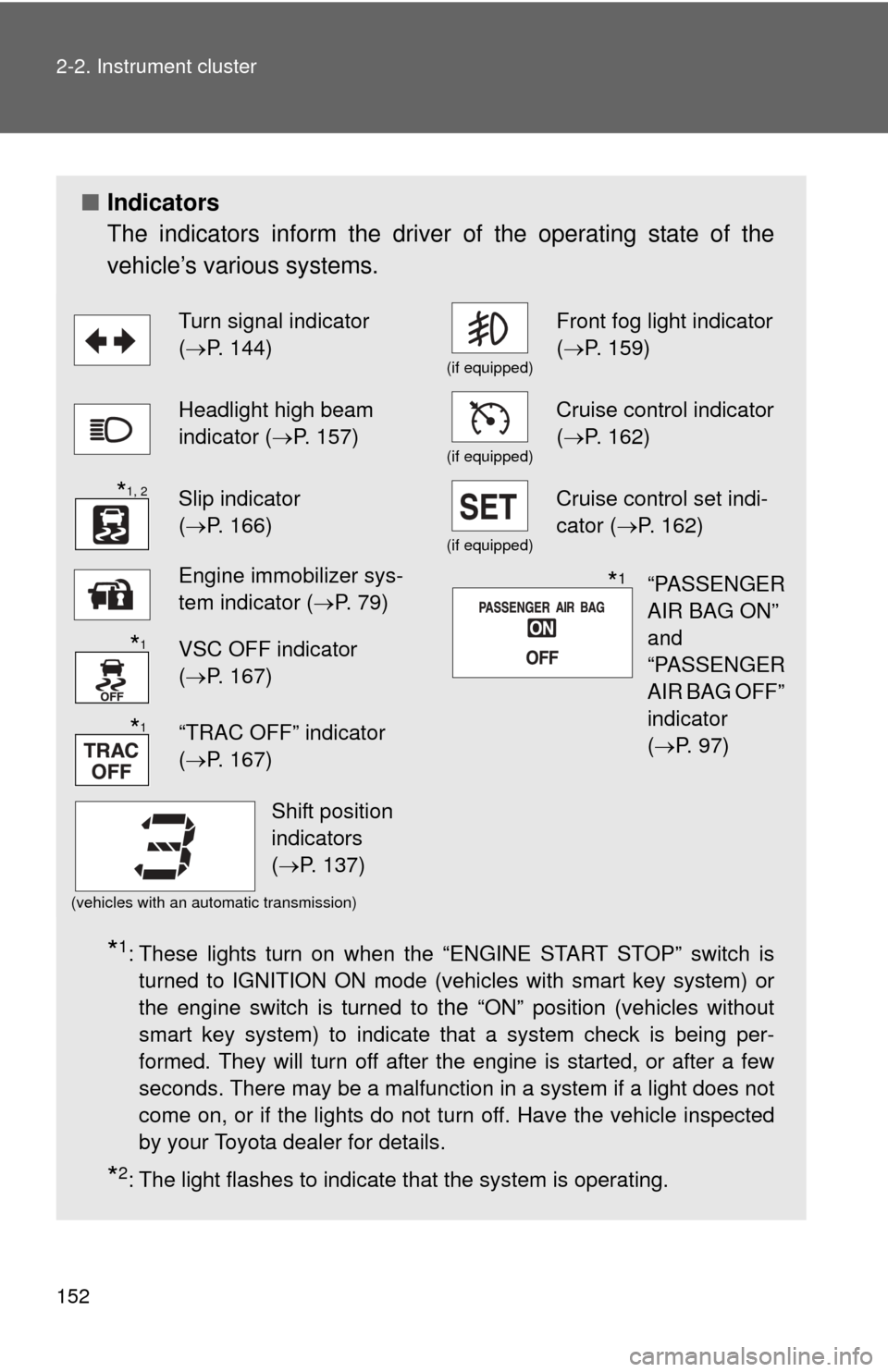
■Indicators
The indicators inform the driver of the operating state of the
vehicle’s various systems.
*1: These lights turn on when the “ENGINE START STOP” switch is
turned to IGNITION ON mode (vehicles with smart key system) or
the engine switch is turned to
the “ON” position (vehicles without
smart key system) to indicate that a system check is being per-
formed. They will turn off after the engine is started, or after a few
seconds. There may be a malfunction in a system if a light does not
come on, or if the lights do not turn off. Have the vehicle inspected
by your Toyota dealer for details.
*2: The light flashes to indicate that the system is operating.
Turn signal indicator
( P. 144)
(if equipped)
Front fog light indicator
( P. 159)
Headlight high beam
indicator ( P. 157)
(if equipped)
Cruise control indicator
(P. 162)
Slip indicator
(P. 166)
(if equipped)
Cruise control set indi-
cator (P. 162)
Engine immobilizer sys-
tem indicator ( P. 79)
VSC OFF indicator
(P. 167)
“TRAC OFF” indicator
(P. 167)
(vehicles with an automatic transmission)
*1, 2
“PASSENGER
AIR BAG ON”
and
“PASSENGER
AIR BAG OFF”
indicator
(P. 97)*1
*1
*1
Shift position
indicators
(P. 137)
Page 153 of 529
153
2-2. Instrument cluster
2
When driving
CAUTION
■
If a safety system warning light does not come on
Should a safety system light such as the ABS or SRS airbag warning light
not come on when you start the engine, this could mean that these systems
are not available to help protect you in an accident, which could result in
death or serious injury. Have the vehicle inspected by your Toyota dealer
immediately if this occurs.
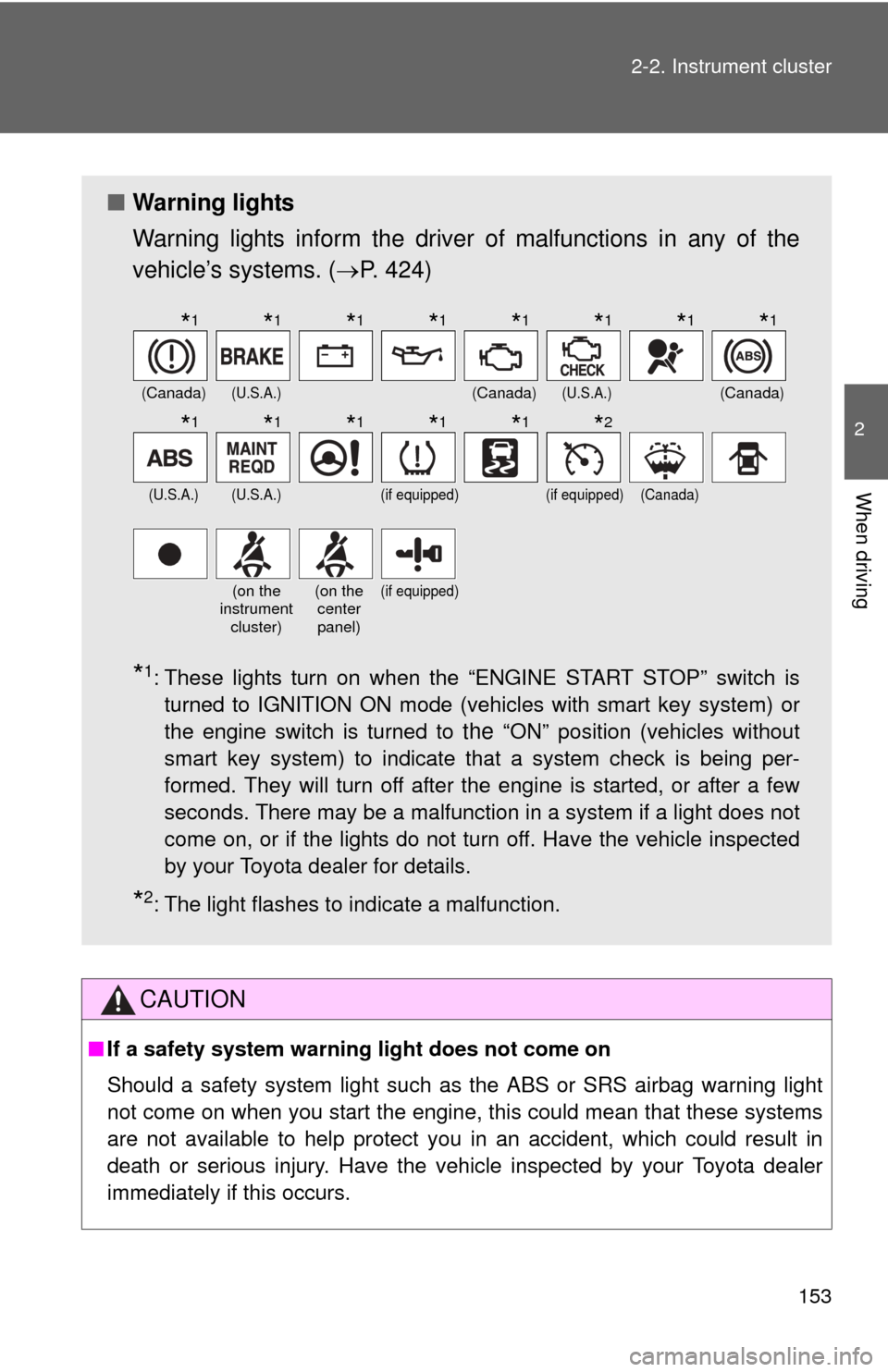
■ Warning lights
Warning lights inform the driver of malfunctions in any of the
vehicle’s systems. ( P. 424)
*1: These lights turn on when the “ENGINE START STOP” switch is
turned to IGNITION ON mode (vehicles with smart key system) or
the engine switch is turned to
the “ON” position (vehicles without
smart key system) to indicate that a system check is being per-
formed. They will turn off after the engine is started, or after a few
seconds. There may be a malfunction in a system if a light does not
come on, or if the lights do not turn off. Have the vehicle inspected
by your Toyota dealer for details.
*2: The light flashes to indicate a malfunction.
(Canada)(U.S.A.)(Canada)(U.S.A.)(Canada)
(U.S.A.)(U.S.A.)(if equipped)(if equipped)(Canada)
(on the
instrument
cluster)(on the center
panel)(if equipped)
*1*1*1*1*1*1*1*1
*1*1*1*1*1*2
Page 161 of 529

161
2-3. Operating the lights and wipers
2
When driving
■
The windshield wipers and w ashers can be operated when
Vehicles with smart key system
The “ENGINE START STOP” switch is in IGNITION ON mode.
Vehicles without smart key system
The engine switch is in the “ON” position.
■ If no windshield washer fluid sprays
Check that the washer nozzles are not blocked and if there is washer fluid in
the windshield washer fluid reservoir.
NOTICE
■When the windshield is dry
Do not use the wipers, as they may damage the windshield.
■ When there is no washer fluid spray from the nozzle
Damage to the washer fluid pump may be caused if the lever is pulled
toward you and held continually.
■ When a nozzle becomes blocked
In this case, contact your Toyota dealer.
Do not try to clear it with a pin or other object. The nozzle will be damaged.