ESP TOYOTA COROLLA 2011 10.G Owners Manual
[x] Cancel search | Manufacturer: TOYOTA, Model Year: 2011, Model line: COROLLA, Model: TOYOTA COROLLA 2011 10.GPages: 529, PDF Size: 9.69 MB
Page 15 of 529

15
For your information
Main Owner’s Manual
Please note that this manual covers all models and all equipment, including
options. Therefore, you may find some explanations for equipment not
installed on your vehicle.
All specifications provided in this manual are current at the time of printing.
However, because of the Toyota policy of continual product improvement, we
reserve the right to make changes at any time without notice.
Depending on specifications, the vehicle shown in the illustrations may differ
from your vehicle in terms of equipment.
Noise from under vehicle after turning off the engine
Approximately five hours after the engine is turned off, you may hear sound
coming from under the vehicle for several minutes. This is the sound of a fuel
evaporation leakage check and, it does not indicate a malfunction.
Accessories, spare parts and modification of your Toyota
A wide variety of non-genuine spare parts and accessories for Toyota
vehicles are currently available on the market. You should know that these
parts are not covered by Toyota warranty and that Toyota is not responsible
for their performance, repair, or replacement, or for any damage they may
cause to, or adverse effect they may have on, your Toyota vehicle.
This vehicle should not be modified with non-genuine Toyota products.
Modification with non-genuine Toyota products could affect its performance,
safety or durability, and may even violate governmental regulations. In
addition, damage or performance problems resulting from the modification
may not be covered under warranty.
Page 32 of 529

32 1-2. Opening, closing and locking the doors and trunk
■If the smart key system does not operate properly
● Locking and unlocking the doors and trunk: Use the mechanical key.
( P. 452)
● Starting the engine: P. 453
■ When the electronic key battery is fully depleted
P. 386
■ Customization that can be co nfigured at Toyota dealer
It is possible to deactivate the smart key system, etc.
(Customizable features P. 495)
■ Certification for the smart key system
For vehicles sold in the U.S.A.
FCC ID: NI4TMLF-2
This device complies with Part 15 of the FCC Rules. Operation is subject to
the following two conditions: (1) this device may not cause harmful interfer-
ence, and (2) this device must accept any interference received, including
interference that may cause undesired operation.
Changes or modifications not expressly approved by the party responsible
for compliance could void the user's authority to operate the equipment. For vehicles sold in Canada
Operation is subject to the following two conditions: (1) this device may not
cause interference, and (2) this device must accept any interference, includ-
ing interference that may cause undesired operation of the device.
AlarmSituationCorrection procedure
Interior alarm
sounds once The electronic key battery
is low Replace the battery.
(
P. 386)
Page 37 of 529

37
1-2. Opening, closing and locking the doors and trunk
1
Before driving
■
Customization that can be co nfigured at Toyota dealer
Settings (e.g. trunk unlocking function) can be changed.
(Customizable features P. 495)
■ Certification for wireless remote control (vehicles with smart key sys-
tem)
For vehicles sold in the U.S.A.
FCC ID: NI4TMLF-2
This device complies with Part 15 of the FCC Rules. Operation is subject to
the following two conditions: (1) this device may not cause harmful interfer-
ence, and (2) this device must accept any interference received, including
interference that may cause undesired operation.
Changes or modifications not expressly approved by the party responsible
for compliance could void the user's authority to operate the equipment. For vehicles sold in Canada
Operation is subject to the following two conditions: (1) this device may not
cause interference, and (2) this device must accept any interference, includ-
ing interference that may cause undesired operation of the device.
Page 38 of 529

38 1-2. Opening, closing and locking the doors and trunk
■Certification for wireless remote c ontrol (vehicles without smart key
system type A)
FCC IDs: GQ4-29T GQ4-36R
IC IDs: 1470A-10T 1470A-8R
This device complies with Part 15 of the FCC Rules and with RSS-210 of
Industry Canada. Operation is subject to the following two conditions: (1)
This device may not cause harmful interference, and (2) This device must
accept any interference received, including interference that may cause
undesired operation.
WARNING:
Changes or modifications not expressly approved by the party responsible
for compliance could void the user's authority to operate the equipment.
■ Certification for wireless remote c ontrol (vehicles without smart key
system type B)
FCC ID: HYQ12BBY
FCC ID: HYQ13BBZ
NOTE:
This device complies with part 15 of the FCC Rules. Operation is subject to
the following two conditions: (1) This device may not cause harmful interfer-
ence, and (2) this device must accept any interference received, including
interference that may cause undesired operation.
FCC WARNING:
Changes or modifications not expressly approved by the party responsible
for compliance could void the user's authority to operate the equipment.
Page 42 of 529
42 1-2. Opening, closing and locking the doors and trunk
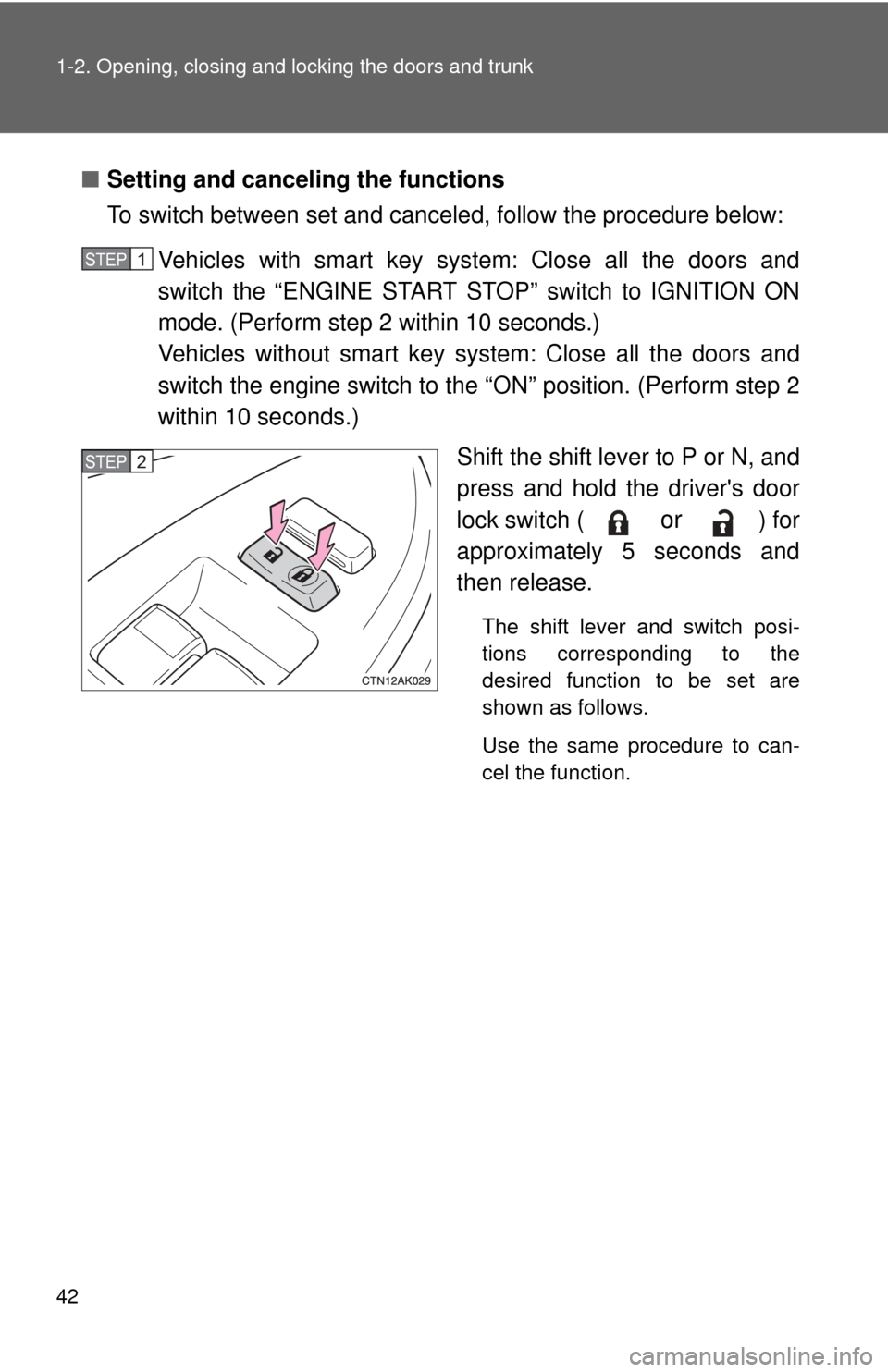
■Setting and canceling the functions
To switch between set and canceled, follow the procedure below:
Vehicles with smart key system: Close all the doors and
switch the “ENGINE START STOP” switch to IGNITION ON
mode. (Perform step 2 within 10 seconds.)
Vehicles without smart key system: Close all the doors and
switch the engine switch to the “ON” position. (Perform step 2
within 10 seconds.)
Shift the shift lever to P or N, and
press and hold the driver's door
lock switch (
or ) for
approximately 5 seconds and
then release.
The shift lever and switch posi-
tions corresponding to the
desired function to be set are
shown as follows.
Use the same procedure to can-
cel the function.
STEP 1
STEP 2
Page 44 of 529

44 1-2. Opening, closing and locking the doors and trunk
CAUTION
■To prevent an accident
Observe the following precautions while driving the vehicle.
Failing to do so may result in a door opening and an occupant falling out,
resulting in death or serious injury.
●Always use a seat belt.
● Always lock the doors.
● Ensure that all doors are properly closed.
● Do not pull the inside handle of the doors while driving.
The doors may be opened and the passengers are thrown out of the vehi-
cle and it may result in serious injury or death.
Be especially careful for the front doors, as the doors may be opened even
if the inside lock buttons are in locked position.
● Set the rear door child protector locks when children are seated in the rear
seat.
Page 55 of 529
55
1-3. Adjustable components (s
eats, mirrors, steering wheel)
1
Before driving
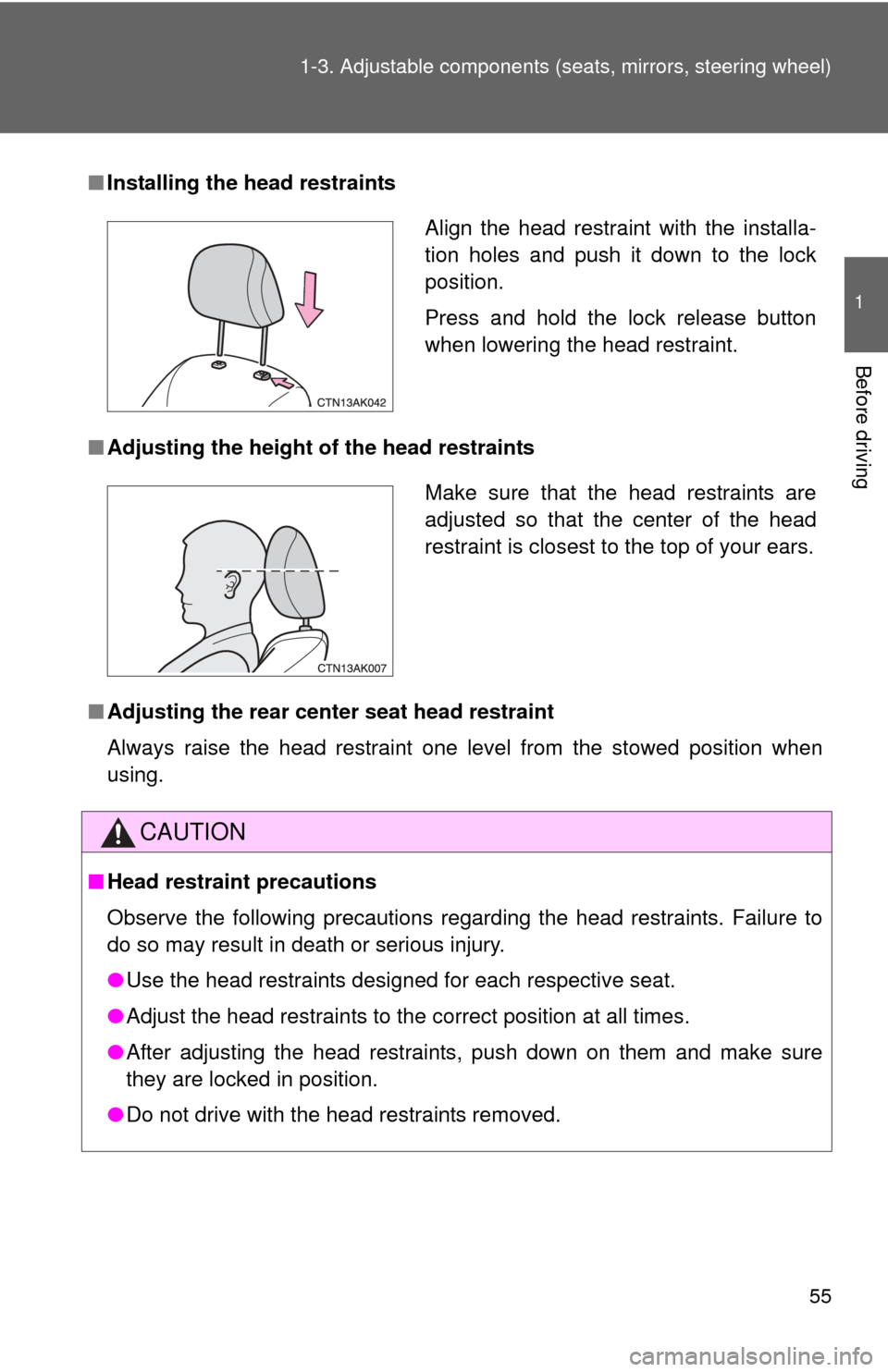
■Installing the head restraints
■ Adjusting the height of the head restraints
■ Adjusting the rear cent er seat head restraint
Always raise the head restraint one level from the stowed position when
using.
CAUTION
■ Head restraint precautions
Observe the following precautions regarding the head restraints. Failure to
do so may result in death or serious injury.
●Use the head restraints designed for each respective seat.
● Adjust the head restraints to the correct position at all times.
● After adjusting the head restraints, push down on them and make sure
they are locked in position.
● Do not drive with the head restraints removed.
Align the head restraint with the installa-
tion holes and push it down to the lock
position.
Press and hold the lock release button
when lowering the head restraint.
Make sure that the head restraints are
adjusted so that the center of the head
restraint is closest to the top of your ears.
Page 80 of 529

80 1-6. Theft deterrent system
■System maintenance
The vehicle has a maintenance-free type engine immobilizer system.
■ Conditions that may cause the system to malfunction
●If the key is in contact with a metallic object
● If the key is in close proximity to or touching a key to the security system
(key with a built-in transponder chip) of another vehicle
■ Certifications for the engine imm obilizer system (for vehicles sold in
U.S.A.)
Vehicles with smart key system
FCC ID: NI4TMIMB-1 Vehicles without smart key system
FCC ID: MOZRI-20BTY
FCC ID: MOZRI-33BTY
FCC ID: WRKRI-34BTY
This device complies with Part 15 of the FCC Rules. Operation is subject to
the following two conditions: (1) this device may not cause harmful interfer-
ence, and (2) this device must accept any interference received, including
interference that may cause undesired operation.
Changes or modifications not expressly approved by the party responsible
for compliance could void the user's authority to operate the equipment.
■ Certifications for the engine imm obilizer system (for vehicles sold in
Canada)
Operation is subject to the following two conditions: (1) this device may not
cause interference, and (2) this device must accept any interference, includ-
ing interference that may cause undesired operation of the device.
Page 88 of 529

88 1-7. Safety information
■If the SRS airbags deploy (inflate)
●Bruising and slight abrasions may result from contact with a deploying
(inflating) SRS airbag.
● A loud noise and white powder will be emitted.
● Parts of the airbag module (steering wheel hub, airbag cover and inflator)
as well as the front seats, and parts of the front and rear pillars and roof
side rail, may be hot for several minutes. The airbag itself may also be
hot.
● The windshield may crack.
■ SRS airbag deployment conditions (front airbags)
●The SRS front airbags will deploy in the event of an impact that exceeds
the set threshold level (the level of force corresponding to an approxi-
mately 12 - 18 mph [20 - 30 km/h] frontal collision with a fixed wall that
does not move or deform).
However, this threshold velocity will be considerably higher if the vehicle
strikes an object, such as a parked vehicle or sign pole, which can move or
deform on impact, or if the vehicle is involved in an underride collision (e.g.
a collision in which the front of the vehicle “underrides”, or goes under, the
bed of a truck, etc.).
● It is possible that in some collisions where the forward deceleration of the
vehicle is very close to the designed threshold level, the SRS front air-
bags and the seat belt pretensioners may not activate together.
● The SRS front passenger airbag will not activate if there is no passenger
sitting in the front passenger seat. However, the front passenger airbag
may deploy if luggage is put in the seat, or the seat belt is fastened, even
if the seat is unoccupied. ( P. 9 7 )
Page 89 of 529
89
1-7. Safety information
1
Before driving
■
SRS airbag deployment conditions (s ide airbags and curtain shield air-
bags)
● The SRS side airbags and SRS curtain shield airbags will deploy in the
event of an impact that exceeds the set threshold level (the level of force
corresponding to the impact force produced by an approximately 3300 lb.
[1500 kg] vehicle colliding with the vehicle cabin from a direction perpen-
dicular to the vehicle orientation at an approximate speed of 12 - 18 mph
[20 - 30 km/h]). Depending on the conditions and type of accident, there
are times when the curtain shield airbags may deploy (inflate) in a front
impact.
● The SRS side airbag on the passenger seat will not activate if there is no
passenger sitting in the front passenger seat. However, the side airbag
on the passenger seat may deploy if luggage is put in the seat, even if
the seat is unoccupied. ( P. 97)
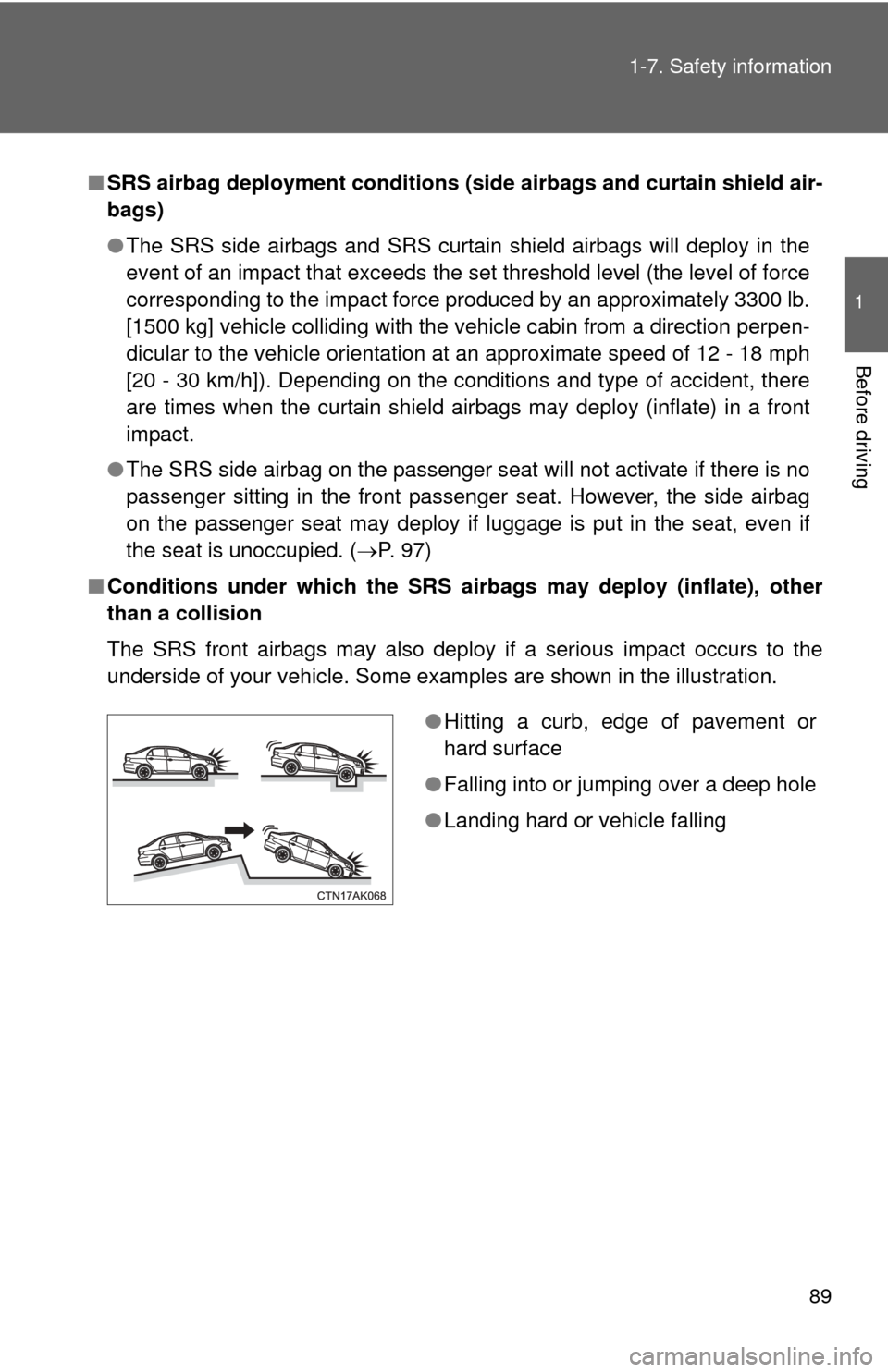
■ Conditions under which the SRS airbags may deploy (inflate), other
than a collision
The SRS front airbags may also deploy if a serious impact occurs to the
underside of your vehicle. Some examples are shown in the illustration.
●Hitting a curb, edge of pavement or
hard surface
● Falling into or jumping over a deep hole
● Landing hard or vehicle falling