trunk TOYOTA COROLLA 2011 10.G Owners Manual
[x] Cancel search | Manufacturer: TOYOTA, Model Year: 2011, Model line: COROLLA, Model: TOYOTA COROLLA 2011 10.GPages: 529, PDF Size: 9.69 MB
Page 2 of 529

TABLE OF CONTENTSIndex
2
1-1. Key informationKeys ..................................... 20
1-2. Opening, closing and locking the doors and
trunk
Smart key system................. 23
Wireless remote control ....... 34
Doors.................................... 39
Trunk .................................... 45
1-3. Adjustable components (seats, mirrors,
steering wheel)
Front seats ........................... 49
Rear seats ............................ 52
Head restraints ..................... 54
Seat belts ............................. 56
Steering wheel ..................... 64
Anti-glare inside rear view mirror .................................. 65
Outside rear view mirrors ..... 67
1-4. Opening and closing the windows
Power windows .................... 69
Moon roof ............................. 71
1-5. Refueling Opening the fuel tank cap .... 75 1-6. Theft deterrent system
Engine immobilizer system ................................ 79
Theft prevention labels (for U.S.A.) ......................... 82
1-7. Safety information Correct driving posture ......... 83
SRS airbags ......................... 85
Front passenger occupant classification system ........... 97
Child restraint systems ....... 102
Installing child restraints ..... 106
2-1. Driving procedures Driving the vehicle .............. 118
Engine (ignition) switch (vehicles with smart key
system) ............................. 129
Engine (ignition) switch (vehicles without smart
key system) ...................... 133
Automatic transmission ...... 137
Manual transmission........... 143
Turn signal lever ................. 144
Parking brake ..................... 145
Horn .................................... 146
2-2. Instrument cluster Gauges and meters ............ 147
Indicators and warning lights ................................. 150
Multi-information display ..... 154
1Before driving
2When driving
Page 7 of 529
7
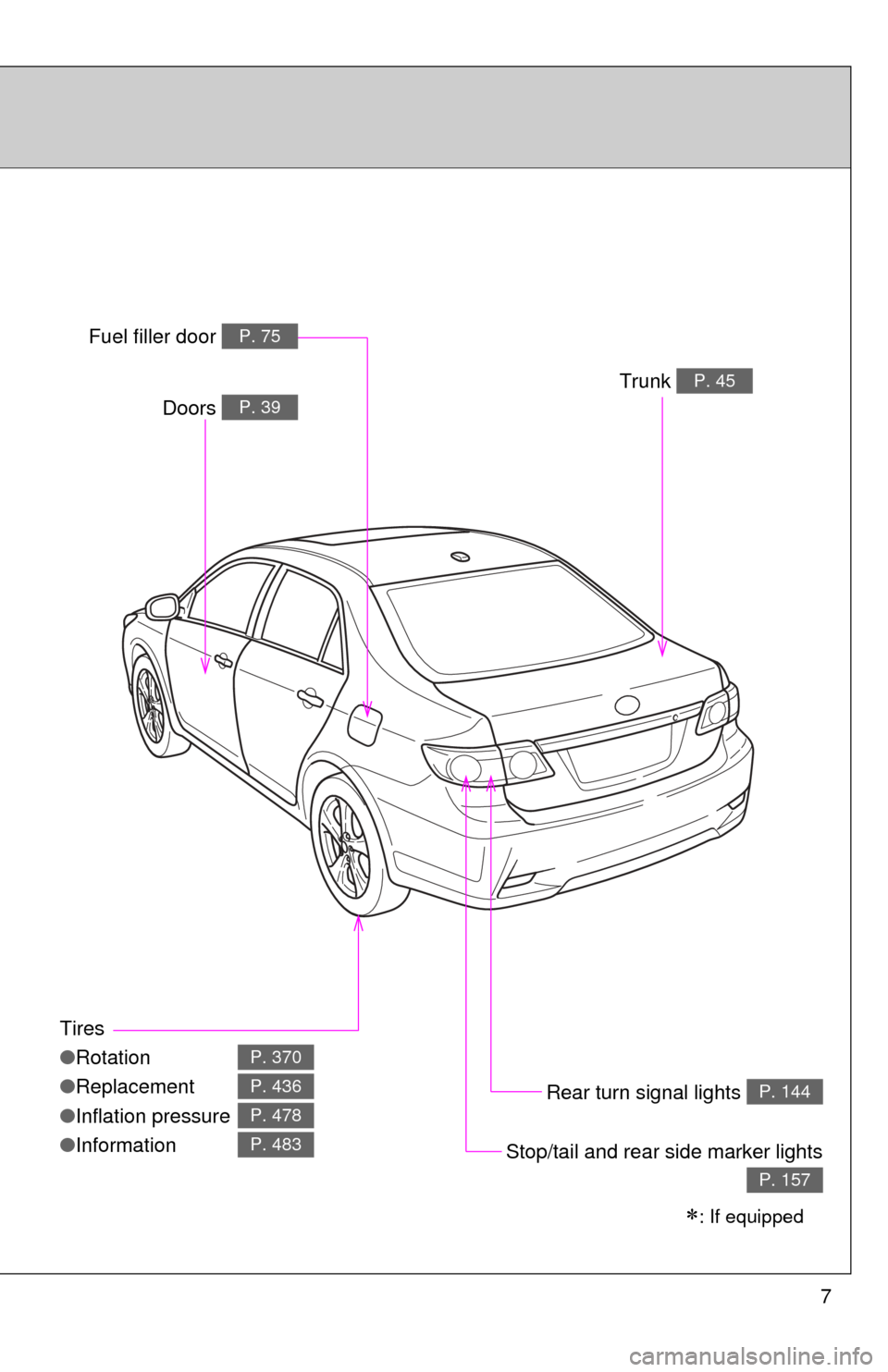
Tires
●Rotation
● Replacement
● Inflation pressure
● Information
P. 370
P. 436
P. 478
P. 483
Trunk P. 45
Rear turn signal lights P. 144
Stop/tail and rear side marker lights
P. 157
: If equipped
Doors P. 39
Fuel filler door P. 75
Page 10 of 529
10
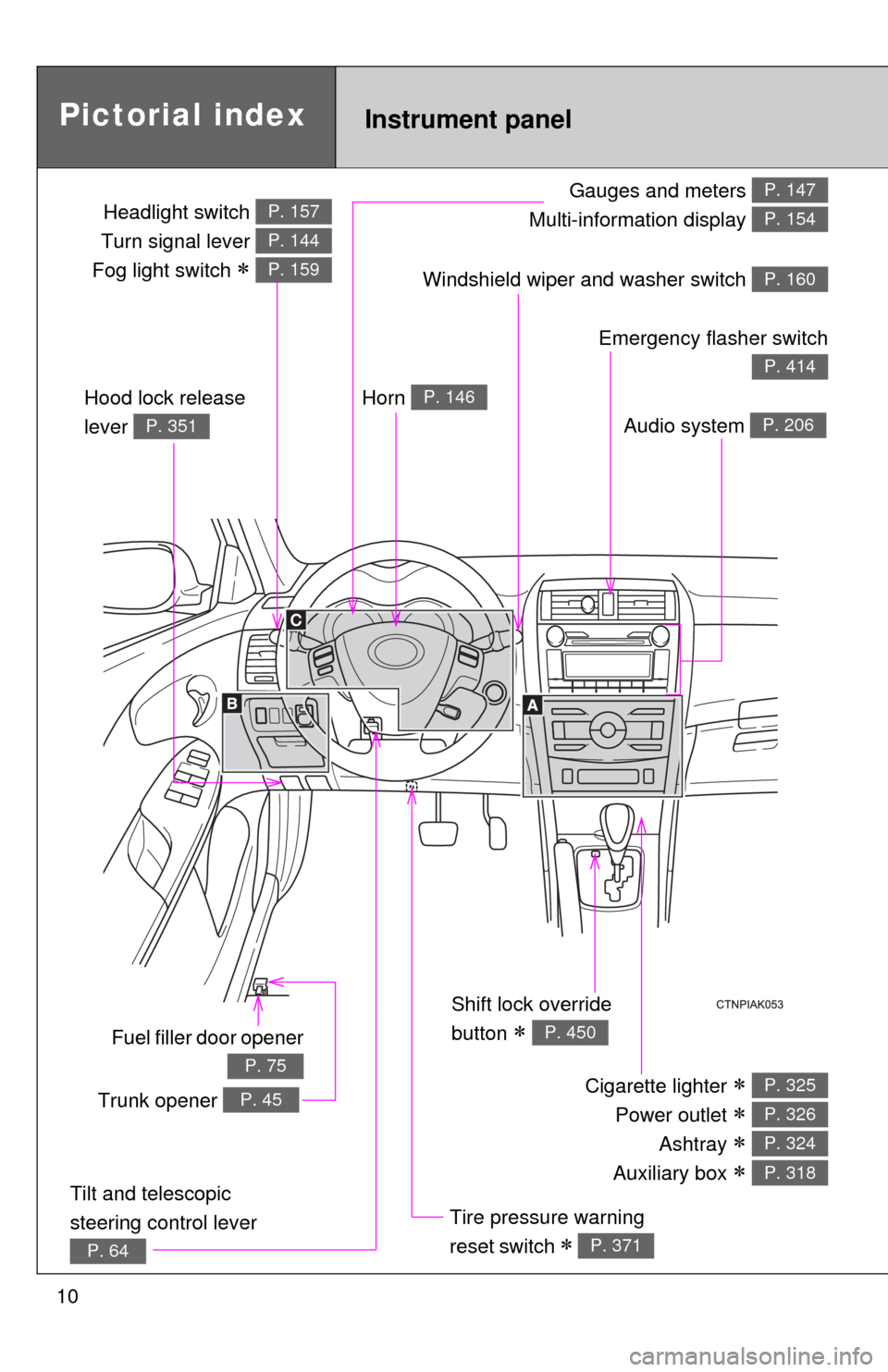
Gauges and meters
Multi-information display P. 147
P. 154
Tilt and telescopic
steering control lever
P. 64
Pictorial index
Trunk opener P. 45
Headlight switch
Turn signal lever
Fog light switch
P. 157
P. 144
P. 159
Instrument panel
Audio system P. 206
Windshield wiper and washer switch P. 160
Hood lock release
lever
P. 351
Fuel filler door opener
P. 75
Emergency flasher switch
P. 414
Shift lock override
button
P. 450
Cigarette lighter
Power outlet
Ashtray
Auxiliary box
P. 325
P. 326
P. 324
P. 318
Tire pressure warning
reset switch
P. 371
Horn P. 146
Page 19 of 529
Before driving1
19
1-1. Key informationKeys ................................... 20
1-2. Opening, closing and locking the doors and
trunk
Smart key system .............. 23
Wireless remote control ..... 34
Doors ................................. 39
Trunk .................................. 45
1-3. Adjustable components (seats, mirrors,
steering wheel)
Front seats ......................... 49
Rear seats.......................... 52
Head restraints................... 54
Seat belts ........................... 56
Steering wheel ................... 64
Anti-glare inside rear view mirror ............................... 65
Outside rear view mirrors.............................. 67 1-4. Opening and closing the
windows
Power windows .................. 69
Moon roof ........................... 71
1-5. Refueling Opening the fuel tank cap ................................... 75
1-6. Theft deterrent system Engine immobilizer system ............................. 79
Theft prevention labels (for U.S.A.) ....................... 82
1-7. Safety information Correct driving posture....... 83
SRS airbags ....................... 85
Front passenger occupant classification system ........ 97
Child restraint systems..... 102
Installing child restraints ........................ 106
Page 21 of 529
21
1-1. Key information
1
Before driving
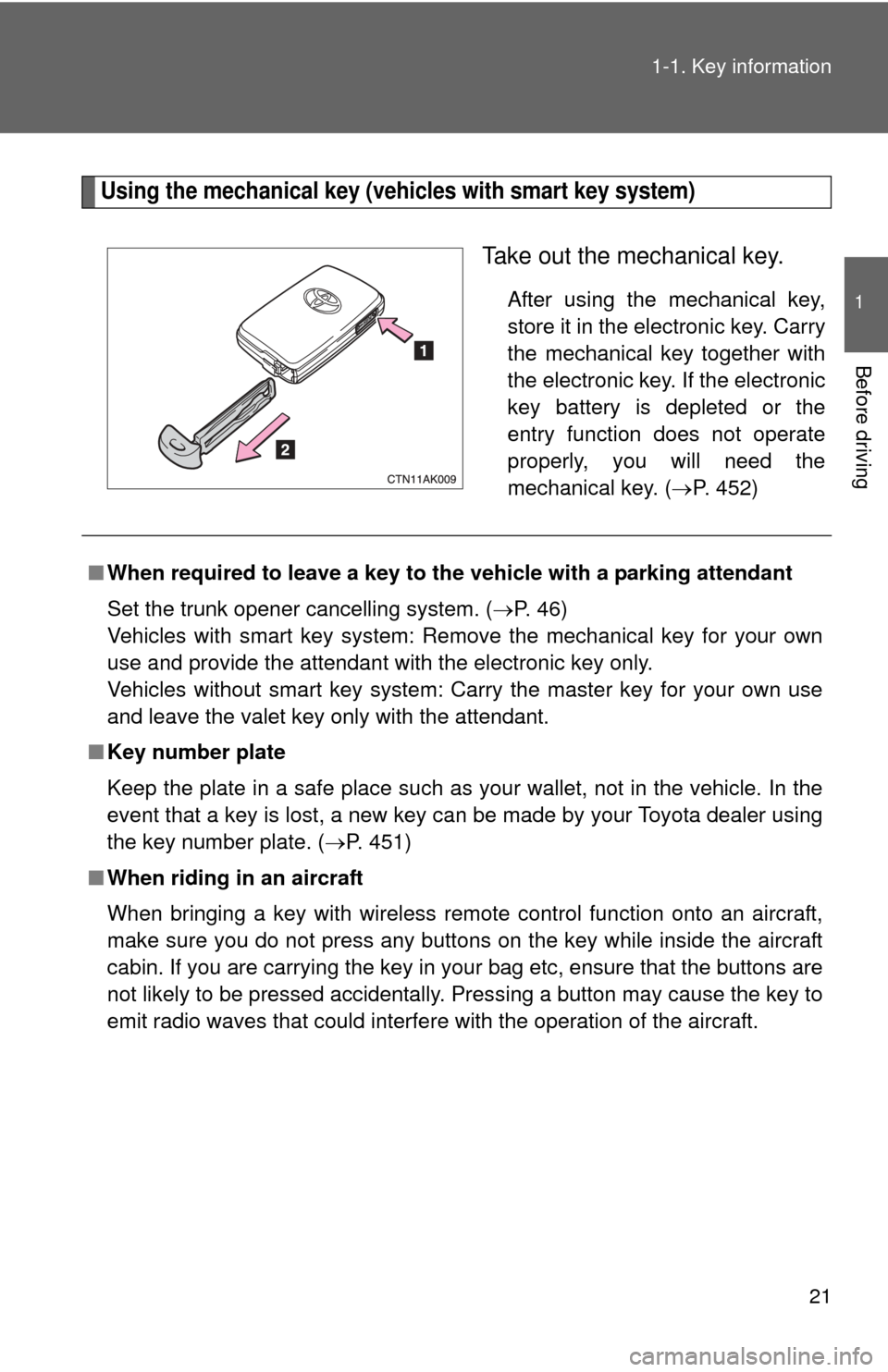
Using the mechanical key (vehicles with smart key system)
Take out the mechanical key.
After using the mechanical key,
store it in the electronic key. Carry
the mechanical key together with
the electronic key. If the electronic
key battery is depleted or the
entry function does not operate
properly, you will need the
mechanical key. (
P. 452)
■When required to leave a key to th e vehicle with a parking attendant
Set the trunk opener cancelling system. ( P. 46)
Vehicles with smart key system: Remove the mechanical key for your own
use and provide the attendant with the electronic key only.
Vehicles without smart key system: Carry the master key for your own use
and leave the valet key only with the attendant.
■ Key number plate
Keep the plate in a safe place such as your wallet, not in the vehicle. In the
event that a key is lost, a new key can be made by your Toyota dealer using
the key number plate. ( P. 451)
■ When riding in an aircraft
When bringing a key with wireless remote control function onto an aircra\
ft,
make sure you do not press any buttons on the key while inside the aircraft
cabin. If you are carrying the key in your bag etc, ensure that the buttons are
not likely to be pressed accidentally. Pressing a button may cause the key to
emit radio waves that could interfere with the operation of the aircraft.
Page 23 of 529
23
1
Before driving
1-2. Opening, closing and locking the doors and trunk
Smart key system
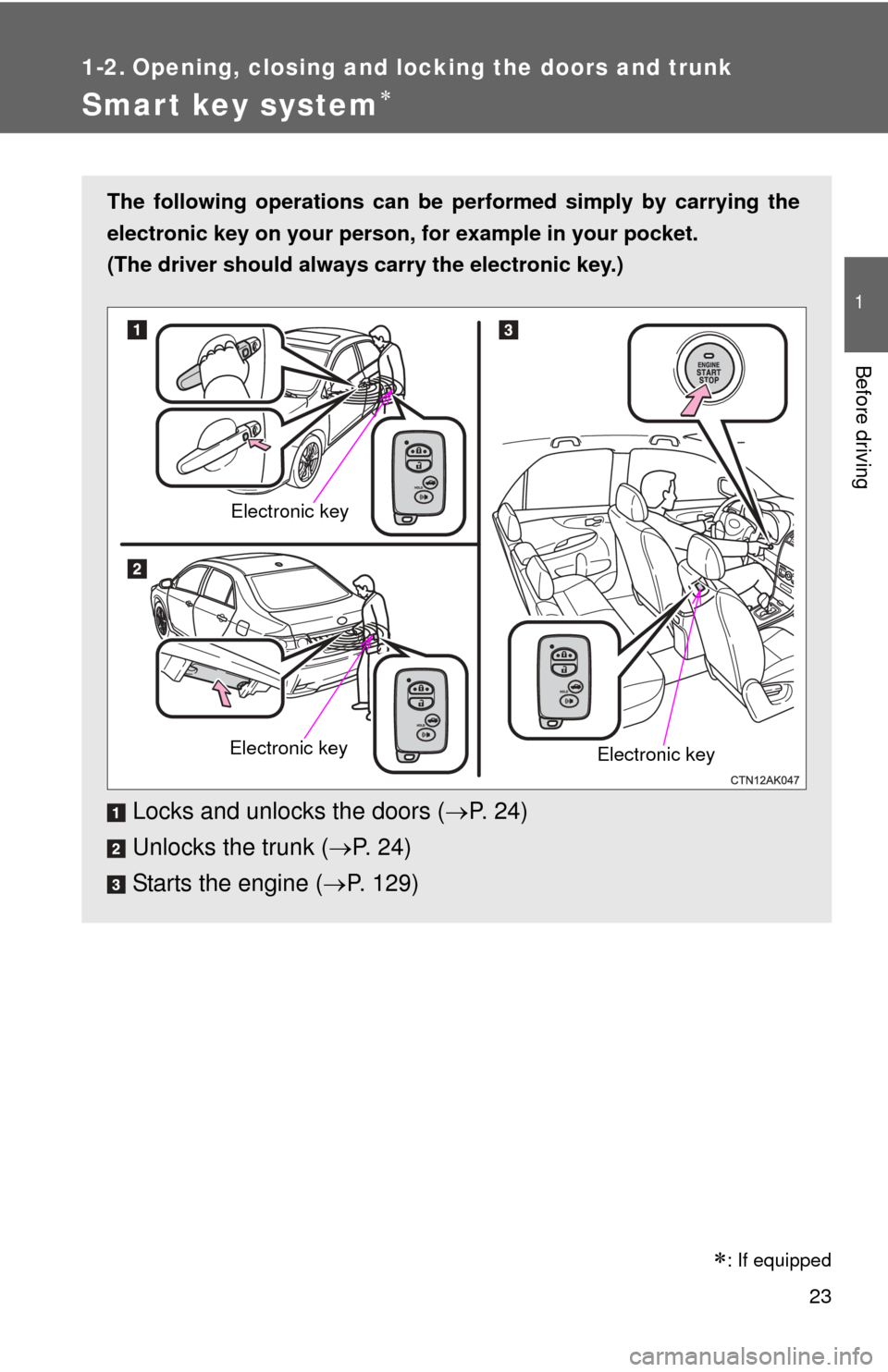
The following operations can be performed simply by carrying the
electronic key on your person, for example in your pocket.
(The driver should always carry the electronic key.)
Locks and unlocks the doors ( P. 2 4 )
Unlocks the trunk ( P. 2 4 )
Starts the engine ( P. 129)
Electronic key
Electronic key Electronic key
: If equipped
Page 24 of 529
24 1-2. Opening, closing and locking the doors and trunk
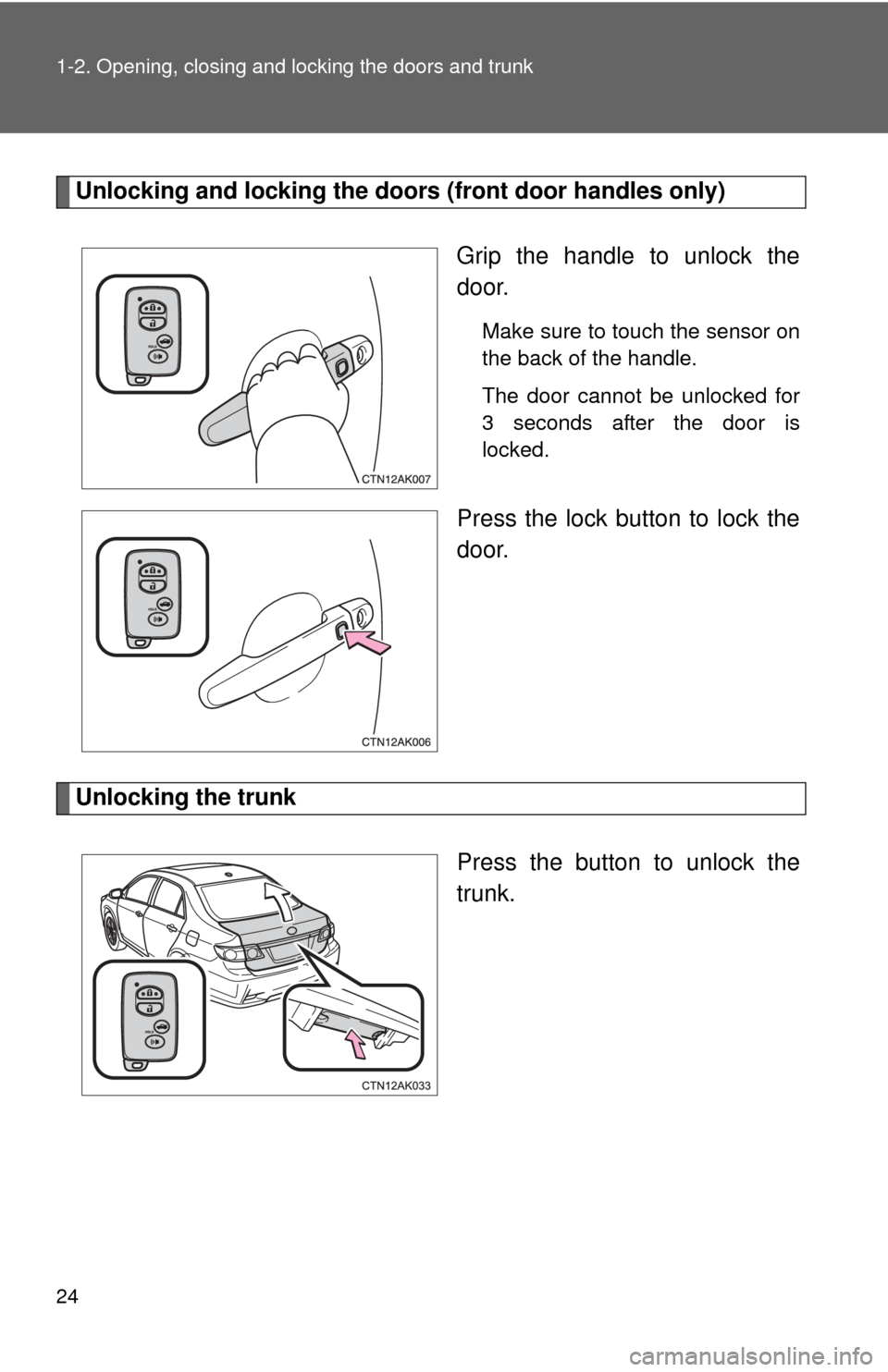
Unlocking and locking the doors (front door handles only)
Grip the handle to unlock the
door.
Make sure to touch the sensor on
the back of the handle.
The door cannot be unlocked for
3 seconds after the door is
locked.
Press the lock button to lock the
door.
Unlocking the trunk
Press the button to unlock the
trunk.
Page 25 of 529
25
1-2. Opening, closing and locking the doors and trunk
1
Before driving
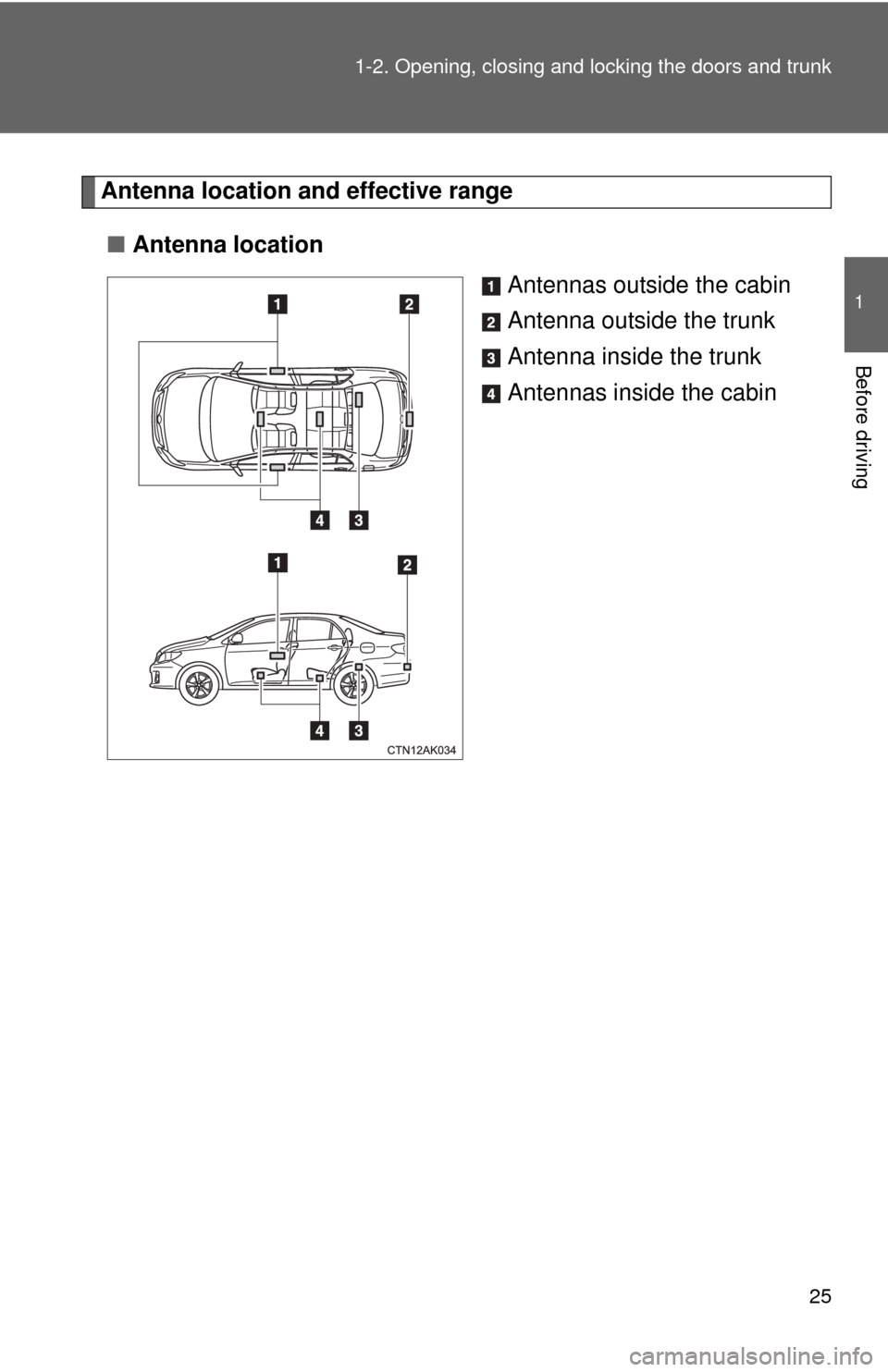
Antenna location a
nd effective range
■ Antenna location
Antennas outside the cabin
Antenna outside the trunk
Antenna inside the trunk
Antennas inside the cabin
Page 26 of 529
26 1-2. Opening, closing and locking the doors and trunk
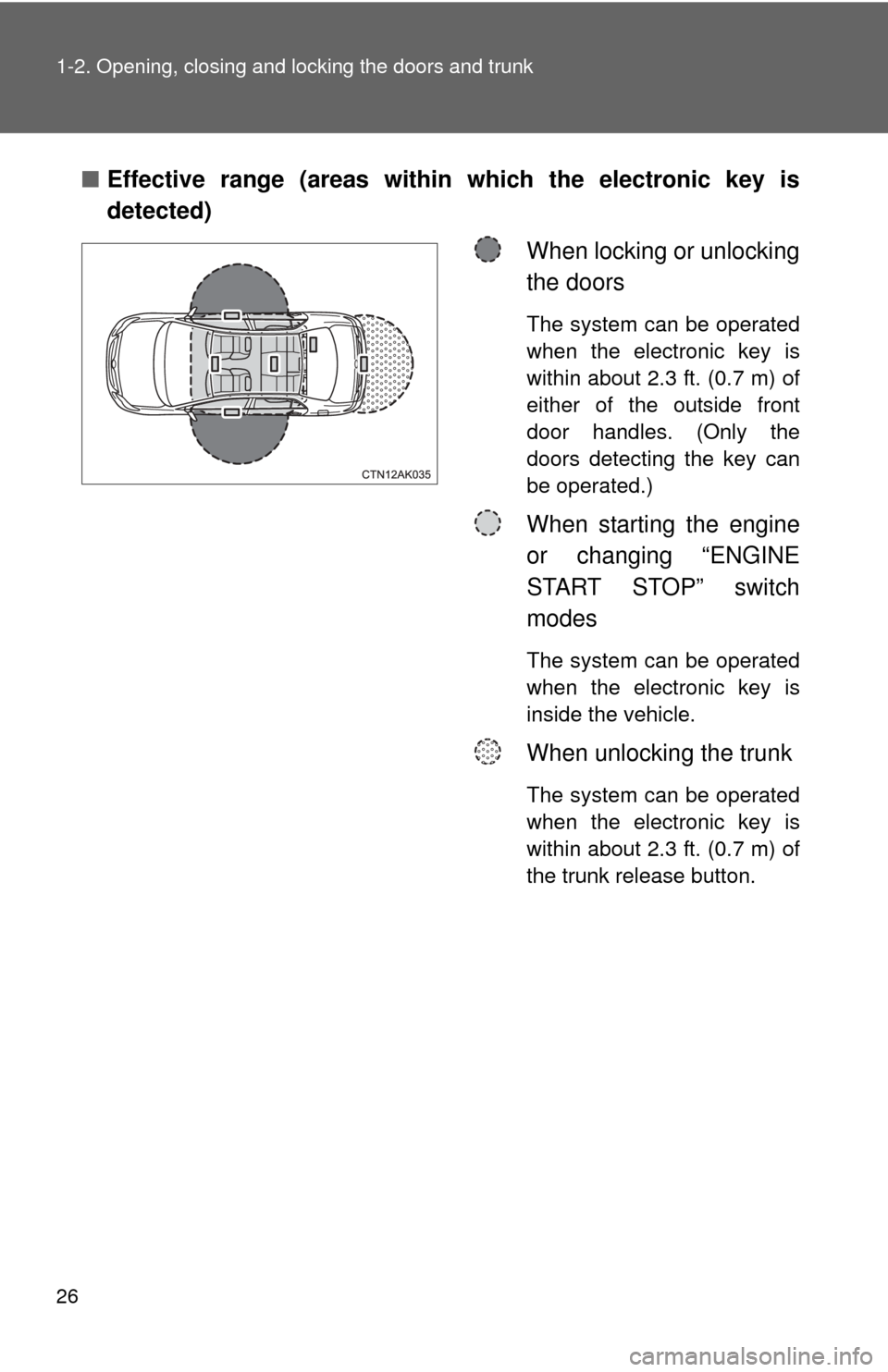
■Effective range (areas within which the electronic key is
detected)
When locking or unlocking
the doors
The system can be operated
when the electronic key is
within about 2.3 ft. (0.7 m) of
either of the outside front
door handles. (Only the
doors detecting the key can
be operated.)
When starting the engine
or changing “ENGINE
START STOP” switch
modes
The system can be operated
when the electronic key is
inside the vehicle.
When unlocking the trunk
The system can be operated
when the electronic key is
within about 2.3 ft. (0.7 m) of
the trunk release button.
Page 27 of 529

27
1-2. Opening, closing and locking the doors and trunk
1
Before driving
■
Operation signals
A buzzer sounds and the emergency flashers flash to indicate that the doors
have been locked/unlocked. (Locked: Once; Unlocked: Twice)
■ Conditions affecting operation
The smart key system uses weak radio waves. In the following situations,
the communication between the electronic key and the vehicle may be
affected, preventing the smart key system and wireless remote control from
operating properly. (Ways of coping: P. 452)
● When the electronic key battery is depleted
● Near a TV tower, electric power plant, gas station, radio station, large dis-
play, airport or other facility that generates strong radio waves or electri-
cal noise
● When carrying a portable radio, ce llular phone, cordless phone or other
wireless communication devices
● When the electronic key is in contact with, or is covered by the following
metallic objects
• Cards to which aluminum foil is attached
• Cigarette boxes that have aluminum foil inside
• Metallic wallets or bags
• Coins
• Hand warmers made of metal
• Media such as CDs and DVDs
● When multiple electronic keys are in the vicinity
● When carrying or using the electronic key together with the following
devices that emit radio waves
• Another vehicle's electronic key or a wireless key that emits radio
waves
• Personal computers or personal digital assistants (PDAs)
• Digital audio players
• Portable game systems
● If window tint with a metallic content or metallic objects are attached to
the rear window