remote control TOYOTA COROLLA 2012 10.G User Guide
[x] Cancel search | Manufacturer: TOYOTA, Model Year: 2012, Model line: COROLLA, Model: TOYOTA COROLLA 2012 10.GPages: 529, PDF Size: 8.07 MB
Page 32 of 529

32 1-2. Opening, closing and locking the doors and trunk
●Do not leave the electronic key on top of the instrument panel or near the
door pockets when exiting the vehicle. Depending on the radio wave
reception conditions, it may be detected by the antenna outside the cabin
and the door will become lockable from the outside, possibly trapping the
electronic key inside the vehicle.
● As long as the electronic key is within the effective range, the doors may
be locked or unlocked by anyone.
● Even if the electronic key is not inside the vehicle, it may be possible to
start the engine if the electronic key is near the window.
● The doors may unlock if a large amount of water splashes on the door
handle, such as in the rain or in a car wash. (The doors will automatically
be locked after approximately 60 seconds if the doors are not opened
and closed.)
● Gripping the door handle when wearing a glove may not unlock the door.
● If the wireless remote control is used to lock the doors when the elec-
tronic key is near the vehicle, there is a possibility that the door may not
be unlocked by the entry function. (Use the wireless remote control to
unlock the doors.)
● A sudden approach to the effective range or door handle may prevent the
doors from being unlocked. In this case, return the door handle to the
original position and check that the doors unlock before pulling the door
handle again.
■ When the vehicle is not driven for extended periods
To prevent theft of the vehicle, do not leave the electronic key within 6 ft. (2
m) of the vehicle.
■ Security feature
If a door is not opened within approximately 60 seconds after the vehicle is
unlocked, the security feature automatically locks the vehicle again.
■ Alarms and warning indicators
A combination of exterior and interior alarms as well as warning lights are
used to reduce the chance of vehicle theft and accidents resulting from erro-
neous operation.
●When any warning lights come on:
Take appropriate measures according to which warning light comes on.
( P. 420)
Page 36 of 529
36
1-2. Opening, closing and locking the doors and trunk
Wireless remote control
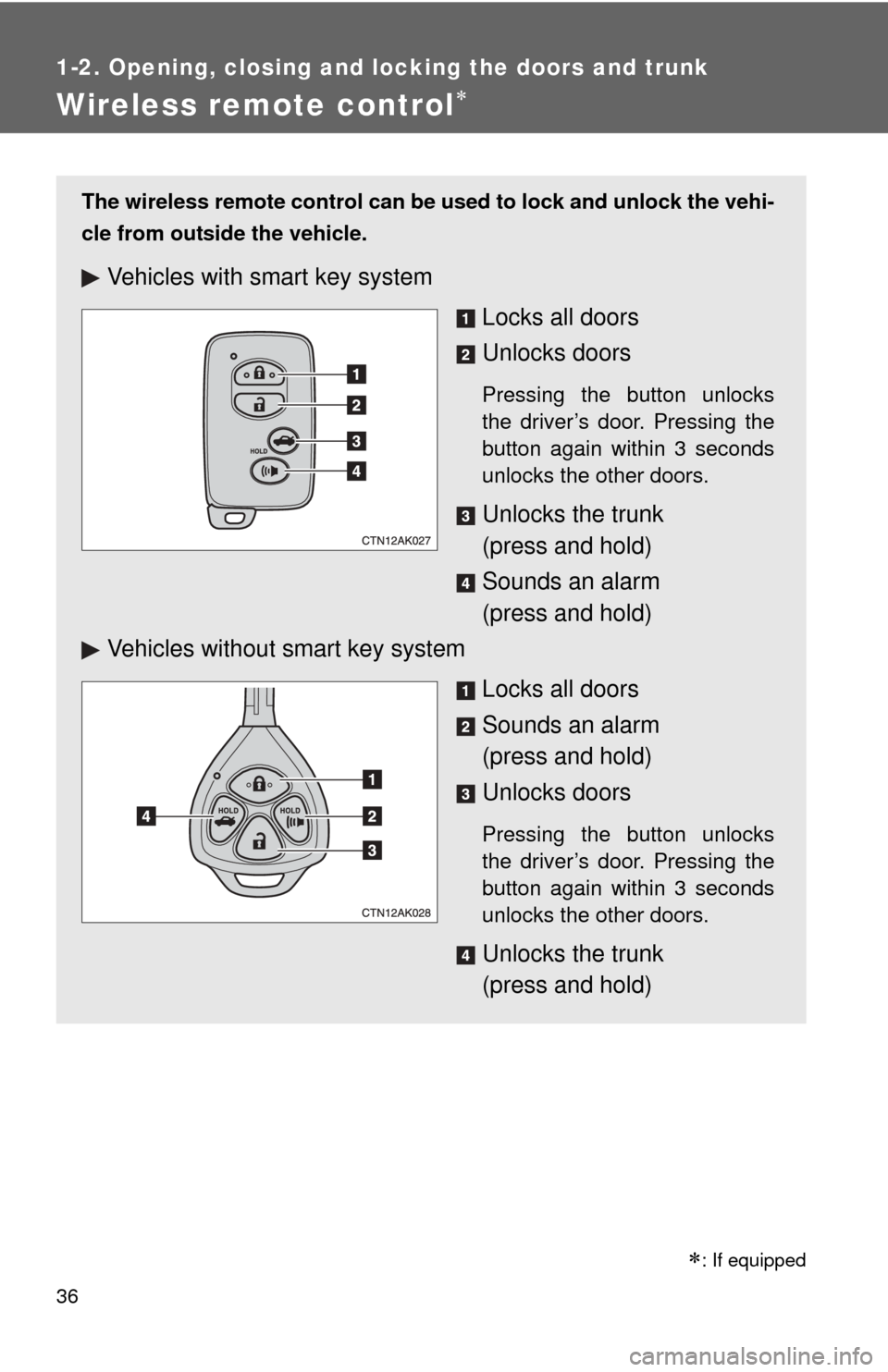
The wireless remote control can be used to lock and unlock the vehi-
cle from outside the vehicle.
Vehicles with smart key system
Locks all doors
Unlocks doors
Pressing the button unlocks
the driver’s door. Pressing the
button again within 3 seconds
unlocks the other doors.
Unlocks the trunk
(press and hold)
Sounds an alarm
(press and hold)
Vehicles without smart key system
Locks all doors
Sounds an alarm
(press and hold)
Unlocks doors
Pressing the button unlocks
the driver’s door. Pressing the
button again within 3 seconds
unlocks the other doors.
Unlocks the trunk
(press and hold)
: If equipped
Page 37 of 529
37
1-2. Opening, closing and locking the doors and trunk
1
Before driving
■
Operation signals
Doors: A buzzer sounds and the emergency flashers flash to indicate that
the doors have been locked/unlocked. (Locked: Once; Unlocked:
Twice)
Trunk: A buzzer sounds to indicate that the trunk has been unlocked.
■ Door lock buzzer
If a door is not fully closed, a buzzer sounds continuously for 10 seconds if
an attempt to lock the door is made. Fully close the door to stop the buzzer,
and lock the vehicle once more.
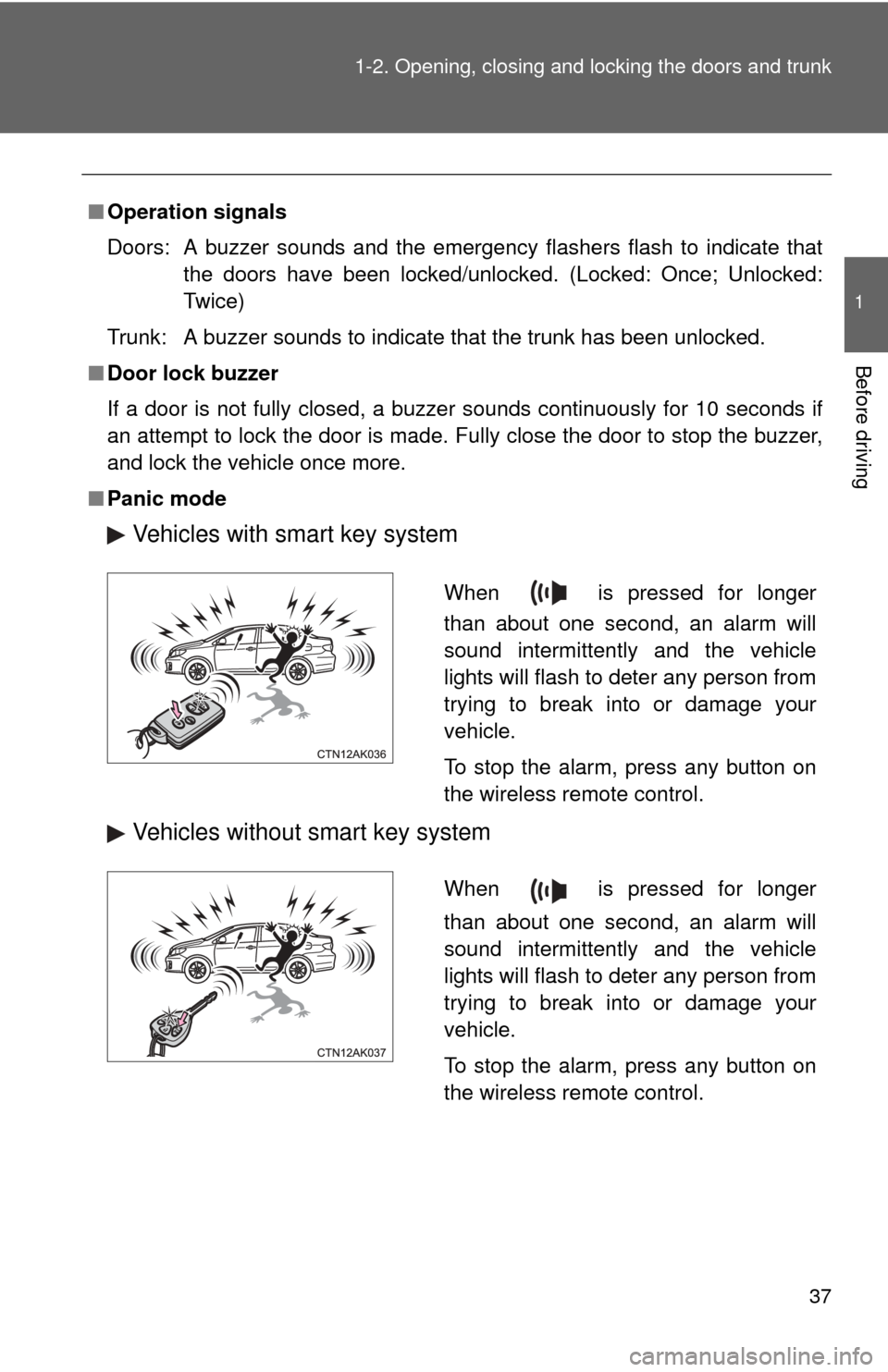
■ Panic mode
Vehicles with smart key system
Vehicles without smart key system
When is pressed for longer
than about one second, an alarm will
sound intermittently and the vehicle
lights will flash to deter any person from
trying to break into or damage your
vehicle.
To stop the alarm, press any button on
the wireless remote control.
When is pressed for longer
than about one second, an alarm will
sound intermittently and the vehicle
lights will flash to deter any person from
trying to break into or damage your
vehicle.
To stop the alarm, press any button on
the wireless remote control.
Page 38 of 529

38 1-2. Opening, closing and locking the doors and trunk
■Key battery depletion
Vehicles with smart key system
P. 3 1
Vehicles without smart key system
If the wireless remote control function does not operate, the battery may be
depleted. Replace the battery when necessary. ( P. 386)
■ Security feature
If a door is not opened within approximately 60 seconds after the vehicle is
unlocked, the security feature automatically locks the vehicle again.
■ When the electronic key battery is fully depleted (vehicles with smart
key system)
P. 385
■ Conditions affecting operation
Vehicles with smart key system
P. 2 9
Vehicles without smart key system
The wireless remote control function may not operate normally in the follow-
ing situations.
● Near a TV tower, radio station, electr ic power plant, airport or other facil-
ity that generates strong radio waves
● When carrying a portable radio, cell ular phone or other wireless commu-
nication devices
● When multiple wireless keys are in the vicinity
● When the wireless key has come into contact with, or is covered by, a
metallic object
● When a wireless key (that emits radio waves) is being used nearby
● When the wireless key has been left near an electrical appliance such as
a personal computer
● When the wireless key battery is depleted
● If window tint with a metallic content or metallic objects are attached to
the rear window
Page 39 of 529

39
1-2. Opening, closing and locking the doors and trunk
1
Before driving
■
Customization that can be co nfigured at Toyota dealer
Settings (e.g. trunk unlocking function) can be changed.
(Customizable features P. 491)
■ Certification for wireless remote control (vehicles with smart key sys-
tem)
For vehicles sold in the U.S.A.
FCC ID: NI4TMLF-2
This device complies with Part 15 of the FCC Rules. Operation is subject to
the following two conditions: (1) this device may not cause harmful interfer-
ence, and (2) this device must accept any interference received, including
interference that may cause undesired operation.
Changes or modifications not expressly approved by the party responsible
for compliance could void the user's authority to operate the equipment. For vehicles sold in Canada
Operation is subject to the following two conditions: (1) this device may not
cause interference, and (2) this device must accept any interference, includ-
ing interference that may cause undesired operation of the device.
Page 41 of 529
41
1
1-2. Opening, closing and locking the doors and trunk
Before driving
Doors
The vehicle can be locked and unlocked using the entry function,
wireless remote control, key or door lock switch.
■Entry function (vehicles with smart key system)
P. 2 5
■ Wireless remote control (if equipped)
P. 3 6
■ Key
Vehicles with smart key system
The doors can also be locked and unlocked with the mechanical
key. ( P. 448)
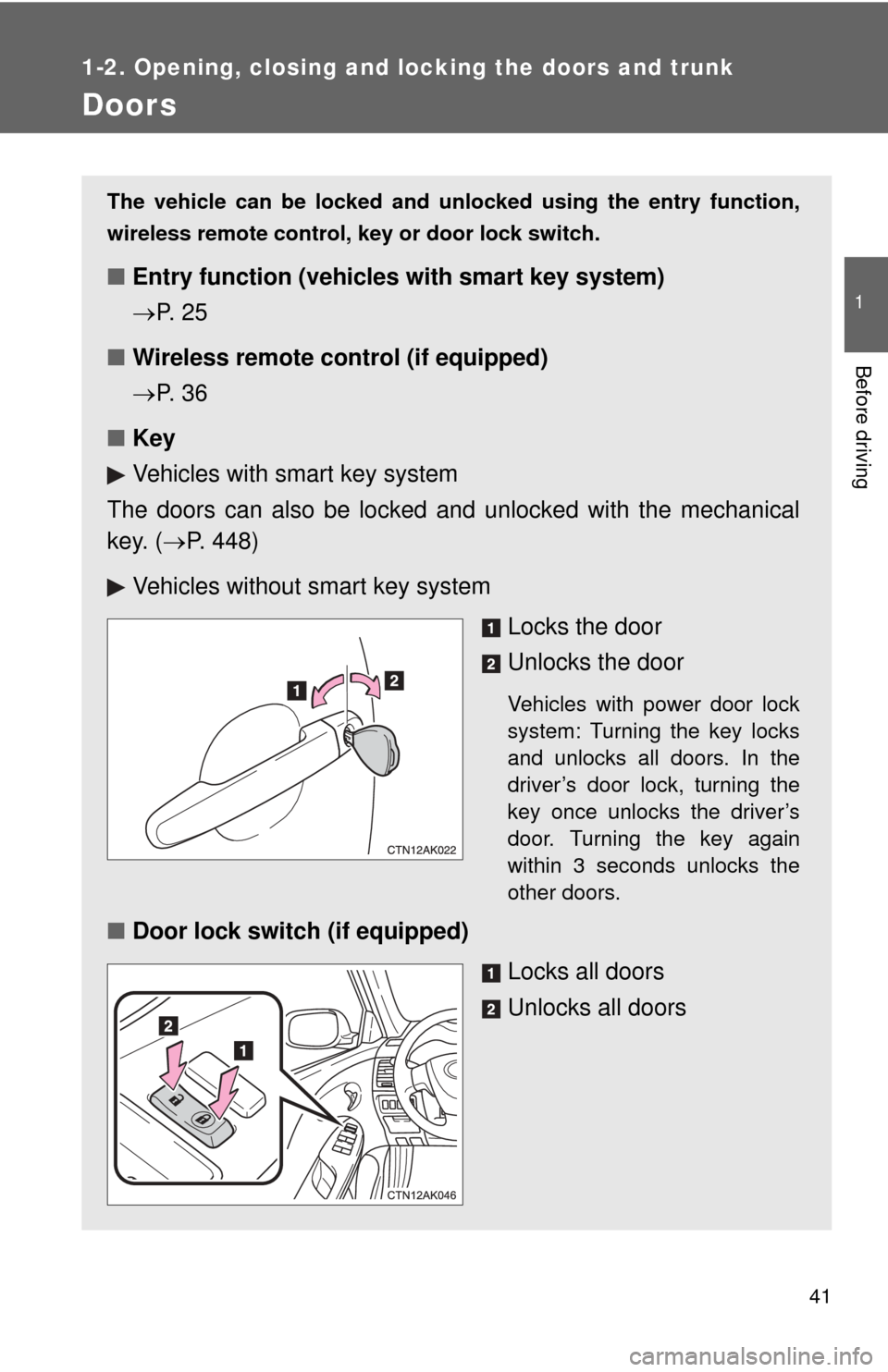
Vehicles without smart key system Locks the door
Unlocks the door
Vehicles with power door lock
system: Turning the key locks
and unlocks all doors. In the
driver’s door lock, turning the
key once unlocks the driver’s
door. Turning the key again
within 3 seconds unlocks the
other doors.
■Door lock switch (if equipped)
Locks all doors
Unlocks all doors
Page 45 of 529
45
1-2. Opening, closing and locking the doors and trunk
1
Before driving
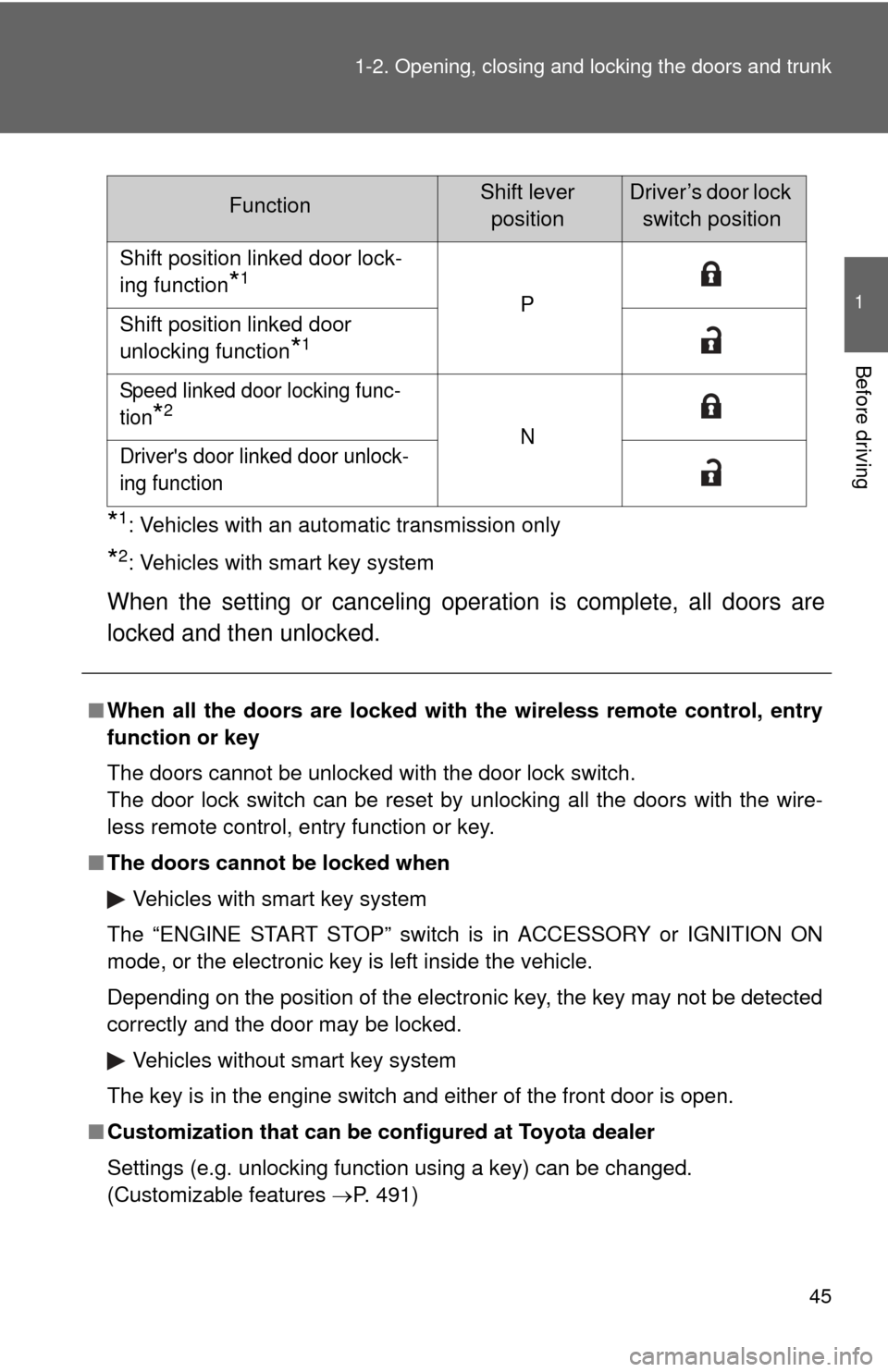
*1: Vehicles with an automatic transmission only
*2: Vehicles with smart key system
When the setting or canceling operation is complete, all doors are
locked and then unlocked.
FunctionShift lever
positionDriver’s door lock switch position
Shift position linked door lock-
ing function
*1
P
Shift position linked door
unlocking function
*1
Speed linked door locking func-
tion
*2
N
Driver's door linked door unlock-
ing function
■ When all the doors are locked with the wireless remote control, entry
function or key
The doors cannot be unlocked with the door lock switch.
The door lock switch can be reset by unlocking all the doors with the wire-
less remote control, entry function or key.
■ The doors cannot be locked when
Vehicles with smart key system
The “ENGINE START STOP” switch is in ACCESSORY or IGNITION ON
mode, or the electronic key is left inside the vehicle.
Depending on the position of the electronic key, the key may not be detected
correctly and the door may be locked. Vehicles without smart key system
The key is in the engine switch and either of the front door is open.
■ Customization that can be co nfigured at Toyota dealer
Settings (e.g. unlocking function using a key) can be changed.
(Customizable features P. 491)
Page 47 of 529
47
1
1-2. Opening, closing and locking the doors and trunk
Before driving
Trunk
The trunk can be opened using the entry function, wireless remote
control, key or trunk opener.
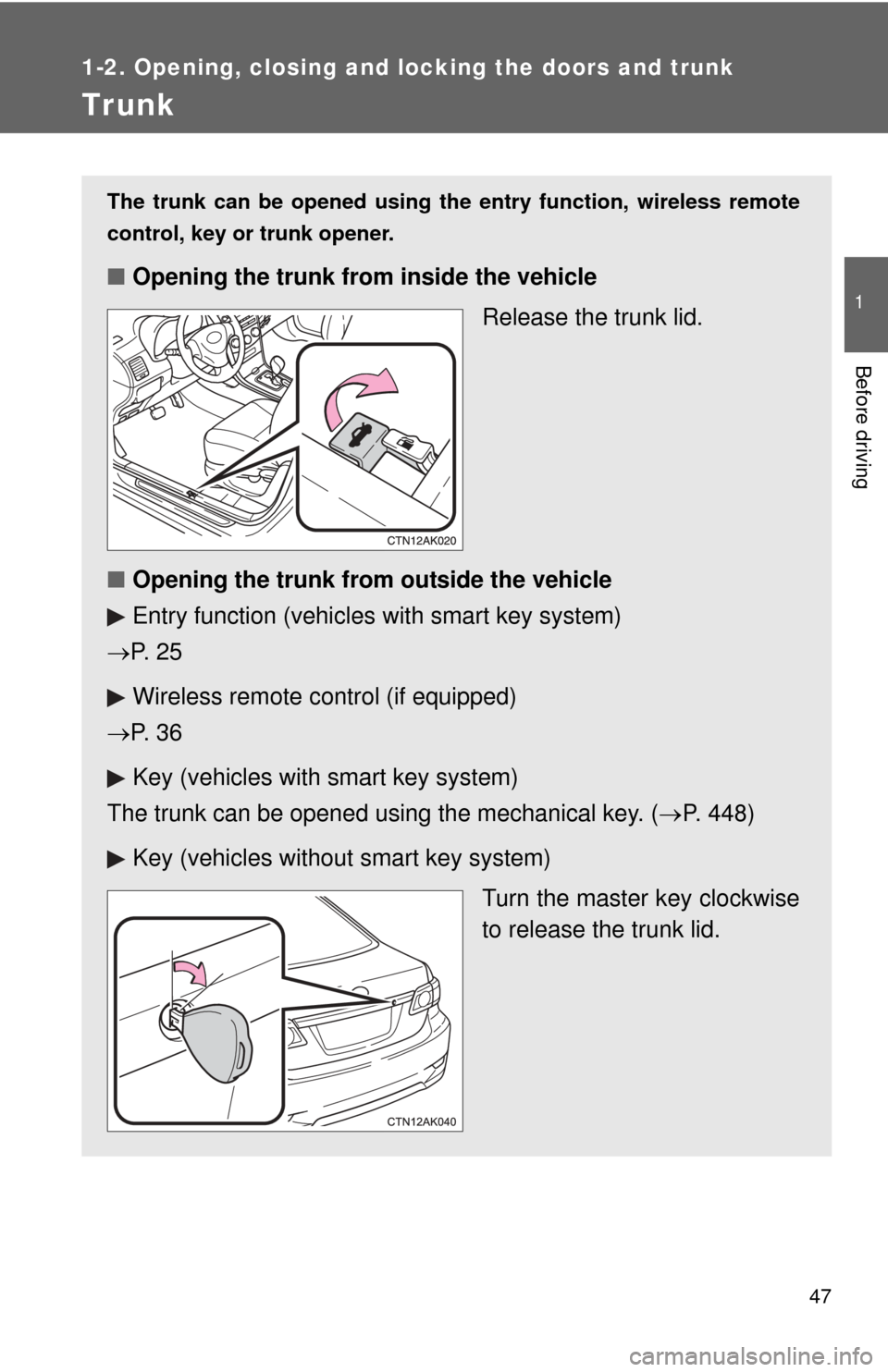
■ Opening the trunk from inside the vehicle
Release the trunk lid.
■ Opening the trunk from outside the vehicle
Entry function (vehicles with smart key system)
P. 2 5
Wireless remote control (if equipped)
P. 3 6
Key (vehicles with smart key system)
The trunk can be opened using the mechanical key. ( P. 448)
Key (vehicles without smart key system)
Turn the master key clockwise
to release the trunk lid.
Page 48 of 529
48 1-2. Opening, closing and locking the doors and trunk
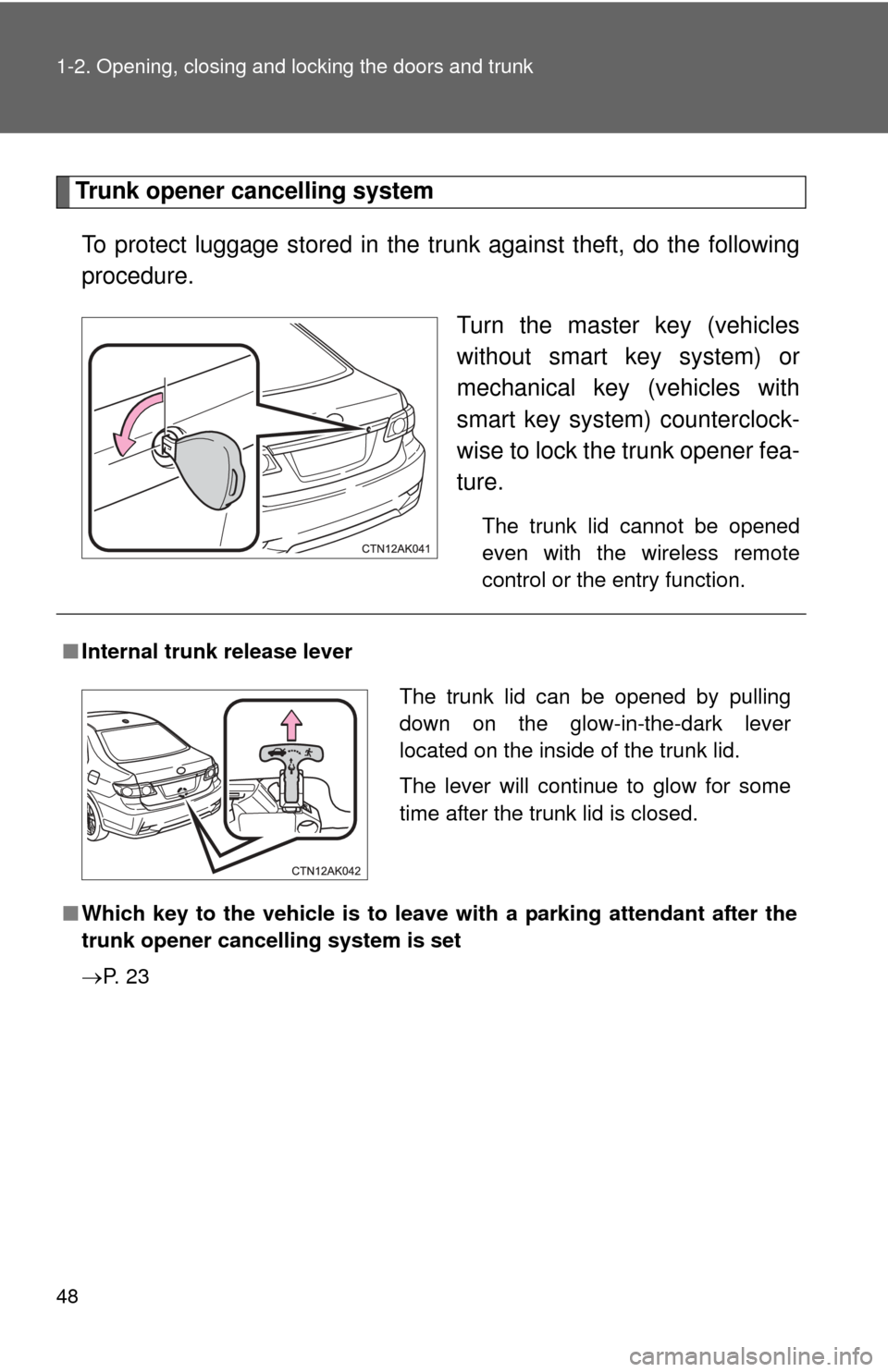
Trunk opener cancelling systemTo protect luggage stored in the trunk against theft, do the following
procedure. Turn the master key (vehicles
without smart key system) or
mechanical key (vehicles with
smart key system) counterclock-
wise to lock the trunk opener fea-
ture.
The trunk lid cannot be opened
even with the wireless remote
control or the entry function.
■Internal trunk release lever
■ Which key to the vehicle is to leave with a parking attendant after the
trunk opener cancelling system is set
P. 2 3
The trunk lid can be opened by pulling
down on the glow-in-the-dark lever
located on the inside of the trunk lid.
The lever will continue to glow for some
time after the trunk lid is closed.
Page 280 of 529
280 3-3. Using the Bluetooth
® audio system
■When transferring ownership of the vehicle
Be sure to initialize the system to prevent personal data from being improp-
erly accessed. ( P. 300)
■ About Bluetooth
®
■Compatible models
●Bluetooth
® specifications:
Ver. 1.1, or higher (recommended: Ver. 2.1 + EDR or higher)
● Following Profiles:
• A2DP (Advanced Audio Distribution Prof ile) Ver. 1.0, or higher (recom-
mended: Ver. 1.2 or higher)
• AVRCP (Audio/Video Remote Control Profile) Ver. 1.0 or higher (rec- ommended: Ver. 1.3 or higher)
Portable players must correspond to the above specifications in order to be
connected to the Bluetooth
® audio system. However, please note that some
functions may be limited depending on the type of portable player.
● Cellular phone
• HFP (Hands Free Profile) Ver. 1.0 or higher (recommended: Ver. 1.5)
• OPP (Object Push Profile) Ver. 1.1
• PBAP (Phone Book Access Profile) Ver. 1.0
CAUTION
■Caution while driving
●Do not use a cellular phone.
● Do not connect Bluetooth
® device or operate the controls.
Bluetooth is a registered trademark of
Bluetooth SIG. Inc.