engine TOYOTA COROLLA 2012 10.G Workshop Manual
[x] Cancel search | Manufacturer: TOYOTA, Model Year: 2012, Model line: COROLLA, Model: TOYOTA COROLLA 2012 10.GPages: 529, PDF Size: 8.07 MB
Page 143 of 529
143
2-1. Driving procedures
2
When driving
■
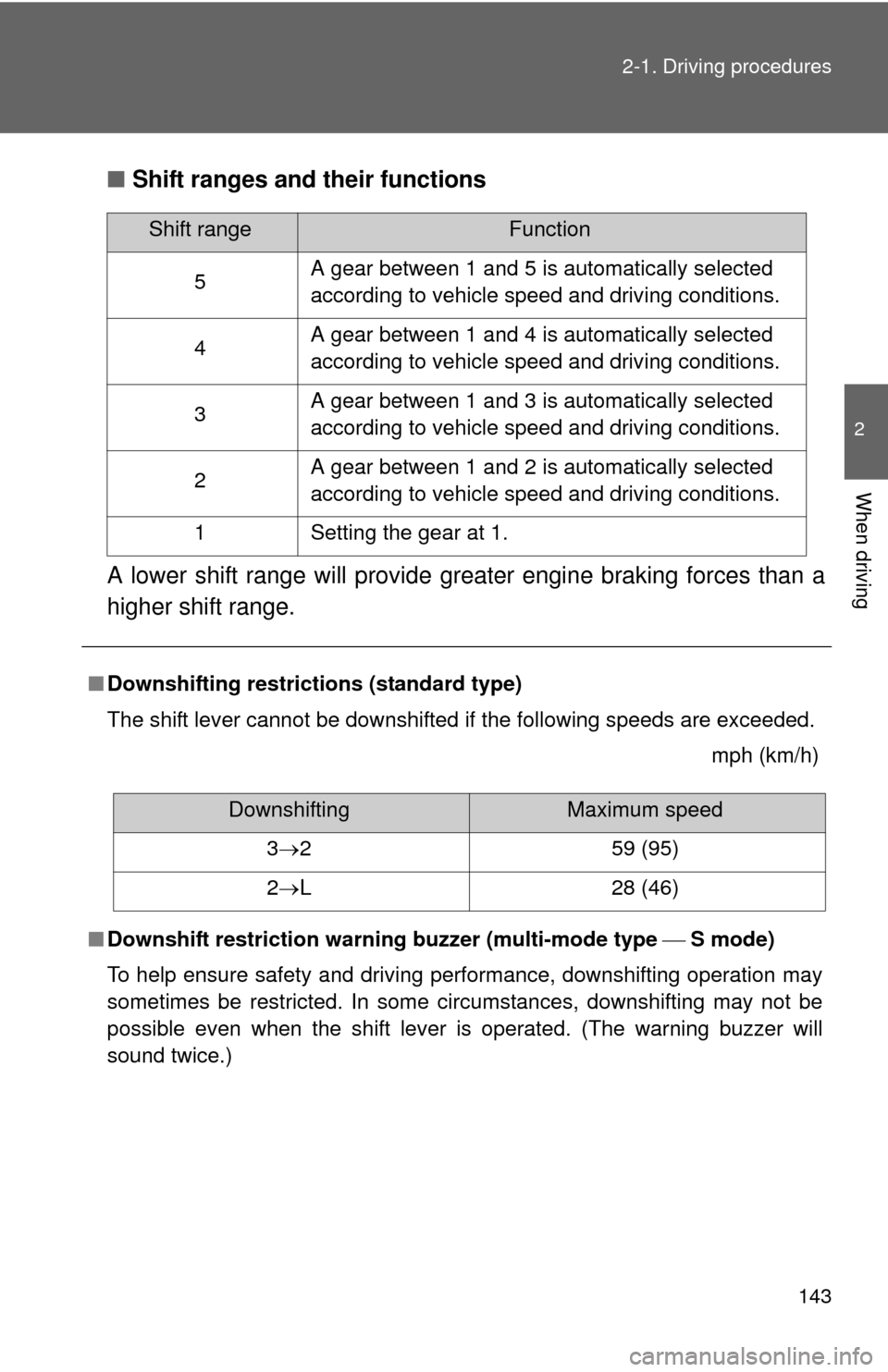
Shift ranges and their functions
A lower shift range will provide greater engine braking forces than a
higher shift range.
■ Downshifting restrictions (standard type)
The shift lever cannot be downshifted if the following speeds are exceeded.
mph (km/h)
■ Downshift restriction warning buzzer (multi-mode type S mode)
To help ensure safety and driving performance, downshifting operation may
sometimes be restricted. In some circumstances, downshifting may not be
possible even when the shift lever is operated. (The warning buzzer will
sound twice.)
Shift rangeFunction
5 A gear between 1 and 5 is automatically selected
according to vehicle speed and driving conditions.
4 A gear between 1 and 4 is automatically selected
according to vehicle speed and driving conditions.
3 A gear between 1 and 3 is automatically selected
according to vehicle speed and driving conditions.
2 A gear between 1 and 2 is automatically selected
according to vehicle speed and driving conditions.
1 Setting the gear at 1.
DownshiftingMaximum speed
3 2 59 (95)
2 L 28 (46)
Page 144 of 529

144 2-1. Driving procedures
■When driving with cruise cont rol activated (if equipped)
Standard type
Even when performing the following actions with the intent of enabling
engine braking, engine braking will not activate while downshifting to 3
because cruise control will not be canceled. ( P. 169)
Multi-mode type
Even when performing the following actions with the intent of enabling
engine braking, engine braking will not activate while driving in S mode and
downshifting to 4 because cruise control will not be canceled. ( P. 169)
■ If the shift lever cannot be shifted from P
P. 446
■ If the “S” indicator does not come on even after shifting the shift lever
to S (multi-mode type)
This may indicate a malfunction in the automatic transmission system. Have
the vehicle inspected by your Toyota dealer immediately.
(In this situation, the vehicle will operate as if the shift lever is in D.)
■ AI-SHIFT
AI-SHIFT automatically selects the suitable gear according to driver perfor-
mance and driving conditions.
Standard type
AI-SHIFT automatically operates when the shift lever is in the D position. Multi-mode type
AI-SHIFT automatically operates when the shift lever is in the D position.
(Shifting the shift lever to the S position cancels the function.)
Page 145 of 529
145
2-1. Driving procedures
2
When driving
Manual transmission
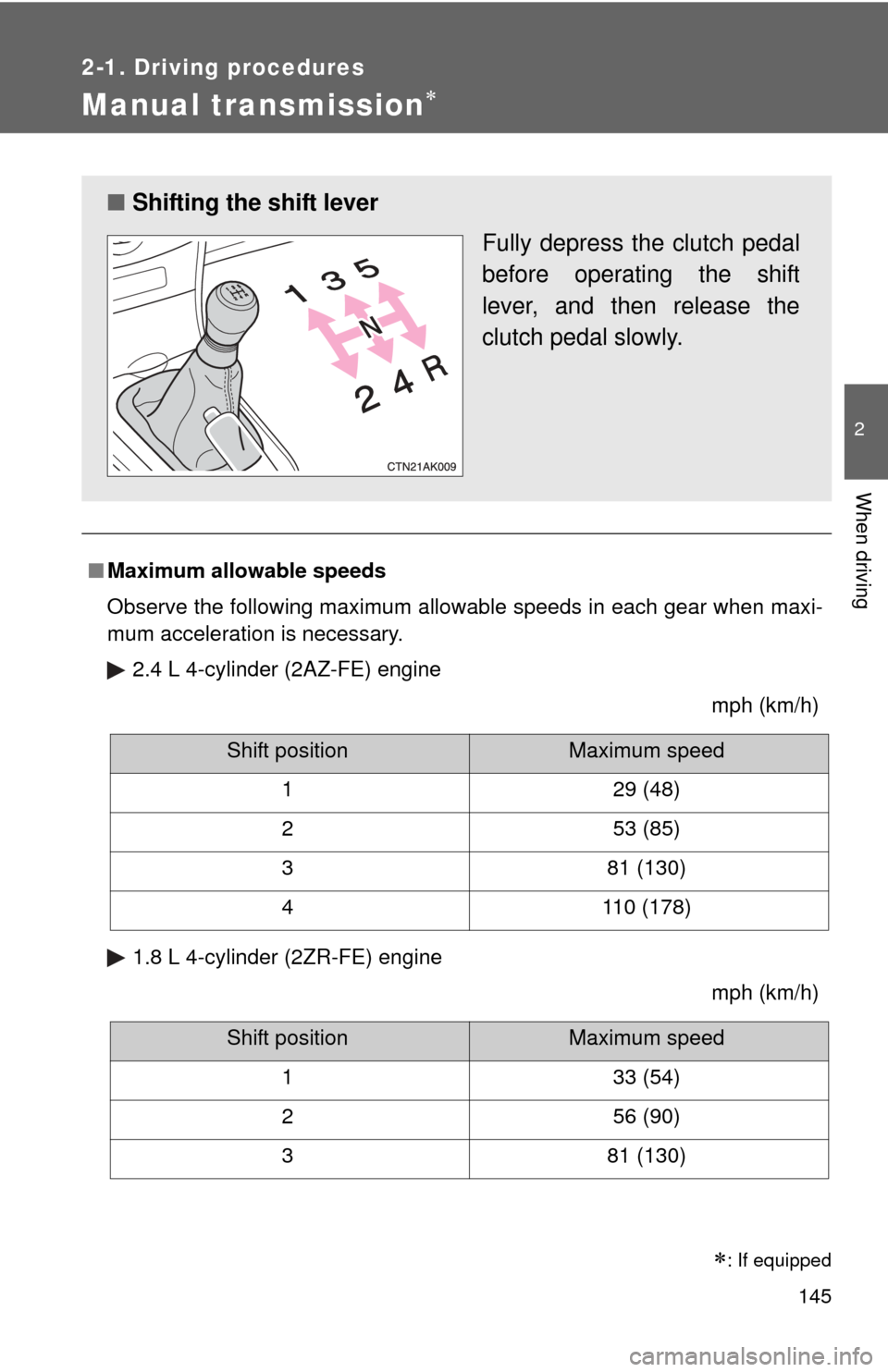
■Maximum allowable speeds
Observe the following maximum allowable speeds in each gear when maxi-
mum acceleration is necessary.
2.4 L 4-cylinder (2AZ-FE) engine mph (km/h)
1.8 L 4-cylinder (2ZR-FE) engine mph (km/h)
■Shifting the shift lever
Fully depress the clutch pedal
before operating the shift
lever, and then release the
clutch pedal slowly.
Shift positionMaximum speed
1 29 (48)
2 53 (85)
3 81 (130)
4 110 (178)
Shift positionMaximum speed
1 33 (54)
2 56 (90)
3 81 (130)
: If equipped
Page 146 of 529
146
2-1. Driving procedures
Tur n signal lever
■Turn signals can be operated when
Vehicles with smart key system
The “ENGINE START STOP” switch is in IGNITION ON mode.
Vehicles without smart key system
The engine switch is in
the “ON” position.
■ If the indicators flash faster than usual
Check that a light bulb in the front or rear turn signal lights has not burned
out.
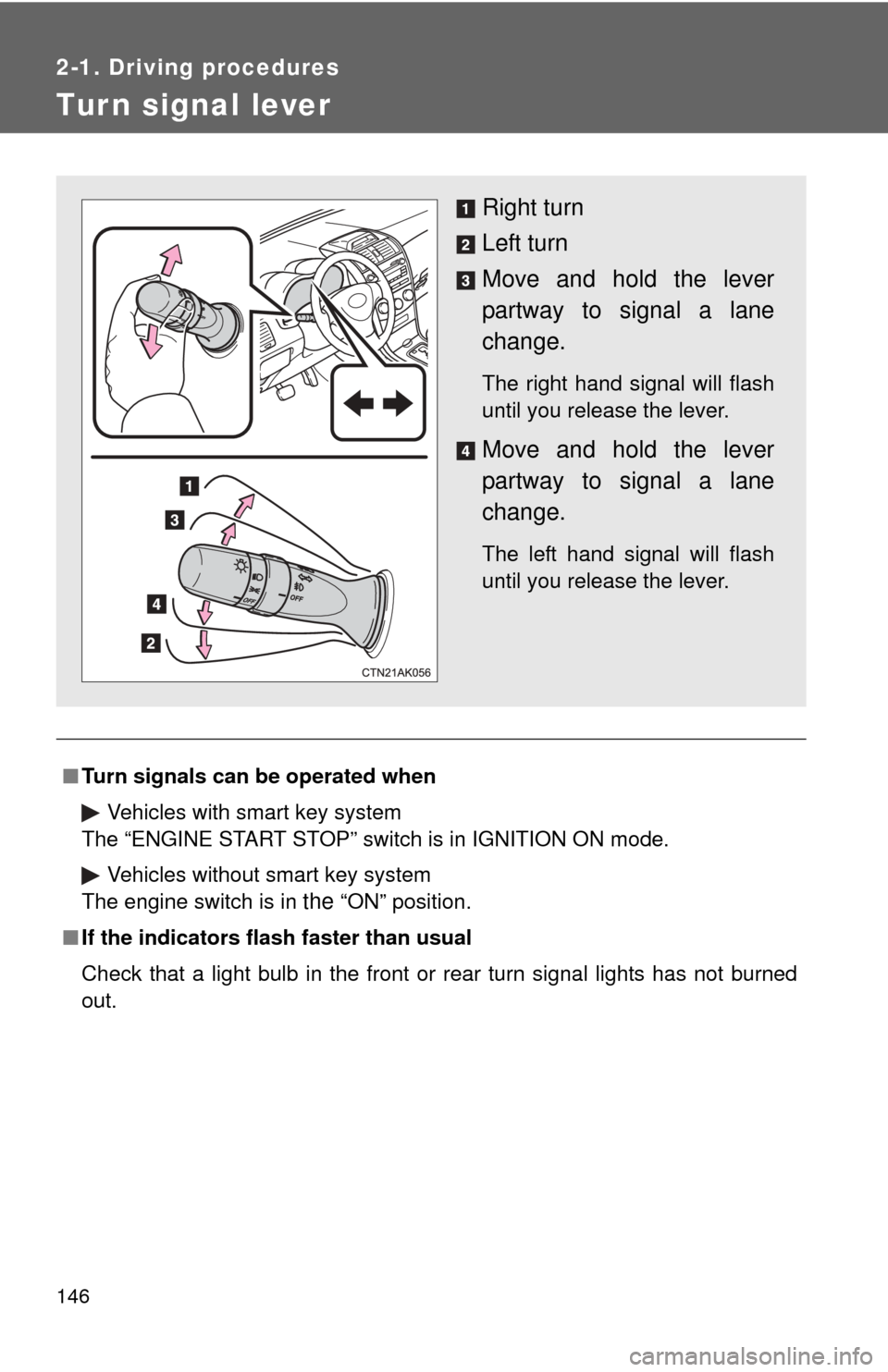
Right turn
Left turn
Move and hold the lever
partway to signal a lane
change.
The right hand signal will flash
until you release the lever.
Move and hold the lever
partway to signal a lane
change.
The left hand signal will flash
until you release the lever.
Page 150 of 529
150 2-2. Instrument cluster
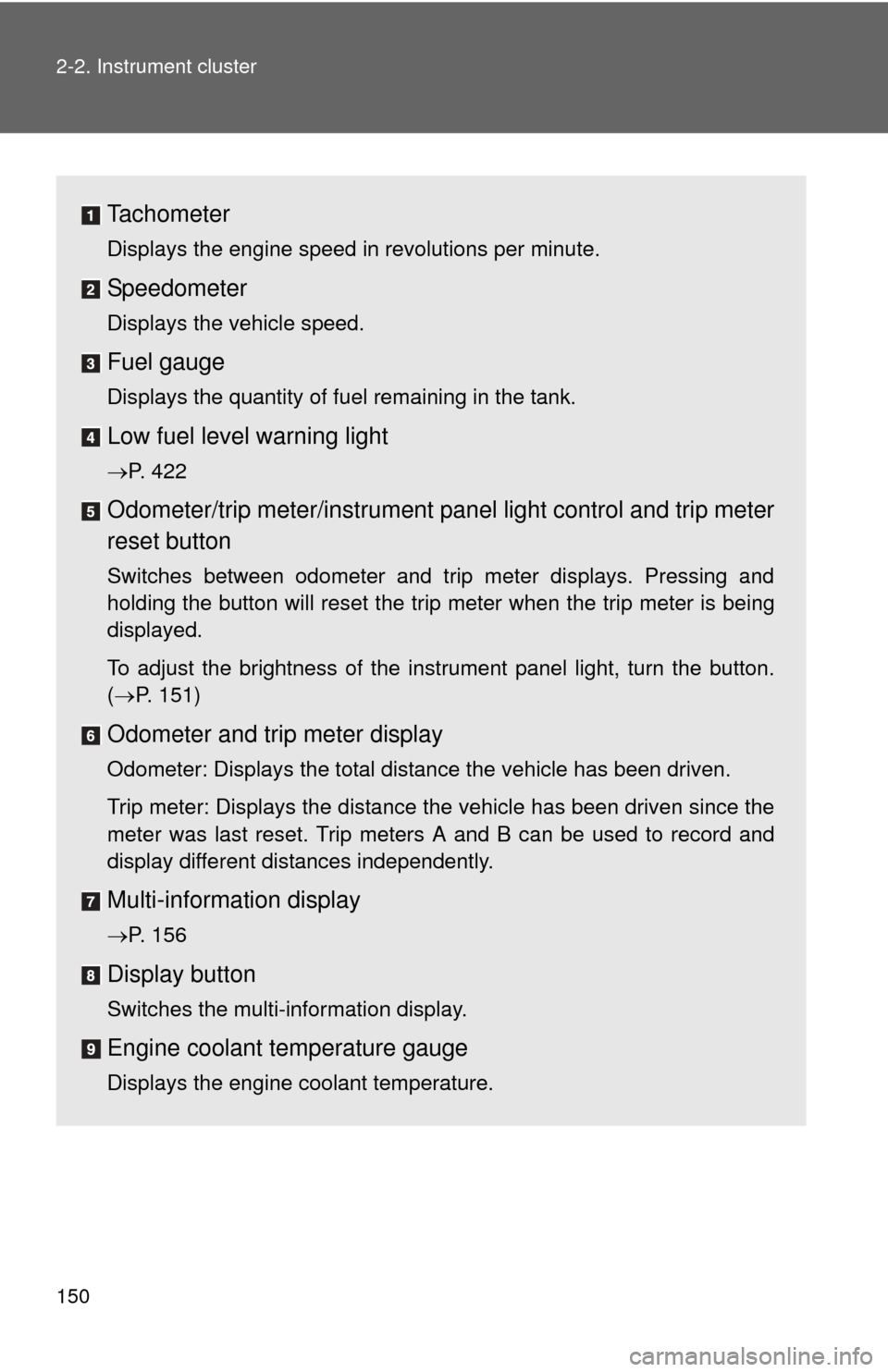
Tachometer
Displays the engine speed in revolutions per minute.
Speedometer
Displays the vehicle speed.
Fuel gauge
Displays the quantity of fuel remaining in the tank.
Low fuel level warning light
P. 422
Odometer/trip meter/instrument panel light control and trip meter
reset button
Switches between odometer and trip meter displays. Pressing and
holding the button will reset the trip meter when the trip meter is being
displayed.
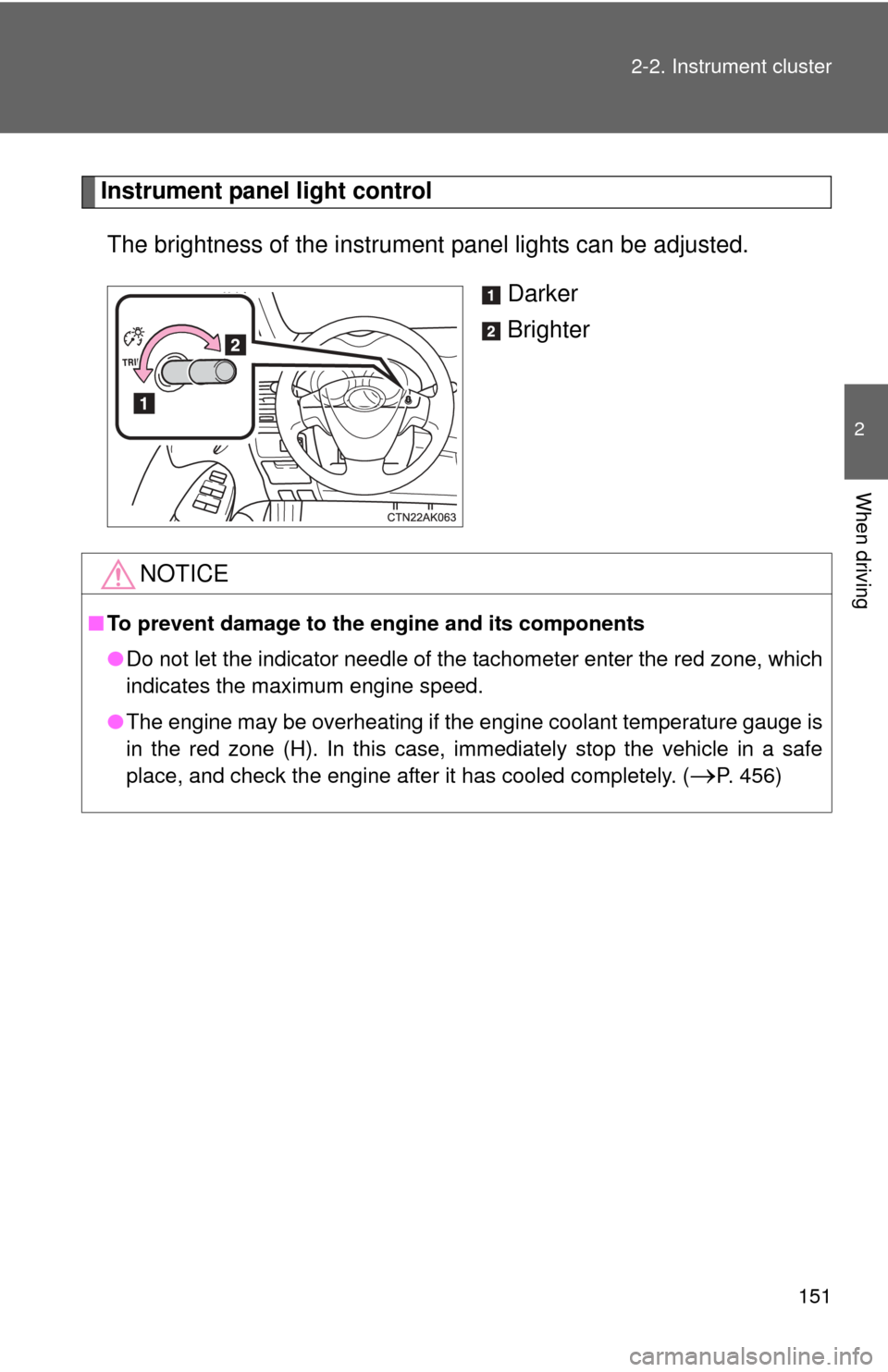
To adjust the brightness of the instrument panel light, turn the button.
( P. 151)
Odometer and trip meter display
Odometer: Displays the total distance the vehicle has been driven.
Trip meter: Displays the distance the vehicle has been driven since the
meter was last reset. Trip meters A and B can be used to record and
display different distances independently.
Multi-informat ion display
P. 156
Display button
Switches the multi-information display.
Engine coolant temperature gauge
Displays the engine coolant temperature.
Page 151 of 529
151
2-2. Instrument cluster
2
When driving
Instrument panel light control
The brightness of the instrument panel lights can be adjusted.
Darker
Brighter
NOTICE
■To prevent damage to the engine and its components
●Do not let the indicator needle of the tachometer enter the red zone, which
indicates the maximum engine speed.
● The engine may be overheating if the engine coolant temperature gauge is
in the red zone (H). In this case, immediately stop the vehicle in a safe
place, and check the engine after it has cooled completely. (
P. 456)
Page 154 of 529
154 2-2. Instrument cluster
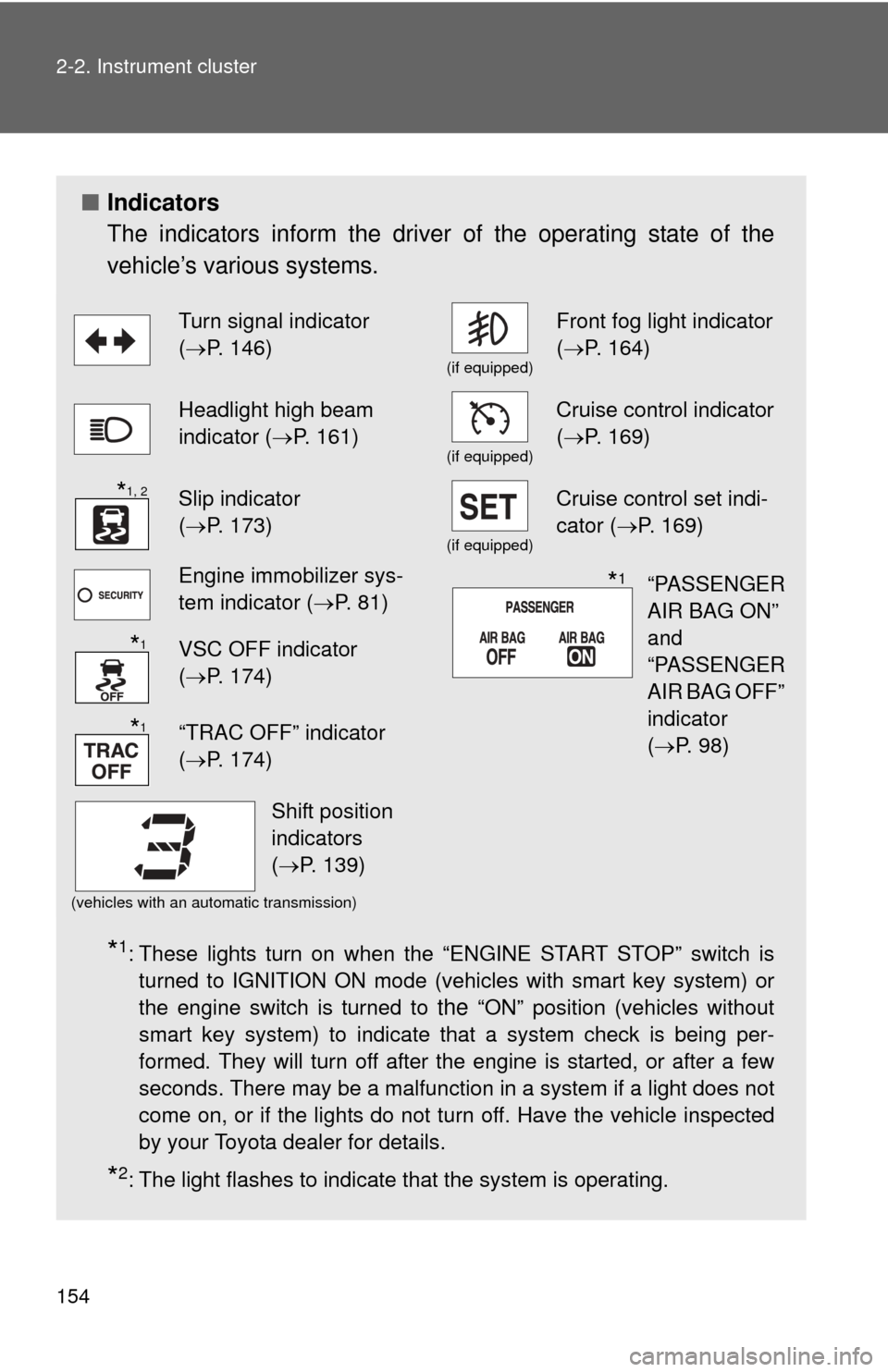
■Indicators
The indicators inform the driver of the operating state of the
vehicle’s various systems.
*1: These lights turn on when the “ENGINE START STOP” switch is
turned to IGNITION ON mode (vehicles with smart key system) or
the engine switch is turned to
the “ON” position (vehicles without
smart key system) to indicate that a system check is being per-
formed. They will turn off after the engine is started, or after a few
seconds. There may be a malfunction in a system if a light does not
come on, or if the lights do not turn off. Have the vehicle inspected
by your Toyota dealer for details.
*2: The light flashes to indicate that the system is operating.
Turn signal indicator
( P. 146)
(if equipped)
Front fog light indicator
( P. 164)
Headlight high beam
indicator ( P. 161)
(if equipped)
Cruise control indicator
(P. 169)
Slip indicator
(P. 173)
(if equipped)
Cruise control set indi-
cator (P. 169)
Engine immobilizer sys-
tem indicator ( P. 81)
VSC OFF indicator
(P. 174)
“TRAC OFF” indicator
(P. 174)
(vehicles with an automatic transmission)
*1, 2
“PASSENGER
AIR BAG ON”
and
“PASSENGER
AIR BAG OFF”
indicator
(P. 98)*1
*1
*1
Shift position
indicators
(P. 139)
Page 155 of 529
155
2-2. Instrument cluster
2
When driving
CAUTION
■
If a safety system warning light does not come on
Should a safety system light such as the ABS or SRS airbag warning light
not come on when you start the engine, this could mean that these systems
are not available to help protect you in an accident, which could result in
death or serious injury. Have the vehicle inspected by your Toyota dealer
immediately if this occurs.
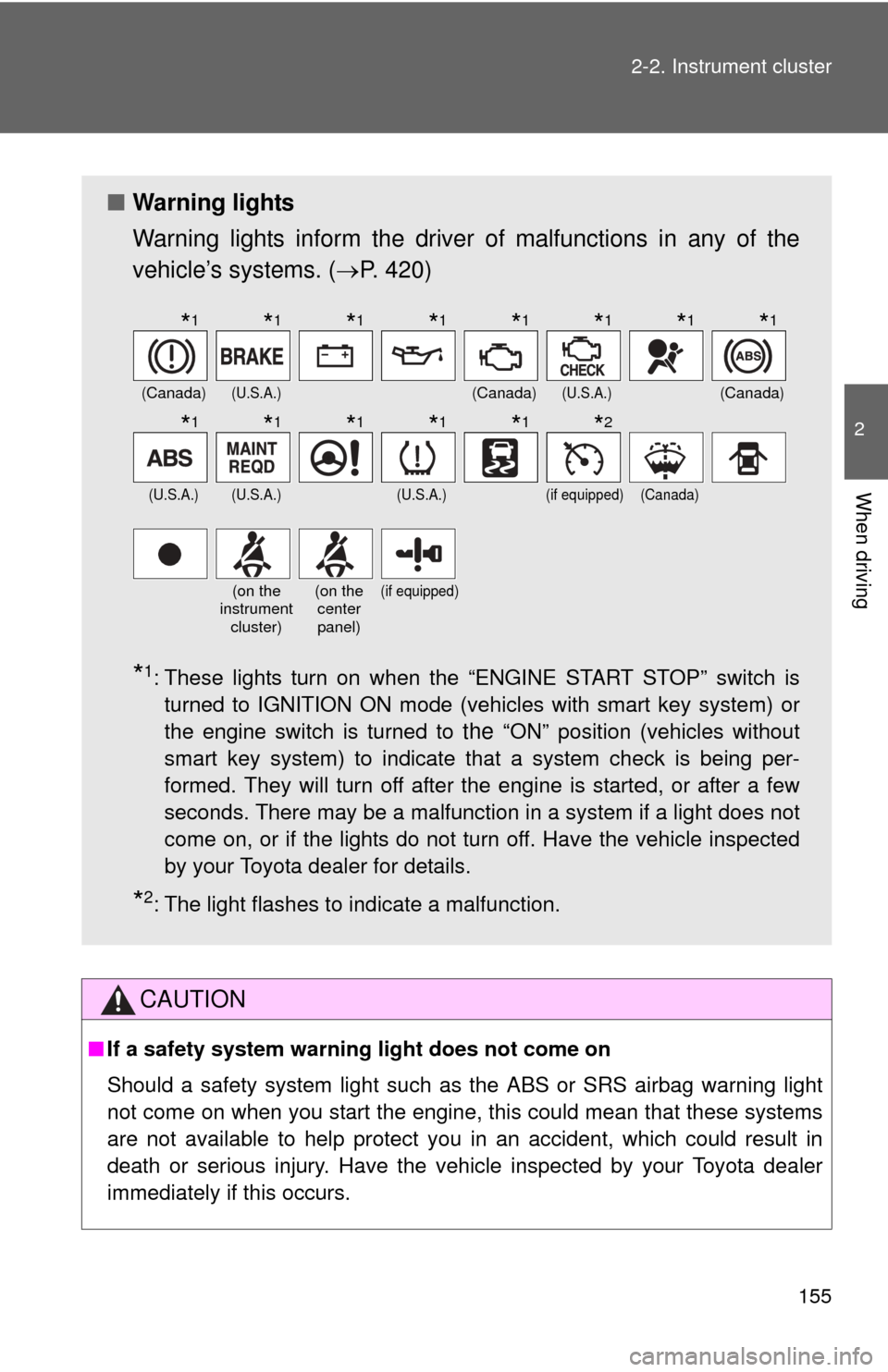
■ Warning lights
Warning lights inform the driver of malfunctions in any of the
vehicle’s systems. ( P. 420)
*1: These lights turn on when the “ENGINE START STOP” switch is
turned to IGNITION ON mode (vehicles with smart key system) or
the engine switch is turned to
the “ON” position (vehicles without
smart key system) to indicate that a system check is being per-
formed. They will turn off after the engine is started, or after a few
seconds. There may be a malfunction in a system if a light does not
come on, or if the lights do not turn off. Have the vehicle inspected
by your Toyota dealer for details.
*2: The light flashes to indicate a malfunction.
(Canada)(U.S.A.)(Canada)(U.S.A.)(Canada)
(U.S.A.)(U.S.A.)(U.S.A.)(if equipped)(Canada)
(on the
instrument
cluster)(on the center
panel)(if equipped)
*1*1*1*1*1*1*1*1
*1*1*1*1*1*2
Page 157 of 529
157
2-2. Instrument cluster
2
When driving
●
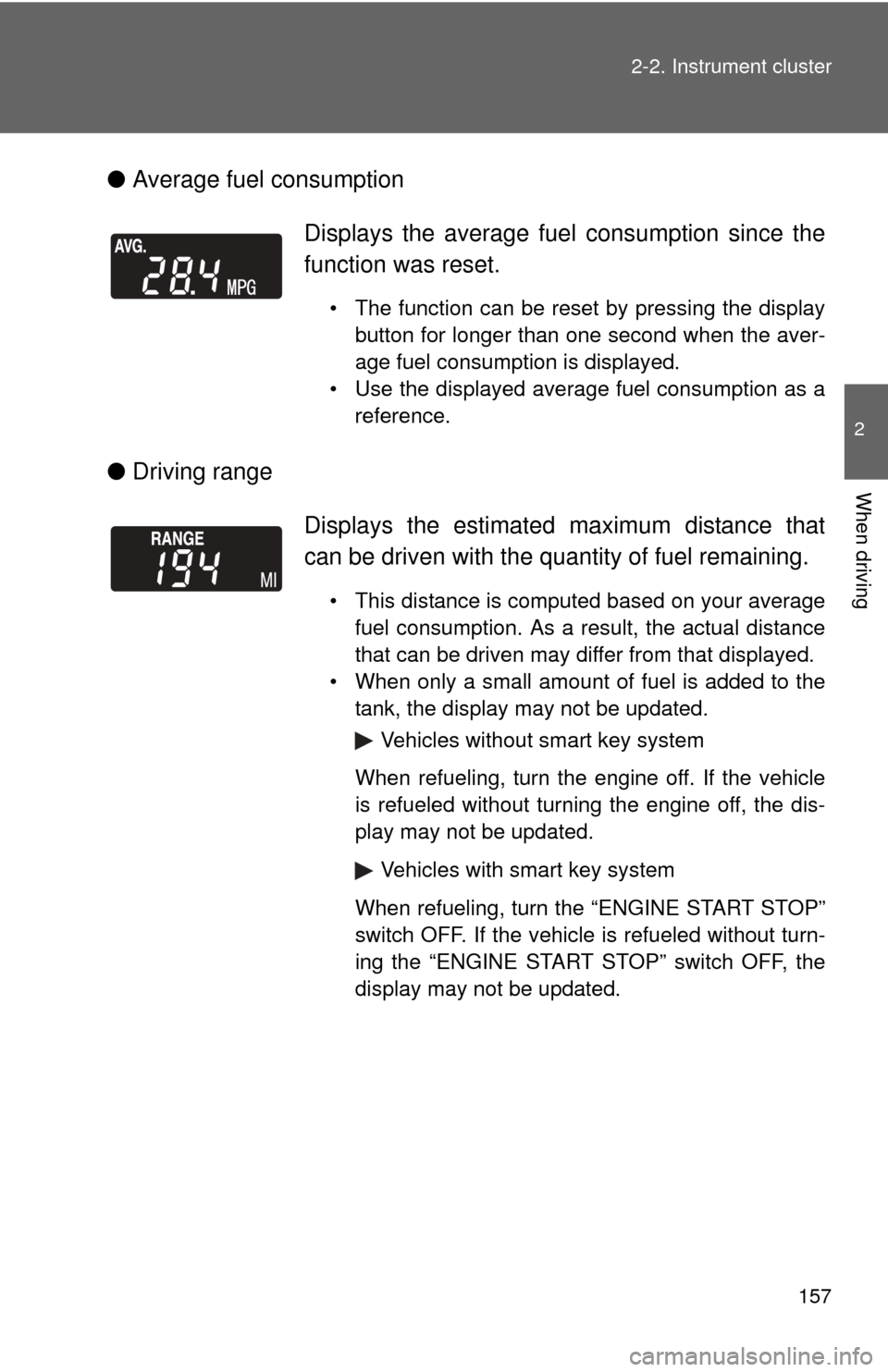
Average fuel consumption
● Driving range Displays the average fuel
consumption since the
function was reset.
• The function can be reset by pressing the display button for longer than one second when the aver-
age fuel consumption is displayed.
• Use the displayed average fuel consumption as a reference.
Displays the estimated maximum distance that
can be driven with the quantity of fuel remaining.
• This distance is computed based on your averagefuel consumption. As a result, the actual distance
that can be driven may differ from that displayed.
• When only a small amount of fuel is added to the tank, the display may not be updated.
Vehicles without smart key system
When refueling, turn the engine off. If the vehicle
is refueled without turning the engine off, the dis-
play may not be updated.
Vehicles with smart key system
When refueling, turn the “ENGINE START STOP”
switch OFF. If the vehicle is refueled without turn-
ing the “ENGINE START STOP” switch OFF, the
display may not be updated.
Page 158 of 529
158 2-2. Instrument cluster
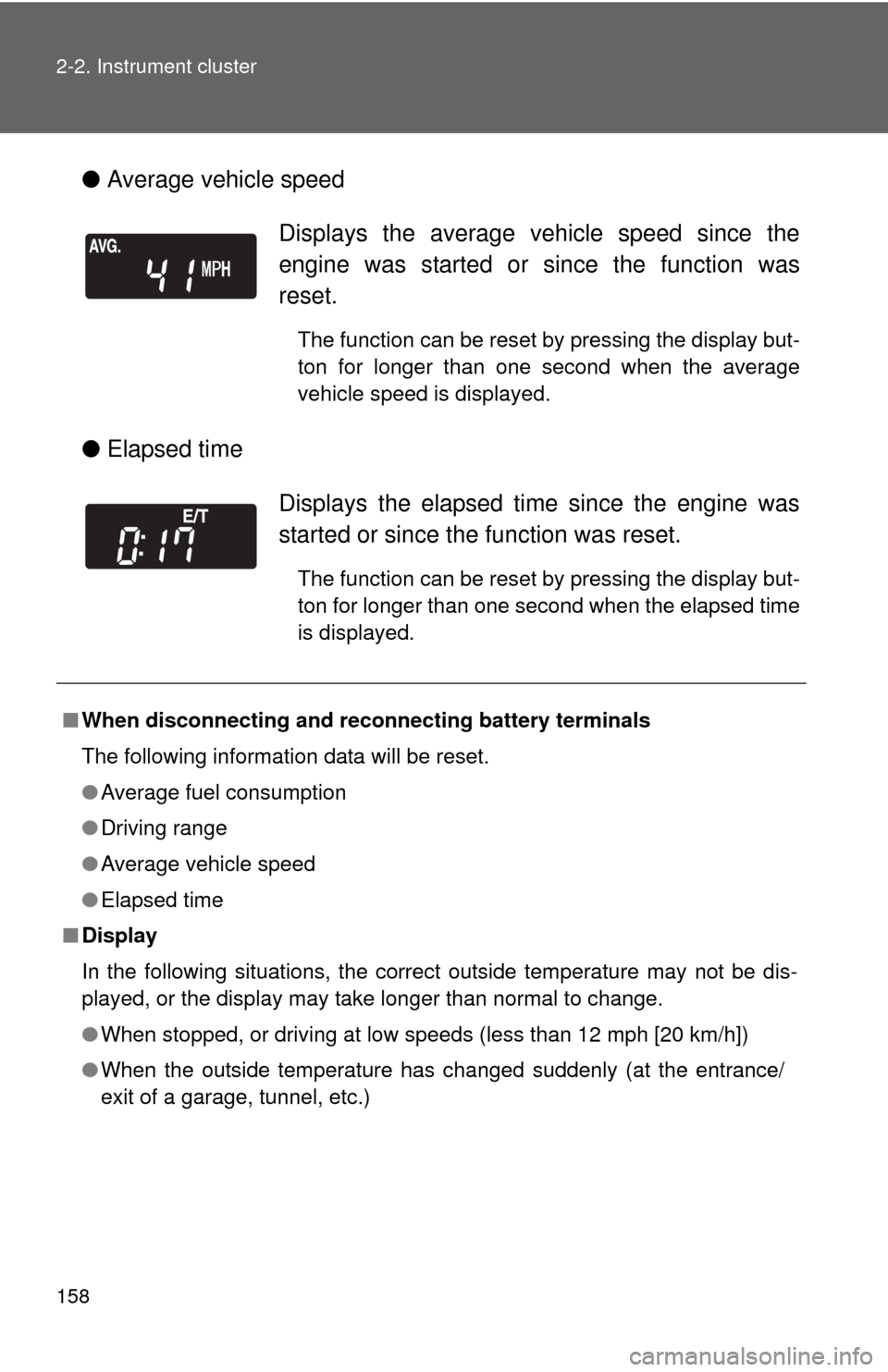
●Average vehicle speed
● Elapsed time
Displays the average vehicle speed since the
engine was started or since the function was
reset.
The function can be reset by pressing the display but-
ton for longer than one second when the average
vehicle speed is displayed.
Displays the elapsed ti me since the engine was
started or since the function was reset.
The function can be reset by pressing the display but-
ton for longer than one second when the elapsed time
is displayed.
■ When disconnecting and reco nnecting battery terminals
The following information data will be reset.
● Average fuel consumption
● Driving range
● Average vehicle speed
● Elapsed time
■ Display
In the following situations, the correct outside temperature may not be dis-
played, or the display may take longer than normal to change.
●When stopped, or driving at low speeds (less than 12 mph [20 km/h])
● When the outside temperature has changed suddenly (at the entrance/
exit of a garage, tunnel, etc.)