Smart TOYOTA COROLLA 2012 10.G Repair Manual
[x] Cancel search | Manufacturer: TOYOTA, Model Year: 2012, Model line: COROLLA, Model: TOYOTA COROLLA 2012 10.GPages: 529, PDF Size: 8.07 MB
Page 445 of 529
5
When trouble arises
445
5-2. Steps to take in an emergency
Emergency start function (vehicles with smart key system)
When the engine does not start, the following steps can be used as
an interim measure to start the engine if the “ENGINE START STOP”
switch is functioning normally.
Set the parking brake.
Shift the shift lever to P.
Set the “ENGINE START ST OP” switch to ACCESSORY
mode.
Press and hold the “ENGINE START STOP” switch for about
15 seconds while depressing the brake pedal firmly.
Even if the engine can be start ed using the above steps, the system
may be malfunctioning. Have the vehicle checked by your Toyota
dealer.
■ The starter motor does not turn over, the interior lights and
headlights do not turn on, or the horn does not sound.
One of the following may be the cause of the problem.
● One or both of the battery terminals may be disconnected.
● The battery may be discharged. ( P. 450)
● There may be a malfunction in the steering lock system (vehi-
cles with smart key system).
Contact your Toyota dealer if the problem cannot be repaired, or if
repair procedures are unknown.
STEP 1
STEP 2
STEP 3
STEP 4
Page 446 of 529
446
5-2. Steps to take in an emergency
If the shift lever cannot be shifted from P (automatic transmission)
If the shift lever cannot be shifted with your foot on the brake, there
may be a problem with the shift lock system (a system to prevent
accidental operation of the shift lever). Have the vehicle inspected by
your Toyota dealer.
The following steps may be used as an emergency measure to
ensure that the shift lever can be shifted.
Set the parking brake.
Vehicles with smart key system: Turn the “ENGINE START
STOP” switch to the ACCESSORY mode.
Vehicles without smart key system: Turn the engine switch
to the “ACC” position.
Depress the brake pedal.
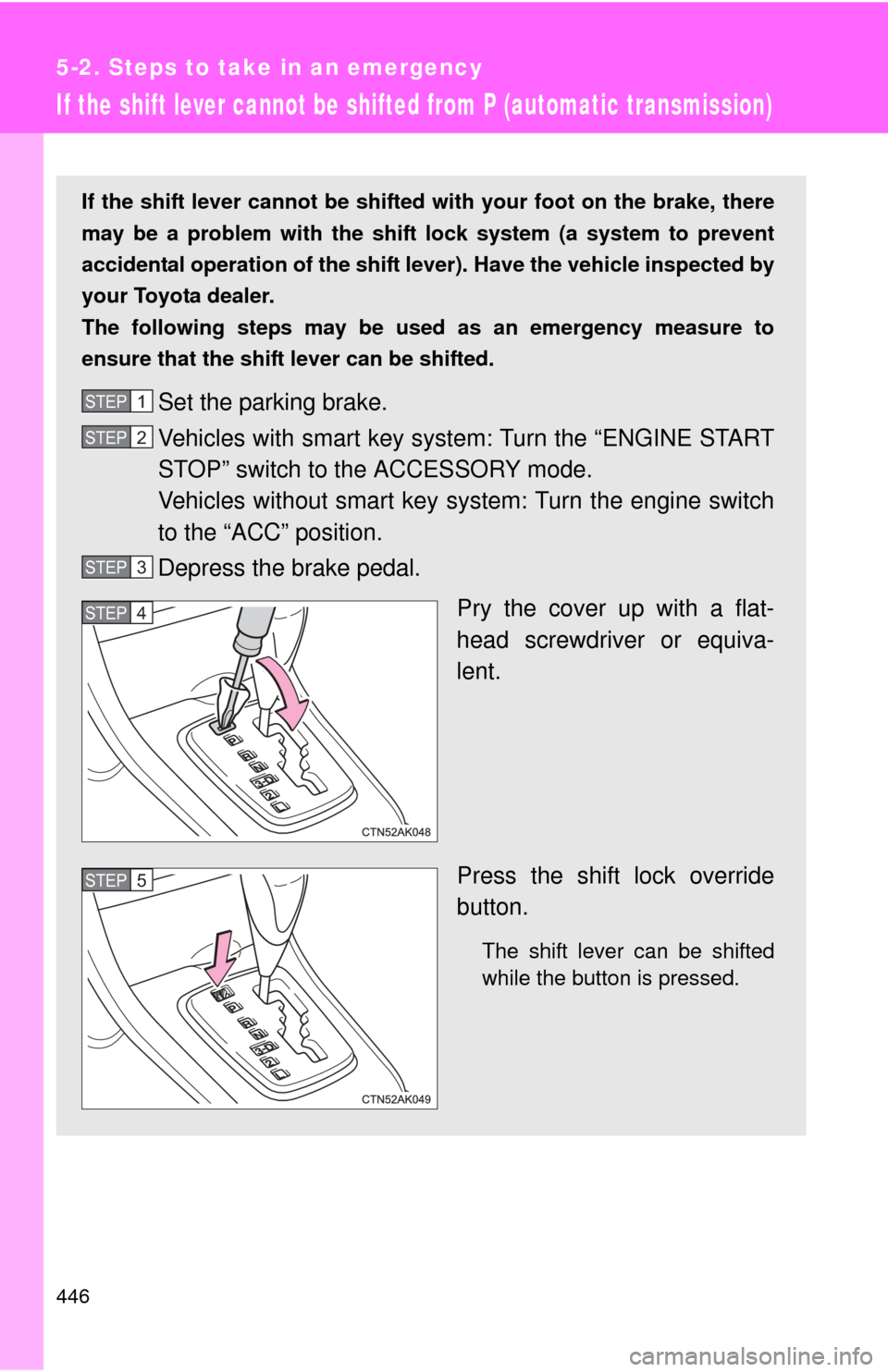
Pry the cover up with a flat-
head screwdriver or equiva-
lent.
Press the shift lock override
button.
The shift lever can be shifted
while the button is pressed.
STEP 1
STEP 2
STEP 3
STEP 4
STEP 5
Page 447 of 529
5
When trouble arises
447
5-2. Steps to take in an emergency
If you lose your keys
New genuine keys can be made by your Toyota dealer. For vehicles
with the smart key system, bring the other key and the key number
stamped on the key number plate. For vehicles without the smart key
system, bring a master key and the key number stamped on the key
number plate.
Page 448 of 529
448
5-2. Steps to take in an emergency
If the electronic key does not operate properly (vehicles with smart key system)
Locking and unlocking the doors and opening the trunk with the
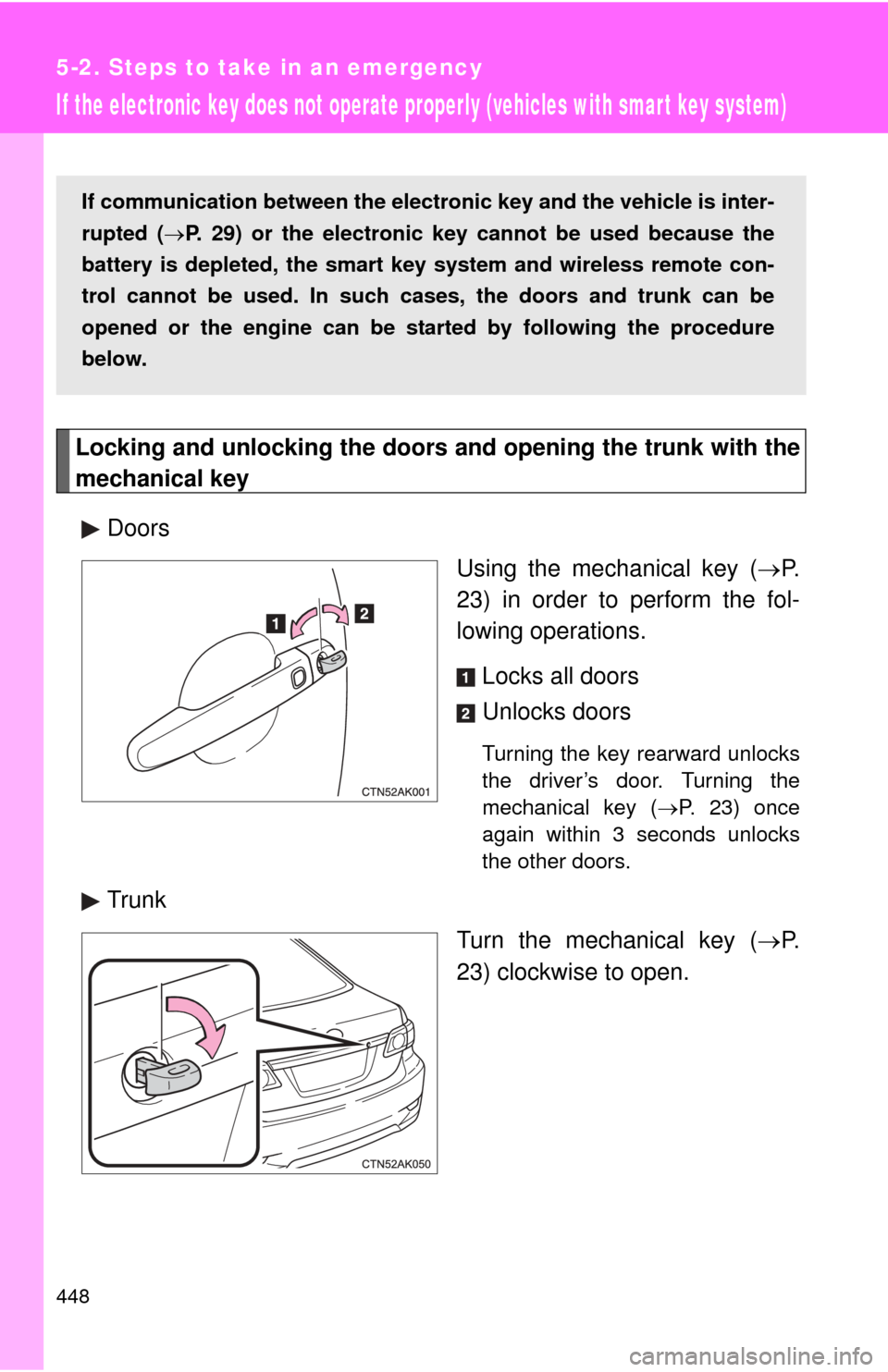
mechanical keyDoors Using the mechanical key (P.
23) in order to perform the fol-
lowing operations.
Locks all doors
Unlocks doors
Turning the key rearward unlocks
the driver’s door. Turning the
mechanical key ( P. 23) once
again within 3 seconds unlocks
the other doors.
Trunk
Turn the mechanical key (P.
23) clockwise to open.
If communication between the elect ronic key and the vehicle is inter-
rupted ( P. 29) or the electronic key cannot be used because the
battery is depleted, the smart key system and wireless remote con-
trol cannot be used. In such cases, the doors and trunk can be
opened or the engine can be st arted by following the procedure
below.
Page 451 of 529
5
When trouble arises
451
5-2. Steps to take in an emergency
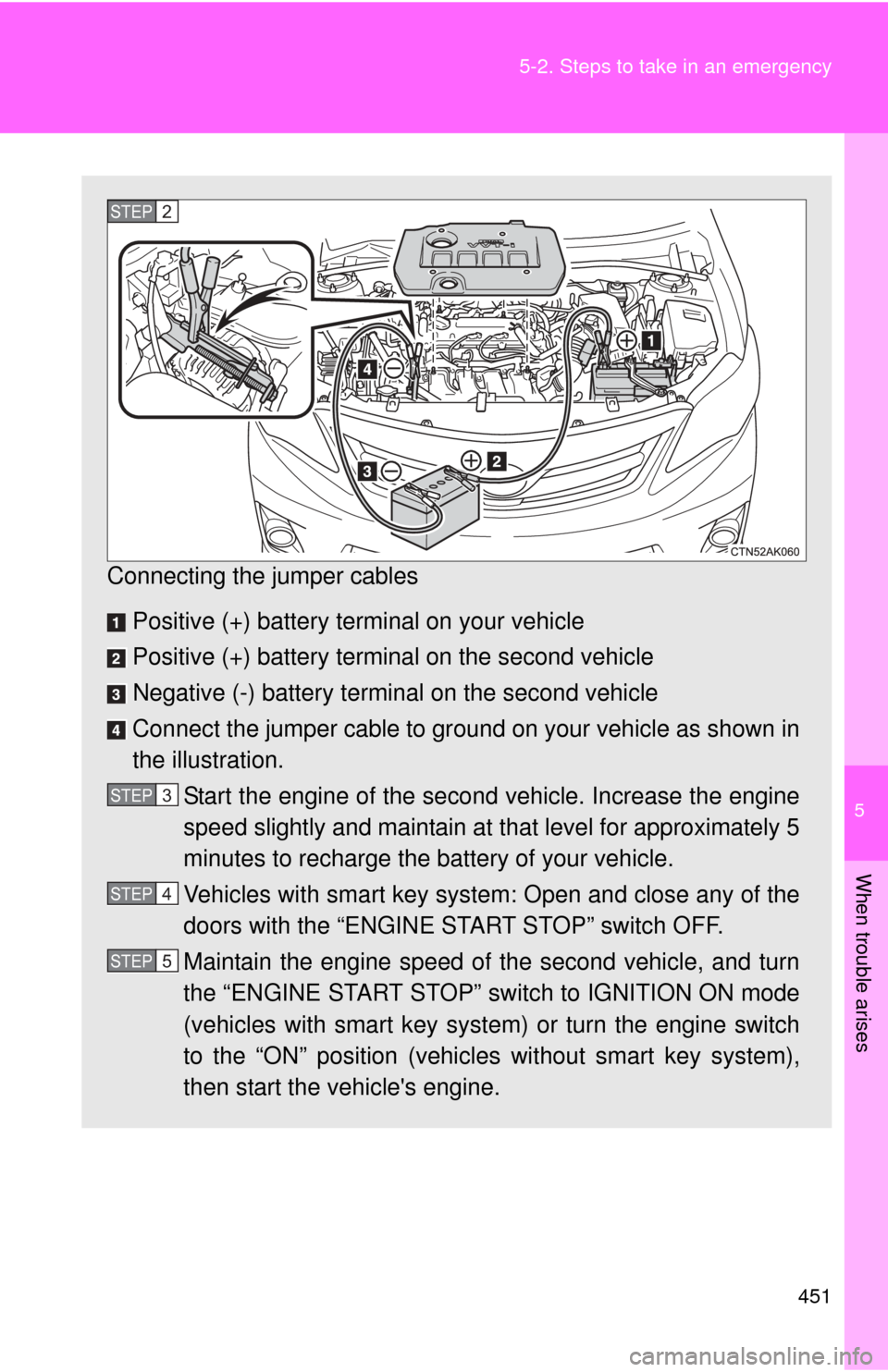
Connecting the jumper cables
Positive (+) battery terminal on your vehicle
Positive (+) battery terminal on the second vehicle
Negative (-) battery terminal on the second vehicle
Connect the jumper cable to ground on your vehicle as shown in
the illustration. Start the engine of the second vehicle. Increase the engine
speed slightly and maintain at that level for approximately 5
minutes to recharge the battery of your vehicle.
Vehicles with smart key system: Open and close any of the
doors with the “ENGINE START STOP” switch OFF.
Maintain the engine speed of the second vehicle, and turn
the “ENGINE START STOP” switch to IGNITION ON mode
(vehicles with smart key system) or turn the engine switch
to the “ON” position (vehicles without smart key system),
then start the vehicle's engine.
STEP 2
STEP 3
STEP 4
STEP 5
Page 461 of 529
5
When trouble arises
461
5-2. Steps to take in an emergency
If your vehicle has to be stopped in an emergency
Only in an emergency, such as if it becomes impossible to stop the
vehicle in the normal way, stop the vehicle using the following pro-
cedure:
Steadily step on the brake pedal with both feet and firmly
depress it.
Do not pump the brake pedal repeatedly as this will increase the
effort required to slow the vehicle.
Shift the shift lever to N.
If the shift lever is shifted to N After slowing down, stop the vehi cle in a safe place by the
road.
Stop the engine.
If the shift lever cannot be shifted to N Keep depressing the brake pedal with both feet to reduce
vehicle speed as much as possible.
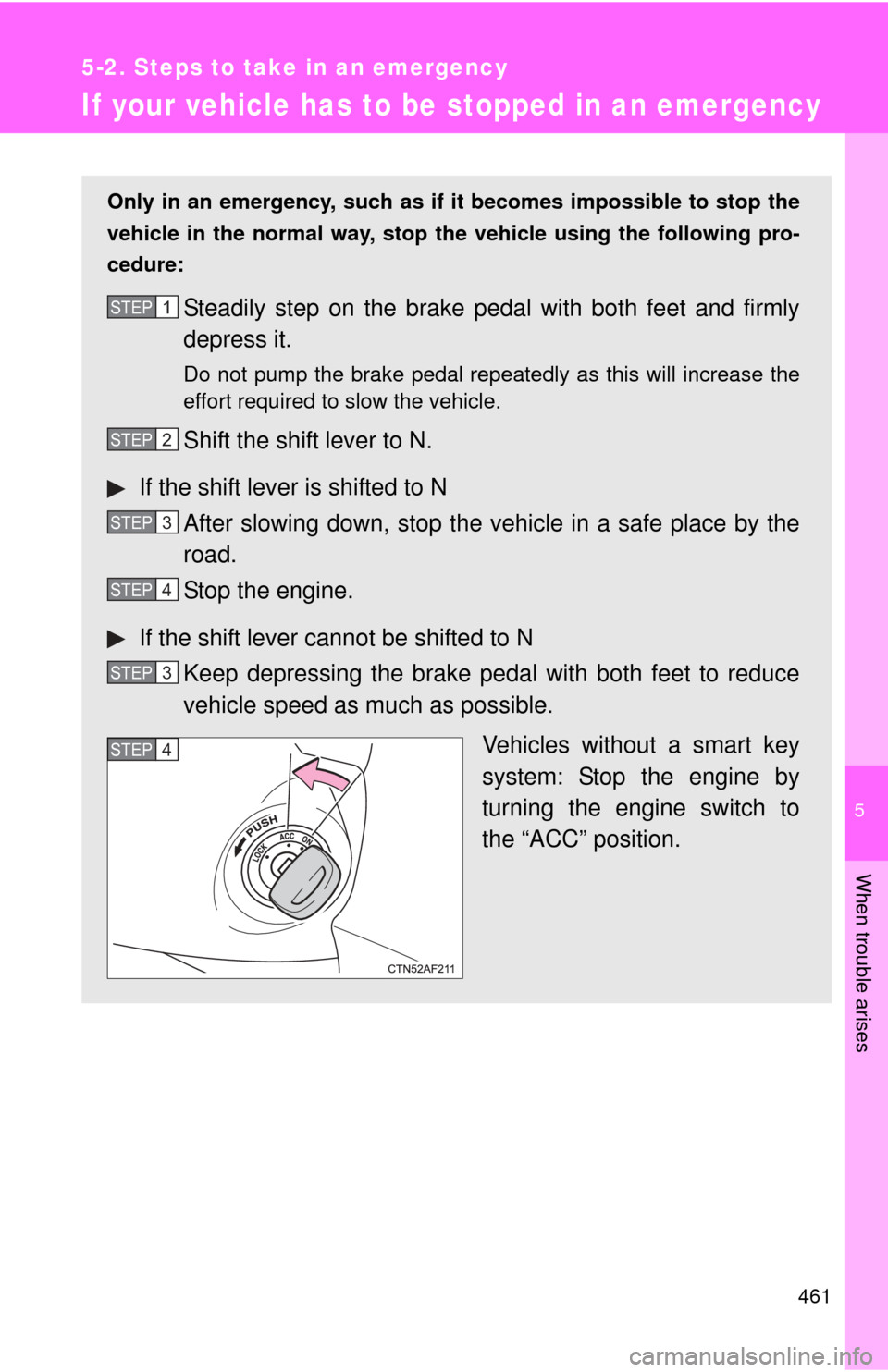
Vehicles without a smart key
system: Stop the engine by
turning the engine switch to
the “ACC” position.
STEP 1
STEP 2
STEP 3
STEP 4
STEP 3
STEP 4
Page 462 of 529
462 5-2. Steps to take in an emergency
CAUTION
■If the engine has to be turned off while driving
●Power assist for the brakes and steering wheel will be lost, making the
brake pedal harder to depress and the steering wheel heavier to turn.
Decelerate as much as possible before turning off the engine.
● Vehicles without a smart key system: Never attempt to remove the key, as
doing so will lock the steering wheel.
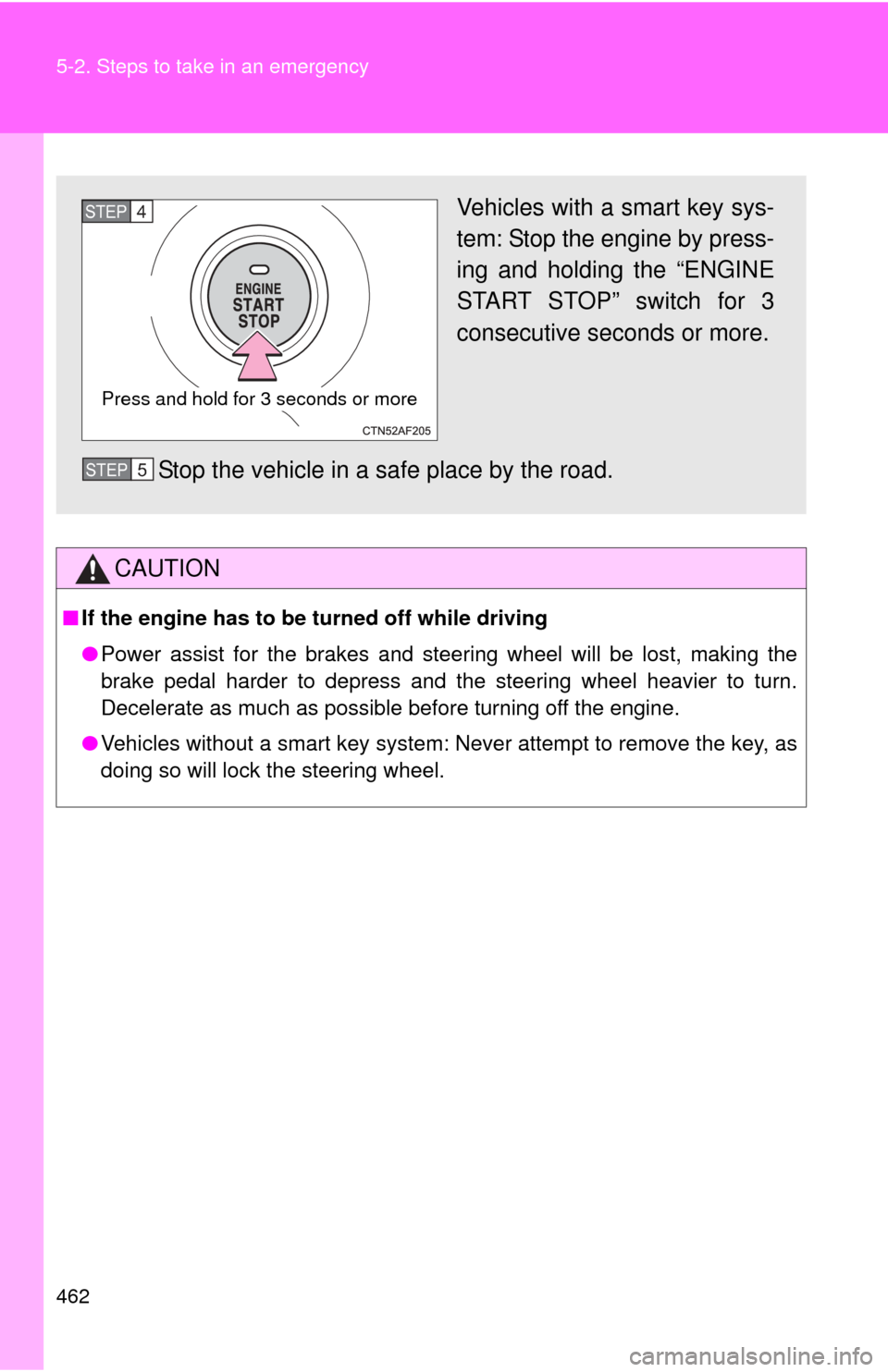
Vehicles with a smart key sys-
tem: Stop the engine by press-
ing and holding the “ENGINE
START STOP” switch for 3
consecutive seconds or more.
Stop the vehicle in a safe place by the road.
Press and hold for 3 seconds or more
STEP 4
STEP 5
Page 491 of 529
491
6
Vehicle specifications
6-2. Customization
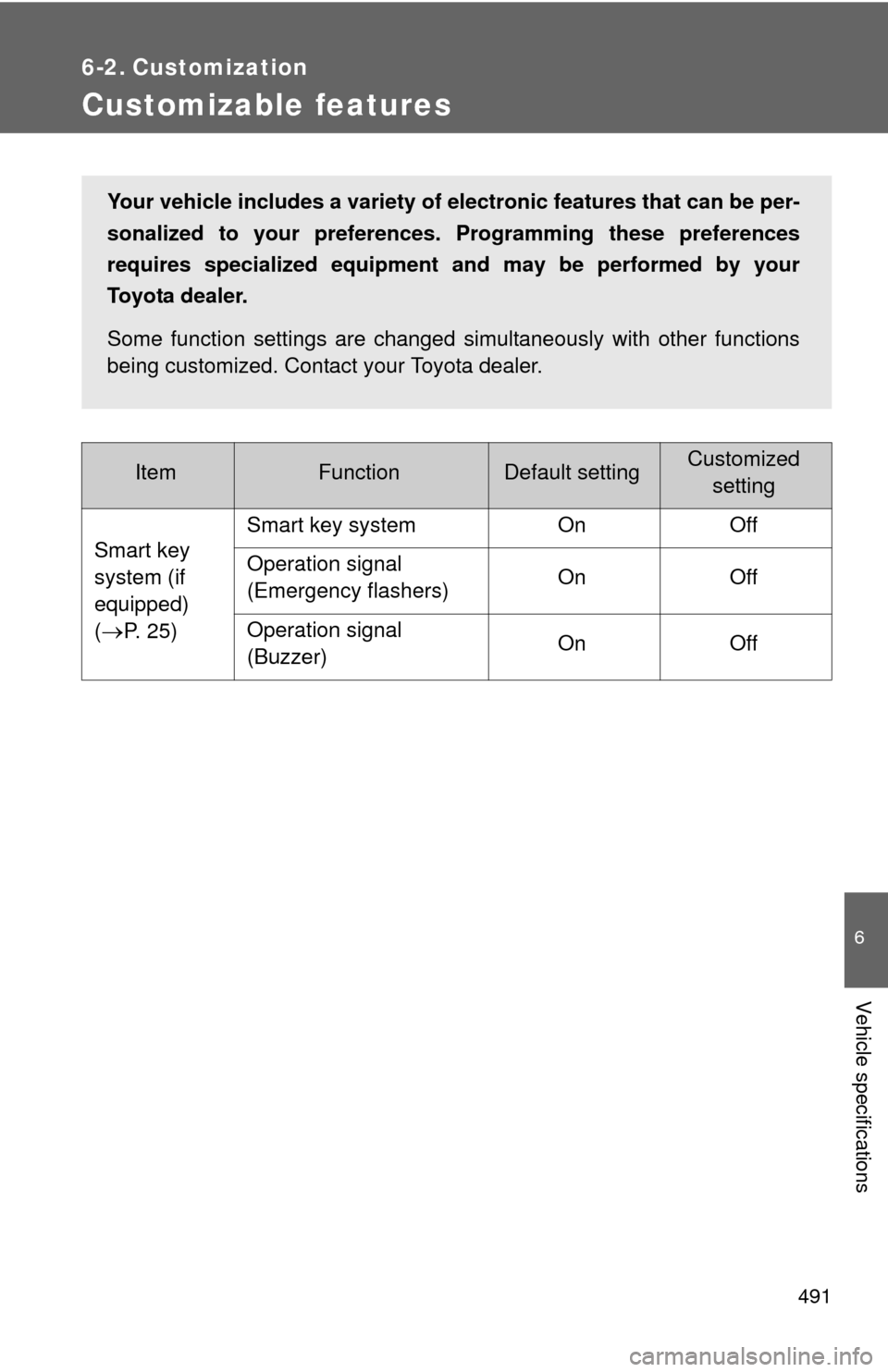
Customizable features
ItemFunctionDefault settingCustomizedsetting
Smart key
system (if
equipped)
(
P. 2 5 ) Smart key system On Off
Operation signal
(Emergency flashers)
On Off
Operation signal
(Buzzer) On Off
Your vehicle includes a variety of electronic features that can be per-
sonalized to your preferences.
Programming these preferences
requires specialized equipment and may be performed by your
Toyota dealer.
Some function settings are changed simultaneously with other functions
being customized. Contact your Toyota dealer.
Page 493 of 529

493
6-2. Customization
6
Vehicle specifications
Door lock
(vehicles
with power
door lock
system)
(
P. 4 1 )
Unlocking using a key
Driver's door
unlocked in one step, all doors
unlocked in two steps All doors
unlocked in one step
Speed-detecting auto-
matic door lock function
(vehicles with smart key
system) Off On
Opening driver's door
unlocks all doors Off On
Shifting gears to P
unlocks all doors. (vehi-
cles with an automatic
transmission) On Off
Shifting gears to posi-
tion other than P locks
all doors. (vehicles with
an automatic transmis-
sion) On Off
ItemFunctionDefault settingCustomized
setting
Page 494 of 529

494 6-2. Customization
Illumination
(
P. 307)Time elapsed before
lights turn off (vehicles
with power door lock
system)
15 seconds
7.5 seconds
30 seconds
Operation when the
doors are unlocked
(vehicles with power
door lock system) On Off
Vehicles with smart key
system: Operation after
the “ENGINE START
STOP” switch is turned
OFF
Vehicles without smart
key system: Operation
after the engine switch
is turned to the “LOCK”
position On Off
Seat belt
reminder
(
P. 422) Vehicle speed linked
seat belt reminder
buzzer
On Off
ItemFunctionDefault settingCustomized
setting