AUX TOYOTA COROLLA 2013 11.G Owners Manual
[x] Cancel search | Manufacturer: TOYOTA, Model Year: 2013, Model line: COROLLA, Model: TOYOTA COROLLA 2013 11.GPages: 532, PDF Size: 8.55 MB
Page 3 of 532

1
2
3
4
5
6
7
3
2-3. Operating the lights and wipers
Headlight switch .................. 159
Fog light switch ................... 163
Windshield wipers and washer .............................. 165
2-4. Using other driving systems
Cruise control ...................... 168
Driving assist systems ........ 172
2-5. Driving information Cargo and luggage ............. 176
Vehicle load limits ............... 180
Winter driving tips ............... 181
Trailer towing (2.4 L 4-cylinder
[2AZ-FE] engine) .............. 185
Trailer towing (1.8 L 4-cylinder
[2ZR-FE] engine) .............. 200
Dinghy towing (automatic transmission) .................... 201
Dinghy towing (manual transmission) .................... 202 3-1. Using the air conditioning
system and defogger
Automatic air conditioning system .............................. 206
Manual air conditioning system .............................. 212
Rear window and outside rear view
mirror defoggers ............... 219
3-2. Using the audio system Audio system types ............ 220
Using the radio ................... 233
Using the CD player ........... 237
Playing back MP3 and WMA discs ....................... 244
Operating an iPod .............. 253
Operating a USB memory ............................ 262
Optimal use of the audio system .............................. 270
Using the AUX port............. 274
Using the steering wheel audio switches.................. 276
3-3. Using the Bluetooth
®
audio system
Bluetooth
® audio/phone ..... 280
Using the Bluetooth®
audio/phone ..................... 283
Operating a Bluetooth
®
enabled portable player.... 288
3Interior features
Page 4 of 532

TABLE OF CONTENTSIndex
4
3-4. Using the hands-free phone system
(for cellular phone)
Making a phone call ........... 291
Using the “SET UP” menu (“Bluetooth” menu) ........... 296
Using the “SET UP” menu (“Phone” menu) ................ 302
3-5. Using the interior lights Interior lights list ................. 308
• Interior light ...................... 310
• Personal lights ................. 310
• Personal/interior lights...... 311
3-6. Using the storage features List of storage features....... 312
• Glove box ......................... 313
• Console box ..................... 313
• Cup holders ...................... 315
• Auxiliary boxes ................. 318
• Bottle holders ................... 320
3-7. Other interior features Sun visors .......................... 321
Vanity mirrors ..................... 322
Clock .................................. 323
Ashtray ............................... 324
Cigarette lighter .................. 325
Power outlet ....................... 326
Seat heaters ....................... 327
Assist grips ......................... 329
Floor mat ............................ 330
Compass ............................ 331 4-1. Maintenance and care
Cleaning and protecting the vehicle exterior ........... 336
Cleaning and protecting the vehicle interior ............ 338
4-2. Maintenance Maintenance requirements .................... 341
General maintenance ......... 343
Emission inspection and maintenance (I/M)
programs .......................... 346
4-3. Do-it-yourself maintenance Do-it-yourself service precautions ....................... 347
Hood ................................... 351
Positioning a floor jack........ 353
Engine compartment .......... 356
Tires.................................... 371
Tire inflation pressure ......... 379
Wheels................................ 383
Air conditioning filter ........... 386
Key battery ......................... 388
Checking and replacing fuses ................................. 392
Light bulbs .......................... 402
4Maintenance and care
Page 8 of 532
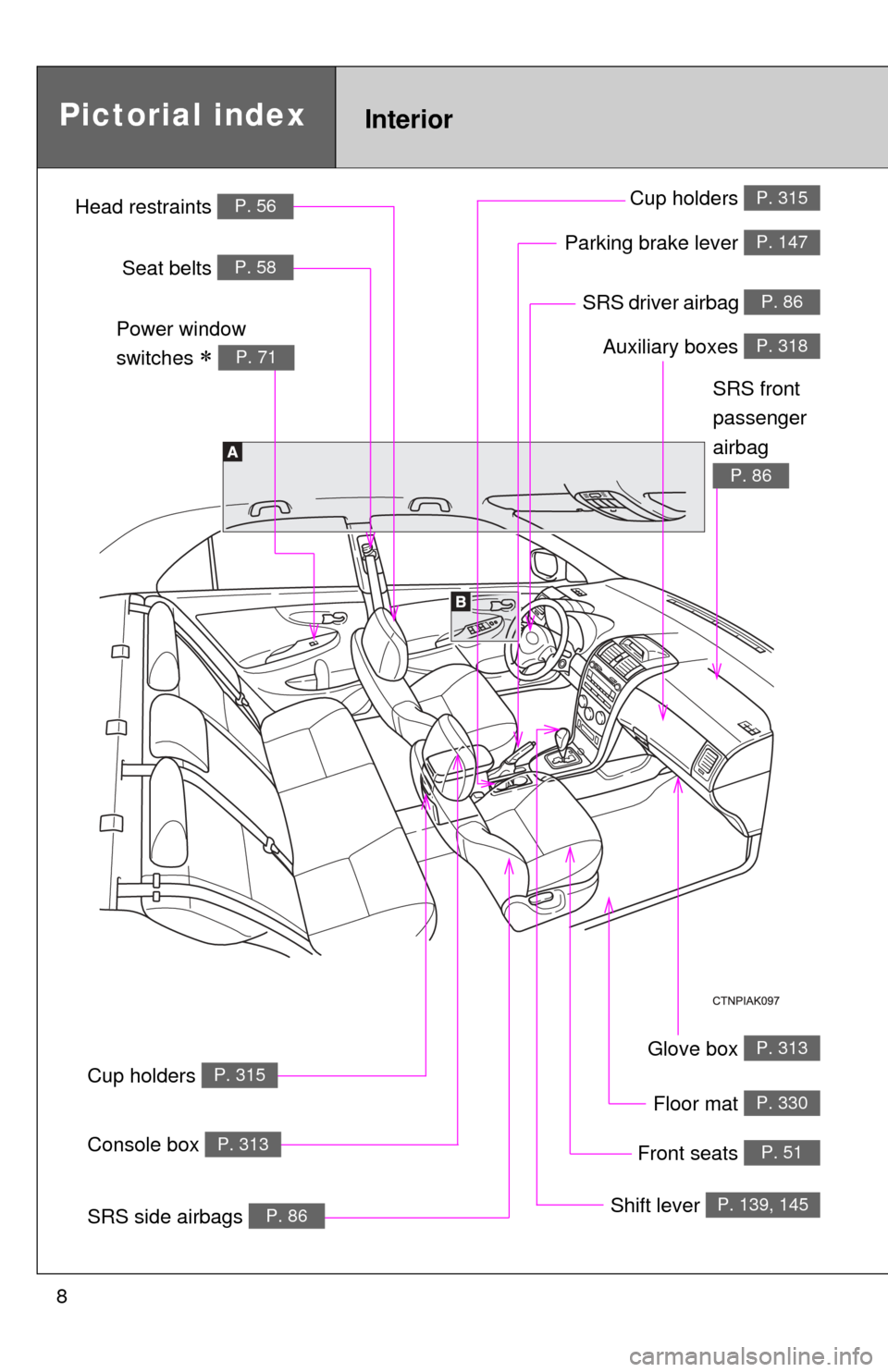
8
Glove box P. 313
SRS driver airbag P. 86
InteriorPictorial index
Floor mat P. 330
Auxiliary boxes P. 318
Parking brake lever P. 147
Shift lever P. 139, 145
Front seats P. 51
Cup holders P. 315
Cup holders P. 315
SRS side airbags P. 86
Console box P. 313
Power window
switches
P. 71
SRS front
passenger
airbag
P. 86
Head restraints P. 56
Seat belts P. 58
Page 9 of 532
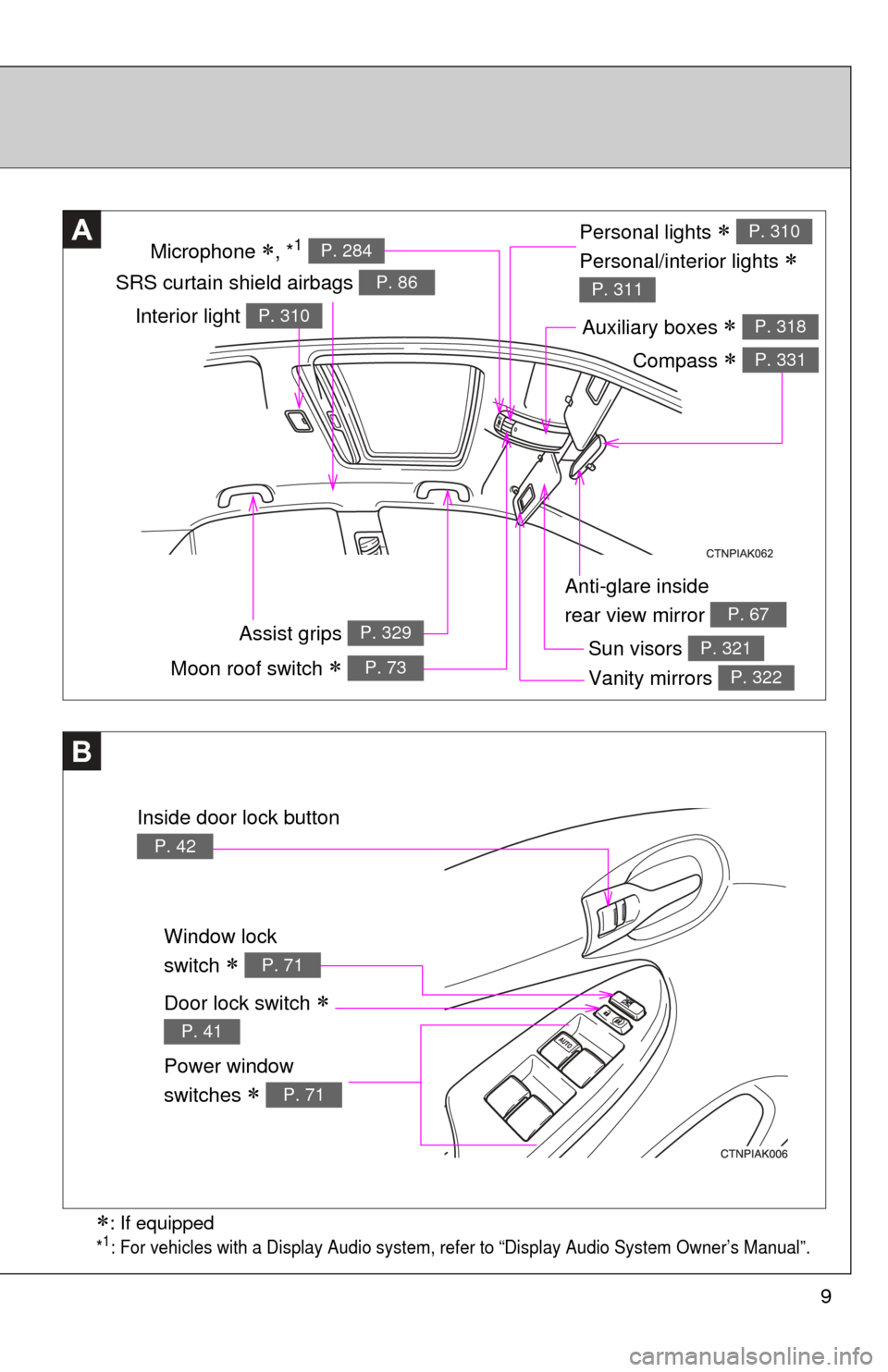
9
Anti-glare inside
rear view mirror
P. 67
Personal lights
Personal/interior lights
P. 310
P. 311SRS curtain shield airbags P. 86
A
Sun visors P. 321
Vanity mirrors P. 322
Auxiliary boxes P. 318
Window lock
switch
P. 71
Power window
switches
P. 71
B
Door lock switch
P. 41
Moon roof switch P. 73
Inside door lock button
P. 42
: If equipped
*1: For vehicles with a Display Audio system, refer to “Display Audio System Owner’s Manual”.
Interior light P. 310
Assist grips P. 329
Microphone , *1 P. 284
Compass P. 331
Page 10 of 532
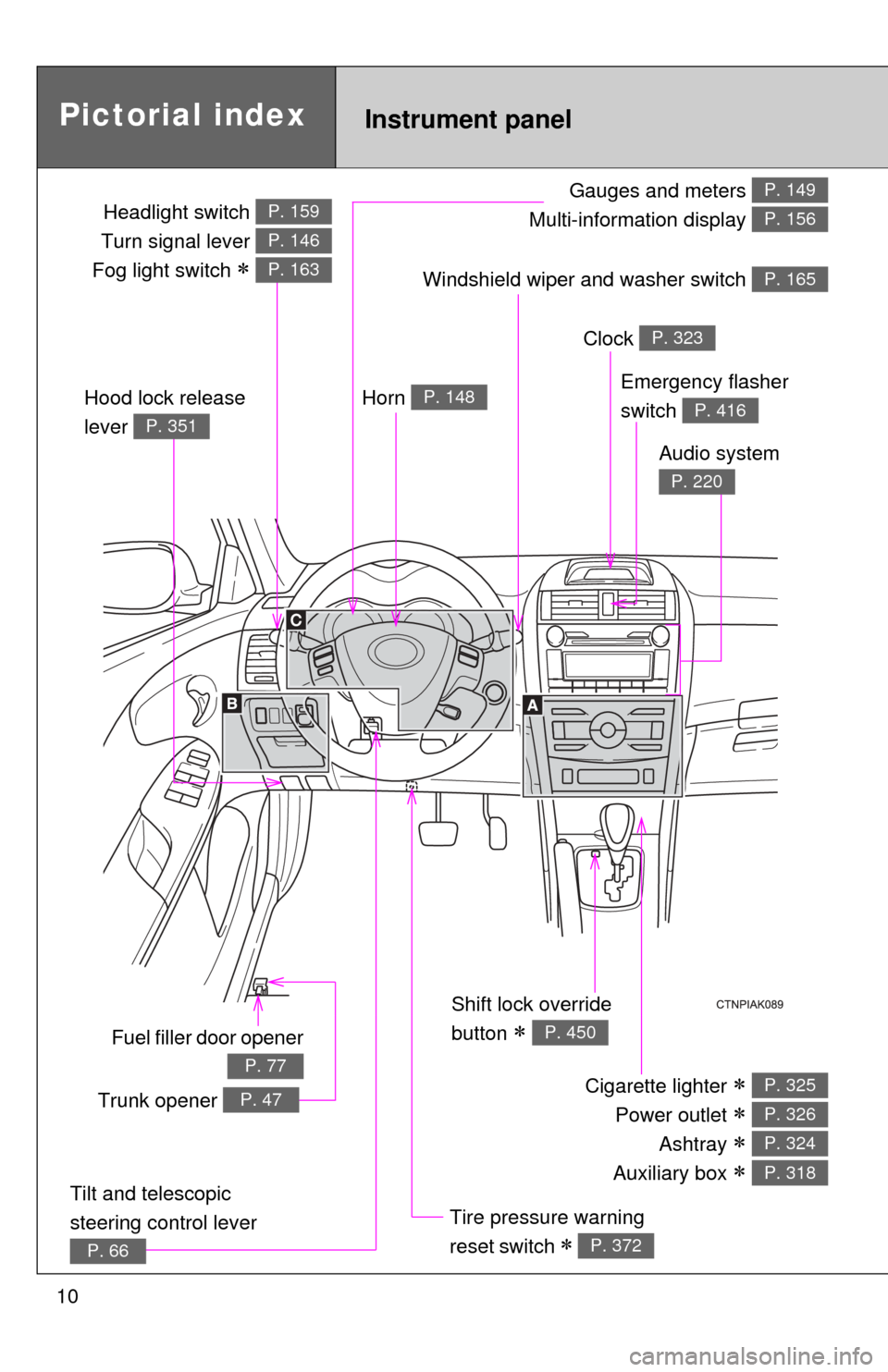
10
Gauges and meters
Multi-information display P. 149
P. 156
Pictorial indexInstrument panel
Windshield wiper and washer switch P. 165
Fuel filler door opener
P. 77
Emergency flasher
switch
P. 416
Shift lock override
button
P. 450
Cigarette lighter
Power outlet
Ashtray
Auxiliary box
P. 325
P. 326
P. 324
P. 318
Tire pressure warning
reset switch
P. 372
Horn P. 148
Clock P. 323
Audio system
P. 220
Hood lock release
lever
P. 351
Trunk opener P. 47
Tilt and telescopic
steering control lever
P. 66
Headlight switch
Turn signal lever
Fog light switch
P. 159
P. 146
P. 163
Page 11 of 532
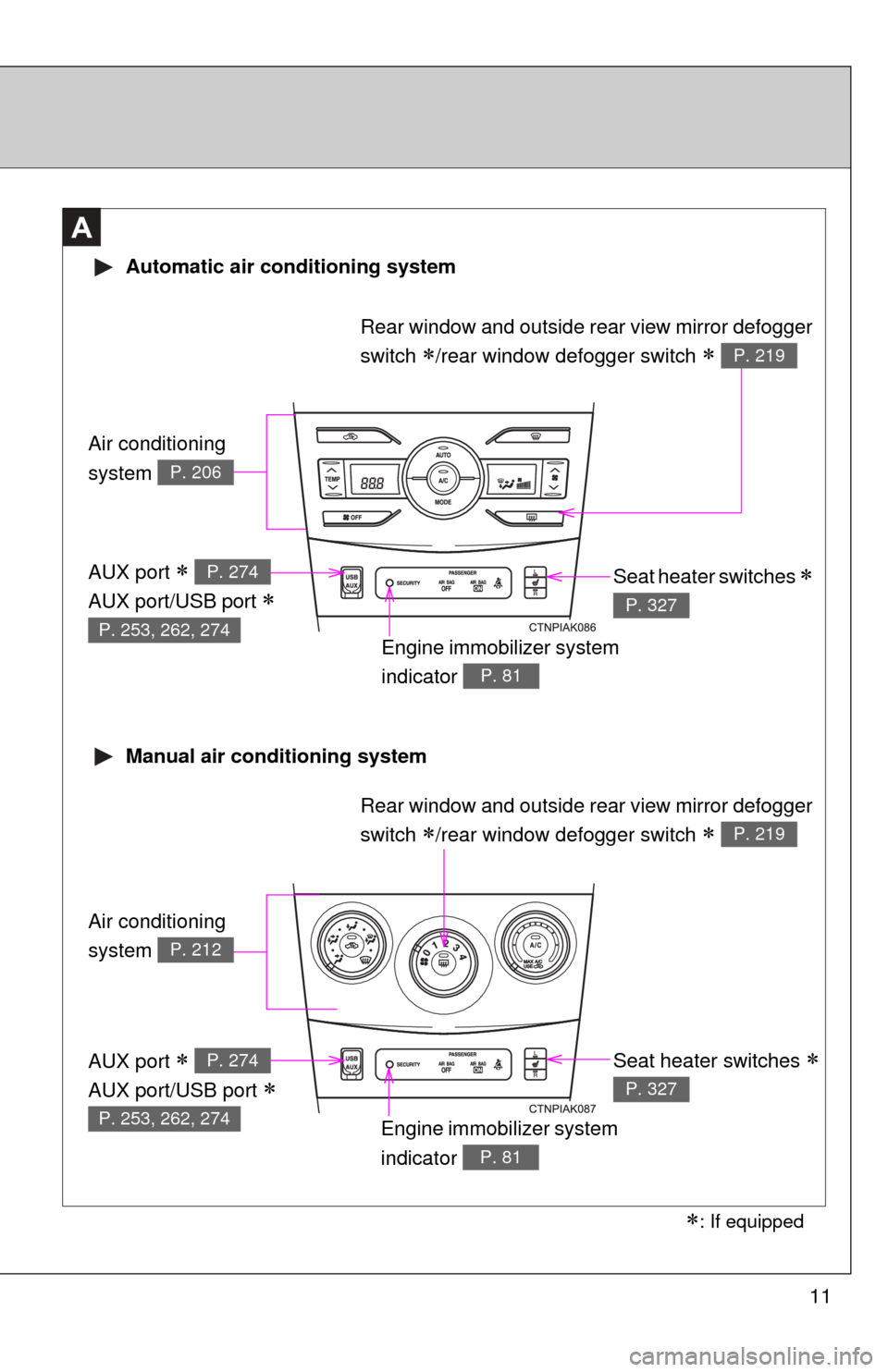
11
A
Air conditioning
system
P. 206
Air conditioning
system
P. 212
Automatic air conditioning system
Manual air conditioning system
Engine immobilizer system
indicator
P. 81
Seat heater switches
P. 327
Rear window and outside rear view mirror defogger
switch
/rear window defogger switch P. 219
Engine immobilizer system
indicator
P. 81
Seat heater switches
P. 327
AUX port
AUX port/USB port
P. 274
P. 253, 262, 274
AUX port
AUX port/USB port
P. 274
P. 253, 262, 274
: If equipped
Rear window and outside rear view mirror defogger
switch
/rear window defogger switch P. 219
Page 12 of 532
12
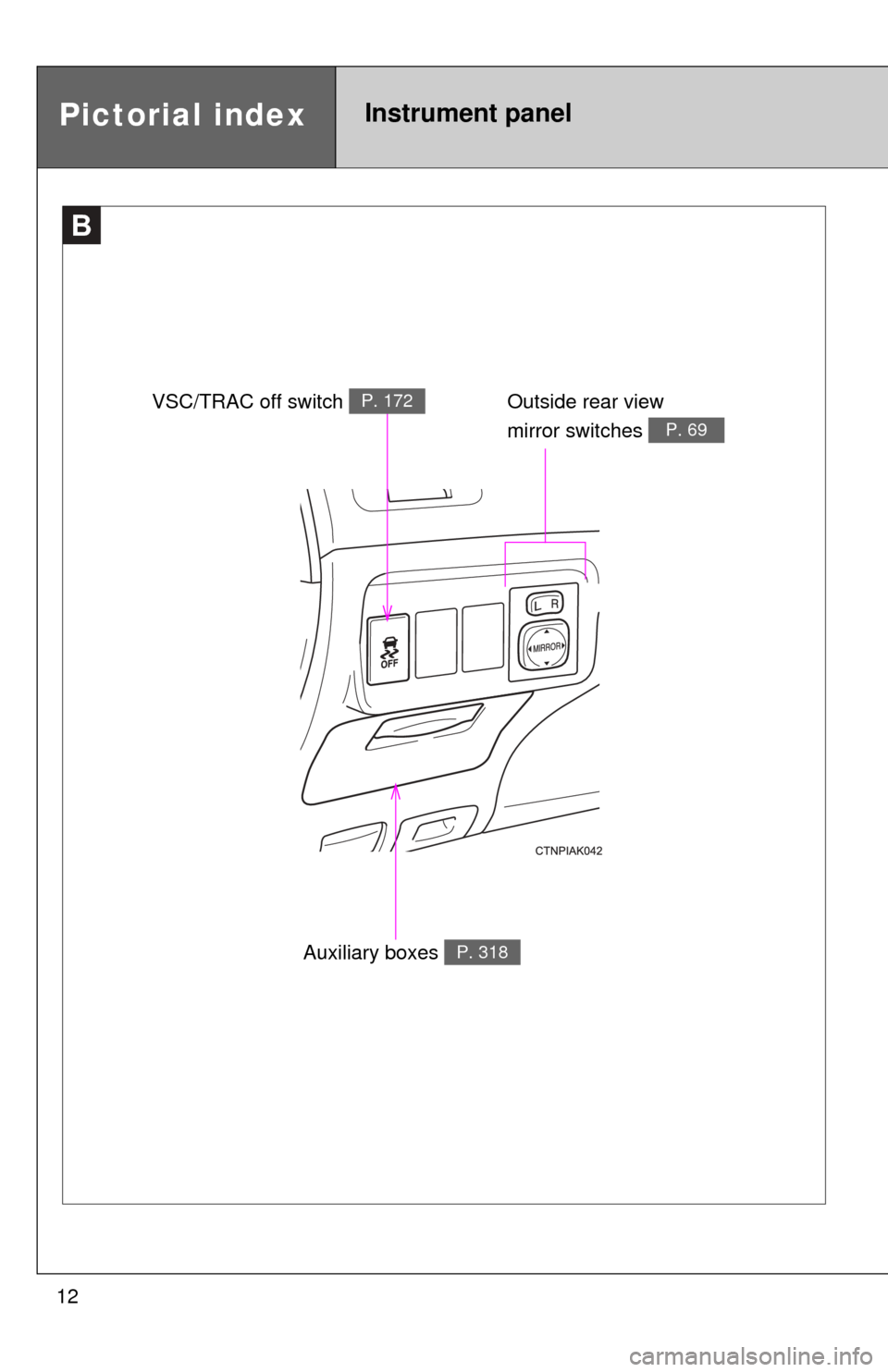
B
Outside rear view
mirror switches
P. 69
Auxiliary boxes P. 318
Pictorial indexInstrument panel
VSC/TRAC off switch P. 172
Page 31 of 532

31
1-2. Opening, closing and locking the doors and trunk
1
Before driving
■
Electronic key battery depletion
●The standard battery life is 1 to 2 years.
● The battery becomes depleted even if the electronic key is not used
because the key always receives radio waves. If the smart key system or
the wireless remote control function does not operate, or the detection
area becomes smaller, the battery may be depleted. Replace the battery
when necessary. ( P. 388)
● If the battery becomes low, an alarm will sound in the cabin when the
engine stops. ( P. 32)
● To avoid serious deterioration, do not leave the electronic key within 3 ft.
(1 m) of the following electrical appliances that produce a magnetic field:
•TVs
• Personal computers
• Recharging cellular phones or cordless phones
• Table lamps
■ To operate the system properly
Make sure to carry the electronic key when operating the system. Do not get
the electronic key too close to the vehicle when operating the system from
the outside of the vehicle.
Depending on the position and holding condition of the electronic key, the
key may not be detected correctly and the system may not operate properly.
(The alarm may go off accidentally, or the door lock prevention may not func-
tion.)
■ Note for the smart key system
●Even when the electronic key is within the effective range (detection
areas), the system may not operate properly in the following cases.
• The electronic key is too close to the window or outside door handle,
near the ground, or in a high place when the doors are locked or
unlocked.
• The electronic key is near the ground or in a high place, or too close to the rear bumper center when the trunk is unlocked.
• The electronic key is on the instrument panel, package tray, floor, or in the auxiliary box of the driver's side instrument panel or glove box
when the engine is started or “ENGINE START STOP” switch modes
are changed.
Page 204 of 532
204
3-1. Using the air conditioning system and defogger
Automatic air conditioning system ........................... 206
Manual air conditioning system ........................... 212
Rear window and outside rear view
mirror defoggers ............ 219
3-2. Using the audio system Audio system types .......... 220
Using the radio ................. 233
Using the CD player ......... 237
Playing back MP3 and WMA discs ..................... 244
Operating an iPod ............ 253
Operating a USB memory .......................... 262
Optimal use of the audio system ........................... 270
Using the AUX port .......... 274
Using the steering wheel audio switches ............... 276
Interior features3
Page 205 of 532
Interior features3
205
3-3. Using the Bluetooth®
audio system
Bluetooth
® audio/
phone ............................. 280
Using the Bluetooth
®
audio/phone ................... 283
Operating a Bluetooth
®
enabled portable
player ............................. 288
3-4. Using the hands-free phone system
(for cellular phone)
Making a phone call ......... 291
Using the “SET UP” menu (“Bluetooth” menu) ......... 296
Using the “SET UP” menu (“Phone” menu).............. 302
3-5. Using the interior lights Interior lights list ............... 308
• Interior light .................... 310
• Personal lights ............... 310
• Personal/interior lights .............................. 311 3-6. Using the storage
features
List of storage features .... 312
• Glove box....................... 313
• Console box ................... 313
• Cup holders ................... 315
• Auxiliary boxes ............... 318
• Bottle holders ................. 320
3-7. Other interior features Sun visors ........................ 321
Vanity mirrors ................... 322
Clock ................................ 323
Ashtray ............................. 324
Cigarette lighter................ 325
Power outlet ..................... 326
Seat heaters..................... 327
Assist grips....................... 329
Floor mat .......................... 330
Compass .......................... 331