ESP TOYOTA COROLLA 2014 11.G User Guide
[x] Cancel search | Manufacturer: TOYOTA, Model Year: 2014, Model line: COROLLA, Model: TOYOTA COROLLA 2014 11.GPages: 612, PDF Size: 12.58 MB
Page 95 of 612

953-1. Key information
3
Operation of each component
COROLLA_TMMMS_TMMC_U (OM12F00U)■Electronic key battery depletion (vehicles with a smart key system)
●The standard battery life is 1 to 2 years.
●If the battery becomes low, an alarm will sound in the cabin when the engine
stops. (P. 498, 509)
●As the electronic key always receives radio waves, the battery will become
depleted even if the electronic key is not used. The following symptoms indi-
cate that the electronic key battery may be depleted. Replace the battery
when necessary. (P. 464)
• The smart key system or the wireless remote control does not operate.
• The detection area becomes smaller.
• The LED indicator on the key surface does not turn on.
●To avoid serious deterioration, do not leave the electronic key within 3 ft. (1
m) of the following electrical appliances that produce a magnetic field:
•TVs
• Personal computers
• Cellular phones, cordless phones and battery chargers
• Recharging cellular phones or cordless phones
• Table lamps
• Induction cookers
■Replacing the battery
P. 464
■Confirmation of the registered key number
The number of keys already registered to the vehicle can be confirmed. Ask
your Toyota dealer for details.
■If a wrong key is used (vehicles with a smart key system)
The key cylinder rotates freely to isolate inside mechanism.
■Certification for the wireless remote control
For the U.S.A.
FCC ID: HYQ23AAH FCC ID: HYQ12BEL
NOTE:
This device complies with part 15 of the FCC Rules. Operation is subject to
the following two conditions: (1) This device may not cause harmful interfer-
ence, and (2) this device must accept any interference received, including
interference that may cause undesired operation.
FCC WARNING:
Changes or modifications not expressly approved by the party responsible for
compliance could void the user’s authority to operate the equipment.
For Canada
NOTE:
This device complies with Industry Canada licence-exempt RSS standard(s).
Operation is subject to the following two conditions: (1) this device may not
cause interference, and (2) this device must accept any interference, includ-
ing interference that may cause undesired operation of the device.
Page 103 of 612
1033-2. Opening, closing and locking the doors
3
Operation of each component
COROLLA_TMMMS_TMMC_U (OM12F00U)■
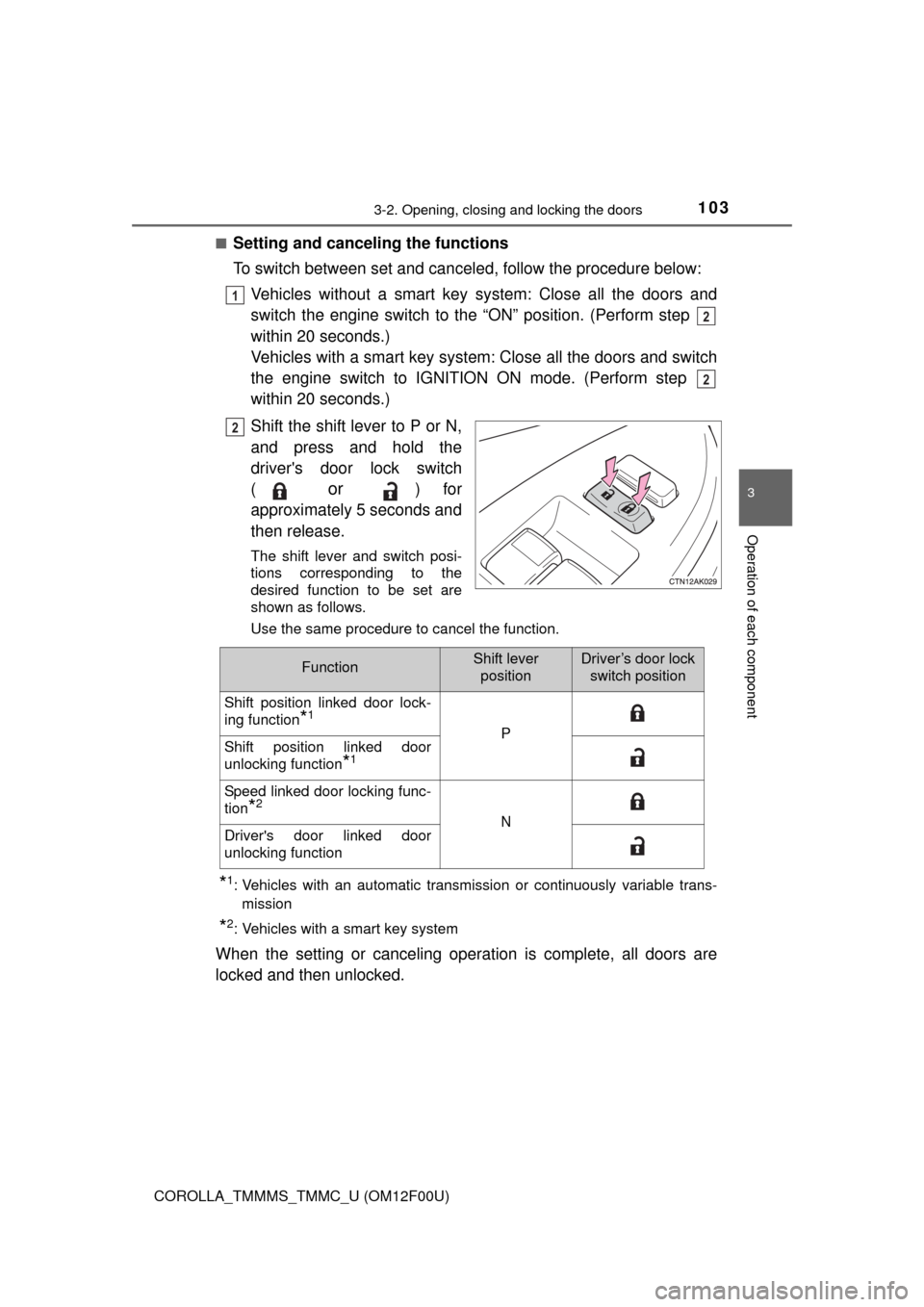
Setting and canceling the functions
To switch between set and canceled, follow the procedure below:
Vehicles without a smart key system: Close all the doors and
switch the engine switch to the “ON” position. (Perform step
within 20 seconds.)
Vehicles with a smart key system: Close all the doors and switch
the engine switch to IGNITION ON mode. (Perform step
within 20 seconds.)
Shift the shift lever to P or N,
and press and hold the
driver's door lock switch
(
or ) for
approximately 5 seconds and
then release.
The shift lever and switch posi-
tions corresponding to the
desired function to be set are
shown as follows.
Use the same procedure to cancel the function.
*1: Vehicles with an automatic transmission or continuously variable trans-
mission
*2: Vehicles with a smart key system
When the setting or canceling operation is complete, all doors are
locked and then unlocked.
1
2
2
2
FunctionShift lever
positionDriver’s door lock
switch position
Shift position linked door lock-
ing function
*1
PShift position linked door
unlocking function
*1
Speed linked door locking func-
tion
*2
NDriver's door linked door
unlocking function
Page 105 of 612

1053-2. Opening, closing and locking the doors
3
Operation of each component
COROLLA_TMMMS_TMMC_U (OM12F00U)■Conditions affecting the operation of the smart key system or wireless
remote control (with a wireless remote control function)
Vehicles without a smart key system
The wireless remote control function may not operate normally in the follow-
ing situations:
●When the wireless key battery is depleted
●Near a TV tower, radio station, electric power plant, airport or other facility
that generates strong radio waves
●When carrying a portable radio, cellular phone or other wireless communi-
cation devices
●When multiple wireless keys are in the vicinity
●When the wireless key is in contact with, or is covered by a metallic object
●When a wireless key (that emits radio waves) is being used nearby
●When the wireless key has been left near an electrical appliance such as a
personal computer
●If window tint with a metallic content or metallic objects are attached to the
rear window
Vehicles with a smart key system
P. 1 1 5
■Customization
Settings (e.g. unlocking function using a key) can be changed.
(Customizable features: P. 570)
CAUTION
■To prevent an accident
Observe the following precautions while driving the vehicle.
Failure to do so may result in a door opening and an occupant falling out,
resulting in death or serious injury.
●Always use a seat belt.
●Always lock all the doors.
●Ensure that all doors are properly closed.
●Do not pull the inside handle of the doors while driving.
The doors may be opened and the passengers are thrown out of the vehi-
cle and it may result in serious injury or death.
Be especially careful for the front doors, as the doors may be opened
even if the inside lock buttons are in locked position.
●Set the rear door child-protector locks when children are seated in the rear
seats.
Page 112 of 612
1123-2. Opening, closing and locking the doors
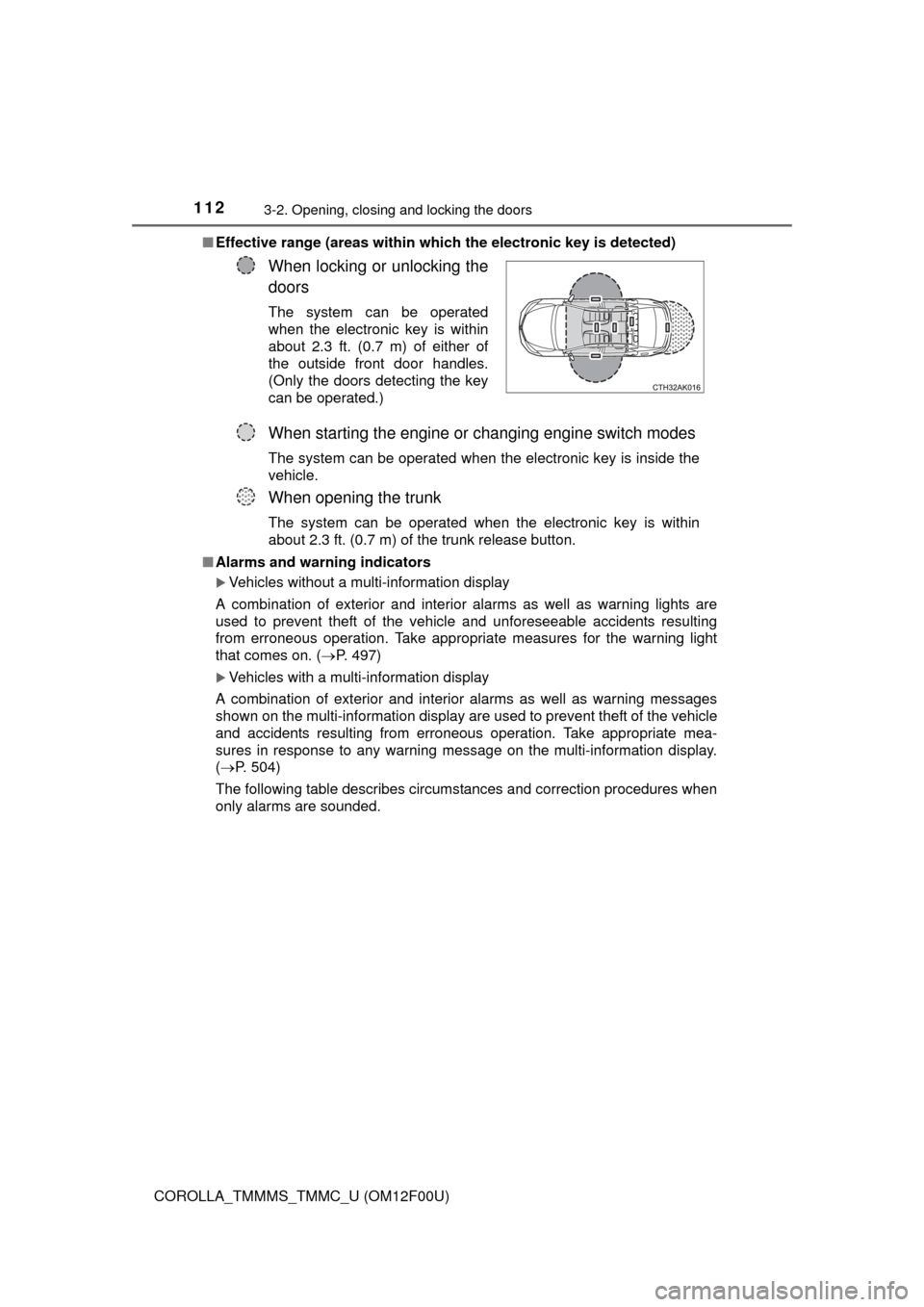
COROLLA_TMMMS_TMMC_U (OM12F00U)■Effective range (areas within which the electronic key is detected)
■Alarms and warning indicators
Vehicles without a multi-information display
A combination of exterior and interior alarms as well as warning lights are
used to prevent theft of the vehicle and unforeseeable accidents resulting
from erroneous operation. Take appropriate measures for the warning light
that comes on. (P. 497)
Vehicles with a multi-information display
A combination of exterior and interior alarms as well as warning messages
shown on the multi-information display are used to prevent theft of the vehicle
and accidents resulting from erroneous operation. Take appropriate mea-
sures in response to any warning message on the multi-information display.
(P. 504)
The following table describes circumstances and correction procedures when
only alarms are sounded.
When locking or unlocking the
doors
The system can be operated
when the electronic key is within
about 2.3 ft. (0.7 m) of either of
the outside front door handles.
(Only the doors detecting the key
can be operated.)
When starting the engine or changing engine switch modes
The system can be operated when the electronic key is inside the
vehicle.
When opening the trunk
The system can be operated when the electronic key is within
about 2.3 ft. (0.7 m) of the trunk release button.
Page 118 of 612

1183-2. Opening, closing and locking the doors
COROLLA_TMMMS_TMMC_U (OM12F00U)■Certification for the smart key system
For the U.S.A.
FCC ID: HYQ23AAB FCC ID: HYQ14FBA
NOTE:
This device complies with part 15 of the FCC Rules. Operation is subject to
the following two conditions: (1) This device may not cause harmful interfer-
ence, and (2) this device must accept any interference received, including
interference that may cause undesired operation.
FCC WARNING:
Changes or modifications not expressly approved by the party responsible for
compliance could void the user’s authority to operate the equipment.
For Canada
NOTE:
This device complies with Industry Canada licence-exempt RSS standard(s).
Operation is subject to the following two conditions: (1) this device may not
cause interference, and (2) this device must accept any interference, includ-
ing interference that may cause undesired operation of the device.
For the U.S.A.
FCC ID: NI4TMLF10-21 FCC ID: NI4TMLF10-51
This device complies with part 15 of the FCC Rules. Operation is subject to
the following two conditions: (1) This device may not cause harmful interfer-
ence, and (2) this device must accept any interference received, including
interference that may cause undesired operation.
Changes or modifications not expressly approved by the party responsible for
compliance could void the user’s authority to operate the equipment.
For Canada
This device complies with Industry Canada licence-exempt RSS standard(s).
Operation is subject to the following two conditions: (1) this device may not
cause interference, and (2) this device must accept any interference, includ-
ing interference that may cause undesired operation of the device.
Page 126 of 612

1263-3. Adjusting the seats
COROLLA_TMMMS_TMMC_U (OM12F00U)
CAUTION
■Head restraint precautions
Observe the following precautions regarding the head restraints. Failure to
do so may result in death or serious injury.
●Use the head restraints designed for each respective seat.
●Adjust the head restraints to the correct position at all times.
●After adjusting the head restraints, push down on them and make sure
they are locked in position.
●Do not drive with the head restraints removed.
Page 130 of 612
1303-4. Adjusting the steering wheel and mirrors
COROLLA_TMMMS_TMMC_U (OM12F00U)
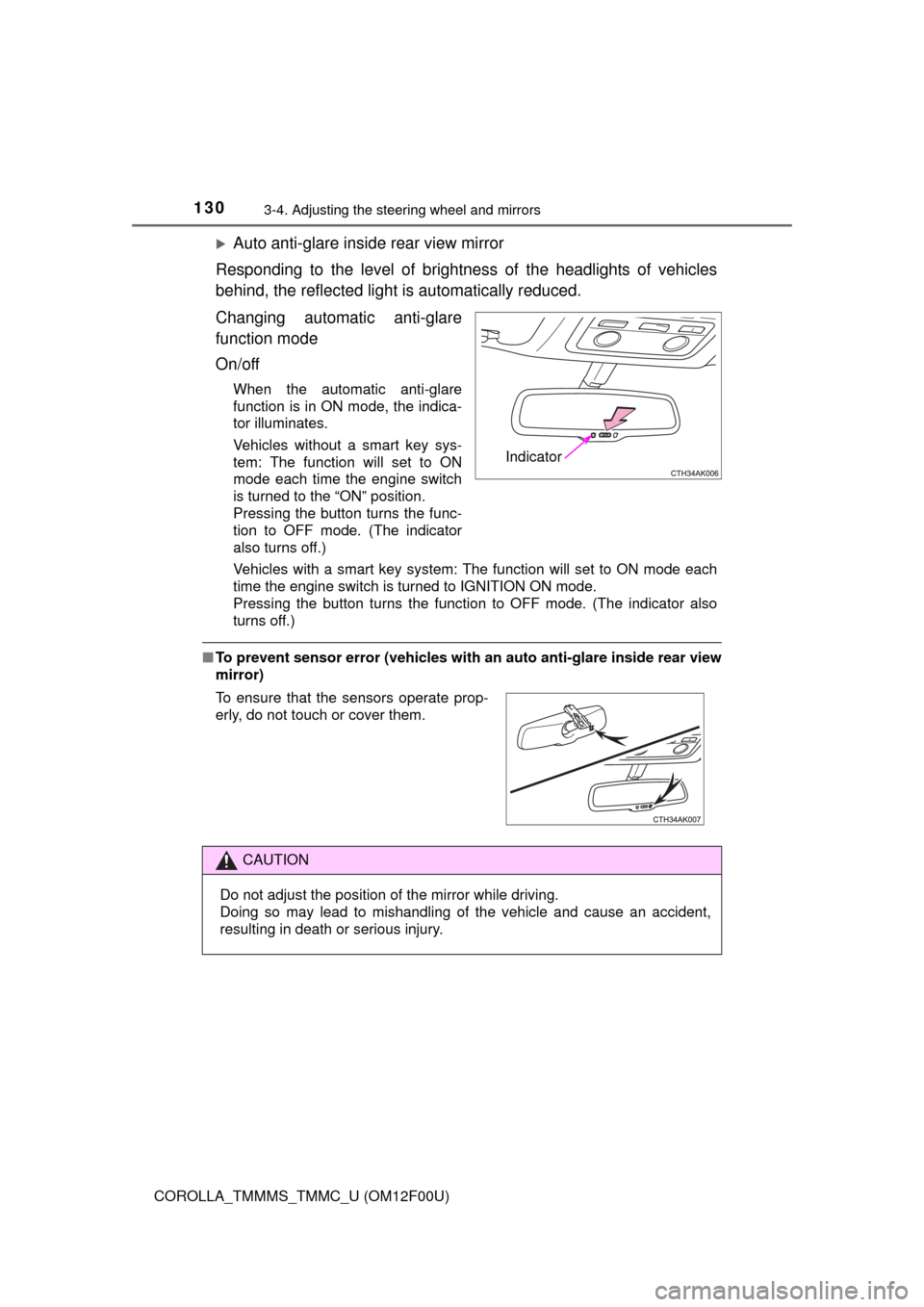
Auto anti-glare inside rear view mirror
Responding to the level of brightness of the headlights of vehicles
behind, the reflected light is automatically reduced.
Changing automatic anti-glare
function mode
On/off
When the automatic anti-glare
function is in ON mode, the indica-
tor illuminates.
Vehicles without a smart key sys-
tem: The function will set to ON
mode each time the engine switch
is turned to the “ON” position.
Pressing the button turns the func-
tion to OFF mode. (The indicator
also turns off.)
Vehicles with a smart key system: The function will set to ON mode each
time the engine switch is turned to IGNITION ON mode.
Pressing the button turns the function to OFF mode. (The indicator also
turns off.)
■To prevent sensor error (vehicles with an auto anti-glare inside rear view
mirror)
Indicator
To ensure that the sensors operate prop-
erly, do not touch or cover them.
CAUTION
Do not adjust the position of the mirror while driving.
Doing so may lead to mishandling of the vehicle and cause an accident,
resulting in death or serious injury.
Page 145 of 612

1454-1. Before driving
4
Driving
COROLLA_TMMMS_TMMC_U (OM12F00U)
■Driving in the rain
●Drive carefully when it is raining, because visibility will be reduced, the win-
dows may become fogged-up, and the road will be slippery.
●Drive carefully when it starts to rain, because the road surface will be espe-
cially slippery.
●Refrain from high speeds when driving on an expressway in the rain,
because there may be a layer of water between the tires and the road sur-
face, preventing the steering and brakes from operating properly.
■Engine speed while driving (except vehicles with a manual transmis-
sion)
In the following conditions, the engine speed may become high while driving.
This is due to automatic up-shifting control or down-shifting implementation to
meet driving conditions. It does not indicate sudden acceleration.
●The vehicle is judged to be driving uphill or downhill
●When the accelerator pedal is released
●When the brake pedal is depressed while sport mode is selected (if
equipped)
●When the brake pedal is depressed suddenly and vehicle speed is reduced
sharply (continuously variable transmission)
■Breaking in your new Toyota
To extend the life of the vehicle, observing the following precautions is recom-
mended:
●For the first 186 miles (300 km):
Avoid sudden stops.
●For the first 621 miles (1000 km):
• Do not drive at extremely high speeds.
• Avoid sudden acceleration.
• Do not drive continuously in low gears.
• Do not drive at a constant speed for extended periods.
■Operating your vehicle in a foreign country
Comply with the relevant vehicle registration laws and confirm the availability
of the correct fuel. (P. 546)
CAUTION
Observe the following precautions.
Failure to do so may result in death or serious injury.
■When starting the vehicle (except vehicles with a manual transmission)
Always keep your foot on the brake pedal while stopped with the engine
running. This prevents the vehicle from creeping.
Page 146 of 612

1464-1. Before driving
COROLLA_TMMMS_TMMC_U (OM12F00U)
CAUTION
Observe the following precautions.
Failure to do so may result in death or serious injury.
■When driving the vehicle
●Do not drive if you are unfamiliar with the location of the brake and accel-
erator pedals to avoid depressing the wrong pedal.
• Accidentally depressing the accelerator pedal instead of the brake
pedal will result in sudden acceleration that may lead to an accident.
• When backing up, you may twist your body around, leading to a diffi-
culty in operating the pedals. Make sure to operate the pedals properly.
• Make sure to keep a correct driving posture even when moving the
vehicle only slightly. This allows you to depress the brake and accelera-
tor pedals properly.
• Depress the brake pedal using your right foot. Depressing the brake
pedal using your left foot may delay response in an emergency, result-
ing in an accident.
●Do not drive the vehicle over or stop the vehicle near flammable materials.
The exhaust system and exhaust gases can be extremely hot. These hot
parts may cause a fire if there is any flammable material nearby.
●During normal driving, do not turn off the engine. Turning the engine off
while driving will not cause loss of steering or braking control, but the
power assist to these systems will be lost. This will make it more difficult to
steer and brake, so you should pull over and stop the vehicle as soon as it
is safe to do so.
However, in the event of an emergency, such as if it becomes impossible
to stop the vehicle in the normal way: P. 483
●Use engine braking (downshift) to maintain a safe speed when driving
down a steep hill.
Using the brakes continuously may cause the brakes to overheat and lose
effectiveness. (P. 172, 174, 176, 180)
●Do not adjust the display, the positions of the steering wheel, the seat, or
the inside or outside rear view mirrors while driving.
Doing so may result in a loss of vehicle control.
●Always check that all passengers’ arms, heads or other parts of their body
are not outside the vehicle.
●Do not drive in excess of the speed limit. Even if the legal speed limit per-
mits it, do not drive over 85 mph (140 km/h) unless your vehicle has high-
speed capability tires. Driving over 85 mph (140 km/h) may result in tire
failure, loss of control and possible injury. Be sure to consult a tire dealer
to determine whether the tires on your vehicle are high-speed capability
tires or not before driving at such speeds.
Page 175 of 612
1754-2. Driving procedures
4
Driving
COROLLA_TMMMS_TMMC_U (OM12F00U)
*: To improve fuel efficiency and reduce noises, set the shift lever in D for
normal driving.
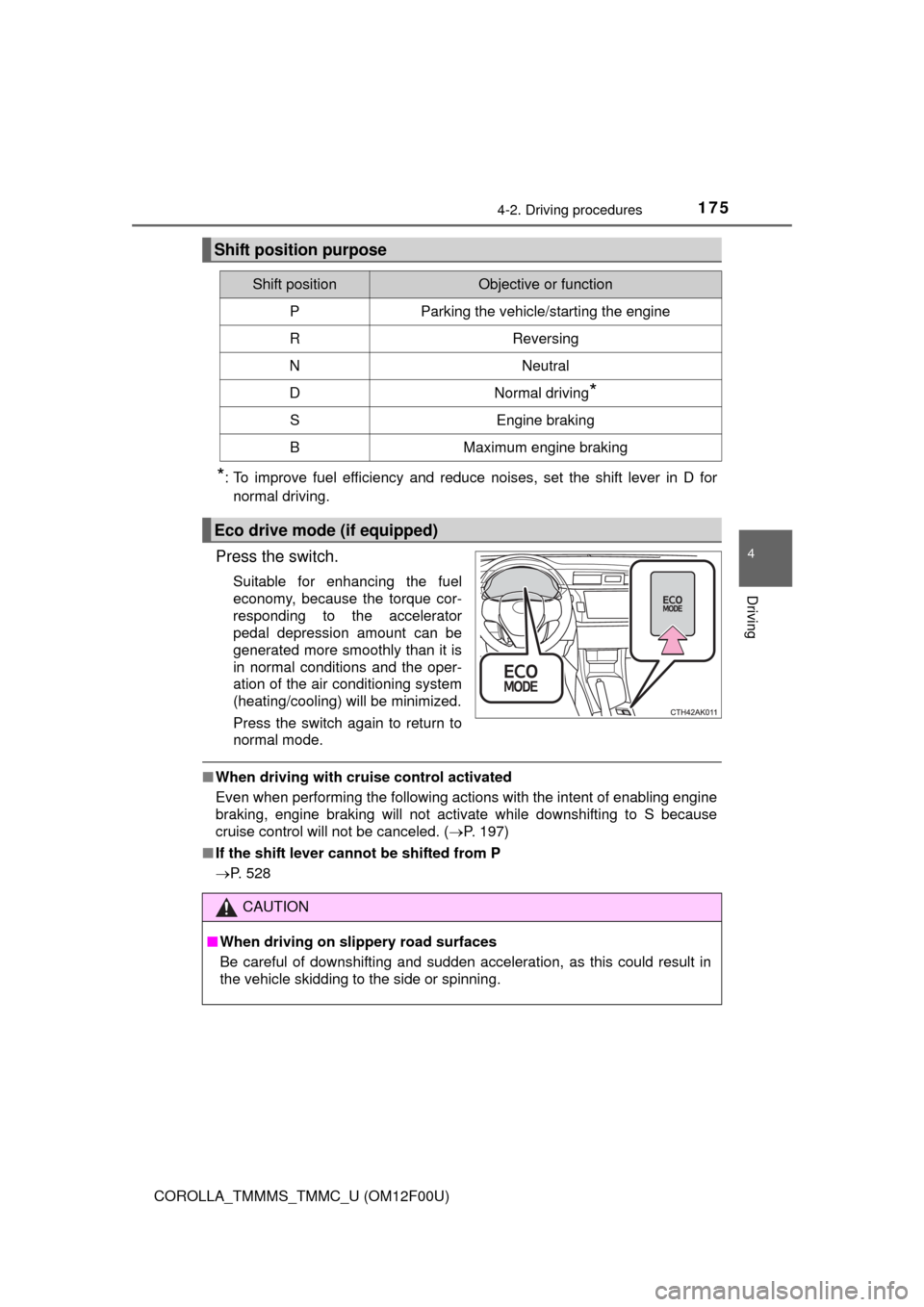
Press the switch.
Suitable for enhancing the fuel
economy, because the torque cor-
responding to the accelerator
pedal depression amount can be
generated more smoothly than it is
in normal conditions and the oper-
ation of the air conditioning system
(heating/cooling) will be minimized.
Press the switch again to return to
normal mode.
■When driving with cruise control activated
Even when performing the following actions with the intent of enabling engine
braking, engine braking will not activate while downshifting to S because
cruise control will not be canceled. (P. 197)
■If the shift lever cannot be shifted from P
P. 528
Shift position purpose
Shift positionObjective or function
PParking the vehicle/starting the engine
RReversing
NNeutral
DNormal driving*
SEngine braking
BMaximum engine braking
Eco drive mode (if equipped)
CAUTION
■When driving on slippery road surfaces
Be careful of downshifting and sudden acceleration, as this could result in
the vehicle skidding to the side or spinning.