change time TOYOTA COROLLA 2014 11.G User Guide
[x] Cancel search | Manufacturer: TOYOTA, Model Year: 2014, Model line: COROLLA, Model: TOYOTA COROLLA 2014 11.GPages: 612, PDF Size: 12.58 MB
Page 182 of 612
1824-2. Driving procedures
COROLLA_TMMMS_TMMC_U (OM12F00U)
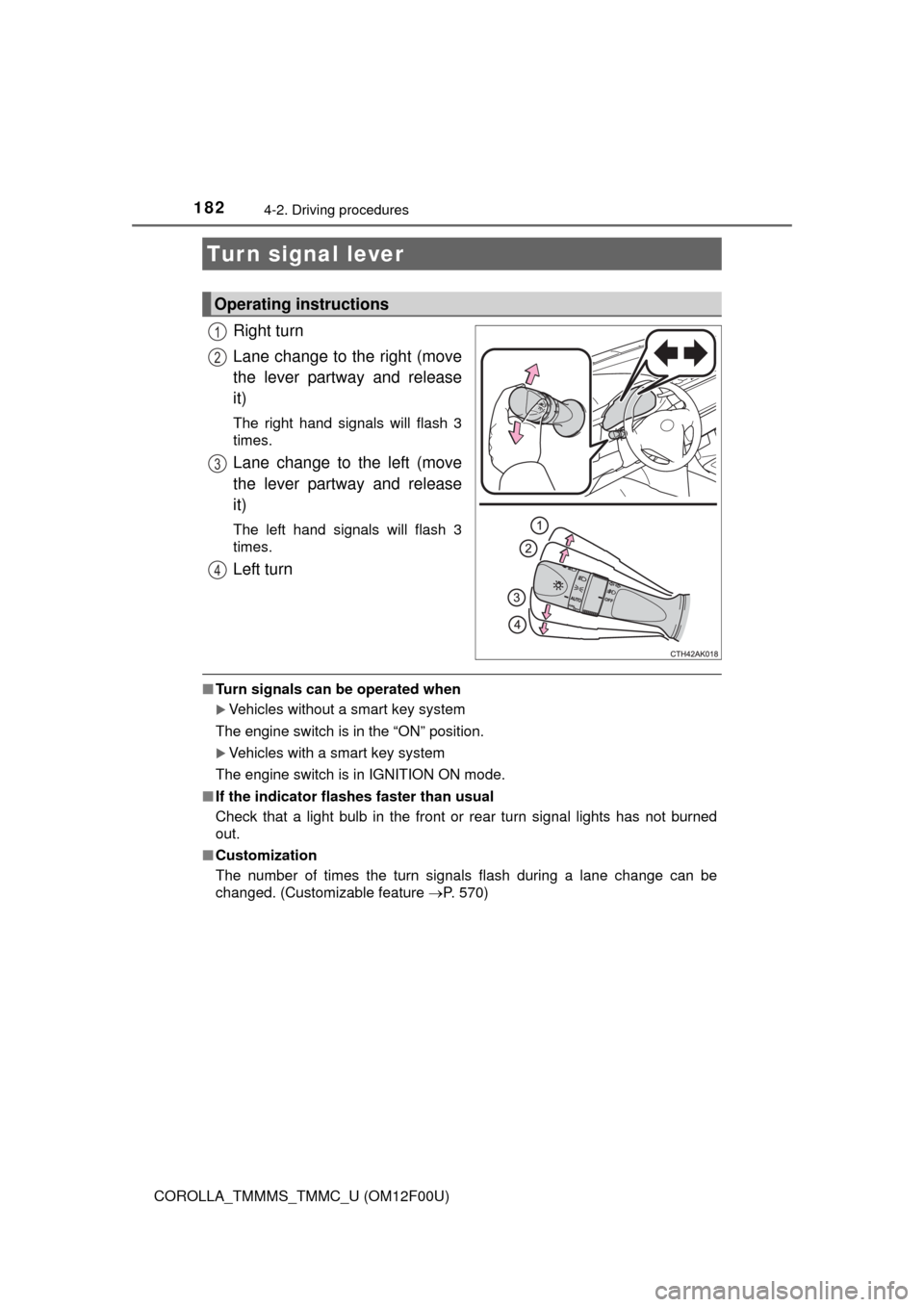
Right turn
Lane change to the right (move
the lever partway and release
it)
The right hand signals will flash 3
times.
Lane change to the left (move
the lever partway and release
it)
The left hand signals will flash 3
times.
Left turn
■Turn signals can be operated when
Vehicles without a smart key system
The engine switch is in the “ON” position.
Vehicles with a smart key system
The engine switch is in IGNITION ON mode.
■If the indicator flashes faster than usual
Check that a light bulb in the front or rear turn signal lights has not burned
out.
■Customization
The number of times the turn signals flash during a lane change can be
changed. (Customizable feature P. 570)
Turn signal lever
Operating instructions
1
2
3
4
Page 198 of 612
1984-5. Using the driving support systems
COROLLA_TMMMS_TMMC_U (OM12F00U)
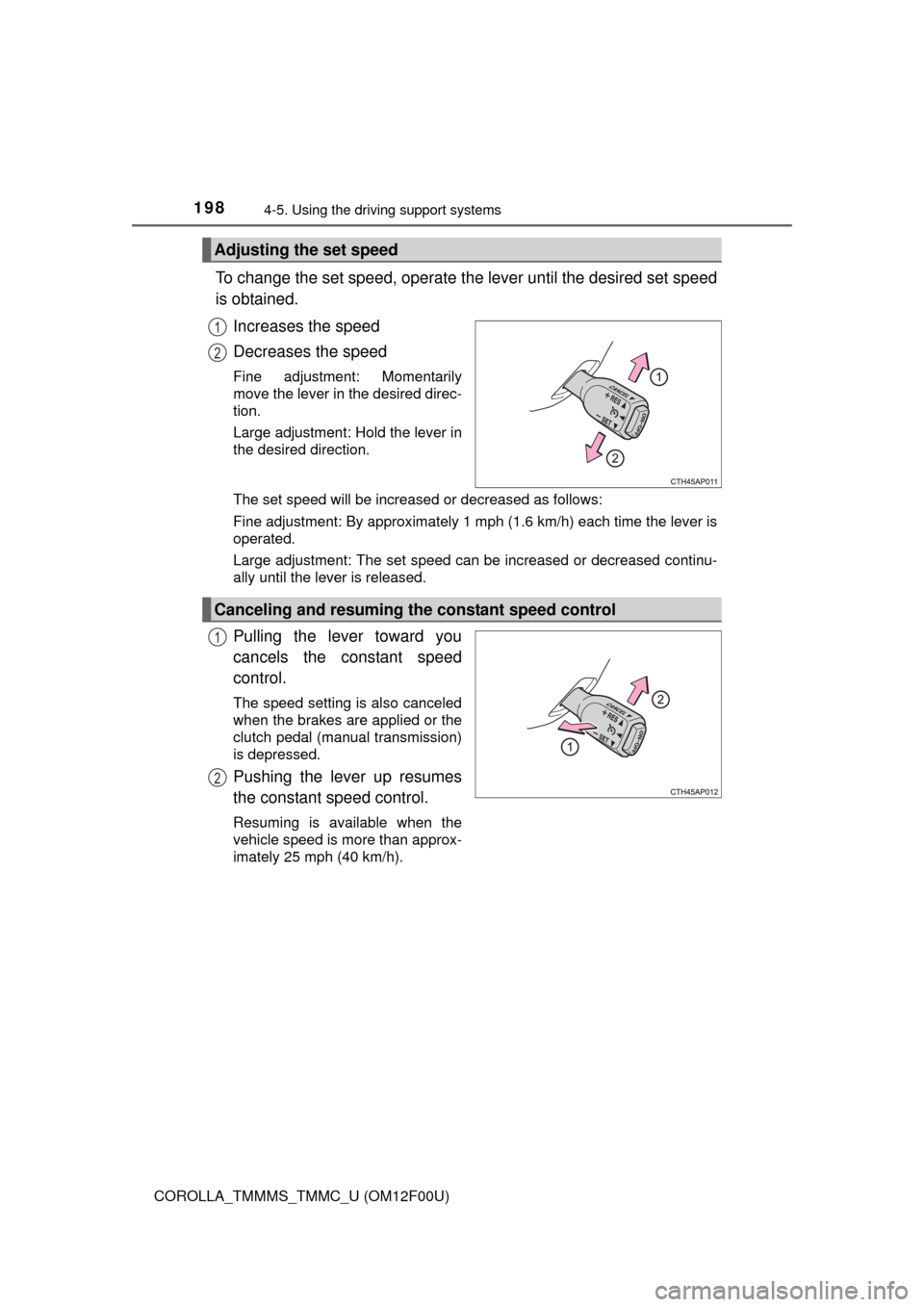
To change the set speed, operate the lever until the desired set speed
is obtained.
Increases the speed
Decreases the speed
Fine adjustment: Momentarily
move the lever in the desired direc-
tion.
Large adjustment: Hold the lever in
the desired direction.
The set speed will be increased or decreased as follows:
Fine adjustment: By approximately 1 mph (1.6 km/h) each time the lever is
operated.
Large adjustment: The set speed can be increased or decreased continu-
ally until the lever is released.
Pulling the lever toward you
cancels the constant speed
control.
The speed setting is also canceled
when the brakes are applied or the
clutch pedal (manual transmission)
is depressed.
Pushing the lever up resumes
the constant speed control.
Resuming is available when the
vehicle speed is more than approx-
imately 25 mph (40 km/h).
Adjusting the set speed
1
2
Canceling and resuming the constant speed control
1
2
Page 223 of 612
2235-1. Basic Operations
5
Interior features
COROLLA_TMMMS_TMMC_U (OM12F00U)
CAUTION
■U.S.A.
FCC ID: ACJ932PTA184
NOTE:
This device complies with Part 15 of the FCC Rules.
Operation is subject to the following two conditions:
(1) this device may not cause harmful interference and
(2) this device must accept any interference received, including interference
that may cause undesired operation.
FCC WARNING:
Changes or modifications in construction not expressly approved by the
party responsible for compliance could void the user’s authority to operate
the equipment.
Radio frequency exposure. This device is approved for Mobile Application
only and, to comply with applicable FCC radio frequency exposure regula-
tions, must be used with a distance of at least 7.9 in. (20 cm) between the
antenna and the body of any person at all time during use.
■U.S.A. and Canada
●Part 15 of the FCC Rules
FCC Warning:
Any unauthorized changes or modifications to this equipment will void the
user’s authority to operate this device.
Page 284 of 612
2845-11. Basic Operations (Multimedia system)
COROLLA_TMMMS_TMMC_U (OM12F00U)
By touching the screen with your finger, you can control the multime-
dia system, etc.
■Drag*
Touch the screen with your finger, and move the screen to the
desired position.
●Scrolling the lists
●Using scroll bar in lists
■Flick*
Touch the screen with your finger and quickly move the screen by
flicking your finger.
●Scrolling the main screen page
●Returning to the menu screen from the sub-menu screen (screen
one level below)
*: The above operations may not be performed on all screens.
■When using the touch screen
●If the screen is cold, the display may be dark, or the system may seem to be
operating slightly slower than normal.
●The screen may seem dark and hard to see when viewed through sun-
glasses. Change your angle of viewing, adjust the display on the “Display
Settings” screen (P. 294) or remove your sunglasses.
Operating the touch screen
NOTICE
■To avoid damaging the touch screen
●To prevent damaging the screen, lightly touch the screen buttons with your
finger.
●Do not use objects other than your finger to touch the screen.
●Wipe off fingerprints using a glass cleaning cloth. Do not use chemical
cleaners to clean the screen, as they may damage the touch screen.
Page 285 of 612
2855-11. Basic Operations (Multimedia system)
5
Interior features
COROLLA_TMMMS_TMMC_U (OM12F00U)
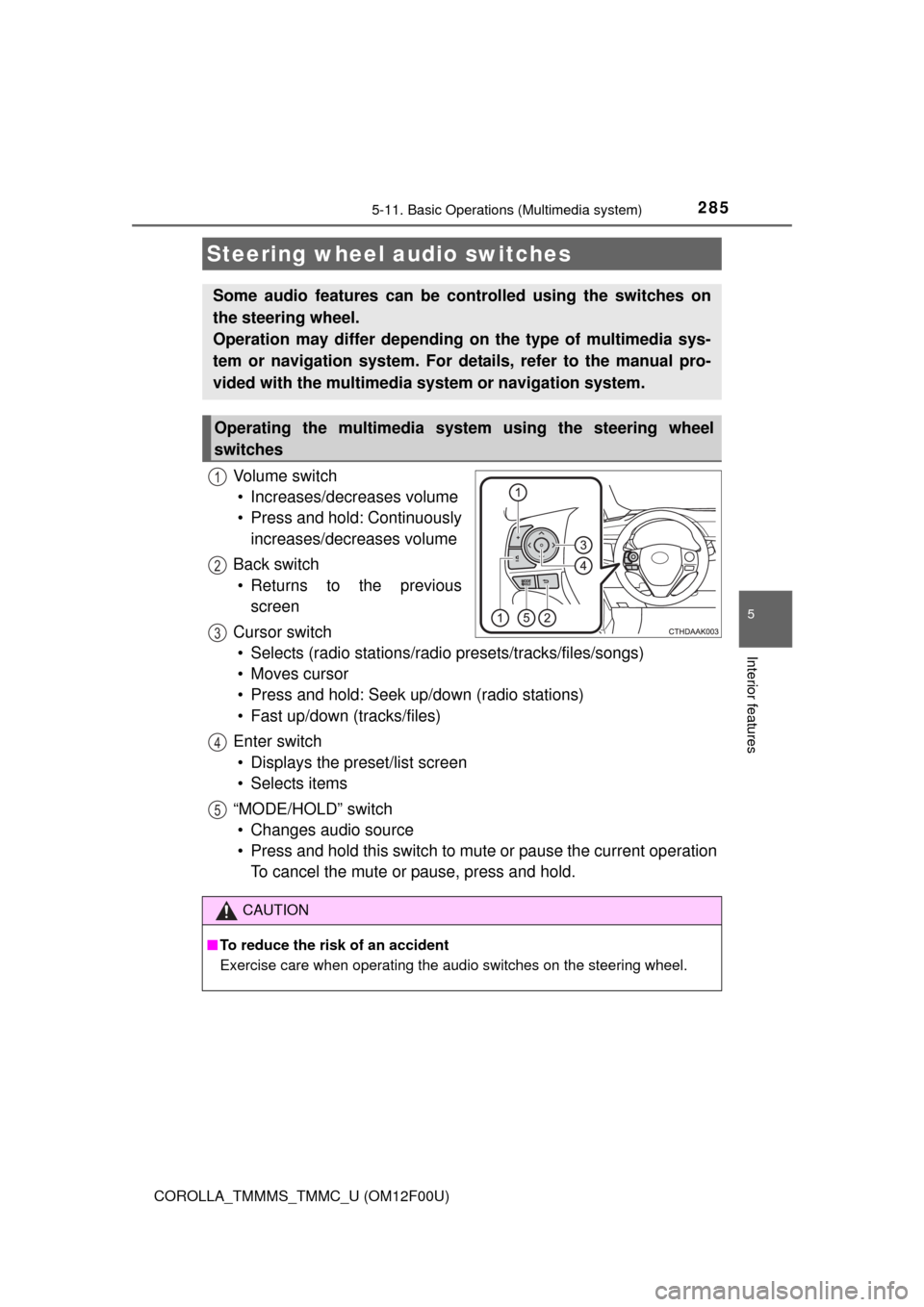
Vo l u m e s w i t c h
• Increases/decreases volume
• Press and hold: Continuously
increases/decreases volume
Back switch
• Returns to the previous
screen
Cursor switch
• Selects (radio stations/radio presets/tracks/files/songs)
• Moves cursor
• Press and hold: Seek up/down (radio stations)
• Fast up/down (tracks/files)
Enter switch
• Displays the preset/list screen
• Selects items
“MODE/HOLD” switch
• Changes audio source
• Press and hold this switch to mute or pause the current operation
To cancel the mute or pause, press and hold.
Steering wheel audio switches
Some audio features can be controlled using the switches on
the steering wheel.
Operation may differ depending on the type of multimedia sys-
tem or navigation system. For details, refer to the manual pro-
vided with the multimedia system or navigation system.
Operating the multimedia system using the steering wheel
switches
1
12
3
4
5
CAUTION
■To reduce the risk of an accident
Exercise care when operating the audio switches on the steering wheel.
Page 288 of 612
2885-11. Basic Operations (Multimedia system)
COROLLA_TMMMS_TMMC_U (OM12F00U)
Select to change on/off.
Select to change on/off.
■Using cellular phones
Interference may be heard through the multimedia system's speakers if a cel-
lular phone is being used inside or close to the vehicle while the multimedia
system is operating.
Random playback
Repeat play
CAUTION
■Laser product
This product is a class 1 laser product.
Do not open the cover of the player or attempt to repair the unit yourself.
Refer servicing to qualified personnel.
●Laser products
• Do not take this unit apart or attempt to make any changes yourself.
This is an intricate unit that uses a laser pickup to retrieve information
from the surface of compact discs. The laser is carefully shielded so
that its rays remain inside the cabinet. Therefore, never try to disassem-
ble the player or alter any of its parts since you may be exposed to laser
rays and dangerous voltages.
• This product utilizes a laser.
Use of controls or adjustments or performance of procedures other than
those specified herein may result in hazardous radiation exposure.
THE USE OF OPTICAL INSTRUMENTS WITH THIS PRODUCT WILL
INCREASE EYE HAZARD.
NOTICE
■To prevent battery discharge
Do not leave the multimedia system on longer than necessary when the
engine is off.
■To avoid damaging the multimedia system
Take care not to spill drinks or other fluids on the multimedia system.
Page 290 of 612
2905-12. Setup (Multimedia system)
COROLLA_TMMMS_TMMC_U (OM12F00U)
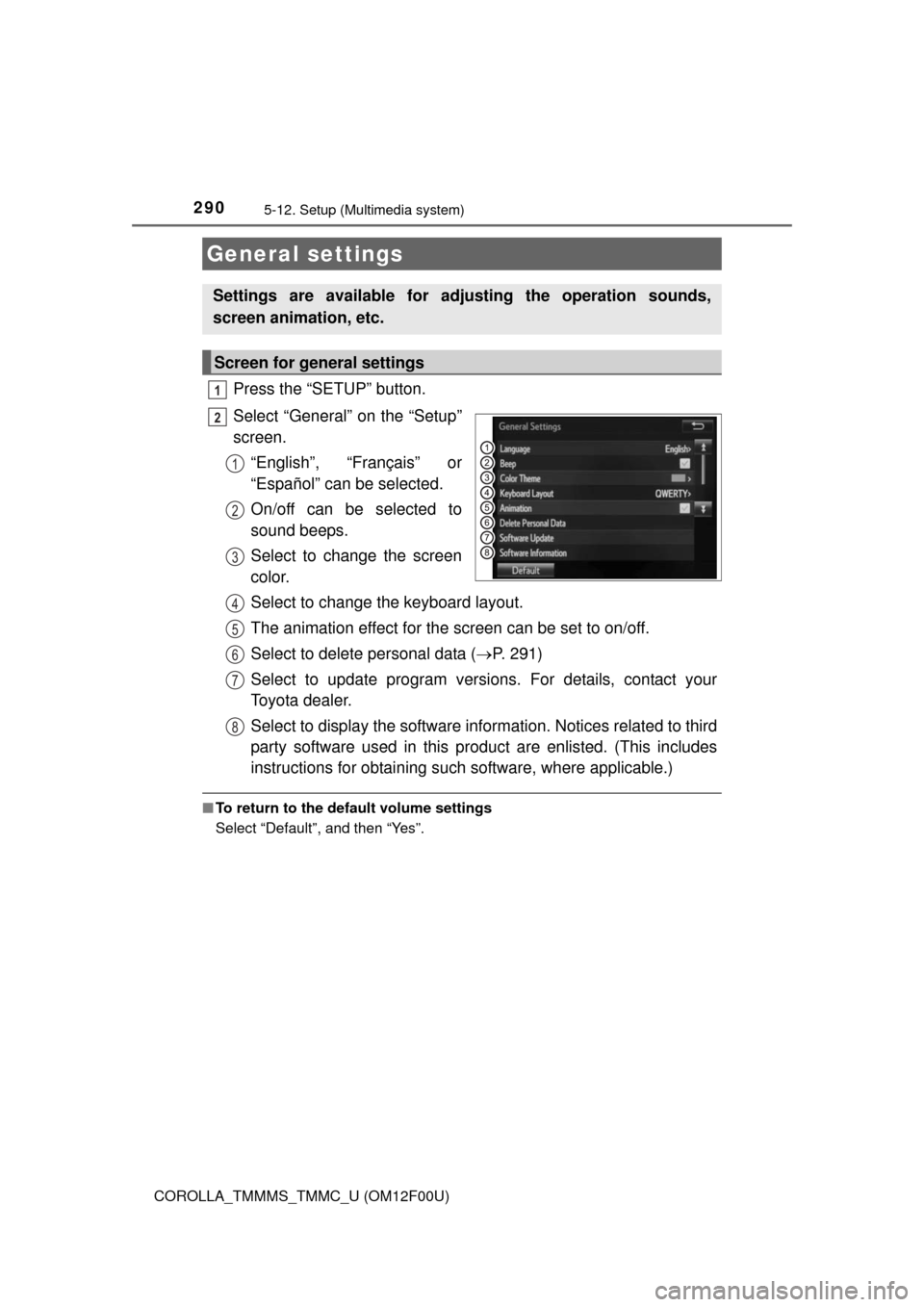
Press the “SETUP” button.
Select “General” on the “Setup”
screen.
“English”, “Français” or
“Español” can be selected.
On/off can be selected to
sound beeps.
Select to change the screen
color.
Select to change the keyboard layout.
The animation effect for the screen can be set to on/off.
Select to delete personal data (P. 291)
Select to update program versions. For details, contact your
Toyota dealer.
Select to display the software information. Notices related to third
party software used in this product are enlisted. (This includes
instructions for obtaining such software, where applicable.)
■To return to the default volume settings
Select “Default”, and then “Yes”.
General settings
Settings are available for adjusting the operation sounds,
screen animation, etc.
Screen for general settings
1
2
1
2
3
4
5
6
7
8
Page 291 of 612
2915-12. Setup (Multimedia system)
5
Interior features
COROLLA_TMMMS_TMMC_U (OM12F00U)
Select “Delete Personal Data” on the “General Settings” screen.
Select “Delete”.
Check carefully beforehand, as data cannot be retrieved once deleted.
A confirmation screen will be displayed. Select “Yes”.
The following personal data will be deleted or changed to its default
settings.
• General settings
• Audio settings
• Phone settings
Delete personal data
1
2
3
Page 294 of 612
2945-12. Setup (Multimedia system)
COROLLA_TMMMS_TMMC_U (OM12F00U)
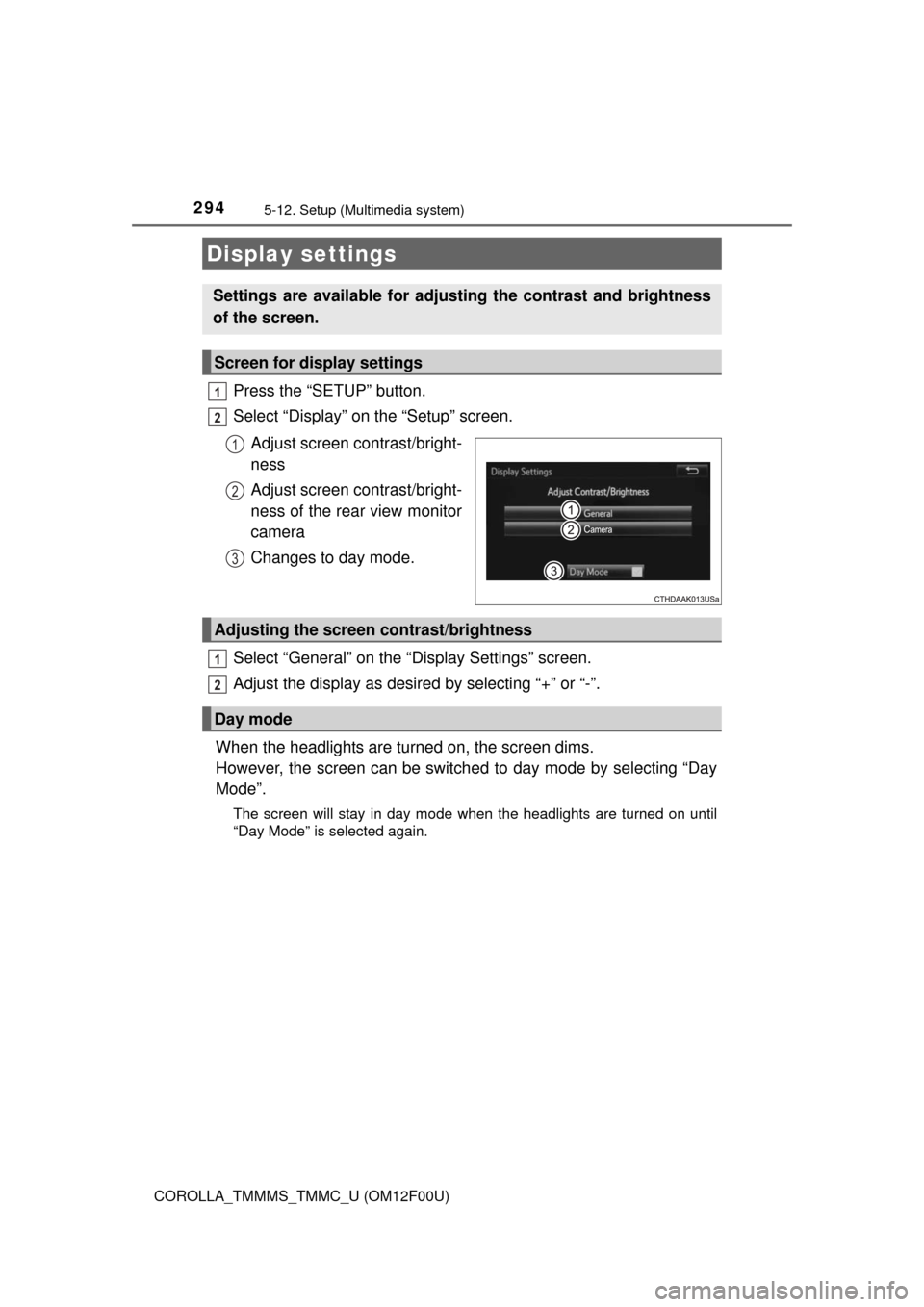
Press the “SETUP” button.
Select “Display” on the “Setup” screen.
Adjust screen contrast/bright-
ness
Adjust screen contrast/bright-
ness of the rear view monitor
camera
Changes to day mode.
Select “General” on the “Display Settings” screen.
Adjust the display as desired by selecting “+” or “-”.
When the headlights are turned on, the screen dims.
However, the screen can be switched to day mode by selecting “Day
Mode”.
The screen will stay in day mode when the headlights are turned on until
“Day Mode” is selected again.
Display settings
Settings are available for adjusting the contrast and brightness
of the screen.
Screen for display settings
1
2
1
2
3
Adjusting the screen contrast/brightness
Day mode
1
2
Page 296 of 612
296
COROLLA_TMMMS_TMMC_U (OM12F00U)5-
13.
Using the Multimedia system
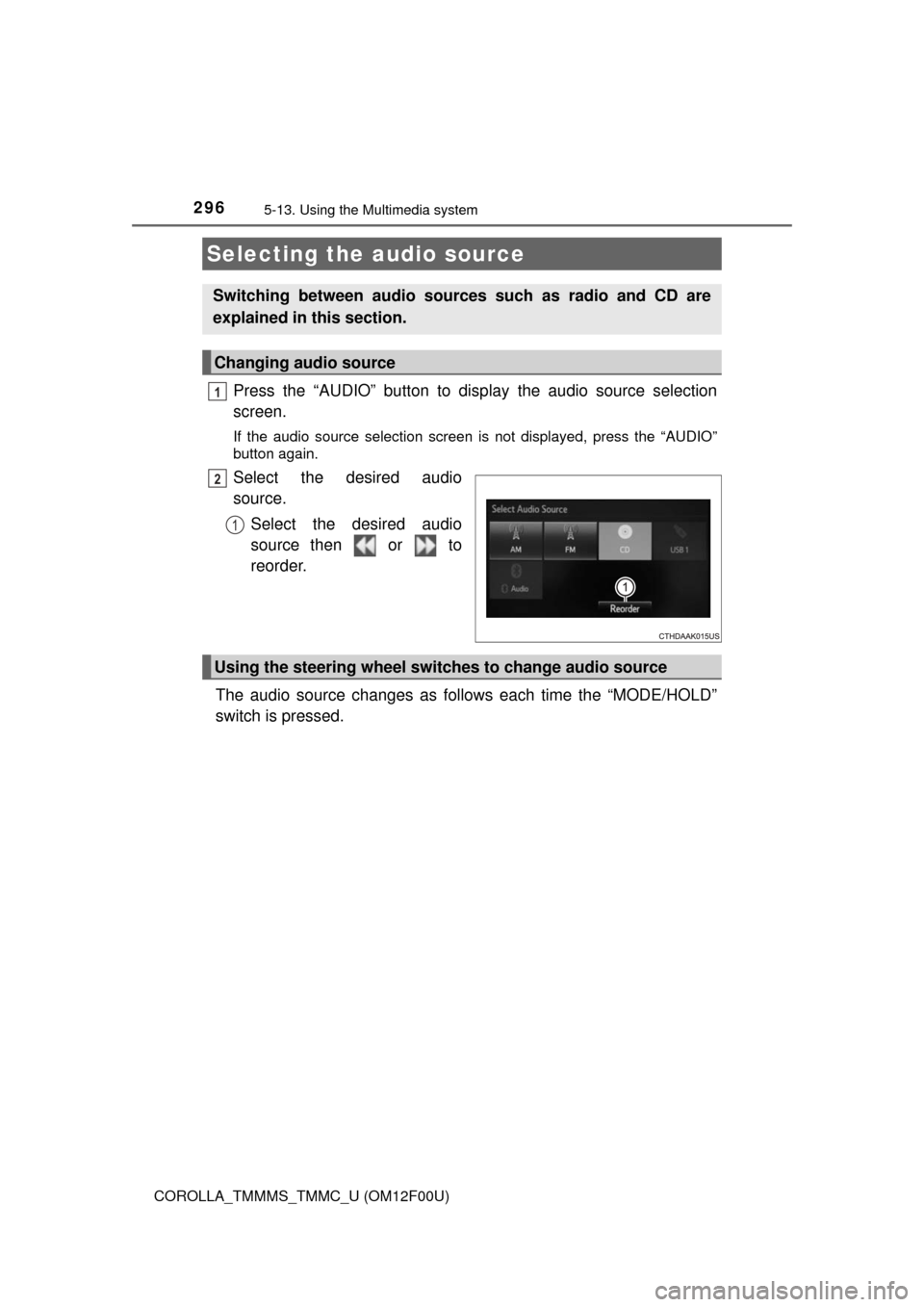
Press the “AUDIO” button to disp lay the audio source selection
screen.
If the audio source selection screen is not displayed, press the “AUDIO”
button again.
Select the desired audio
source.
Select the desired audio
source then or to
reorder.
The audio source changes as follows each time the “MODE/HOLD”
switch is pressed.
Selecting the audio source
Switching between audio sources such as radio and CD are
explained in this section.
Changing audio source
1
2
1
Using the steering wheel switches to change audio source