buzzer TOYOTA COROLLA 2014 11.G Owners Manual
[x] Cancel search | Manufacturer: TOYOTA, Model Year: 2014, Model line: COROLLA, Model: TOYOTA COROLLA 2014 11.GPages: 612, PDF Size: 12.58 MB
Page 6 of 612

TABLE OF CONTENTS6
COROLLA_TMMMS_TMMC_U (OM12F00U)7-1. Maintenance and care
Cleaning and protecting
the vehicle exterior .......... 414
Cleaning and protecting
the vehicle interior ........... 417
7-2. Maintenance
Maintenance
requirements ................... 420
General maintenance ........ 423
Emission inspection and
maintenance (I/M)
programs ......................... 427
7-3. Do-it-yourself
maintenance
Do-it-yourself service
precautions ..................... 428
Hood.................................. 431
Positioning a floor jack ...... 433
Engine compartment ......... 435
Tires .................................. 448
Tire inflation pressure........ 457
Wheels .............................. 460
Air conditioning filter .......... 462
Wireless remote control/
electronic key battery ...... 464
Checking and replacing
fuses ............................... 467
Light bulbs ......................... 4708-1. Essential information
Emergency flashers ........... 482
If your vehicle has to
be stopped in an
emergency....................... 483
8-2. Steps to take in an
emergency
If your vehicle needs
to be towed ...................... 485
If you think something is
wrong............................... 490
Fuel pump shut off
system ............................. 491
If a warning light turns
on or a warning buzzer
sounds ............................. 492
If a warning message or
indicator is displayed ....... 504
If you have a flat tire .......... 514
If the engine will not
start ................................. 526
If the shift lever cannot
be shifted from P ............. 528
If the electronic key does
not operate properly ........ 529
If the vehicle battery is
discharged ....................... 532
If your vehicle
overheats......................... 537
If the vehicle becomes
stuck ................................ 540
7Maintenance and care8When trouble arises
Page 17 of 612
17Pictorial index
COROLLA_TMMMS_TMMC_U (OM12F00U)Drive monitor display
*1. . . . . . . . . . . . . . . . . . . . . . . . . . . . . . P. 77
Multi-information display
*1. . . . . . . . . . . . . . . . . . . . . . . . . . . P. 82
When the warning messages are displayed
*3. . . . . . . . . . . . . P. 504
Parking brake . . . . . . . . . . . . . . . . . . . . . . . . . . . . . . . . . . . . . P. 183
Applying/releasing . . . . . . . . . . . . . . . . . . . . . . . . . . . . . . . . . . P. 183
Precautions against winter season . . . . . . . . . . . . . . . . . . . . . P. 217
Warning buzzer/message
*3. . . . . . . . . . . . . . . . . . . . . . . . . . . P. 504
Turn signal lever . . . . . . . . . . . . . . . . . . . . . . . . . . . . . . . . . . P. 182
Headlight switch . . . . . . . . . . . . . . . . . . . . . . . . . . . . . . . . . . P. 184
Headlights/front parking lights/tail lights/
daytime running lights . . . . . . . . . . . . . . . . . . . . . . . . . . . . . . . P. 184
Front fog lights
*1 . . . . . . . . . . . . . . . . . . . . . . . . . . . . . . . . . . . P. 191
Windshield wiper and washer switch . . . . . . . . . . . . . . . . . P. 192
Usage . . . . . . . . . . . . . . . . . . . . . . . . . . . . . . . . . . . . . . . . . . . P. 192
Adding washer fluid . . . . . . . . . . . . . . . . . . . . . . . . . . . . . . . . . P. 447
Warning lights
*1, 2/warning messages*1, 3 . . . . . . . . . . . P. 494, 506
Emergency flasher switch . . . . . . . . . . . . . . . . . . . . . . . . . . P. 482
Hood lock release lever. . . . . . . . . . . . . . . . . . . . . . . . . . . . . P. 431
Tilt and telescopic steering control lever . . . . . . . . . . . . . . P. 127
Air conditioning system . . . . . . . . . . . . . . . . . . . . . . . . P. 380, 386
Usage . . . . . . . . . . . . . . . . . . . . . . . . . . . . . . . . . . . . . . . P. 380, 386
Rear window defogger . . . . . . . . . . . . . . . . . . . . . . . . . . . P. 381, 389
Audio system
*1 . . . . . . . . . . . . . . . . . . . . . . . . . . . . . . . . . . . P. 222
Multimedia system
*1. . . . . . . . . . . . . . . . . . . . . . . . . . . . . . . P. 283
Navigation system
*1, 4
*1: If equipped
*2: Vehicles with a drive monitor display
*3: Vehicles with a multi-information display
*4: Refer to “Navigation System Owner's Manual”.
4
5
6
7
8
9
10
11
12
Page 99 of 612
993-2. Opening, closing and locking the doors
3
Operation of each component
COROLLA_TMMMS_TMMC_U (OM12F00U)
■Operation signals
A buzzer sounds and the emergency flashers flash to indicate that the doors
have been locked/unlocked. (Locked: once; Unlocked: twice)
■Security feature
If a door is not opened within approximately 60 seconds after the vehicle is
unlocked, the security feature automatically locks the vehicle again.
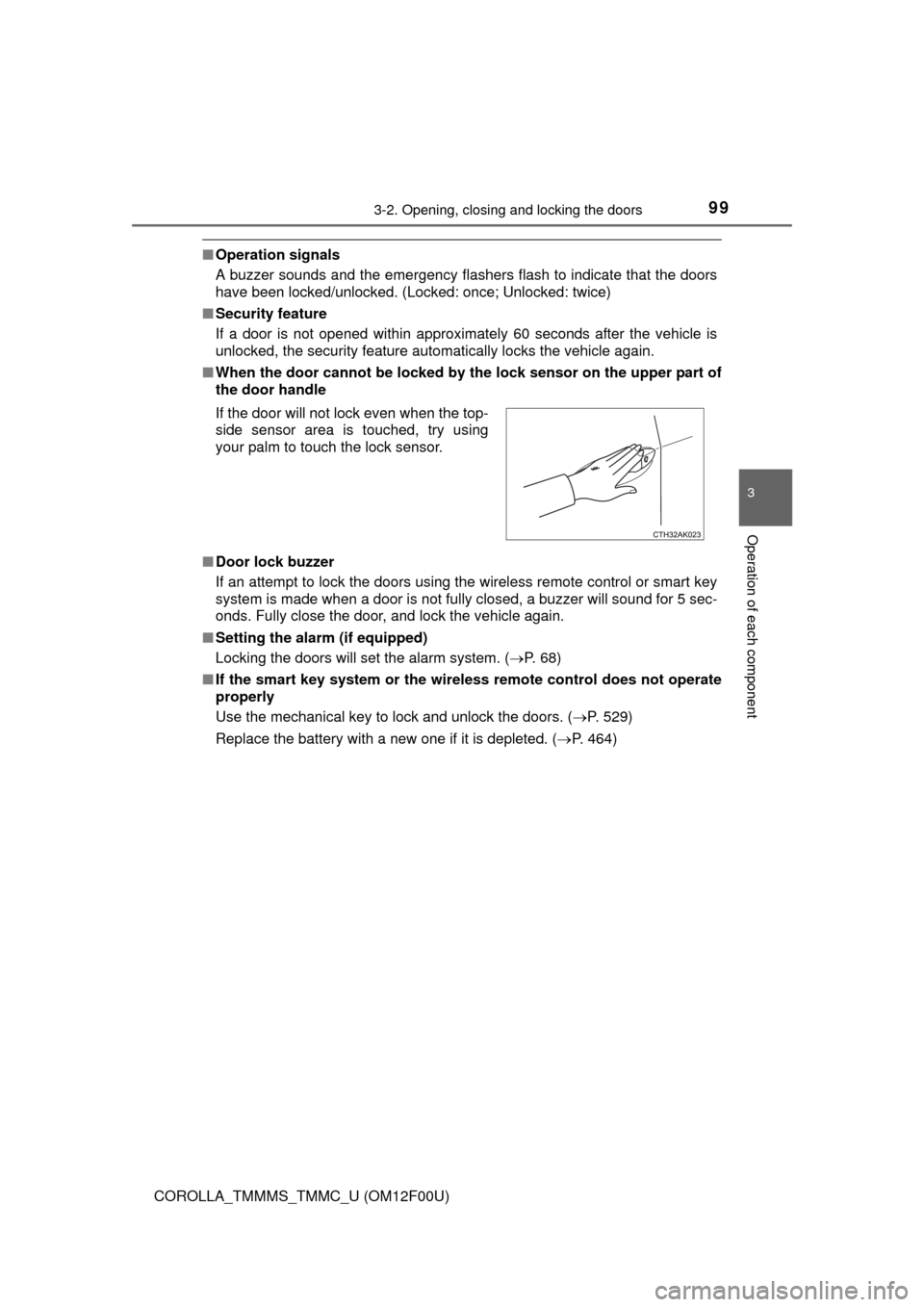
■When the door cannot be locked by the lock sensor on the upper part of
the door handle
■Door lock buzzer
If an attempt to lock the doors using the wireless remote control or smart key
system is made when a door is not fully closed, a buzzer will sound for 5 sec-
onds. Fully close the door, and lock the vehicle again.
■Setting the alarm (if equipped)
Locking the doors will set the alarm system. (P. 68)
■If the smart key system or the wireless remote control does not operate
properly
Use the mechanical key to lock and unlock the doors. (P. 529)
Replace the battery with a new one if it is depleted. (P. 464) If the door will not lock even when the top-
side sensor area is touched, try using
your palm to touch the lock sensor.
Page 108 of 612
1083-2. Opening, closing and locking the doors
COROLLA_TMMMS_TMMC_U (OM12F00U)
■Operation signal (with a wireless remote control function)
A buzzer sounds to indicate that the trunk has been opened.
■Tr u n k l i g h t
The trunk light turns on when the trunk is opened.
■Function to prevent the trunk being locked with the electronic key inside
(vehicles with a smart key system)
●When all doors are being locked, closing the trunk lid with the electronic key
left inside the trunk will sound an alarm.
In this case, the trunk lid can be opened by pressing the trunk release but-
ton on the trunk lid.
●Even when the spare electronic key is put in the trunk with all the doors
locked, the key confinement prevention function can be activated so the
trunk can be opened. In order to prevent theft, take all electronic keys with
you when leaving the vehicle.
●Even when the electronic key is put in the trunk with all the doors are locked,
the key may not be detected depending on the places and the surrounding
radio wave conditions. In this case, the key confinement prevention function
cannot be activated, causing the doors to lock when the trunk is closed.
Make sure to check where the key is before closing the trunk.
●The key confinement prevention function cannot be activated if any one of
the doors is unlocked. In this case, open the trunk using the trunk opener.
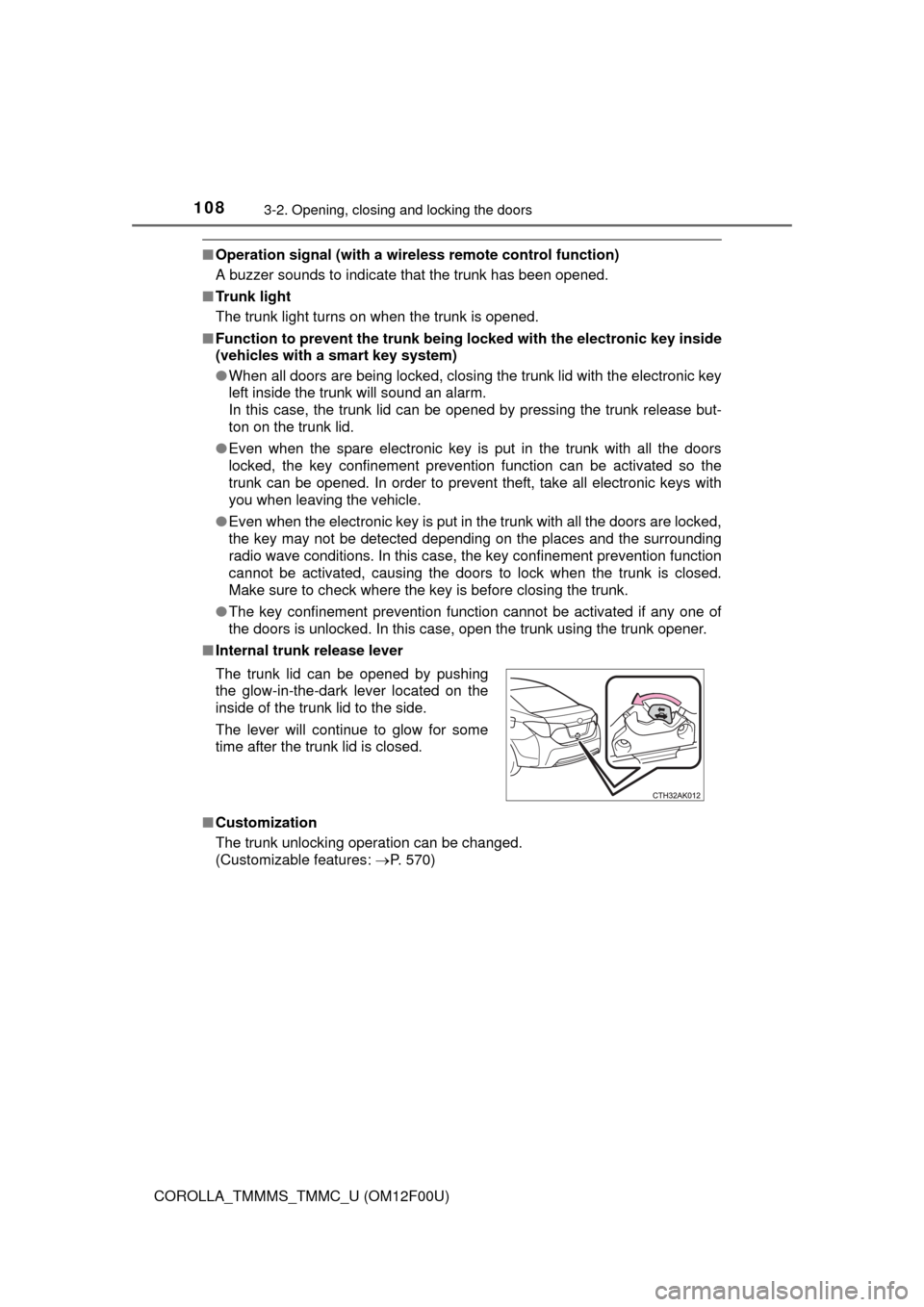
■Internal trunk release lever
■Customization
The trunk unlocking operation can be changed.
(Customizable features: P. 570) The trunk lid can be opened by pushing
the glow-in-the-dark lever located on the
inside of the trunk lid to the side.
The lever will continue to glow for some
time after the trunk lid is closed.
Page 116 of 612

1163-2. Opening, closing and locking the doors
COROLLA_TMMMS_TMMC_U (OM12F00U)■Note for the entry function
●Even when the electronic key is within the effective range (detection areas),
the system may not operate properly in the following cases:
• The electronic key is too close to the window or outside door handle, near
the ground, or in a high place when the doors are locked or unlocked.
• The electronic key is near the ground or in a high place, or too close to
the rear bumper center when the trunk is opened.
• The electronic key is on the instrument panel, rear package tray or floor,
or in the door pockets or glove box when the engine is started or engine
switch modes are changed.
●Do not leave the electronic key on top of the instrument panel or near the
door pockets when exiting the vehicle. Depending on the radio wave recep-
tion conditions, it may be detected by the antenna outside the cabin and the
doors will become lockable from the outside, possibly trapping the electronic
key inside the vehicle.
●As long as the electronic key is within the effective range, the doors may be
locked or unlocked by anyone. However, only the doors detecting the elec-
tronic key can be used to unlock the vehicle.
●Even if the electronic key is not inside the vehicle, it may be possible to start
the engine if the electronic key is near the window.
●The doors may unlock or lock if a large amount of water splashes on the
door handle, such as in the rain or in a car wash, when the electronic key is
within the effective range. (The doors will automatically be locked after
approximately 60 seconds if the doors are not opened and closed.)
●If the wireless remote control is used to lock the doors when the electronic
key is near the vehicle, there is a possibility that the door may not be
unlocked by the entry function. (Use the wireless remote control to unlock
the doors.)
●Touching the door lock or unlock sensor while wearing gloves may prevent
lock or unlock operation.
●When the lock operation is performed using the lock sensor, recognition sig-
nals will be shown up to two consecutive times. After this, no recognition
signals will be given.
●If the door handle becomes wet while the electronic key is within the effec-
tive range, the door may lock and unlock repeatedly. In this case, follow the
following correction procedures to wash the vehicle:
• Place the electronic key in a location 6 ft. (2 m) or more away from the
vehicle. (Take care to ensure that the key is not stolen.)
• Set the electronic key to battery-saving mode to disable the smart key
system. (P. 114)
●Vehicles without a multi-information display: If the electronic key is inside
the vehicle and a door handle becomes wet during a car wash, a buzzer will
sound outside the vehicle. To turn off the alarm, lock all the doors.
Page 117 of 612

1173-2. Opening, closing and locking the doors
3
Operation of each component
COROLLA_TMMMS_TMMC_U (OM12F00U)●Vehicles with a multi-information display: If the electronic key is inside the
vehicle and a door handle becomes wet during a car wash, a message may
be shown on the multi-information display and a buzzer will sound outside
the vehicle. To turn off the alarm, lock all the doors.
●The lock sensor may not work properly if it comes into contact with ice,
snow, mud, etc. Clean the lock sensor and attempt to operate it again.
●If there is another electronic key in the detection area, it may take slightly
longer to unlock the doors after the door handle is gripped.
●Fingernails may scrape against the door during operation of the door han-
dle. Be careful not to injure fingernails or damage the surface of the door.
●A sudden handle operation or a handle operation immediately after entering
the effective range may prevent the doors from being unlocked. Touch the
door unlock sensor and check that the doors are unlocked before pulling the
door handle again.
●Unlocking the vehicle may take more time if another electronic key is within
the effective range.
■When the vehicle is not driven for extended periods
●To prevent theft of the vehicle, do not leave the electronic key within 6 ft. (2
m) of the vehicle.
●The smart key system can be deactivated in advance. (P. 570)
■To operate the system properly
Make sure to carry the electronic key when operating the system. Do not get
the electronic key too close to the vehicle when operating the system from the
outside of the vehicle.
Depending on the position and holding condition of the electronic key, the key
may not be detected correctly and the system may not operate properly. (The
alarm may go off accidentally, or the door lock prevention function may not
operate.)
■If the smart key system does not operate properly
●Locking and unlocking the doors: Use the mechanical key. (P. 529)
●Starting the engine: P. 530
■Customization
Settings (e. g. smart key system) can be changed.
(Customizable features: P. 570)
■If the smart key system has been deactivated in a customized setting
●Locking and unlocking the doors and opening the trunk:
Use the wireless remote control or mechanical key. (P. 107, 529)
●Starting the engine and changing engine switch modes: P. 530
●Stopping the engine: P. 1 6 5
Page 162 of 612
1624-2. Driving procedures
COROLLA_TMMMS_TMMC_U (OM12F00U)
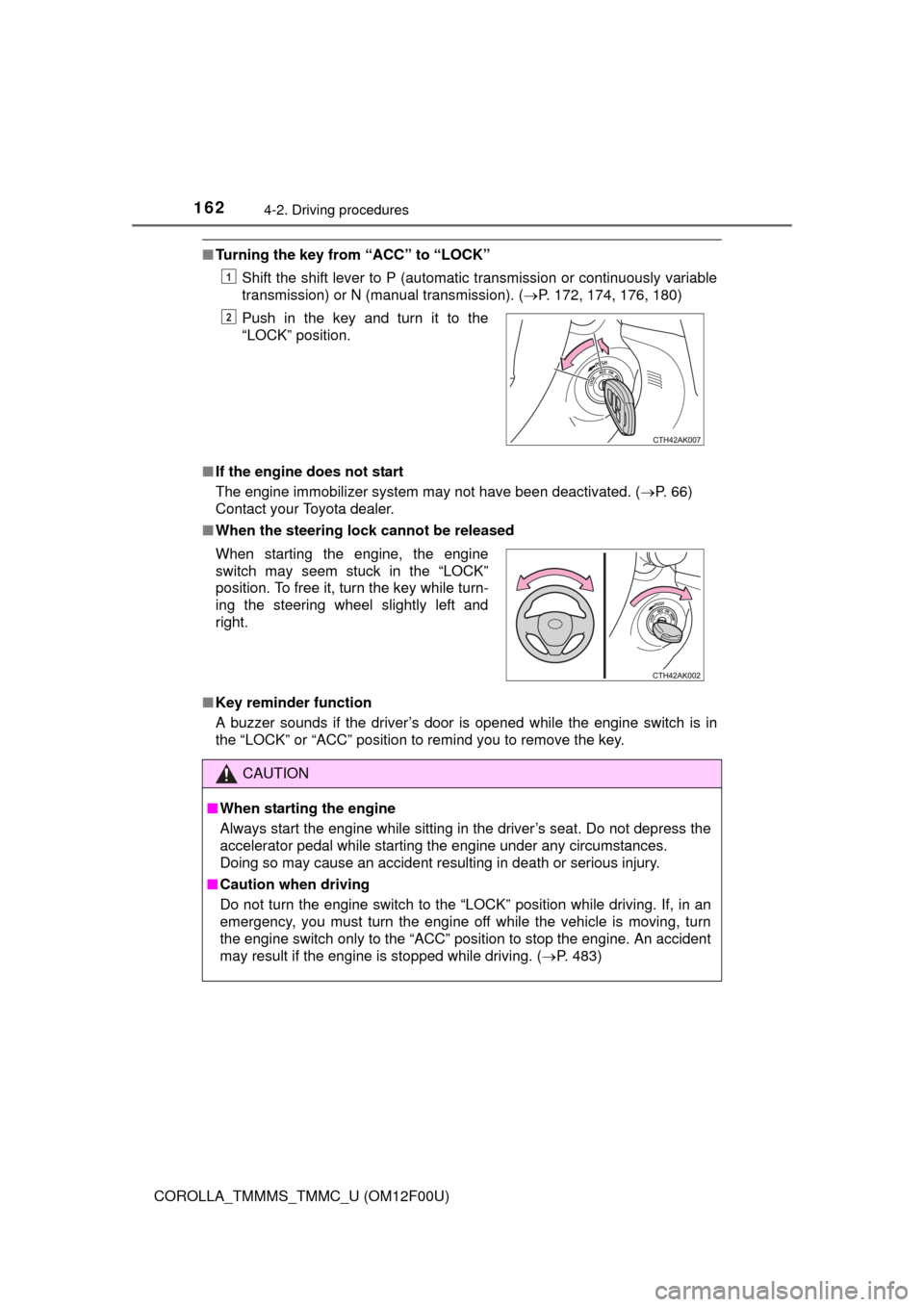
■Turning the key from “ACC” to “LOCK”
Shift the shift lever to P (automatic transmission or continuously variable
transmission) or N (manual transmission). (P. 172, 174, 176, 180)
■If the engine does not start
The engine immobilizer system may not have been deactivated. (P. 66)
Contact your Toyota dealer.
■When the steering lock cannot be released
■Key reminder function
A buzzer sounds if the driver’s door is opened while the engine switch is in
the “LOCK” or “ACC” position to remind you to remove the key.Push in the key and turn it to the
“LOCK” position.
1
2
When starting the engine, the engine
switch may seem stuck in the “LOCK”
position. To free it, turn the key while turn-
ing the steering wheel slightly left and
right.
CAUTION
■When starting the engine
Always start the engine while sitting in the driver’s seat. Do not depress the
accelerator pedal while starting the engine under any circumstances.
Doing so may cause an accident resulting in death or serious injury.
■Caution when driving
Do not turn the engine switch to the “LOCK” position while driving. If, in an
emergency, you must turn the engine off while the vehicle is moving, turn
the engine switch only to the “ACC” position to stop the engine. An accident
may result if the engine is stopped while driving. (P. 483)
Page 178 of 612
1784-2. Driving procedures
COROLLA_TMMMS_TMMC_U (OM12F00U)
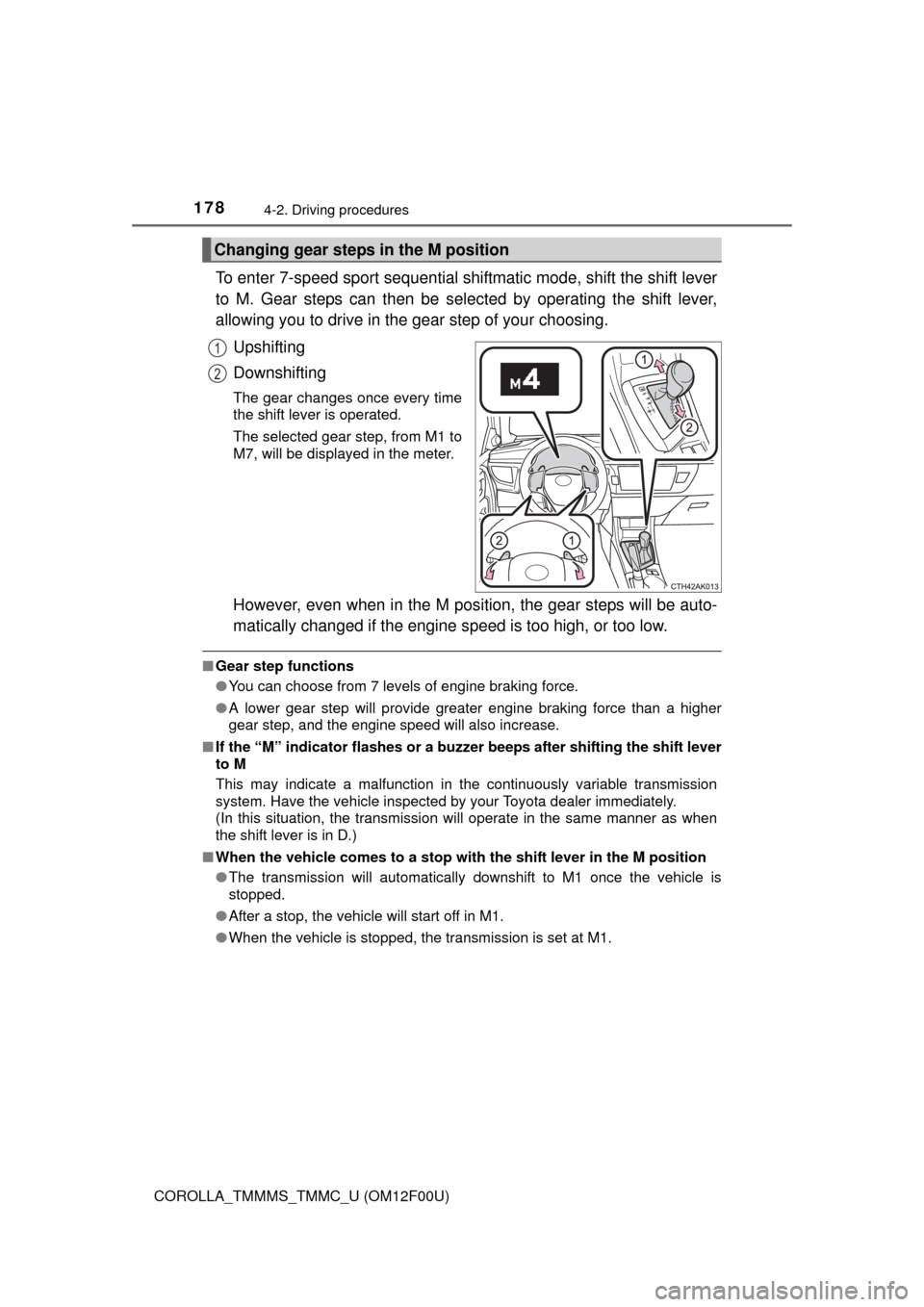
To enter 7-speed sport sequential shiftmatic mode, shift the shift lever
to M. Gear steps can then be selected by operating the shift lever,
allowing you to drive in the gear step of your choosing.
Upshifting
Downshifting
The gear changes once every time
the shift lever is operated.
The selected gear step, from M1 to
M7, will be displayed in the meter.
However, even when in the M position, the gear steps will be auto-
matically changed if the engine speed is too high, or too low.
■Gear step functions
●You can choose from 7 levels of engine braking force.
●A lower gear step will provide greater engine braking force than a higher
gear step, and the engine speed will also increase.
■If the “M” indicator flashes or a buzzer beeps after shifting the shift lever
to M
This may indicate a malfunction in the continuously variable transmission
system. Have the vehicle inspected by your Toyota dealer immediately.
(In this situation, the transmission will operate in the same manner as when
the shift lever is in D.)
■When the vehicle comes to a stop with the shift lever in the M position
●The transmission will automatically downshift to M1 once the vehicle is
stopped.
●After a stop, the vehicle will start off in M1.
●When the vehicle is stopped, the transmission is set at M1.
Changing gear steps in the M position
1
2
Page 179 of 612

1794-2. Driving procedures
4
Driving
COROLLA_TMMMS_TMMC_U (OM12F00U)■When driving with cruise control activated
Even when performing the following actions with the intent of enabling engine
braking, engine braking will not activate because cruise control will not be
canceled.
●While driving in D or 7-speed sport sequential shiftmatic mode, downshifting
to 6, 5 or 4. (P. 178)
●When switching the driving mode to sport mode while driving in D position.
(P. 177)
■Downshifting restrictions warning buzzer
To help ensure safety and driving performance, downshifting operation may
sometimes be restricted. In some circumstances, downshifting may not be
possible even when the shift lever is operated. (A buzzer will sound twice.)
■Sport mode automatic deactivation
Sport mode is automatically deactivated if the engine switch is turned off after
driving in sport mode.
■If the shift lever cannot be shifted from P
P. 528
CAUTION
■When driving on slippery road surfaces
Be careful of downshifting and sudden acceleration, as this could result in
the vehicle skidding to the side or spinning.
Page 183 of 612
1834-2. Driving procedures
4
Driving
COROLLA_TMMMS_TMMC_U (OM12F00U)
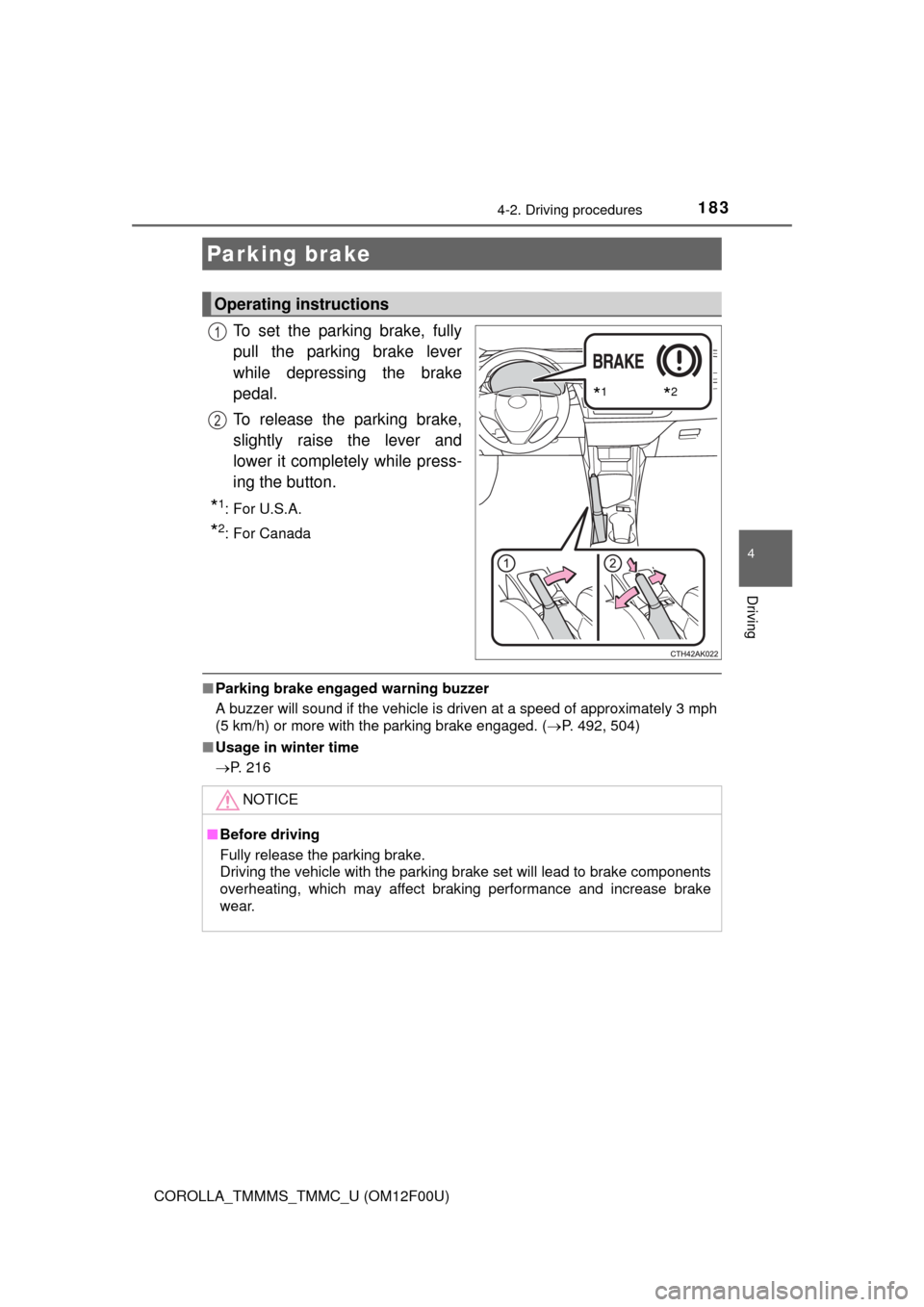
To set the parking brake, fully
pull the parking brake lever
while depressing the brake
pedal.
To release the parking brake,
slightly raise the lever and
lower it completely while press-
ing the button.
*1:For U.S.A.
*2: For Canada
■Parking brake engaged warning buzzer
A buzzer will sound if the vehicle is driven at a speed of approximately 3 mph
(5 km/h) or more with the parking brake engaged. (P. 492, 504)
■Usage in winter time
P. 216
Parking brake
Operating instructions
*1*2
1
2
NOTICE
■Before driving
Fully release the parking brake.
Driving the vehicle with the parking brake set will lead to brake components
overheating, which may affect braking performance and increase brake
wear.