Radio TOYOTA COROLLA 2015 11.G User Guide
[x] Cancel search | Manufacturer: TOYOTA, Model Year: 2015, Model line: COROLLA, Model: TOYOTA COROLLA 2015 11.GPages: 612, PDF Size: 8.48 MB
Page 115 of 612

1153-2. Opening, closing and locking the doors
3
Operation of each component
COROLLA_TMMMS_TMMC_U (OM12F00U)■
Conditions affecting operation
The smart key system uses weak radio waves. In the following situations, the
communication between the electronic key and the vehicle may be affected,
preventing the smart key system, wireless remote control and engine immobi-
lizer system from operating properly. (Ways of coping: P. 528)
● When the electronic key battery is depleted
● Near a TV tower, electric power plant, gas station, radio station, large dis-
play, airport or other facility that generates strong radio waves or electrical
noise
● When carrying a portable radio, cellular phone, cordless phone or other
wireless communication device
● When the electronic key is in contact with, or is covered by the following
metallic objects
• Cards to which aluminum foil is attached
• Cigarette boxes that have aluminum foil inside
• Metallic wallets or bags
• Coins
• Hand warmers made of metal
• Media such as CDs and DVDs
● When other wireless keys (that emit radio waves) are being used nearby
● When carrying the electronic key together with the following devices that
emit radio waves
• Another vehicle’s electronic key or a wireless key that emits radio waves
• Personal computers or personal digital assistants (PDAs)
• Digital audio players
• Portable game systems
● If window tint with a metallic content or metallic objects are attached to the
rear window
● When the electronic key is placed near a battery charger or electronic
devices
Page 116 of 612

1163-2. Opening, closing and locking the doors
COROLLA_TMMMS_TMMC_U (OM12F00U)■
Note for the entry function
●Even when the electronic key is within the effective range (detection areas),
the system may not operate properly in the following cases:
• The electronic key is too close to the window or outside door handle, near
the ground, or in a high place when the doors are locked or unlocked.
• The electronic key is near the ground or in a high place, or too close to
the rear bumper center when the trunk is opened.
• The electronic key is on the instrument panel, rear package tray or floor, or in the door pockets or glove box when the engine is started or engine
switch modes are changed.
● Do not leave the electronic key on top of the instrument panel or near the
door pockets when exiting the vehicle. Depending on the radio wave recep-
tion conditions, it may be detected by the antenna outside the cabin and the
doors will become lockable from the out side, possibly trapping the electronic
key inside the vehicle.
● As long as the electronic key is within the effective range, the doors may be
locked or unlocked by anyone. However, only the doors detecting the elec-
tronic key can be used to unlock the vehicle.
● Even if the electronic key is not inside the vehicle, it may be possible to start
the engine if the electronic key is near the window.
● The doors may unlock or lock if a large amount of water splashes on the
door handle, such as in the rain or in a car wash, when the electronic key is
within the effective range. (The doors will automatically be locked after
approximately 60 seconds if the doors are not opened and closed.)
● If the wireless remote control is used to lock the doors when the electronic
key is near the vehicle, there is a possibility that the door may not be
unlocked by the entry function. (Use the wireless remote control to unlock
the doors.)
● Touching the door lock or unlock sensor while wearing gloves may prevent
lock or unlock operation.
● When the lock operation is performed using the lock sensor, recognition sig-
nals will be shown up to two consecutive times. After this, no recognition
signals will be given.
● If the door handle becomes wet while the electronic key is within the effec-
tive range, the door may lock and unlock repeatedly. In this case, follow the
following correction procedures to wash the vehicle:
• Place the electronic key in a location 6 ft. (2 m) or more away from the
vehicle. (Take care to ensure that the key is not stolen.)
• Set the electronic key to battery-saving mode to disable the smart key
system. ( P. 114)
● Vehicles with a drive monitor display: If the electronic key is inside the vehi-
cle and a door handle becomes wet during a car wash, a buzzer will sound
outside the vehicle. To turn off the alarm, lock all the doors.
Page 119 of 612

1193-2. Opening, closing and locking the doors
3
Operation of each component
COROLLA_TMMMS_TMMC_U (OM12F00U)
CAUTION
■Caution regarding interfer ence with electronic devices
● People with implantable cardiac pacemakers, cardiac resynchronization
therapy-pacemakers or implantable cardioverter defibrillators should keep
away from the smart key system antennas. ( P. 111 )
The radio waves may affect the operation of such devices. If necessary,
the entry function can be disabled. Ask your Toyota dealer for details, such
as the frequency of radio waves and timing of the emitted radio waves.
Then, consult your doctor to see if you should disable the entry function.
● User of any electrical medical device other than implantable cardiac pace-
makers, cardiac resynchronization therapy-pacemakers or implantable
cardioverter defibrillators should consult the manufacturer of the devic\
e for
information about its operation under the influence of radio waves.
Radio waves could have unexpected effects on the operation of such
medical devices.
Ask your Toyota dealer for details for disabling the entry function.
Page 219 of 612
219
5Audio system
COROLLA_TMMMS_TMMC_U (OM12F00U)5-1. Basic Operations
Audio system types ........... 222
Steering wheel audio switches .......................... 226
AUX port/USB port ............ 227
5-2. Using the audio system Optimal use of the audio system ............................ 228
5-3. Using the radio Radio operation................. 230
5-4. Playing audio CDs and MP3/WMA discs
CD player operation .......... 232
5-5. Using an external device Listening to an iPod .......... 241
Listening to a USB memory device ............... 248
Using the AUX port ........... 254
5-6. Using Bluetooth
® devices
Bluetooth®
audio/phone .................... 255
Using the steering wheel switches .......................... 260
Registering a Bluetooth
®
device ............................. 261
Page 220 of 612

220
COROLLA_TMMMS_TMMC_U (OM12F00U)5-7. “SET UP” menu
Using the “SET UP” menu (“Bluetooth” menu) .......... 262
Using the “SET UP” menu (“Phone” menu) ............... 267
5-8. Bluetooth
® Audio
Operating a Bluetooth®
enabled portable
player .............................. 272
5-9. Bluetooth
® Phone
Making a phone call .......... 275
Receiving a phone call ...... 278
Speaking on the phone ..... 279
5-10. Bluetooth
®
Bluetooth®........................ 281
5-11. Basic Operations (Multimedia system)
Multimedia system ............ 283
Steering wheel audio switches .......................... 285
USB port/AUX port ............ 286
Basic audio operations...... 287 5-12. Setup
(Multimedia system)
Setup menu....................... 289
General settings ................ 290
Audio settings ................... 292
Display settings ................. 294
Voice settings.................... 295
5-13. Using the Multimedia system
Selecting the audio source ............................. 296
List screen operation......... 297
Optimal use of the multimedia system .......... 299
5-14. Using the radio (Multimedia system)
Radio operation................. 300
5-15. Playing an audio CD and MP3/WMA/AAC discs
(Multimedia system)
CD player operation .......... 302
5-16. Using an external device (Multimedia system)
Listening to an iPod .......... 308
Listening to a USB memory device ............... 313
Using the AUX port ........... 317
Vehicle information ........... 318
Page 223 of 612

2235-1. Basic Operations
5
Audio system
COROLLA_TMMMS_TMMC_U (OM12F00U)
CAUTION
■U.S.A.
FCC ID: ACJ932PTA184
NOTE:
This device complies with Part 15 of the FCC Rules.
Operation is subject to the following two conditions:
(1) this device may not cause harmful interference and
(2) this device must accept any interference received, including interference
that may cause undesired operation.
FCC WARNING:
Changes or modifications in construction not expressly approved by the
party responsible for compliance could void the user’s authority to operate
the equipment.
Radio frequency exposure. This device is approved for Mobile Application
only and, to comply with applicable FCC radio frequency exposure regula-
tions, must be used with a distance of at least 7.9 in. (20 cm) between the
antenna and the body of any person at all time during use.
■ U.S.A. and Canada
● Part 15 of the FCC Rules
FCC Warning:
Any unauthorized changes or modifications to this equipment will void the
user’s authority to operate this device.
Page 224 of 612

2245-1. Basic Operations
COROLLA_TMMMS_TMMC_U (OM12F00U)
CAUTION
■Canada
IC: 216J-PTA184
NOTE:
This device complies with Industry Canada license-exempt RSS stan-
dard(s). Operation is subject to the following two conditions:
(1) this device may not cause interference, and
(2) this device must accept any interference, including interference that ma\
y
cause undesired operation of the device.
Le présent appareil est conforme aux CNR d'Industrie Canada applicables
aux appareils radio exempts de licence. L'exploitation est autorisée aux
deux conditions suivantes :
(1) l'appareil ne doit pas produire de brouillage, et
(2) l'utilisateur de l'appareil doit accepter tout brouillage radioélectrique subi, même si le brouillage est susceptible d'en compromettre le fonc-
tionnement.
This radio transmitter (identify the device by certification number, or model
number if Category II) has been approved by Industry Canada to operate
with the antenna types listed below with the maximum permissible gain and
required antenna impedance for each antenna type indicated. Antenna
types not included in this list, having a gain greater than the maximum gain
indicated for that type, are strictly prohibited for use with this device.
Le présent émetteur radio (identifier le dispositif par son numéro de certifi-
cation ou son numéro de modèle s'il fait partie du matériel de catégorie I) a
été approuvé par Industrie Canada pour fonctionner avec les types
d'antenne énumérés ci-dessous et ayant un gain admissible maximal et
l'impédance requise pour chaque type d'antenne. Les types d'antenne non
inclus dans cette liste, ou dont le gain est supérieur au gain maximal
indiqué, sont strictement interdits pour l'exploitation de l'émetteur.
■ LASER PRODUCTS
● Do not take this unit apart or attempt to make any changes yourself.
This is an intricate unit that uses a laser pickup to retrieve information from
the surface of compact discs.
The laser is carefully shielded so that its rays remain inside the cabinet.
Therefore, never try to disassemble the player or alter any of its parts
since you may be exposed to laser rays and dangerous voltages.
● This product utilizes a laser.
Use of controls or adjustments or performance of procedures other than
those specified herein may result in hazardous radiation exposure.
Page 226 of 612
2265-1. Basic Operations
COROLLA_TMMMS_TMMC_U (OM12F00U)
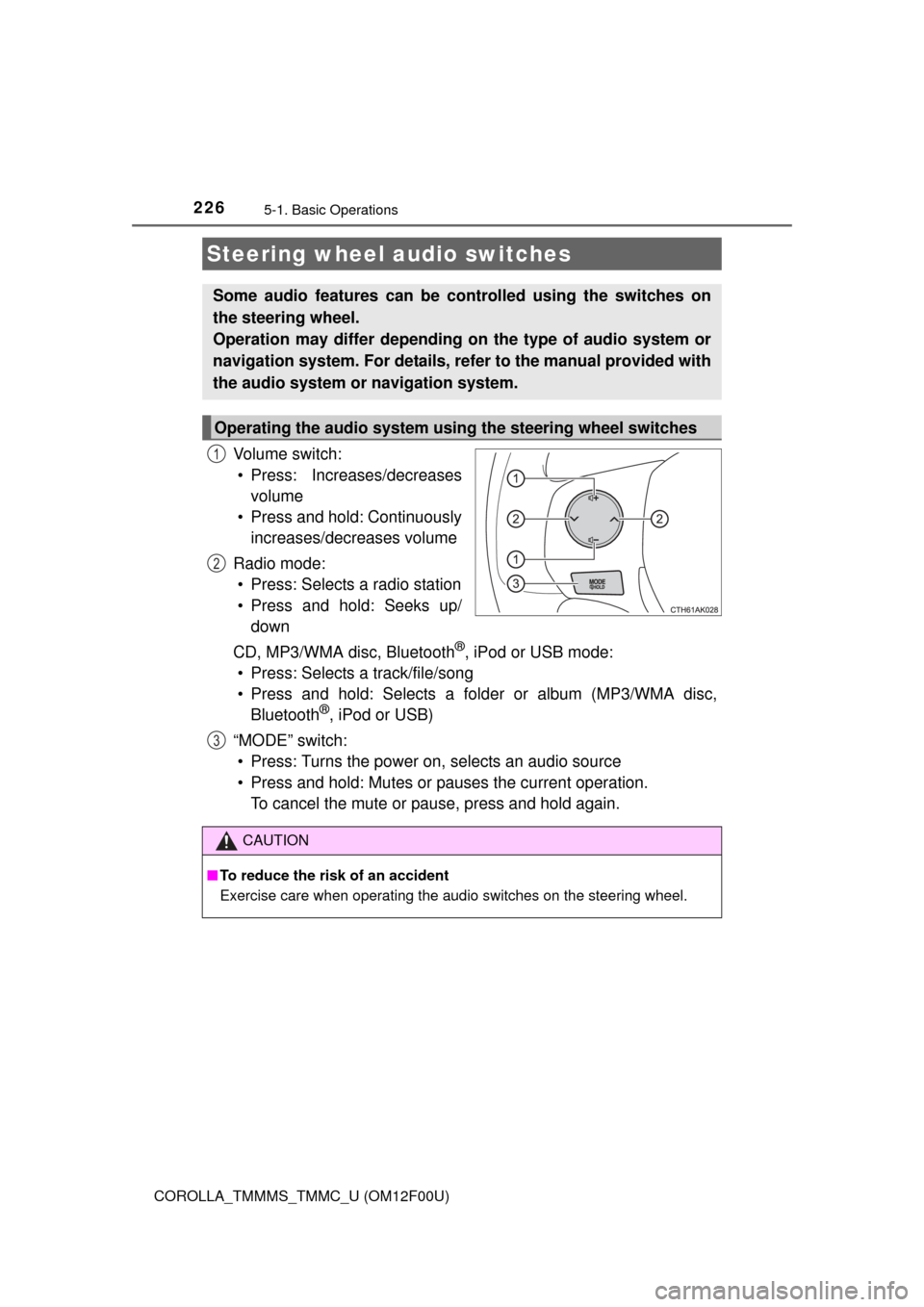
Vo l u m e s w i t c h :• Press: Increases/decreases volume
• Press and hold: Continuously increases/decreases volume
Radio mode: • Press: Selects a radio station
• Press and hold: Seeks up/ down
CD, MP3/WMA disc, Bluetooth
®, iPod or USB mode:
• Press: Selects a track/file/song
• Press and hold: Selects a folder or album (MP3/WMA disc, Bluetooth
®, iPod or USB)
“MODE” switch: • Press: Turns the power on, selects an audio source
• Press and hold: Mutes or pauses the current operation. To cancel the mute or pause, press and hold again.
Steering wheel audio switches
Some audio features can be c ontrolled using the switches on
the steering wheel.
Operation may differ depending on the type of audio system or
navigation system. For details, refer to the manual provided with
the audio system or navigation system.
Operating the audio system using the steering wheel switches
1
2
3
CAUTION
■ To reduce the risk of an accident
Exercise care when operating the audio switches on the steering wheel.
Page 230 of 612
230
COROLLA_TMMMS_TMMC_U (OM12F00U)
5-3. Using the radio
Search for a desired station by turning or pressing or
.
Press and hold a desired station se lector button until you hear a
beep.
Radio operation
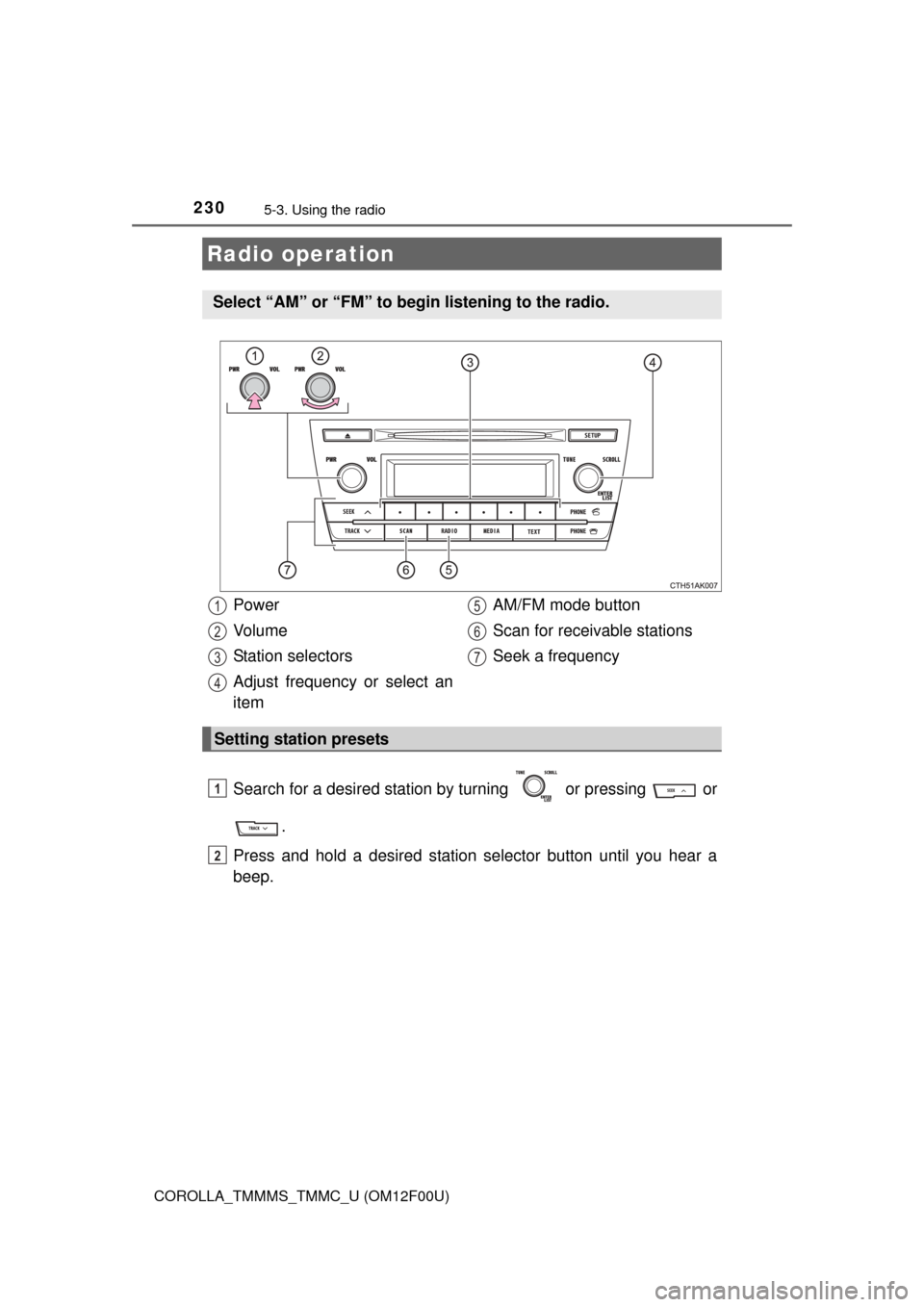
Select “AM” or “FM” to be gin listening to the radio.
Power
Vo l u m e
Station selectors
Adjust frequency or select an
item AM/FM mode button
Scan for receivable stations
Seek a frequency
Setting station presets
1
2
3
4
5
6
7
1
2
Page 231 of 612
2315-3. Using the radio
5
Audio system
COROLLA_TMMMS_TMMC_U (OM12F00U)■
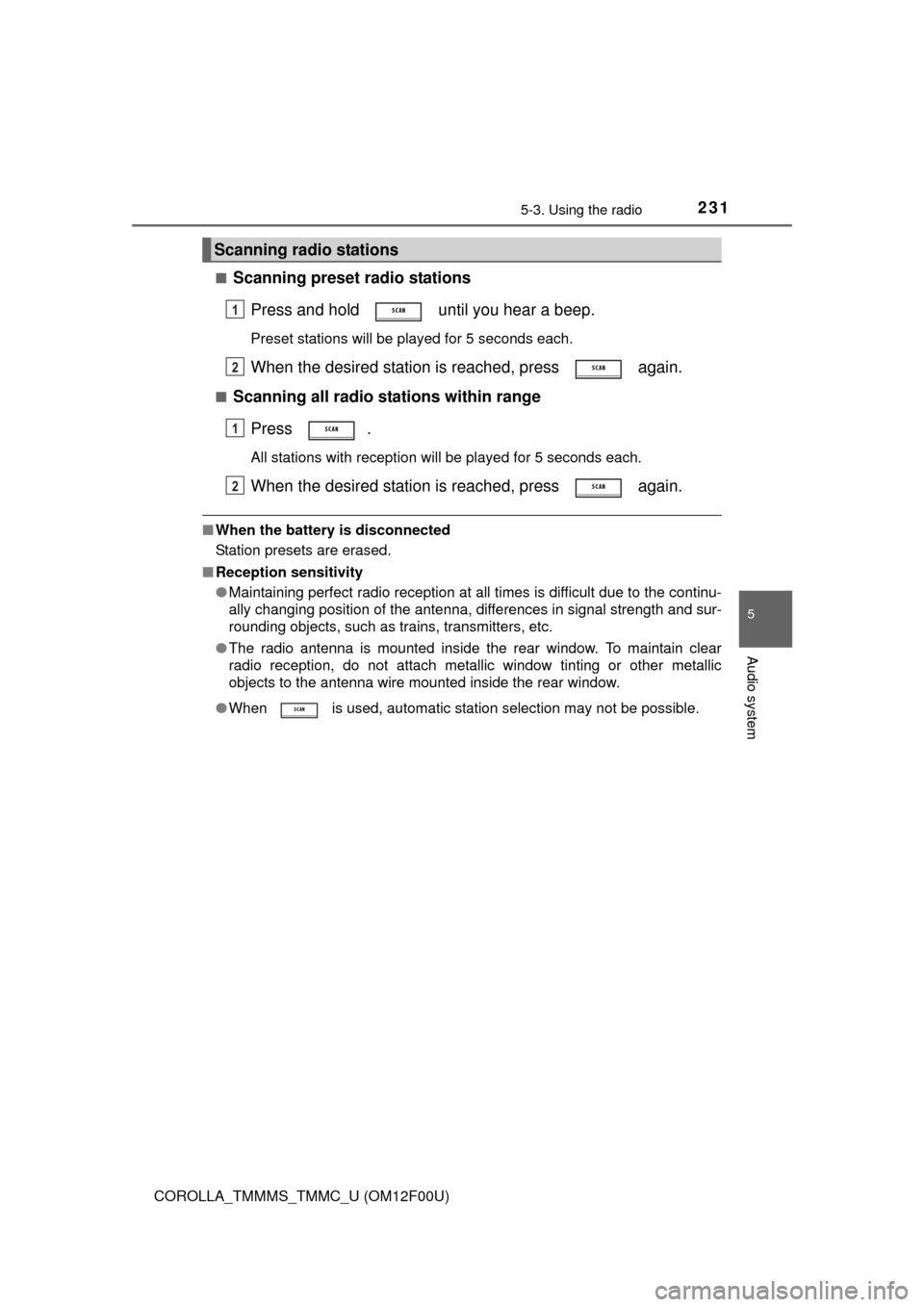
Scanning preset radio stations
Press and hold until you hear a beep.
Preset stations will be played for 5 seconds each.
When the desired station is reached, press again.
■Scanning all radio stations within rangePress .
All stations with reception will be played for 5 seconds each.
When the desired station is reached, press again.
■When the battery is disconnected
Station presets are erased.
■ Reception sensitivity
●Maintaining perfect radio reception at all times is difficult due to the continu-
ally changing position of the antenna, differences in signal strength and sur-
rounding objects, such as trains, transmitters, etc.
● The radio antenna is mounted inside the rear window. To maintain clear
radio reception, do not attach metallic window tinting or other metallic
objects to the antenna wire mounted inside the rear window.
● When is used, automatic station selection may not be possible.
Scanning radio stations
1
2
1
2