phone TOYOTA COROLLA 2015 11.G User Guide
[x] Cancel search | Manufacturer: TOYOTA, Model Year: 2015, Model line: COROLLA, Model: TOYOTA COROLLA 2015 11.GPages: 612, PDF Size: 8.48 MB
Page 221 of 612

221
5Audio system
COROLLA_TMMMS_TMMC_U (OM12F00U)5-17. Connecting Bluetooth
®
(Multimedia system)
Preparations to use wireless
communication ................ 320
Registering a Bluetooth
®
audio player for
the first time .................... 324
Registering a Bluetooth
®
phone for the
first time .......................... 325
Registering a Bluetooth
®
device.............................. 326
Connecting a Bluetooth
®
device.............................. 329
Displaying a Bluetooth
®
device details .................. 332
Detailed Bluetooth
®
system settings ............... 334
5-18. Bluetooth
® Audio
(Multimedia system)
Listening to Bluetooth
®
Audio ............................... 336 5-19. Bluetooth
® phone
(Multimedia system)
Using a Bluetooth
®
Phone ............................. 338
Making a call ..................... 341
Receiving a call ................. 344
Speaking on the phone ..... 345
Bluetooth
® phone
message function ............ 349
Using the steering wheel switches ................ 354
Bluetooth
® phone
settings ........................... 355
Contact/Call History Settings ........................... 357
What to do if... (Troubleshooting) ............ 367
5-20. Bluetooth
®
(Multimedia system)
Bluetooth
®......................... 371
5-21. Using the voice command system
(Multimedia system)
Voice command system ............................ 376
Page 222 of 612
222
COROLLA_TMMMS_TMMC_U (OM12F00U)
5-1. Basic Operations
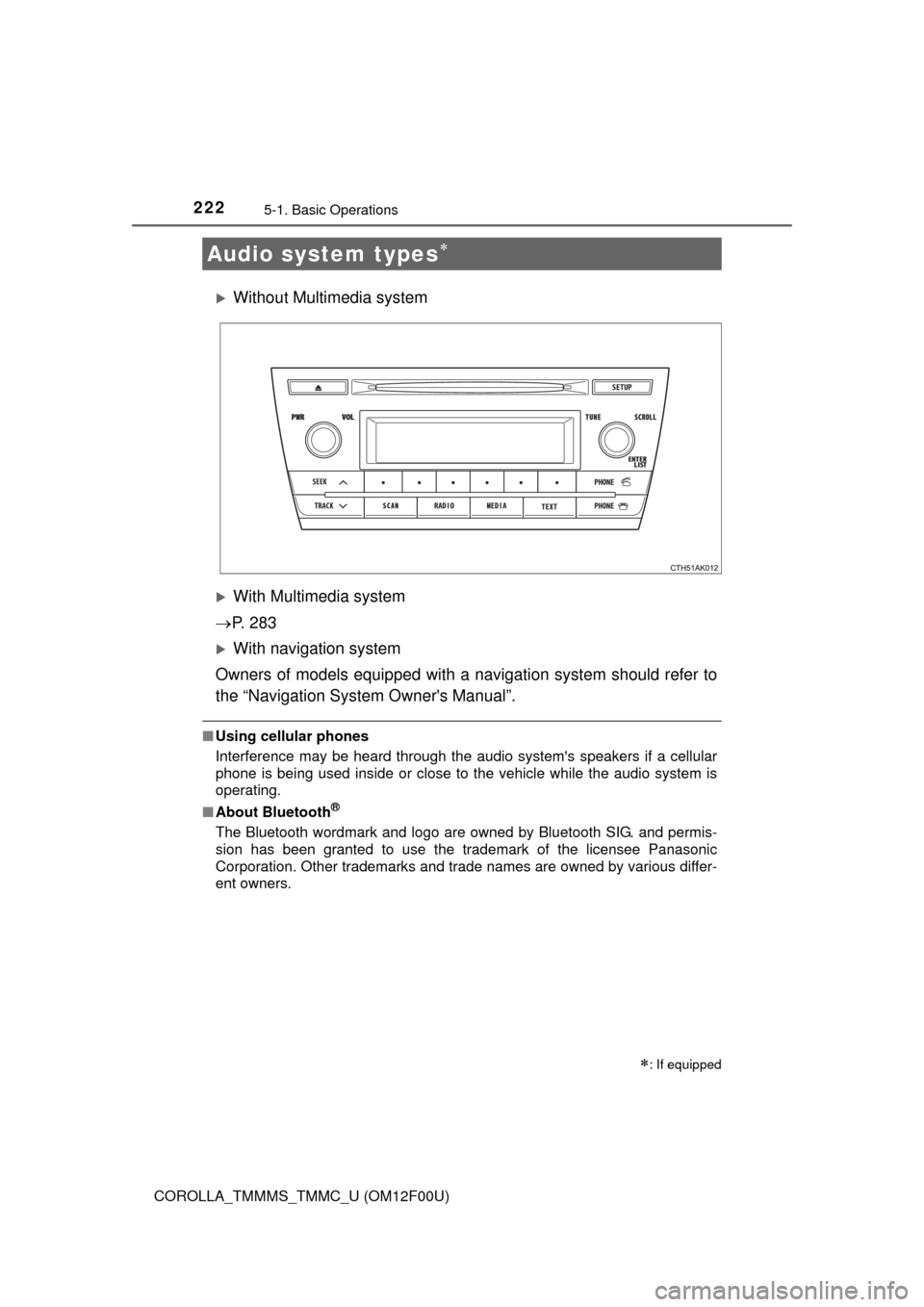
Without Multimedia system
With Multimedia system
P. 2 8 3
With navigation system
Owners of models equipped with a navigation system should refer to
the “Navigation System Owner's Manual”.
■ Using cellular phones
Interference may be heard through the audio system's speakers if a cellular
phone is being used inside or close to the vehicle while the audio system is
operating.
■ About Bluetooth
®
The Bluetooth wordmark and logo are owned by Bluetooth SIG. and permis-
sion has been granted to use the trademark of the licensee Panasonic
Corporation. Other trademarks and trade names are owned by various differ-
ent owners.
Audio system types
: If equipped
Page 244 of 612
2445-5. Using an external device
COROLLA_TMMMS_TMMC_U (OM12F00U)
Pressing (RDM) changes the shuffle playback mode in the fol-
lowing order:
Track shuffle Album shuffle Off.
Press to display or hide the album title.
If there is additional text, is displayed.
Press and hold to display the remaining text.
Press to enter iPod menu mode.
Press to change sound modes. ( P. 228)
■About iPod
●“Made for iPod” and “Made for iPhone” mean that an electronic accessory
has been designed to connect specifically to iPod, or iPhone, respectively,
and has been certified by the developer to meet Apple performance stan-
dards.
● Apple is not responsible for the operation of this device or its compliance
with safety and regulatory standards. Please note that the use of this acces-
sory with iPod or iPhone may affect wireless performance.
● iPhone, iPod, iPod classic, iPod nano and iPod touch are trademarks of
Apple Inc., registered in the U.S. and other countries.
Shuffle playback
Switching the display
Adjusting sound quality and volume balance
1
2
Page 247 of 612
2475-5. Using an external device
5
Audio system
COROLLA_TMMMS_TMMC_U (OM12F00U)■
Compatible models
The following iPod
, iPod nano, iPod classic, iPod touch and iPhone
devices can be used with this system.
●Made for
• iPod touch (4th generation)
• iPod touch (3rd generation)
• iPod touch (2nd generation)
• iPod touch (1st generation)
• iPod classic
• iPod with video
• iPod nano (6th generation)
• iPod nano (5th generation)
• iPod nano (4th generation)
• iPod nano (3rd generation)
• iPod nano (2nd generation)
• iPod nano (1st generation)
• iPhone 4
• iPhone 3GS
• iPhone 3G
• iPhone
Depending on differences between models or software versions etc., some
models might be incompatible with this system.
Items related to standards and limitations are as follows:
● Maximum number of lists in device: 9999
● Maximum number of songs in device: 65535
● Maximum number of songs per list: 65535
CAUTION
■Caution while driving
Do not connect iPod or operate the controls.
NOTICE
■To prevent damage to iPod
● Do not leave the iPod in the vehicle. The temperature inside the vehicle
may become high, resulting in damage to the iPod.
● Do not push down on or apply unnecessary pressure to the iPod while it is
connected.
● Do not insert foreign objects into the port.
Page 255 of 612
255
5
Audio system
COROLLA_TMMMS_TMMC_U (OM12F00U)
5-6. Using Bluetooth® devices
Bluetooth® audio/phone
The following can be performed using Bluetooth® wireless com-
munication:
■Bluetooth® audio
The Bluetooth
® audio system enables you to enjoy music played
on a portable player from the vehi cle speakers via wireless com-
munication.
This audio system supports Bluetooth
®, a wireless data system
capable of playing portable audio music without cables. If your
portable player does not support Bluetooth
®, the Bluetooth®
audio system cannot be used.
■Bluetooth® phone (hands-free phone system)
This system supports Bluetooth
®, which allows you to make or
receive calls without using cables to connect a cellular phone to
the system, and without oper ating the cellular phone.
Page 256 of 612

2565-6. Using Bluetooth® devices
COROLLA_TMMMS_TMMC_U (OM12F00U)
Device registration/connection flow
1. Register a Bluetooth® device to be used with the audio
system ( P. 261)
2. Connect a registered Bluetooth® device to be used
( P. 262, 263)
To be used for audio
To be used for hands-free phone
3. Set automatic connection of the device ( P. 264)
4. Check the Bluetooth® connection condition
( P. 257)
5. Use Bluetooth® audio
( P. 272)5. Use Bluetooth® phone
( P. 275)
Page 257 of 612
2575-6. Using Bluetooth® devices
5
Audio system
COROLLA_TMMMS_TMMC_U (OM12F00U)
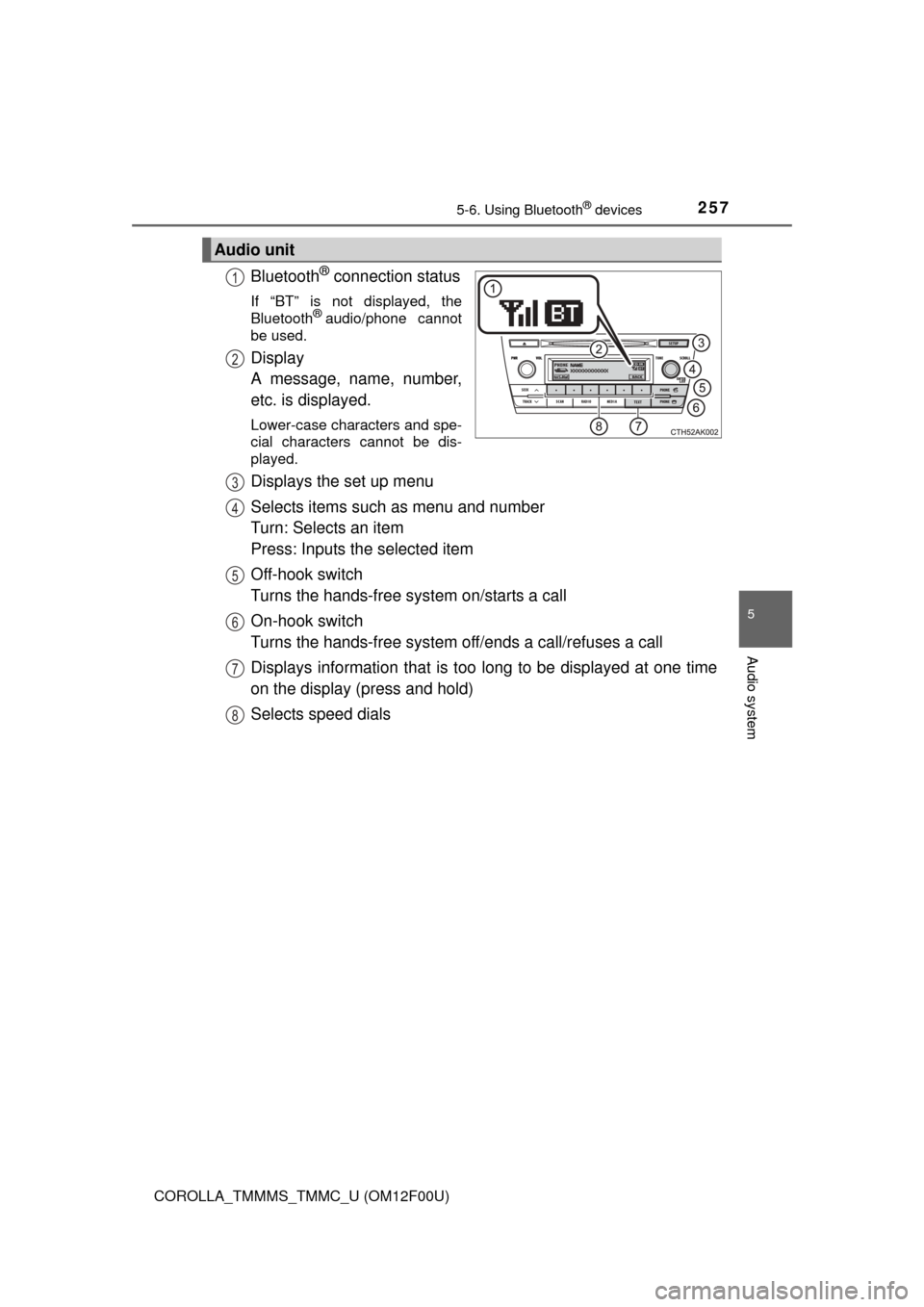
Bluetooth® connection status
If “BT” is not displayed, the
Bluetooth® audio/phone cannot
be used.
Display
A message, name, number,
etc. is displayed.
Lower-case characters and spe-
cial characters cannot be dis-
played.
Displays the set up menu
Selects items such as menu and number
Turn: Selects an item
Press: Inputs the selected item
Off-hook switch
Turns the hands-free system on/starts a call
On-hook switch
Turns the hands-free system off/ends a call/refuses a call
Displays information that is t oo long to be displayed at one time
on the display (press and hold)
Selects speed dials
Audio unit
1
2
3
4
5
6
7
8
Page 258 of 612
2585-6. Using Bluetooth® devices
COROLLA_TMMMS_TMMC_U (OM12F00U)
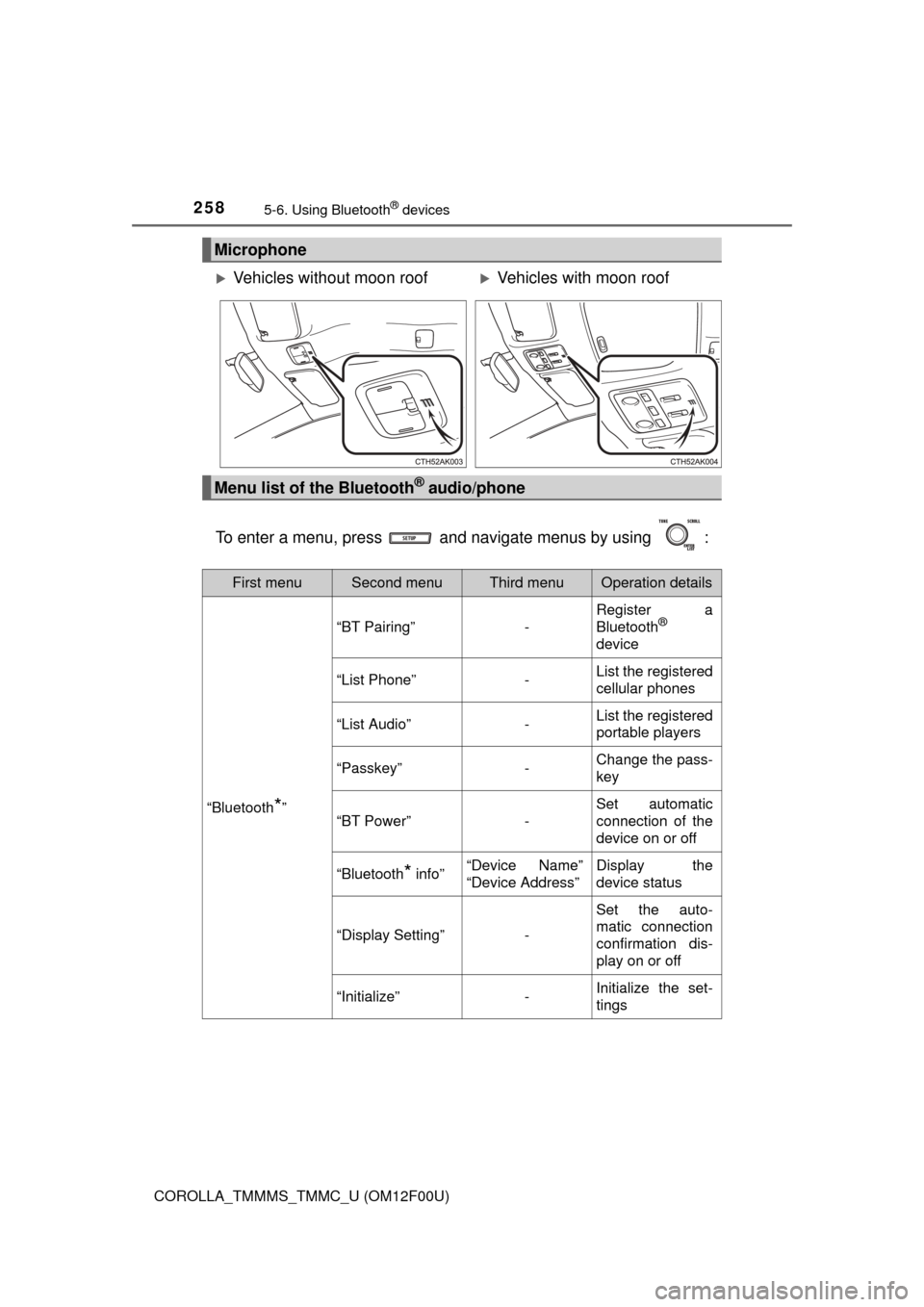
To enter a menu, press and navigate menus by using :
Microphone
Vehicles without moon roofVehicles with moon roof
Menu list of the Bluetooth® audio/phone
First menuSecond menuThird menuOperation details
“Bluetooth*”
“BT Pairing”-
Register a
Bluetooth®
device
“List Phone”-List the registered
cellular phones
“List Audio”-List the registered
portable players
“Passkey”-Change the pass-
key
“BT Power”-
Set automatic
connection of the
device on or off
“Bluetooth* info”“Device Name”
“Device Address”Display the
device status
“Display Setting”-
Set the auto-
matic connection
confirmation dis-
play on or off
“Initialize”-Initialize the set-
tings
Page 259 of 612
2595-6. Using Bluetooth® devices
5
Audio system
COROLLA_TMMMS_TMMC_U (OM12F00U)
*: Bluetooth is a registered trademark of Bluetooth SIG, Inc.
■Bluetooth® audio/phone system functions
Depending on the Bluetooth® device, certain functions may not be available.
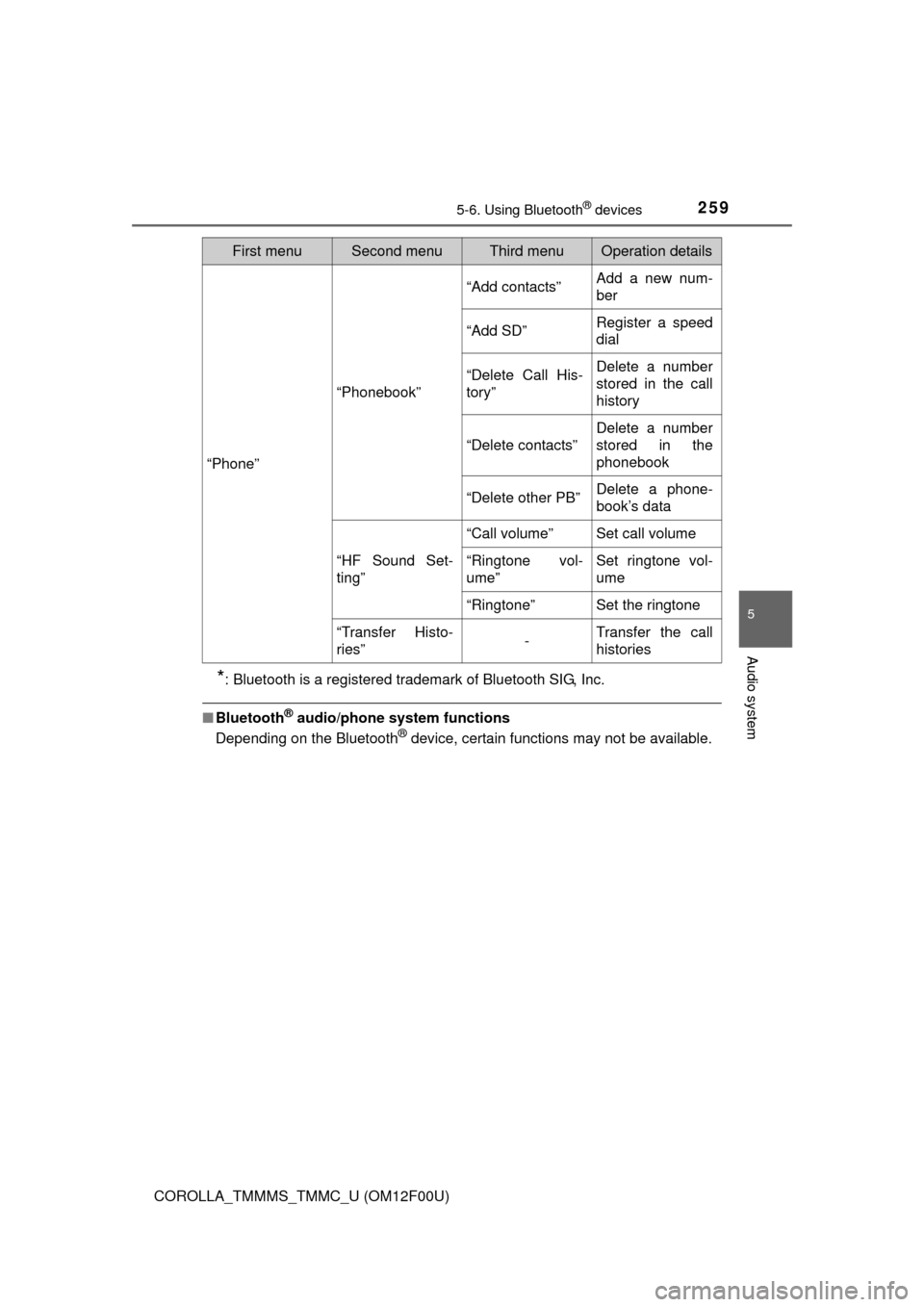
“Phone”
“Phonebook”
“Add contacts”Add a new num-
ber
“Add SD”Register a speed
dial
“Delete Call His-
tory”Delete a number
stored in the call
history
“Delete contacts”
Delete a number
stored in the
phonebook
“Delete other PB”Delete a phone-
book’s data
“HF Sound Set-
ting”
“Call volume”Set call volume
“Ringtone vol-
ume”Set ringtone vol-
ume
“Ringtone”Set the ringtone
“Transfer Histo-
ries”-Transfer the call
histories
First menuSecond menuThird menuOperation details
Page 260 of 612
2605-6. Using Bluetooth® devices
COROLLA_TMMMS_TMMC_U (OM12F00U)
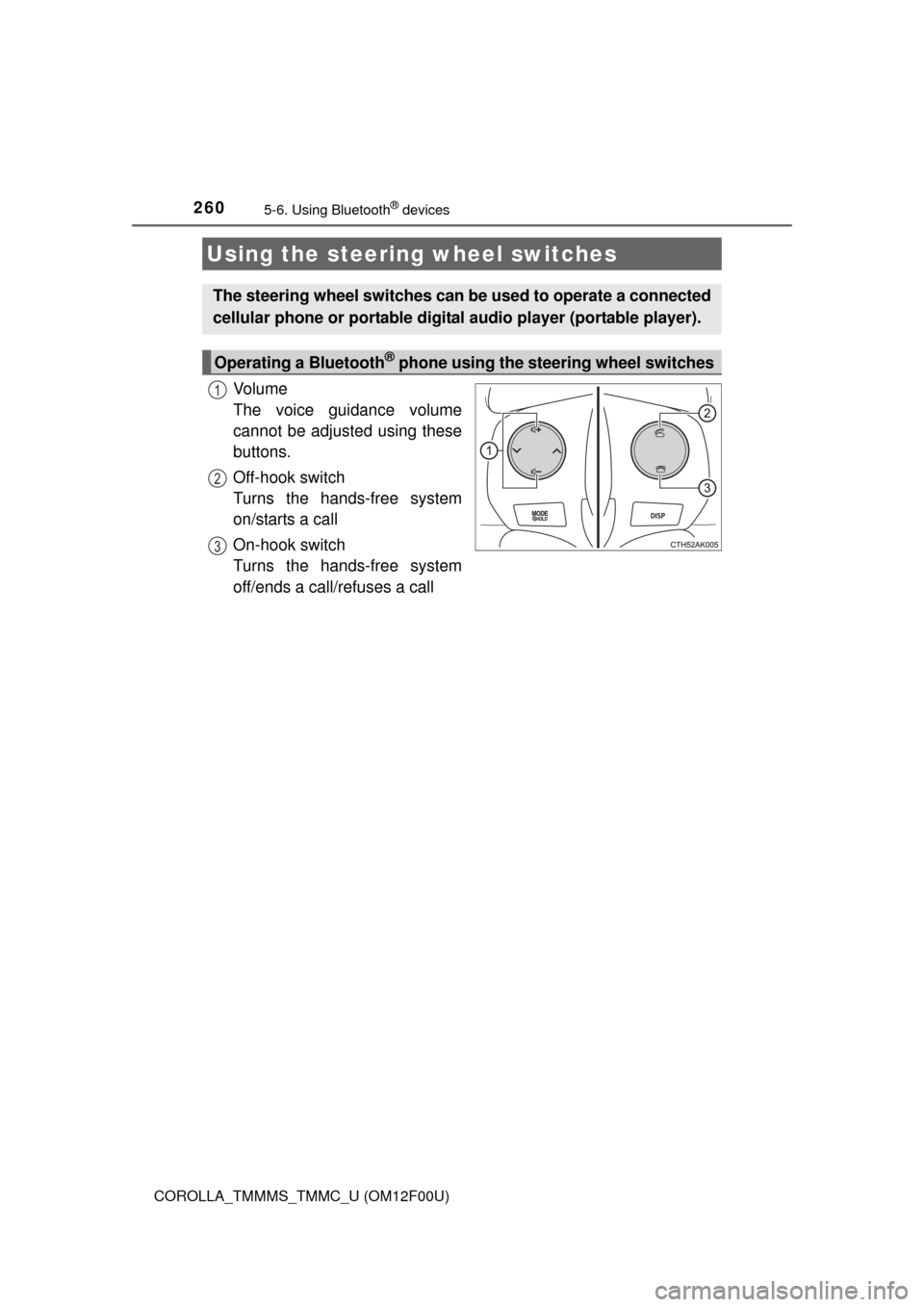
Vo l u m e
The voice guidance volume
cannot be adjusted using these
buttons.
Off-hook switch
Turns the hands-free system
on/starts a call
On-hook switch
Turns the hands-free system
off/ends a call/refuses a call
Using the steering wheel switches
The steering wheel switches can be used to operate a connected
cellular phone or portable digita l audio player (portable player).
Operating a Bluetooth® phone using the steering wheel switches
1
2
3