Ignition TOYOTA COROLLA 2015 11.G Owner's Manual
[x] Cancel search | Manufacturer: TOYOTA, Model Year: 2015, Model line: COROLLA, Model: TOYOTA COROLLA 2015 11.GPages: 612, PDF Size: 8.48 MB
Page 171 of 612
1714-2. Driving procedures
4
Driving
COROLLA_TMMMS_TMMC_U (OM12F00U)
NOTICE
■To prevent battery discharge
● Do not leave the engine switch in ACCESSORY or IGNITION ON mode
for long periods of time without the engine running.
● Vehicles with a drive monitor display:
If the smart key system indicator light (green) is illuminated, the engine
switch is not off. When exiting the vehicle, always check that the engine
switch is off.
● Vehicles with a multi-information display:
If “POWER ON” is displayed on the multi-information display, the engine
switch is not off. When exiting the vehicle, always check that the engine
switch is off.
● Vehicles with a continuously variable transmission:
Do not stop the engine when the shift lever is in a position other than P. If
the engine is stopped in another shift lever position, the engine switch will
not be turned off but instead be turned to ACCESSORY mode. If the vehi-
cle is left in ACCESSORY mode, battery discharge may occur.
■ When starting the engine
● Do not race a cold engine.
● If the engine becomes difficult to star t or stalls frequently, have your vehi-
cle checked by your Toyota dealer immediately.
■ Symptoms indicating a malfunction with the engine switch
If the engine switch seems to be operating somewhat differently than usual,
such as the switch sticking slightly, there may be a malfunction. Contact
your Toyota dealer immediately.
Page 174 of 612
1744-2. Driving procedures
COROLLA_TMMMS_TMMC_U (OM12F00U)
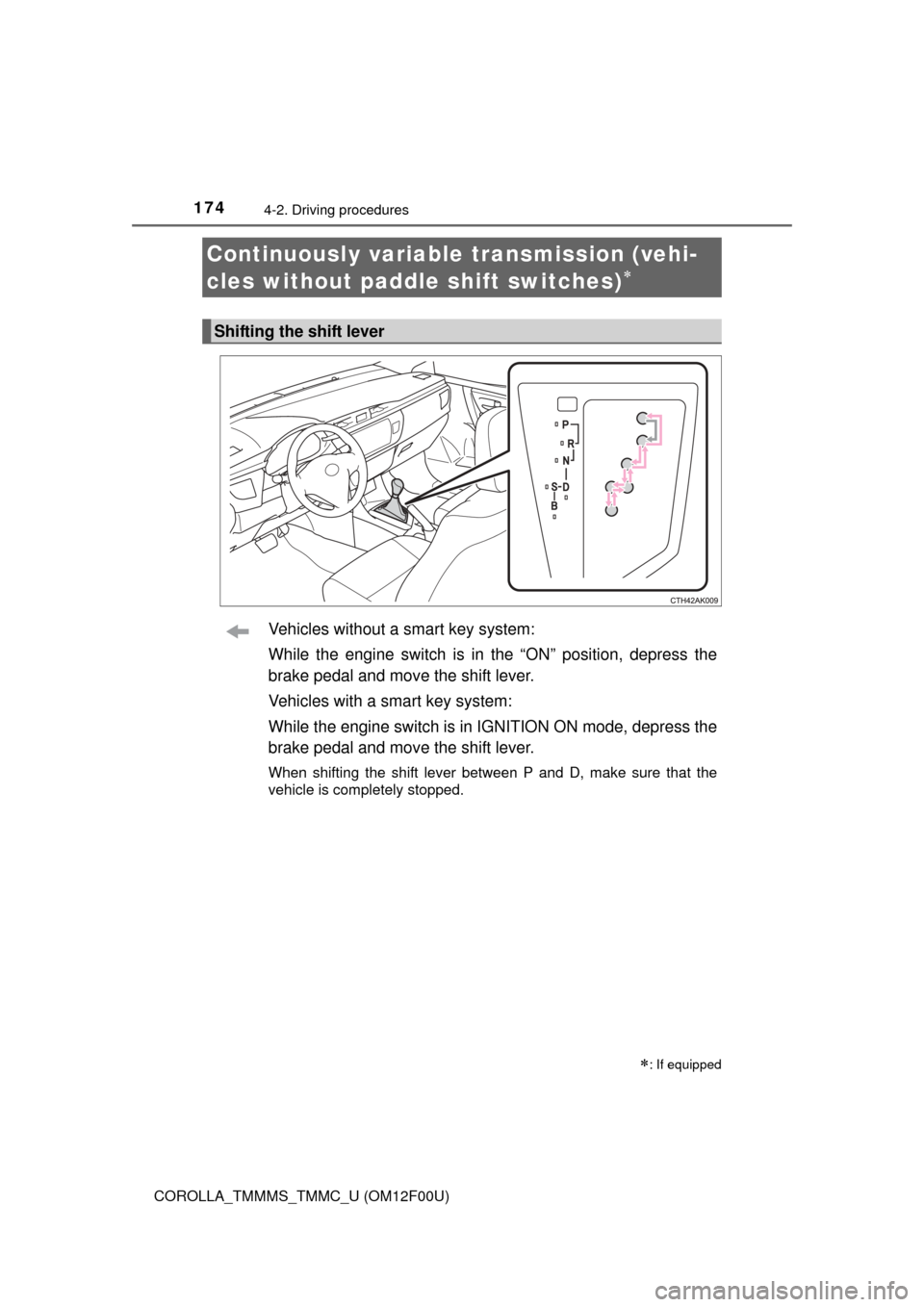
Vehicles without a smart key system:
While the engine switch is in the “ON” position, depress the
brake pedal and move the shift lever.
Vehicles with a smart key system:
While the engine switch is in IGNITION ON mode, depress the
brake pedal and move the shift lever.
When shifting the shift lever between P and D, make sure that the
vehicle is completely stopped.
Continuously variable transmission (vehi-
cles without paddle shift switches)
: If equipped
Shifting the shift lever
Page 176 of 612
1764-2. Driving procedures
COROLLA_TMMMS_TMMC_U (OM12F00U)
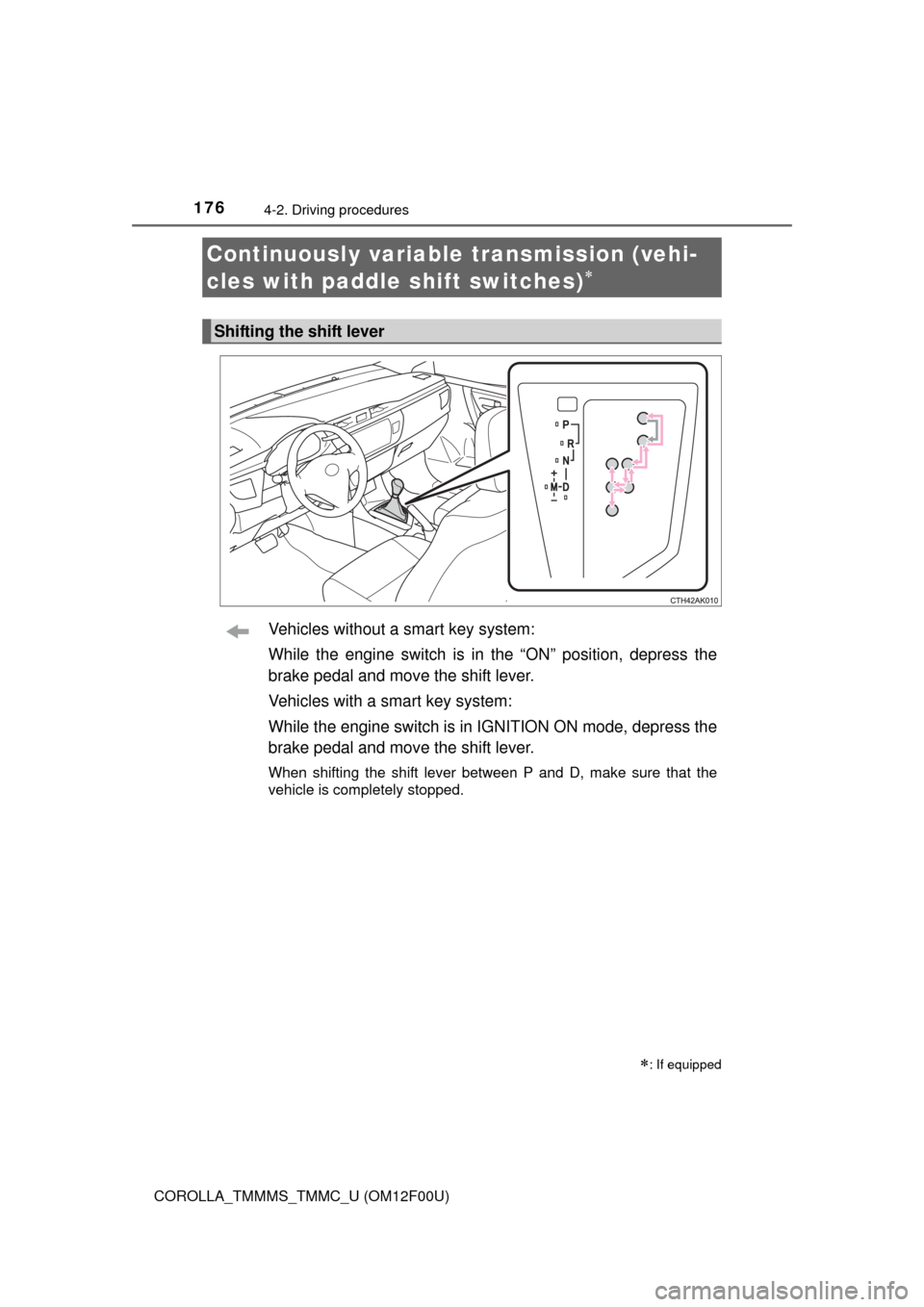
Vehicles without a smart key system:
While the engine switch is in the “ON” position, depress the
brake pedal and move the shift lever.
Vehicles with a smart key system:
While the engine switch is in IGNITION ON mode, depress the
brake pedal and move the shift lever.
When shifting the shift lever between P and D, make sure that the
vehicle is completely stopped.
Continuously variable transmission (vehi-
cles with paddle shift switches)
: If equipped
Shifting the shift lever
Page 182 of 612
1824-2. Driving procedures
COROLLA_TMMMS_TMMC_U (OM12F00U)
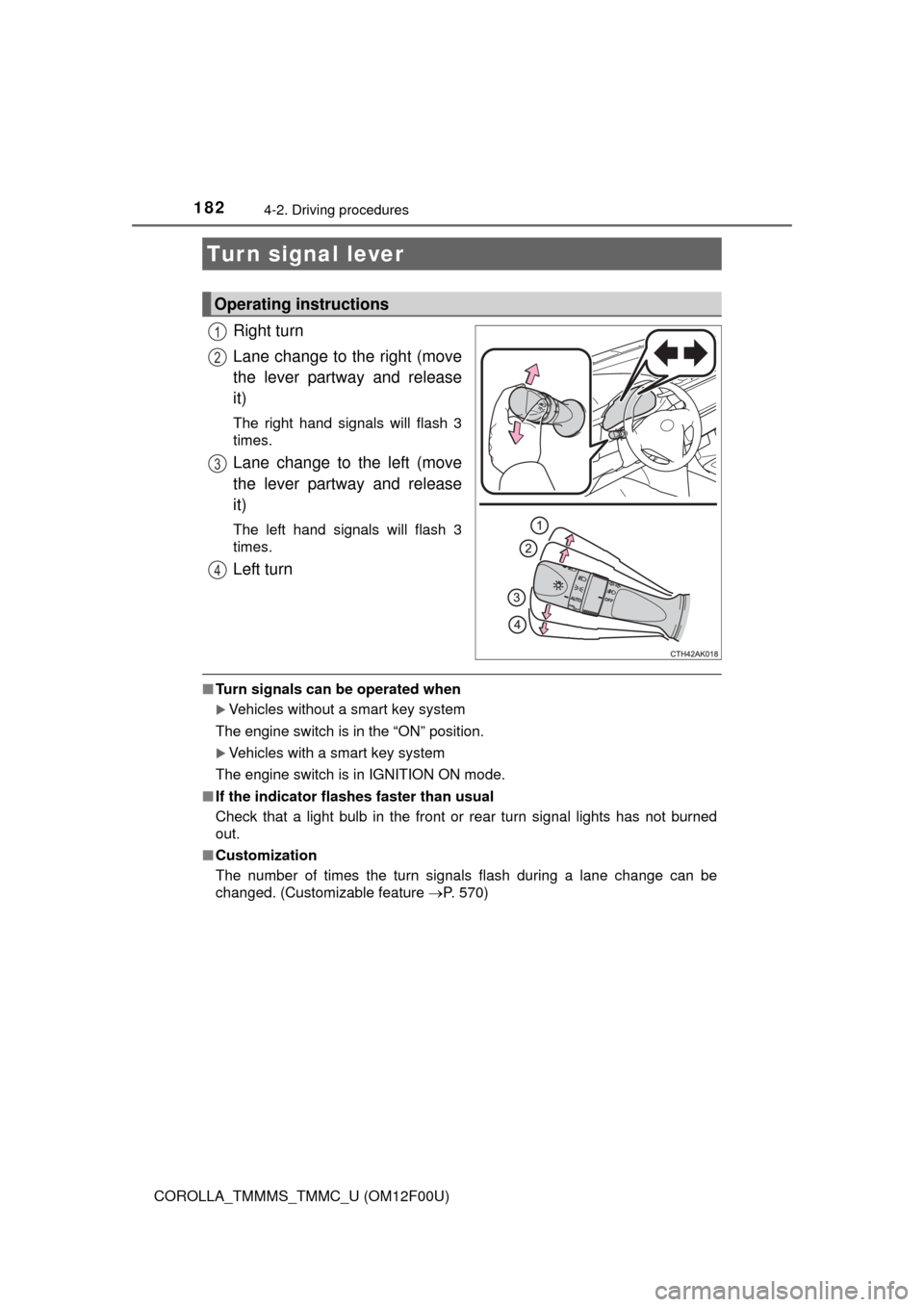
Right turn
Lane change to the right (move
the lever partway and release
it)
The right hand signals will flash 3
times.
Lane change to the left (move
the lever partway and release
it)
The left hand signals will flash 3
times.
Left turn
■Turn signals can be operated when
Vehicles without a smart key system
The engine switch is in the “ON” position.
Vehicles with a smart key system
The engine switch is in IGNITION ON mode.
■ If the indicator flashes faster than usual
Check that a light bulb in the front or rear turn signal lights has not burned
out.
■ Customization
The number of times the turn signals flash during a lane change can be
changed. (Customizable feature P. 570)
Turn signal lever
Operating instructions
1
2
3
4
Page 186 of 612
1864-3. Operating the lights and wipers
COROLLA_TMMMS_TMMC_U (OM12F00U)
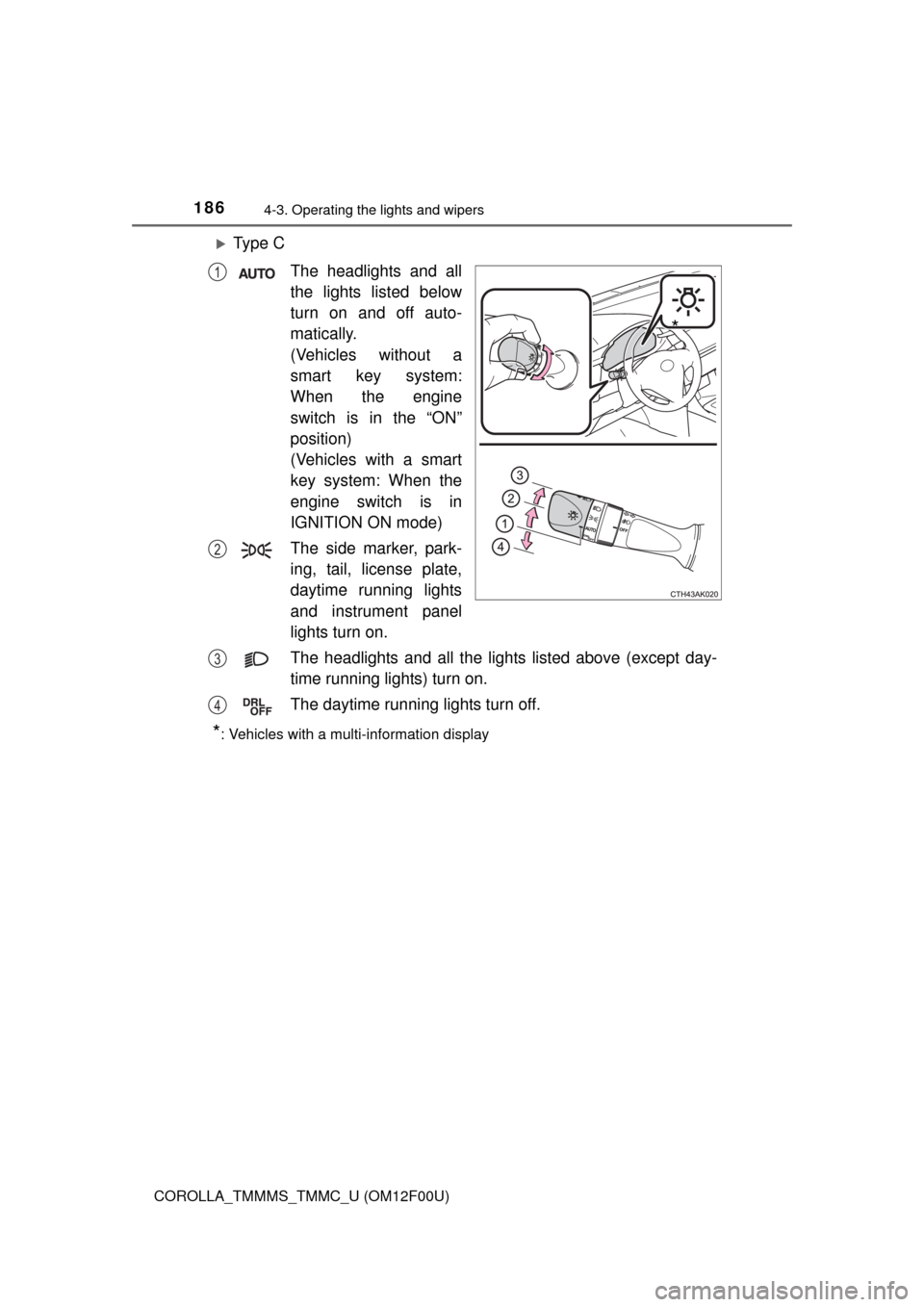
Ty p e CThe headlights and all
the lights listed below
turn on and off auto-
matically.
(Vehicles without a
smart key system:
When the engine
switch is in the “ON”
position)
(Vehicles with a smart
key system: When the
engine switch is in
IGNITION ON mode)
The side marker, park-
ing, tail, license plate,
daytime running lights
and instrument panel
lights turn on.
The headlights and all the lights listed above (except day-
time running lights) turn on.
The daytime running lights turn off.
*: Vehicles with a multi-information display
*
1
2
3
4
Page 187 of 612
1874-3. Operating the lights and wipers
4
Driving
COROLLA_TMMMS_TMMC_U (OM12F00U)
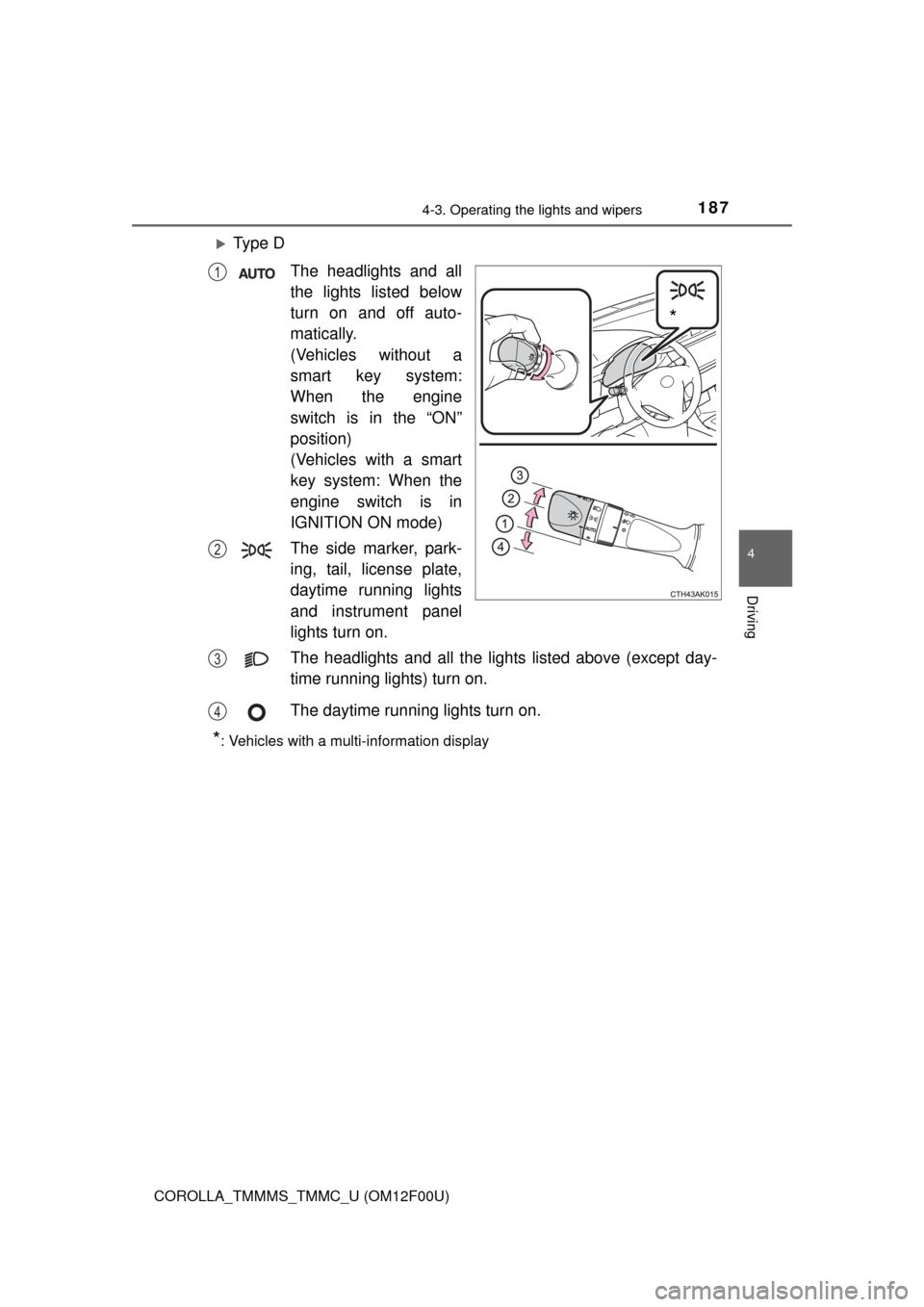
Ty p e DThe headlights and all
the lights listed below
turn on and off auto-
matically.
(Vehicles without a
smart key system:
When the engine
switch is in the “ON”
position)
(Vehicles with a smart
key system: When the
engine switch is in
IGNITION ON mode)
The side marker, park-
ing, tail, license plate,
daytime running lights
and instrument panel
lights turn on.
The headlights and all the lights listed above (except day-
time running lights) turn on.
The daytime running lights turn on.
*: Vehicles with a multi-information display
*
1
2
3
4
Page 189 of 612
1894-3. Operating the lights and wipers
4
Driving
COROLLA_TMMMS_TMMC_U (OM12F00U)■
Automatic light off system
Vehicles without a smart key system
● When the headlights are on: The headlights and tail lights turn off 30 sec-
onds after the engine switch is turned to the “ACC” or “LOCK” position and a
door is opened and closed. (Vehicles with a wireless remote control: The
lights turn off immediately if on the key is pressed after all the doors
are locked.)
● When only the tail lights are on: The tail lights turn off automatically if the
engine switch is turned to the “ACC” or “LOCK” position and the driver’s
door is opened.
To turn the lights on again, turn the engine switch to “ON” position, or turn the
light switch off once and then back to or .
If any of the doors or trunk lid is kept open, the lights automatically turn off
after 20 minutes.
Vehicles with a smart key system
● When the headlights are on: The headlights and tail lights turn off 30 sec-
onds after the engine switch is turned to ACCESSORY mode or turned off
and a door is opened and closed. (The lights turn off immediately if on
the key is pressed after all the doors are locked.)
● When only the tail lights are on: The tail lights turn off automatically if the
engine switch is turned to ACCESSORY mode or turned off and the driver’s
door is opened.
To turn the lights on again, turn the engine switch to IGNITION ON mode, or
turn the light switch off once and then back to or .
If any of the doors or trunk lid is kept open, the lights automatically turn off
after 20 minutes.
■ Light reminder buzzer
Vehicles without a smart key system
A buzzer sounds when the engine switch is turned to “LOCK” position and the
driver's door is opened while the lights are turned on.
Vehicles with a smart key system
A buzzer sounds when the engine switch is turned off or turned to ACCES-
SORY mode and the driver's door is opened while the lights are turned on.
Page 193 of 612
1934-3. Operating the lights and wipers
4
Driving
COROLLA_TMMMS_TMMC_U (OM12F00U)
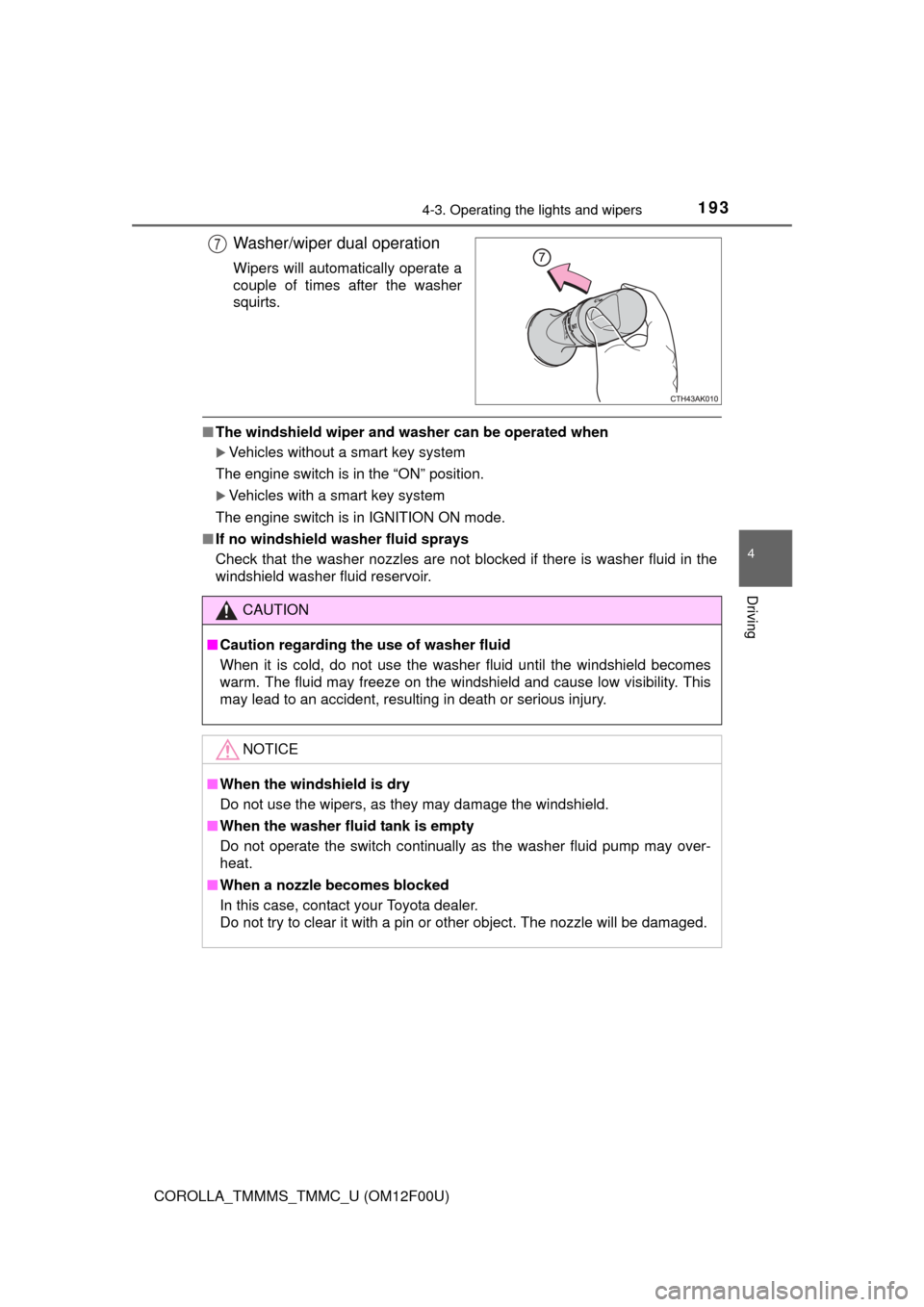
Washer/wiper dual operation
Wipers will automatically operate a
couple of times after the washer
squirts.
■The windshield wiper and washer can be operated when
Vehicles without a smart key system
The engine switch is in the “ON” position.
Vehicles with a smart key system
The engine switch is in IGNITION ON mode.
■ If no windshield washer fluid sprays
Check that the washer nozzles are not blocked if there is washer fluid in the
windshield washer fluid reservoir.
7
CAUTION
■Caution regarding the use of washer fluid
When it is cold, do not use the washer fluid until the windshield becomes
warm. The fluid may freeze on the windshield and cause low visibility. This
may lead to an accident, resulting in death or serious injury.
NOTICE
■When the windshield is dry
Do not use the wipers, as they may damage the windshield.
■ When the washer fluid tank is empty
Do not operate the switch continually as the washer fluid pump may over-
heat.
■ When a nozzle becomes blocked
In this case, contact your Toyota dealer.
Do not try to clear it with a pin or other object. The nozzle will be damaged\
.
Page 194 of 612
194
COROLLA_TMMMS_TMMC_U (OM12F00U)
4-4. Refueling
●Close all the doors and windows, and turn the engine switch off.
● Confirm the type of fuel.
■Fuel types
Unleaded gasoline (Octane rating 87 [Research Octane Number 91] or
higher)
Opening the fuel tank cap
Perform the following steps to open the fuel tank cap:
Before refueling the vehicle
CAUTION
■When refueling the vehicle
Observe the following precautions while refueling the vehicle. Failure to do
so may result in death or serious injury.
● After exiting the vehicle and before opening the fuel door, touch an
unpainted metal surface to discharge any static electricity. It is important to
discharge static electricity before refueling because sparks resulting from
static electricity can cause fuel vapors to ignite while refueling.
● Always hold the grips on the fuel tank cap and turn it slowly to remove it.
A whooshing sound may be heard when the fuel tank cap is loosened.
Wait until the sound cannot be heard before fully removing the cap. In hot
weather, pressurized fuel may spray out the filler neck and cause injury.
● Do not allow anyone that has not discharged static electricity from their
body to come close to an open fuel tank.
● Do not inhale vaporized fuel.
Fuel contains substances that are harmful if inhaled.
● Do not smoke while refueling the vehicle.
Doing so may cause the fuel to ignite and cause a fire.
● Do not return to the vehicle or touch any person or object that is statically
charged.
This may cause static electricity to build up, resulting in a possible ignition
hazard.
■ When refueling
Observe the following precautions to prevent fuel overflowing from the fuel
tank:
● Securely insert the fuel nozzle into the fuel filler neck.
● Stop filling the tank after the fuel nozzle automatically clicks off.
● Do not top off the fuel tank.
Page 201 of 612
2014-5. Using the driving support systems
4
Driving
COROLLA_TMMMS_TMMC_U (OM12F00U)
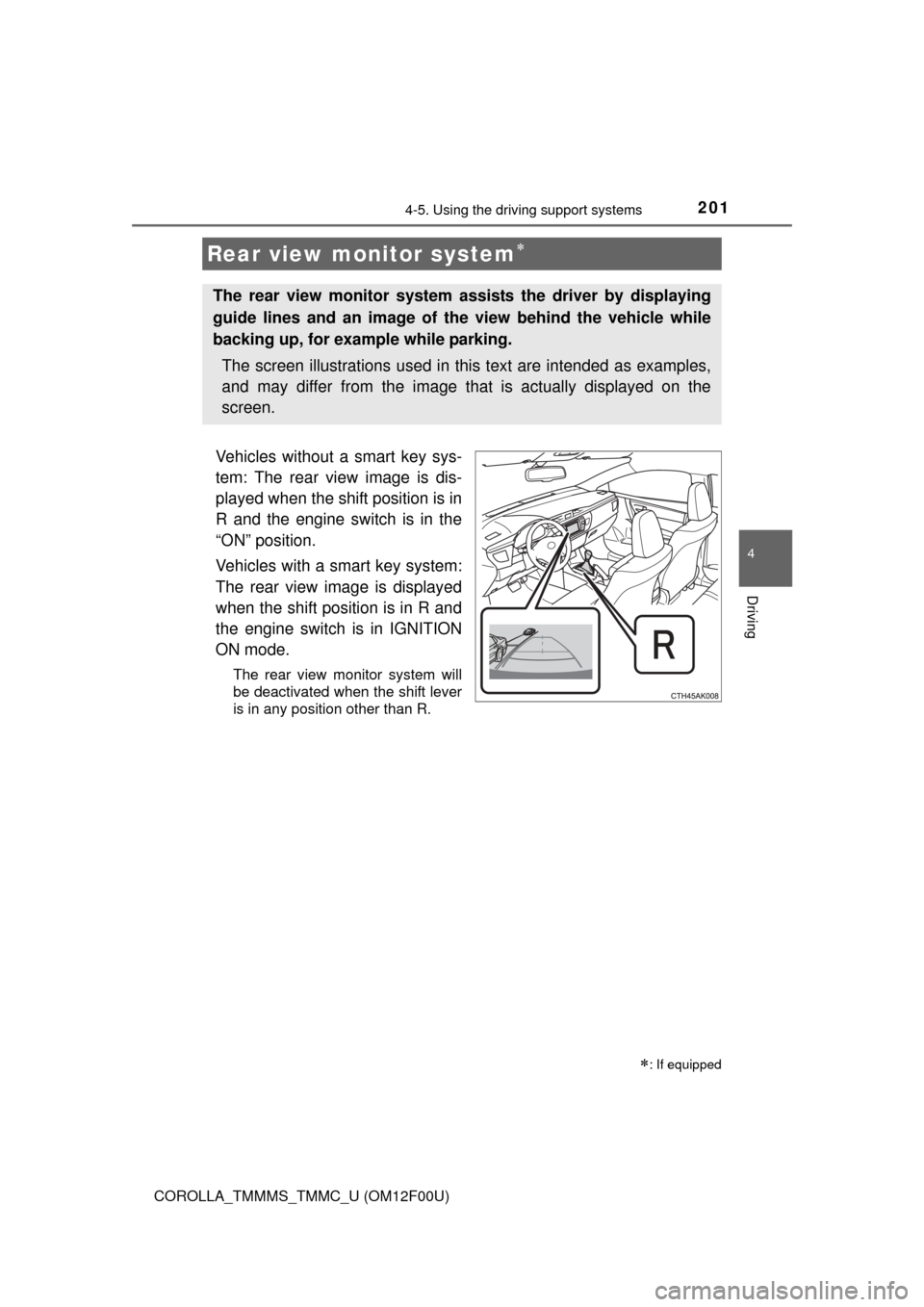
Vehicles without a smart key sys-
tem: The rear view image is dis-
played when the shift position is in
R and the engine switch is in the
“ON” position.
Vehicles with a smart key system:
The rear view image is displayed
when the shift position is in R and
the engine switch is in IGNITION
ON mode.
The rear view monitor system will
be deactivated when the shift lever
is in any position other than R.
Rear view monitor system
: If equipped
The rear view monitor system assists the driver by displaying
guide lines and an image of the view behind the vehicle while
backing up, for example while parking.
The screen illustrations used in this text are intended as examples,
and may differ from the image that is actually displayed on the
screen.