change time TOYOTA COROLLA 2015 11.G Owner's Manual
[x] Cancel search | Manufacturer: TOYOTA, Model Year: 2015, Model line: COROLLA, Model: TOYOTA COROLLA 2015 11.GPages: 612, PDF Size: 8.48 MB
Page 301 of 612
3015-14. Using the radio (Multimedia system)
5
Audio system
COROLLA_TMMMS_TMMC_U (OM12F00U)
Search for desired stations by turning the “TUNE/SCROLL” knob or
pressing the “ ” or “ ” button on “SEEK/TRACK”.
Select “(add new)”.
To change the preset station to a different one, select and hold the preset
station.
Select “Yes”.
Select “OK” after setting the new preset station.
■Refreshing the station list Select “Refresh” on the “Station List” screen.
To cancel the refresh, select “Cancel Refresh”.
■Reception sensitivity
●Maintaining perfect radio reception at all times is difficult due to the continu-
ally changing position of the antenna, differences in signal strength and sur-
rounding objects, such as trains, transmitters, etc.
● The radio antenna is mounted inside the rear window. To maintain clear
radio reception, do not attach metallic window tinting or other metallic
objects to the antenna wire mounted inside the rear window.
Setting station presets
1
2
3
4
1
Page 309 of 612
3095-16. Using an external device (Multimedia system)
5
Audio system
COROLLA_TMMMS_TMMC_U (OM12F00U)
Select “Browse” on the screen.
Select the desired play mode. Then select a song to begin using
the selected play mode.
Select to change on/off.
Select to change on/off.
Selecting a play mode
Shuffle play
Repeat play
1
2
Page 310 of 612
3105-16. Using an external device (Multimedia system)
COROLLA_TMMMS_TMMC_U (OM12F00U)
■About iPod
●“Made for iPod” and “Made for iPhone” mean that an electronic accessory
has been designed to connect specifically to iPod or iPhone, respectively,
and has been certified by the developer to meet Apple performance stan-
dards.
● Apple is not responsible for the operation of this device or its compliance
with safety and regulatory standards. Please note that the use of this acces-
sory with iPod or iPhone may affect wireless performance.
● iPhone, iPod, iPod classic, iPod nano, and iPod touch are trademarks of
Apple Inc., registered in the U.S. and other countries. Lightning is a trade-
mark of Apple Inc.
■ iPod cover art
●Depending on the iPod and songs in the iPod, iPod cover art may be dis-
played.
● This function can be changed to on/off. ( P. 292)
● It may take time to display iPod cover art, and the iPod may not be operated
while the cover art display is in process.
● Only iPod cover art that is saved in JPEG format can be displayed.
■ iPod functions
●When an iPod is connected and the audio source is changed to iPod mode,
the iPod will resume play from the same point in which it was last used.
● Depending on the iPod that is connected to the system, certain functions
may not be available. If a function is unavailable due to a malfunction (as
opposed to a system specification), disconnecting the device and recon-
necting it may resolve the problem.
● While connected to the system, the iPod cannot be operated with its own
controls. It is necessary to use the controls of the vehicle's multimedia sys-
tem instead.
● When the battery level of an iPod is very low, the iPod may not operate. If
so, charge the iPod before use.
● Compatible models ( P. 312)
Page 316 of 612
3165-16. Using an external device (Multimedia system)
COROLLA_TMMMS_TMMC_U (OM12F00U)●
MP3, WMA and AAC playback
• When a device containing MP3, WMA and AAC files is connected, all
files in the USB memory device are checked. Once the file check is fin-
ished, the first MP3, WMA and AAC file is played. To make the file check
finish more quickly, we recommend that you do not include any files other
than MP3, WMA and AAC files or create any unnecessary folders.
• When a USB memory device is connected and the audio source is
changed to USB memory mode, the USB memory device will start play-
ing the first file in the first folder. If the same device is removed and
reconnected (and the con- tents have not been changed), the USB mem-
ory device will resume play from the same point in which it was last used.
● Extensions
If the file extensions .mp3, .wma and .m4a are used for files other than
MP3, WMA and AAC files, they will be skipped (not played).
● Playback
• To play MP3 files with steady sound quality, we recommend a fixed bit
rate of at least 128 kbps and a sampling frequency of 44.1 kHz.
• There is a wide variety of freeware and other encoding software for MP3, WMA and AAC files on the market, and depending on the status of the
encoding and the file format, poor sound quality or noise at the start of
playback may result. In some cases, playback may not be possible at all.\
• Microsoft, Windows, and Windows Media are the registered trademarks of Microsoft Corporation in the U.S.A. and other countries.
CAUTION
■While driving
Do not connect a USB memory device or operate the device controls.
NOTICE
■To prevent damage to the USB memory device or its terminals
● Do not leave the USB memory device in the vehicle. The temperature
inside the vehicle may become high, resulting in damage to the USB
memory device.
● Do not push down on or apply unnecessary pressure to the USB memory
device while it is connected.
● Do not insert foreign objects into the port.
Page 321 of 612

3215-17. Connecting Bluetooth® (Multimedia system)
5
Audio system
COROLLA_TMMMS_TMMC_U (OM12F00U)
CAUTION
●CAUTION: Radio Frequency Radiation Exposure
This equipment complies with FCC radiation exposure limits set forth for
uncontrolled equipment and meets the FCC radio frequency (RF) Expo-
sure Guidelines in Supplement C to OET65. This equipment has very low
levels of RF energy that it deemed to comply without maximum permis-
sive exposure evaluation (MPE). But it is desirable that it should be
installed and operated with at least 20cm and more between the radiator
and person's body (excluding extremities: hands, wrists, feet and ankles).
• Co-location: This transmitter must not be co-located or operated in con- junction with any other antenna or transmitter.
• This device complies with part 15 of the FCC Rules. Operation is sub-
ject to the following two conditions: (1) This device may not cause
harmful interference, and (2) this device must accept any interference\
received, including interference that may cause undesired operation.
● FCC WARNING:
Changes or modifications not expressly approved by the party responsi-
ble for compliance could void the user's authority to operate the equip-
ment.
● IC: 2024B-FT0049A
• This device complies with Industry Canada licence-exempt RSS stan-
dard(s). Operation is subject to the following two conditions: (1) this
device may not cause interference, and (2) this device must accept any
interference, including interference that may cause undesired operation
of the device.
● CAUTION: Radio Frequency Radiation Exposure
This equipment complies with IC radiation exposure limits set forth for
uncontrolled equipment and meets RSS-102 of the IC radio frequency
(RF) Exposure rules.
This equipment has very low levels of RF energy that it deemed to comply
without maximum permissive exposure evaluation (MPE).
But it is desirable that it should be installed and operated with at least
20cm and more between the radiator and person's body (excluding
extremities: hands, wrists, feet and ankles).
Page 327 of 612
3275-17. Connecting Bluetooth® (Multimedia system)
5
Audio system
COROLLA_TMMMS_TMMC_U (OM12F00U)
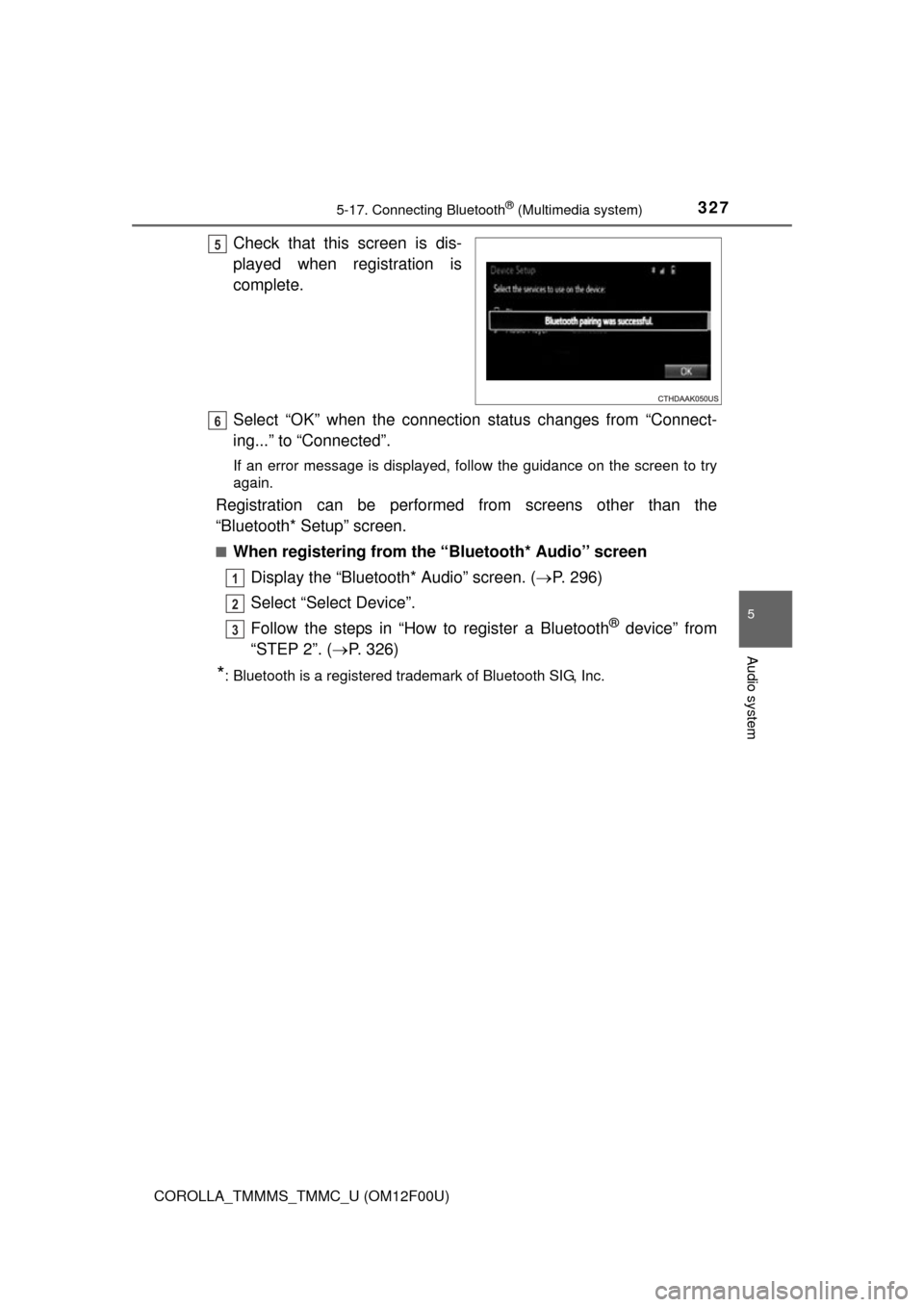
Check that this screen is dis-
played when registration is
complete.
Select “OK” when the connection status changes from “Connect-
ing...” to “Connected”.
If an error message is displayed, follow the guidance on the screen to try
again.
Registration can be performed from screens other than the
“Bluetooth* Setup” screen.
■When registering from the “Bluetooth* Audio” screenDisplay the “Bluetooth* Audio” screen. ( P. 296)
Select “Select Device”.
Follow the steps in “How to register a Bluetooth
® device” from
“STEP 2”. ( P. 326)
*: Bluetooth is a registered trademark of Bluetooth SIG, Inc.
5
6
1
2
3
Page 332 of 612
3325-17. Connecting Bluetooth® (Multimedia system)
COROLLA_TMMMS_TMMC_U (OM12F00U)
Display the “Bluetooth* Setup” screen. (P. 323)
*: Bluetooth is a registered trademark of Bluetooth SIG, Inc.
Select the device.
Select “Device Info”.
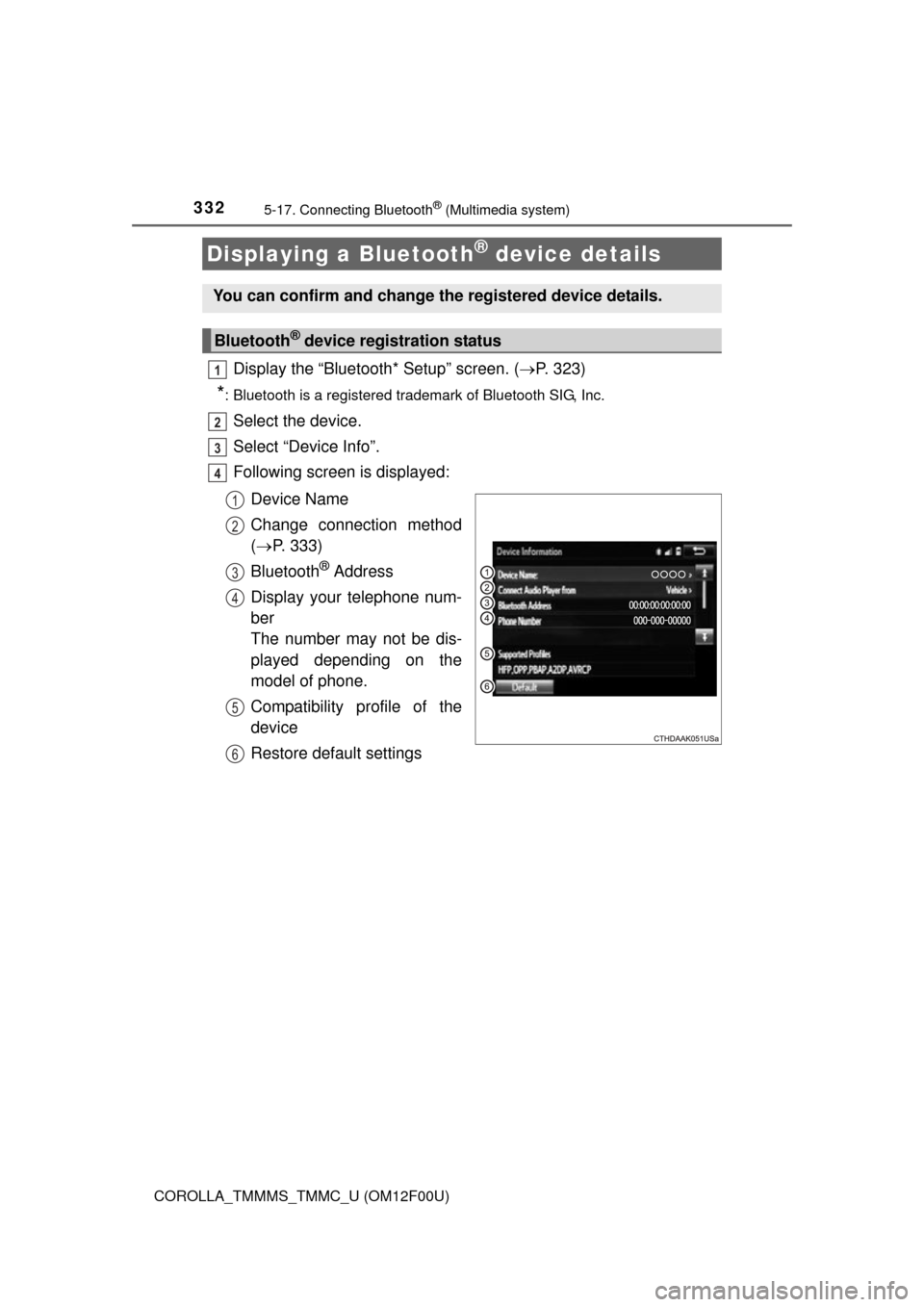
Following screen is displayed:
Device Name
Change connection method
( P. 333)
Bluetooth
® Address
Display your telephone num-
ber
The number may not be dis-
played depending on the
model of phone.
Compatibility profile of the
device
Restore default settings
Displaying a Bluetooth® device details
You can confirm and change the registered device details.
Bluetooth® device registration status
1
2
3
4
1
2
3
4
5
6
Page 334 of 612
3345-17. Connecting Bluetooth® (Multimedia system)
COROLLA_TMMMS_TMMC_U (OM12F00U)
Display the “Bluetooth* Setup” screen. (P. 323)
Select “System Settings”.
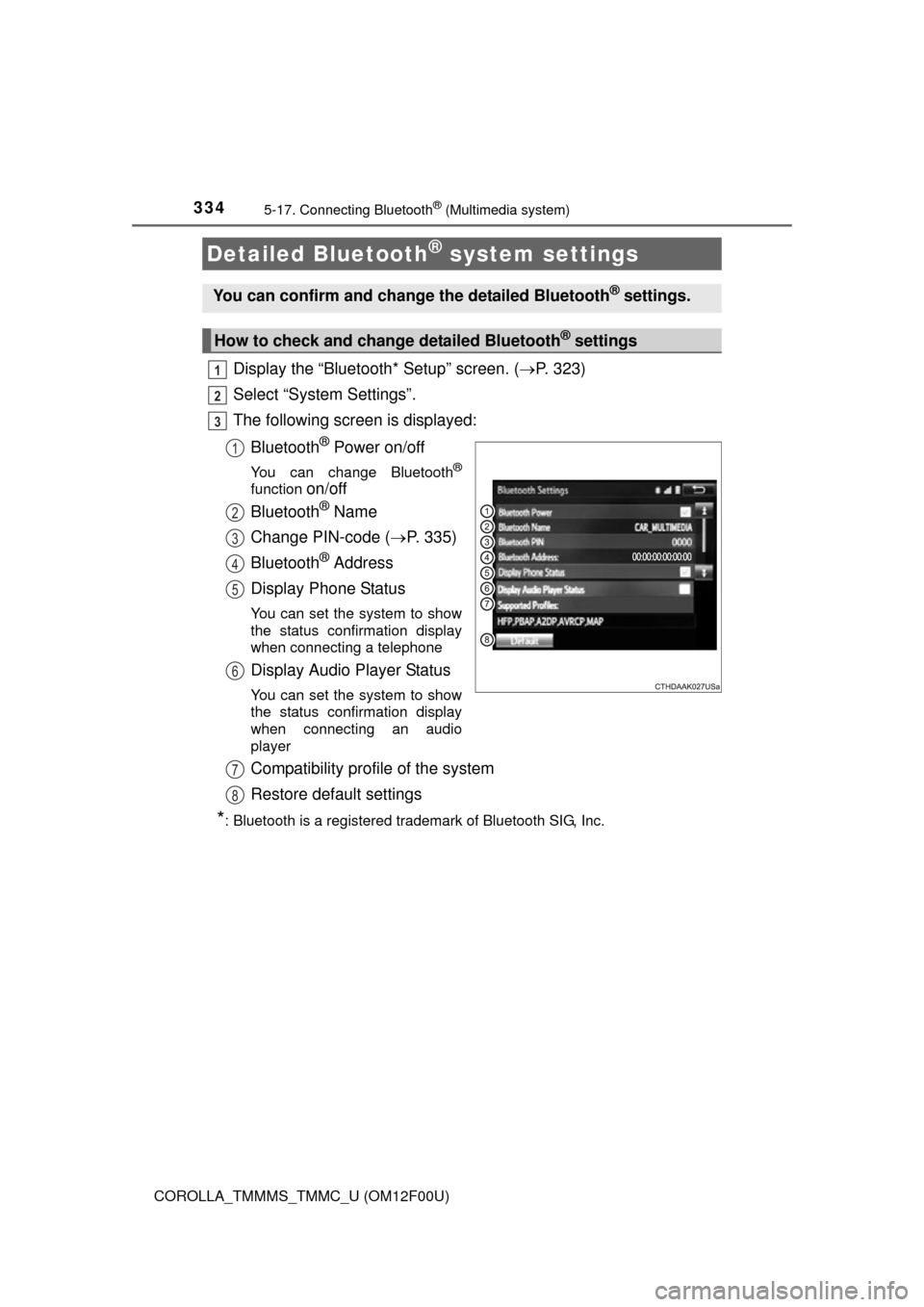
The following screen is displayed:
Bluetooth
® Power on/off
You can change Bluetooth®
function on/off
Bluetooth
® Name
Change PIN-code ( P. 335)
Bluetooth
® Address
Display Phone Status
You can set the system to show
the status confirmation display
when connecting a telephone
Display Audio Player Status
You can set the system to show
the status confirmation display
when connecting an audio
player
Compatibility profile of the system
Restore default settings
*: Bluetooth is a registered trademark of Bluetooth SIG, Inc.
Detailed Bluetooth® system settings
You can confirm and change the detailed Bluetooth® settings.
How to check and change detailed Bluetooth® settings
1
2
3
1
2
3
4
5
6
7
8
Page 335 of 612

3355-17. Connecting Bluetooth® (Multimedia system)
5
Audio system
COROLLA_TMMMS_TMMC_U (OM12F00U)
You can change the PIN-code that is used to register your Bluetooth®
devices in the system.
Select “Bluetooth* PIN”.
Input a PIN-code, and select “OK”.
*: Bluetooth is a registered trademark of Bluetooth SIG, Inc.
Editing the Bluetooth* PIN
1
2
Page 357 of 612
3575-19. Bluetooth® phone (Multimedia system)
5
Audio system
COROLLA_TMMMS_TMMC_U (OM12F00U)
The contact can be transferred from a Bluetooth® phone to the sys-
tem. The contact also c an be added, edited and deleted.
The call history can be deleted and contact and favorites can be
changed. Display the “Phone/Message Settings” screen. ( P. 355)
Select “Contact/Call History Settings”.
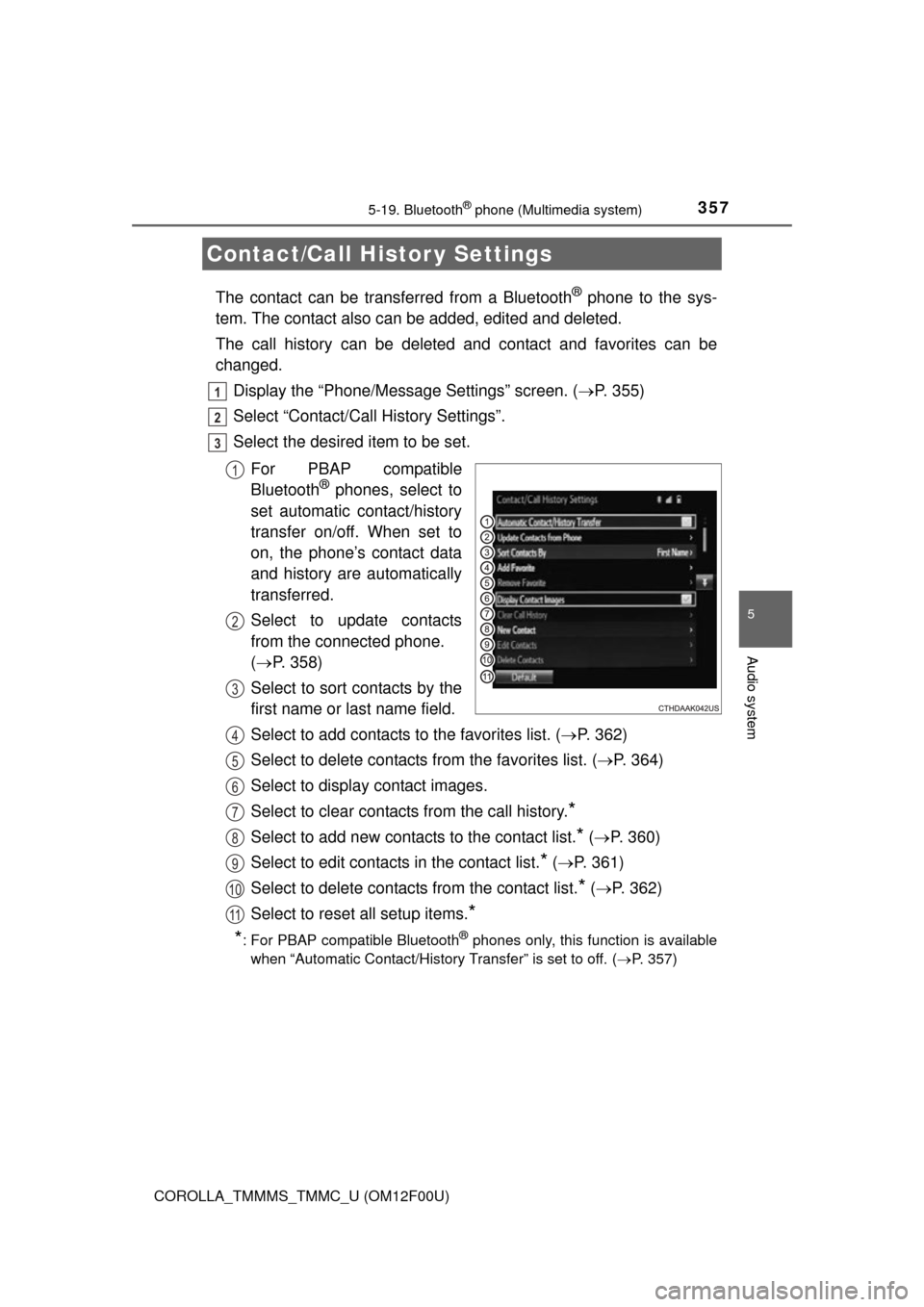
Select the desired item to be set.
For PBAP compatible
Bluetooth
® phones, select to
set automatic contact/history
transfer on/off. When set to
on, the phone’s contact data
and history are automatically
transferred.
Select to update contacts
from the connected phone.
( P. 358)
Select to sort contacts by the
first name or last name field.
Select to add contacts to the favorites list. ( P. 362)
Select to delete contacts from the favorites list. ( P. 364)
Select to display contact images.
Select to clear contacts from the call history.
*
Select to add new contacts to the contact list.* ( P. 360)
Select to edit contacts in the contact list.
* ( P. 361)
Select to delete contacts from the contact list.
* ( P. 362)
Select to reset all setup items.
*
*
: For PBAP compatible Bluetooth® phones only, this function is available
when “Automatic Contact/History Transfer” is set to off.
( P. 357)
Contact/Call Histor y Settings
1
2
3
1
2
3
4
5
6
7
8
9
10
11