Meter TOYOTA COROLLA 2017 11.G User Guide
[x] Cancel search | Manufacturer: TOYOTA, Model Year: 2017, Model line: COROLLA, Model: TOYOTA COROLLA 2017 11.GPages: 612, PDF Size: 14.18 MB
Page 88 of 612
882. Instrument cluster
COROLLA_TMMMS_TMMC_U (OM02494U)
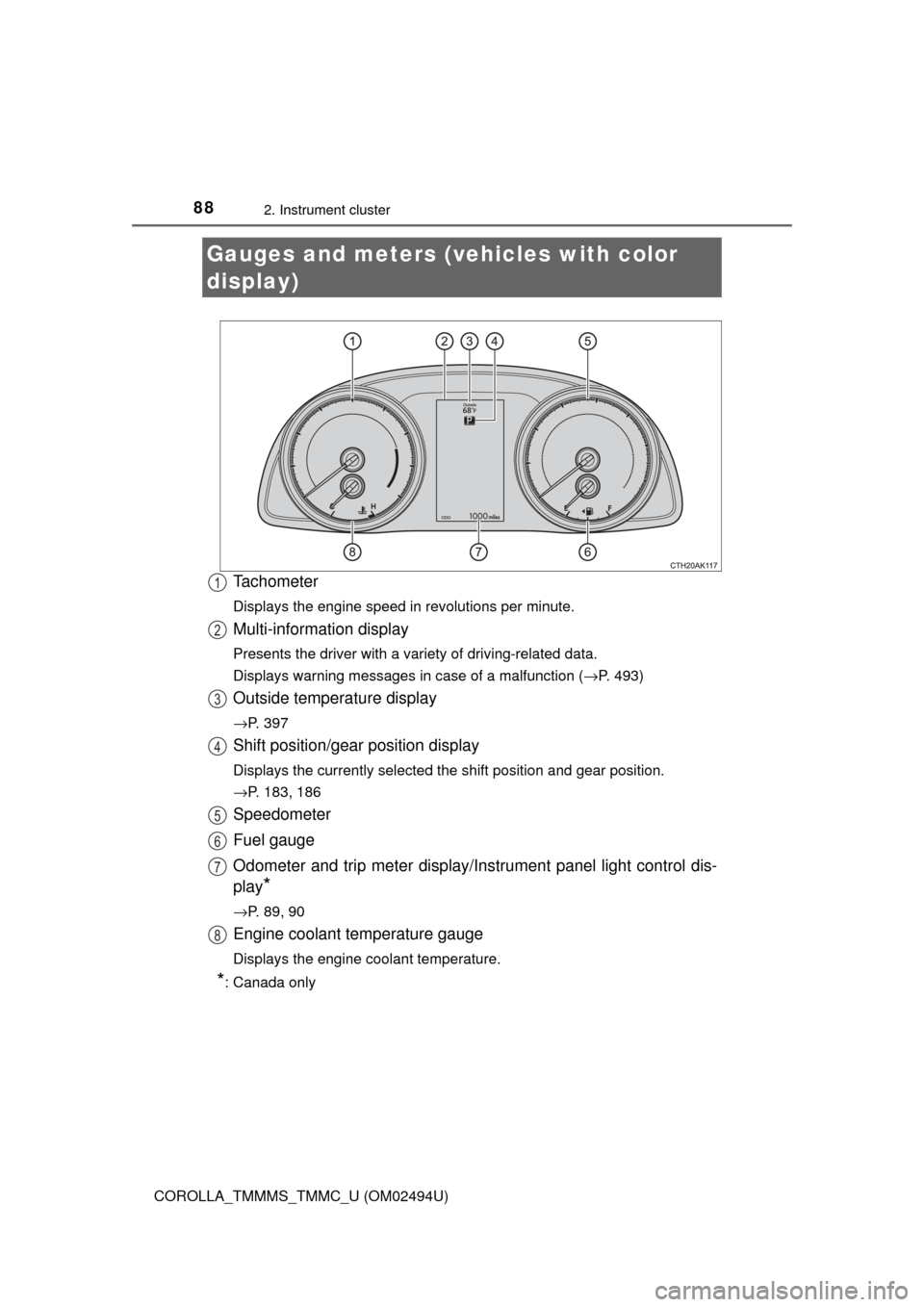
Tachometer
Displays the engine speed in revolutions per minute.
Multi-information display
Presents the driver with a variety of driving-related data.
Displays warning messages in case of a malfunction (→P. 493)
Outside temperature display
→P. 397
Shift position/gear position display
Displays the currently selected the shift position and gear position.
→P. 183, 186
Speedometer
Fuel gauge
Odometer and trip meter display/Instrument panel light control dis-
play
*
→P. 89, 90
Engine coolant temperature gauge
Displays the engine coolant temperature.
*: Canada only
Gauges and meters (vehicles with color
display)
1
2
3
4
5
6
7
8
Page 89 of 612
892. Instrument cluster
2
Instrument cluster
COROLLA_TMMMS_TMMC_U (OM02494U)
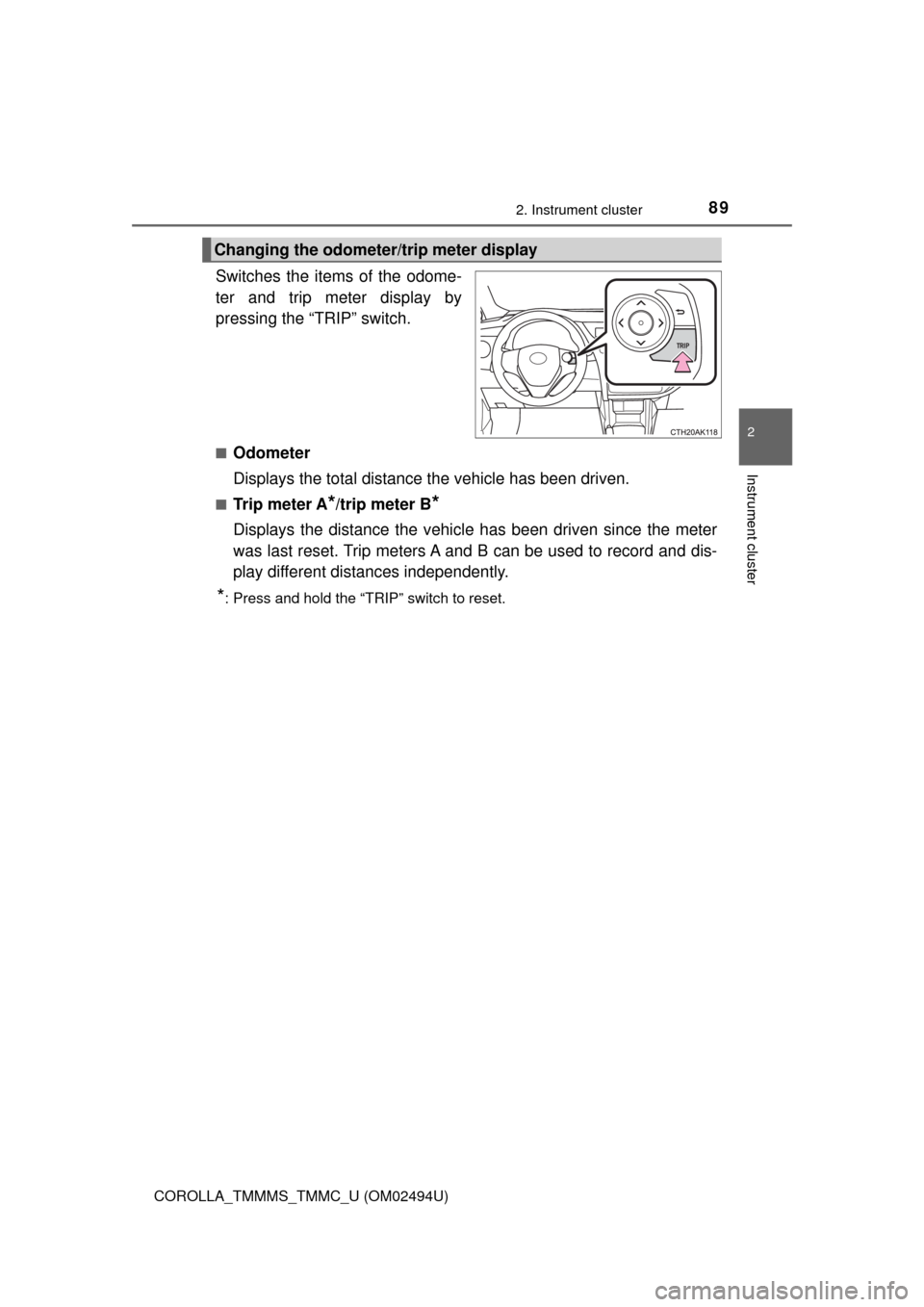
Switches the items of the odome-
ter and trip meter display by
pressing the “TRIP” switch.
■Odometer
Displays the total distance the vehicle has been driven.
■Tr i p m e t e r A*/trip meter B*
Displays the distance the vehicle has been driven since the meter
was last reset. Trip meters A and B can be used to record and dis-
play different distances independently.
*: Press and hold the “TRIP” switch to reset.
Changing the odometer/trip meter display
Page 91 of 612
912. Instrument cluster
2
Instrument cluster
COROLLA_TMMMS_TMMC_U (OM02494U)
■The meters and display illuminate when
Vehicles without a smart key system
The engine switch is in the “ON” position.
Vehicles with a smart key system
The engine switch is in IGNITION ON mode.
NOTICE
■To prevent damage to the engine and its components
●Do not let the indicator needle of the tachometer enter the red zone, which
indicates the maximum engine speed.
●The engine may be overheating if the engine coolant temperature gauge is
in the red zone. In this case, immediately stop the vehicle in a safe place,
and check the engine after it has cooled completely. (→P. 535)
Page 92 of 612
922. Instrument cluster
COROLLA_TMMMS_TMMC_U (OM02494U)■
Display contents
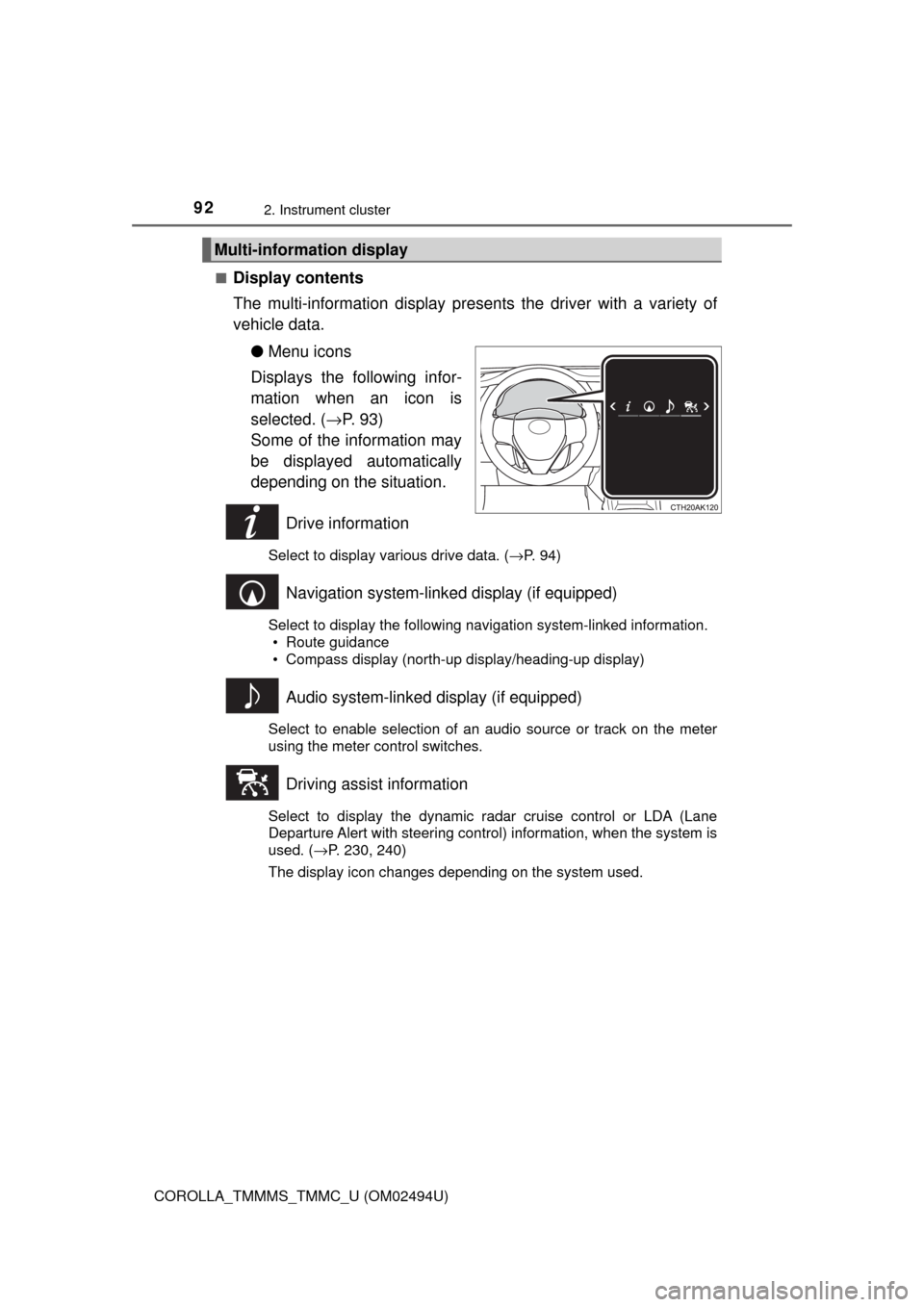
The multi-information display presents the driver with a variety of
vehicle data.
●Menu icons
Displays the following infor-
mation when an icon is
selected. (→P. 9 3 )
Some of the information may
be displayed automatically
depending on the situation.
Drive information
Select to display various drive data. (→P. 94)
Navigation system-linked display (if equipped)
Select to display the following navigation system-linked information.
• Route guidance
• Compass display (north-up display/heading-up display)
Audio system-linked display (if equipped)
Select to enable selection of an audio source or track on the meter
using the meter control switches.
Driving assist information
Select to display the dynamic radar cruise control or LDA (Lane
Departure Alert with steering control) information, when the system is
used. (→P. 230, 240)
The display icon changes depending on the system used.
Multi-information display
Page 93 of 612
932. Instrument cluster
2
Instrument cluster
COROLLA_TMMMS_TMMC_U (OM02494U)
Warning message display
Select to display warning messages and measures to be taken if a
malfunction is detected. (→P. 493)
Settings display
Select to change the meter display settings. (→P. 95)
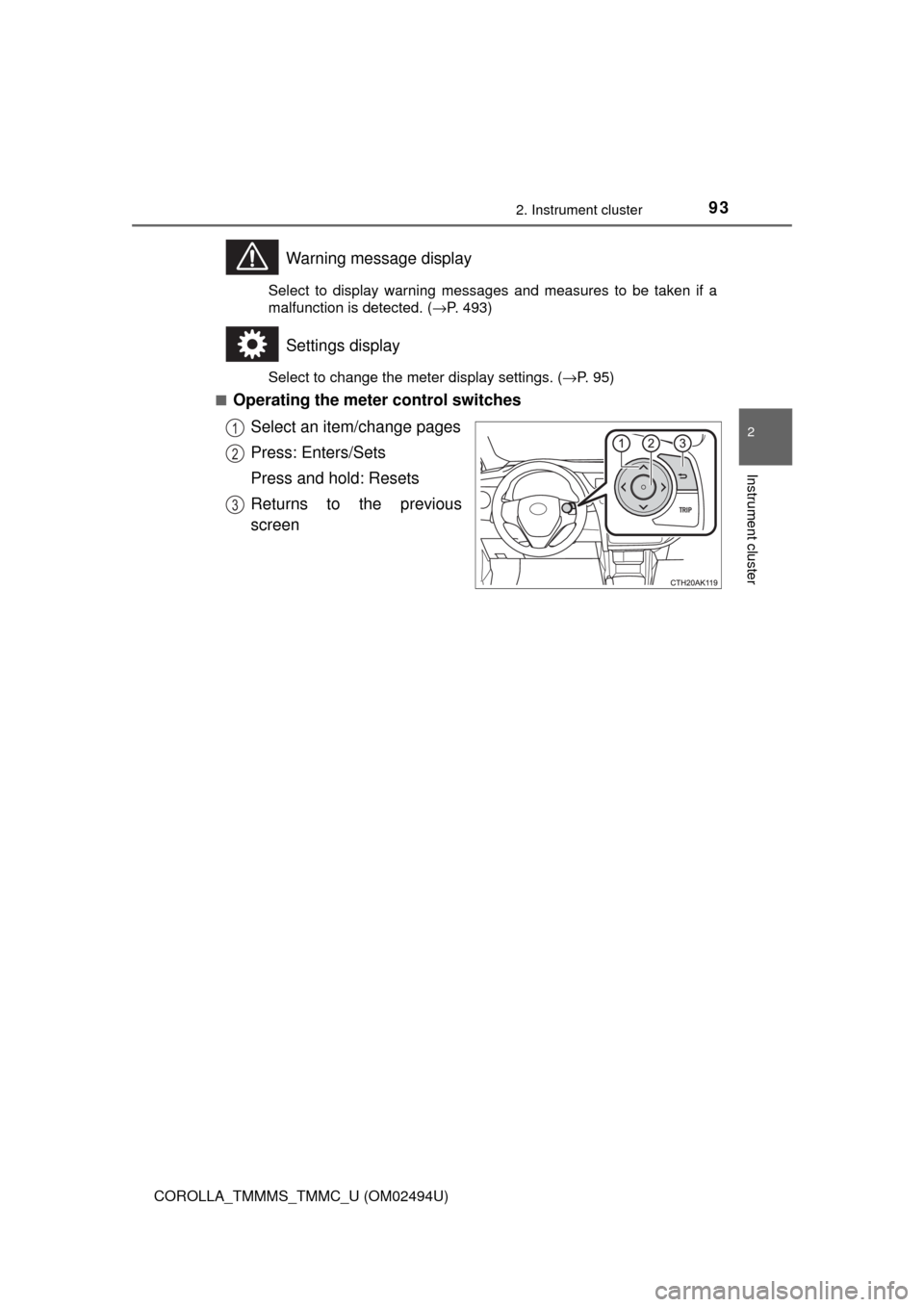
■
Operating the meter control switches
Select an item/change pages
Press: Enters/Sets
Press and hold: Resets
Returns to the previous
screen
1
2
3
Page 94 of 612

942. Instrument cluster
COROLLA_TMMMS_TMMC_U (OM02494U)
●Current fuel consumption*1
●Average fuel consumption (after reset*2/after start/after refuel)*1
Displays the average fuel consumption since the function was
reset, the engine was started, and the vehicle was refueled, respec-
tively
Use the displayed average fuel consumption as a reference.
●Average speed (after reset*2/after start)*1
Displays the average vehicle speed since the function was reset
and the engine was started, respectively
●Distance (driving range/after start)
*1
Displays the estimated maximum distance that can be driven with
the quantity of fuel remaining and the distance driven after the
engine was started, respectively.
• This distance is computed based on your average fuel consumption. As
a result, the actual distance that can be driven may differ from that dis-
played.
• When only a small amount of fuel is added to the tank, the display may
not be updated.
When refueling, turn the engine switch off. If the vehicle is refueled with-
out turning the engine switch off, the display may not be updated.
●Elapsed time (after reset*2/after start)*1
Displays the elapsed time since the function was reset and the
engine was started, respectively
●Eco Driving Indicator Zone Display (vehicles with a continuously
variable transmission)
→P. 1 0 2
●LDA (Lane Departure Alert with steering control) vehicle sway
warning
→P. 2 3 1
●Display off
A blank screen is displayed
*1: Can be registered to Drive information 1 or 2. (→P. 95)
*2: Resetting procedures:
• Select a function to be reset using the meter control switch and then
press and hold to reset.
• If there is more than one function that can be reset, check boxes will be
displayed next to those functions.
Drive information
Page 95 of 612
952. Instrument cluster
2
Instrument cluster
COROLLA_TMMMS_TMMC_U (OM02494U)■
Changing the settings
Select using the meter control switch.
Select an item and then set it with the center button.
■Customizable items
●LDA (Lane Departure Alert with steering control)
→P. 2 3 0
●LDA (Lane Departure Alert with steering control) vehicle
sway warning
→P. 2 3 1
●PCS (Pre-Collision System)
→P. 2 1 6
●Language
Select to change the language displayed on the multi-information
display.
●Units
Select to change the unit of measure displayed on the multi-infor-
mation display.
●Drive information 1/Drive information 2
Select to select up to 2 items that will be displayed on a Drive
information screen.
●Eco driving indicator light
Select to activate/deactivate the Eco Driving Indicator Light.
(
→P. 101)
●Pop-up display
Select to set the following pop-up displays, which may appear in
some situations, on/off.
• Route guidance display of the navigation system-linked sys-
tem (if equipped)
• Incoming call display of the hands-free phone system
●Accent color
Select to change the accent colors on the screen, such as the
cursor color.
Settings display
1
2
Page 96 of 612

962. Instrument cluster
COROLLA_TMMMS_TMMC_U (OM02494U)
●Maintenance system (U.S.A.)
Select to reset the message after the required maintenance is
performed. (
→P. 419)
●Initialization
Registered or changed meter settings will be deleted or returned
to their default setting.
■Pop-up display
In some situations, such as when a switch operation is performed, a pop-up
display, such as the operating dynamic radar cruise control switch, will be
temporarily displayed on the multi-information display.
The pop-up display function can be set on/off.
■Setting display automatic cancelation
In the following situations, a setting display in which the settings can be
changed through the meter control switches will automatically be turned off.
●When a warning message appears while the setting display is displayed
●When the vehicle begins to move while the setting display is displayed
■Liquid crystal display
Small spots or light spots may appear on the display. This phenomenon is
characteristic of liquid crystal displays, and there is no problem continuing to
use the display.
Page 187 of 612
1874-2. Driving procedures
4
Driving
COROLLA_TMMMS_TMMC_U (OM02494U)
*1: To improve fuel efficiency and reduce noises, set the shift lever in D for
normal driving.
*2: Selecting gear step using the M position achieves suitable engine braking
forces by operating the shift lever.
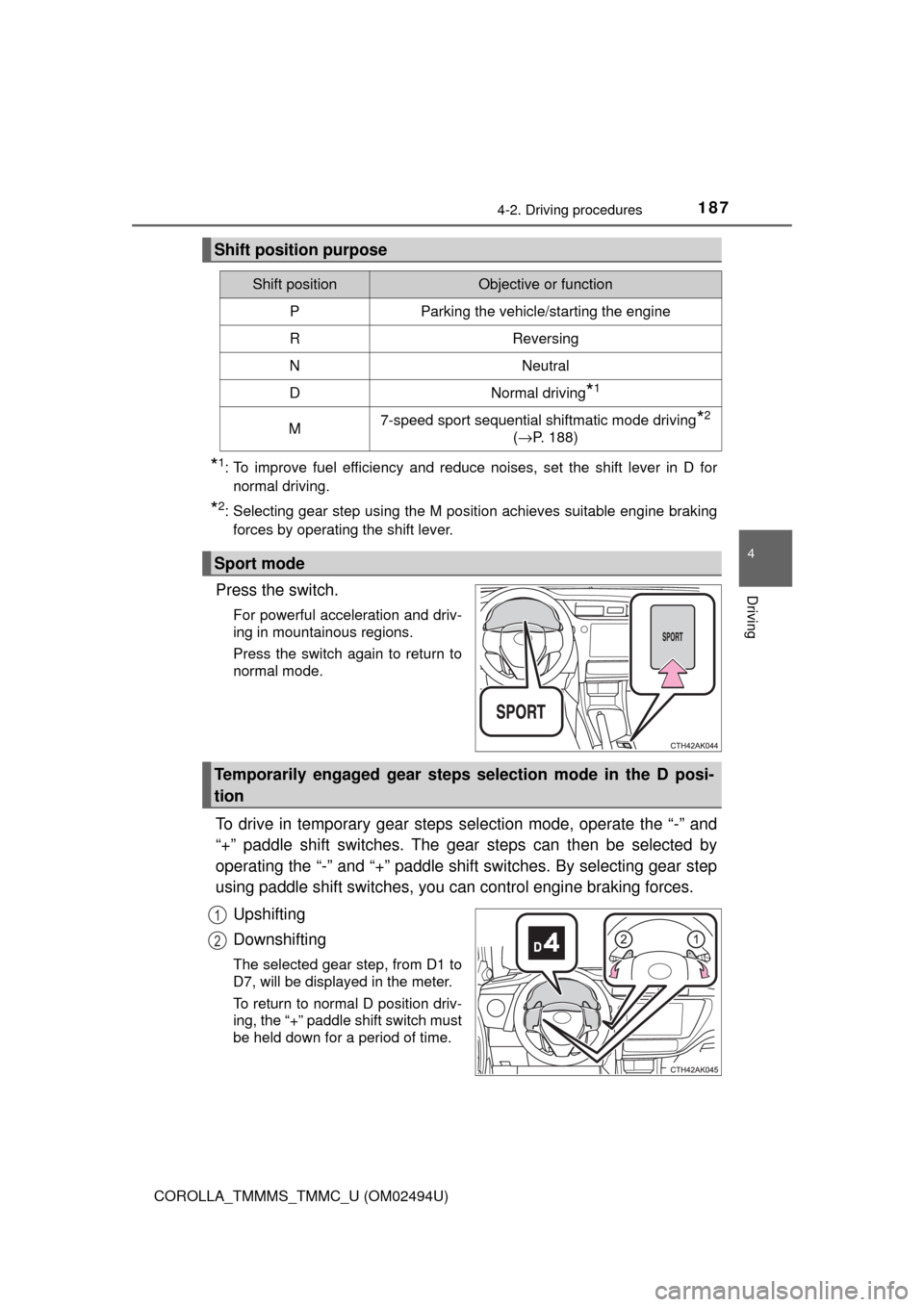
Press the switch.
For powerful acceleration and driv-
ing in mountainous regions.
Press the switch again to return to
normal mode.
To drive in temporary gear steps selection mode, operate the “-” and
“+” paddle shift switches. The gear steps can then be selected by
operating the “-” and “+” paddle shift switches. By selecting gear step
using paddle shift switches, you can control engine braking forces.
Upshifting
Downshifting
The selected gear step, from D1 to
D7, will be displayed in the meter.
To return to normal D position driv-
ing, the “+” paddle shift switch must
be held down for a period of time.
Shift position purpose
Shift positionObjective or function
PParking the vehicle/starting the engine
RReversing
NNeutral
DNormal driving*1
M7-speed sport sequential shiftmatic mode driving*2
(→P. 188)
Sport mode
Temporarily engaged gear steps selection mode in the D posi-
tion
1
2
Page 188 of 612
1884-2. Driving procedures
COROLLA_TMMMS_TMMC_U (OM02494U)
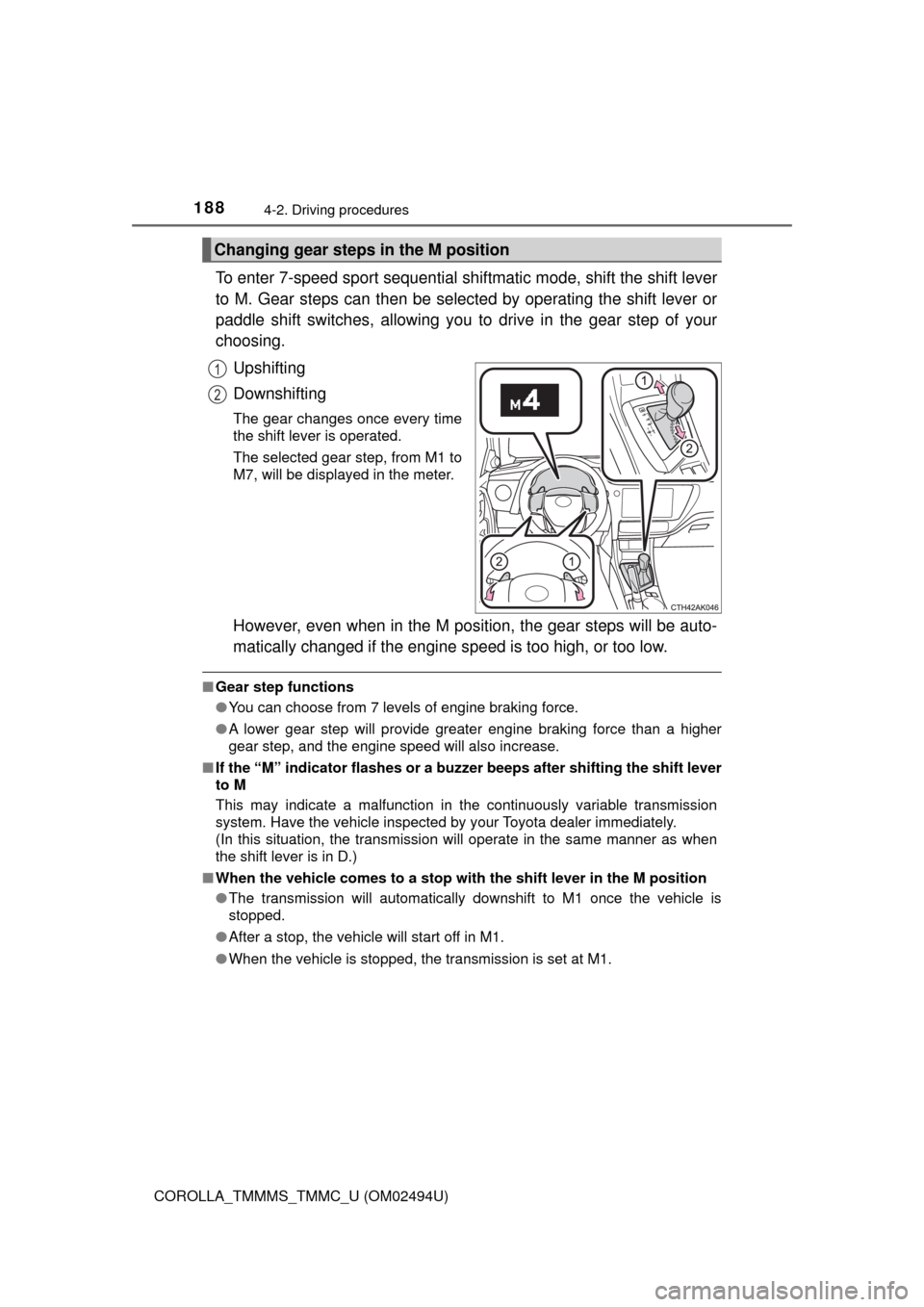
To enter 7-speed sport sequential shiftmatic mode, shift the shift lever
to M. Gear steps can then be selected by operating the shift lever or
paddle shift switches, allowing you to drive in the gear step of your
choosing.
Upshifting
Downshifting
The gear changes once every time
the shift lever is operated.
The selected gear step, from M1 to
M7, will be displayed in the meter.
However, even when in the M position, the gear steps will be auto-
matically changed if the engine speed is too high, or too low.
■Gear step functions
●You can choose from 7 levels of engine braking force.
●A lower gear step will provide greater engine braking force than a higher
gear step, and the engine speed will also increase.
■If the “M” indicator flashes or a buzzer beeps after shifting the shift lever
to M
This may indicate a malfunction in the continuously variable transmission
system. Have the vehicle inspected by your Toyota dealer immediately.
(In this situation, the transmission will operate in the same manner as when
the shift lever is in D.)
■When the vehicle comes to a stop with the shift lever in the M position
●The transmission will automatically downshift to M1 once the vehicle is
stopped.
●After a stop, the vehicle will start off in M1.
●When the vehicle is stopped, the transmission is set at M1.
Changing gear steps in the M position
1
2