Outside TOYOTA COROLLA 2017 11.G User Guide
[x] Cancel search | Manufacturer: TOYOTA, Model Year: 2017, Model line: COROLLA, Model: TOYOTA COROLLA 2017 11.GPages: 612, PDF Size: 14.18 MB
Page 80 of 612
802. Instrument cluster
COROLLA_TMMMS_TMMC_U (OM02494U)
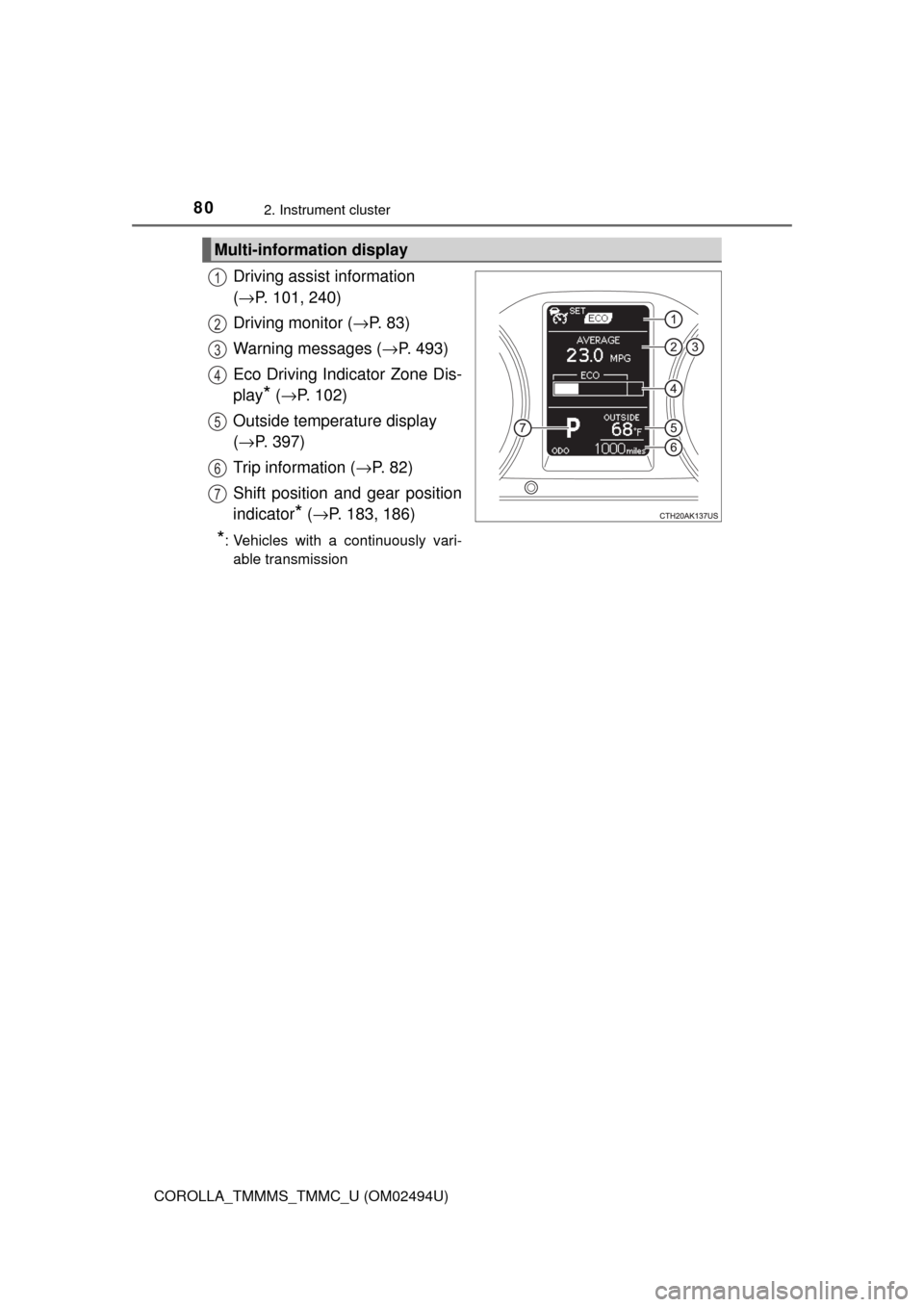
Driving assist information
(→P. 101, 240)
Driving monitor (→P. 83)
Warning messages (→P. 493)
Eco Driving Indicator Zone Dis-
play
* (→P. 102)
Outside temperature display
(→P. 397)
Trip information (→P. 8 2 )
Shift position and gear position
indicator
* (→P. 183, 186)
*: Vehicles with a continuously vari-
able transmission
Multi-information display
1
2
3
4
5
6
7
Page 88 of 612
882. Instrument cluster
COROLLA_TMMMS_TMMC_U (OM02494U)
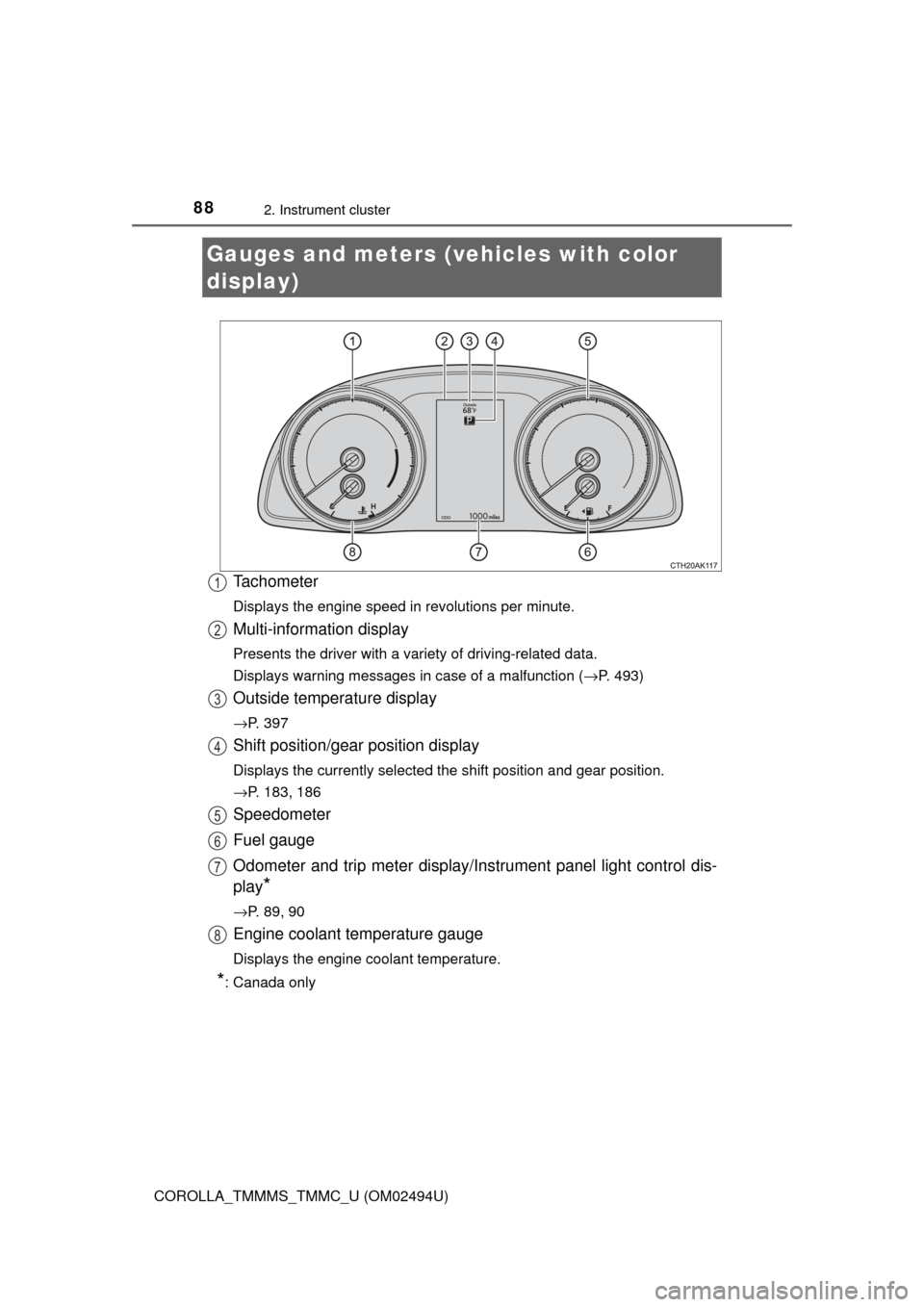
Tachometer
Displays the engine speed in revolutions per minute.
Multi-information display
Presents the driver with a variety of driving-related data.
Displays warning messages in case of a malfunction (→P. 493)
Outside temperature display
→P. 397
Shift position/gear position display
Displays the currently selected the shift position and gear position.
→P. 183, 186
Speedometer
Fuel gauge
Odometer and trip meter display/Instrument panel light control dis-
play
*
→P. 89, 90
Engine coolant temperature gauge
Displays the engine coolant temperature.
*: Canada only
Gauges and meters (vehicles with color
display)
1
2
3
4
5
6
7
8
Page 103 of 612
103
3
Operation of
each component
COROLLA_TMMMS_TMMC_U (OM02494U)3-1. Key information
Keys .................................. 104
3-2. Opening, closing and
locking the doors
Doors ................................ 110
Trunk ................................. 119
Smart key system ............. 124
3-3. Adjusting the seats
Front seats ........................ 132
Rear seats......................... 134
Head restraints.................. 136
3-4. Adjusting the steering
wheel and mirrors
Steering wheel .................. 139
Inside rear view mirror ...... 141
Outside rear view
mirrors ............................. 143
3-5. Opening and closing
the windows
Power windows ................. 145
Moon roof .......................... 149
Page 110 of 612
110
COROLLA_TMMMS_TMMC_U (OM02494U)
3-2. Opening, closing and locking the doors
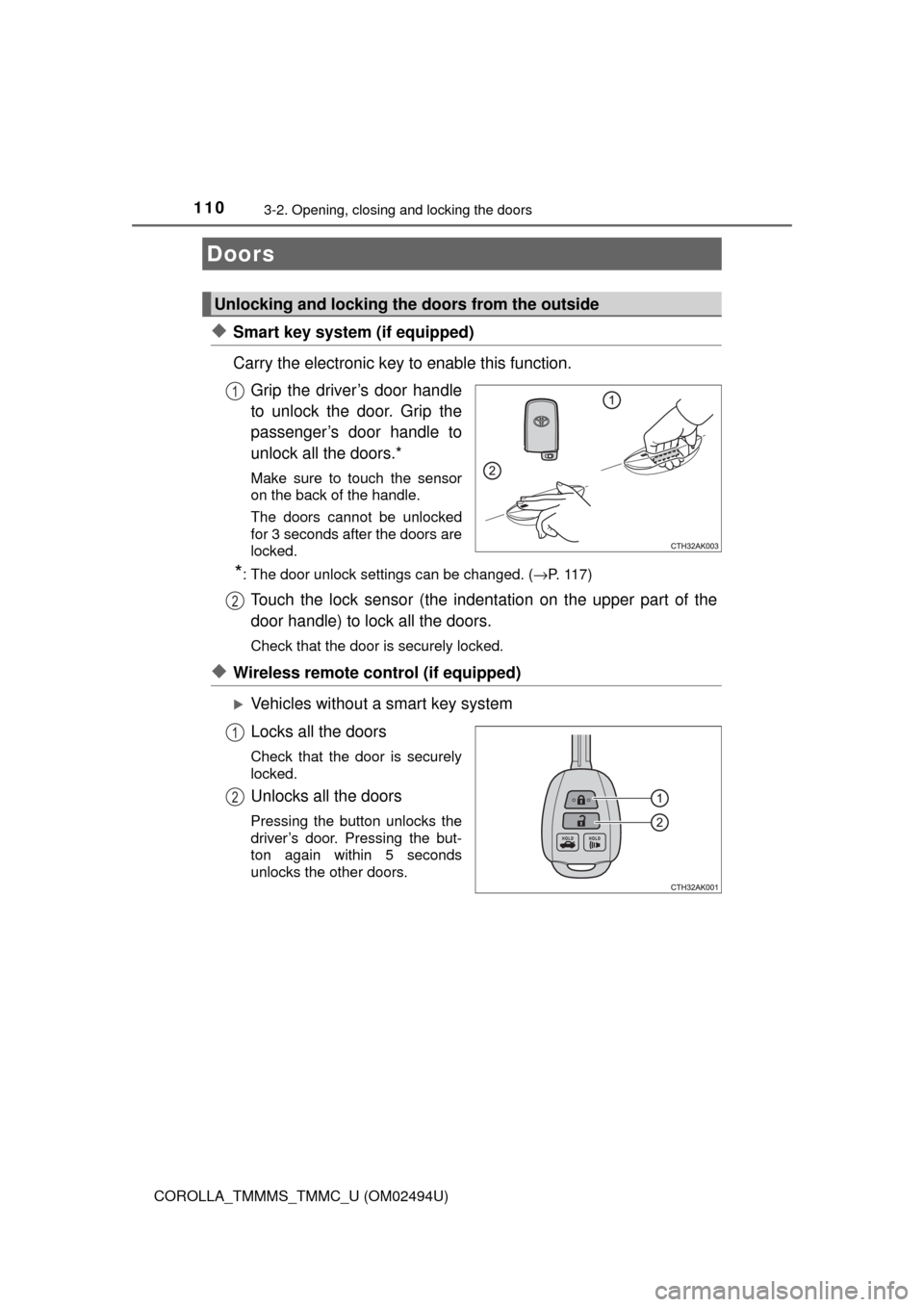
◆Smart key system (if equipped)
Carry the electronic key to enable this function.
Grip the driver’s door handle
to unlock the door. Grip the
passenger’s door handle to
unlock all the doors.*
Make sure to touch the sensor
on the back of the handle.
The doors cannot be unlocked
for 3 seconds after the doors are
locked.
*: The door unlock settings can be changed. (→P. 117)
Touch the lock sensor (the indentation on the upper part of the
door handle) to lock all the doors.
Check that the door is securely locked.
◆Wireless remote control (if equipped)
Vehicles without a smart key system
Locks all the doors
Check that the door is securely
locked.
Unlocks all the doors
Pressing the button unlocks the
driver’s door. Pressing the but-
ton again within 5 seconds
unlocks the other doors.
Doors
Unlocking and locking the doors from the outside
1
2
1
2
Page 113 of 612
1133-2. Opening, closing and locking the doors
3
Operation of each component
COROLLA_TMMMS_TMMC_U (OM02494U)
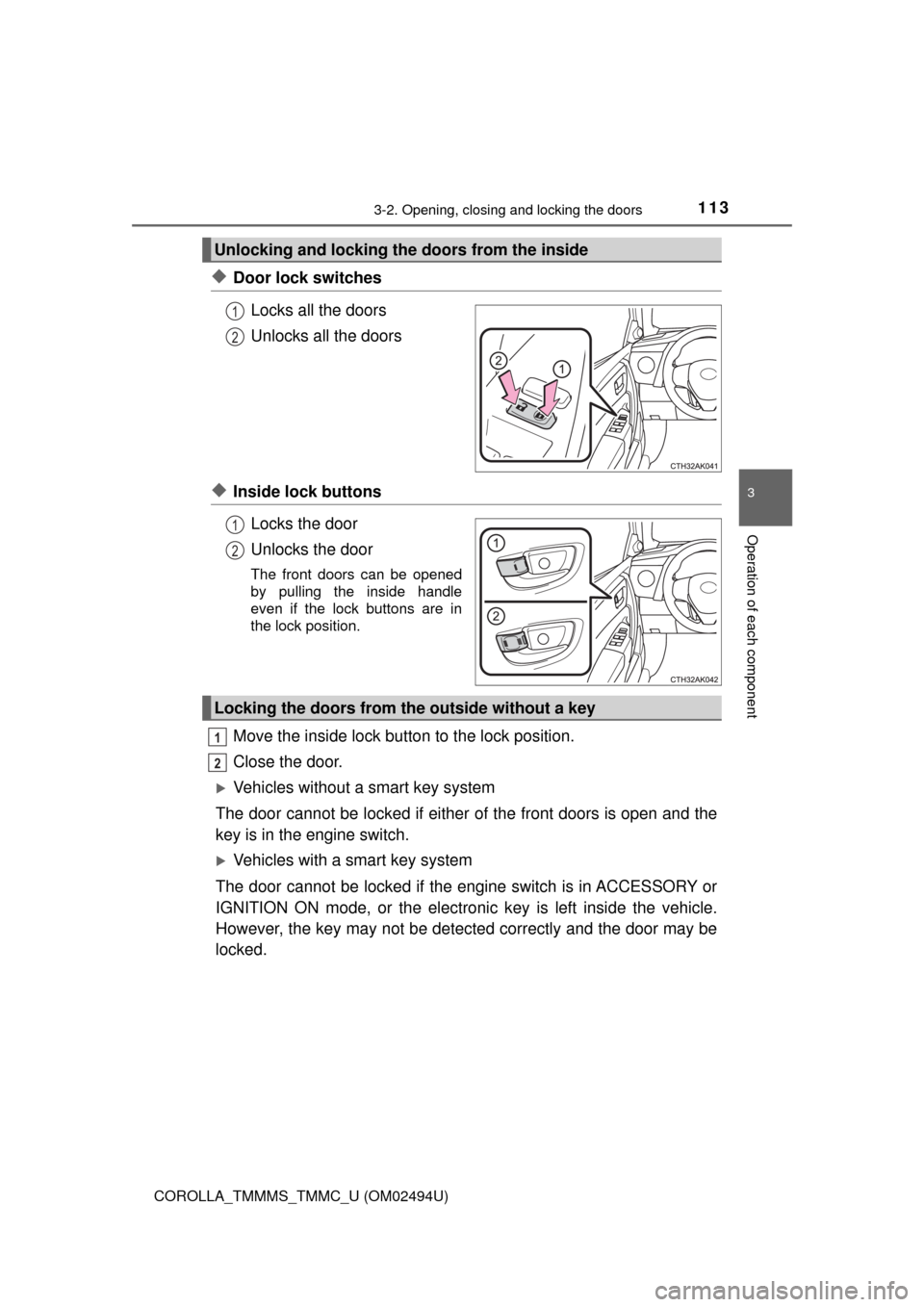
◆Door lock switches
Locks all the doors
Unlocks all the doors
◆Inside lock buttons
Locks the door
Unlocks the door
The front doors can be opened
by pulling the inside handle
even if the lock buttons are in
the lock position.
Move the inside lock button to the lock position.
Close the door.
Vehicles without a smart key system
The door cannot be locked if either of the front doors is open and the
key is in the engine switch.
Vehicles with a smart key system
The door cannot be locked if the engine switch is in ACCESSORY or
IGNITION ON mode, or the electronic key is left inside the vehicle.
However, the key may not be detected correctly and the door may be
locked.
Unlocking and locking the doors from the inside
1
2
1
2
Locking the doors from the outside without a key
1
2
Page 119 of 612
1193-2. Opening, closing and locking the doors
3
Operation of each component
COROLLA_TMMMS_TMMC_U (OM02494U)
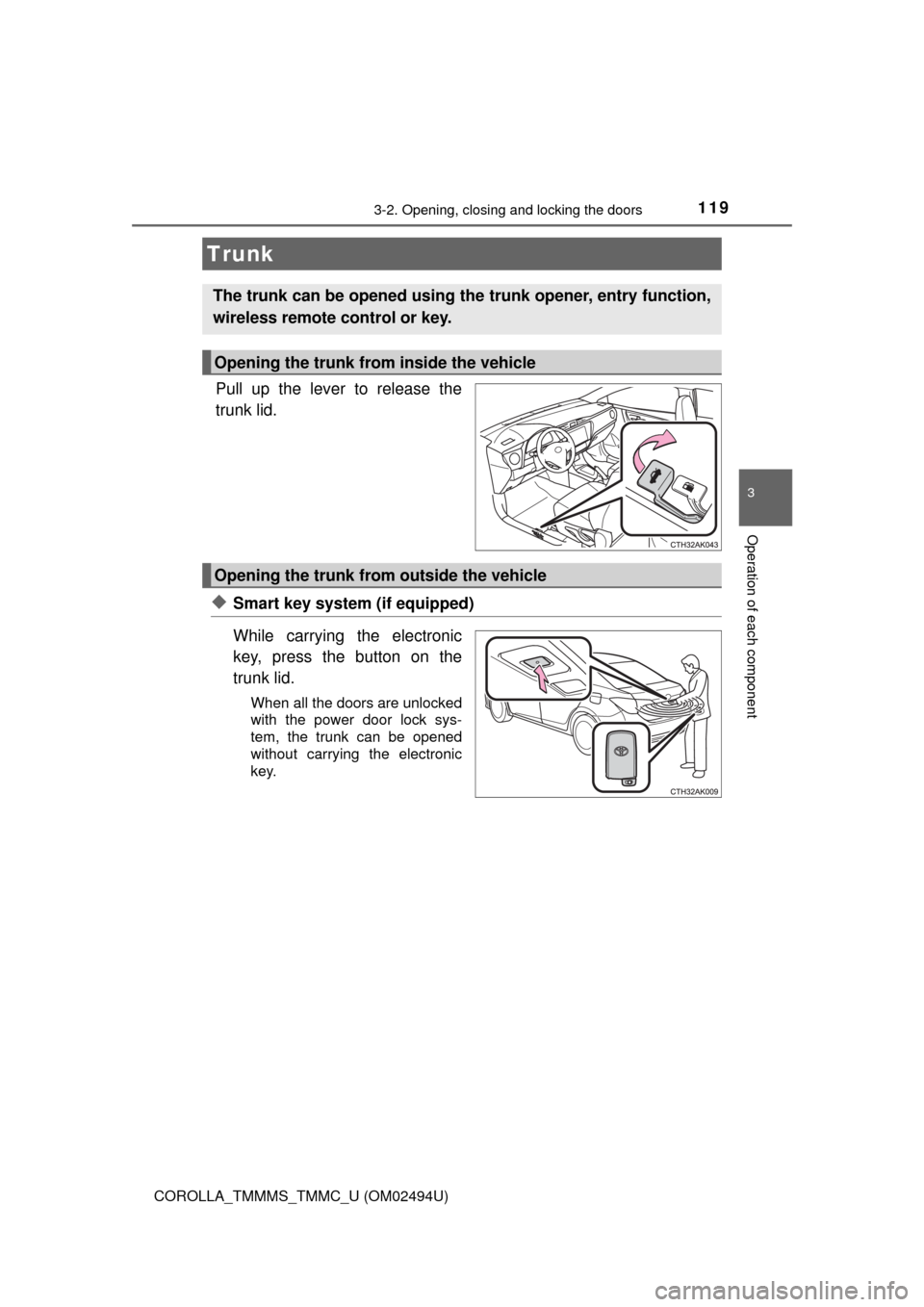
Pull up the lever to release the
trunk lid.
◆Smart key system (if equipped)
While carrying the electronic
key, press the button on the
trunk lid.
When all the doors are unlocked
with the power door lock sys-
tem, the trunk can be opened
without carrying the electronic
key.
Trunk
The trunk can be opened using the trunk opener, entry function,
wireless remote control or key.
Opening the trunk from inside the vehicle
Opening the trunk from outside the vehicle
Page 124 of 612
1243-2. Opening, closing and locking the doors
COROLLA_TMMMS_TMMC_U (OM02494U)
●Locks and unlocks the doors (→P. 1 1 0 )
●Opens the trunk (→P. 1 1 9 )
●Starts the engine (→P. 176)
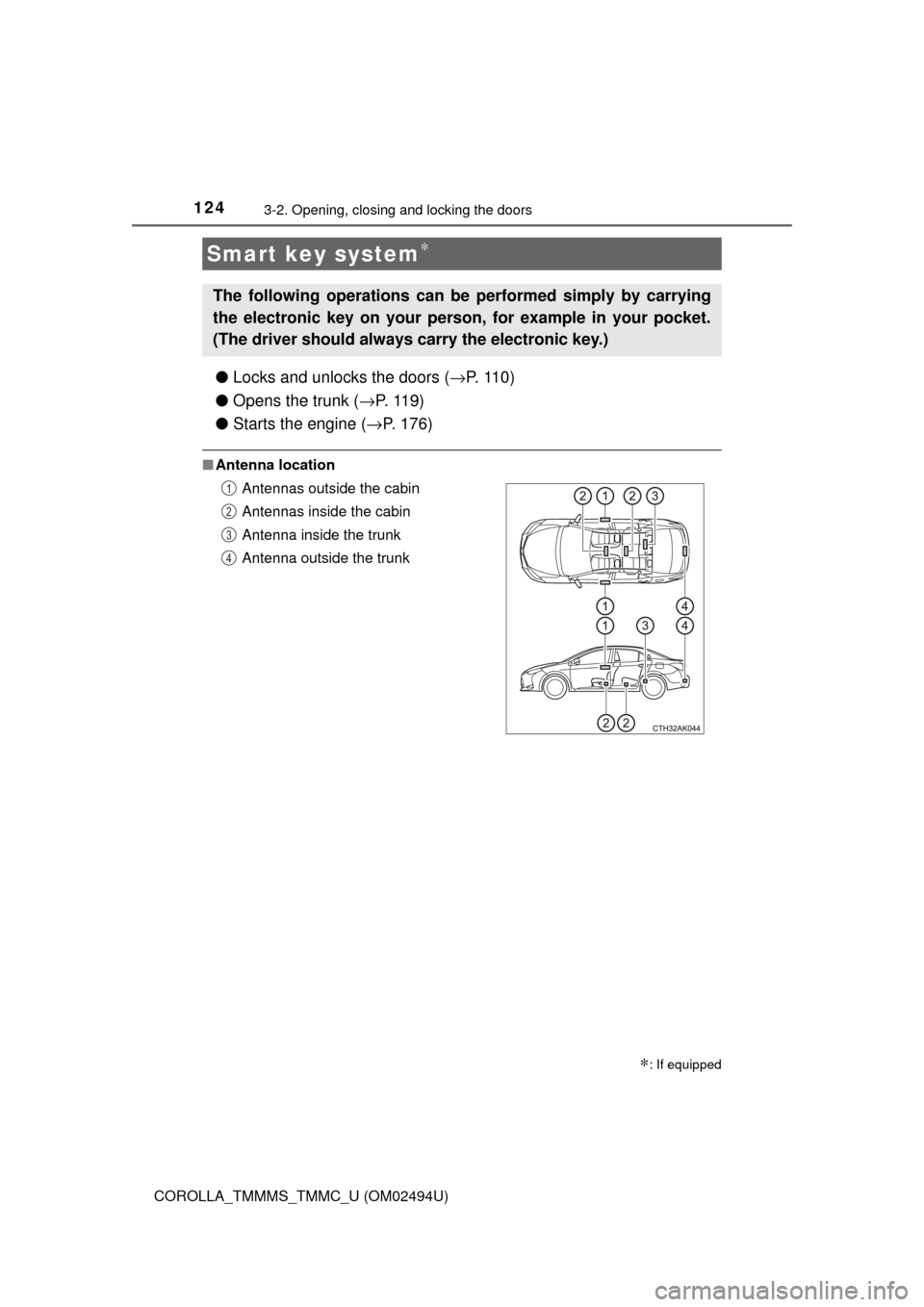
■Antenna location
Smart key system∗
∗: If equipped
The following operations can be performed simply by carrying
the electronic key on your person, for example in your pocket.
(The driver should always carry the electronic key.)
Antennas outside the cabin
Antennas inside the cabin
Antenna inside the trunk
Antenna outside the trunk1
2
3
4
Page 125 of 612
1253-2. Opening, closing and locking the doors
3
Operation of each component
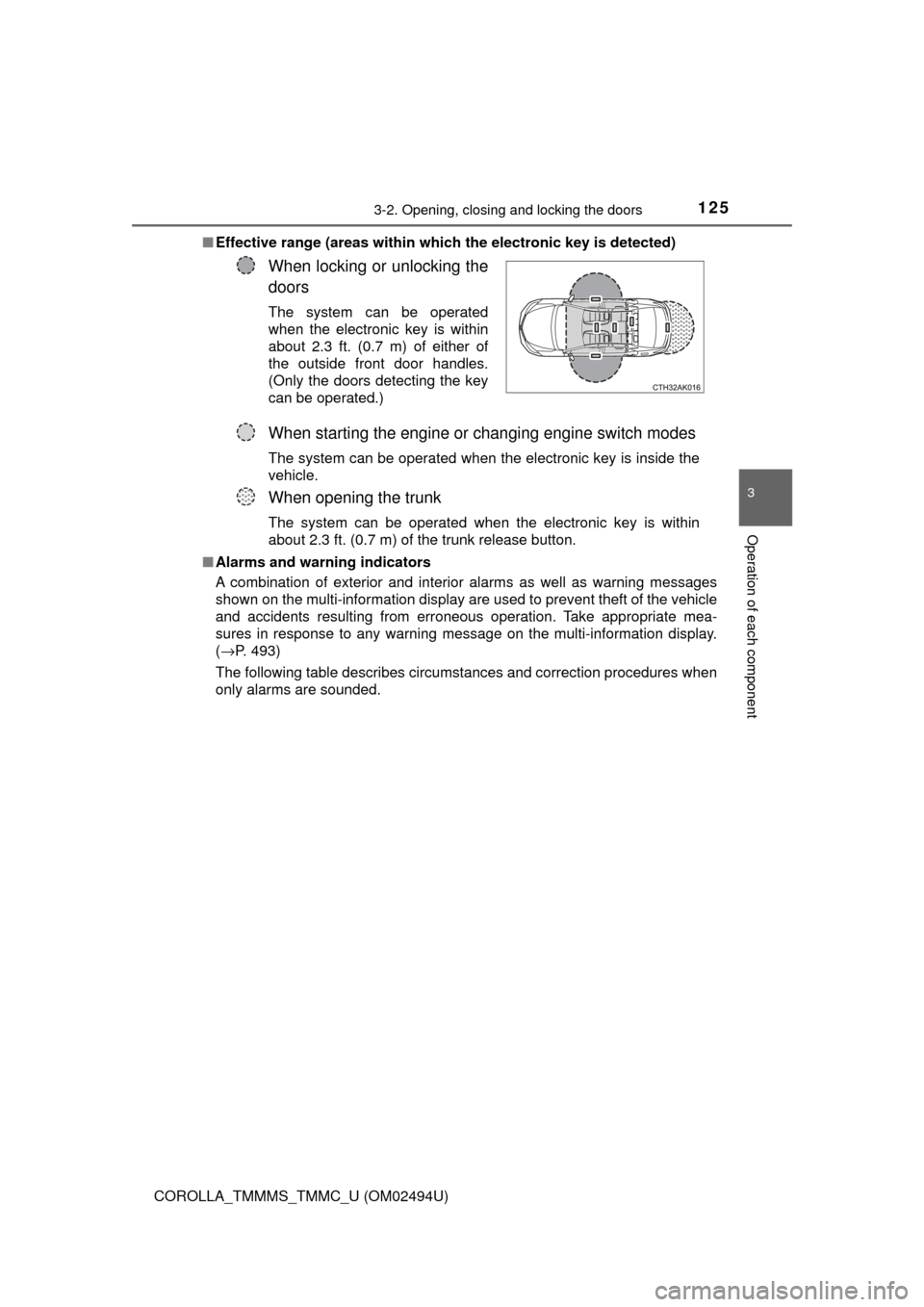
COROLLA_TMMMS_TMMC_U (OM02494U)■Effective range (areas within which the electronic key is detected)
■Alarms and warning indicators
A combination of exterior and interior alarms as well as warning messages
shown on the multi-information display are used to prevent theft of the vehicle
and accidents resulting from erroneous operation. Take appropriate mea-
sures in response to any warning message on the multi-information display.
(→P. 493)
The following table describes circumstances and correction procedures when
only alarms are sounded.
When locking or unlocking the
doors
The system can be operated
when the electronic key is within
about 2.3 ft. (0.7 m) of either of
the outside front door handles.
(Only the doors detecting the key
can be operated.)
When starting the engine or changing engine switch modes
The system can be operated when the electronic key is inside the
vehicle.
When opening the trunk
The system can be operated when the electronic key is within
about 2.3 ft. (0.7 m) of the trunk release button.
Page 126 of 612
1263-2. Opening, closing and locking the doors
COROLLA_TMMMS_TMMC_U (OM02494U)■Battery-saving function
The battery-saving function will be activated in order to prevent the electronic
key battery and the vehicle battery from being discharged while the vehicle is
not in operation for a long time.
●In the following situations, the smart key system may take some time to
unlock the doors.
• The electronic key has been left in an area of approximately 6 ft. (2 m) of
the outside of the vehicle for 10 minutes or longer.
• The smart key system has not been used for 5 days or longer.
●If the smart key system has not been used for 14 days or longer, the doors
cannot be unlocked at any doors except the driver’s door. In this case, take
hold of the driver’s door handle, or use the wireless remote control or the
mechanical key, to unlock the doors.
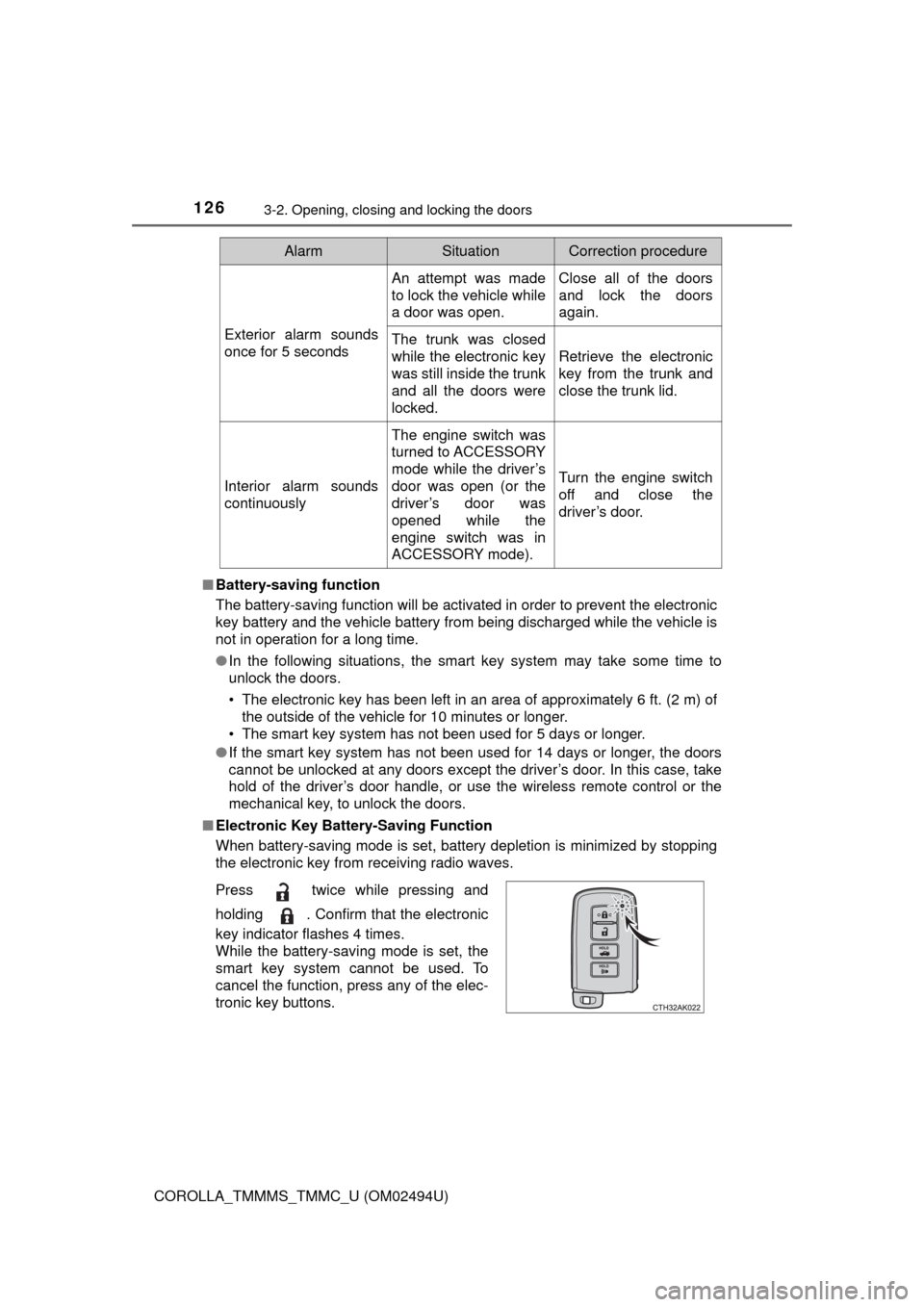
■Electronic Key Battery-Saving Function
When battery-saving mode is set, battery depletion is minimized by stopping
the electronic key from receiving radio waves.
AlarmSituationCorrection procedure
Exterior alarm sounds
once for 5 seconds
An attempt was made
to lock the vehicle while
a door was open.Close all of the doors
and lock the doors
again.
The trunk was closed
while the electronic key
was still inside the trunk
and all the doors were
locked.
Retrieve the electronic
key from the trunk and
close the trunk lid.
Interior alarm sounds
continuously
The engine switch was
turned to ACCESSORY
mode while the driver’s
door was open (or the
driver’s door was
opened while the
engine switch was in
ACCESSORY mode).
Turn the engine switch
off and close the
driver’s door.
Press twice while pressing and
holding . Confirm that the electronic
key indicator flashes 4 times.
While the battery-saving mode is set, the
smart key system cannot be used. To
cancel the function, press any of the elec-
tronic key buttons.
Page 128 of 612

1283-2. Opening, closing and locking the doors
COROLLA_TMMMS_TMMC_U (OM02494U)■Note for the entry function
●Even when the electronic key is within the effective range (detection areas),
the system may not operate properly in the following cases:
• The electronic key is too close to the window or outside door handle, near
the ground, or in a high place when the doors are locked or unlocked.
• The electronic key is near the ground or in a high place, or too close to
the rear bumper center when the trunk is opened.
• The electronic key is on the instrument panel, rear package tray or floor,
or in the door pockets or glove box when the engine is started or engine
switch modes are changed.
●Do not leave the electronic key on top of the instrument panel or near the
door pockets when exiting the vehicle. Depending on the radio wave recep-
tion conditions, it may be detected by the antenna outside the cabin and the
doors will become lockable from the outside, possibly trapping the electronic
key inside the vehicle.
●As long as the electronic key is within the effective range, the doors may be
locked or unlocked by anyone. However, only the doors detecting the elec-
tronic key can be used to unlock the vehicle.
●Even if the electronic key is not inside the vehicle, it may be possible to start
the engine if the electronic key is near the window.
●The doors may unlock or lock if a large amount of water splashes on the
door handle, such as in the rain or in a car wash, when the electronic key is
within the effective range. (The doors will automatically be locked after
approximately 60 seconds if the doors are not opened and closed.)
●If the wireless remote control is used to lock the doors when the electronic
key is near the vehicle, there is a possibility that the door may not be
unlocked by the entry function. (Use the wireless remote control to unlock
the doors.)
●Touching the door lock or unlock sensor while wearing gloves may prevent
lock or unlock operation.
●When the lock operation is performed using the lock sensor, recognition sig-
nals will be shown up to two consecutive times. After this, no recognition
signals will be given.
●If the door handle becomes wet while the electronic key is within the effec-
tive range, the door may lock and unlock repeatedly. In this case, follow the
following correction procedures to wash the vehicle:
• Place the electronic key in a location 6 ft. (2 m) or more away from the
vehicle. (Take care to ensure that the key is not stolen.)
• Set the electronic key to battery-saving mode to disable the smart key
system. (→P. 126)