air condition TOYOTA COROLLA 2017 11.G User Guide
[x] Cancel search | Manufacturer: TOYOTA, Model Year: 2017, Model line: COROLLA, Model: TOYOTA COROLLA 2017 11.GPages: 612, PDF Size: 14.18 MB
Page 228 of 612

2284-5. Using the driving support systems
COROLLA_TMMMS_TMMC_U (OM02494U)●Some pedestrians such as the following may not be detected by the radar
sensor and camera sensor, preventing the system from operating prop-
erly
*2:
• Pedestrians shorter than approximately 3.2 ft. (1 m) or taller than approx-
imately 6.5 ft. (2 m)
• Pedestrians wearing oversized clothing (a rain coat, long skirt, etc.), mak-
ing their silhouette obscure
• Pedestrians who are carrying large baggage, holding an umbrella, etc.,
hiding part of their body
• Pedestrians who are bending forward or squatting
• Pedestrians who are pushing a stroller, wheelchair, bicycle or other vehi-
cle
• Groups of pedestrians which are close together
• Pedestrians who are wearing white and look extremely bright
• Pedestrians in the dark, such as at night or while in a tunnel
• Pedestrians whose clothing appears to be nearly the same color or
brightness as their surroundings
• Pedestrians near walls, fences, guardrails, or large objects
• Pedestrians who are on a metal object (manhole cover, steel plate, etc.)
on the road
• Pedestrians who are walking fast
• Pedestrians who are changing speed abruptly
• Pedestrians running out from behind a vehicle or a large object
• Pedestrians who are extremely close to the side of the vehicle (outside
rear view mirror, etc.)
*2: Depending on the region in which the vehicle was sold, the pedestrian
detection function may not be available.
■If the PCS (Pre-Collision System) warning light flashes and a warning
message is displayed on the multi-information display
The pre-collision system may be temporarily unavailable or there may be a
malfunction in the system.
●In the following situations, the warning light will turn off, the message will
disappear and the system will become operational when normal operating
conditions return:
• When the radar sensor or camera sensor or the area around either sen-
sor is hot, such as in the sun
• When the radar sensor or camera sensor or the area around either sen-
sor is cold, such as in an extremely cold environment
• When the radar sensor or front grille emblem is dirty or covered with
snow, etc.
• If the camera sensor is obstructed, such as when the hood is open or a
sticker is attached to the windshield near the camera sensor
●If the PCS (Pre-Collision System) warning light continues to flash or the
warning message does not disappear, the system may be malfunctioning.
Have the vehicle inspected by your Toyota dealer immediately.
Page 232 of 612

2324-5. Using the driving support systems
COROLLA_TMMMS_TMMC_U (OM02494U)
WARNING
■Before using LDA system
Do not rely solely upon the LDA system. LDA is not a system which auto-
matically drives the vehicle or reduces the amount of attention that must be
paid to the area in front of the vehicle. The driver must always assume full
responsibility for driving safely by always paying careful attention to the sur-
rounding conditions and operate the steering wheel to correct the path of
the vehicle. Also, make sure to take adequate breaks when fatigued, such
as from driving for a long period of time.
Failure to perform appropriate driving operations and pay careful attention
may lead to an accident, resulting in death or serious injury.
■To avoid operating LDA by mistake
When not using the LDA system, use the LDA switch to turn the system off.
■Situations unsuitable for LDA
Do not use the LDA system in the following situations.
The system may not operate properly and lead to an accident, resulting in
death or serious injury.
●A spare tire, tire chains, etc., are equipped.
●When the tires have been excessively worn, or when the tire inflation pres-
sure is low.
●Tires which differ by structure, manufacturer, brand or tread pattern are
used.
●Objects or patterns that could be mistaken for white (yellow) lines are
present on the side of the road (guardrails, curbs, reflective poles, etc.).
●Vehicle is driven on a snow-covered road.
●White (yellow) lines are difficult to see due to rain, snow, fog, dust, etc.
●Asphalt repair marks, white (yellow) line marks, etc., are present due to
road repair.
●Vehicle is driven in a temporary lane or restricted lane due to construction
work.
●Vehicle is driven on a road surface which is slippery due to rainy weather,
fallen snow, freezing, etc.
●Vehicle is driven in traffic lanes other than on highways and freeways.
●Vehicle is driven in a construction zone.
●During emergency towing
Page 233 of 612
2334-5. Using the driving support systems
4
Driving
COROLLA_TMMMS_TMMC_U (OM02494U)
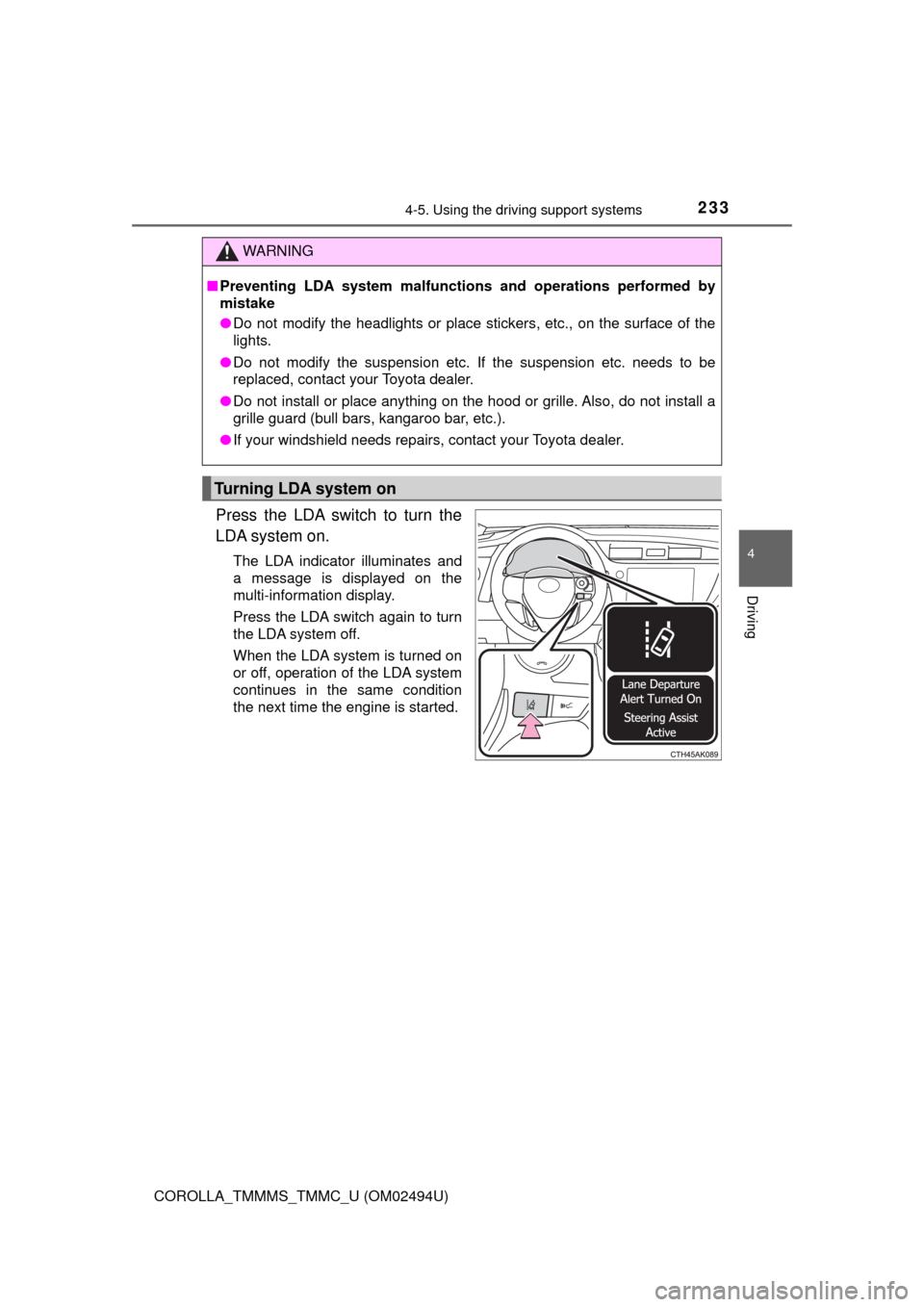
Press the LDA switch to turn the
LDA system on.
The LDA indicator illuminates and
a message is displayed on the
multi-information display.
Press the LDA switch again to turn
the LDA system off.
When the LDA system is turned on
or off, operation of the LDA system
continues in the same condition
the next time the engine is started.
WARNING
■Preventing LDA system malfunctions and operations performed by
mistake
●Do not modify the headlights or place stickers, etc., on the surface of the
lights.
●Do not modify the suspension etc. If the suspension etc. needs to be
replaced, contact your Toyota dealer.
●Do not install or place anything on the hood or grille. Also, do not install a
grille guard (bull bars, kangaroo bar, etc.).
●If your windshield needs repairs, contact your Toyota dealer.
Turning LDA system on
Page 268 of 612
268
COROLLA_TMMMS_TMMC_U (OM02494U)
4-6. Driving tips
●Use fluids that are appropriate to the prevailing outside tempera-
tures.
• Engine oil
• Engine coolant
• Washer fluid
●Have a service technician inspect the condition of the battery.
●Have the vehicle fitted with four snow tires or purchase a set of tire
chains for the front tires.
Ensure that all tires are the same size and brand, and that chains match
the size of the tires.
Perform the following according to the driving conditions:
●Do not try to forcibly open a window or move a wiper that is frozen.
Pour warm water over the frozen area to melt the ice. Wipe away
the water immediately to prevent it from freezing.
●To ensure proper operation of the climate control system fan,
remove any snow that has accumulated on the air inlet vents in
front of the windshield.
●Check for and remove any excess ice or snow that may have accu-
mulated on the exterior lights, vehicle’s roof, chassis, around the
tires or on the brakes.
●Remove any snow or mud from the bottom of your shoes before
getting in the vehicle.
Winter driving tips
Carry out the necessary preparations and inspections before
driving the vehicle in winter. Always drive the vehicle in a man-
ner appropriate to the prevailing weather conditions.
Preparation for winter
Before driving the vehicle
Page 359 of 612
359
5
Audio system
COROLLA_TMMMS_TMMC_U (OM02494U)
5-10. Bluetooth®
■When using the Bluetooth® audio system
●In the following conditions, the system may not function.
• If the portable audio player is turned off
• If the portable audio player is not connected
• If the portable audio player’s battery is low
●There may be a delay if a cellular phone connection is made during
Bluetooth
® audio play.
●Depending on the type of portable audio player that is connected to the sys-
tem, operation may differ slightly and certain functions may not be available.
■When using the hands-free system
●Entune Audio is muted when making a call.
●If both parties speak at the same time, it may be difficult to hear.
●If the received call volume is overly loud, an echo may be heard.
If the Bluetooth
® phone is too close to the system, quality of the sound may
deteriorate and connection status may deteriorate.
●In the following circumstances, it may be difficult to hear the other party:
• When driving on unpaved roads
• When driving at high speeds
• If a roof or window is open
• If the air conditioning is blowing directly on the microphone
• If there is interference from the network of the cellular phone
■Conditions under which the system will not operate
●If using a cellular phone that does not support Bluetooth
®
●If the cellular phone is turned off
●If you are outside of cellular phone service coverage
●If the cellular phone is not connected
●If the cellular phone’s battery is low
●When outgoing calls are controlled, due to heavy traffic on telephone lines,
etc.
●When the cellular phone itself cannot be used
●When transferring contact data from the cellular phone
Bluetooth®
Page 364 of 612
3645-11. Using the voice command system
COROLLA_TMMMS_TMMC_U (OM02494U)
■Microphone
→P. 327
■When using the microphone
●It is unnecessary to speak directly into the microphone when giving a com-
mand.
●When “Voice Prompt Interrupt” set to on, it is not necessary to wait for the
confirmation beep before speaking a command. (→P. 287)
●Voice commands may not be recognized if:
• Spoken too quickly.
• Spoken at a low or high volume.
• The roof or windows are open.
• Passengers are talking while voice commands are spoken.
• The air conditioning speed is set high.
• The air conditioning vents are turned towards the microphone.
●In the following conditions, the system may not recognize the command
properly and using voice commands may not be possible:
• The command is incorrect or unclear. Note that certain words, accents or
speech patterns may be difficult for the system to recognize.
• There is excessive background noise, such as wind noise.
Due to natural language speech recognition technology, this system
enables recognition of a command when spoken naturally. However,
the system cannot recognize every variation of each command.
In some situations, it is possible to omit the command for the proce-
dure and directly state the desired operation.
Not all voice commands are displayed in the short cut menu.
This function is available in English, Spanish and French.
■Expression examples for each function
Casual speech recognization
CommandExpression examples
“Call (name)
(type)”Get me (Robert Brown).
I need to call (Robert Brown) at (Work) right away.
“Dial (number)”Please dial the number (3334445555).
Ring (3334445555).
Page 369 of 612
369
6Interior features
COROLLA_TMMMS_TMMC_U (OM02494U)6-1. Using the air
conditioning system
and defogger
Manual air conditioning
system ............................ 370
Automatic air
conditioning system ........ 377
Heated steering wheel/
seat heaters .................... 386
6-2. Using the interior lights
Interior lights list ................ 388
• Front interior light/
personal lights............... 389
• Rear interior light .......... 390
6-3. Using the storage
features
List of storage features ..... 391
• Glove box...................... 392
• Console box .................. 392
• Bottle holders ................ 393
• Cup holders .................. 394
6-4. Other interior features
Other interior features ....... 396
• Sun visors ..................... 396
• Vanity mirrors................ 396
• Clock ............................. 396
• Outside temperature
display........................... 397
• Power outlet .................. 398
• Assist grips ................... 399
Garage door opener.......... 400
Compass ........................... 407
Page 370 of 612
370
COROLLA_TMMMS_TMMC_U (OM02494U)
6-1. Using the air conditioning system and defogger
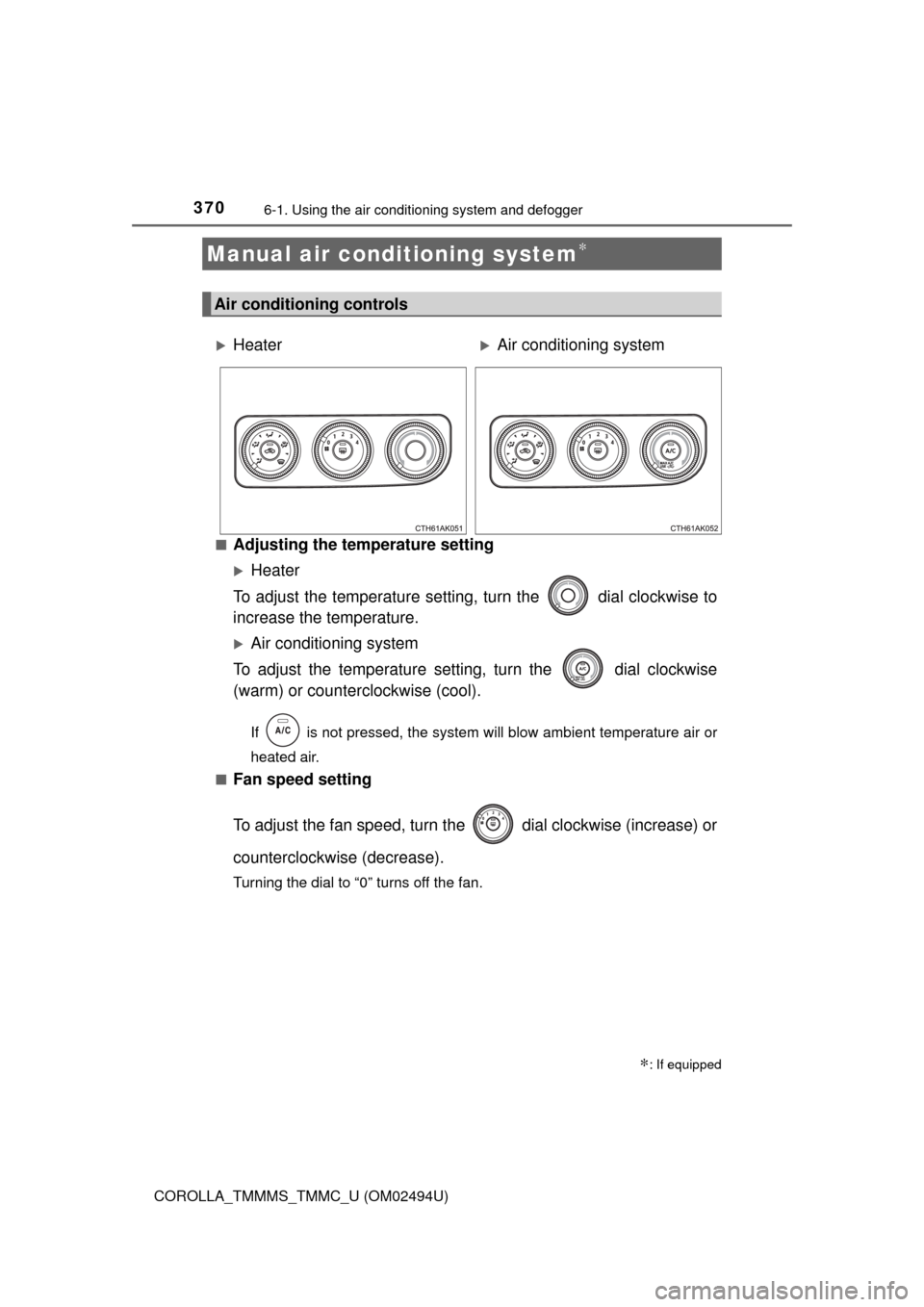
■Adjusting the temperature setting
Heater
To adjust the temperature setting, turn the dial clockwise to
increase the temperature.
Air conditioning system
To adjust the temperature setting, turn the dial clockwise
(warm) or counterclockwise (cool).
If is not pressed, the system will blow ambient temperature air or
heated air.
■
Fan speed setting
To adjust the fan speed, turn the dial clockwise (increase) or
counterclockwise (decrease).
Turning the dial to “0” turns off the fan.
Manual air conditioning system∗
∗: If equipped
Air conditioning controls
HeaterAir conditioning system
Page 371 of 612
3716-1. Using the air conditioning system and defogger
6
Interior features
COROLLA_TMMMS_TMMC_U (OM02494U)■
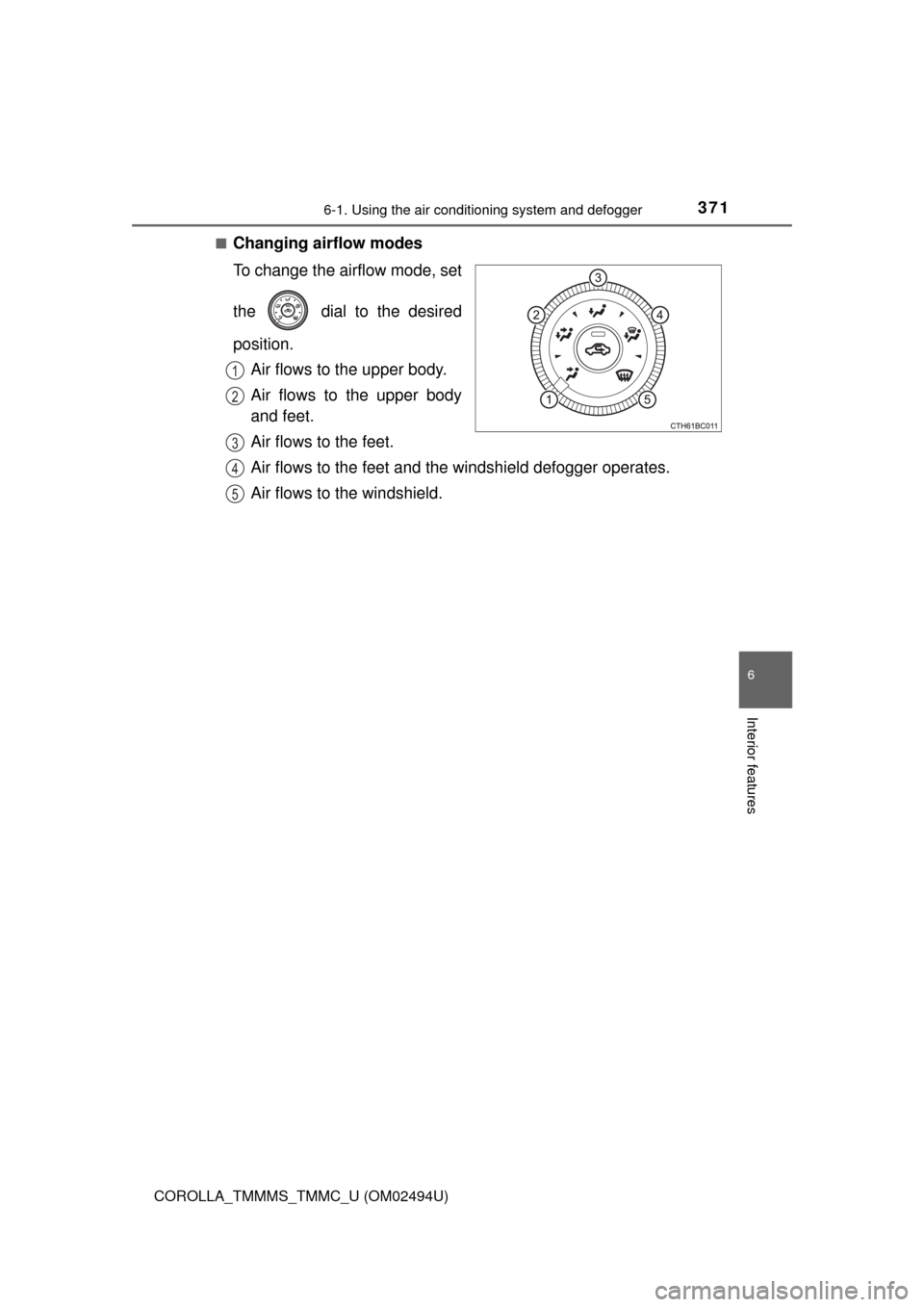
Changing airflow modes
To change the airflow mode, set
the dial to the desired
position.
Air flows to the upper body.
Air flows to the upper body
and feet.
Air flows to the feet.
Air flows to the feet and the windshield defogger operates.
Air flows to the windshield.
1
2
3
4
5
Page 372 of 612
3726-1. Using the air conditioning system and defogger
COROLLA_TMMMS_TMMC_U (OM02494U)■
Switching between outside air and recirculated air modes
Press .
The mode switches between outside air mode (indicator off) and recir-
culated air mode (indicator on) each time is pressed.
■
Defogging the windshield
Defoggers are used to defog the windshield and front side win-
dows.
Set the air outlet selector dial to the position.
Set the outside/recirculated air mode button to outside air mode if the
recirculated air mode is used. (It may switch automatically.)
To defog the windshield and the side windows early, turn the air flow and
temperature up.
Vehicles with the air conditioning system: If the dehumidification
function is not operating, press to operate the dehumidifica-
tion function.
■Defogging the rear window and outside rear view mirrors
Vehicles without outside rear view mirror defoggers
Defoggers are used to defog the rear window.
Press .
The defoggers will automatically turn off after a period of time.
Vehicles with outside rear view mirror defoggers
Defoggers are used to defog the rear window, and to remove rain-
drops, dew and frost from the outside rear view mirrors.
Press .
The defoggers will automatically turn off after a period of time.
Other functions