key battery TOYOTA COROLLA 2017 11.G User Guide
[x] Cancel search | Manufacturer: TOYOTA, Model Year: 2017, Model line: COROLLA, Model: TOYOTA COROLLA 2017 11.GPages: 612, PDF Size: 14.18 MB
Page 180 of 612
1804-2. Driving procedures
COROLLA_TMMMS_TMMC_U (OM02494U)■Electronic key battery depletion
→P. 107
■Conditions affecting operation
→P. 127
■Notes for the entry function
→P. 128
■If the engine does not start
●The engine immobilizer system may not have been deactivated. (→P. 67)
Contact your Toyota dealer.
●Vehicles with a continuously variable transmission: Check that the shift lever
is securely set in P. The engine may not start if the shift lever is displaced
out of P.
“Shift to P position to Start” will be displayed on the multi-information dis-
play.
■Steering lock
After turning the engine switch off and opening and closing the doors, the
steering wheel will be locked due to the steering lock function. Operating the
engine switch again automatically cancels the steering lock.
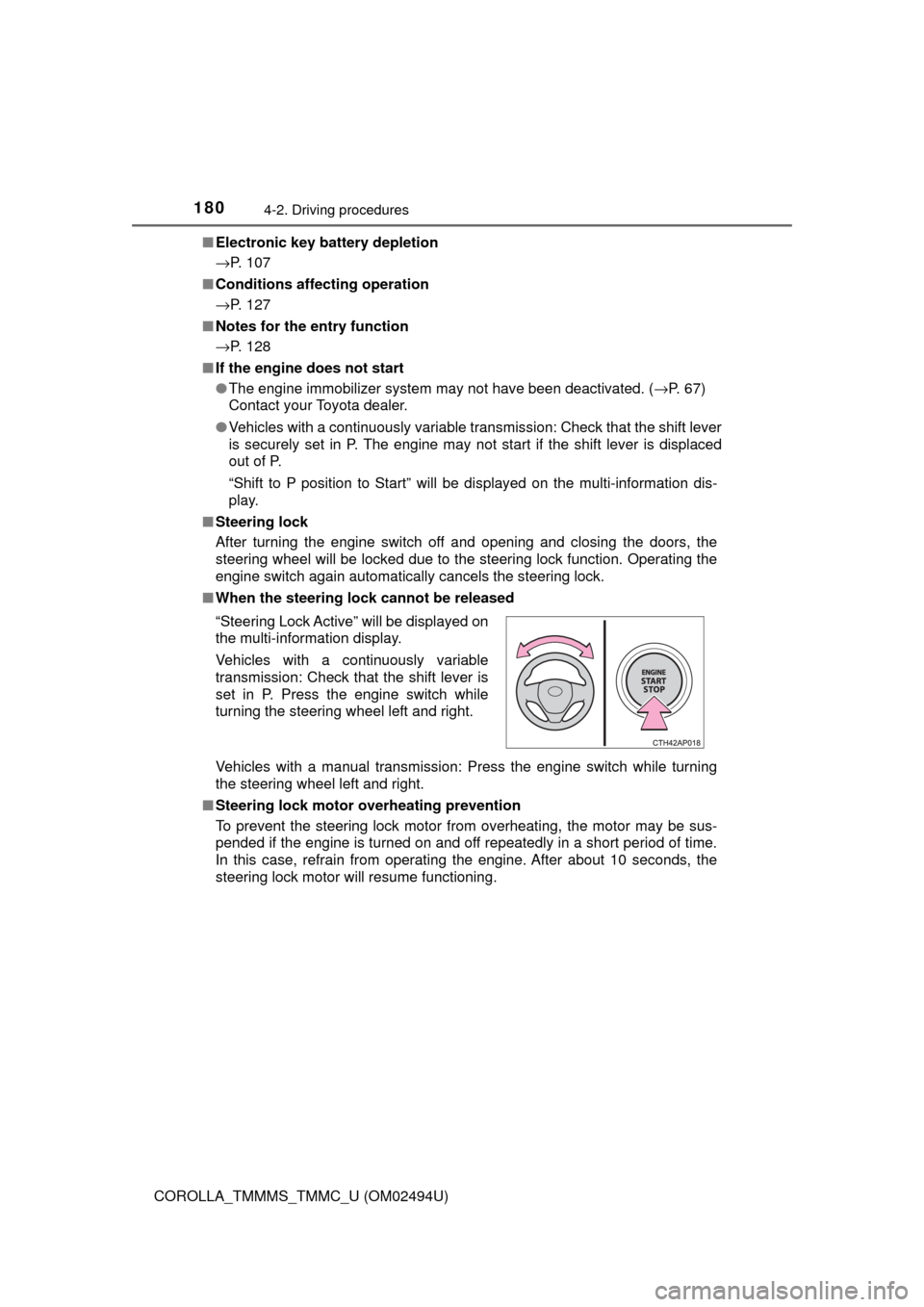
■When the steering lock cannot be released
Vehicles with a manual transmission: Press the engine switch while turning
the steering wheel left and right.
■Steering lock motor overheating prevention
To prevent the steering lock motor from overheating, the motor may be sus-
pended if the engine is turned on and off repeatedly in a short period of time.
In this case, refrain from operating the engine. After about 10 seconds, the
steering lock motor will resume functioning. “Steering Lock Active” will be displayed on
the multi-information display.
Vehicles with a continuously variable
transmission: Check that the shift lever is
set in P. Press the engine switch while
turning the steering wheel left and right.
Page 181 of 612

1814-2. Driving procedures
4
Driving
COROLLA_TMMMS_TMMC_U (OM02494U)■When “Smart Key System Malfunction See Owner's Manual”/“CHECK
SMART KEY SYSTEM” will be displayed on the multi-information display
The system may be malfunctioning. Have the vehicle inspected by your
Toyota dealer immediately.
■If the electronic key battery is depleted
→P. 459
■Operation of the engine switch
●If the switch is not pressed shortly and firmly, the engine switch mode may
not change or the engine may not start.
●If attempting to restart the engine immediately after turning the engine
switch off, the engine may not start in some cases. After turning the engine
switch off, please wait a few seconds before restarting the engine.
■If the smart key system has been deactivated in a customized setting
→P. 527
WARNING
■When starting the engine
Always start the engine while sitting in the driver’s seat. Do not depress the
accelerator pedal while starting the engine under any circumstances.
Doing so may cause an accident resulting in death or serious injury.
■Caution while driving
If engine failure occurs while the vehicle is moving, do not lock or open the
doors until the vehicle reaches a safe and complete stop. Activation of the
steering lock in this circumstance may lead to an accident, resulting in
death or serious injury.
■Stopping the engine in an emergency
If you want to stop the engine in an emergency while driving the vehicle,
press and hold the engine switch for more than 2 seconds, or press it briefly
3 times or more in succession. (→P. 475)
However, do not touch the engine switch while driving except in an emer-
gency. Turning the engine off while driving will not cause loss of steering or
braking control, but the power assist to these systems will be lost. This will
make it more difficult to steer and brake, so you should pull over and stop
the vehicle as soon as it is safe to do so.
Page 199 of 612
1994-3. Operating the lights and wipers
4
Driving
COROLLA_TMMMS_TMMC_U (OM02494U)■Battery-saving function
In the following conditions, the headlights and the other remaining lights will
go off automatically after 20 minutes in order to prevent the vehicle battery
from being discharged:
●The headlights and/or tail lights are on.
●Vehicles without a smart key system: The engine switch is in the “ACC” or
“LOCK” position.
●Vehicles with a smart key system: The engine switch is turned to ACCES-
SORY mode or turned off.
This function will be canceled in any of the following situations:
●Vehicles without a smart key system: When the engine switch is turned to
the “ON” position.
●Vehicles with a smart key system: When the engine switch is turned to IGNI-
TION ON mode.
●When the light switch is operated
●When the door or trunk is opened or closed
■Customization
Settings (e.g. light sensor sensitivity) can be changed.
(Customizable features: →P. 568)
NOTICE
■To prevent battery discharge
Do not leave the lights on longer than necessary when the engine is not
running.
Page 390 of 612
3906-2. Using the interior lights
COROLLA_TMMMS_TMMC_U (OM02494U)
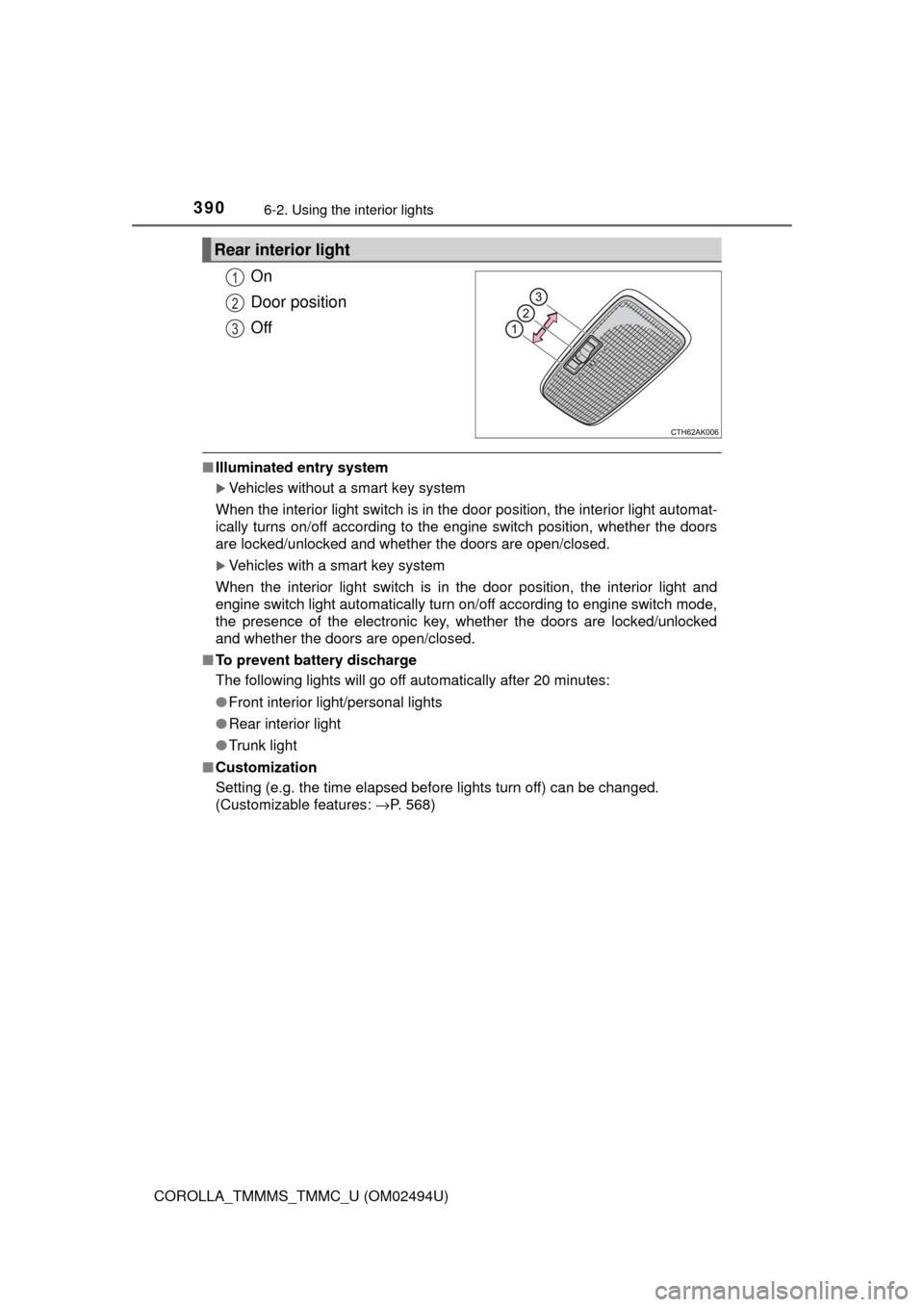
On
Door position
Off
■Illuminated entry system
Vehicles without a smart key system
When the interior light switch is in the door position, the interior light automat-
ically turns on/off according to the engine switch position, whether the doors
are locked/unlocked and whether the doors are open/closed.
Vehicles with a smart key system
When the interior light switch is in the door position, the interior light and
engine switch light automatically turn on/off according to engine switch mode,
the presence of the electronic key, whether the doors are locked/unlocked
and whether the doors are open/closed.
■To prevent battery discharge
The following lights will go off automatically after 20 minutes:
●Front interior light/personal lights
●Rear interior light
●Trunk light
■Customization
Setting (e.g. the time elapsed before lights turn off) can be changed.
(Customizable features: →P. 568)
Rear interior light
1
2
3
Page 398 of 612
3986-4. Other interior features
COROLLA_TMMMS_TMMC_U (OM02494U)
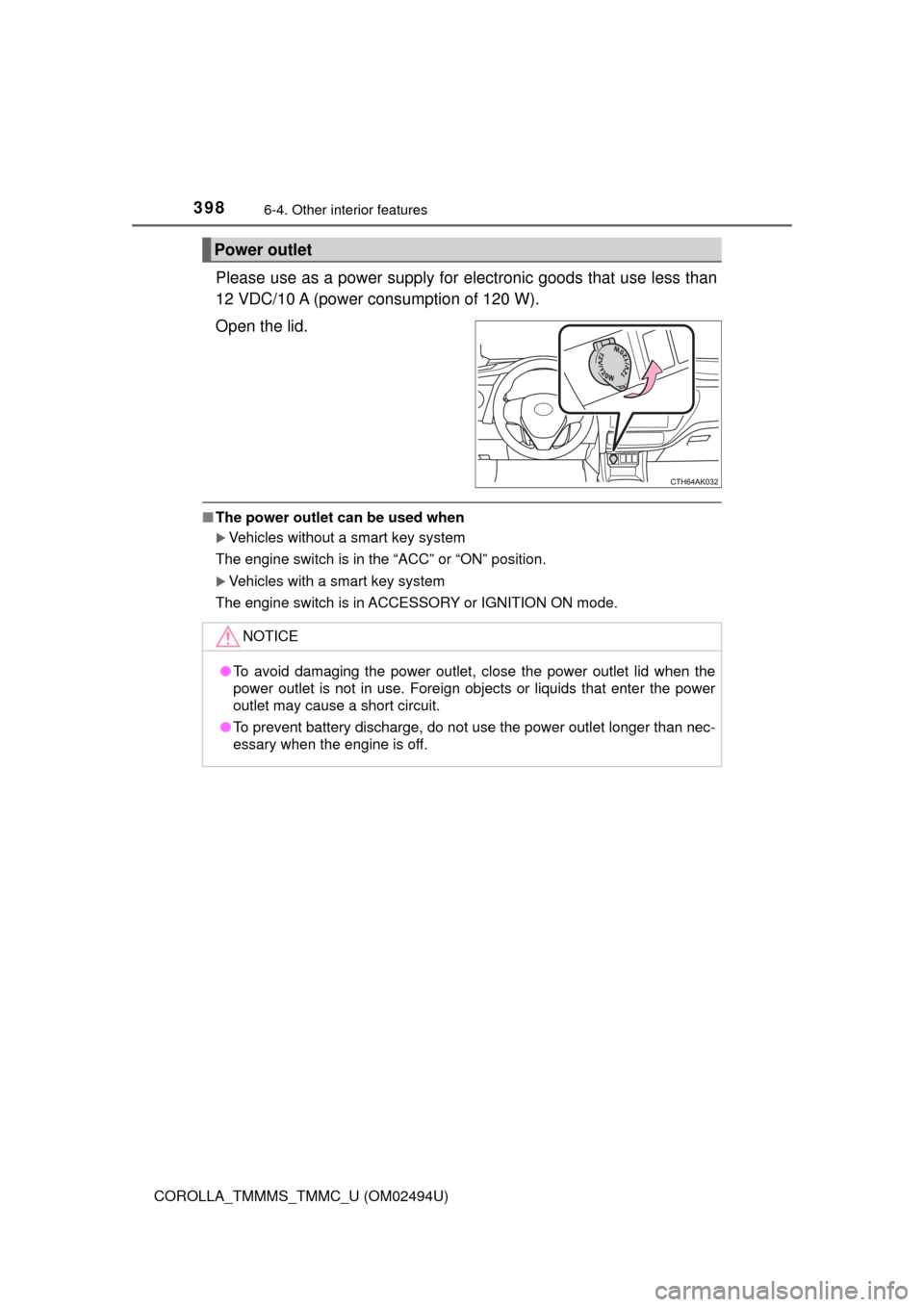
Please use as a power supply for electronic goods that use less than
12 VDC/10 A (power consumption of 120 W).
Open the lid.
■The power outlet can be used when
Vehicles without a smart key system
The engine switch is in the “ACC” or “ON” position.
Vehicles with a smart key system
The engine switch is in ACCESSORY or IGNITION ON mode.
Power outlet
NOTICE
●To avoid damaging the power outlet, close the power outlet lid when the
power outlet is not in use. Foreign objects or liquids that enter the power
outlet may cause a short circuit.
●To prevent battery discharge, do not use the power outlet longer than nec-
essary when the engine is off.
Page 411 of 612
411
7Maintenance and care
COROLLA_TMMMS_TMMC_U (OM02494U)7-1. Maintenance and care
Cleaning and protecting
the vehicle exterior .......... 412
Cleaning and protecting
the vehicle interior ........... 415
7-2. Maintenance
Maintenance
requirements ................... 418
General maintenance........ 421
Emission inspection and
maintenance (I/M)
programs......................... 425
7-3. Do-it-yourself
maintenance
Do-it-yourself service
precautions ..................... 426
Hood ................................. 429
Positioning a floor jack ...... 431
Engine compartment ......... 433
Tires .................................. 444
Tire inflation pressure ....... 452
Wheels .............................. 455
Air conditioning filter.......... 457
Wireless remote control/
electronic key
battery ............................. 459
Checking and replacing
fuses ............................... 462
Light bulbs......................... 465
Page 413 of 612
4137-1. Maintenance and care
7
Maintenance and care
COROLLA_TMMMS_TMMC_U (OM02494U)■When using a car wash (vehicles with a smart key system)
If the door handle becomes wet while the electronic key is within the effective
range, the door may lock and unlock repeatedly. In that case, follow the fol-
lowing correction procedures to wash the vehicle:
●Place the key in a position 6 ft. (2 m) or more separate from the vehicle
while the vehicle is being washed. (Take care to ensure that the key is not
stolen.)
●Set the electronic key to battery-saving mode to disable the smart key sys-
tem. (→P. 126)
■Aluminum wheels (if equipped)
●Remove any dirt immediately by using a neutral detergent. Do not use hard
brushes or abrasive cleaners. Do not use strong or harsh chemical clean-
ers.
Use the same mild detergent and wax as used on the paint.
●Do not use detergent on the wheels when they are hot, for example after
driving for long distance in the hot weather.
●Wash detergent from the wheels immediately after use.
■Bumpers
Do not scrub with abrasive cleaners.
WARNING
■When washing the vehicle
Do not apply water to the inside of the engine compartment. Doing so may
cause the electrical components etc. to catch fire.
■Precautions regarding the exhaust pipe
Exhaust gasses cause the exhaust pipe to become quite hot.
When washing the vehicle, be careful not to touch the pipe until it has
cooled sufficiently, as touching a hot exhaust pipe can cause burns.
Page 441 of 612
4417-3. Do-it-yourself maintenance
7
Maintenance and care
COROLLA_TMMMS_TMMC_U (OM02494U)
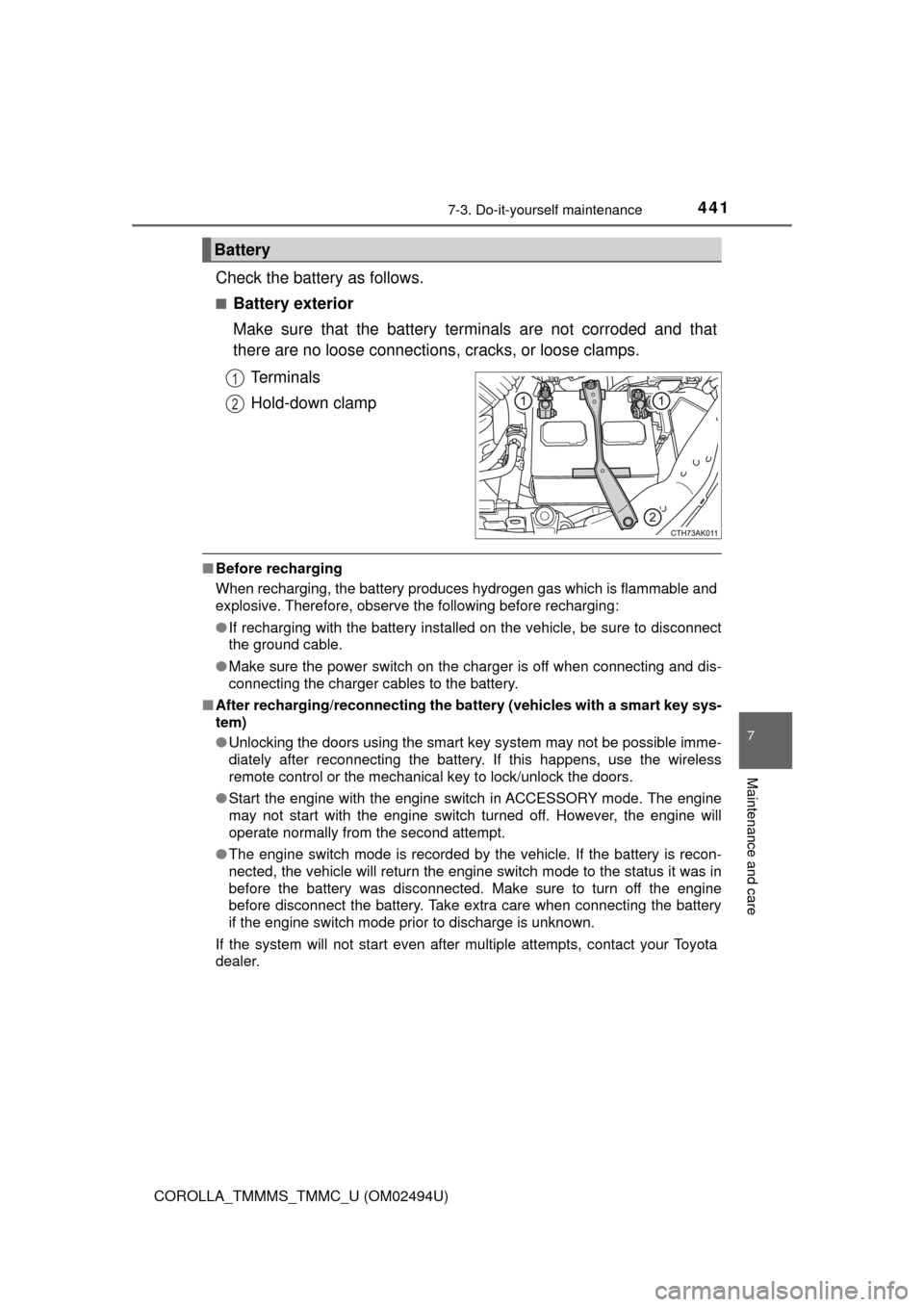
Check the battery as follows.
■Battery exterior
Make sure that the battery terminals are not corroded and that
there are no loose connections, cracks, or loose clamps.
Terminals
Hold-down clamp
■Before recharging
When recharging, the battery produces hydrogen gas which is flammable and
explosive. Therefore, observe the following before recharging:
●If recharging with the battery installed on the vehicle, be sure to disconnect
the ground cable.
●Make sure the power switch on the charger is off when connecting and dis-
connecting the charger cables to the battery.
■After recharging/reconnecting the battery (vehicles with a smart key sys-
tem)
●Unlocking the doors using the smart key system may not be possible imme-
diately after reconnecting the battery. If this happens, use the wireless
remote control or the mechanical key to lock/unlock the doors.
●Start the engine with the engine switch in ACCESSORY mode. The engine
may not start with the engine switch turned off. However, the engine will
operate normally from the second attempt.
●The engine switch mode is recorded by the vehicle. If the battery is recon-
nected, the vehicle will return the engine switch mode to the status it was in
before the battery was disconnected. Make sure to turn off the engine
before disconnect the battery. Take extra care when connecting the battery
if the engine switch mode prior to discharge is unknown.
If the system will not start even after multiple attempts, contact your Toyota
dealer.
Battery
1
2
Page 459 of 612
4597-3. Do-it-yourself maintenance
7
Maintenance and care
COROLLA_TMMMS_TMMC_U (OM02494U)
●Flathead screwdriver
●Small flathead screwdriver
●Lithium battery CR2016 (vehicles without a smart key system), or
CR2032 (vehicles with a smart key system)
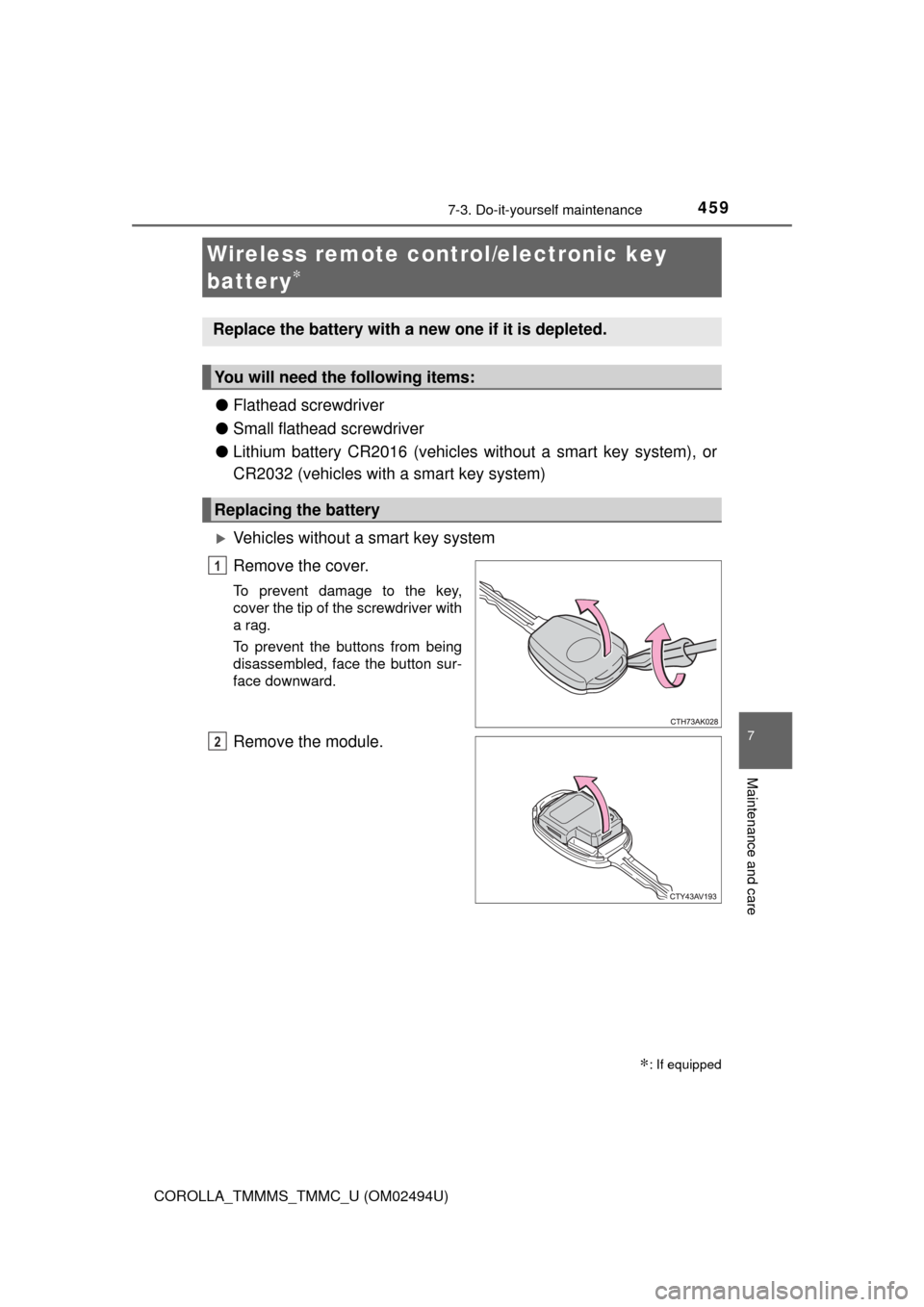
Vehicles without a smart key system
Remove the cover.
To prevent damage to the key,
cover the tip of the screwdriver with
a rag.
To prevent the buttons from being
disassembled, face the button sur-
face downward.
Remove the module.
Wireless remote control/electronic key
battery
∗
∗: If equipped
Replace the battery with a new one if it is depleted.
You will need the following items:
Replacing the battery
1
2
Page 460 of 612
4607-3. Do-it-yourself maintenance
COROLLA_TMMMS_TMMC_U (OM02494U)
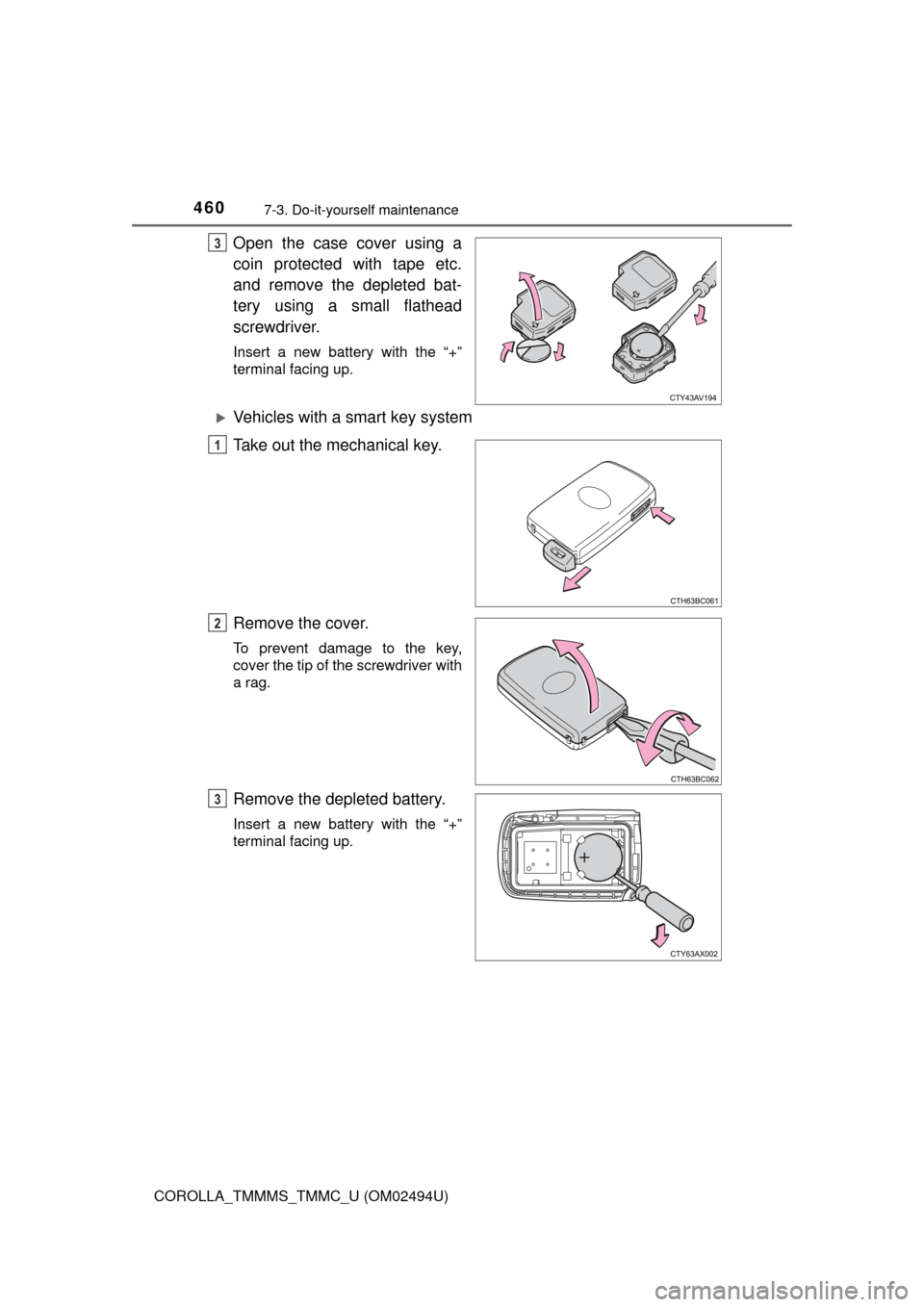
Open the case cover using a
coin protected with tape etc.
and remove the depleted bat-
tery using a small flathead
screwdriver.
Insert a new battery with the “+”
terminal facing up.
Vehicles with a smart key system
Take out the mechanical key.
Remove the cover.
To prevent damage to the key,
cover the tip of the screwdriver with
a rag.
Remove the depleted battery.
Insert a new battery with the “+”
terminal facing up.
3
1
2
3