phone TOYOTA COROLLA 2017 11.G User Guide
[x] Cancel search | Manufacturer: TOYOTA, Model Year: 2017, Model line: COROLLA, Model: TOYOTA COROLLA 2017 11.GPages: 612, PDF Size: 14.18 MB
Page 277 of 612
2775-1. Basic Operations
5
Audio system
COROLLA_TMMMS_TMMC_U (OM02494U)
Entune Audio∗
∗: If equipped
With Entune Audio
Operations such as listening to audio, using the hands-free
phone and changing Entune Audio settings are started by using
the following buttons.
With Entune Audio Plus
Owners of this system should refer to the “NAVIGATION AND
MULTIMEDIA SYSTEM OWNER'S MANUAL”.
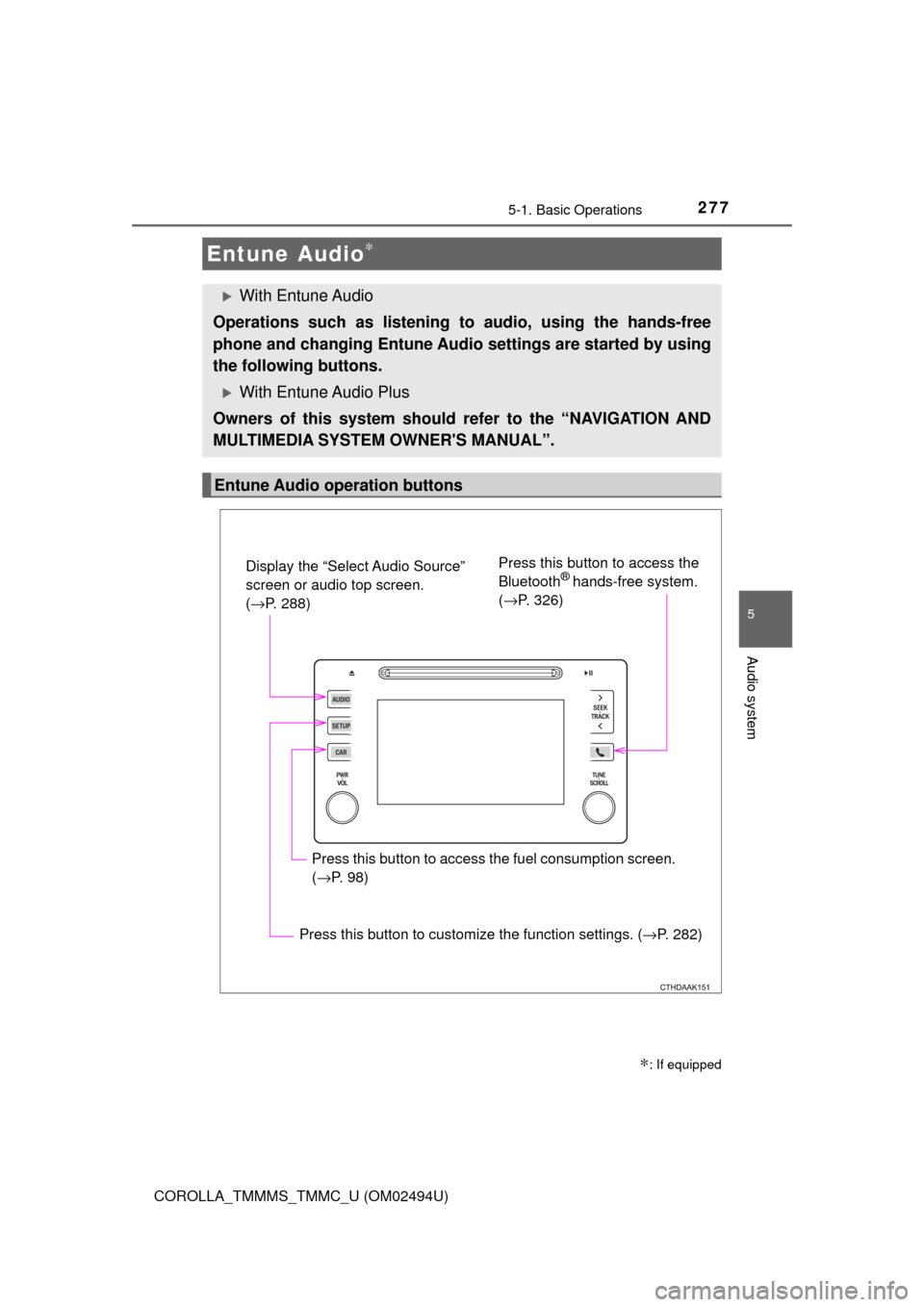
Entune Audio operation buttons
Display the “Select Audio Source”
screen or audio top screen.
(→P. 288)Press this button to access the
Bluetooth® hands-free system.
(→P. 326)
Press this button to access the fuel consumption screen.
(→P. 98)
Press this button to customize the function settings. (→P. 282)
Page 281 of 612
2815-1. Basic Operations
5
Audio system
COROLLA_TMMMS_TMMC_U (OM02494U)
Select to change on/off.
Select to change on/off.
■Using cellular phones
Interference may be heard through Entune Audio’s speakers if a cellular
phone is being used inside or close to the vehicle while Entune Audio is oper-
ating.
Random playback
Repeat play
WARNING
■Laser product
This product is a class 1 laser product.
Do not open the cover of the player or attempt to repair the unit yourself.
Refer servicing to qualified personnel.
●Laser products
• Do not take this unit apart or attempt to make any changes yourself.
This is an intricate unit that uses a laser pickup to retrieve information
from the surface of compact discs. The laser is carefully shielded so
that its rays remain inside the cabinet. Therefore, never try to disassem-
ble the player or alter any of its parts since you may be exposed to laser
rays and dangerous voltages.
• This product utilizes a laser.
Use of controls or adjustments or performance of procedures other than
those specified herein may result in hazardous radiation exposure.
THE USE OF OPTICAL INSTRUMENTS WITH THIS PRODUCT WILL
INCREASE EYE HAZARD.
NOTICE
■To prevent battery discharge
Do not leave Entune Audio on longer than necessary when the engine is off.
■To avoid damaging Entune Audio
Take care not to spill drinks or other fluids on Entune Audio.
Page 282 of 612
282
COROLLA_TMMMS_TMMC_U (OM02494U)
5-2. Setup
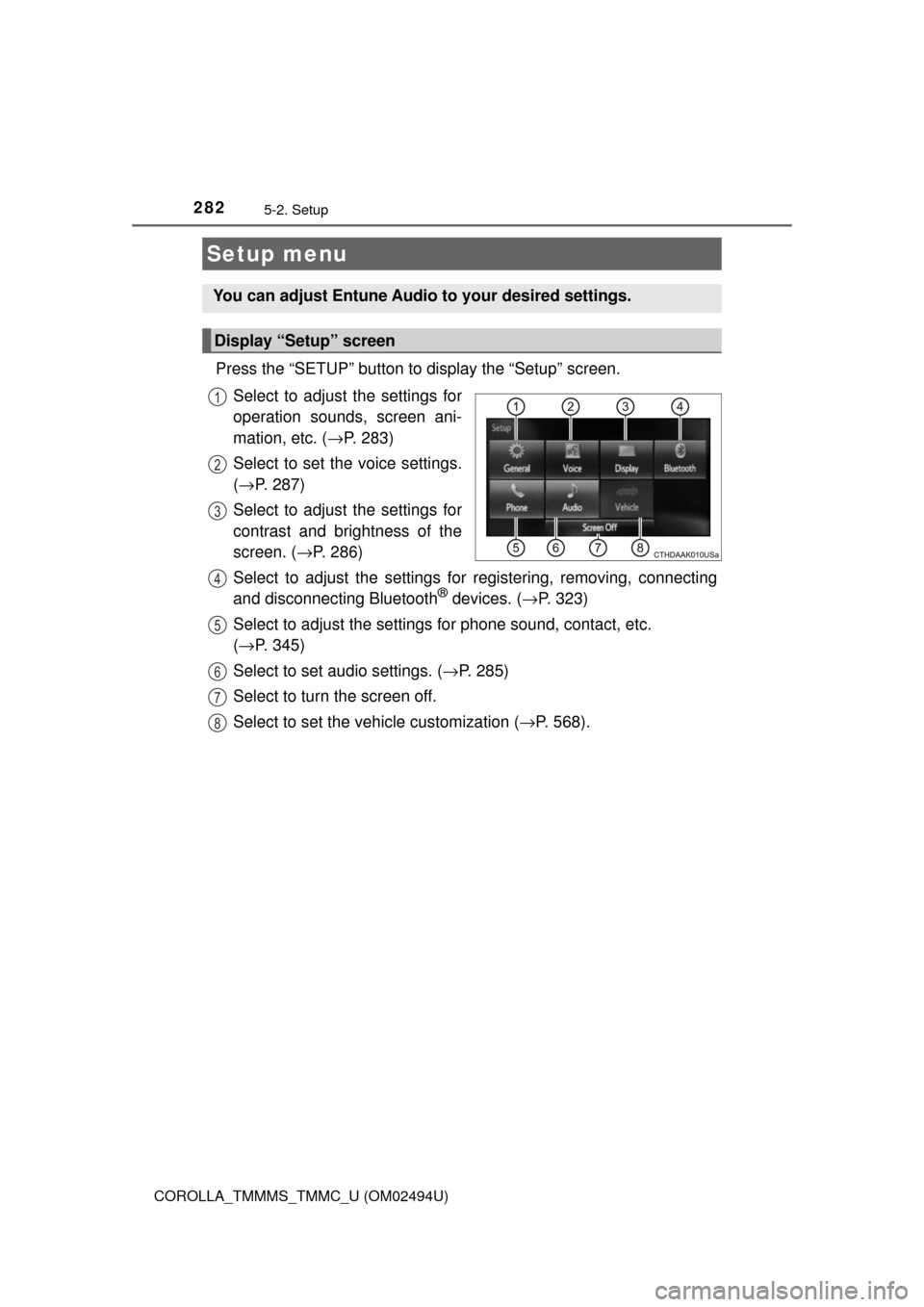
Press the “SETUP” button to display the “Setup” screen.
Select to adjust the settings for
operation sounds, screen ani-
mation, etc. (→P. 283)
Select to set the voice settings.
(→P. 287)
Select to adjust the settings for
contrast and brightness of the
screen. (→P. 286)
Select to adjust the settings for registering, removing, connecting
and disconnecting Bluetooth
® devices. (→P. 323)
Select to adjust the settings for phone sound, contact, etc.
(→P. 345)
Select to set audio settings. (→P. 285)
Select to turn the screen off.
Select to set the vehicle customization (→P. 568).
Setup menu
You can adjust Entune Audio to your desired settings.
Display “Setup” screen
1
2
3
4
5
6
7
8
Page 284 of 612

2845-2. Setup
COROLLA_TMMMS_TMMC_U (OM02494U)
Select “Delete Personal Data” on the “General Settings” screen.
Select “Delete”.
Check carefully beforehand, as data cannot be retrieved once deleted.
A confirmation screen will be displayed. Select “Yes”.
The following personal data will be deleted or changed to its default
settings.
• General settings
• Audio settings
• Phone settings
Delete personal data
1
2
3
Page 302 of 612
3025-6. Using an external device
COROLLA_TMMMS_TMMC_U (OM02494U)
■About iPod
●“Made for iPod”, “Made for iPhone” and “Made for iPad” mean that an elec-
tronic accessory has been designed to connect specifically to iPod or
iPhone, or iPad, respectively, and has been certified by the developer to
meet Apple performance standards.
●Apple is not responsible for the operation of this device or its compliance
with safety and regulatory standards. Please note that the use of this acces-
sory with iPod, iPhone or iPad may affect wireless performance.
●iPad, iPhone, iPod, iPod classic, iPod nano, and iPod touch are trademarks
of Apple Inc., registered in the U.S. and other countries. Lightning is a trade-
mark of Apple Inc.
■iPod cover art
●Depending on the iPod and songs in the iPod, iPod cover art may be dis-
played.
●This function can be changed to on/off. (→P. 285)
●It may take time to display iPod cover art, and the iPod may not be operated
while the cover art display is in process.
●Only iPod cover art that is saved in JPEG format can be displayed.
■iPod functions
●When an iPod is connected and the audio source is changed to iPod mode,
the iPod will resume play from the same point in which it was last used.
●Depending on the iPod that is connected to the system, certain functions
may not be available. If a function is unavailable due to a malfunction (as
opposed to a system specification), disconnecting the device and recon-
necting it may resolve the problem.
●While connected to the system, the iPod cannot be operated with its own
controls. It is necessary to use the controls of the vehicle's Entune Audio
instead.
●When the battery level of an iPod is very low, the iPod may not operate. If
so, charge the iPod before use.
●Compatible models (→P. 304)
Page 304 of 612

3045-6. Using an external device
COROLLA_TMMMS_TMMC_U (OM02494U)■Compatible models
The following iPod
®, iPod nano®, iPod classic®, iPod touch® and iPhone®
devices can be used with this system.
●Made for
• iPod touch (5th generation)
• iPod touch (4th generation)
• iPod touch (3rd generation)
• iPod touch (2nd generation)
• iPod touch (1st generation)
• iPod classic
• iPod with video
• iPod nano (7th generation)
• iPod nano (6th generation)
• iPod nano (5th generation)
• iPod nano (4th generation)
• iPod nano (3rd generation)
• iPod nano (2nd generation)
• iPod nano (1st generation)
• iPhone 5s
• iPhone 5c
• iPhone 5
• iPhone 4S
• iPhone 4
• iPhone 3GS
• iPhone 3G
• iPhone
Depending on differences between models or software versions etc., some
models might be incompatible with this system.
WARNING
■While driving
Do not connect an iPod or operate the controls.
NOTICE
■To prevent damage to the iPod or its terminals
●Do not leave the iPod in the vehicle. The temperature inside the vehicle
may become high, resulting in damage to the iPod.
●Do not push down on or apply unnecessary pressure to the iPod while it is
connected.
●Do not insert foreign objects into the port.
Page 310 of 612
310
COROLLA_TMMMS_TMMC_U (OM02494U)
5-7. Connecting Bluetooth®
■About Bluetooth®
Preparations to use wireless communica-
tion
The following can be performed using Bluetooth® wireless com-
munication:
■A portable audio player can be operated and listened to via
Entune Audio
■Hands-free phone calls can be made via a cellular phone
In order to use wireless communication, register and connect a
Bluetooth
® device by performing the following procedures.
The Bluetooth® word mark and logos are
registered trademarks owned Bluetooth
SIG, Inc. and any use of such marks by
Fujitsu Ten Limited is under license.
Other trademarks and trade names are
those of their respective owners.
WARNING
■Certifications for the Bluetooth
FCC ID: BABFT0077A
●CAUTION: Radio Frequency Radiation Exposure
This equipment complies with FCC radiation exposure limits set forth for
uncontrolled equipment and meets the FCC radio frequency (RF) Expo-
sure Guidelines.
This equipment has very low levels of RF energy that it deemed to comply
without maximum permissive exposure evaluation (MPE). But it is desir-
able that it should be installed and operated with at least 20cm and more
between the radiator and person's body in normal use position.
• Co-location: This transmitter must not be co-located or operated in con-
junction with any other antenna or transmitter.
• This device complies with part 15 of the FCC Rules. Operation is sub-
ject to the following two conditions: (1) This device may not cause
harmful interference, and (2) this device must accept any interference
received, including interference that may cause undesired operation.
Page 312 of 612

3125-7. Connecting Bluetooth®
COROLLA_TMMMS_TMMC_U (OM02494U)
Device registration/connection flow
1. Register the Bluetooth® device to be used with Entune
Audio (→P. 314, 315, 316)
2. Connect the Bluetooth® device to be used
(→P. 319)
To be used for audio To be used for hands-free
phone
3. Start Bluetooth® connec-
tion (→P. 319)3. Start Bluetooth® connec-
tion (→P. 319)
4. Check connection status
(→P. 324)4. Check connection status
(→P. 327)
5. Use Bluetooth® audio
(→P. 324)5. Use Bluetooth® phone
(→P. 326)
Page 315 of 612
3155-7. Connecting Bluetooth®
5
Audio system
COROLLA_TMMMS_TMMC_U (OM02494U)
Turn the Bluetooth® connection setting of your cellular phone on.
Press the “ ” button.
Select “OK” to register a phone.
Follow the steps in “How to registering a Bluetooth
® device” from
step . (→P. 316)
Registering a Bluetooth® phone for the first
time
To use the hands-free system, it is necessary to register a
Bluetooth® phone with the system.
Once the phone has been registered, it is possible to use the
hands-free system.
For details about registering a Bluetooth
® device (→P. 316)
1
2
3
4
3
Page 316 of 612
3165-7. Connecting Bluetooth®
COROLLA_TMMMS_TMMC_U (OM02494U)
Display the “Bluetooth* Setup” screen. (→P. 313)
Select “Add”.
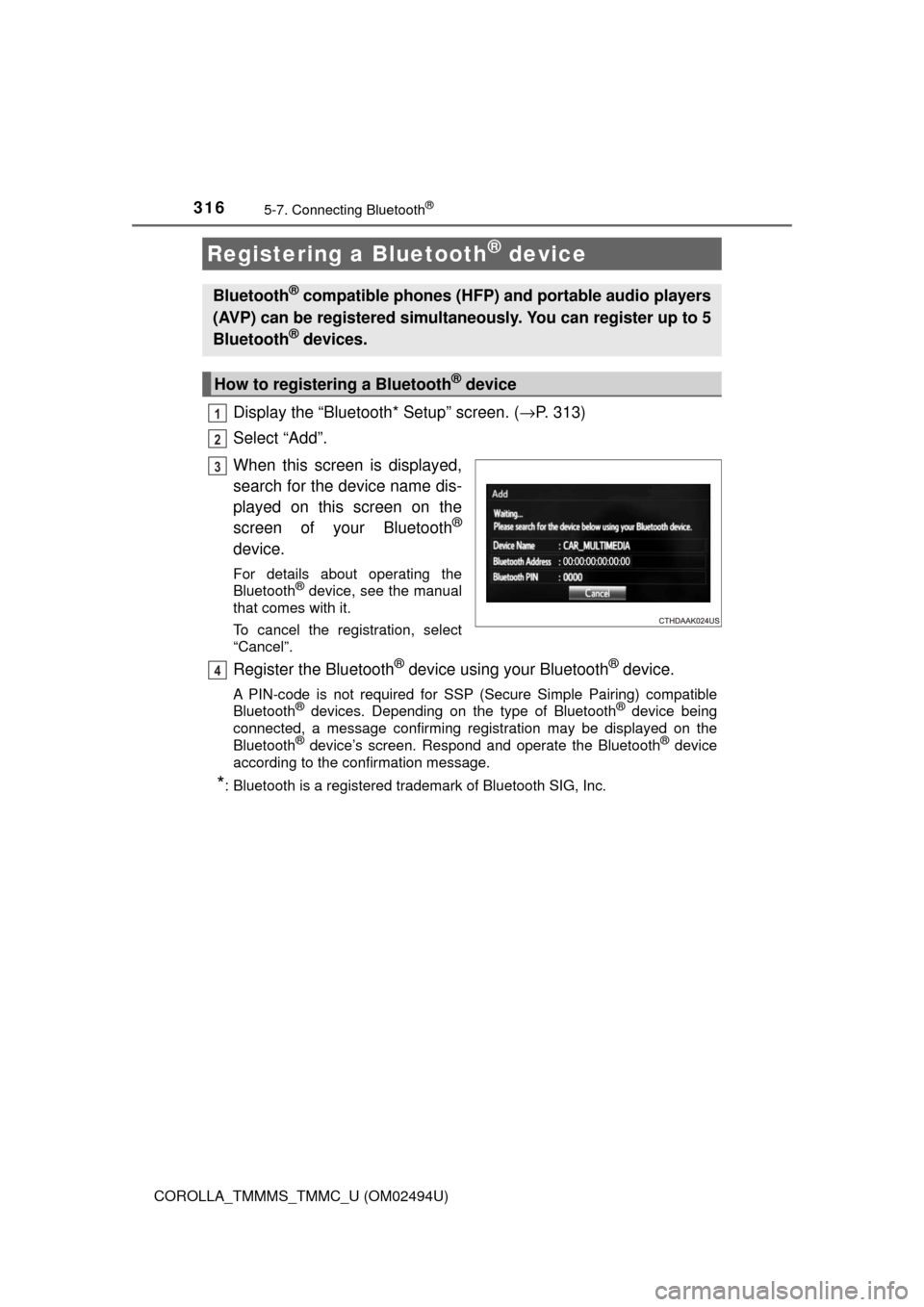
When this screen is displayed,
search for the device name dis-
played on this screen on the
screen of your Bluetooth
®
device.
For details about operating the
Bluetooth® device, see the manual
that comes with it.
To cancel the registration, select
“Cancel”.
Register the Bluetooth® device using your Bluetooth® device.
A PIN-code is not required for SSP (Secure Simple Pairing) compatible
Bluetooth® devices. Depending on the type of Bluetooth® device being
connected, a message confirming registration may be displayed on the
Bluetooth
® device’s screen. Respond and operate the Bluetooth® device
according to the confirmation message.
*: Bluetooth is a registered trademark of Bluetooth SIG, Inc.
Registering a Bluetooth® device
Bluetooth® compatible phones (HFP) and portable audio players
(AVP) can be registered simultaneously. You can register up to 5
Bluetooth
® devices.
How to registering a Bluetooth® device
1
2
3
4