reset TOYOTA COROLLA 2017 11.G User Guide
[x] Cancel search | Manufacturer: TOYOTA, Model Year: 2017, Model line: COROLLA, Model: TOYOTA COROLLA 2017 11.GPages: 612, PDF Size: 14.18 MB
Page 275 of 612
2755-1. Basic Operations
5
Audio system
COROLLA_TMMMS_TMMC_U (OM02494U)
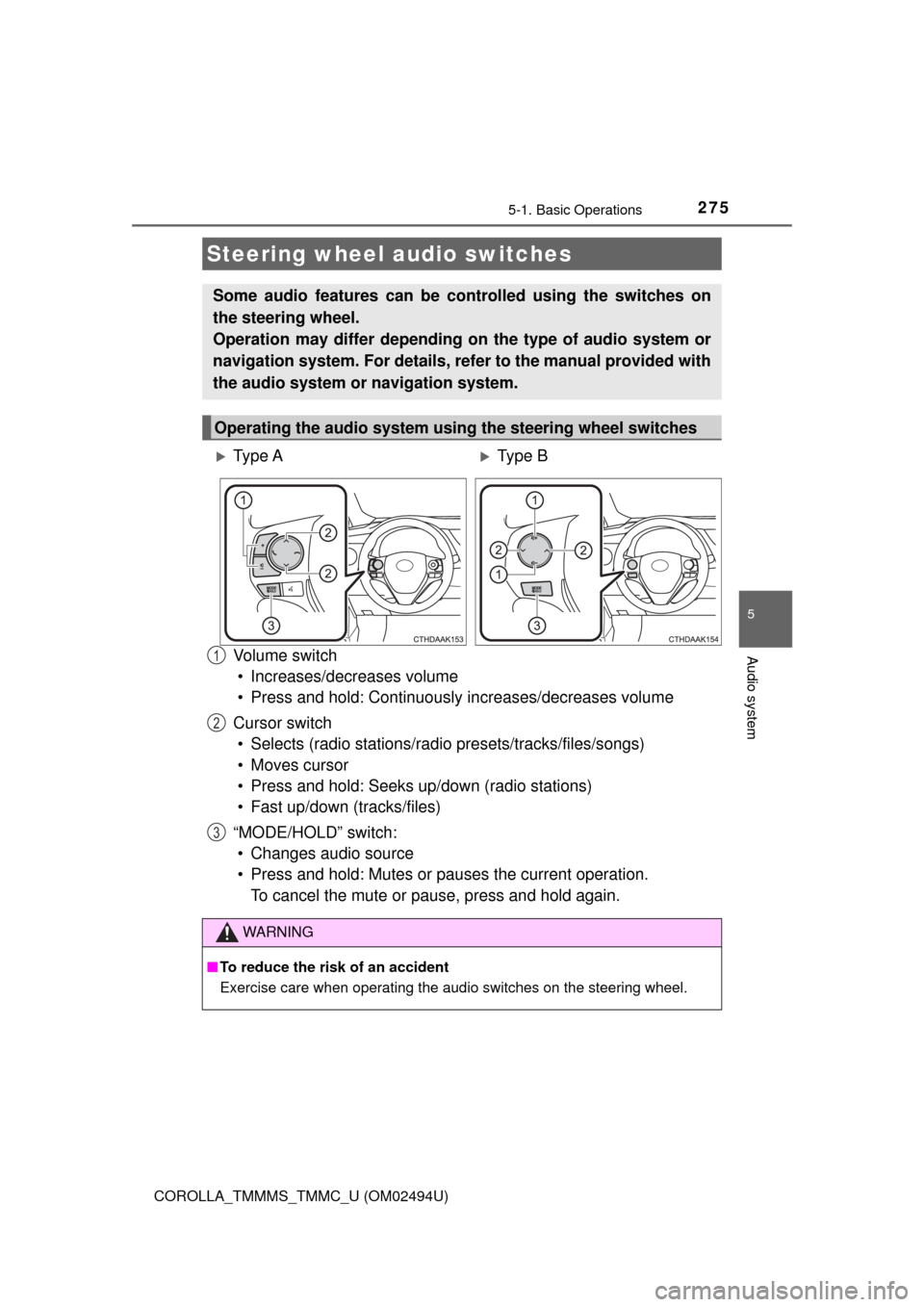
Vo l u m e s w i t c h
• Increases/decreases volume
• Press and hold: Continuously increases/decreases volume
Cursor switch
• Selects (radio stations/radio presets/tracks/files/songs)
• Moves cursor
• Press and hold: Seeks up/down (radio stations)
• Fast up/down (tracks/files)
“MODE/HOLD” switch:
• Changes audio source
• Press and hold: Mutes or pauses the current operation.
To cancel the mute or pause, press and hold again.
Steering wheel audio switches
Some audio features can be controlled using the switches on
the steering wheel.
Operation may differ depending on the type of audio system or
navigation system. For details, refer to the manual provided with
the audio system or navigation system.
Operating the audio system using the steering wheel switches
Ty p e AType B
WARNING
■To reduce the risk of an accident
Exercise care when operating the audio switches on the steering wheel.
1
2
3
Page 285 of 612
2855-2. Setup
5
Audio system
COROLLA_TMMMS_TMMC_U (OM02494U)
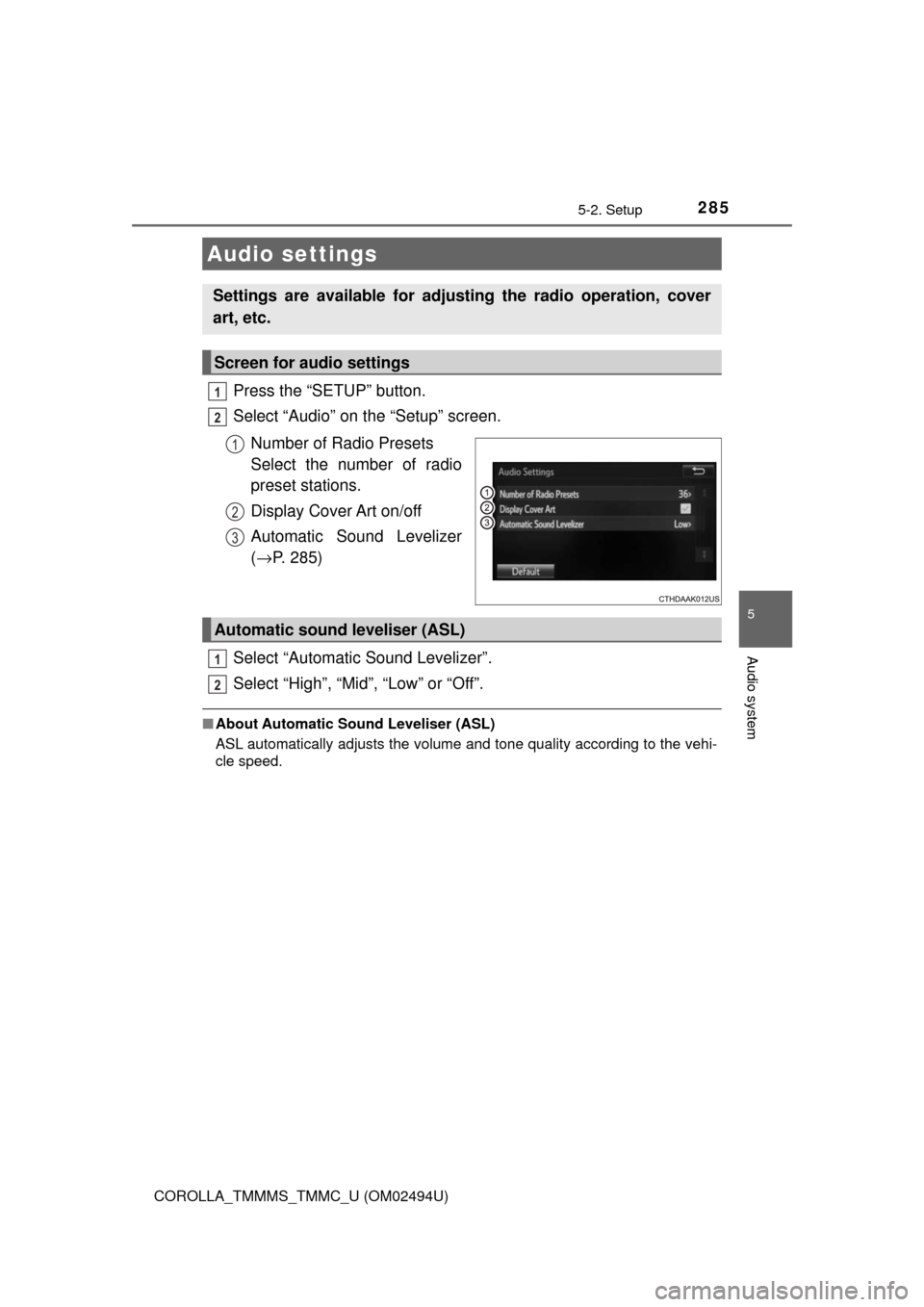
Press the “SETUP” button.
Select “Audio” on the “Setup” screen.
Number of Radio Presets
Select the number of radio
preset stations.
Display Cover Art on/off
Automatic Sound Levelizer
(→P. 285)
Select “Automatic Sound Levelizer”.
Select “High”, “Mid”, “Low” or “Off”.
■About Automatic Sound Leveliser (ASL)
ASL automatically adjusts the volume and tone quality according to the vehi-
cle speed.
Audio settings
Settings are available for adjusting the radio operation, cover
art, etc.
Screen for audio settings
1
2
1
2
3
Automatic sound leveliser (ASL)
1
2
Page 292 of 612
292
COROLLA_TMMMS_TMMC_U (OM02494U)
5-4. Using the radio
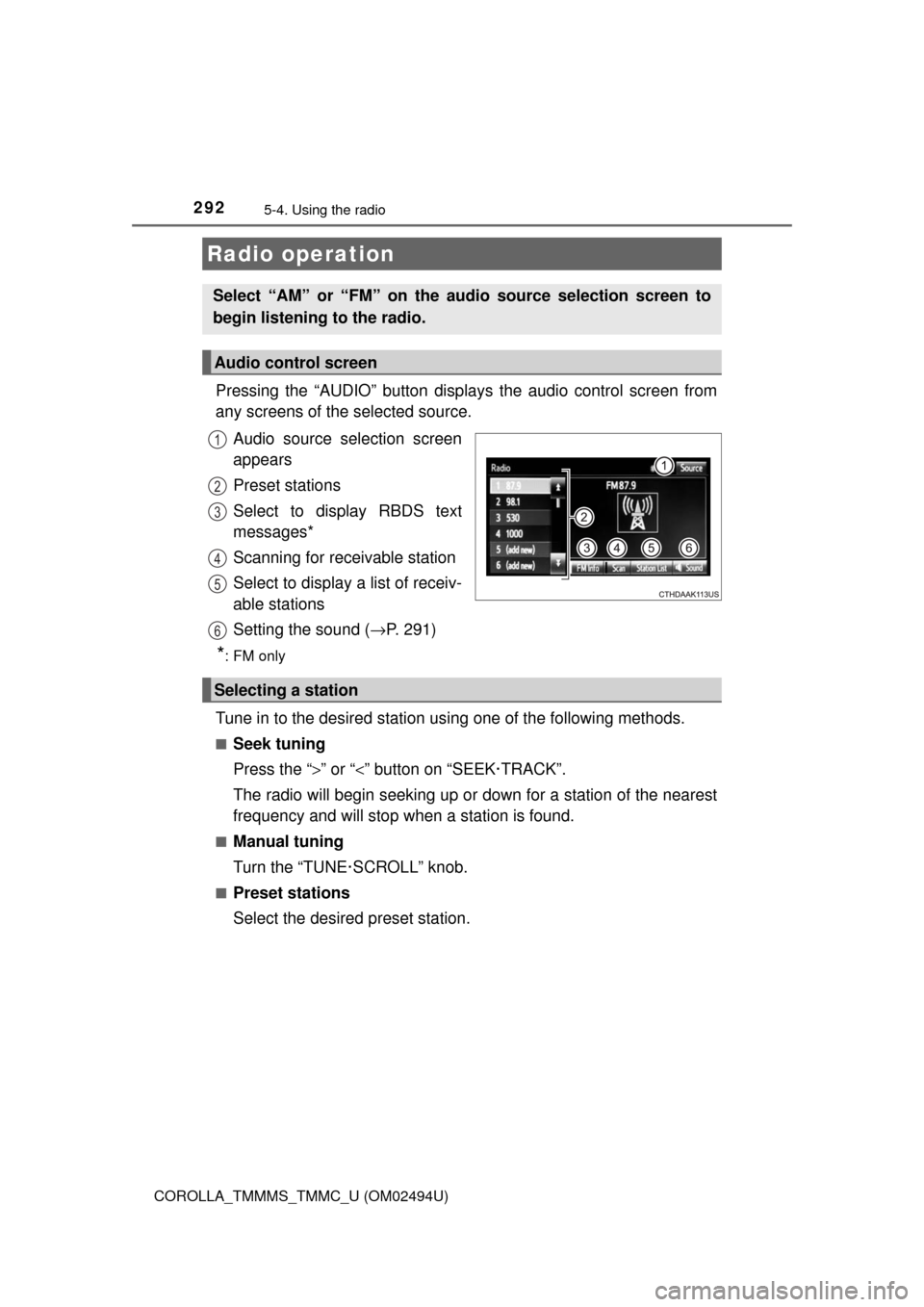
Pressing the “AUDIO” button displays the audio control screen from
any screens of the selected source.
Audio source selection screen
appears
Preset stations
Select to display RBDS text
messages*
Scanning for receivable station
Select to display a list of receiv-
able stations
Setting the sound (→P. 291)
*:FM only
Tune in to the desired station using one of the following methods.
■Seek tuning
Press the “>” or “<” button on “SEEK·TRACK”.
The radio will begin seeking up or down for a station of the nearest
frequency and will stop when a station is found.
■Manual tuning
Turn the “TUNE·SCROLL” knob.
■Preset stations
Select the desired preset station.
Radio operation
Select “AM” or “FM” on the audio source selection screen to
begin listening to the radio.
Audio control screen
1
2
3
4
5
6
Selecting a station
Page 293 of 612
2935-4. Using the radio
5
Audio system
COROLLA_TMMMS_TMMC_U (OM02494U)
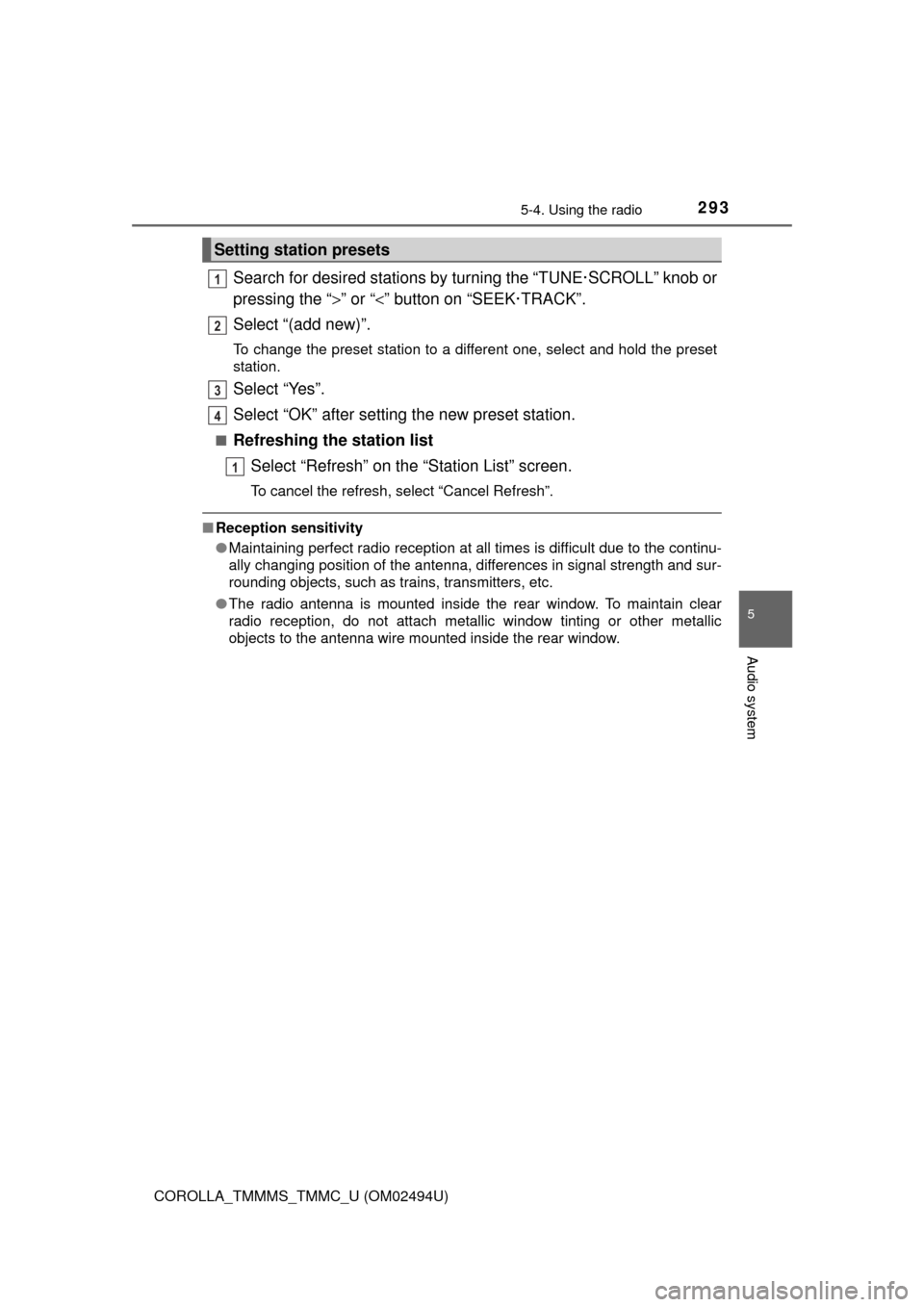
Search for desired stations by turning the “TUNE·SCROLL” knob or
pressing the “>” or “<” button on “SEEK·TRACK”.
Select “(add new)”.
To change the preset station to a different one, select and hold the preset
station.
Select “Yes”.
Select “OK” after setting the new preset station.
■Refreshing the station list
Select “Refresh” on the “Station List” screen.
To cancel the refresh, select “Cancel Refresh”.
■Reception sensitivity
●Maintaining perfect radio reception at all times is difficult due to the continu-
ally changing position of the antenna, differences in signal strength and sur-
rounding objects, such as trains, transmitters, etc.
●The radio antenna is mounted inside the rear window. To maintain clear
radio reception, do not attach metallic window tinting or other metallic
objects to the antenna wire mounted inside the rear window.
Setting station presets
1
2
3
4
1
Page 303 of 612
3035-6. Using an external device
5
Audio system
COROLLA_TMMMS_TMMC_U (OM02494U)■iPod problems
To resolve most problems encountered when using your iPod, disconnect
your iPod from the vehicle iPod connection and reset it. For instructions on
how to reset your iPod, refer to your iPod Owner's Manual.
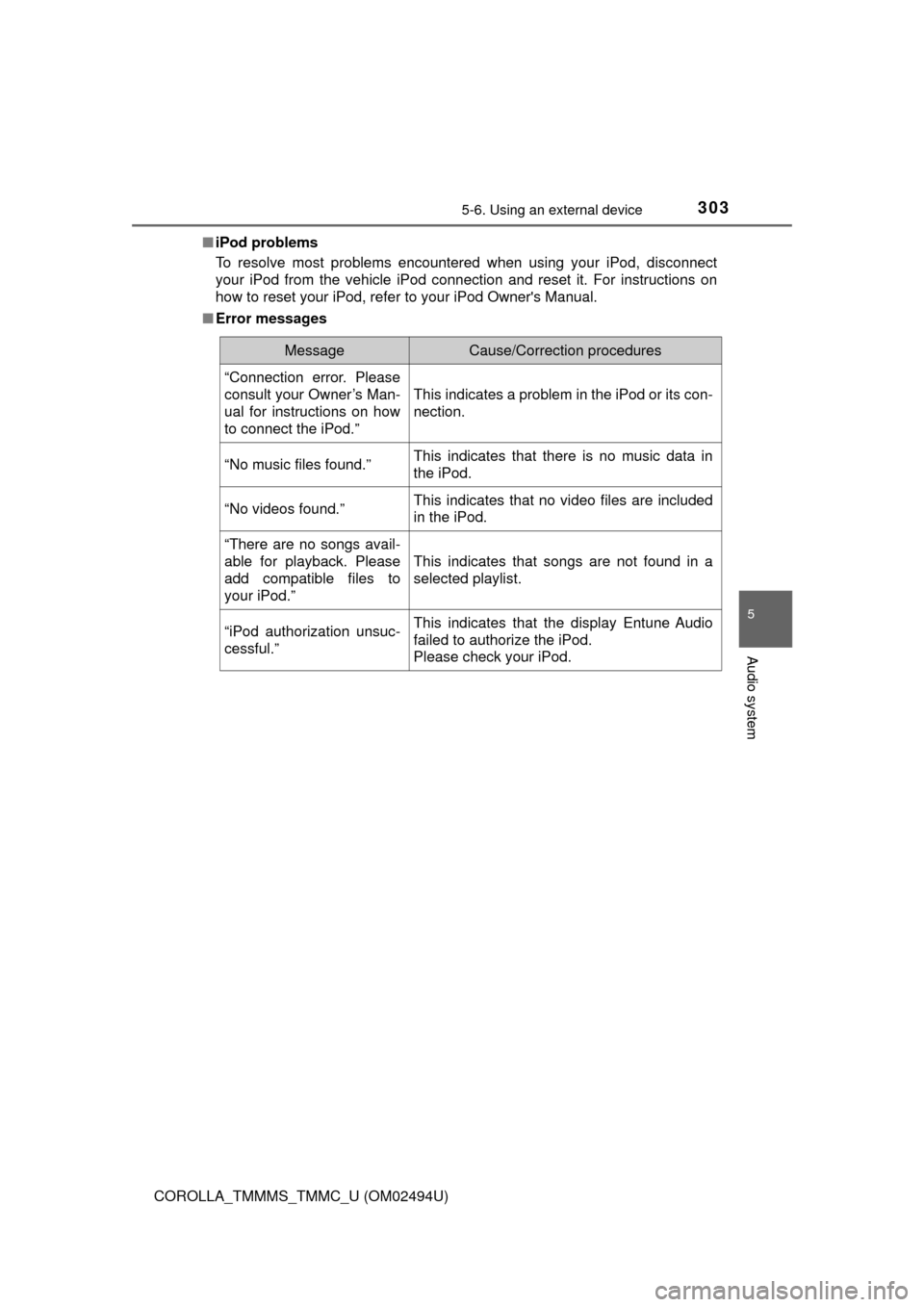
■Error messages
MessageCause/Correction procedures
“Connection error. Please
consult your Owner’s Man-
ual for instructions on how
to connect the iPod.”
This indicates a problem in the iPod or its con-
nection.
“No music files found.”This indicates that there is no music data in
the iPod.
“No videos found.”This indicates that no video files are included
in the iPod.
“There are no songs avail-
able for playback. Please
add compatible files to
your iPod.”
This indicates that songs are not found in a
selected playlist.
“iPod authorization unsuc-
cessful.”This indicates that the display Entune Audio
failed to authorize the iPod.
Please check your iPod.
Page 345 of 612
3455-9. Bluetooth® phone
5
Audio system
COROLLA_TMMMS_TMMC_U (OM02494U)
The contact can be transferred from a Bluetooth® phone to the sys-
tem. The contact also can be added, edited and deleted.
The call history can be deleted and contact and favorites can be
changed.
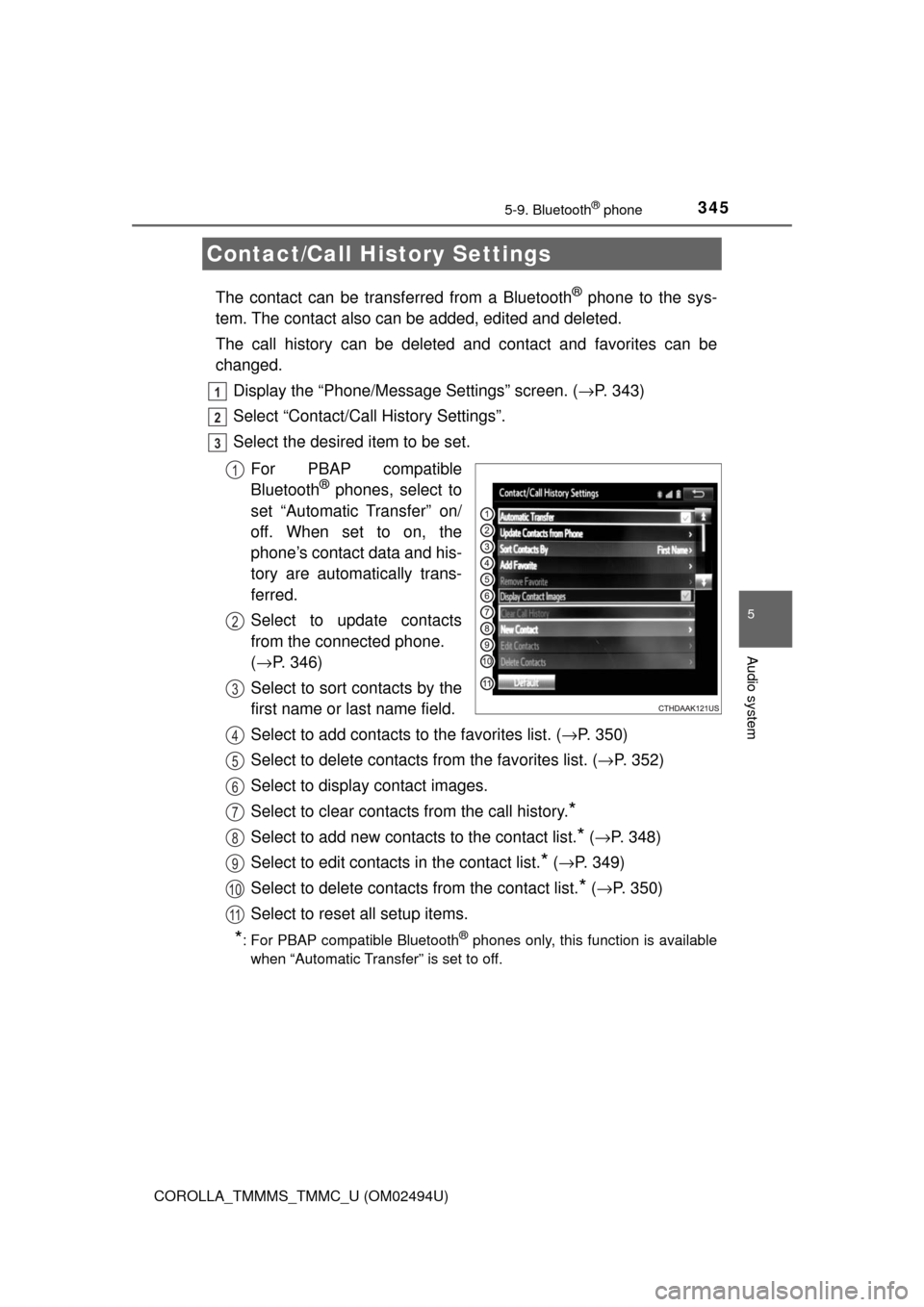
Display the “Phone/Message Settings” screen. (→P. 343)
Select “Contact/Call History Settings”.
Select the desired item to be set.
For PBAP compatible
Bluetooth
® phones, select to
set “Automatic Transfer” on/
off. When set to on, the
phone’s contact data and his-
tory are automatically trans-
ferred.
Select to update contacts
from the connected phone.
(→P. 346)
Select to sort contacts by the
first name or last name field.
Select to add contacts to the favorites list. (→P. 350)
Select to delete contacts from the favorites list. (→P. 352)
Select to display contact images.
Select to clear contacts from the call history.
*
Select to add new contacts to the contact list.* (→P. 348)
Select to edit contacts in the contact list.
* (→P. 349)
Select to delete contacts from the contact list.
* (→P. 350)
Select to reset all setup items.
*: For PBAP compatible Bluetooth® phones only, this function is available
when “Automatic Transfer” is set to off.
Contact/Call History Settings
1
2
3
1
2
3
4
5
6
7
8
9
10
11
Page 419 of 612

4197-2. Maintenance
7
Maintenance and care
COROLLA_TMMMS_TMMC_U (OM02494U)
■Repair and replacement
It is recommended that genuine Toyota parts be used for repairs to ensure
performance of each system. If non-Toyota parts are used in replacement or if
a repair shop other than a Toyota dealer performs repairs, confirm the war-
ranty coverage.
■Resetting the message indicating maintenance is required (U.S.A. only)
After the required maintenance is performed according to the maintenance
schedule, please reset the message.
To reset the message, follow the procedure described below:
Vehicles with monochrome display
Vehicles without a smart key system: Turn the engine switch to the “LOCK”
position with the trip meter A reading shown. (→P. 79)
Vehicles with a smart key system: Turn the engine switch off with the trip
meter A reading shown. (→P. 79)
Vehicles without a smart key system:
While pressing the display change button (→P. 79), turn the engine switch
to the “ON” position (do not start the engine because reset mode will be
canceled).
Vehicles with a smart key system:
While pressing the display change button (→P. 79), turn the engine switch
to the IGNITION ON mode (do not start the engine because otherwise the
reset mode will be canceled).
Continue to press and hold the button until the trip meter displays “000000”.
Vehicles with color display
While the engine is running, switch the multi-information display to the “Set-
tings” screen. (→P. 95)
Select “Reset Scheduled Maint. Data” on the “Settings” screen.
Select “Yes” when “Reset Data?” is displayed on the multi-information dis-
play.
“The Data Has Been Reset” will be displayed when the reset procedure has
been completed.
■Allow inspection and repairs to be performed by a Toyota dealer
●Toyota technicians are well-trained specialists and are kept up to date with
the latest service information. They are well informed about the operations
of all systems on your vehicle.
●Keep a copy of the repair order. It proves that the maintenance that has
been performed is under warranty coverage. If any problem should arise
while your vehicle is under warranty, your Toyota dealer will promptly take
care of it.
1
2
3
1
2
3
Page 446 of 612
4467-3. Do-it-yourself maintenance
COROLLA_TMMMS_TMMC_U (OM02494U)■
How to initialize the tire pressure warning system
Park the vehicle in a safe place and turn the engine switch off.
Initialization cannot be performed while the vehicle is moving.
Adjust the tire inflation pressure to the specified cold tire inflation
pressure level. (→P. 550)
Make sure to adjust the tire pressure to the specified cold tire infla-
tion pressure level. The tire pressure warning system will operate
based on this pressure level.
Turn the engine switch to the “ON” position (vehicles without a
smart key system) or IGNITION ON mode (vehicles with a smart
key system).
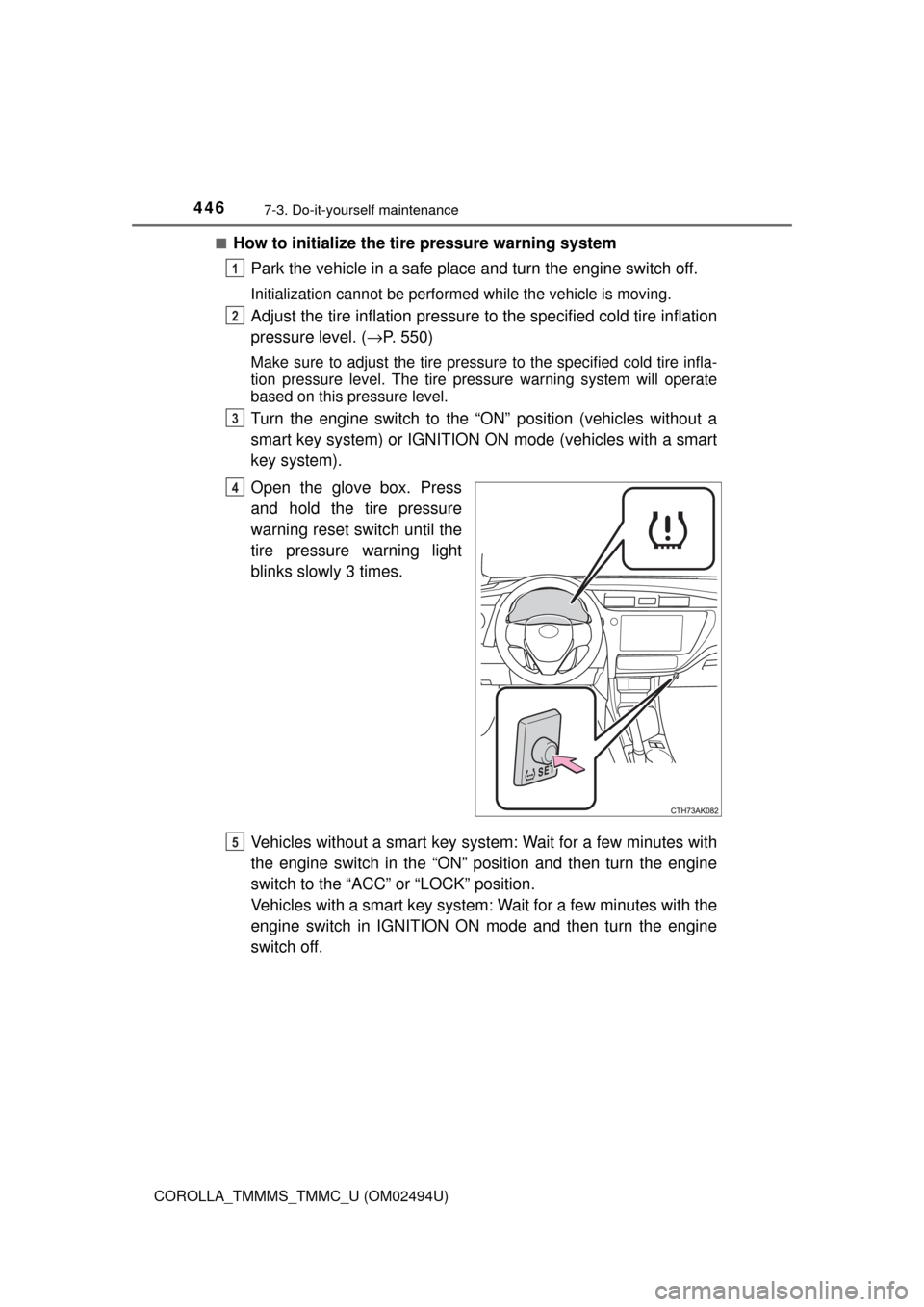
Open the glove box. Press
and hold the tire pressure
warning reset switch until the
tire pressure warning light
blinks slowly 3 times.
Vehicles without a smart key system: Wait for a few minutes with
the engine switch in the “ON” position and then turn the engine
switch to the “ACC” or “LOCK” position.
Vehicles with a smart key system: Wait for a few minutes with the
engine switch in IGNITION ON mode and then turn the engine
switch off.
1
2
3
4
5
Page 449 of 612

4497-3. Do-it-yourself maintenance
7
Maintenance and care
COROLLA_TMMMS_TMMC_U (OM02494U)■
If you press the tire pressure warning reset switch accidentally (vehi-
cles with a tire pressure warning system)
If initialization is performed, adjust the tire inflation pressure to the speci-
fied level and initialize the tire pressure warning system again.
■When initialization of the tire pressure warning system has failed
(vehicles with a tire pressure warning system)
Initialization can be completed in a few minutes. However, in the following
cases, the settings have not been recorded and the system will not oper-
ate properly. If repeated attempts to record tire inflation pressure settings
are unsuccessful, have the vehicle inspected by your Toyota dealer.
●When operating the tire pressure warning reset switch, the tire pressure
warning light does not blink 3 times.
●After driving for a certain period of time since the initialization has been
completed, the warning light comes on after blinking for 1 minute.
■Tire pressure warning system certification
For the U.S.A.
FCC ID: HYQ23AAK FCC ID: PAXPMVC010
NOTE:
This device complies with part 15 of the FCC Rules. Operation is subject
to the following two conditions: (1) This device may not cause harmful
interference, and (2) this device must accept any interference received,
including interference that may cause undesired operation.
FCC WARNING:
Changes or modifications not expressly approved by the party responsi-
ble for compliance could void the user’s authority to operate the equip-
ment.
For Canada
NOTE:
Operation is subject to the following two conditions: (1) this device may
not cause interference, and (2) this device must accept any interference,
including interference that may cause undesired operation of the device.
NOTE:
L’utilisation de ce dispositif est autorisée seulement aux deux conditions
suivantes : (1) il ne doit pas produire de brouillage, et (2) l’utilisateur du
dispositif doit être prêt à accepter tout brouillage radioélectrique reçu,
même si ce brouillage est susceptible de compromettre le fonctionne-
ment du dispositif.
Page 450 of 612

4507-3. Do-it-yourself maintenance
COROLLA_TMMMS_TMMC_U (OM02494U)
WARNING
■When inspecting or replacing tires
Observe the following precautions to prevent accidents.
Failure to do so may cause damage to parts of the drive train as well as
dangerous handling characteristics, which may lead to an accident
resulting in death or serious injury.
●Do not mix tires of different makes, models or tread patterns.
Also, do not mix tires of remarkably different treadwear.
●Do not use tire sizes other than those recommended by Toyota.
●Do not mix differently constructed tires (radial, bias-belted or bias-ply
tires).
●Do not mix summer, all season and snow tires.
●Do not use tires that have been used on another vehicle.
Do not use tires if you do not know how they were used previously.
■When initializing the tire pressure warning system (vehicles with a
tire pressure warning system)
Do not operate the tire pressure warning reset switch without first
adjusting the tire inflation pressure to the specified level. Otherwise, the
tire pressure warning light may not come on even if the tire inflation
pressure is low, or it may come on when the tire inflation pressure is
actually normal.