steering TOYOTA COROLLA 2017 11.G User Guide
[x] Cancel search | Manufacturer: TOYOTA, Model Year: 2017, Model line: COROLLA, Model: TOYOTA COROLLA 2017 11.GPages: 612, PDF Size: 14.18 MB
Page 42 of 612
421-1. For safe use
COROLLA_TMMMS_TMMC_U (OM02494U)
■If the SRS airbags deploy (inflate)
●Slight abrasions, burns, bruising etc.,may be sustained from SRS airbags,
due to the extremely high speed deployment (inflation) by hot gases.
●A loud noise and white powder will be emitted.
●Parts of the airbag module (steering wheel hub, airbag cover and inflator) as
well as the front seats, parts of the front and rear pillars, and roof side rails,
may be hot for several minutes. The airbag itself may also be hot.
●The windshield may crack.
■SRS airbag deployment conditions (SRS front airbags)
●The SRS front airbags will deploy in the event of an impact that exceeds the
set threshold level (the level of force corresponding to an approximately 12 -
18 mph [20 - 30 km/h] frontal collision with a fixed wall that does not move or
deform).
However, this threshold velocity will be considerably higher in the following
situations:
• If the vehicle strikes an object, such as a parked vehicle or sign pole,
which can move or deform on impact
• If the vehicle is involved in an underride collision, such as a collision in
which the front of the vehicle “underrides”, or goes under, the bed of a
truck
●Depending on the type of collision, it is possible that only the seat belt pre-
tensioners will activate.
●The SRS front airbags for the front passenger will not activate if there is no
passenger sitting in the front passenger seat. However, the SRS front air-
bags for the front passenger may deploy if luggage is put in the seat, even if
the seat is unoccupied.
●The SRS seat cushion airbag on the front seats will not operate if the occu-
pant is not wearing a seat belt.
■SRS airbag deployment conditions (SRS side and curtain shield airbags)
●The SRS side and curtain shield airbags will deploy in the event of an
impact that exceeds the set threshold level (the level of force corresponding
to the impact force produced by an approximately 3300 lb. [1500 kg] vehicle
colliding with the vehicle cabin from a direction perpendicular to the vehicle
orientation at an approximate speed of 12 - 18 mph [20 - 30 km/h]).
●The SRS curtain shield airbags will deploy in the event of vehicle rollover.
●The SRS side and curtain shield airbags will deploy in the event of a severe
frontal collision.
Page 45 of 612
451-1. For safe use
1
For safety and security
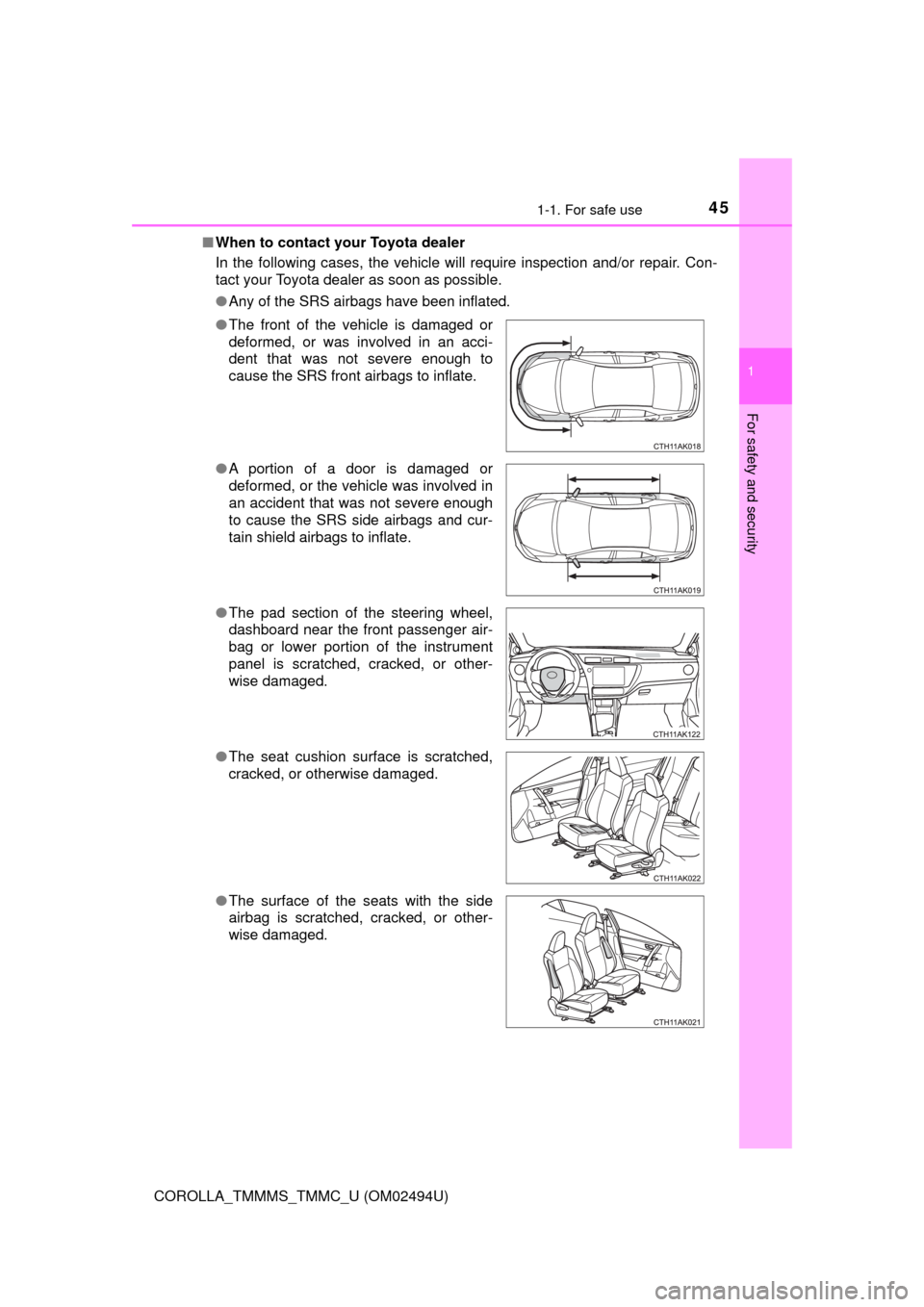
COROLLA_TMMMS_TMMC_U (OM02494U)■When to contact your Toyota dealer
In the following cases, the vehicle will require inspection and/or repair. Con-
tact your Toyota dealer as soon as possible.
●Any of the SRS airbags have been inflated.
●The front of the vehicle is damaged or
deformed, or was involved in an acci-
dent that was not severe enough to
cause the SRS front airbags to inflate.
●A portion of a door is damaged or
deformed, or the vehicle was involved in
an accident that was not severe enough
to cause the SRS side airbags and cur-
tain shield airbags to inflate.
●The pad section of the steering wheel,
dashboard near the front passenger air-
bag or lower portion of the instrument
panel is scratched, cracked, or other-
wise damaged.
●The seat cushion surface is scratched,
cracked, or otherwise damaged.
●The surface of the seats with the side
airbag is scratched, cracked, or other-
wise damaged.
Page 75 of 612
752. Instrument cluster
2
Instrument cluster
COROLLA_TMMMS_TMMC_U (OM02494U)
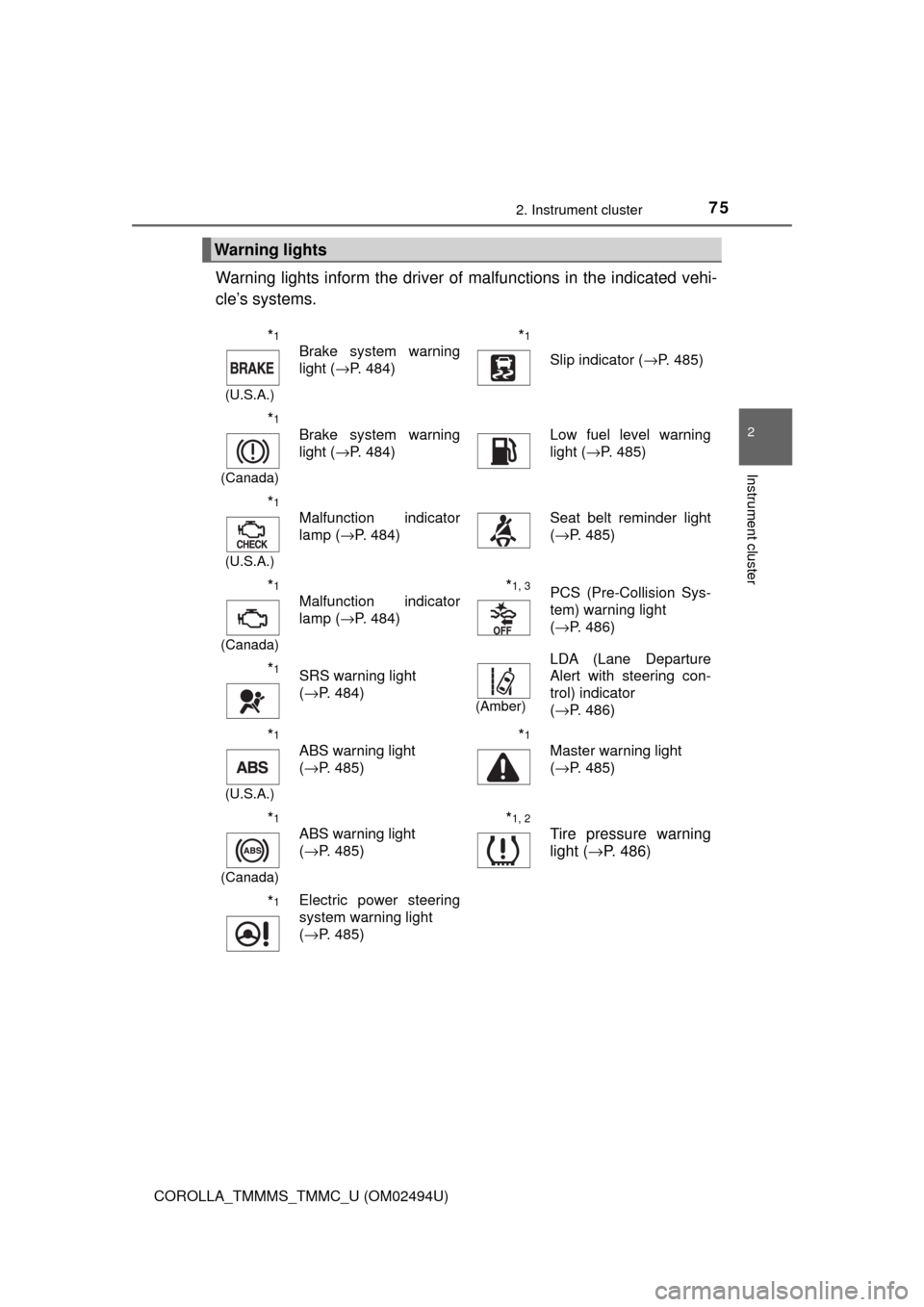
Warning lights inform the driver of malfunctions in the indicated vehi-
cle’s systems.
Warning lights
*1
(U.S.A.)
Brake system warning
light (→P. 484)*1
Slip indicator (→P. 485)
*1
(Canada)
Brake system warning
light (→P. 484)Low fuel level warning
light (→P. 485)
*1
(U.S.A.)
Malfunction indicator
lamp (→P. 484)Seat belt reminder light
(→P. 485)
*1
(Canada)
Malfunction indicator
lamp (→P. 484)*1, 3PCS (Pre-Collision Sys-
tem) warning light
(→P. 486)
*1SRS warning light
(→P. 484)
(Amber)
LDA (Lane Departure
Alert with steering con-
trol) indicator
(→P. 486)
*1
(U.S.A.)
ABS warning light
(→P. 485)*1
Master warning light
(→P. 485)
*1
(Canada)
ABS warning light
(→P. 485)*1, 2
Tire pressure warning
light (→P. 486)
*1Electric power steering
system warning light
(→P. 485)
Page 77 of 612
772. Instrument cluster
2
Instrument cluster
COROLLA_TMMMS_TMMC_U (OM02494U)
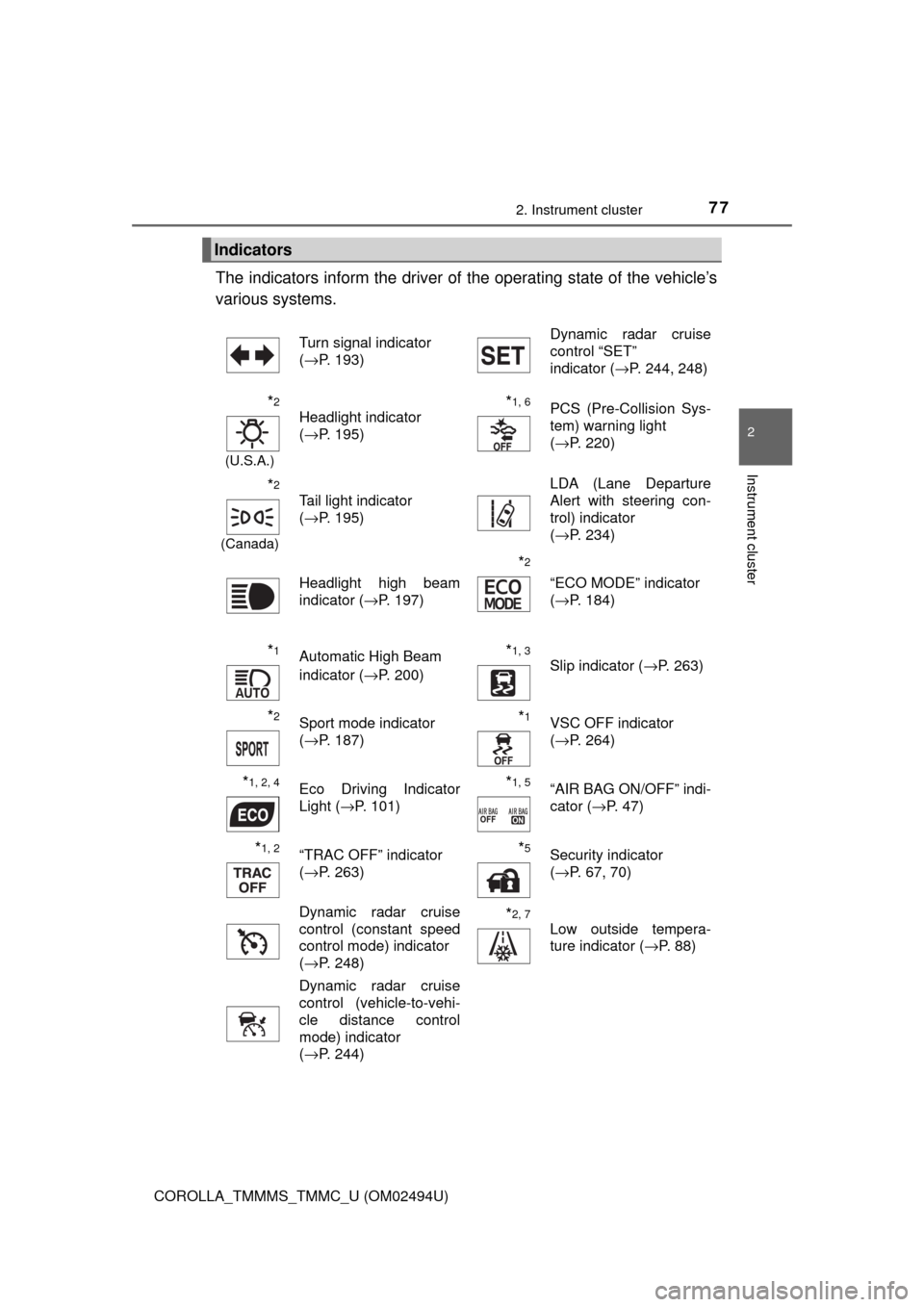
The indicators inform the driver of the operating state of the vehicle’s
various systems.
Indicators
Turn signal indicator
(→P. 193)Dynamic radar cruise
control “SET”
indicator (→P. 244, 248)
*2
(U.S.A.)
Headlight indicator
(→P. 195)*1, 6PCS (Pre-Collision Sys-
tem) warning light
(→P. 220)
*2
(Canada)
Tail light indicator
(→P. 195) LDA (Lane Departure
Alert with steering con-
trol) indicator
(→P. 234)
Headlight high beam
indicator (→P. 197)
*2
“ECO MODE” indicator
(→P. 184)
*1Automatic High Beam
indicator (→P. 200)*1, 3 Slip indicator (→P. 263)
*2Sport mode indicator
(→P. 187)*1VSC OFF indicator
(→P. 264)
*1, 2, 4Eco Driving Indicator
Light (→P. 101)*1, 5“AIR BAG ON/OFF” indi-
cator (→P. 47)
*1, 2“TRAC OFF” indicator
(→P. 263)*5Security indicator
(→P. 67, 70)
Dynamic radar cruise
control (constant speed
control mode) indicator
(→P. 248)
*2, 7
Low outside tempera-
ture indicator (→P. 88)
Dynamic radar cruise
control (vehicle-to-vehi-
cle distance control
mode) indicator
(→P. 244)
Page 92 of 612
922. Instrument cluster
COROLLA_TMMMS_TMMC_U (OM02494U)■
Display contents
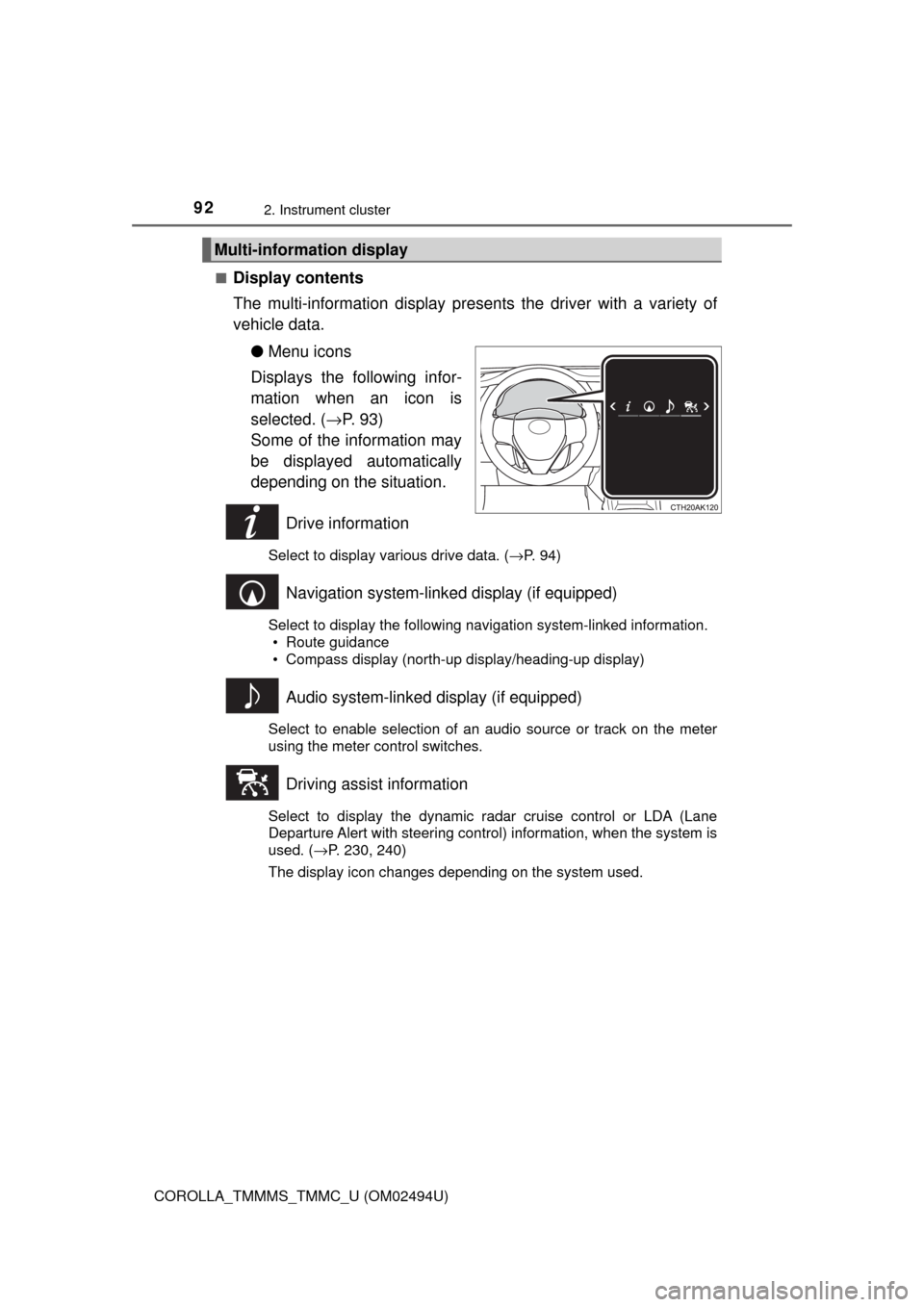
The multi-information display presents the driver with a variety of
vehicle data.
●Menu icons
Displays the following infor-
mation when an icon is
selected. (→P. 9 3 )
Some of the information may
be displayed automatically
depending on the situation.
Drive information
Select to display various drive data. (→P. 94)
Navigation system-linked display (if equipped)
Select to display the following navigation system-linked information.
• Route guidance
• Compass display (north-up display/heading-up display)
Audio system-linked display (if equipped)
Select to enable selection of an audio source or track on the meter
using the meter control switches.
Driving assist information
Select to display the dynamic radar cruise control or LDA (Lane
Departure Alert with steering control) information, when the system is
used. (→P. 230, 240)
The display icon changes depending on the system used.
Multi-information display
Page 94 of 612

942. Instrument cluster
COROLLA_TMMMS_TMMC_U (OM02494U)
●Current fuel consumption*1
●Average fuel consumption (after reset*2/after start/after refuel)*1
Displays the average fuel consumption since the function was
reset, the engine was started, and the vehicle was refueled, respec-
tively
Use the displayed average fuel consumption as a reference.
●Average speed (after reset*2/after start)*1
Displays the average vehicle speed since the function was reset
and the engine was started, respectively
●Distance (driving range/after start)
*1
Displays the estimated maximum distance that can be driven with
the quantity of fuel remaining and the distance driven after the
engine was started, respectively.
• This distance is computed based on your average fuel consumption. As
a result, the actual distance that can be driven may differ from that dis-
played.
• When only a small amount of fuel is added to the tank, the display may
not be updated.
When refueling, turn the engine switch off. If the vehicle is refueled with-
out turning the engine switch off, the display may not be updated.
●Elapsed time (after reset*2/after start)*1
Displays the elapsed time since the function was reset and the
engine was started, respectively
●Eco Driving Indicator Zone Display (vehicles with a continuously
variable transmission)
→P. 1 0 2
●LDA (Lane Departure Alert with steering control) vehicle sway
warning
→P. 2 3 1
●Display off
A blank screen is displayed
*1: Can be registered to Drive information 1 or 2. (→P. 95)
*2: Resetting procedures:
• Select a function to be reset using the meter control switch and then
press and hold to reset.
• If there is more than one function that can be reset, check boxes will be
displayed next to those functions.
Drive information
Page 95 of 612

952. Instrument cluster
2
Instrument cluster
COROLLA_TMMMS_TMMC_U (OM02494U)■
Changing the settings
Select using the meter control switch.
Select an item and then set it with the center button.
■Customizable items
●LDA (Lane Departure Alert with steering control)
→P. 2 3 0
●LDA (Lane Departure Alert with steering control) vehicle
sway warning
→P. 2 3 1
●PCS (Pre-Collision System)
→P. 2 1 6
●Language
Select to change the language displayed on the multi-information
display.
●Units
Select to change the unit of measure displayed on the multi-infor-
mation display.
●Drive information 1/Drive information 2
Select to select up to 2 items that will be displayed on a Drive
information screen.
●Eco driving indicator light
Select to activate/deactivate the Eco Driving Indicator Light.
(
→P. 101)
●Pop-up display
Select to set the following pop-up displays, which may appear in
some situations, on/off.
• Route guidance display of the navigation system-linked sys-
tem (if equipped)
• Incoming call display of the hands-free phone system
●Accent color
Select to change the accent colors on the screen, such as the
cursor color.
Settings display
1
2
Page 103 of 612
103
3
Operation of
each component
COROLLA_TMMMS_TMMC_U (OM02494U)3-1. Key information
Keys .................................. 104
3-2. Opening, closing and
locking the doors
Doors ................................ 110
Trunk ................................. 119
Smart key system ............. 124
3-3. Adjusting the seats
Front seats ........................ 132
Rear seats......................... 134
Head restraints.................. 136
3-4. Adjusting the steering
wheel and mirrors
Steering wheel .................. 139
Inside rear view mirror ...... 141
Outside rear view
mirrors ............................. 143
3-5. Opening and closing
the windows
Power windows ................. 145
Moon roof .......................... 149
Page 139 of 612
139
3
Operation of each component
COROLLA_TMMMS_TMMC_U (OM02494U)
3-4. Adjusting the steering wheel and mirrors
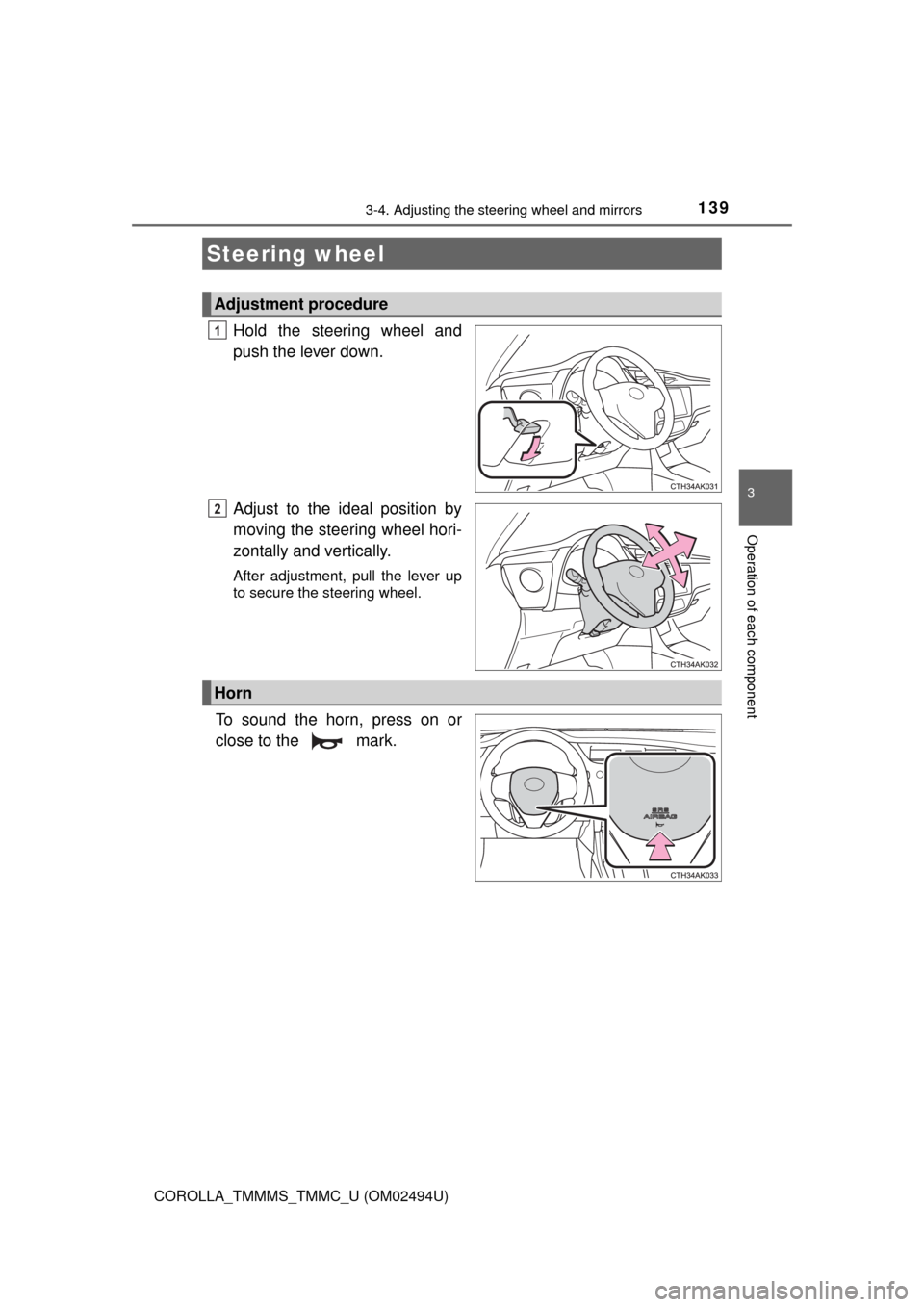
Hold the steering wheel and
push the lever down.
Adjust to the ideal position by
moving the steering wheel hori-
zontally and vertically.
After adjustment, pull the lever up
to secure the steering wheel.
To sound the horn, press on or
close to the mark.
Steering wheel
Adjustment procedure
1
2
Horn
Page 140 of 612

1403-4. Adjusting the steering wheel and mirrors
COROLLA_TMMMS_TMMC_U (OM02494U)
WARNING
■Caution while driving
Do not adjust the steering wheel while driving.
Doing so may cause the driver to mishandle the vehicle and cause an acci-
dent, resulting in death or serious injury.
■After adjusting the steering wheel
Make sure that the steering wheel is securely locked.
Otherwise, the steering wheel may move suddenly, possibly causing an
accident, and resulting in death or serious injury. Also, the horn may not
sound if the steering wheel is not securely locked.