Radio TOYOTA COROLLA 2017 11.G Owner's Manual
[x] Cancel search | Manufacturer: TOYOTA, Model Year: 2017, Model line: COROLLA, Model: TOYOTA COROLLA 2017 11.GPages: 612, PDF Size: 14.18 MB
Page 285 of 612
2855-2. Setup
5
Audio system
COROLLA_TMMMS_TMMC_U (OM02494U)
Press the “SETUP” button.
Select “Audio” on the “Setup” screen.
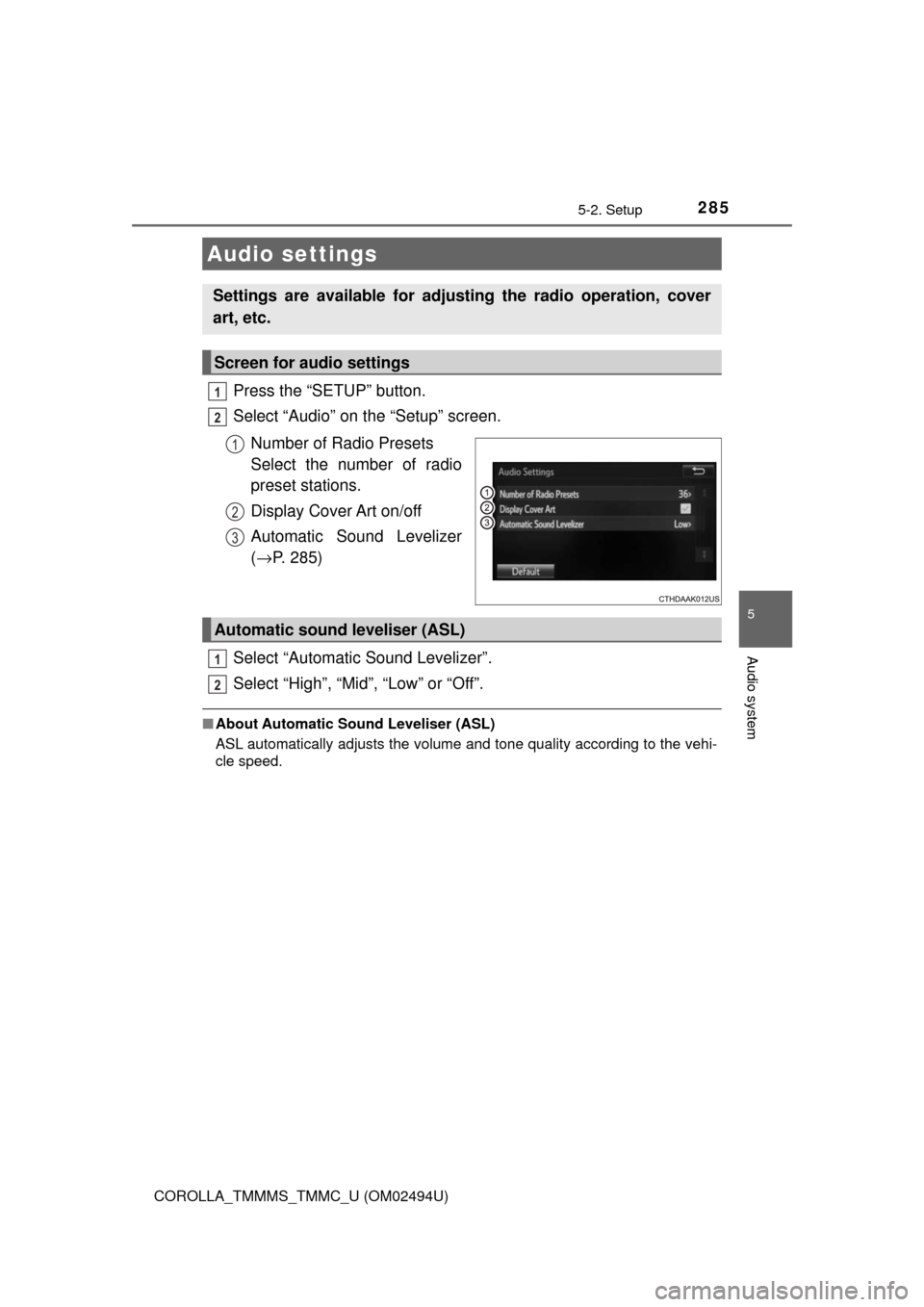
Number of Radio Presets
Select the number of radio
preset stations.
Display Cover Art on/off
Automatic Sound Levelizer
(→P. 285)
Select “Automatic Sound Levelizer”.
Select “High”, “Mid”, “Low” or “Off”.
■About Automatic Sound Leveliser (ASL)
ASL automatically adjusts the volume and tone quality according to the vehi-
cle speed.
Audio settings
Settings are available for adjusting the radio operation, cover
art, etc.
Screen for audio settings
1
2
1
2
3
Automatic sound leveliser (ASL)
1
2
Page 288 of 612
288
COROLLA_TMMMS_TMMC_U (OM02494U)
5-3. Using Entune Audio
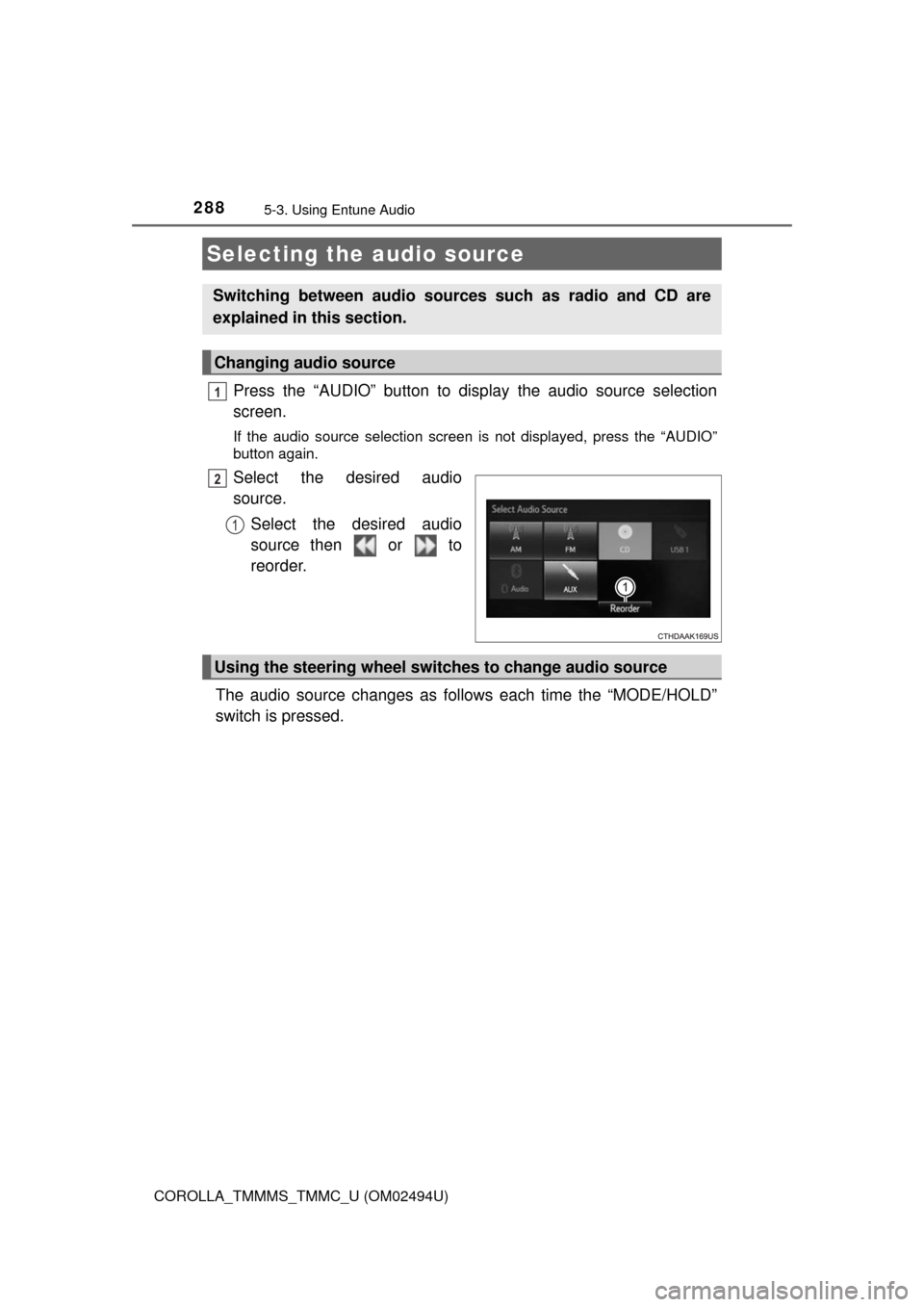
Press the “AUDIO” button to display the audio source selection
screen.
If the audio source selection screen is not displayed, press the “AUDIO”
button again.
Select the desired audio
source.
Select the desired audio
source then or to
reorder.
The audio source changes as follows each time the “MODE/HOLD”
switch is pressed.
Selecting the audio source
Switching between audio sources such as radio and CD are
explained in this section.
Changing audio source
1
2
1
Using the steering wheel switches to change audio source
Page 292 of 612
292
COROLLA_TMMMS_TMMC_U (OM02494U)
5-4. Using the radio
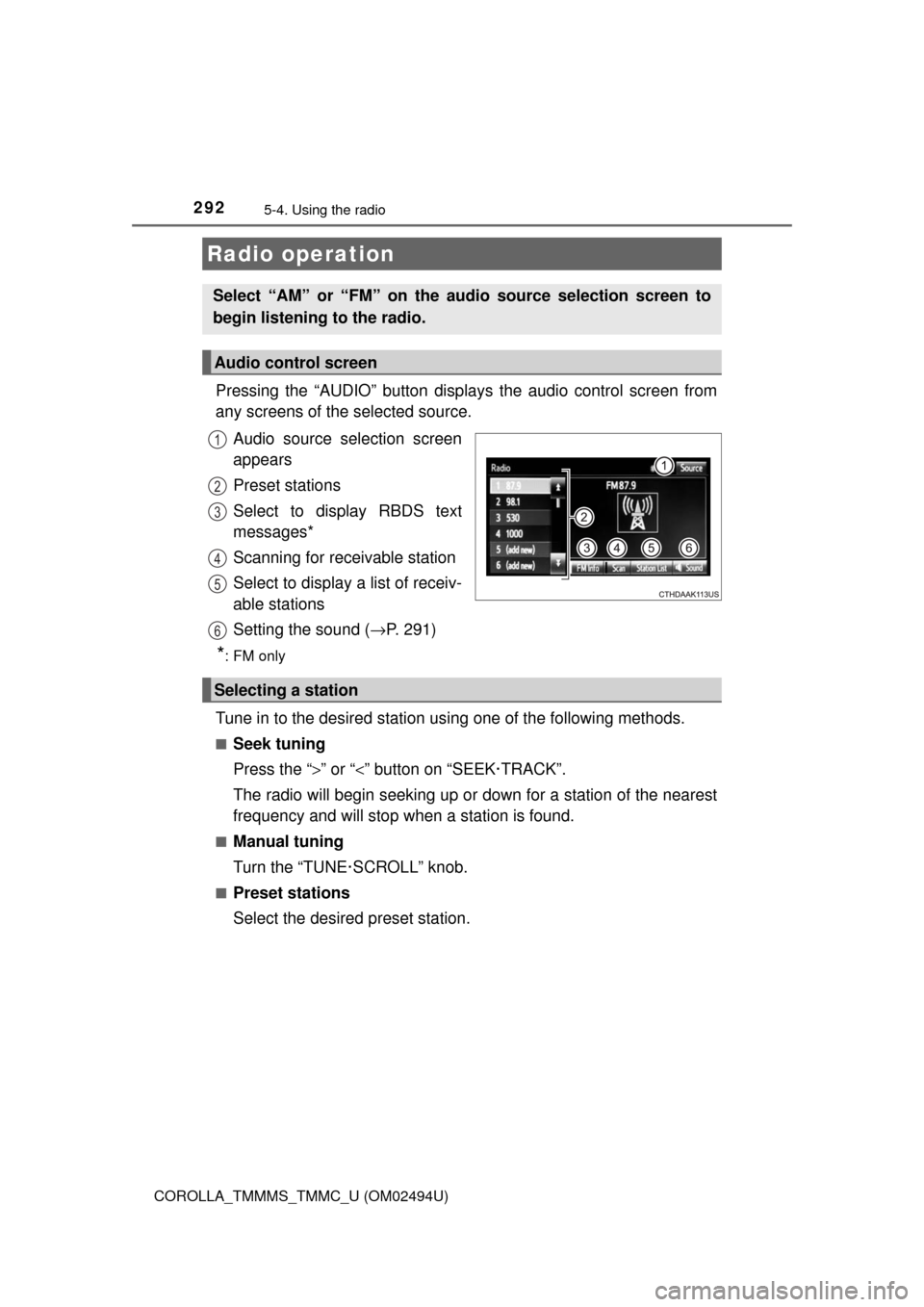
Pressing the “AUDIO” button displays the audio control screen from
any screens of the selected source.
Audio source selection screen
appears
Preset stations
Select to display RBDS text
messages*
Scanning for receivable station
Select to display a list of receiv-
able stations
Setting the sound (→P. 291)
*:FM only
Tune in to the desired station using one of the following methods.
■Seek tuning
Press the “>” or “<” button on “SEEK·TRACK”.
The radio will begin seeking up or down for a station of the nearest
frequency and will stop when a station is found.
■Manual tuning
Turn the “TUNE·SCROLL” knob.
■Preset stations
Select the desired preset station.
Radio operation
Select “AM” or “FM” on the audio source selection screen to
begin listening to the radio.
Audio control screen
1
2
3
4
5
6
Selecting a station
Page 293 of 612
2935-4. Using the radio
5
Audio system
COROLLA_TMMMS_TMMC_U (OM02494U)
Search for desired stations by turning the “TUNE·SCROLL” knob or
pressing the “>” or “<” button on “SEEK·TRACK”.
Select “(add new)”.
To change the preset station to a different one, select and hold the preset
station.
Select “Yes”.
Select “OK” after setting the new preset station.
■Refreshing the station list
Select “Refresh” on the “Station List” screen.
To cancel the refresh, select “Cancel Refresh”.
■Reception sensitivity
●Maintaining perfect radio reception at all times is difficult due to the continu-
ally changing position of the antenna, differences in signal strength and sur-
rounding objects, such as trains, transmitters, etc.
●The radio antenna is mounted inside the rear window. To maintain clear
radio reception, do not attach metallic window tinting or other metallic
objects to the antenna wire mounted inside the rear window.
Setting station presets
1
2
3
4
1
Page 310 of 612
310
COROLLA_TMMMS_TMMC_U (OM02494U)
5-7. Connecting Bluetooth®
■About Bluetooth®
Preparations to use wireless communica-
tion
The following can be performed using Bluetooth® wireless com-
munication:
■A portable audio player can be operated and listened to via
Entune Audio
■Hands-free phone calls can be made via a cellular phone
In order to use wireless communication, register and connect a
Bluetooth
® device by performing the following procedures.
The Bluetooth® word mark and logos are
registered trademarks owned Bluetooth
SIG, Inc. and any use of such marks by
Fujitsu Ten Limited is under license.
Other trademarks and trade names are
those of their respective owners.
WARNING
■Certifications for the Bluetooth
FCC ID: BABFT0077A
●CAUTION: Radio Frequency Radiation Exposure
This equipment complies with FCC radiation exposure limits set forth for
uncontrolled equipment and meets the FCC radio frequency (RF) Expo-
sure Guidelines.
This equipment has very low levels of RF energy that it deemed to comply
without maximum permissive exposure evaluation (MPE). But it is desir-
able that it should be installed and operated with at least 20cm and more
between the radiator and person's body in normal use position.
• Co-location: This transmitter must not be co-located or operated in con-
junction with any other antenna or transmitter.
• This device complies with part 15 of the FCC Rules. Operation is sub-
ject to the following two conditions: (1) This device may not cause
harmful interference, and (2) this device must accept any interference
received, including interference that may cause undesired operation.
Page 311 of 612
3115-7. Connecting Bluetooth®
5
Audio system
COROLLA_TMMMS_TMMC_U (OM02494U)
WARNING
●FCC WARNING:
Changes or modifications not expressly approved by the party responsi-
ble for compliance could void the user's authority to operate the equip-
ment.
●IC: 2024B-FT0077A
• This device complies with Industry Canada’s licence-exempt RSSs.
Operation is subject to the following two conditions: (1) This device may
not cause interference; and (2) This device must accept any interfer-
ence, including interference that may cause undesired operation of the
device.
●CAUTION: Radio Frequency Radiation Exposure
This equipment complies with IC radiation exposure limits set forth for
uncontrolled equipment and meets RSS-102 of the IC radio frequency
(RF) Exposure rules.
This equipment has very low levels of RF energy that it deemed to comply
without maximum permissive exposure evaluation (MPE).
But it is desirable that it should be installed and operated with at least
20cm and more between the radiator and person's body (excluding
extremities: hands, wrists, feet and ankles).
●IC: 2024B-FT0077A
• Le présent appareil est conforme aux CNR d'Industrie Canada appli-
cables aux appareils radio exempts de licence. L'exploitation est autori-
sée aux deux conditions suivantes : (1) l'appareil ne doit pas produire
de brouillage; (2) l'utilisateur de l'appareil doit accepter tout brouillage
radioélectrique subi, même si le brouillage est susceptible d'en compro-
mettre le fonctionnement.
●ATTENTION: l'exposition aux rayonnements radiofréquence
- Cet équipement se conforme aux limites d’exposition aux radiations éta-
blies par Industrie Canada pour un environnement non contrôlé ainsi
qu’aux directives d’exposition aux fréquences radioélectriques (RF)
émises par Industrie Canada dans la norme CNR-102. Cet équipement
émet un niveau d’énergie RF faible à un point tel qu’il se conforme sans
devoir effectuer d’évaluation d’exposition maximum admissible (EMA).
Lorsque l’équipement est utilisé, il est toutefois souhaitable de laisser au
moins 20cm entre l’antenne et le corps (à l’exception des extrémités :
mains, poignets, pieds et chevilles).
Page 362 of 612
3625-10. Bluetooth®
COROLLA_TMMMS_TMMC_U (OM02494U)■Reconnecting the portable audio player
If the portable audio player is disconnected due to poor reception when the
engine switch is in the “ACC” or “ON” position (vehicles without smart key
system) or ACCESSORY or IGNITION ON mode (vehicles with smart key
system), the system automatically reconnects the portable audio player.
If you have switched off the portable audio player yourself, follow the instruc-
tions below to reconnect:
●Select the portable audio player again
●Enter the portable audio player
■When you sell your car
Be sure to delete your personal data. (→P. 284)
WARNING
■While driving
Do not use the portable audio player, cellular phone or connect a device to
the Bluetooth
® system.
■Caution regarding interference with electronic devices
●Your audio unit is fitted with Bluetooth
® antennas. People with implantable
cardiac pacemakers, cardiac resynchronization therapy-pacemakers or
implantable cardioverter defibrillators should maintain a reasonable dis-
tance between themselves and the Bluetooth
® antennas. The radio waves
may affect the operation of such devices.
●Before using Bluetooth
® devices, users of any electrical medical device
other than implantable cardiac pacemakers, cardiac resynchronization
therapy-pacemakers or implantable cardioverter defibrillators should con-
sult the manufacturer of the device for information about its operation
under the influence of radio waves. Radio waves could have unexpected
effects on the operation of such medical devices.
NOTICE
■When leaving the vehicle
Do not leave your portable audio player or cellular phone in the vehicle. The
inside of the vehicle may become hot, causing damage to the portable
audio player or cellular phone.
Page 405 of 612
4056-4. Other interior features
6
Interior features
COROLLA_TMMMS_TMMC_U (OM02494U)
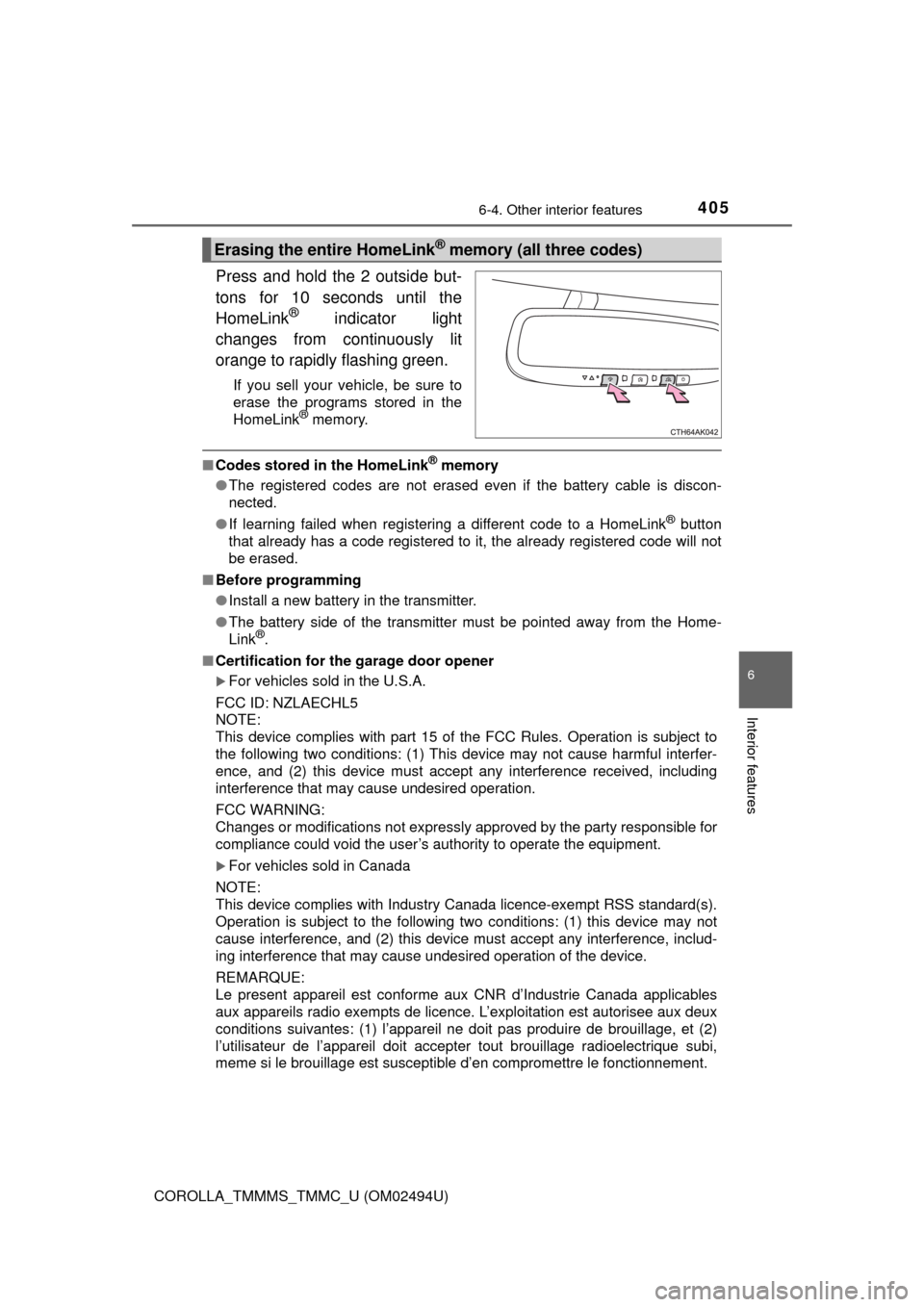
Press and hold the 2 outside but-
tons for 10 seconds until the
HomeLink
® indicator light
changes from continuously lit
orange to rapidly flashing green.
If you sell your vehicle, be sure to
erase the programs stored in the
HomeLink
® memory.
■Codes stored in the HomeLink® memory
●The registered codes are not erased even if the battery cable is discon-
nected.
●If learning failed when registering a different code to a HomeLink
® button
that already has a code registered to it, the already registered code will not
be erased.
■Before programming
●Install a new battery in the transmitter.
●The battery side of the transmitter must be pointed away from the Home-
Link
®.
■Certification for the garage door opener
For vehicles sold in the U.S.A.
FCC ID: NZLAECHL5
NOTE:
This device complies with part 15 of the FCC Rules. Operation is subject to
the following two conditions: (1) This device may not cause harmful interfer-
ence, and (2) this device must accept any interference received, including
interference that may cause undesired operation.
FCC WARNING:
Changes or modifications not expressly approved by the party responsible for
compliance could void the user’s authority to operate the equipment.
For vehicles sold in Canada
NOTE:
This device complies with Industry Canada licence-exempt RSS standard(s).
Operation is subject to the following two conditions: (1) this device may not
cause interference, and (2) this device must accept any interference, includ-
ing interference that may cause undesired operation of the device.
REMARQUE:
Le present appareil est conforme aux CNR d’Industrie Canada applicables
aux appareils radio exempts de licence. L’exploitation est autorisee aux deux
conditions suivantes: (1) l’appareil ne doit pas produire de brouillage, et (2)
l’utilisateur de l’appareil doit accepter tout brouillage radioelectrique subi,
meme si le brouillage est susceptible d’en compromettre le fonctionnement.
Erasing the entire HomeLink® memory (all three codes)
Page 449 of 612

4497-3. Do-it-yourself maintenance
7
Maintenance and care
COROLLA_TMMMS_TMMC_U (OM02494U)■
If you press the tire pressure warning reset switch accidentally (vehi-
cles with a tire pressure warning system)
If initialization is performed, adjust the tire inflation pressure to the speci-
fied level and initialize the tire pressure warning system again.
■When initialization of the tire pressure warning system has failed
(vehicles with a tire pressure warning system)
Initialization can be completed in a few minutes. However, in the following
cases, the settings have not been recorded and the system will not oper-
ate properly. If repeated attempts to record tire inflation pressure settings
are unsuccessful, have the vehicle inspected by your Toyota dealer.
●When operating the tire pressure warning reset switch, the tire pressure
warning light does not blink 3 times.
●After driving for a certain period of time since the initialization has been
completed, the warning light comes on after blinking for 1 minute.
■Tire pressure warning system certification
For the U.S.A.
FCC ID: HYQ23AAK FCC ID: PAXPMVC010
NOTE:
This device complies with part 15 of the FCC Rules. Operation is subject
to the following two conditions: (1) This device may not cause harmful
interference, and (2) this device must accept any interference received,
including interference that may cause undesired operation.
FCC WARNING:
Changes or modifications not expressly approved by the party responsi-
ble for compliance could void the user’s authority to operate the equip-
ment.
For Canada
NOTE:
Operation is subject to the following two conditions: (1) this device may
not cause interference, and (2) this device must accept any interference,
including interference that may cause undesired operation of the device.
NOTE:
L’utilisation de ce dispositif est autorisée seulement aux deux conditions
suivantes : (1) il ne doit pas produire de brouillage, et (2) l’utilisateur du
dispositif doit être prêt à accepter tout brouillage radioélectrique reçu,
même si ce brouillage est susceptible de compromettre le fonctionne-
ment du dispositif.
Page 489 of 612
4898-2. Steps to take in an emergency
8
When trouble arises
COROLLA_TMMMS_TMMC_U (OM02494U)■
When a tire is replaced with a spare tire (vehicles with a tire pressure
warning system)
The compact spare tire is not equipped with a tire pressure warning valve
and transmitter. If a tire goes flat, the tire pressure warning light will not
turn off even though the flat tire has been replaced with the spare tire.
Replace the spare tire with the repaired tire and adjust the tire inflation
pressure. The tire pressure warning light will go off after a few minutes.
■Conditions that the tire pressure warning system may not function
properly (vehicles with a tire pressure warning system)
The tire pressure warning system will be disabled in the following condi-
tions:
(When the condition becomes normal, the system will work properly.)
●If tires not equipped with tire pressure warning valves and transmitters
are used
●If the ID code on the tire pressure warning valves and transmitters is not
registered in the tire pressure warning computer
●If the tire inflation pressure is 73 psi (500 kPa, 5.1 kgf/cm2 or bar) or
higher
The tire pressure warning system may be disabled in the following condi-
tions:
(When the condition becomes normal, the system will work properly.)
●If electronic devices or facilities using similar radio wave frequencies are
nearby
●If a radio set at similar frequency is in use in the vehicle
●If a window tint that affects the radio wave signals is installed
●If there is a lot of snow or ice on the vehicle, in particular around the
wheels or wheel housings
●If non-genuine Toyota wheels are used (Even if you use Toyota wheels,
the tire pressure warning system may not work properly with some types
of tires.)
●If tire chains are used
■If the tire pressure warning light frequently comes on after blinking
for 1 minute (vehicles with a tire pressure warning system)
If the tire pressure warning light frequently comes on after blinking for 1
minute when the engine switch is turned on, have it checked by your
Toyota dealer.
■Warning buzzer
In some cases, the buzzer may not be heard because of noisy place or an
audio sound.
■Electric power steering system warning light (warning buzzer)
When the battery charge becomes insufficient or the voltage temporarily
drops, the electric power steering system warning light may come on and the
warning buzzer may sound.