change time TOYOTA COROLLA 2017 11.G Owner's Manual
[x] Cancel search | Manufacturer: TOYOTA, Model Year: 2017, Model line: COROLLA, Model: TOYOTA COROLLA 2017 11.GPages: 612, PDF Size: 14.18 MB
Page 302 of 612
3025-6. Using an external device
COROLLA_TMMMS_TMMC_U (OM02494U)
■About iPod
●“Made for iPod”, “Made for iPhone” and “Made for iPad” mean that an elec-
tronic accessory has been designed to connect specifically to iPod or
iPhone, or iPad, respectively, and has been certified by the developer to
meet Apple performance standards.
●Apple is not responsible for the operation of this device or its compliance
with safety and regulatory standards. Please note that the use of this acces-
sory with iPod, iPhone or iPad may affect wireless performance.
●iPad, iPhone, iPod, iPod classic, iPod nano, and iPod touch are trademarks
of Apple Inc., registered in the U.S. and other countries. Lightning is a trade-
mark of Apple Inc.
■iPod cover art
●Depending on the iPod and songs in the iPod, iPod cover art may be dis-
played.
●This function can be changed to on/off. (→P. 285)
●It may take time to display iPod cover art, and the iPod may not be operated
while the cover art display is in process.
●Only iPod cover art that is saved in JPEG format can be displayed.
■iPod functions
●When an iPod is connected and the audio source is changed to iPod mode,
the iPod will resume play from the same point in which it was last used.
●Depending on the iPod that is connected to the system, certain functions
may not be available. If a function is unavailable due to a malfunction (as
opposed to a system specification), disconnecting the device and recon-
necting it may resolve the problem.
●While connected to the system, the iPod cannot be operated with its own
controls. It is necessary to use the controls of the vehicle's Entune Audio
instead.
●When the battery level of an iPod is very low, the iPod may not operate. If
so, charge the iPod before use.
●Compatible models (→P. 304)
Page 378 of 612
3786-1. Using the air conditioning system and defogger
COROLLA_TMMMS_TMMC_U (OM02494U)■
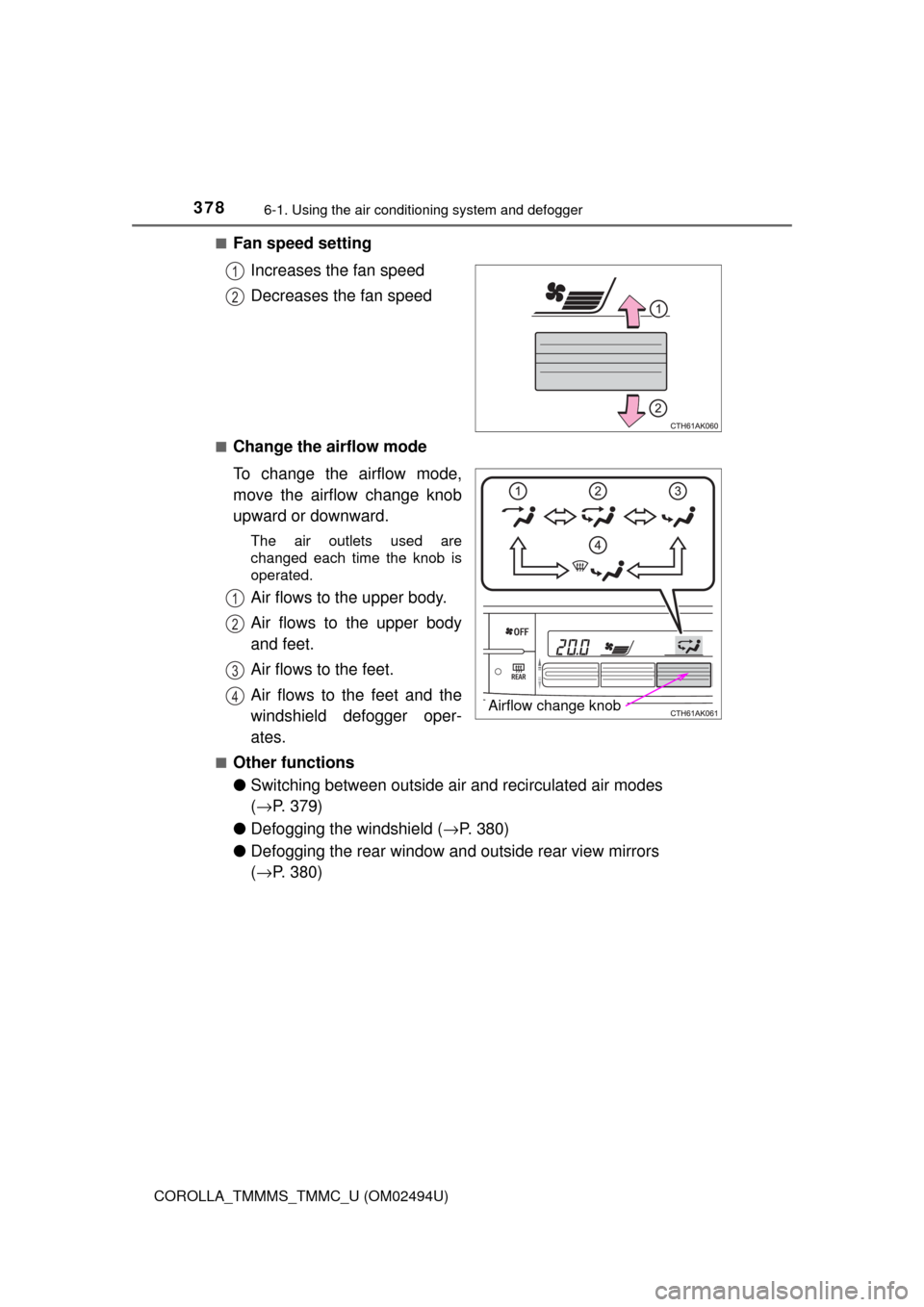
Fan speed setting
Increases the fan speed
Decreases the fan speed
■Change the airflow mode
To change the airflow mode,
move the airflow change knob
upward or downward.
The air outlets used are
changed each time the knob is
operated.
Air flows to the upper body.
Air flows to the upper body
and feet.
Air flows to the feet.
Air flows to the feet and the
windshield defogger oper-
ates.
■Other functions
●Switching between outside air and recirculated air modes
(→P. 379)
●Defogging the windshield (→P. 380)
●Defogging the rear window and outside rear view mirrors
(→P. 380)
1
2
Airflow change knob
1
2
3
4
Page 384 of 612
3846-1. Using the air conditioning system and defogger
COROLLA_TMMMS_TMMC_U (OM02494U)■When the outside temperature exceeds 75°F (24°C) and the air condition-
ing system is on
●In order to reduce the air conditioning power consumption, the air condition-
ing system may switch to recirculated air mode automatically. This may also
reduce fuel consumption.
Vehicles without a smart key system
●Recirculated air mode is selected as a default mode when the engine switch
is turned to the “ON” position.
Vehicles with a smart key system
●Recirculated air mode is selected as a default mode when the engine switch
is turned to IGNITION ON mode.
●It is possible to switch to outside air mode at any time by pressing .
■When the outside temperature is low
The dehumidification function may not operate even when is pressed.
■Ventilation and air conditioning odors
●To let fresh air in, set the air conditioning system to the outside air mode.
●During use, various odors from inside and outside the vehicle may enter into
and accumulate in the air conditioning system. This may then cause odor to
be emitted from the vents.
●To reduce potential odors from occurring:
• It is recommended that the air conditioning system be set to outside air
mode prior to turning the vehicle off.
• The start timing of the blower may be delayed for a short period of time
immediately after the air conditioning system is started in automatic
mode.
■Air conditioning filter
→P. 457
■Customization that can be configured at Toyota dealer
Settings (e.g. air conditioning setting) can be changed.
(Customizable features →P. 568)
Page 390 of 612
3906-2. Using the interior lights
COROLLA_TMMMS_TMMC_U (OM02494U)
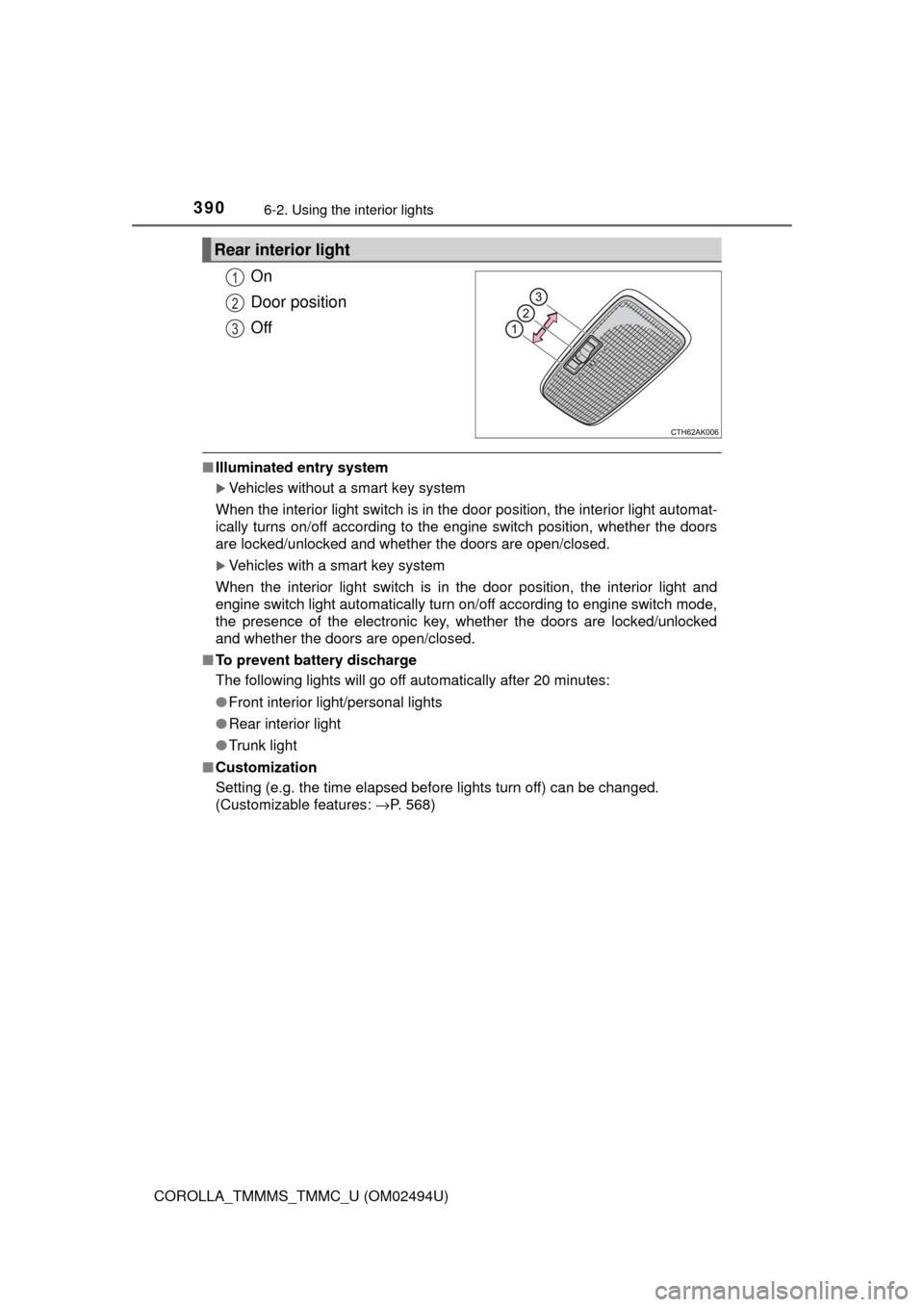
On
Door position
Off
■Illuminated entry system
Vehicles without a smart key system
When the interior light switch is in the door position, the interior light automat-
ically turns on/off according to the engine switch position, whether the doors
are locked/unlocked and whether the doors are open/closed.
Vehicles with a smart key system
When the interior light switch is in the door position, the interior light and
engine switch light automatically turn on/off according to engine switch mode,
the presence of the electronic key, whether the doors are locked/unlocked
and whether the doors are open/closed.
■To prevent battery discharge
The following lights will go off automatically after 20 minutes:
●Front interior light/personal lights
●Rear interior light
●Trunk light
■Customization
Setting (e.g. the time elapsed before lights turn off) can be changed.
(Customizable features: →P. 568)
Rear interior light
1
2
3
Page 449 of 612

4497-3. Do-it-yourself maintenance
7
Maintenance and care
COROLLA_TMMMS_TMMC_U (OM02494U)■
If you press the tire pressure warning reset switch accidentally (vehi-
cles with a tire pressure warning system)
If initialization is performed, adjust the tire inflation pressure to the speci-
fied level and initialize the tire pressure warning system again.
■When initialization of the tire pressure warning system has failed
(vehicles with a tire pressure warning system)
Initialization can be completed in a few minutes. However, in the following
cases, the settings have not been recorded and the system will not oper-
ate properly. If repeated attempts to record tire inflation pressure settings
are unsuccessful, have the vehicle inspected by your Toyota dealer.
●When operating the tire pressure warning reset switch, the tire pressure
warning light does not blink 3 times.
●After driving for a certain period of time since the initialization has been
completed, the warning light comes on after blinking for 1 minute.
■Tire pressure warning system certification
For the U.S.A.
FCC ID: HYQ23AAK FCC ID: PAXPMVC010
NOTE:
This device complies with part 15 of the FCC Rules. Operation is subject
to the following two conditions: (1) This device may not cause harmful
interference, and (2) this device must accept any interference received,
including interference that may cause undesired operation.
FCC WARNING:
Changes or modifications not expressly approved by the party responsi-
ble for compliance could void the user’s authority to operate the equip-
ment.
For Canada
NOTE:
Operation is subject to the following two conditions: (1) this device may
not cause interference, and (2) this device must accept any interference,
including interference that may cause undesired operation of the device.
NOTE:
L’utilisation de ce dispositif est autorisée seulement aux deux conditions
suivantes : (1) il ne doit pas produire de brouillage, et (2) l’utilisateur du
dispositif doit être prêt à accepter tout brouillage radioélectrique reçu,
même si ce brouillage est susceptible de compromettre le fonctionne-
ment du dispositif.
Page 529 of 612

5298-2. Steps to take in an emergency
8
When trouble arises
COROLLA_TMMMS_TMMC_U (OM02494U)
■Stopping the engine
Shift the shift lever to P (continuously variable transmission) or N (manual
transmission) and press the engine switch as you normally do when stopping
the engine.
■Replacing the key battery
As the above procedure is a temporary measure, it is recommended that the
electronic key battery be replaced immediately when the battery is depleted.
(→P. 459)
■Changing engine switch modes
Release the brake pedal (continuously variable transmission) or clutch pedal
(manual transmission) and press the engine switch in step above.
The engine does not start and modes will be changed each time the switch is
pressed. (→P. 178)
■When the electronic key does not work properly
●Make sure that the smart key system has not been deactivated in the cus-
tomization setting. If it is off, turn the function on.
(Customizable features →P. 568)
●Check if battery-saving mode is set. If it is set, cancel the function.
(→P. 126)
3
Page 574 of 612
5749-2. Customization
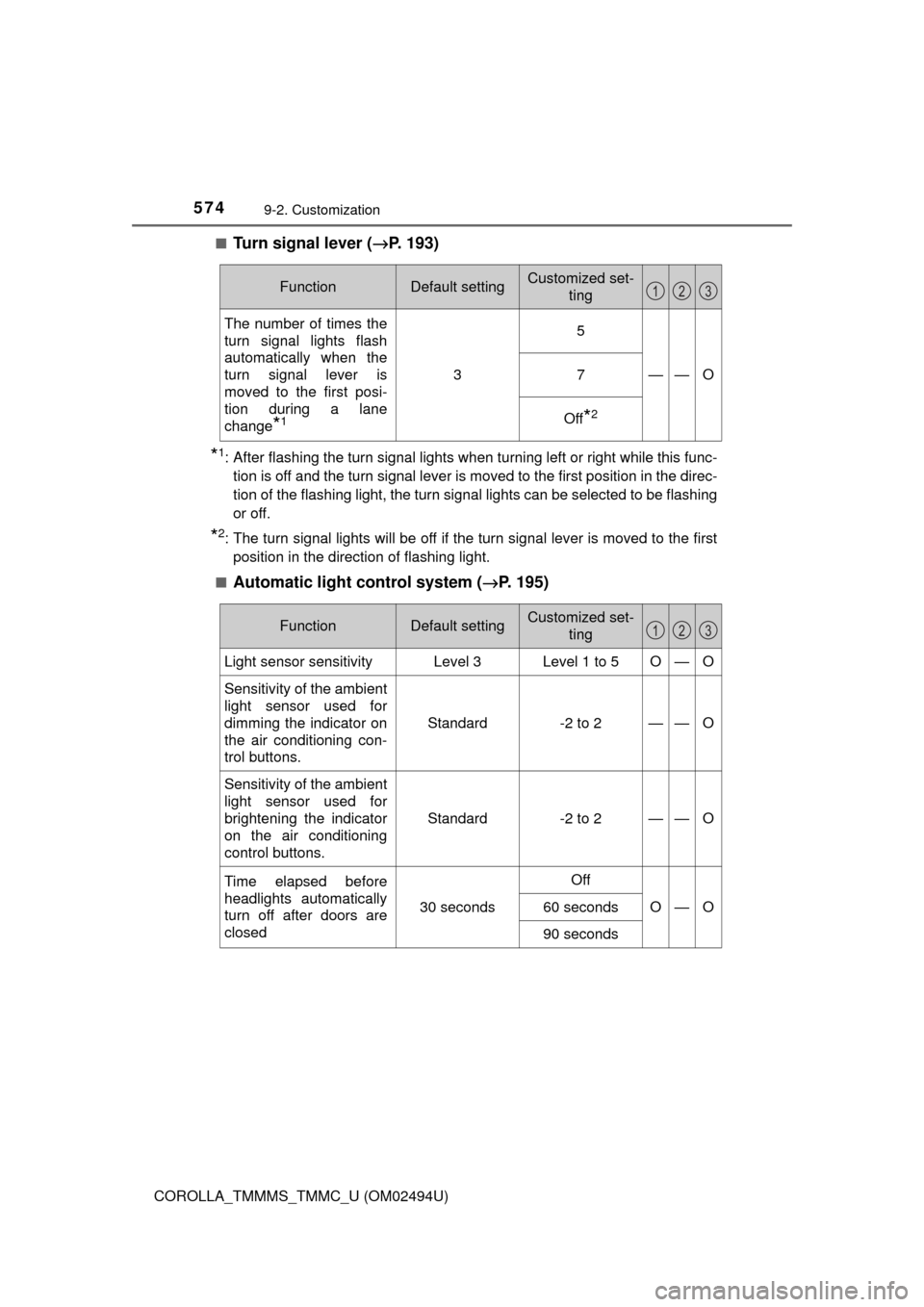
COROLLA_TMMMS_TMMC_U (OM02494U)■
Turn signal lever (→P. 193)
*1: After flashing the turn signal lights when turning left or right while this func-
tion is off and the turn signal lever is moved to the first position in the direc-
tion of the flashing light, the turn signal lights can be selected to be flashing
or off.
*2: The turn signal lights will be off if the turn signal lever is moved to the first
position in the direction of flashing light.
■
Automatic light control system (→P. 195)
FunctionDefault settingCustomized set-
ting
The number of times the
turn signal lights flash
automatically when the
turn signal lever is
moved to the first posi-
tion during a lane
change
*1
3
5
——O7
Off*2
123
FunctionDefault settingCustomized set-
ting
Light sensor sensitivityLevel 3Level 1 to 5O—O
Sensitivity of the ambient
light sensor used for
dimming the indicator on
the air conditioning con-
trol buttons.Standard -2 to 2
——O
Sensitivity of the ambient
light sensor used for
brightening the indicator
on the air conditioning
control buttons.Standard -2 to 2
——O
Time elapsed before
headlights automatically
turn off after doors are
closed
30 seconds
Off
O—O60 seconds
90 seconds
123